
96MB Low End VPS Review Part XVIII – Last Minute Review of BuyVM
It has been a while since my last post about BuyVM and several things have happened since. Over all of them, the biggest change was that they are no longer with Hurricane Electric and instead moved all their servers to Coresite.com, as indicated here. How are the pony VPS doing now after months of improvements? 96MB decided to take a quick peek just before the new stock opens again in a few hours’ time.
Note that this is a not a full review since many thing have not changed since my last review, instead, I will only focus on things that are changed.
OS Selections
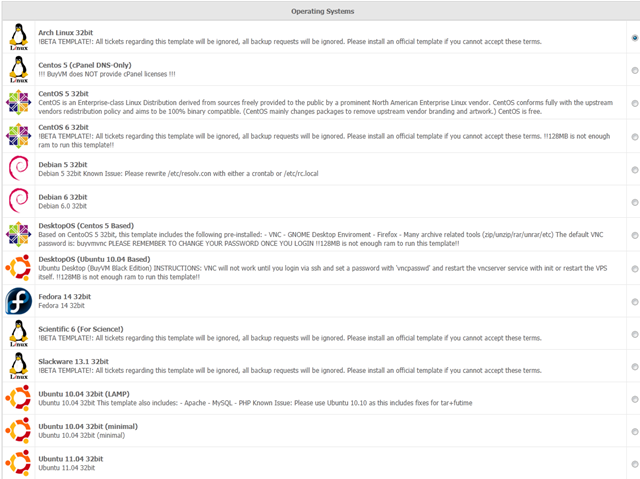
Several OS templates have been added to the BuyVM’s list of OS selections since the last time I reviewed them, most notably Debian 6, CentOS 6 and CPanel DNS-only template, which according to Francisco, would use very minimal amount of memory.
Here is a list of the OS templates that are available to the VPS users at the moment:
Tests on the VPS
The testing VPS that I used here is one of their famous 15 per year, 128MB VPS on node 32 and I loaded it up with the Ubuntu 10.04 minimal template. The data centre, as mentioned above, has been moved from Fremont to San Jose in California in west coast US.
With the OS fresh install, the VPS uses merely 15MB of RAM, which is good for Ubuntu since Ubuntu itself is a little heavier than Debian in terms of memory footprint:
free -m
             total       used       free     shared    buffers     cached
Mem:           256         15        240          0          0          0
-/+ buffers/cache:         15        240
Swap:            0          0          0
The top output is really short, which shows most of the default installations have been removed:
top - 07:18:17 up 13 min,  1 user,  load average: 0.00, 0.00, 0.00
Tasks:  11 total,   2 running,   9 sleeping,   0 stopped,   0 zombie
Cpu(s):  0.0%us,  0.0%sy,  0.0%ni,100.0%id,  0.0%wa,  0.0%hi,  0.0%si,  0.0%st
Mem:    262144k total,    16208k used,   245936k free,        0k buffers
Swap:        0k total,        0k used,        0k free,        0k cached

  PID USER      PR  NI  VIRT  RES  SHR S %CPU %MEM    TIME+  COMMAND
 1604 root      18   0  8280 2812 S2240 R  0.0  1.1   0:00.09 sshd
 1593 root      18   0  5156 2324 1072 S  0.0  0.9   0:00.04 apache2
 1401 root      18   0  5472 2116 1712 S  0.0  0.8   0:00.01 sshd
 1594 www-data  22   0  5156 1744  484 S  0.0  0.7   0:00.00 apache2
 1576 root      15   0 11064 1676  528 S  0.0  0.6   0:00.01 sendmail-mta
 1615 root      15   0  2984 1660 1320 S  0.0  0.6   0:00.00 bash
    1 root      15   0  2472 1396 1160 S  0.0  0.5   0:00.23 init
 1627 root      15   0  2344 1076  888 R  0.0  0.4   0:00.00 top
 1211 root      18   0  2304  896  712 S  0.0  0.3   0:00.00 cron
 1548 root      25   0  2424  860  688 S  0.0  0.3   0:00.00 xinetd
 1232 syslog    15   0  1916  672  536 S  0.0  0.3   0:00.00 syslogd
Note that Apache2 is still installed, which I am sure it will save a little memory here if that could be removed as well.
After the LNMP stack is installed, the memory usage basically takes about 60MB:
free -m
             total       used       free     shared    buffers     cached
Mem:           256         61        194          0          0          0
-/+ buffers/cache:         61        194
Swap:            0          0          0
And the top output shows the entire LNMP stack
top - 20:26:38 up  9:21,  1 user,  load average: 0.00, 0.00, 0.00
Tasks:  19 total,   2 running,  17 sleeping,   0 stopped,   0 zombie
Cpu(s):  0.0%us,  0.4%sy,  0.0%ni, 99.6%id,  0.0%wa,  0.0%hi,  0.0%si,  0.0%st
Mem:    262144k total,    64348k used,   197796k free,        0k buffers
Swap:        0k total,        0k used,        0k free,        0k cached

  PID USER      PR  NI  VIRT  RES  SHR S %CPU %MEM    TIME+  COMMAND
19608 www       15   0 14484  10m  776 S  0.0  4.2   0:00.01 nginx
19594 mysql     19   0 34872 5812 3124 S  0.0  2.2   0:00.02 mysqld
19600 www       18   0 22756 4908 1584 S  0.0  1.9   0:00.00 php-cgi
19601 www       18   0 22756 4908 1584 S  0.0  1.9   0:00.00 php-cgi
19602 www       18   0 22756 4908 1584 S  0.0  1.9   0:00.00 php-cgi
19603 www       18   0 22756 4908 1584 S  0.0  1.9   0:00.00 php-cgi
19604 www       18   0 22756 4908 1584 S  0.0  1.9   0:00.00 php-cgi
19599 root      18   0 22756 4692 1396 S  0.0  1.8   0:06.83 php-cgi
 1604 root      18   0  8416 2868 2260 R  0.0  1.1   0:05.38 sshd
 1401 root      18   0  5472 2116 1712 S  0.0  0.8   0:00.01 sshd
 1576 root      15   0 11064 1676  528 S  0.0  0.6   0:00.63 sendmail-mta
 1615 root      15   0  2984 1668 1324 S  0.0  0.6   0:00.02 bash
    1 root      15   0  2472 1396 1160 S  0.0  0.5   0:00.23 init
20380 root      15   0  2344 1088  888 R  0.0  0.4   0:00.00 top
 1211 root      15   0  2304  904  720 S  0.0  0.3   0:00.07 cron
 1548 root      25   0  2424  860  688 S  0.0  0.3   0:00.00 xinetd
19607 root      18   0  4672  700  252 S  0.0  0.3   0:00.00 nginx
vmstats shows the node is not heavily used:
 vmstat
procs -----------memory---------- ---swap-- -----io---- -system-- ----cpu----
 r  b   swpd   free   buff  cache   si   so    bi    bo   in   cs us sy id wa
 0  0      0 198020      0      0    0    0    18    79    0  422  4  1 94  0
which is confirmed again by the output of uptime:
 uptime
 06:14:05 up 19:09,  1 user,  load average: 0.05, 0.02, 0.00
Beancounters value are set to pretty high:
cat /proc/user_beancounters
Version: 2.5
       uid  resource                     held              maxheld              barrier                limit              failcnt
    11183:  kmemsize                  2749601              9523915           2147483646           2147483646                    0
            lockedpages                     0                  448               999999               999999                    0
            privvmpages                 15948                53515                65536                65536                    0
            shmpages                      642                  673                32768                32768                    0
            dummy                           0                    0                    0                    0                    0
            numproc                        20                   48               999999               999999                    0
            physpages                    7459                31632                    0           2147483647                    0
            vmguarpages                     0                    0                32768           2147483647                    0
            oomguarpages                 7459                31632                32768           2147483647                    0
            numtcpsock                      7                   16              7999992              7999992                    0
            numflock                        2                    8               999999               999999                    0
            numpty                          1                    2               500000               500000                    0
            numsiginfo                      0                    7               999999               999999                    0
            tcpsndbuf                  122528              5876968            214748160            396774400                    0
            tcprcvbuf                  114688             12253224            214748160            396774400                    0
            othersockbuf                13968                57184            214748160            396774400                    0
            dgramrcvbuf                     0                 8472            214748160            396774400                    0
            numothersock                   15                   20              7999992              7999992                    0
            dcachesize                      0                    0           2147483646           2147483646                    0
            numfile                       470                 1527             23999976             23999976                    0
            dummy                           0                    0                    0                    0                    0
            dummy                           0                    0                    0                    0                    0
            dummy                           0                    0                    0                    0                    0
            numiptent                      24                   24                  256                  256                    0
Vzfree shows no signs of overselling memory:
 vzfree
             Total     Used     Free
Kernel:   2048.00M    2.62M 2045.38M
Allocate:  256.00M   62.28M  193.72M (128M Guaranteed)
Commit:    128.00M   31.74M   96.26M (46.8% of Allocated)
Swap:                 0.00M          (0.0% of Committed)
whic is re-affirmed by meminfo output:
 cat /proc/meminfo
MemTotal:       262144 kB
MemFree:        198640 kB
Buffers:             0 kB
Cached:              0 kB
SwapCached:          0 kB
Active:              0 kB
Inactive:            0 kB
HighTotal:           0 kB
HighFree:            0 kB
LowTotal:       262144 kB
LowFree:        198640 kB
SwapTotal:           0 kB
SwapFree:            0 kB
Dirty:             520 kB
Writeback:           0 kB
AnonPages:           0 kB
Mapped:              0 kB
Slab:                0 kB
PageTables:          0 kB
NFS_Unstable:        0 kB
Bounce:              0 kB
CommitLimit:         0 kB
Committed_AS:        0 kB
VmallocTotal:        0 kB
VmallocUsed:         0 kB
VmallocChunk:        0 kB
HugePages_Total:     0
HugePages_Free:      0
HugePages_Rsvd:      0
Hugepagesize:     2048 kB
As with last time, the CPU is assigned to this VPS is still just one core, and remains to be the same E5520 CPU:
 cat /proc/cpuinfo
processor       : 0
vendor_id       : GenuineIntel
cpu family      : 6
model           : 26
model name      : Intel(R) Xeon(R) CPU           E5520  @ 2.27GHz
stepping        : 5
cpu MHz         : 2261.452
cache size      : 4096 KB
physical id     : 0
siblings        : 4
core id         : 0
cpu cores       : 4
apicid          : 0
fpu             : yes
fpu_exception   : yes
cpuid level     : 11
wp              : yes
flags           : fpu vme de pse tsc msr pae mce cx8 apic sep mtrr pge mca cmov pat pse36 clflush mmx fxsr sse sse2 ss ht syscall nx rdtscp lm constant_tsc pni ssse3 cx16 sse4_1 sse4_2 popcnt lahf_lm
bogomips        : 4522.90
clflush size    : 64
cache_alignment : 64
address sizes   : 40 bits physical, 48 bits virtual
power management:
Hard drive space is not oversold,as indicated by the df output:
 df -h
Filesystem            Size  Used Avail Use% Mounted on
/dev/simfs             15G  1.6G   14G  11% /
 df -i
Filesystem            Inodes   IUsed   IFree IUse% Mounted on
/dev/simfs           7864320   67925 7796395    1% /
However, unfortunately, the disk I/O speed is getting pretty unstable:
I was getting a pretty good results running it for the first time:
 dd if=/dev/zero of=test bs=64k count=16k conv=fdatasync
16384+0 records in
16384+0 records out
1073741824 bytes (1.1 GB) copied, 12.9436 s, 83.0 MB/s
Running it the next morning shows the speed is pretty bad:
 dd if=/dev/zero of=test bs=64k count=16k conv=fdatasync
16384+0 records in
16384+0 records out
1073741824 bytes (1.1 GB) copied, 22.769 s, 47.2 MB/s
However, runnning it while I was typing this article right now shows the results has improved significantly:
dd if=/dev/zero of=test bs=64k count=16k conv=fdatasync
16384+0 records in
16384+0 records out
1073741824 bytes (1.1 GB) copied, 7.60879 s, 141 MB/s
Nonetheless, I think even the worst I/O among the three tests is more than sufficient for a general-purpose server and is already way better than what I have got a few weeks ago, right after the move:
dd if=/dev/zero of=test bs=64k count=16k conv=fdatasync
16384+0 records in
16384+0 records out
1073741824 bytes (1.1 GB) copied, 165.596 s, 6.5 MB/s
Network was one of the major issues cited by BuyVM on their decision to move away from Hurricance Electric, and Coresite seems to offer a better download speed:
 wget cachefly.cachefly.net/100mb.test
--2011-08-08 20:29:30--  http://cachefly.cachefly.net/100mb.test
Resolving cachefly.cachefly.net... 205.234.175.175
Connecting to cachefly.cachefly.net|205.234.175.175|:80... connected.
HTTP request sent, awaiting response... 200 OK
Length: 104857600 (100M) [application/octet-stream]
Saving to: `100mb.test'

100%[======================================>] 104,857,600 28.0M/s   in 3.6s

2011-08-08 20:29:33 (28.0 MB/s) - `100mb.test' saved [104857600/104857600]
Unfortunately upload speed has not improved a lot, and although the best among my three test VPS, the results from Nix Communications VPS in Montreal, Canada, gives a respectable 5.6MB/s:
wget 205.185.123.50/100mb.test
--2011-08-08 21:30:20--  http://205.185.123.50/100mb.test
Connecting to 205.185.123.50:80... connected.
HTTP request sent, awaiting response... 200 OK
Length: 104857600 (100M) [application/octet-stream]
Saving to: `100mb.test'

100%[======================================>] 104,857,600 4.50M/s   in 20s

2011-08-08 21:30:41 (5.08 MB/s) - `100mb.test' saved [104857600/104857600]
QuickWeb VPS in London, UK, gives only 1.63MB/s:
 wget 205.185.123.50/100mb.test
--2011-08-08 12:30:17--  http://205.185.123.50/100mb.test
Connecting to 205.185.123.50:80... connected.
HTTP request sent, awaiting response... 200 OK
Length: 104857600 (100M) [application/octet-stream]
Saving to: `100mb.test'

100%[======================================>] 104,857,600  851K/s   in 61s

2011-08-08 12:31:19 (1.63 MB/s) - `100mb.test' saved [104857600/104857600]
And for the slowest speed goes with my test VPS with Inception Hosting in Netherlands, which seems to show that Coresite is also having trouble in providing fast trans-Atlantic connection:
wget 205.185.123.50/100mb.test
--2011-08-08 13:23:05--  http://205.185.123.50/100mb.test
Connecting to 205.185.123.50:80... connected.
HTTP request sent, awaiting response... 200 OK
Length: 104857600 (100M) [application/octet-stream]
Saving to: `100mb.test'

100%[======================================>] 104,857,600  739K/s   in 3m 19s

2011-08-08 13:26:24 (516 KB/s) - `100mb.test' saved [104857600/104857600]
Finally, for the benchmarks, given the improvements in the VPS, including the upgrade in CPU, I am not surprised that the VPS did pretty well during the UnixBench run:
   #    #  #    #  #  #    #          #####   ######  #    #   ####   #    #
   #    #  ##   #  #   #  #           #    #  #       ##   #  #    #  #    #
   #    #  # #  #  #    ##            #####   #####   # #  #  #       ######
   #    #  #  # #  #    ##            #    #  #       #  # #  #       #    #
   #    #  #   ##  #   #  #           #    #  #       #   ##  #    #  #    #
    ####   #    #  #  #    #          #####   ######  #    #   ####   #    #

   Version 5.1.3                      Based on the Byte Magazine Unix Benchmark

   Multi-CPU version                  Version 5 revisions by Ian Smith,
                                      Sunnyvale, CA, USA
   January 13, 2011                   johantheghost at yahoo period com

1 x Dhrystone 2 using register variables  1 2 3 4 5 6 7 8 9 10

1 x Double-Precision Whetstone  1 2 3 4 5 6 7 8 9 10

1 x Execl Throughput  1 2 3

1 x File Copy 1024 bufsize 2000 maxblocks  1 2 3

1 x File Copy 256 bufsize 500 maxblocks  1 2 3

1 x File Copy 4096 bufsize 8000 maxblocks  1 2 3

1 x Pipe Throughput  1 2 3 4 5 6 7 8 9 10

1 x Pipe-based Context Switching  1 2 3 4 5 6 7 8 9 10

1 x Process Creation  1 2 3

1 x System Call Overhead  1 2 3 4 5 6 7 8 9 10

1 x Shell Scripts (1 concurrent)  1 2 3

1 x Shell Scripts (8 concurrent)  1 2 3

========================================================================
   BYTE UNIX Benchmarks (Version 5.1.3)

   System: *****: GNU/Linux
   OS: GNU/Linux -- 2.6.18-238.12.1.el5.pony6-1 -- #3 SMP Fri Jun 3 16:37:31 PDT 2011
   Machine: i686 (unknown)
   Language: en_US.utf8 (charmap="ANSI_X3.4-1968", collate="ANSI_X3.4-1968")
   CPU 0: Intel(R) Xeon(R) CPU E5520 @ 2.27GHz (4522.9 bogomips)
          Hyper-Threading, x86-64, MMX, Physical Address Ext, SYSENTER/SYSEXIT, SYSCALL/SYSRET
   23:17:02 up 12:11,  1 user,  load average: 0.21, 0.07, 0.02; runlevel 2

------------------------------------------------------------------------
Benchmark Run: Mon Aug 08 2011 23:17:02 - 23:45:05
1 CPU in system; running 1 parallel copy of tests

Dhrystone 2 using register variables        9732199.7 lps   (10.0 s, 7 samples)
Double-Precision Whetstone                     2229.3 MWIPS (9.8 s, 7 samples)
Execl Throughput                               1894.4 lps   (29.9 s, 2 samples)
File Copy 1024 bufsize 2000 maxblocks        278777.5 KBps  (30.0 s, 2 samples)
File Copy 256 bufsize 500 maxblocks           76948.3 KBps  (30.0 s, 2 samples)
File Copy 4096 bufsize 8000 maxblocks        606654.3 KBps  (30.0 s, 2 samples)
Pipe Throughput                              602595.4 lps   (10.0 s, 7 samples)
Pipe-based Context Switching                 155244.0 lps   (10.0 s, 7 samples)
Process Creation                               5312.1 lps   (30.0 s, 2 samples)
Shell Scripts (1 concurrent)                   3118.2 lpm   (60.0 s, 2 samples)
Shell Scripts (8 concurrent)                    421.2 lpm   (60.1 s, 2 samples)
System Call Overhead                         524068.0 lps   (10.0 s, 7 samples)

System Benchmarks Index Values               BASELINE       RESULT    INDEX
Dhrystone 2 using register variables         116700.0    9732199.7    834.0
Double-Precision Whetstone                       55.0       2229.3    405.3
Execl Throughput                                 43.0       1894.4    440.6
File Copy 1024 bufsize 2000 maxblocks          3960.0     278777.5    704.0
File Copy 256 bufsize 500 maxblocks            1655.0      76948.3    464.9
File Copy 4096 bufsize 8000 maxblocks          5800.0     606654.3   1046.0
Pipe Throughput                               12440.0     602595.4    484.4
Pipe-based Context Switching                   4000.0     155244.0    388.1
Process Creation                                126.0       5312.1    421.6
Shell Scripts (1 concurrent)                     42.4       3118.2    735.4
Shell Scripts (8 concurrent)                      6.0        421.2    702.0
System Call Overhead                          15000.0     524068.0    349.4
                                                                   ========
System Benchmarks Index Score                                         547.7
Second time, the score was a little better, mostly due to disk caching:
   #    #  #    #  #  #    #          #####   ######  #    #   ####   #    #
   #    #  ##   #  #   #  #           #    #  #       ##   #  #    #  #    #
   #    #  # #  #  #    ##            #####   #####   # #  #  #       ######
   #    #  #  # #  #    ##            #    #  #       #  # #  #       #    #
   #    #  #   ##  #   #  #           #    #  #       #   ##  #    #  #    #
    ####   #    #  #  #    #          #####   ######  #    #   ####   #    #

   Version 5.1.3                      Based on the Byte Magazine Unix Benchmark

   Multi-CPU version                  Version 5 revisions by Ian Smith,
                                      Sunnyvale, CA, USA
   January 13, 2011                   johantheghost at yahoo period com

1 x Dhrystone 2 using register variables  1 2 3 4 5 6 7 8 9 10

1 x Double-Precision Whetstone  1 2 3 4 5 6 7 8 9 10

1 x Execl Throughput  1 2 3

1 x File Copy 1024 bufsize 2000 maxblocks  1 2 3

1 x File Copy 256 bufsize 500 maxblocks  1 2 3

1 x File Copy 4096 bufsize 8000 maxblocks  1 2 3

1 x Pipe Throughput  1 2 3 4 5 6 7 8 9 10

1 x Pipe-based Context Switching  1 2 3 4 5 6 7 8 9 10

1 x Process Creation  1 2 3

1 x System Call Overhead  1 2 3 4 5 6 7 8 9 10

1 x Shell Scripts (1 concurrent)  1 2 3

1 x Shell Scripts (8 concurrent)  1 2 3

========================================================================
   BYTE UNIX Benchmarks (Version 5.1.3)

   System: ******: GNU/Linux
   OS: GNU/Linux -- 2.6.18-238.12.1.el5.pony6-1 -- #3 SMP Fri Jun 3 16:37:31 PDT 2011
   Machine: i686 (unknown)
   Language: en_US.utf8 (charmap="ANSI_X3.4-1968", collate="ANSI_X3.4-1968")
   CPU 0: Intel(R) Xeon(R) CPU E5520 @ 2.27GHz (4522.9 bogomips)
          Hyper-Threading, x86-64, MMX, Physical Address Ext, SYSENTER/SYSEXIT, SYSCALL/SYSRET
   23:49:16 up 12:44,  1 user,  load average: 0.08, 1.50, 1.38; runlevel 2

------------------------------------------------------------------------
Benchmark Run: Mon Aug 08 2011 23:49:16 - 00:17:25
1 CPU in system; running 1 parallel copy of tests

Dhrystone 2 using register variables       10033436.7 lps   (10.0 s, 7 samples)
Double-Precision Whetstone                     2227.4 MWIPS (10.0 s, 7 samples)
Execl Throughput                               1917.9 lps   (29.9 s, 2 samples)
File Copy 1024 bufsize 2000 maxblocks        267100.3 KBps  (30.0 s, 2 samples)
File Copy 256 bufsize 500 maxblocks           81690.2 KBps  (30.0 s, 2 samples)
File Copy 4096 bufsize 8000 maxblocks        616777.9 KBps  (30.0 s, 2 samples)
Pipe Throughput                              603938.0 lps   (10.0 s, 7 samples)
Pipe-based Context Switching                 151863.9 lps   (10.0 s, 7 samples)
Process Creation                               5203.3 lps   (30.0 s, 2 samples)
Shell Scripts (1 concurrent)                   3269.3 lpm   (60.0 s, 2 samples)
Shell Scripts (8 concurrent)                    429.4 lpm   (60.1 s, 2 samples)
System Call Overhead                         525018.6 lps   (10.0 s, 7 samples)

System Benchmarks Index Values               BASELINE       RESULT    INDEX
Dhrystone 2 using register variables         116700.0   10033436.7    859.8
Double-Precision Whetstone                       55.0       2227.4    405.0
Execl Throughput                                 43.0       1917.9    446.0
File Copy 1024 bufsize 2000 maxblocks          3960.0     267100.3    674.5
File Copy 256 bufsize 500 maxblocks            1655.0      81690.2    493.6
File Copy 4096 bufsize 8000 maxblocks          5800.0     616777.9   1063.4
Pipe Throughput                               12440.0     603938.0    485.5
Pipe-based Context Switching                   4000.0     151863.9    379.7
Process Creation                                126.0       5203.3    413.0
Shell Scripts (1 concurrent)                     42.4       3269.3    771.1
Shell Scripts (8 concurrent)                      6.0        429.4    715.7
System Call Overhead                          15000.0     525018.6    350.0
                                                                   ========
System Benchmarks Index Score                                         552.5
For GeekBench, the results are pretty good as well:
System Information
  Platform:                  Linux x86 (32-bit)
  Compiler:                  GCC 4.1.2 20070925 (Red Hat 4.1.2-33)
  Operating System:          Ubuntu 10.04.3 LTS 2.6.18-238.12.1.el5.pony6-1 i686
  Model:                     Linux PC (Intel Xeon E5520)
  Motherboard:               Unknown Motherboard
  Processor:                 Intel Xeon E5520
  Processor ID:              GenuineIntel Family 6 Model 26 Stepping 5
  Logical Processors:        1
  Physical Processors:       1
  Processor Frequency:       2.26 GHz
  L1 Instruction Cache:      64.0 KB
  L1 Data Cache:             64.0 KB
  L2 Cache:                  512 KB
  L3 Cache:                  0.00 B
  Bus Frequency:             0.00 Hz
  Memory:                    6.80 GB
  Memory Type:               N/A
  SIMD:                      1
  BIOS:                      N/A
  Processor Model:           Intel Xeon E5520
  Processor Cores:           1

Integer
  Blowfish
    single-threaded scalar    1454 |||||
    multi-threaded scalar     1550 ||||||
  Text Compress
    single-threaded scalar    1588 ||||||
    multi-threaded scalar     1575 ||||||
  Text Decompress
    single-threaded scalar    1613 ||||||
    multi-threaded scalar     1677 ||||||
  Image Compress
    single-threaded scalar    1360 |||||
    multi-threaded scalar     1255 |||||
  Image Decompress
    single-threaded scalar    1231 ||||
    multi-threaded scalar     1217 ||||
  Lua
    single-threaded scalar    2423 |||||||||
    multi-threaded scalar     2470 |||||||||

Floating Point
  Mandelbrot
    single-threaded scalar    1759 |||||||
    multi-threaded scalar     1768 |||||||
  Dot Product
    single-threaded scalar    2638 ||||||||||
    multi-threaded scalar     2921 |||||||||||
    single-threaded vector    3488 |||||||||||||
    multi-threaded vector     3770 |||||||||||||||
  LU Decomposition
    single-threaded scalar    2049 ||||||||
    multi-threaded scalar     2135 ||||||||
  Primality Test
    single-threaded scalar    2833 |||||||||||
    multi-threaded scalar     2178 ||||||||
  Sharpen Image
    single-threaded scalar    4653 ||||||||||||||||||
    multi-threaded scalar     4533 ||||||||||||||||||
  Blur Image
    single-threaded scalar    4430 |||||||||||||||||
    multi-threaded scalar     4044 ||||||||||||||||

Memory
  Read Sequential
    single-threaded scalar    2484 |||||||||
  Write Sequential
    single-threaded scalar    4428 |||||||||||||||||
  Stdlib Allocate
    single-threaded scalar    2848 |||||||||||
  Stdlib Write
    single-threaded scalar    2480 |||||||||
  Stdlib Copy
    single-threaded scalar    4796 |||||||||||||||||||

Stream
  Stream Copy
    single-threaded scalar    3013 ||||||||||||
    single-threaded vector    3521 ||||||||||||||
  Stream Scale
    single-threaded scalar    2756 |||||||||||
    single-threaded vector    3569 ||||||||||||||
  Stream Add
    single-threaded scalar    2610 ||||||||||
    single-threaded vector    3367 |||||||||||||
  Stream Triad
    single-threaded scalar    2866 |||||||||||
    single-threaded vector    2570 ||||||||||

Integer Score:                1617 ||||||
Floating Point Score:         3085 ||||||||||||
Memory Score:                 3407 |||||||||||||
Stream Score:                 3034 ||||||||||||

Overall Geekbench Score:      2630 ||||||||||
And second results is once again pretty consistent:
System Information
  Platform:                  Linux x86 (32-bit)
  Compiler:                  GCC 4.1.2 20070925 (Red Hat 4.1.2-33)
  Operating System:          Ubuntu 10.04.3 LTS 2.6.18-238.12.1.el5.pony6-1 i686
  Model:                     Linux PC (Intel Xeon E5520)
  Motherboard:               Unknown Motherboard
  Processor:                 Intel Xeon E5520
  Processor ID:              GenuineIntel Family 6 Model 26 Stepping 5
  Logical Processors:        1
  Physical Processors:       1
  Processor Frequency:       2.26 GHz
  L1 Instruction Cache:      64.0 KB
  L1 Data Cache:             64.0 KB
  L2 Cache:                  512 KB
  L3 Cache:                  0.00 B
  Bus Frequency:             0.00 Hz
  Memory:                    6.80 GB
  Memory Type:               N/A
  SIMD:                      1
  BIOS:                      N/A
  Processor Model:           Intel Xeon E5520
  Processor Cores:           1

Integer
  Blowfish
    single-threaded scalar    1486 |||||
    multi-threaded scalar     1560 ||||||
  Text Compress
    single-threaded scalar    1572 ||||||
    multi-threaded scalar     1510 ||||||
  Text Decompress
    single-threaded scalar    1650 ||||||
    multi-threaded scalar     1679 ||||||
  Image Compress
    single-threaded scalar    1158 ||||
    multi-threaded scalar     1370 |||||
  Image Decompress
    single-threaded scalar    1249 ||||
    multi-threaded scalar     1289 |||||
  Lua
    single-threaded scalar    2637 ||||||||||
    multi-threaded scalar     2517 ||||||||||

Floating Point
  Mandelbrot
    single-threaded scalar    1792 |||||||
    multi-threaded scalar     1813 |||||||
  Dot Product
    single-threaded scalar    2825 |||||||||||
    multi-threaded scalar     2964 |||||||||||
    single-threaded vector    3430 |||||||||||||
    multi-threaded vector     3900 |||||||||||||||
  LU Decomposition
    single-threaded scalar    2150 ||||||||
    multi-threaded scalar     2165 ||||||||
  Primality Test
    single-threaded scalar    2803 |||||||||||
    multi-threaded scalar     2266 |||||||||
  Sharpen Image
    single-threaded scalar    4606 ||||||||||||||||||
    multi-threaded scalar     4785 |||||||||||||||||||
  Blur Image
    single-threaded scalar    4289 |||||||||||||||||
    multi-threaded scalar     4305 |||||||||||||||||

Memory
  Read Sequential
    single-threaded scalar    2896 |||||||||||
  Write Sequential
    single-threaded scalar    5769 |||||||||||||||||||||||
  Stdlib Allocate
    single-threaded scalar    3087 ||||||||||||
  Stdlib Write
    single-threaded scalar    2397 |||||||||
  Stdlib Copy
    single-threaded scalar    4786 |||||||||||||||||||

Stream
  Stream Copy
    single-threaded scalar    2633 ||||||||||
    single-threaded vector    3756 |||||||||||||||
  Stream Scale
    single-threaded scalar    2744 ||||||||||
    single-threaded vector    3332 |||||||||||||
  Stream Add
    single-threaded scalar    2006 ||||||||
    single-threaded vector    3516 ||||||||||||||
  Stream Triad
    single-threaded scalar    2767 |||||||||||
    single-threaded vector    2411 |||||||||

Integer Score:                1639 ||||||
Floating Point Score:         3149 ||||||||||||
Memory Score:                 3787 |||||||||||||||
Stream Score:                 2895 |||||||||||

Overall Geekbench Score:      2722 ||||||||||
Conclusion
There has been quite a few improvements since the last time I have review BuyVM’s VPS and it is mostly for the better, there are new OS template selections added and they have moved to a better data centre. The VPS remains pretty solid in general, however it is still having the issue of inconsistent disk I/O, even after improvements were done, although the slowest disk I/O speed among the tests is still pretty fast for such a low end VPS. The network speed to Europe unfortunately still requires some improvements as well. Having said that, overall, for 15 per year, this is definitely a bargain and is good enough for a general purpose VPS for hosting some non-memory intensive website or VPN in general.
Thanks for the review
on the other, lighter note, RSS subscription sometime sucks, I got 7 approx notifications that the article was changed 😛
@Asim: Mmm…interesting, I was so hungry that I start to grab my first slice of pizza as soon as I finished typing up on LEB and post it on Twitter…and definitely did not have time to change it for 7 times…
I guess I’d better find out why before 96MB becomes 96SPAmb, LOL 🙂
Those bumps in your IO are really weird, you should log a ticket when you have time.
It’s quite possible there was a configuration error on our part with a raid cache, or just some really over the top abuse that our systems didn’t spot.
Either way, thanks for the heads up!
Francisco
@Francisco: Ticket Created #540859, thanks!
I have been trying to sign up for a vps with these guys literally for months and every time I try (every few days) it says out of stock.
Is there some trick to getting a VM with them? I even waited end of month/start of new month in case someone canceled 🙂
@Luma: I subscribed to their stock announcement list: http://eepurl.com/daaLk, also they have a live stock count list here: http://doesbuyvmhavestock.com/. That page has Json and XML feed, so you can use whatever tool you prefer to get the stock information.
Anyone noticed this on the CentOS 6 template?
“!!128MB is not enough ram to run this template!!”
If so, why does it work for me on my BuyVM 128, Hostigation (128mb OVZ), Secure Dragon (96mb Xen)?
Interesting, I guess they just want to be safe? I knew (from one of the posts on LEB) that CentOS installer takes a lot of memory because it was written in Python, but for OVZ they do not even need to run the installer, so I guess only Francisco could come and resolve the mystery for us…
Pingback: 96MB Low End VPS Review Part XXXVII – BuyVM KVM Series (Part 2 of 2) | | 96MB.com96MB.com