
96MB Low End VPS Review Part XIV – Hostigation
After received a honourable mention in the last quarter’s Best Low End Providers, and being the only one in the list using KVM virtualization, which offered the capability of practically installing any OS, and for barely for 3 dollars a month, the VPS provided by Hostigation is almost a steal. However, is it really as good as it sounds? I decided to give it a shot to see.
Basic Information
Up until 2 weeks ago, the only VPS location that Hostigation provide was at Rock Hill, South Carolina, and for 3 USD per month, here is what you will be able to get:
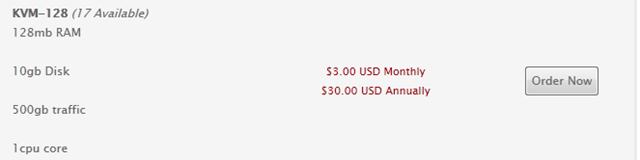
Hostigation has since announced that it started a new location in Los Angeles to cater to the west coast clientele and Tim has been kind enough to move my test server there too, therefore, this review will be based on the LA KVM server.
Provision was almost instant (payment submitted at 6:18PM, received VPS login info at 6:21PM) and the welcome email contains your root password in plain text. However, there is a special link to the Hostigation Wiki. Despite the wiki layout is half developed with no logo whatsoever, the wiki actually gave really detailed information to get you started on the KVM set up. (On a side note: As an amateur coder myself, I used to hate doing documentations, but this is a prime example to show how much support time would be saved for a little bit of documentation, granted there will be people who will not bother reading documentations and submit request for everything, however if there will always be people reading them and save you the effort of supporting that group of people.)
Hostigation’s WHMCS installation has enabled both HTTPS and HTTP access and after entering the WHMCS site, the basic control of the VPS is enabled under Product Details:
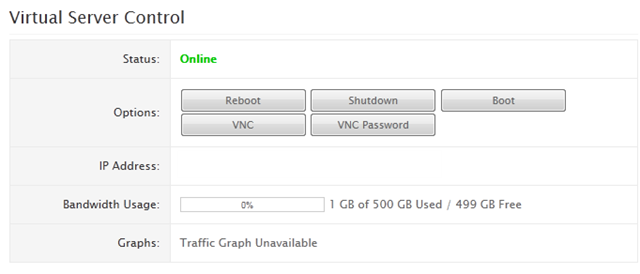
The biggest difference, presumably due to the fact that this is a KVM VPS and hence most of the clients are going to be installing the operating systems themselves, the usual “Reset Root Password” or “Change Host Name” functionalities are not in the WHMCS Virtual Server Control, instead, there are VNC and VNC Password controls, which is essentially a remote desktop program that would enable you to control the VPS like a real PC as soon as it is boot up. There is no graph to display resources usages, presumably to save some resources on the main node.
The SolusVM can be accessed via HTTPS connection, on a non-standard port. Once logged in, it shows a typical KVM SolusVM screen:
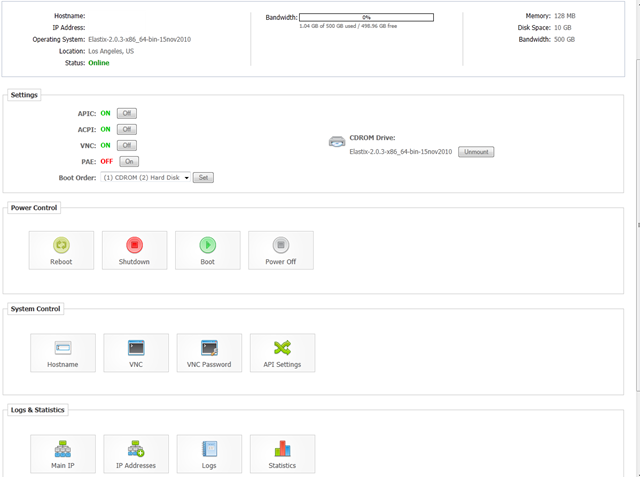
Note that instead of reinstalling OS, you will need to mount the CDROM with the Linux distribution of your choice. Thanks to the full virtualization, there are tonnes of Linux OS that are available:
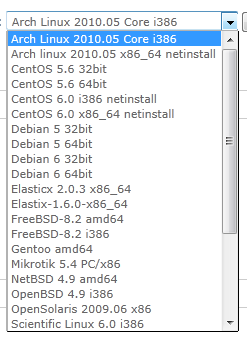
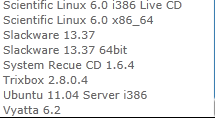
There are even Live CDs for those who are not sure if they should use the distribution or not. Furthermore, since Hostigation pretty much only has to download the ISO and mount it to the host node, you can pretty much request any distribution you like.
The other interesting bit is their IP addresses section of SolusVM:
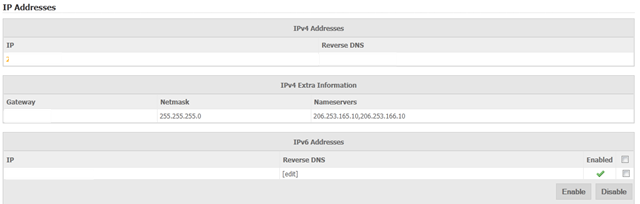
Here, you do not only see your IP address assignment (you get one IPV4 + one IPV6 for this VPS, although I would assume you can get as many IPV6 as you want if you request for more), but also the IPV4 configuration information, which would be really helpful for those who do not want to use DHCP for any reason.
Furthermore, it is worthwhile to note that the reverse DNS is instant, for both IPV4 and IPV6.
The backups within SolusVM are not working, however Hostigation also provide backup VPS for those who need some backup space.
On a side note again (although this is almost irrelevant to the VPS itself), the SolusVM from Hostigation actually showed up an IV6 address as my login IP, instead of my usual IPV4 address:

I guess it must be some custom scripting that Hostigation used. Although I am not sure what the purpose is, this is definitely something interesting.
Test on VPS
As noted above, the test VPS I have received has 128MB of RAM (128 burstable RAM) and 1 CPU core, unlike my usual tests where I liked to use Debian 5/Ubuntu 10.04 with a LNMP stack, I actually have had Trixbox CE installed here. With the full Trixbox installation, the VPS only used 64MB of memory:
 free -m
             total       used       free     shared    buffers     cached
Mem:           122        118          4          0          5         48
-/+ buffers/cache:         64         58
Swap:          760         96        663
It is pretty amazing to note how much swap space was put up there, 760MB, which is 6 times of the actual RAM! I am really not sure what is the point for doing so since most of the time, swap space is set to at most 1.5 times of the actual RAM space.
The corresponding top output showed most of the RAM space was taken away by httpd (i.e., Apache processes), obviously I do not think Trixbox has done a lot of optimizations on the LAMP stack, so it was almost amazing that I can get the whole stack running with 128MB of RAM (my tests with Elastix did not go that well and both RAM and CPU usage shoot up after a while:
top - 20:23:33 up 1 day, 22:07,  1 user,  load average: 0.00, 0.00, 0.00
Tasks:  96 total,   2 running,  94 sleeping,   0 stopped,   0 zombie
Cpu(s):  0.3%us,  0.0%sy,  0.0%ni, 99.0%id,  0.7%wa,  0.0%hi,  0.0%si,  0.0%st
Mem:    125496k total,   121336k used,     4160k free,     6064k buffers
Swap:   779144k total,    99252k used,   679892k free,    49408k cached

  PID USER      PR  NI  VIRT  RES  SHR S %CPU %MEM    TIME+  COMMAND
 7050 asterisk  15   0 63880  22m 7676 S  0.0 18.4   0:02.17 asterisk
 6311 asterisk  15   0 34024 8916 3108 S  0.0  7.1   0:00.18 httpd
 2271 asterisk  15   0 34064 7180 3712 S  0.0  5.7   0:00.71 httpd
 2276 asterisk  15   0 35128 6172 3436 S  0.0  4.9   0:01.30 httpd
 2149 mysql     15   0  136m 6084 3052 S  0.0  4.8   0:01.06 mysqld
 7107 asterisk  15   0 12240 5788 1748 S  0.0  4.6   0:04.48 op_server.pl
 2277 asterisk  15   0 34328 5772 3092 S  0.0  4.6   0:00.44 httpd
 2272 asterisk  15   0 34368 5504 3124 S  0.0  4.4   0:00.40 httpd
 2275 asterisk  24   0 34080 4824 2964 S  0.0  3.8   0:00.61 httpd
 6310 asterisk  15   0 28644 4644 2248 S  0.0  3.7   0:00.16 httpd
 2270 asterisk  22   0 34072 4624 3124 S  0.0  3.7   0:01.15 httpd
 2046 ntp       15   0  4500 4500 3492 S  0.0  3.6   0:00.04 ntpd
 2274 asterisk  15   0 35136 4456 2960 S  0.0  3.6   0:00.90 httpd
 1296 root       5 -10  4148 4148 3152 S  0.0  3.3   0:00.01 iscsid
 2273 asterisk  15   0 34608 3932 2956 S  0.0  3.1   0:01.13 httpd
 2435 root      34  19 25920 3212 1756 S  0.0  2.6   0:00.11 yum-updatesd
 2251 root      18   0 27376 3004 2532 S  0.0  2.4   0:00.20 httpd
CPU info confirmed that there is only one core available, however it was clocked at 7.8GHz, which is something really weird:
cat /proc/cpuinfo
processor       : 0
vendor_id       : GenuineIntel
cpu family      : 6
model           : 6
model name      : QEMU Virtual CPU version 0.9.1
stepping        : 3
cpu MHz         : 7826.312
cache size      : 32 KB
fdiv_bug        : no
hlt_bug         : no
f00f_bug        : no
coma_bug        : no
fpu             : yes
fpu_exception   : yes
cpuid level     : 4
wp              : yes
flags           : fpu tsc msr pae mce cx8 apic mtrr mca cmov pat pse36 clflush mmx fxsr sse sse2 nx lm up pni
bogomips        : 20494.43
vmstats shows the system is not overloaded:
 vmstat
procs -----------memory---------- ---swap-- -----io---- --system-- -----cpu------
 r  b   swpd   free   buff  cache   si   so    bi    bo   in   cs us sy id wa st
 0  0  99252   4332   6104  49424    1    1    30     7  226  195  0  1 99  0  0
Meminfo does not show signs of overselling as well:
 cat /proc/meminfo
MemTotal:       101592 kB
MemFree:          1892 kB
Buffers:           928 kB
Cached:          21080 kB
SwapCached:       2512 kB
Active:          71380 kB
Inactive:         2228 kB
HighTotal:           0 kB
HighFree:            0 kB
LowTotal:       101592 kB
LowFree:          1892 kB
SwapTotal:      779144 kB
SwapFree:       762608 kB
Dirty:              44 kB
Writeback:           0 kB
AnonPages:       50840 kB
Mapped:          19060 kB
Slab:            12340 kB
PageTables:       3264 kB
NFS_Unstable:        0 kB
Bounce:              0 kB
CommitLimit:    829940 kB
Committed_AS:   295192 kB
VmallocTotal:   745464 kB
VmallocUsed:      2916 kB
VmallocChunk:   742092 kB
Both df -i and df -h shows the hard drive space is not oversold:
 df -i
Filesystem            Inodes   IUsed   IFree IUse% Mounted on
/dev/hda2            2401152   63546 2337606    3% /
/dev/hda1              26104      44   26060    1% /boot
tmpfs                  15687       1   15686    1% /dev/shm
 df -h
Filesystem            Size  Used Avail Use% Mounted on
/dev/hda2             8.9G  1.8G  6.7G  22% /
/dev/hda1              99M   18M   76M  20% /boot
tmpfs                  62M     0   62M   0% /dev/shm
Disk I/O, although is not the best, is definitely very impressive:
 dd if=/dev/zero of=test bs=64k count=16k conv=fdatasync                                                                                                 c
16384+0 records in
16384+0 records out
1073741824 bytes (1.1 GB) copied, 14.8554 seconds, 72.3 MB/s
Running it again gives even better results, presumbly due to disk caching:
 dd if=/dev/zero of=test bs=64k count=16k conv=fdatasync
16384+0 records in
16384+0 records out
1073741824 bytes (1.1 GB) copied, 13.569 seconds, 79.1 MB/s
The download speed is pretty impressive as well:
 wget cachefly.cachefly.net/100mb.test
--2011-07-19 22:10:12--  http://cachefly.cachefly.net/100mb.test
Resolving cachefly.cachefly.net... 205.234.175.175
Connecting to cachefly.cachefly.net|205.234.175.175|:80... connected.
HTTP request sent, awaiting response... 200 OK
Length: 104857600 (100M) [application/octet-stream]
Saving to: `100mb.test'

100%[======================================>] 104,857,600 11.1M/s   in 9.4s

2011-07-19 22:10:22 (10.7 MB/s) - `100mb.test' saved [104857600/104857600]
And the tests that ran a little later showed a very consistent download speed:
wget cachefly.cachefly.net/100mb.test
--2011-07-19 22:12:24--  http://cachefly.cachefly.net/100mb.test
Resolving cachefly.cachefly.net... 205.234.175.175
Connecting to cachefly.cachefly.net|205.234.175.175|:80... connected.
HTTP request sent, awaiting response... 200 OK
Length: 104857600 (100M) [application/octet-stream]
Saving to: `100mb.test'

100%[======================================>] 104,857,600 11.1M/s   in 9.8s

2011-07-19 22:12:34 (10.2 MB/s) - `100mb.test' saved [104857600/104857600]
The upload speed is unfortunately not that great to the east coast and Europe, however it is definitely impressive for the boxes in the west coast:
From Nix Communications VPS in Montreal, Canada, the speed barely hit above 1MB/s:
 wget http://206.253.165.9/100mb.test
--2011-07-20 10:14:00--  http://206.253.165.9/100mb.test
Connecting to 206.253.165.9:80... connected.
HTTP request sent, awaiting response... 200 OK
Length: 104857600 (100M) [application/x-tar]
Saving to: `100mb.test.1'

100%[======================================>] 104,857,600  510K/s   in 1m 41s

2011-07-20 10:15:41 (1018 KB/s) - `100mb.test.1' saved [104857600/104857600]
Quickweb VPS in London, UK, gives half of that, since it is located even further:
wget http://206.253.165.9/100mb.test
--2011-07-19 22:16:00--  http://206.253.165.9/100mb.test
Connecting to 206.253.165.9:80... connected.
HTTP request sent, awaiting response... 200 OK
Length: 104857600 (100M) [application/x-tar]
Saving to: `100mb.test.1'

100%[======================================>] 104,857,600  544K/s   in 3m 12s

2011-07-19 22:19:13 (532 KB/s) - `100mb.test.1' saved [104857600/104857600]
And finally, the BuyVM VPS in Fremont, CA, gave a speed that is much better than the previous two test cases:
 wget http://206.253.165.9/100mb.test
--2011-07-19 22:24:07--  http://206.253.165.9/100mb.test
Connecting to 206.253.165.9:80... connected.
HTTP request sent, awaiting response... 200 OK
Length: 104857600 (100M) [application/x-tar]
Saving to: `100mb.test'

100%[======================================>] 104,857,600 5.89M/s   in 17s

2011-07-19 22:24:25 (5.72 MB/s) - `100mb.test' saved [104857600/104857600]
Given the fact it only has a single core, I was pretty impressed when the VPS has had a UnixBench score of 1361:
   #    #  #    #  #  #    #          #####   ######  #    #   ####   #    #
   #    #  ##   #  #   #  #           #    #  #       ##   #  #    #  #    #
   #    #  # #  #  #    ##            #####   #####   # #  #  #       ######
   #    #  #  # #  #    ##            #    #  #       #  # #  #       #    #
   #    #  #   ##  #   #  #           #    #  #       #   ##  #    #  #    #
    ####   #    #  #  #    #          #####   ######  #    #   ####   #    #

   Version 5.1.3                      Based on the Byte Magazine Unix Benchmark

   Multi-CPU version                  Version 5 revisions by Ian Smith,
                                      Sunnyvale, CA, USA
   January 13, 2011                   johantheghost at yahoo period com


1 x Dhrystone 2 using register variables  1 2 3 4 5 6 7 8 9 10

1 x Double-Precision Whetstone  1 2 3 4 5 6 7 8 9 10

1 x Execl Throughput  1 2 3

1 x File Copy 1024 bufsize 2000 maxblocks  1 2 3

1 x File Copy 256 bufsize 500 maxblocks  1 2 3

1 x File Copy 4096 bufsize 8000 maxblocks  1 2 3

1 x Pipe Throughput  1 2 3 4 5 6 7 8 9 10

1 x Pipe-based Context Switching  1 2 3 4 5 6 7 8 9 10

1 x Process Creation  1 2 3

1 x System Call Overhead  1 2 3 4 5 6 7 8 9 10

1 x Shell Scripts (1 concurrent)  1 2 3

1 x Shell Scripts (8 concurrent)  1 2 3

========================================================================
   BYTE UNIX Benchmarks (Version 5.1.3)

   System: trixbox1.localdomain: GNU/Linux
   OS: GNU/Linux -- 2.6.18-164.11.1.el5 -- #1 SMP Wed Jan 20 07:39:04 EST 2010
   Machine: i686 (i386)
   Language: en_US.utf8 (charmap="UTF-8", collate="UTF-8")
   CPU 0: QEMU Virtual CPU version 0.9.1 (6800.4 bogomips)
          x86-64, MMX, Physical Address Ext, SYSCALL/SYSRET
   22:27:15 up 2 days, 10 min,  1 user,  load average: 0.23, 0.11, 0.09; runlevel 3

------------------------------------------------------------------------
Benchmark Run: Tue Jul 19 2011 22:27:16 - 22:55:36
1 CPU in system; running 1 parallel copy of tests

Dhrystone 2 using register variables       17092599.8 lps   (10.0 s, 7 samples)
Double-Precision Whetstone                     2919.1 MWIPS (10.1 s, 7 samples)
Execl Throughput                               8034.2 lps   (30.0 s, 2 samples)
File Copy 1024 bufsize 2000 maxblocks        671939.4 KBps  (30.0 s, 2 samples)
File Copy 256 bufsize 500 maxblocks          182840.6 KBps  (30.0 s, 2 samples)
File Copy 4096 bufsize 8000 maxblocks       1805966.9 KBps  (30.0 s, 2 samples)
Pipe Throughput                             1175144.6 lps   (10.0 s, 7 samples)
Pipe-based Context Switching                 350268.3 lps   (10.0 s, 7 samples)
Process Creation                              26825.3 lps   (30.0 s, 2 samples)
Shell Scripts (1 concurrent)                   8802.6 lpm   (60.0 s, 2 samples)
Shell Scripts (8 concurrent)                   1198.3 lpm   (60.0 s, 2 samples)
System Call Overhead                         981821.9 lps   (10.0 s, 7 samples)

System Benchmarks Index Values               BASELINE       RESULT    INDEX
Dhrystone 2 using register variables         116700.0   17092599.8   1464.7
Double-Precision Whetstone                       55.0       2919.1    530.7
Execl Throughput                                 43.0       8034.2   1868.4
File Copy 1024 bufsize 2000 maxblocks          3960.0     671939.4   1696.8
File Copy 256 bufsize 500 maxblocks            1655.0     182840.6   1104.8
File Copy 4096 bufsize 8000 maxblocks          5800.0    1805966.9   3113.7
Pipe Throughput                               12440.0    1175144.6    944.6
Pipe-based Context Switching                   4000.0     350268.3    875.7
Process Creation                                126.0      26825.3   2129.0
Shell Scripts (1 concurrent)                     42.4       8802.6   2076.1
Shell Scripts (8 concurrent)                      6.0       1198.3   1997.1
System Call Overhead                          15000.0     981821.9    654.5
                                                                   ========
System Benchmarks Index Score                                        1361.4
And the evil me torturing the poor VPS again for the second time:
   #    #  #    #  #  #    #          #####   ######  #    #   ####   #    #
   #    #  ##   #  #   #  #           #    #  #       ##   #  #    #  #    #
   #    #  # #  #  #    ##            #####   #####   # #  #  #       ######
   #    #  #  # #  #    ##            #    #  #       #  # #  #       #    #
   #    #  #   ##  #   #  #           #    #  #       #   ##  #    #  #    #
    ####   #    #  #  #    #          #####   ######  #    #   ####   #    #

   Version 5.1.3                      Based on the Byte Magazine Unix Benchmark

   Multi-CPU version                  Version 5 revisions by Ian Smith,
                                      Sunnyvale, CA, USA
   January 13, 2011                   johantheghost at yahoo period com


1 x Dhrystone 2 using register variables  1 2 3 4 5 6 7 8 9 10

1 x Double-Precision Whetstone  1 2 3 4 5 6 7 8 9 10

1 x Execl Throughput  1 2 3

1 x File Copy 1024 bufsize 2000 maxblocks  1 2 3

1 x File Copy 256 bufsize 500 maxblocks  1 2 3

1 x File Copy 4096 bufsize 8000 maxblocks  1 2 3

1 x Pipe Throughput  1 2 3 4 5 6 7 8 9 10

1 x Pipe-based Context Switching  1 2 3 4 5 6 7 8 9 10

1 x Process Creation  1 2 3

1 x System Call Overhead  1 2 3 4 5 6 7 8 9 10

1 x Shell Scripts (1 concurrent)  1 2 3

1 x Shell Scripts (8 concurrent)  1 2 3

========================================================================
   BYTE UNIX Benchmarks (Version 5.1.3)

   System: trixbox1.localdomain: GNU/Linux
   OS: GNU/Linux -- 2.6.18-164.11.1.el5 -- #1 SMP Wed Jan 20 07:39:04 EST 2010
   Machine: i686 (i386)
   Language: en_US.utf8 (charmap="UTF-8", collate="UTF-8")
   CPU 0: QEMU Virtual CPU version 0.9.1 (6800.4 bogomips)
          x86-64, MMX, Physical Address Ext, SYSCALL/SYSRET
   23:10:22 up 2 days, 53 min,  1 user,  load average: 0.04, 0.16, 0.64; runlevel 3

------------------------------------------------------------------------
Benchmark Run: Tue Jul 19 2011 23:10:22 - 23:38:40
1 CPU in system; running 1 parallel copy of tests

Dhrystone 2 using register variables       16977910.3 lps   (10.0 s, 7 samples)
Double-Precision Whetstone                     2933.7 MWIPS (9.9 s, 7 samples)
Execl Throughput                               7778.9 lps   (30.0 s, 2 samples)
File Copy 1024 bufsize 2000 maxblocks        676637.4 KBps  (30.0 s, 2 samples)
File Copy 256 bufsize 500 maxblocks          188585.2 KBps  (30.0 s, 2 samples)
File Copy 4096 bufsize 8000 maxblocks       1827007.0 KBps  (30.0 s, 2 samples)
Pipe Throughput                             1186589.4 lps   (10.0 s, 7 samples)
Pipe-based Context Switching                 352224.7 lps   (10.0 s, 7 samples)
Process Creation                              26788.9 lps   (30.0 s, 2 samples)
Shell Scripts (1 concurrent)                   8694.4 lpm   (60.0 s, 2 samples)
Shell Scripts (8 concurrent)                   1213.8 lpm   (60.0 s, 2 samples)
System Call Overhead                         984906.8 lps   (10.0 s, 7 samples)

System Benchmarks Index Values               BASELINE       RESULT    INDEX
Dhrystone 2 using register variables         116700.0   16977910.3   1454.8
Double-Precision Whetstone                       55.0       2933.7    533.4
Execl Throughput                                 43.0       7778.9   1809.1
File Copy 1024 bufsize 2000 maxblocks          3960.0     676637.4   1708.7
File Copy 256 bufsize 500 maxblocks            1655.0     188585.2   1139.5
File Copy 4096 bufsize 8000 maxblocks          5800.0    1827007.0   3150.0
Pipe Throughput                               12440.0    1186589.4    953.8
Pipe-based Context Switching                   4000.0     352224.7    880.6
Process Creation                                126.0      26788.9   2126.1
Shell Scripts (1 concurrent)                     42.4       8694.4   2050.6
Shell Scripts (8 concurrent)                      6.0       1213.8   2023.0
System Call Overhead                          15000.0     984906.8    656.6
                                                                   ========
System Benchmarks Index Score                                        1365.1
And the GeekBench score is pretty good too:
System Information
  Platform:                  Linux x86 (32-bit)
  Compiler:                  GCC 4.1.2 20070925 (Red Hat 4.1.2-33)
  Operating System:          Linux 2.6.18-164.11.1.el5 i686
  Model:                     Linux PC (QEMU Virtual CPU version 0.9.1)
  Motherboard:               Unknown Motherboard
  Processor:                 QEMU Virtual CPU version 0.9.1
  Processor ID:              GenuineIntel Family 6 Model 6 Stepping 3
  Logical Processors:        1
  Physical Processors:       1
  Processor Frequency:       3.40 GHz
  L1 Instruction Cache:      64.0 KB
  L1 Data Cache:             64.0 KB
  L2 Cache:                  512 KB
  L3 Cache:                  0.00 B
  Bus Frequency:             0.00 Hz
  Memory:                    123 MB
  Memory Type:               N/A
  SIMD:                      1
  BIOS:                      N/A
  Processor Model:           QEMU Virtual CPU version 0.9.1
  Processor Cores:           1

Integer
  Blowfish
    single-threaded scalar    2185 ||||||||
    multi-threaded scalar     2357 |||||||||
  Text Compress
    single-threaded scalar    2659 ||||||||||
    multi-threaded scalar     2620 ||||||||||
  Text Decompress
    single-threaded scalar    2895 |||||||||||
    multi-threaded scalar     2934 |||||||||||
  Image Compress
    single-threaded scalar    2205 ||||||||
    multi-threaded scalar     2200 ||||||||
  Image Decompress
    single-threaded scalar    2248 ||||||||
    multi-threaded scalar     2311 |||||||||
  Lua
    single-threaded scalar    4128 ||||||||||||||||
    multi-threaded scalar     4024 ||||||||||||||||

Floating Point
  Mandelbrot
    single-threaded scalar    2867 |||||||||||
    multi-threaded scalar     2926 |||||||||||
  Dot Product
    single-threaded scalar    4665 ||||||||||||||||||
    multi-threaded scalar     4925 |||||||||||||||||||
    single-threaded vector    5616 ||||||||||||||||||||||
    multi-threaded vector     6380 |||||||||||||||||||||||||
  LU Decomposition
    single-threaded scalar    3250 |||||||||||||
    multi-threaded scalar     3327 |||||||||||||
  Primality Test
    single-threaded scalar    4958 |||||||||||||||||||
    multi-threaded scalar     4014 ||||||||||||||||
  Sharpen Image
    single-threaded scalar   10573 ||||||||||||||||||||||||||||||||||||||||||
    multi-threaded scalar    10635 ||||||||||||||||||||||||||||||||||||||||||
  Blur Image
    single-threaded scalar    8448 |||||||||||||||||||||||||||||||||
    multi-threaded scalar     8509 ||||||||||||||||||||||||||||||||||

Memory
  Read Sequential
    single-threaded scalar    6873 |||||||||||||||||||||||||||
  Write Sequential
    single-threaded scalar    9890 |||||||||||||||||||||||||||||||||||||||
  Stdlib Allocate
    single-threaded scalar    4934 |||||||||||||||||||
  Stdlib Write
    single-threaded scalar    6542 ||||||||||||||||||||||||||
  Stdlib Copy
    single-threaded scalar   12884 |||||||||||||||||||||||||||||||||||||||||||||||||||

Stream
  Stream Copy
    single-threaded scalar    5656 ||||||||||||||||||||||
    single-threaded vector    6643 ||||||||||||||||||||||||||
  Stream Scale
    single-threaded scalar    5956 |||||||||||||||||||||||
    single-threaded vector    6285 |||||||||||||||||||||||||
  Stream Add
    single-threaded scalar    5621 ||||||||||||||||||||||
    single-threaded vector    6185 ||||||||||||||||||||||||
  Stream Triad
    single-threaded scalar    5837 |||||||||||||||||||||||
    single-threaded vector    4654 ||||||||||||||||||

Integer Score:                2730 ||||||||||
Floating Point Score:         5792 |||||||||||||||||||||||
Memory Score:                 8224 ||||||||||||||||||||||||||||||||
Stream Score:                 5854 |||||||||||||||||||||||

Overall Geekbench Score:      5212 ||||||||||||||||||||
And finally, running it again just to confirm:
System Information
  Platform:                  Linux x86 (32-bit)
  Compiler:                  GCC 4.1.2 20070925 (Red Hat 4.1.2-33)
  Operating System:          Linux 2.6.18-164.11.1.el5 i686
  Model:                     Linux PC (QEMU Virtual CPU version 0.9.1)
  Motherboard:               Unknown Motherboard
  Processor:                 QEMU Virtual CPU version 0.9.1
  Processor ID:              GenuineIntel Family 6 Model 6 Stepping 3
  Logical Processors:        1
  Physical Processors:       1
  Processor Frequency:       3.40 GHz
  L1 Instruction Cache:      64.0 KB
  L1 Data Cache:             64.0 KB
  L2 Cache:                  512 KB
  L3 Cache:                  0.00 B
  Bus Frequency:             0.00 Hz
  Memory:                    123 MB
  Memory Type:               N/A
  SIMD:                      1
  BIOS:                      N/A
  Processor Model:           QEMU Virtual CPU version 0.9.1
  Processor Cores:           1

Integer
  Blowfish
    single-threaded scalar    2236 ||||||||
    multi-threaded scalar     2378 |||||||||
  Text Compress
    single-threaded scalar    2691 ||||||||||
    multi-threaded scalar     2637 ||||||||||
  Text Decompress
    single-threaded scalar    2788 |||||||||||
    multi-threaded scalar     3022 ||||||||||||
  Image Compress
    single-threaded scalar    2368 |||||||||
    multi-threaded scalar     2316 |||||||||
  Image Decompress
    single-threaded scalar    2373 |||||||||
    multi-threaded scalar     2453 |||||||||
  Lua
    single-threaded scalar    3997 |||||||||||||||
    multi-threaded scalar     3930 |||||||||||||||

Floating Point
  Mandelbrot
    single-threaded scalar    2872 |||||||||||
    multi-threaded scalar     2924 |||||||||||
  Dot Product
    single-threaded scalar    4533 ||||||||||||||||||
    multi-threaded scalar     4795 |||||||||||||||||||
    single-threaded vector    5271 |||||||||||||||||||||
    multi-threaded vector     6133 ||||||||||||||||||||||||
  LU Decomposition
    single-threaded scalar    3369 |||||||||||||
    multi-threaded scalar     3117 ||||||||||||
  Primality Test
    single-threaded scalar    4672 ||||||||||||||||||
    multi-threaded scalar     3803 |||||||||||||||
  Sharpen Image
    single-threaded scalar   10742 ||||||||||||||||||||||||||||||||||||||||||
    multi-threaded scalar    11062 ||||||||||||||||||||||||||||||||||||||||||||
  Blur Image
    single-threaded scalar    8600 ||||||||||||||||||||||||||||||||||
    multi-threaded scalar     8475 |||||||||||||||||||||||||||||||||

Memory
  Read Sequential
    single-threaded scalar    6238 ||||||||||||||||||||||||
  Write Sequential
    single-threaded scalar    9254 |||||||||||||||||||||||||||||||||||||
  Stdlib Allocate
    single-threaded scalar    4523 ||||||||||||||||||
  Stdlib Write
    single-threaded scalar    6407 |||||||||||||||||||||||||
  Stdlib Copy
    single-threaded scalar   11718 ||||||||||||||||||||||||||||||||||||||||||||||

Stream
  Stream Copy
    single-threaded scalar    5184 ||||||||||||||||||||
    single-threaded vector    5912 |||||||||||||||||||||||
  Stream Scale
    single-threaded scalar    5669 ||||||||||||||||||||||
    single-threaded vector    5709 ||||||||||||||||||||||
  Stream Add
    single-threaded scalar    4792 |||||||||||||||||||
    single-threaded vector    5590 ||||||||||||||||||||||
  Stream Triad
    single-threaded scalar    5039 ||||||||||||||||||||
    single-threaded vector    4044 ||||||||||||||||

Integer Score:                2765 |||||||||||
Floating Point Score:         5740 ||||||||||||||||||||||
Memory Score:                 7628 ||||||||||||||||||||||||||||||
Stream Score:                 5242 ||||||||||||||||||||

Overall Geekbench Score:      5026 ||||||||||||||||||||
In conclusion, other than the upload speed to the East Coast, the VPS has very good I/O and great performance in general, which definitely makes it a great canadidate for a general-purpose VPS.
Customer Service and Support
Although Tim is practically the only one who addressed all my needs and he is not trying to hide by any means the fact that he is the only one watching the servers (not sure if there is anyone else taking care of the billing stuff and so on), but by no means that means any sort of lack of customer service. None of my tickets has taken more than 30 minutes to get a response no matter the hours of the day I logged the tickets, and as an unmanaged provider, Tim has gone an extra mile (or many extra miles) to help me set up mini-VOIP system, for which I have to admit that I am a complete noob when it comes to VOIP technologies. In fact, after providing several suggestions (including moving the server for free from SC to LA, which he offered for every single Hostigation clients), he even went as far as asking his friends who are experts in this area for more suggestions. I have no doubt, at least in terms of client services and support, this is definitely the best I have received from VPS providers in that price range.
Conclusion
It is not that difficult to comprehend, after using their services, the reason why Hostigation was nominated one of the best VPS providers in the budget VPS line. Although the box is indeed in the low end category, the performance of the VPS is definitely not. Besides the upload speed which is perhaps not that ideal (which, according to my tracert results, seems to be a result that the VPS is using HE.Net for traffic sent from the East Coast, and although I am very thankful to HE.Net for providing the IPV6 infrastructure, I have to admit that routing through them is not really the best solution), the general performance of the VPS is great. Furthermore, although Tim seems to be the only one running the entire business, I have never had to wait more than 30 minutes for any of the answers. Hostigation is definitely very high on my recommendation list whether you are a newbie who are interested in learning low end box setup or an advanced user who needs the box for any task that does not involve intense uploading of data.
Wow, what a great review, I’m so happy you have enjoyed your VPS, but I’d be happier when your VoIP worked properly. I never put two and two together, so you received the same support I would have given anyone, which is probably your goal anyway to write a fair review.
I few tidbits to add, since you were amused by the IPv6 on the SolusVM interface, it is actually fully IPv6 compatible/compliant on both the standard 5353 and SSL 5656 ports, and the SSL port sports a valid SSL cert. It was just some simple lighttpd config changes and 1 ticket into SolusVM as it borked the WHMCS plugin since the plugin never envisioned IPv6, Phil at SolusVM modified a few lines of code in their products and everything is 100% functional now, but was the cause of the ftp node backups failing until he did make those changes.
And a minor thing I noticed in the review itself, with KVM on SolusVM, it is not possible to oversell disk space. LVM is used on the host node to allocate disk space and each vm gets it’s own Logical Volume assigned to it.
Memory, CPU and Disk IO certainly could be over committed, which is why I think we’ll all need to be leery of providers offering what will appear too good to be true pricing on KVM as it becomes more popular.
@Tim: Yes, I signed up just like an ordinary customer, and used my personal email rather than the official contact email for 96MB.com, so hopefully this review is a pleasant surprise to you from yet another happy customer you have. Regardless of what the outcome becomes in end with my VOIP set up, I truly appreciate every effort that you have put in to help me out.
Now I see the weird part with the IPV6 address showing up, I was initially suspecting you are putting up a reverse proxy in front of your SolusVM server that sits only on IPV6 network somehow (which I do not think it is possible?), but it is something great to know.
It is also good to know that KVM can not be oversold with SolusVM, however I do agree with you as it becomes more popular, there will be coding monkeys who can come up with tricks to oversell resources. We’ll see, hopefully there won’t be too many more GarmanOnline-alikes 🙂
@Tim: And completely off the topic, you definitely won the award of having one of the most “cartoonic” wordpress avatar I have seen 🙂
Shoeshine Boy, a.k.a. Underdog is how I feel, and drives me to knock one of those three off their perch next quarter 🙂
@Tim: Considering this:
You might have a really good chance this quarter!
And just to be fair, BuyVM’s VPS is pretty solid in general, however the huge outage caused by the move will definitely get some unhappy souls on WHT/LET I suspect…
Excellent review! If you are new to voip, I would suggest you try out PBX In a flash. They seem to have a great community with lots of documentation and noob friendliness. Thanks for taking the time to check them out. How do you think they will work for gameserver hosting? The current dedicated server uses about 350MB of ram at max.
My BuyVM is mostly down, either its the RAID drive issues or random reboots or kernal panics. There is not a single time in a week where this is no reboot. I am using two of their 256MB VPSes on two different nodes. Already in support with them.
I guess you are lucky admin
@Asim: Here are the uptime for my BuyVM boxes, monitored through UpTimeRobot,which might be the problem why I do not notice any downtime since the monitor only pings once every 5 minutes….
http://i54.tinypic.com/30szz2s.jpg
Both of them are 128MB ones, I guess their 128MB is perhaps more solid than other product lines….
@Asim: Looks like my luck is gone too: 🙁
dd if=/dev/zero of=test bs=64k count=16k conv=fdatasync
16384+0 records in
16384+0 records out
1073741824 bytes (1.1 GB) copied, 165.596 s, 6.5 MB/s
For those ones who are reading this disk I/O, this is NOT from Hostigation.
Nice review, I’ve just bought one box from them (KVM-256, SC). Let’s if it’s good!
@Gus: Nice, let us know how it goes, I am pretty sure you won’t be disappointed 🙂
It’s working pretty well, the only problem I had was with myself hehe. Do you have any tips on setting up email and private nameservers? They are kinda nasty to configure, specially for a begginer – I’m a desktop Linux user and I bought this box only to learn more about it, just like you (I read all your articles, lol).
@Gus: Have you raised a request to Tim about this? I know it is unmanaged so I guess technically he is not supposed to do all these for you, but from what I know about Tim, I am pretty sure he will give you some guidance along the way! When I first started learning setting up my VPS, howtoforge was my best friend, and their perfect server guides pretty much have everything to get me started. One of the example is this guide: http://www.howtoforge.com/perfect-server-debian-lenny-ispconfig3. Obviously you won’t need to follow every single step there but that should give you some ideas how to run the command lines.
Another important source is definitely all sorts of online community, WHT and LEB are both good places to ask and to learn, and 96MB is a pretty good spot too! 🙂
Best of luck and do let us know if there is anything we can help with.
Thanks mate! I had already visited HowtoForge but I swear I didn’t see its sidebar, lol. I’ve also learned that Debian’s Wiki covers everything that I needed to know, even though it’s kinda scarce. Now I’m diving into shell scripting to automate all those things… 😉
Thanks again!
@Gus: I think you totally should, my dream system is one that I can just sit around and reading newspapers while the boxes do all the work for me…doing all the reviews for me maybe? 🙂
Once I tried to build some kind of AI to write simple texts, but it did not work quite well, roflmao. You’ll have to keep writing the reviews manually, and please, keep ’em coming! 😀
@Gus, if you want to learn to setup proper email server follow this tutorial -> http://workaround.org/ispmail/squeeze it will teach you a lot, but if you want a quick setup guide, you can use iredmail -> http://code.google.com/p/iredmail/wiki/Installation_on_Debian
good luck 🙂
Awesome tut, thanks mate!
Pingback: 96MB Low End VPS Review - BuyVM Take Two96MB.com
I wrote my review for hostigation at http://gentoovps.net/hostigation-review/ if anyone is interested.