
96MB Low End VPS Review Part X – QualityServers
It is always interesting to see a company selling VPS services half-way across the globe, which is exactly what QualityServers did. Through their Eliminator plan, which was advertised on WHT, they have promised to have a “one-size fits all” plan. Is it really good as it has advertised? I decided to try it out myself just to see.
Plans and Set Up
As per their advertisement on WHT, here is the specification of the box:

As per this post on LowEndBox.com, their US servers are based in Tempa, Florida with Hivelocity DC. UK is also available for the same price for those who prefer a European location.
6USD for a 600MB OpenVZ box is not exactly cheap for an unmanaged service, however for a “fully managed” service, it definitely sounds like a good deal, add 1 more pound per month and you get a Xen box, which definitely is a more worthy deal if you prefer Xen to OpenVZ.
Set up was literally instant, I signed up at 4:11pm and received email within the same minute. It is interesting to note how much link they still have with their previous brand, QuickVPS: on the sign up page, the SSL certificate is showing QuickVPS Ltd. (GB), on their welcome email, although it was sent from qualityservers.co.uk email address, it actually said, on the subject line, “New QuickVPS Information” and even Paypal payment was sent to “QuickVPS”. However, other than perhaps confusing some customers, this is not exactly a big matter.
Control Panel
For customer area, QualityServers used a unbranded WHMCS integrated to their website, as well as Kayako helpdesk that was integrated into WHMCS to handle all the tickets. As I have mentioned before, I personally have a preference of Kayako over the built-in WHMCS ticket system, since everything is a lot clearer. After login to their WHMCS area via secured HTTP login and click on submit a ticket:

The departments basically outlined the services they offer: cloud hosting, VPS, and Shoutcast services.
There is also instant chat available although I have yet to see it showing online status:

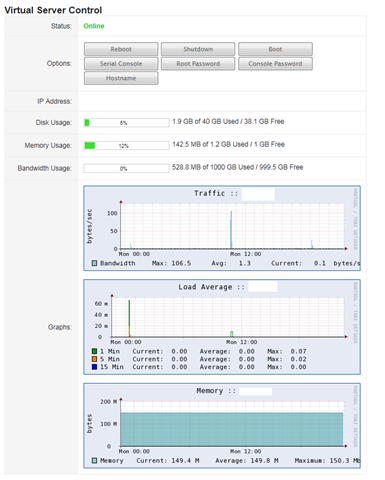
Besides this, there is also a build-in VPS control panel to pretty much perform all basic functions needed to the VPS: reboot, shutdown, boot, emergency console, reset root password, console password and change host name, without the need to login to SolusVM Control Panel. It also display the status, IP Address and the usage information.
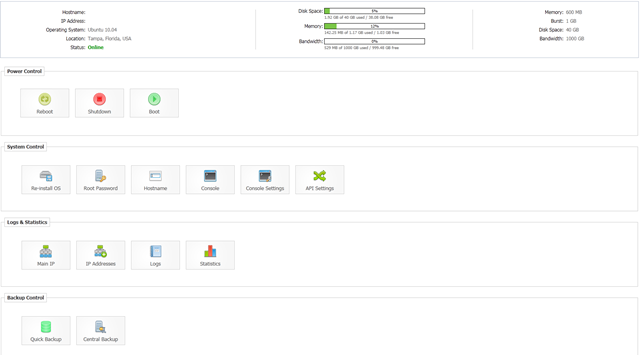
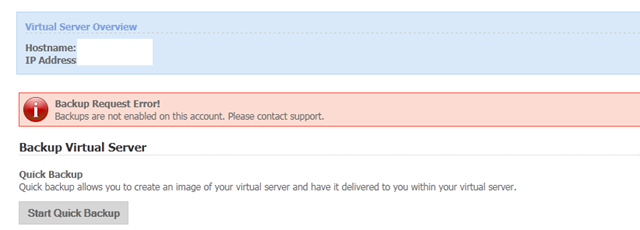
If you are a SolusVM fan, then SolusVM on secured HTTP login on a alternative port is also available. However, instant rDNS is not available and since there is dedicated backup space, the in-panel backups do not work as well.

There are several OS templates available, basically covers most of common OS for Linux these days. Alternative Linux is something I have not seen before, so it might be worth a shot for those who would like to give it a try:
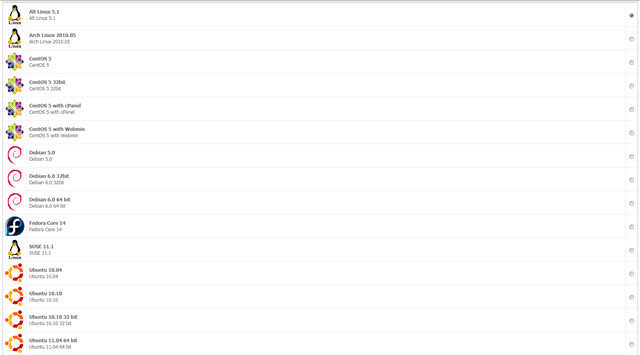
Note that the Ubuntu 10.10 32 bit OS template seems to be broken and once I reloaded the OS, here is the error message that I have received:
Starting PowerConsole v1.1 <> (c)2010 soluslabs ltd.
please wait...
successfully logged in.
enter into CT 245 failed
Unable to open pty: No such file or directory
Test on the VPS
The test VPS that I have signed up for is the OpenVZ Eliminator as the Xen Eliminator was out of stock at the time I made the purchase. However, both Xen and OpenVZ have exactly the same specifications except in OpenVZ, it is burst memory and swap memory in Xen. Ubuntu 10.04 was installed as the OS.
VPS has four cores enabled, using Intel Xeon X3220 CPU with no restrictions on the clock speed:
cat /proc/cpuinfo
processor       : 0
vendor_id       : GenuineIntel
cpu family      : 6
model           : 15
model name      : Intel(R) Xeon(R) CPU           X3220  @ 2.40GHz
stepping        : 11
cpu MHz         : 2394.064
cache size      : 4096 KB
physical id     : 0
siblings        : 4
core id         : 0
cpu cores       : 4
apicid          : 0
fpu             : yes
fpu_exception   : yes
cpuid level     : 10
wp              : yes
flags           : fpu vme de pse tsc msr pae mce cx8 apic sep mtrr pge mca cmov pat pse36 clflush dts acpi mmx fxsr sse sse2 ss ht tm syscall nx lm constant_tsc pni monitor ds_cpl vmx est tm2 ssse3 cx16 xtpr lahf_lm
bogomips        : 4788.12
clflush size    : 64
cache_alignment : 64
address sizes   : 36 bits physical, 48 bits virtual
power management:

processor       : 1
vendor_id       : GenuineIntel
cpu family      : 6
model           : 15
model name      : Intel(R) Xeon(R) CPU           X3220  @ 2.40GHz
stepping        : 11
cpu MHz         : 2394.064
cache size      : 4096 KB
physical id     : 0
siblings        : 4
core id         : 1
cpu cores       : 4
apicid          : 1
fpu             : yes
fpu_exception   : yes
cpuid level     : 10
wp              : yes
flags           : fpu vme de pse tsc msr pae mce cx8 apic sep mtrr pge mca cmov pat pse36 clflush dts acpi mmx fxsr sse sse2 ss ht tm syscall nx lm constant_tsc pni monitor ds_cpl vmx est tm2 ssse3 cx16 xtpr lahf_lm
bogomips        : 4787.29
clflush size    : 64
cache_alignment : 64
address sizes   : 36 bits physical, 48 bits virtual
power management:

processor       : 2
vendor_id       : GenuineIntel
cpu family      : 6
model           : 15
model name      : Intel(R) Xeon(R) CPU           X3220  @ 2.40GHz
stepping        : 11
cpu MHz         : 2394.064
cache size      : 4096 KB
physical id     : 0
siblings        : 4
core id         : 2
cpu cores       : 4
apicid          : 2
fpu             : yes
fpu_exception   : yes
cpuid level     : 10
wp              : yes
flags           : fpu vme de pse tsc msr pae mce cx8 apic sep mtrr pge mca cmov pat pse36 clflush dts acpi mmx fxsr sse sse2 ss ht tm syscall nx lm constant_tsc pni monitor ds_cpl vmx est tm2 ssse3 cx16 xtpr lahf_lm
bogomips        : 4787.39
clflush size    : 64
cache_alignment : 64
address sizes   : 36 bits physical, 48 bits virtual
power management:

processor       : 3
vendor_id       : GenuineIntel
cpu family      : 6
model           : 15
model name      : Intel(R) Xeon(R) CPU           X3220  @ 2.40GHz
stepping        : 11
cpu MHz         : 2394.064
cache size      : 4096 KB
physical id     : 0
siblings        : 4
core id         : 3
cpu cores       : 4
apicid          : 3
fpu             : yes
fpu_exception   : yes
cpuid level     : 10
wp              : yes
flags           : fpu vme de pse tsc msr pae mce cx8 apic sep mtrr pge mca cmov pat pse36 clflush dts acpi mmx fxsr sse sse2 ss ht tm syscall nx lm constant_tsc pni monitor ds_cpl vmx est tm2 ssse3 cx16 xtpr lahf_lm
bogomips        : 4787.32
clflush size    : 64
cache_alignment : 64
address sizes   : 36 bits physical, 48 bits virtual
power management:
Disk and memory usage with a full LNMP installed:
 df -h
Filesystem            Size  Used Avail Use% Mounted on
/dev/simfs             40G  2.0G   39G   5% /
 free -m
             total       used       free     shared    buffers     cached
Mem:          1200        149       1050          0          0          0
-/+ buffers/cache:        149       1050
Swap:            0          0          0
And the top output:
top - 07:17:00 up 38 days,  2:54,  1 user,  load average: 0.00, 0.00, 0.00
Tasks:  21 total,   2 running,  19 sleeping,   0 stopped,   0 zombie
Cpu(s):  0.0%us,  0.0%sy,  0.0%ni,100.0%id,  0.0%wa,  0.0%hi,  0.0%si,  0.0%st
Mem:   1228800k total,   153584k used,  1075216k free,        0k buffers
Swap:        0k total,        0k used,        0k free,        0k cached

  PID USER      PR  NI  VIRT  RES  SHR S %CPU %MEM    TIME+  COMMAND
23690 www       15   0 47584  20m  868 S    0  1.7   0:00.91 nginx
30202 bind      21   0  143m  15m 2100 S    0  1.3   0:00.19 named
23683 www       15   0  107m  10m 3008 S    0  0.8   0:00.03 php-cgi
23684 www       18   0  107m  10m 3008 S    0  0.8   0:00.03 php-cgi
11293 mysql     18   0 61156 7456 3464 S    0  0.6   0:00.00 mysqld
23682 www       15   0  105m 5952 1508 S    0  0.5   0:00.00 php-cgi
23685 www       18   0  105m 5952 1508 S    0  0.5   0:00.00 php-cgi
23686 www       18   0  105m 5952 1508 S    0  0.5   0:00.00 php-cgi
23681 root      18   0  105m 5712 1308 S    0  0.5   0:10.18 php-cgi
30674 root      16   0 71376 3364 2544 R    0  0.3   0:00.03 sshd
 1373 root      15   0 69520 2092  544 S    0  0.2   0:25.04 sendmail-mta
30686 root      16   0 17880 1940 1448 S    0  0.2   0:00.00 bash
    1 root      18   0 23316 1572 1268 S    0  0.1   0:01.18 init
30698 root      15   0 19092 1300 1056 R    0  0.1   0:00.00 top
 5233 root      15   0 49264 1084  536 S    0  0.1   0:06.71 sshd
 1141 root      15   0 21080 1024  784 S    0  0.1   0:03.62 cron
30359 root      25   0 19528  956  748 S    0  0.1   0:00.00 xinetd
VZfree indicates moderate overselling: Correction:dmmcintyre3 has mentioned in this comment here that this does not indicate overselling and was an error that I made on my end.
 vzfree
             Total     Used     Free
Kernel:   2048.00M    5.04M 2042.96M
Allocate: 1200.00M  149.64M 1050.36M (600M Guaranteed)
Commit:    600.00M   73.20M  526.80M (45.5% of Allocated)
Swap:                 0.00M          (0.0% of Committed)
vmstat showing an almost entirely empty VPS:
vmstat
procs -----------memory---------- ---swap-- -----io---- -system-- ----cpu----
 r  b   swpd   free   buff  cache   si   so    bi    bo   in   cs us sy id wa
 0  0      0 1075688      0      0    0    0     0     1    0    0  0  0 100  0
Beancounters showing very high limits:
cat /proc/user_beancounters
Version: 2.5
       uid  resource                     held              maxheld              barrier                limit              failcnt
      245:  kmemsize                  5279387             31200458           2147483646           2147483646                    0
            lockedpages                     0                    0               999999               999999                    0
            privvmpages                 38312               170376               307200               307200                    0
            shmpages                      642                 1010               153600               153600                    0
            dummy                           0                    0                    0                    0                    0
            numproc                        28                  125               999999               999999                    0
            physpages                   17454                72337                    0           2147483647                    0
            vmguarpages                     0                    0               153600           2147483647                    0
            oomguarpages                17454                72337               153600           2147483647                    0
            numtcpsock                     12                   23              7999992              7999992                    0
            numflock                        3                    9               999999               999999                    0
            numpty                          1                    2               500000               500000                    0
            numsiginfo                      0                    4               999999               999999                    0
            tcpsndbuf                  212376              3783192            214748160            396774400                    0
            tcprcvbuf                  196608             11316832            214748160            396774400                    0
            othersockbuf                23280                53632            214748160            396774400                    0
            dgramrcvbuf                     0                16944            214748160            396774400                    0
            numothersock                   21                   32              7999992              7999992                    0
            dcachesize                      0                    0           2147483646           2147483646                    0
            numfile                       675                 2871             23999976             23999976                    0
            dummy                           0                    0                    0                    0                    0
            dummy                           0                    0                    0                    0                    0
            dummy                           0                    0                    0                    0                    0
            numiptent                      18                   18               999999               999999                    0
So is the Inodes limits:
 df -i
Filesystem            Inodes   IUsed   IFree IUse% Mounted on
/dev/simfs           20971520   68295 20903225    1% /
The disk I/O results are pretty impressive:
 dd if=/dev/zero of=test bs=64k count=16k conv=fdatasync
16384+0 records in
16384+0 records out
1073741824 bytes (1.1 GB) copied, 13.7726 s, 78.0 MB/s
And the second try indicating a little smaller but still impressive I/O:
 dd if=/dev/zero of=test bs=64k count=16k conv=fdatasync
16384+0 records in
16384+0 records out
1073741824 bytes (1.1 GB) copied, 16.056 s, 66.9 MB/s
Meminfo and time sync, which does not really reveal any other important fact
cat /proc/meminfo
MemTotal:      1228800 kB
MemFree:       1075756 kB
Buffers:             0 kB
Cached:              0 kB
SwapCached:          0 kB
Active:              0 kB
Inactive:            0 kB
HighTotal:           0 kB
HighFree:            0 kB
LowTotal:      1228800 kB
LowFree:       1075756 kB
SwapTotal:           0 kB
SwapFree:            0 kB
Dirty:          189540 kB
Writeback:           0 kB
AnonPages:           0 kB
Mapped:              0 kB
Slab:                0 kB
PageTables:          0 kB
NFS_Unstable:        0 kB
Bounce:              0 kB
CommitLimit:         0 kB
Committed_AS:        0 kB
VmallocTotal:        0 kB
VmallocUsed:         0 kB
VmallocChunk:        0 kB
HugePages_Total:     0
HugePages_Free:      0
HugePages_Rsvd:      0
Hugepagesize:     2048 kB
time sync

real    0m0.076s
user    0m0.000s
sys     0m0.055s
The port speed is another impressive feature of this VPS, considering that it is a 100Mbps port, as per James here:
 wget cachefly.cachefly.net/100mb.test
--2011-06-28 07:21:16--  http://cachefly.cachefly.net/100mb.test
Resolving cachefly.cachefly.net... 205.234.175.175
Connecting to cachefly.cachefly.net|205.234.175.175|:80... connected.
HTTP request sent, awaiting response... 200 OK
Length: 104857600 (100M) [application/octet-stream]
Saving to: `100mb.test'

100%[=============================================>] 104,857,600 10.6M/s   in 9.5s

2011-06-28 07:21:26 (10.6 MB/s) - `100mb.test' saved [104857600/104857600]
As you can see, this is pretty much like a dedicated 100Mbps port!
Second try is almost equally impressive:
 wget cachefly.cachefly.net/100mb.test
--2011-06-28 07:21:39--  http://cachefly.cachefly.net/100mb.test
Resolving cachefly.cachefly.net... 205.234.175.175
Connecting to cachefly.cachefly.net|205.234.175.175|:80... connected.
HTTP request sent, awaiting response... 200 OK
Length: 104857600 (100M) [application/octet-stream]
Saving to: `100mb.test.1'

100%[=============================================>] 104,857,600 10.1M/s   in 9.7s

2011-06-28 07:21:49 (10.3 MB/s) - `100mb.test.1' saved [104857600/104857600]
Something interesting happened when I tried to run a speed test to check on the upload speed of my VPS: it actually does not seem to vary a lot with the network location! I tried to download via Nix Communication VPS in Montreal, Canada, the speed is 2.48MB/s:
wget 96.31.90.166/100mb.test
--2011-06-16 00:22:20--  http://96.31.90.166/100mb.test
Connecting to 96.31.90.166:80... connected.
HTTP request sent, awaiting response... 200 OK
Length: 104857600 (100M) [application/octet-stream]
Saving to: `100mb.test'

100%[======================================>] 104,857,600 3.61M/s   in 40s

2011-06-16 00:23:01 (2.48 MB/s) - `100mb.test' saved [104857600/104857600]
BuyVM VPS in Fremont, CA clocked in almost the same speed at 3.03 MB/s:
 wget 96.31.90.166/100mb.test
--2011-06-16 00:25:23--  http://96.31.90.166/100mb.test
Connecting to 96.31.90.166:80... connected.
HTTP request sent, awaiting response... 200 OK
Length: 104857600 (100M) [application/octet-stream]
Saving to: `100mb.test'

100%[======================================>] 104,857,600 3.62M/s   in 33s

2011-06-16 00:25:56 (3.03 MB/s) - `100mb.test' saved [104857600/104857600]
And finally, QuickWeb VPS, which was half way across the globe, has almost the same download speed at 2.01 MB/s.
 wget 96.31.90.166/100mb.test
--2011-06-16 00:28:30--  http://96.31.90.166/100mb.test
Connecting to 96.31.90.166:80... connected.
HTTP request sent, awaiting response... 200 OK
Length: 104857600 (100M) [application/octet-stream]
Saving to: `100mb.test'

100%[======================================>] 104,857,600 3.10M/s   in 50s

2011-06-16 00:29:20 (2.01 MB/s) - `100mb.test' saved [104857600/104857600]
Finally, the UnixBench results, which showed pretty decent score:
   #    #  #    #  #  #    #          #####   ######  #    #   ####   #    #
   #    #  ##   #  #   #  #           #    #  #       ##   #  #    #  #    #
   #    #  # #  #  #    ##            #####   #####   # #  #  #       ######
   #    #  #  # #  #    ##            #    #  #       #  # #  #       #    #
   #    #  #   ##  #   #  #           #    #  #       #   ##  #    #  #    #
    ####   #    #  #  #    #          #####   ######  #    #   ####   #    #

   Version 5.1.3                      Based on the Byte Magazine Unix Benchmark

   Multi-CPU version                  Version 5 revisions by Ian Smith,
                                      Sunnyvale, CA, USA
   January 13, 2011                   johantheghost at yahoo period com

1 x Dhrystone 2 using register variables  1 2 3 4 5 6 7 8 9 10

1 x Double-Precision Whetstone  1 2 3 4 5 6 7 8 9 10

1 x Execl Throughput  1 2 3

1 x File Copy 1024 bufsize 2000 maxblocks  1 2 3

1 x File Copy 256 bufsize 500 maxblocks  1 2 3

1 x File Copy 4096 bufsize 8000 maxblocks  1 2 3

1 x Pipe Throughput  1 2 3 4 5 6 7 8 9 10

1 x Pipe-based Context Switching  1 2 3 4 5 6 7 8 9 10

1 x Process Creation  1 2 3

1 x System Call Overhead  1 2 3 4 5 6 7 8 9 10

1 x Shell Scripts (1 concurrent)  1 2 3

1 x Shell Scripts (8 concurrent)  1 2 3

4 x Dhrystone 2 using register variables  1 2 3 4 5 6 7 8 9 10

4 x Double-Precision Whetstone  1 2 3 4 5 6 7 8 9 10

4 x Execl Throughput  1 2 3

4 x File Copy 1024 bufsize 2000 maxblocks  1 2 3

4 x File Copy 256 bufsize 500 maxblocks  1 2 3

4 x File Copy 4096 bufsize 8000 maxblocks  1 2 3

4 x Pipe Throughput  1 2 3 4 5 6 7 8 9 10

4 x Pipe-based Context Switching  1 2 3 4 5 6 7 8 9 10

4 x Process Creation  1 2 3

4 x System Call Overhead  1 2 3 4 5 6 7 8 9 10

4 x Shell Scripts (1 concurrent)  1 2 3

4 x Shell Scripts (8 concurrent)  1 2 3

========================================================================
   BYTE UNIX Benchmarks (Version 5.1.3)

   System: ayserv: GNU/Linux
   OS: GNU/Linux -- 2.6.18-238.9.1.el5.028stab089.1 -- #1 SMP Thu Apr 14 14:06:01 MSD 2011
   Machine: x86_64 (unknown)
   Language: en_US.utf8 (charmap="ANSI_X3.4-1968", collate="ANSI_X3.4-1968")
   CPU 0: Intel(R) Xeon(R) CPU X3220 @ 2.40GHz (4788.1 bogomips)
          Hyper-Threading, x86-64, MMX, Physical Address Ext, SYSENTER/SYSEXIT, SYSCALL/SYSRET, Intel virtualization
   CPU 1: Intel(R) Xeon(R) CPU X3220 @ 2.40GHz (4787.3 bogomips)
          Hyper-Threading, x86-64, MMX, Physical Address Ext, SYSENTER/SYSEXIT, SYSCALL/SYSRET, Intel virtualization
   CPU 2: Intel(R) Xeon(R) CPU X3220 @ 2.40GHz (4787.4 bogomips)
          Hyper-Threading, x86-64, MMX, Physical Address Ext, SYSENTER/SYSEXIT, SYSCALL/SYSRET, Intel virtualization
   CPU 3: Intel(R) Xeon(R) CPU X3220 @ 2.40GHz (4787.3 bogomips)
          Hyper-Threading, x86-64, MMX, Physical Address Ext, SYSENTER/SYSEXIT, SYSCALL/SYSRET, Intel virtualization
   10:30:23 up 19 days,  6:12,  1 user,  load average: 0.09, 0.03, 0.01; runlevel 2

------------------------------------------------------------------------
Benchmark Run: Thu Jun 09 2011 10:30:23 - 10:58:37
4 CPUs in system; running 1 parallel copy of tests

Dhrystone 2 using register variables       22914950.5 lps   (10.0 s, 7 samples)
Double-Precision Whetstone                     2809.2 MWIPS (9.9 s, 7 samples)
Execl Throughput                               2289.0 lps   (29.6 s, 2 samples)
File Copy 1024 bufsize 2000 maxblocks        392181.8 KBps  (30.0 s, 2 samples)
File Copy 256 bufsize 500 maxblocks          115234.4 KBps  (30.0 s, 2 samples)
File Copy 4096 bufsize 8000 maxblocks        750520.2 KBps  (30.1 s, 2 samples)
Pipe Throughput                              832194.1 lps   (10.0 s, 7 samples)
Pipe-based Context Switching                 228284.4 lps   (10.0 s, 7 samples)
Process Creation                               9059.5 lps   (30.0 s, 2 samples)
Shell Scripts (1 concurrent)                   5857.0 lpm   (60.0 s, 2 samples)
Shell Scripts (8 concurrent)                   1108.3 lpm   (60.0 s, 2 samples)
System Call Overhead                         702984.1 lps   (10.0 s, 7 samples)

System Benchmarks Index Values               BASELINE       RESULT    INDEX
Dhrystone 2 using register variables         116700.0   22914950.5   1963.6
Double-Precision Whetstone                       55.0       2809.2    510.8
Execl Throughput                                 43.0       2289.0    532.3
File Copy 1024 bufsize 2000 maxblocks          3960.0     392181.8    990.4
File Copy 256 bufsize 500 maxblocks            1655.0     115234.4    696.3
File Copy 4096 bufsize 8000 maxblocks          5800.0     750520.2   1294.0
Pipe Throughput                               12440.0     832194.1    669.0
Pipe-based Context Switching                   4000.0     228284.4    570.7
Process Creation                                126.0       9059.5    719.0
Shell Scripts (1 concurrent)                     42.4       5857.0   1381.4
Shell Scripts (8 concurrent)                      6.0       1108.3   1847.2
System Call Overhead                          15000.0     702984.1    468.7
                                                                   ========
System Benchmarks Index Score                                         856.7

------------------------------------------------------------------------
Benchmark Run: Thu Jun 09 2011 10:58:37 - 11:29:25
4 CPUs in system; running 4 parallel copies of tests

Dhrystone 2 using register variables       44103203.6 lps   (10.0 s, 7 samples)
Double-Precision Whetstone                    11173.5 MWIPS (10.0 s, 7 samples)
Execl Throughput                               4783.5 lps   (30.0 s, 2 samples)
File Copy 1024 bufsize 2000 maxblocks        262655.0 KBps  (30.0 s, 2 samples)
File Copy 256 bufsize 500 maxblocks           80087.2 KBps  (30.0 s, 2 samples)
File Copy 4096 bufsize 8000 maxblocks        645261.2 KBps  (30.0 s, 2 samples)
Pipe Throughput                             1538412.7 lps   (10.0 s, 7 samples)
Pipe-based Context Switching                 486635.5 lps   (10.0 s, 7 samples)
Process Creation                              15101.0 lps   (30.0 s, 2 samples)
Shell Scripts (1 concurrent)                   8751.5 lpm   (60.0 s, 2 samples)
Shell Scripts (8 concurrent)                   1154.3 lpm   (60.1 s, 2 samples)
System Call Overhead                        1158960.7 lps   (10.0 s, 7 samples)

System Benchmarks Index Values               BASELINE       RESULT    INDEX
Dhrystone 2 using register variables         116700.0   44103203.6   3779.2
Double-Precision Whetstone                       55.0      11173.5   2031.5
Execl Throughput                                 43.0       4783.5   1112.5
File Copy 1024 bufsize 2000 maxblocks          3960.0     262655.0    663.3
File Copy 256 bufsize 500 maxblocks            1655.0      80087.2    483.9
File Copy 4096 bufsize 8000 maxblocks          5800.0     645261.2   1112.5
Pipe Throughput                               12440.0    1538412.7   1236.7
Pipe-based Context Switching                   4000.0     486635.5   1216.6
Process Creation                                126.0      15101.0   1198.5
Shell Scripts (1 concurrent)                     42.4       8751.5   2064.0
Shell Scripts (8 concurrent)                      6.0       1154.3   1923.8
System Call Overhead                          15000.0    1158960.7    772.6
                                                                   ========
System Benchmarks Index Score                                        1265.5
Results are pretty consistent as well, which is a good sign:
   #    #  #    #  #  #    #          #####   ######  #    #   ####   #    #
   #    #  ##   #  #   #  #           #    #  #       ##   #  #    #  #    #
   #    #  # #  #  #    ##            #####   #####   # #  #  #       ######
   #    #  #  # #  #    ##            #    #  #       #  # #  #       #    #
   #    #  #   ##  #   #  #           #    #  #       #   ##  #    #  #    #
    ####   #    #  #  #    #          #####   ######  #    #   ####   #    #

   Version 5.1.3                      Based on the Byte Magazine Unix Benchmark

   Multi-CPU version                  Version 5 revisions by Ian Smith,
                                      Sunnyvale, CA, USA
   January 13, 2011                   johantheghost at yahoo period com

1 x Dhrystone 2 using register variables  1 2 3 4 5 6 7 8 9 10

1 x Double-Precision Whetstone  1 2 3 4 5 6 7 8 9 10

1 x Execl Throughput  1 2 3

1 x File Copy 1024 bufsize 2000 maxblocks  1 2 3

1 x File Copy 256 bufsize 500 maxblocks  1 2 3

1 x File Copy 4096 bufsize 8000 maxblocks  1 2 3

1 x Pipe Throughput  1 2 3 4 5 6 7 8 9 10

1 x Pipe-based Context Switching  1 2 3 4 5 6 7 8 9 10

1 x Process Creation  1 2 3

1 x System Call Overhead  1 2 3 4 5 6 7 8 9 10

1 x Shell Scripts (1 concurrent)  1 2 3

1 x Shell Scripts (8 concurrent)  1 2 3

4 x Dhrystone 2 using register variables  1 2 3 4 5 6 7 8 9 10

4 x Double-Precision Whetstone  1 2 3 4 5 6 7 8 9 10

4 x Execl Throughput  1 2 3

4 x File Copy 1024 bufsize 2000 maxblocks  1 2 3

4 x File Copy 256 bufsize 500 maxblocks  1 2 3

4 x File Copy 4096 bufsize 8000 maxblocks  1 2 3

4 x Pipe Throughput  1 2 3 4 5 6 7 8 9 10

4 x Pipe-based Context Switching  1 2 3 4 5 6 7 8 9 10

4 x Process Creation  1 2 3

4 x System Call Overhead  1 2 3 4 5 6 7 8 9 10

4 x Shell Scripts (1 concurrent)  1 2 3

4 x Shell Scripts (8 concurrent)  1 2 3

========================================================================
   BYTE UNIX Benchmarks (Version 5.1.3)

   System: ayserv: GNU/Linux
   OS: GNU/Linux -- 2.6.18-238.9.1.el5.028stab089.1 -- #1 SMP Thu Apr 14 14:06:01 MSD 2011
   Machine: x86_64 (unknown)
   Language: en_US.utf8 (charmap="ANSI_X3.4-1968", collate="ANSI_X3.4-1968")
   CPU 0: Intel(R) Xeon(R) CPU X3220 @ 2.40GHz (4788.1 bogomips)
          Hyper-Threading, x86-64, MMX, Physical Address Ext, SYSENTER/SYSEXIT, SYSCALL/SYSRET, Intel virtualization
   CPU 1: Intel(R) Xeon(R) CPU X3220 @ 2.40GHz (4787.3 bogomips)
          Hyper-Threading, x86-64, MMX, Physical Address Ext, SYSENTER/SYSEXIT, SYSCALL/SYSRET, Intel virtualization
   CPU 2: Intel(R) Xeon(R) CPU X3220 @ 2.40GHz (4787.4 bogomips)
          Hyper-Threading, x86-64, MMX, Physical Address Ext, SYSENTER/SYSEXIT, SYSCALL/SYSRET, Intel virtualization
   CPU 3: Intel(R) Xeon(R) CPU X3220 @ 2.40GHz (4787.3 bogomips)
          Hyper-Threading, x86-64, MMX, Physical Address Ext, SYSENTER/SYSEXIT, SYSCALL/SYSRET, Intel virtualization
   20:35:30 up 19 days, 16:17,  1 user,  load average: 0.00, 0.00, 0.00; runlevel 2

------------------------------------------------------------------------
Benchmark Run: Thu Jun 09 2011 20:35:30 - 21:03:45
4 CPUs in system; running 1 parallel copy of tests

Dhrystone 2 using register variables       22776538.5 lps   (10.0 s, 7 samples)
Double-Precision Whetstone                     2815.7 MWIPS (9.9 s, 7 samples)
Execl Throughput                               2280.4 lps   (29.6 s, 2 samples)
File Copy 1024 bufsize 2000 maxblocks        395720.0 KBps  (30.0 s, 2 samples)
File Copy 256 bufsize 500 maxblocks          117167.4 KBps  (30.0 s, 2 samples)
File Copy 4096 bufsize 8000 maxblocks        759196.2 KBps  (30.0 s, 2 samples)
Pipe Throughput                              830985.7 lps   (10.0 s, 7 samples)
Pipe-based Context Switching                 219732.1 lps   (10.0 s, 7 samples)
Process Creation                               9106.4 lps   (30.0 s, 2 samples)
Shell Scripts (1 concurrent)                   5541.4 lpm   (60.4 s, 2 samples)
Shell Scripts (8 concurrent)                   1062.9 lpm   (60.0 s, 2 samples)
System Call Overhead                         698710.6 lps   (10.0 s, 7 samples)

System Benchmarks Index Values               BASELINE       RESULT    INDEX
Dhrystone 2 using register variables         116700.0   22776538.5   1951.7
Double-Precision Whetstone                       55.0       2815.7    511.9
Execl Throughput                                 43.0       2280.4    530.3
File Copy 1024 bufsize 2000 maxblocks          3960.0     395720.0    999.3
File Copy 256 bufsize 500 maxblocks            1655.0     117167.4    708.0
File Copy 4096 bufsize 8000 maxblocks          5800.0     759196.2   1309.0
Pipe Throughput                               12440.0     830985.7    668.0
Pipe-based Context Switching                   4000.0     219732.1    549.3
Process Creation                                126.0       9106.4    722.7
Shell Scripts (1 concurrent)                     42.4       5541.4   1306.9
Shell Scripts (8 concurrent)                      6.0       1062.9   1771.5
System Call Overhead                          15000.0     698710.6    465.8
                                                                   ========
System Benchmarks Index Score                                         849.1

------------------------------------------------------------------------
Benchmark Run: Thu Jun 09 2011 21:03:45 - 21:34:34
4 CPUs in system; running 4 parallel copies of tests

Dhrystone 2 using register variables       35899508.0 lps   (10.0 s, 7 samples)
Double-Precision Whetstone                    11131.1 MWIPS (10.0 s, 7 samples)
Execl Throughput                               4733.2 lps   (29.9 s, 2 samples)
File Copy 1024 bufsize 2000 maxblocks        296428.9 KBps  (30.0 s, 2 samples)
File Copy 256 bufsize 500 maxblocks           94165.7 KBps  (30.0 s, 2 samples)
File Copy 4096 bufsize 8000 maxblocks        684650.9 KBps  (30.0 s, 2 samples)
Pipe Throughput                             1556245.1 lps   (10.0 s, 7 samples)
Pipe-based Context Switching                 467877.5 lps   (10.0 s, 7 samples)
Process Creation                              14722.3 lps   (30.0 s, 2 samples)
Shell Scripts (1 concurrent)                   8499.7 lpm   (60.0 s, 2 samples)
Shell Scripts (8 concurrent)                   1127.8 lpm   (60.1 s, 2 samples)
System Call Overhead                        1146553.1 lps   (10.0 s, 7 samples)

System Benchmarks Index Values               BASELINE       RESULT    INDEX
Dhrystone 2 using register variables         116700.0   35899508.0   3076.2
Double-Precision Whetstone                       55.0      11131.1   2023.8
Execl Throughput                                 43.0       4733.2   1100.8
File Copy 1024 bufsize 2000 maxblocks          3960.0     296428.9    748.6
File Copy 256 bufsize 500 maxblocks            1655.0      94165.7    569.0
File Copy 4096 bufsize 8000 maxblocks          5800.0     684650.9   1180.4
Pipe Throughput                               12440.0    1556245.1   1251.0
Pipe-based Context Switching                   4000.0     467877.5   1169.7
Process Creation                                126.0      14722.3   1168.4
Shell Scripts (1 concurrent)                     42.4       8499.7   2004.7
Shell Scripts (8 concurrent)                      6.0       1127.8   1879.7
System Call Overhead                          15000.0    1146553.1    764.4
                                                                   ========
System Benchmarks Index Score                                        1266.1
I actually ended up reloading the OS just to run 32 bit GeekBench tests to satisfy the Geekbench fans:
 dist/Geekbench21-Linux/geekbench_x86_32
Geekbench 2.1.13 : http://www.primatelabs.ca/geekbench/

Geekbench is in tryout mode.

Your copy of Geekbench is in tryout mode.  If you like Geekbench, please
purchase it so we can continue to make Geekbench awesome.  You can
purchase Geekbench online at:

        http://store.primatelabs.ca/

If you've already purchased Geekbench, enter your license information
with the following command line:

        dist/Geekbench21-Linux/geekbench_x86_32 -r

System Information
  Platform:                  Linux x86 (32-bit)
  Compiler:                  GCC 4.1.2 20070925 (Red Hat 4.1.2-33)
  Operating System:          Linux 2.6.32-238.9.1.el5.028stab089.1 i686
  Model:                     Linux PC (Intel Xeon X3220)
  Motherboard:               Unknown Motherboard
  Processor:                 Intel Xeon X3220
  Processor ID:              GenuineIntel Family 6 Model 15 Stepping 11
  Logical Processors:        4
  Physical Processors:       1
  Processor Frequency:       2.39 GHz
  L1 Instruction Cache:      0.00 B
  L1 Data Cache:             0.00 B
  L2 Cache:                  4.00 MB
  L3 Cache:                  0.00 B
  Bus Frequency:             0.00 Hz
  Memory:                    7.79 GB
  Memory Type:               N/A
  SIMD:                      1
  BIOS:                      N/A
  Processor Model:           Intel Xeon X3220
  Processor Cores:           4

Integer
  Blowfish
    single-threaded scalar    1728 ||||||
    multi-threaded scalar     3824 |||||||||||||||
  Text Compress
    single-threaded scalar    1965 |||||||
    multi-threaded scalar     5191 ||||||||||||||||||||
  Text Decompress
    single-threaded scalar    1736 ||||||
    multi-threaded scalar     4725 ||||||||||||||||||
  Image Compress
    single-threaded scalar    1651 ||||||
    multi-threaded scalar     3947 |||||||||||||||
  Image Decompress
    single-threaded scalar    1436 |||||
    multi-threaded scalar     3381 |||||||||||||
  Lua
    single-threaded scalar    3124 ||||||||||||
    multi-threaded scalar     7562 ||||||||||||||||||||||||||||||

Floating Point
  Mandelbrot
    single-threaded scalar    1791 |||||||
    multi-threaded scalar     4438 |||||||||||||||||
  Dot Product
    single-threaded scalar    3278 |||||||||||||
    multi-threaded scalar     8530 ||||||||||||||||||||||||||||||||||
    single-threaded vector    2422 |||||||||
    multi-threaded vector     6967 |||||||||||||||||||||||||||
  LU Decomposition
    single-threaded scalar    2035 ||||||||
    multi-threaded scalar     3504 ||||||||||||||
  Primality Test
    single-threaded scalar    2820 |||||||||||
    multi-threaded scalar     6421 |||||||||||||||||||||||||
  Sharpen Image
    single-threaded scalar    5703 ||||||||||||||||||||||
    multi-threaded scalar    14189 |||||||||||||||||||||||||||||||||||||||||||||                                                                                                                                                             |||||||||||
  Blur Image
    single-threaded scalar    4249 ||||||||||||||||
    multi-threaded scalar    11481 |||||||||||||||||||||||||||||||||||||||||||||

Memory
  Read Sequential
    single-threaded scalar    3886 |||||||||||||||
  Write Sequential
    single-threaded scalar    2634 ||||||||||
  Stdlib Allocate
    single-threaded scalar    2139 ||||||||
  Stdlib Write
    single-threaded scalar    1554 ||||||
  Stdlib Copy
    single-threaded scalar    2998 |||||||||||

Stream
  Stream Copy
    single-threaded scalar    1863 |||||||
    single-threaded vector    2055 ||||||||
  Stream Scale
    single-threaded scalar    2105 ||||||||
    single-threaded vector    1996 |||||||
  Stream Add
    single-threaded scalar    1916 |||||||
    single-threaded vector    2140 ||||||||
  Stream Triad
    single-threaded scalar    2084 ||||||||
    single-threaded vector    1453 |||||

Integer Score:                3355 |||||||||||||
Floating Point Score:         5559 ||||||||||||||||||||||
Memory Score:                 2642 ||||||||||
Stream Score:                 1951 |||||||

Overall Geekbench Score:      3843 |||||||||||||||
Results is almost the same as the first run when I decided to give it another shot:
 dist/Geekbench21-Linux/geekbench_x86_32
Geekbench 2.1.13 : http://www.primatelabs.ca/geekbench/

Geekbench is in tryout mode.

Your copy of Geekbench is in tryout mode.  If you like Geekbench, please
purchase it so we can continue to make Geekbench awesome.  You can
purchase Geekbench online at:

        http://store.primatelabs.ca/

If you've already purchased Geekbench, enter your license information
with the following command line:

        dist/Geekbench21-Linux/geekbench_x86_32 -r

System Information
  Platform:                  Linux x86 (32-bit)
  Compiler:                  GCC 4.1.2 20070925 (Red Hat 4.1.2-33)
  Operating System:          Linux 2.6.32-238.9.1.el5.028stab089.1 i686
  Model:                     Linux PC (Intel Xeon X3220)
  Motherboard:               Unknown Motherboard
  Processor:                 Intel Xeon X3220
  Processor ID:              GenuineIntel Family 6 Model 15 Stepping 11
  Logical Processors:        4
  Physical Processors:       1
  Processor Frequency:       2.39 GHz
  L1 Instruction Cache:      0.00 B
  L1 Data Cache:             0.00 B
  L2 Cache:                  4.00 MB
  L3 Cache:                  0.00 B
  Bus Frequency:             0.00 Hz
  Memory:                    7.79 GB
  Memory Type:               N/A
  SIMD:                      1
  BIOS:                      N/A
  Processor Model:           Intel Xeon X3220
  Processor Cores:           4

Integer
  Blowfish
    single-threaded scalar    1715 ||||||
    multi-threaded scalar     4745 ||||||||||||||||||
  Text Compress
    single-threaded scalar    1964 |||||||
    multi-threaded scalar     5254 |||||||||||||||||||||
  Text Decompress
    single-threaded scalar    1737 ||||||
    multi-threaded scalar     4274 |||||||||||||||||
  Image Compress
    single-threaded scalar    1657 ||||||
    multi-threaded scalar     4412 |||||||||||||||||
  Image Decompress
    single-threaded scalar    1445 |||||
    multi-threaded scalar     3330 |||||||||||||
  Lua
    single-threaded scalar    3121 ||||||||||||
    multi-threaded scalar     7644 ||||||||||||||||||||||||||||||

Floating Point
  Mandelbrot
    single-threaded scalar    1791 |||||||
    multi-threaded scalar     4957 |||||||||||||||||||
  Dot Product
    single-threaded scalar    3278 |||||||||||||
    multi-threaded scalar     9447 |||||||||||||||||||||||||||||||||||||
    single-threaded vector    2423 |||||||||
    multi-threaded vector     6742 ||||||||||||||||||||||||||
  LU Decomposition
    single-threaded scalar    2037 ||||||||
    multi-threaded scalar     2090 ||||||||
  Primality Test
    single-threaded scalar    2821 |||||||||||
    multi-threaded scalar     5943 |||||||||||||||||||||||
  Sharpen Image
    single-threaded scalar    5710 ||||||||||||||||||||||
    multi-threaded scalar    13591 ||||||||||||||||||||||||||||||||||||||||||||||||||||||
  Blur Image
    single-threaded scalar    4256 |||||||||||||||||
    multi-threaded scalar    10100 ||||||||||||||||||||||||||||||||||||||||

Memory
  Read Sequential
    single-threaded scalar    3771 |||||||||||||||
  Write Sequential
    single-threaded scalar    2508 ||||||||||
  Stdlib Allocate
    single-threaded scalar    2160 ||||||||
  Stdlib Write
    single-threaded scalar    1452 |||||
  Stdlib Copy
    single-threaded scalar    2849 |||||||||||

Stream
  Stream Copy
    single-threaded scalar    1775 |||||||
    single-threaded vector    1926 |||||||
  Stream Scale
    single-threaded scalar    1871 |||||||
    single-threaded vector    1866 |||||||
  Stream Add
    single-threaded scalar    1838 |||||||
    single-threaded vector    2075 ||||||||
  Stream Triad
    single-threaded scalar    2007 ||||||||
    single-threaded vector    1532 ||||||

Integer Score:                3441 |||||||||||||
Floating Point Score:         5370 |||||||||||||||||||||
Memory Score:                 2548 ||||||||||
Stream Score:                 1861 |||||||

Overall Geekbench Score:      3779 |||||||||||||||
In conclusion, the box by itself, is a pretty solid one, the disk I/O is impressive, overselling is pretty moderate and the limits are set to high enough that would perhaps be more than enough for majority of users, download speed is also pretty good, although the upload speed could have some room for improvements,it is nontheless more than sufficient for a general purpose VPS.
Customer Service and Support
I guess this is perhaps the most interesting section of this review and perhaps the biggest doubt I have had when I decide to give a shot with QualityServers.
Based on my experience, when you put in the ticket is basically the biggest determinant of how fast the response would be. If the ticket is put in during the day or evening time in UK (before 6:00PM EST), tickets normally gets responded fast. For example, a ticket I put in at 10:27AM was responded at 12:37PM EST, which was within 2 hours. However, if you put in the ticket really late, it could potentially take a while to respond. A ticket that I had put in on 6:50PM EST was not answered the next day until 10:31PM (could just be a really busy day since it is 4:00AM in UK!).
Furthermore, all my support requests were dealt by James Todd, and his names appears on the all the questions regarding their LEB ads/WHT threads as well. Although I have not asked specifically about the number of employees that QualityServers has, but I would doubt if this is a lot more than a one man show. Do remember though, there are lots of great VPS hosting providers running by not a lot more than a single individual. Nix Communications, for example, that I have been using for quite a few months and have a really stable server, is practically running by Martin himself.
Then comes the “management” part, which is what makes this deal really good. However, with only 6 USD a month, you can not really expect a to just leave your servers with them and worry about nothing even though “full management” was promised in the advertisement. Specifically, as per this knowledge base article, the management covers most of the common application. However, I have tried to send in a ticket to set up MySQL replication and was told it was beyond the scope of management. As for my ticket for Tribox installation, I was told there is a 10 pound administration charge.
Furthermore, active monitoring is not covered here as well, which means if your VPS goes offline, you will probably still have to boot it up/troubleshoot yourself.
Basically, if you are just running a web browser without any fancy application/set up, the management should be able to cover all your day-to-day needs. Realistically speaking, this should be the level of expectations you should have for a 6 USD per month set up.
In conclusion, the ticket response is a YMMV, if you put in the ticket at the right time, the ticket could be answered very fast. Full management covers the basic applications/set up but not quite a lot more than that.
Conclusion
Is the Eliminator good bang for bucks? Definitely, in fact, I would say this price point is good enough even for a completely unmanaged VPS with similar specifications. However, is it good enough to “eliminate” other VPS providers? I highly doubt so. Granted the VPS is pretty solid and the resources provided are really generous, furthermore if you put in the tickets at the right time, it could be resolved in a matter of minutes. Having said that, however, it is what 6 USD would give you (which is not necessarily a bad thing, would you rather having a provider who charge you a buck a month and promise the entire world or would you rather have a VPS provider offering reasonably-priced services and will last a long time?), i.e., if you are expecting this service would make you never worry about your servers and instead just focusing on development website contents, it might be a little stretch for the dollar, unless all you want is just running standard LAMP stack with nothing fancy. Instead, I think this is a VPS that would be very suitable for the beginners who does not really want to spend a lot of time setting a general-purpose web server.
Cheers for this review 🙂 Will be following your site!
I don’t see signs of overselling in the vzfree output you posted.
@dmmcintyre3: I have just started using VZFree at that time and thought by no overselling, the memory has to be 100% committed, which was incorrect. I have fixed that error on my post, thanks for letting me know! 96MB is a learning journey for me as well, so feel free to point out all the mistakes I have made along the way. Thanks!
I’ve been very happy with my OpenVZ Eliminator! Support from James has been brilliant and I’ve been impressed by Quality Servers so much I’ve just bought another VPS 🙂
@Michael: good thing you are happy with them! Is it the UK VPS or the US one?
It’s a UK one.
Thank you for the review. I will probably give a shot.
Pingback: 96MB Low End VPS Review Part XXXI – QualityServers Xen Blowout | | 96MB.com96MB.com