
96MB Low End VPS Review Part V – CheapVPS (KVM)
Personally, I am not exactly a fan of KVM and has never had one before. After all, what is the great part of KVM when both OpenVZ (which is cheap) and Xen (which is sort of dedicated) are already in place?
However, this post on LowEndBox.com has made me curious about taking a look at the KVM boxes, and since the opportunity has presented itself (who does not like free stuff?), I decided to give it a try.
Basically you get the following specifications:
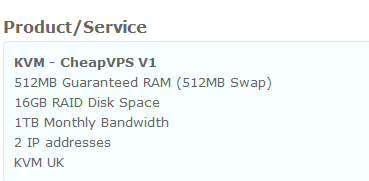
The prices are not exactly cheap, since 1 GBP = 1.6USD approximately, so even prepay a year means you will have to pay 160USD, which is more expensive than any of the VPS that I have ever had!

Provision
It could be due to the fact that they were still in Beta stage when I tested it out, however the provision was completely manual and it literally took them 5 days (request submitted on Apr 15, received VPS on Apr 20). However they have been very professional every time I asked about the status of the VPS set up and has even offered me a few days more of extension to express their apologies. Although they did not managed to fulfill all the promises they made (such as “your VPS will be provisioned by the end of day today”), quite frankly speaking, it was way more than what I was expecting as a customer who did not pay for the service.
Website and Control Panel
One of the biggest thing I have noticed about them is the fact that they managed to integrate WHCMS with Kayako, one of my favorite customer relationship management software and used by many big websites such as WebhostingTalk.com. Not only the interface is a lot “cleaner” than the ticket system in WHCMS, it also gives better interaction and better management in the tickets.

Control Panel is the standard SolusVM, which is boring at the first look:

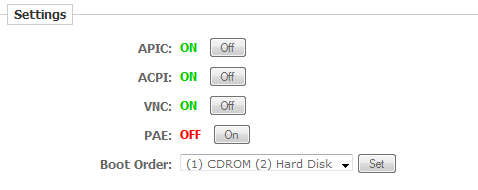
But wait, they have a lot of customizations, as shown in the screenshot below, you can manually turn on/off APIC, ACPI, VNC and PAE, even change the boot order of the VPS, although I am not sure what exactly the boot order does, I can only assume the VPS would have the installation discs mounted as CDs during the OS reload, and booting directly through hard disk will save some boot time:
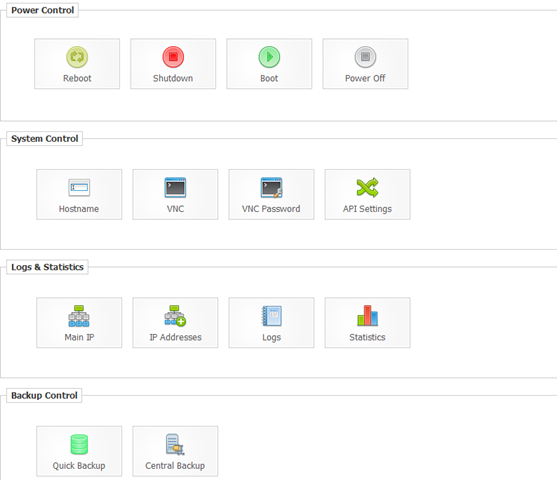
Other than that, it is just the standard SolusVM interface:
It actually got me excited for a second when I saw this as I thought instant rDNS may be possible in this case:
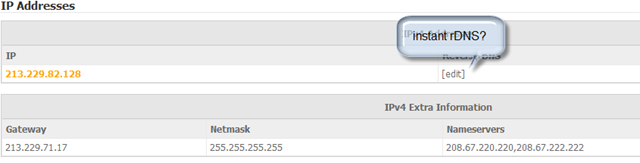
Only ended in a bit of disappointment:

Both Quick Backup and Central Backup features are not usable, both gave me the following information when I click Start, so I guess SolusVM backup is not exactly ready for KVM:

Overall, although I can see some effort on customizing the control panel, it is unfortunately still far from complete.
THE Box
Nothing is more important for buying a VPS than, well, the box. After all, that is what you are paying for. I have heard a lot good things about KVM before (at least a lot of claims to say it is better than OpenVZ for many reasons).
First, by default, your “root” login is not root, and anything with root privilege has to be done using sudo (in Ubuntu), which, unless you would prefer to create like 20 different alias, can be quite troublesome.
The first hardware I checked was the RAM and quite frankly speaking, I was shocked to see the RAM usage on an almost empty box when I ran free –m:
     total       used       free     shared    buffers     cached
Mem:           495        489          6          0         20        376
-/+ buffers/cache:         91        403
Swap:          715          0        715
Yes, basically the VPS box is using almost all its dedicated RAM although nothing is running! Correction: As David has suggested below, as well as fanovpn used to post a comment here which was unfortunately lost during the previous disaster, the actual RAM usage in this case is 91MB, which is pretty reasonable for a LNMP stack.
I then tried to run top to look into this further, and it seems there are lot’s of “sleeping” processes, which is far from satisfactory:
top - 00:34:35 up 9 days, 12:52,  1 user,  load average: 0.00, 0.03, 0.26
Tasks: 124 total,   1 running, 123 sleeping,   0 stopped,   0 zombie
Cpu(s):  0.1%us,  0.1%sy,  0.0%ni, 99.9%id,  0.0%wa,  0.0%hi,  0.0%si,  0.0%st
Mem:    507684k total,   501388k used,     6296k free,    21320k buffers
Swap:   733180k total,      696k used,   732484k free,   385940k cached

  PID USER      PR  NI  VIRT  RES  SHR S %CPU %MEM    TIME+  COMMAND
    1 root      20   0  2868 1412 1008 S    0  0.3   0:00.68 init
    2 root      20   0     0    0    0 S    0  0.0   0:00.00 kthreadd
    3 root      20   0     0    0    0 S    0  0.0   0:02.19 ksoftirqd/0
    4 root      RT   0     0    0    0 S    0  0.0   0:01.28 migration/0
    5 root      RT   0     0    0    0 S    0  0.0   0:00.00 watchdog/0
    6 root      RT   0     0    0    0 S    0  0.0   0:01.32 migration/1
    7 root      20   0     0    0    0 S    0  0.0   0:01.11 ksoftirqd/1
    8 root      RT   0     0    0    0 S    0  0.0   0:00.00 watchdog/1
    9 root      RT   0     0    0    0 S    0  0.0   0:01.26 migration/2
   10 root      20   0     0    0    0 S    0  0.0   0:00.26 ksoftirqd/2
   11 root      RT   0     0    0    0 S    0  0.0   0:00.00 watchdog/2
   12 root      RT   0     0    0    0 S    0  0.0   0:01.22 migration/3
   13 root      20   0     0    0    0 S    0  0.0   0:00.19 ksoftirqd/3
   14 root      RT   0     0    0    0 S    0  0.0   0:00.00 watchdog/3
   15 root      20   0     0    0    0 S    0  0.0   0:36.54 events/0
   16 root      20   0     0    0    0 S    0  0.0   0:10.32 events/1
   17 root      20   0     0    0    0 S    0  0.0   0:02.05 events/2
It is understandable that there are some flaws in the VPS box due to the fact that it is still in beta stage, however having an empty box that consumes almost all the memory is definitely not something desirable. Correction: Again, I failed to rank the top output by memory usage, unfortunately I no longer have access to the box to run top again.
There are certain great aspects of this VPS box though, one such example is the download speed that I have received from downloading the “standard” cachefly test file:
--2011-05-01 00:37:21--  http://cachefly.cachefly.net/100mb.test
Resolving cachefly.cachefly.net... 140.99.94.175
Connecting to cachefly.cachefly.net|140.99.94.175|:80... connected.
HTTP request sent, awaiting response... 200 OK
Length: 104857600 (100M) [application/octet-stream]
Saving to: `100mb.test'

100%[======================================>] 104,857,600 23.5M/s   in 4.3s

2011-05-01 00:37:26 (23.5 MB/s) - `100mb.test' saved [104857600/104857600]
23.5 M/s (close to 200mbit/s) is definitely a very impressive speed.
Besides download, more importantly to a server is the upload speed. As such, here are quite a few results from obtaining the file from various other VPS that I have.
The most impressive one is the Quickweb VPS located in London, UK, which is hardly a surprise since they are the closes geographically:
--2011-05-03 10:57:26--  http://213.229.82.128/100mb.test
Connecting to 213.229.82.128:80... connected.
HTTP request sent, awaiting response... 200 OK
Length: 104857600 (100M) [application/octet-stream]
Saving to: `100mb.test'

100%[======================================>] 104,857,600 14.1M/s   in 7.2s

2011-05-03 10:57:33 (13.9 MB/s) - `100mb.test' saved [104857600/104857600]
However, don’t think it is going to be slow even across the Atlantic Ocean, here is the test result from a NixCom VPS in Montreal, QC, Canada:
--2011-05-03 11:02:40--  http://213.229.82.128/100mb.test
Connecting to 213.229.82.128:80... connected.
HTTP request sent, awaiting response... 200 OK
Length: 104857600 (100M) [application/octet-stream]
Saving to: `100mb.test.1'

100%[======================================>] 104,857,600 9.82M/s   in 12s

2011-05-03 11:02:52 (8.09 MB/s) - `100mb.test.1' saved [104857600/104857600]
And finally, even with a BuyVM VPS, which the pony himself has admitted that HE.Net has to make some improvement for trans-Atlantic communications, it still managed to score a respectable 2.10MB/s:
--2011-05-03 10:59:12--  http://213.229.82.128/100mb.test
Connecting to 213.229.82.128:80... connected.
HTTP request sent, awaiting response... 200 OK
Length: 104857600 (100M) [application/octet-stream]
Saving to: `100mb.test'

100%[======================================>] 104,857,600 2.10M/s   in 41s

2011-05-03 10:59:53 (2.47 MB/s) - `100mb.test' saved [104857600/104857600]
I really do not think I can give them anything lower than a five star in terms of the network speed, truly impressive.
However, that is not it, their hard disk write speed is just as impressive, here is the result of dd test:
 sudo dd if=/dev/zero of=test bs=64k count=16k conv=fdatasync
16384+0 records in
16384+0 records out
1073741824 bytes (1.1 GB) copied, 12.6947 s, 84.6 MB/s
This is definitely one of the best disk write speed I have ever seen!
Finally, just to push this little beast a bit harder, I decided to give it a UnixBench test, and the result is fair for a quad-core box, although I would think it could have done better if the RAM usage problem could be fixed:
   #    #  #    #  #  #    #          #####   ######  #    #   ####   #    #
   #    #  ##   #  #   #  #           #    #  #       ##   #  #    #  #    #
   #    #  # #  #  #    ##            #####   #####   # #  #  #       ######
   #    #  #  # #  #    ##            #    #  #       #  # #  #       #    #
   #    #  #   ##  #   #  #           #    #  #       #   ##  #    #  #    #
    ####   #    #  #  #    #          #####   ######  #    #   ####   #    #

   Version 5.1.3                      Based on the Byte Magazine Unix Benchmark

   Multi-CPU version                  Version 5 revisions by Ian Smith,
                                      Sunnyvale, CA, USA
   January 13, 2011                   johantheghost at yahoo period com

1 x Dhrystone 2 using register variables  1 2 3 4 5 6 7 8 9 10

1 x Double-Precision Whetstone  1 2 3 4 5 6 7 8 9 10

1 x Execl Throughput  1 2 3

1 x File Copy 1024 bufsize 2000 maxblocks  1 2 3

1 x File Copy 256 bufsize 500 maxblocks  1 2 3

1 x File Copy 4096 bufsize 8000 maxblocks  1 2 3

1 x Pipe Throughput  1 2 3 4 5 6 7 8 9 10

1 x Pipe-based Context Switching  1 2 3 4 5 6 7 8 9 10

1 x Process Creation  1 2 3

1 x System Call Overhead  1 2 3 4 5 6 7 8 9 10

1 x Shell Scripts (1 concurrent)  1 2 3

1 x Shell Scripts (8 concurrent)  1 2 3

4 x Dhrystone 2 using register variables  1 2 3 4 5 6 7 8 9 10

4 x Double-Precision Whetstone  1 2 3 4 5 6 7 8 9 10

4 x Execl Throughput  1 2 3

4 x File Copy 1024 bufsize 2000 maxblocks  1 2 3

4 x File Copy 256 bufsize 500 maxblocks  1 2 3

4 x File Copy 4096 bufsize 8000 maxblocks  1 2 3

4 x Pipe Throughput  1 2 3 4 5 6 7 8 9 10

4 x Pipe-based Context Switching  1 2 3 4 5 6 7 8 9 10

4 x Process Creation  1 2 3

4 x System Call Overhead  1 2 3 4 5 6 7 8 9 10

4 x Shell Scripts (1 concurrent)  1 2 3

4 x Shell Scripts (8 concurrent)  1 2 3

========================================================================
   BYTE UNIX Benchmarks (Version 5.1.3)

   System: ubuntu: GNU/Linux
   OS: GNU/Linux -- 2.6.35-22-generic-pae -- #35-Ubuntu SMP Sat Oct 16 22:16:51                                                                                                  UTC 2010
   Machine: i686 (unknown)
   Language: en_US.utf8 (charmap="UTF-8", collate="UTF-8")
   CPU 0: QEMU Virtual CPU version 0.9.1 (4987.6 bogomips)
          x86-64, MMX, Physical Address Ext, SYSENTER/SYSEXIT, SYSCALL/SYSRET
   CPU 1: QEMU Virtual CPU version 0.9.1 (4987.6 bogomips)
          x86-64, MMX, Physical Address Ext, SYSENTER/SYSEXIT, SYSCALL/SYSRET
   CPU 2: QEMU Virtual CPU version 0.9.1 (4987.6 bogomips)
          x86-64, MMX, Physical Address Ext, SYSENTER/SYSEXIT, SYSCALL/SYSRET
   CPU 3: QEMU Virtual CPU version 0.9.1 (4987.6 bogomips)
          x86-64, MMX, Physical Address Ext, SYSENTER/SYSEXIT, SYSCALL/SYSRET
   00:40:51 up 9 days, 12:58,  1 user,  load average: 0.04, 0.05, 0.18; runlevel                                                                                                  2

------------------------------------------------------------------------
Benchmark Run: Sun May 01 2011 00:40:51 - 01:08:58
4 CPUs in system; running 1 parallel copy of tests

Dhrystone 2 using register variables       12363644.8 lps   (10.0 s, 7 samples)
Double-Precision Whetstone                     2370.0 MWIPS (10.1 s, 7 samples)
Execl Throughput                                757.6 lps   (30.0 s, 2 samples)
File Copy 1024 bufsize 2000 maxblocks        560615.3 KBps  (30.0 s, 2 samples)
File Copy 256 bufsize 500 maxblocks          162143.6 KBps  (30.0 s, 2 samples)
File Copy 4096 bufsize 8000 maxblocks        823847.6 KBps  (30.0 s, 2 samples)
Pipe Throughput                             1083870.5 lps   (10.0 s, 7 samples)
Pipe-based Context Switching                  94216.5 lps   (10.0 s, 7 samples)
Process Creation                               1461.1 lps   (30.0 s, 2 samples)
Shell Scripts (1 concurrent)                   2078.3 lpm   (60.0 s, 2 samples)
Shell Scripts (8 concurrent)                    433.3 lpm   (60.1 s, 2 samples)
System Call Overhead                        1716148.5 lps   (10.0 s, 7 samples)

System Benchmarks Index Values               BASELINE       RESULT    INDEX
Dhrystone 2 using register variables         116700.0   12363644.8   1059.4
Double-Precision Whetstone                       55.0       2370.0    430.9
Execl Throughput                                 43.0        757.6    176.2
File Copy 1024 bufsize 2000 maxblocks          3960.0     560615.3   1415.7
File Copy 256 bufsize 500 maxblocks            1655.0     162143.6    979.7
File Copy 4096 bufsize 8000 maxblocks          5800.0     823847.6   1420.4
Pipe Throughput                               12440.0    1083870.5    871.3
Pipe-based Context Switching                   4000.0      94216.5    235.5
Process Creation                                126.0       1461.1    116.0
Shell Scripts (1 concurrent)                     42.4       2078.3    490.2
Shell Scripts (8 concurrent)                      6.0        433.3    722.2
System Call Overhead                          15000.0    1716148.5   1144.1
                                                                   ========
System Benchmarks Index Score                                         582.5

------------------------------------------------------------------------
Benchmark Run: Sun May 01 2011 01:08:58 - 01:37:21
4 CPUs in system; running 4 parallel copies of tests

Dhrystone 2 using register variables       49360561.4 lps   (10.0 s, 7 samples)
Double-Precision Whetstone                     9235.2 MWIPS (10.2 s, 7 samples)
Execl Throughput                               1812.9 lps   (29.9 s, 2 samples)
File Copy 1024 bufsize 2000 maxblocks        274203.1 KBps  (30.0 s, 2 samples)
File Copy 256 bufsize 500 maxblocks           74583.6 KBps  (30.0 s, 2 samples)
File Copy 4096 bufsize 8000 maxblocks        737816.5 KBps  (30.0 s, 2 samples)
Pipe Throughput                             4244615.0 lps   (10.0 s, 7 samples)
Pipe-based Context Switching                 303130.7 lps   (10.0 s, 7 samples)
Process Creation                               2341.9 lps   (30.0 s, 2 samples)
Shell Scripts (1 concurrent)                   3309.1 lpm   (60.0 s, 2 samples)
Shell Scripts (8 concurrent)                    426.7 lpm   (60.3 s, 2 samples)
System Call Overhead                        2488278.1 lps   (10.0 s, 7 samples)

System Benchmarks Index Values               BASELINE       RESULT    INDEX
Dhrystone 2 using register variables         116700.0   49360561.4   4229.7
Double-Precision Whetstone                       55.0       9235.2   1679.1
Execl Throughput                                 43.0       1812.9    421.6
File Copy 1024 bufsize 2000 maxblocks          3960.0     274203.1    692.4
File Copy 256 bufsize 500 maxblocks            1655.0      74583.6    450.7
File Copy 4096 bufsize 8000 maxblocks          5800.0     737816.5   1272.1
Pipe Throughput                               12440.0    4244615.0   3412.1
Pipe-based Context Switching                   4000.0     303130.7    757.8
Process Creation                                126.0       2341.9    185.9
Shell Scripts (1 concurrent)                     42.4       3309.1    780.4
Shell Scripts (8 concurrent)                      6.0        426.7    711.2
System Call Overhead                          15000.0    2488278.1   1658.9
                                                                   ========
System Benchmarks Index Score                                         947.9
Miscellaneous
An important reason why KVM is a better virtualization option compared to OpenVZ is the fact that it is a full virtualization, i.e., each VPS will have it’s own kernel, which makes getting the latest version of Ubuntu so much easier. Simply run
apt-get dist-upgrade
reboot the box and vola, my Ubuntu 10.04 installation instantly becomes:
Welcome to Ubuntu 11.04 (GNU/Linux 2.6.38-8-generic-pae i686)
Conclusion
A beta product is, well, a beta product, it will have some problems, such as long set up waiting time and the ghosts that are using RAM heavily. However for the case of CheapVPS, the beta product has many impressive aspects, the network speed is first-class, so is the disk I/O. Also, CheapVPS always have a listening ear and always like to know the problems, which is something that many low-end VPS providers are lack of. Therefore, although it may be an overkill for hosting some low-traffic website, I would definitely recommend people to start considering it for some mission-critical tasks once CheapVPS could resolve the minor kinks in their system.
Pingback: 96MB Low End VPS Review Part X – QualityServers - 96MB.com-Blog running on a 96MB RAM VPS
What you’re seeing on “free -m” and “top” is typical for a physical Linux box.
Linux uses free ram for caches to speed up disk I/O. What you actually need to look at is the third line of output from “free -m” which adjusts for caches/buffers and tells you how much memory is really available. That line begins with “-/+ buffers/cache:”. In this case, it says 91 MB is in use and 403 MB is available.
If you look at the output from top, all those processes which have 0 in the memory columns “VIRT RES SHR” are internal processes in the kernel. These do things like handle post processing of hardware interrupts, writes (flushes) of dirty cache buffers to disk, and various housekeeping tasks for Linux. Many of them are duplicated for each cpu core. I believe that what you’re seeing is typical for an actual physical or fully virtual server that is idle.
OpenVZ is a different type of virtualization similar to Solaris zones or FreeBSD jails. It’s very different from having actual Virtual Machines. Wikipedia has more info on Operating system-level virtualization
— David
@David, thanks for pointing those out, I was at the early stage of learning VPS back then (actually not so long ago) so I made a few errors here and there, I should have updated the post to reflect those corrections, thanks a lot once again for pointing them out.
Pingback: Limitations of 96MB.com Low End VPS Reviews | | 96MB.com96MB.com
Pingback: CheapVPS – £3 128MB KVM VPS in UK – Low End Box
Pingback: CheapVPS – £3 128MB KVM VPS in UK