
96MB Low End VPS Review Part XXIV – BrightBox Cloud
Brightbox has definitely won the title of the longest free beta service providers on my list. Although it is common to see providers offering a month or two worth of beta services, having one that offered beta services for more than 6 months is something unheard of. Quite frankly speaking, I have completely forgot about the cloud VPS with them until I have received an email informing me that they will discontinue the beta services soon and put things in production mode to make some cash. How is their services? Let’s take a look.
Basic information and Set Up
I have to admit that I have never heard of Brightbox before I signed up for the beta program, and their price structure has really made me wondering if I have encountered the most expensive VPS providers. Although the specifications seems by no means beyond “low end”, the price structure is definitely is not “low end”:
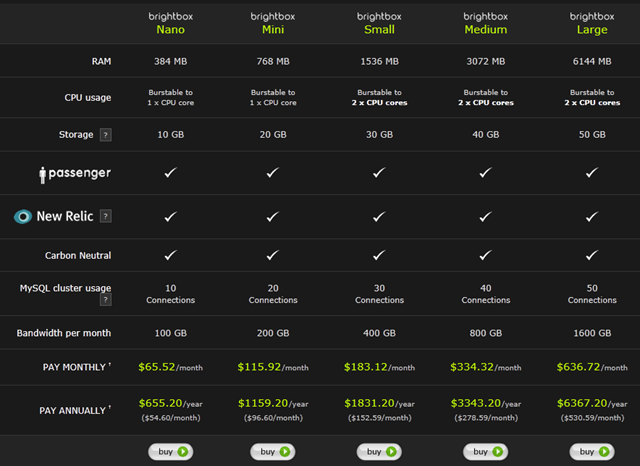
As you can see, for 384MB of RAM, you are looking at 65.52 per month!
UPDATE: The above was for the Ruby on Rails hosting and here is the fee structure for the cloud hosting:
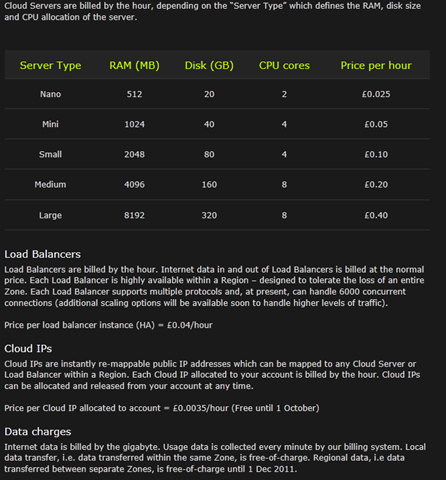
As per this fee structure, for a Nano instance, it will only cost you 18 pounds per month (+ IP charge + data charge), which is still pretty high but is reasonable.
Interesting enough, they have a managed MYSQL cluster storage which unspecific storage size, which could be pretty useful especially on the low memory versions since MySQL takes a lot of memory most of the time.
Registration for the free beta account was fairly easy, all you need to do is to go to this page, sign up with your name and email address and then patiently wait for the email containing the client ID and secret.
Unlike most of the providers, Brightbox does not provide a graphical control panel (although it was mentioned that there will be a graphical control panel coming in the next few weeks) and you will need to use a API to create and control the VPS (and delete one for that matter as well).
To install the API was fairly straight-forward, primarily due to the fact that I was using Ubuntu in the VPS that I used to install the API (yes, the client side can be installed on Linux only) and the fact that they have had a fairly complete documentations here. The only thing to take note of is that you can only create, at most, a small instance due to the limitations in the RAM offered, although with 2GB of RAM, the “small” instance is nowhere small. Furthermore, to reload an OS template, you will need to destroy and recreate the entire instance as well.
Various OS templates can be listed using a single command:
brightbox-images list

 id         owner      type      created_on  status  size   name
--------------------------------------------------------------------------------------------------
 img-3rb1e  brightbox  official  2011-04-19  public  0      Blank disk image (i686)
 img-715uq  brightbox  official  2011-04-19  public  0      Blank disk image (x86_64)
 img-adtke  brightbox  official  2011-07-20  public  0      Blank disk image (compat) (i686)
 img-ztdma  brightbox  official  2011-07-20  public  0      Blank disk image (compat) (x86_64)
 img-99q79  brightbox  official  2010-10-02  public  10244  CentOS 5.5 server (i686)
 img-pnqnc  brightbox  official  2010-10-03  public  10240  CentOS 5.5 server (x86_64)
 img-qjuex  brightbox  official  2010-10-14  public  10244  Fedora 14 Beta Base (i686)
 img-vyeeg  brightbox  official  2010-10-15  public  10244  Fedora 14 Beta Base (x86_64)
 img-1okdf  brightbox  official  2010-11-19  public  20480  FreeBSD 8.1 minimal (i686)
 img-aoubd  brightbox  official  2010-11-19  public  20480  FreeBSD 8.1 minimal (x86_64)
 img-2ab98  brightbox  official  2011-04-18  public  1409   Ubuntu Lucid 10.04 server (i686)
 img-4gqhs  brightbox  official  2011-05-09  public  1409   Ubuntu Lucid 10.04 server (i686)
 img-3ikco  brightbox  official  2011-05-09  public  1409   Ubuntu Lucid 10.04 server (x86_64)
 img-7i0fl  brightbox  official  2011-05-09  public  1409   Ubuntu Maverick 10.10 server (i686)
 img-cq4kz  brightbox  official  2011-05-09  public  1409   Ubuntu Maverick 10.10 server (x86_64)
 img-ieh3b  brightbox  official  2011-05-09  public  1409   Ubuntu Natty 11.04 server (i686)
 img-7p3wu  brightbox  official  2011-05-09  public  1409   Ubuntu Natty 11.04 server (x86_64)
--------------------------------------------------------------------------------------------------
As you can see, there is still relatively few OS templates available at the moment, and there are only 3 Linux distributions available,although I am glad that they have a relatively complete Ubuntu collections.
There is no way, at least from what I know, to change the rDNS record using the API client and by default, they are all in cip-xxx-xxx-xxx-xxx.gb1.brightbox.com format.
Furthermore, you can only login to the VPS via SSH keys (log in as root in CentOS and ubuntu as Ubuntu user with sudo privileges) and if for any reason the keys are lost, you will need to destroy and recreate the VPS again since there is no “emergency recovery console” available.
Finally, you can take “snapshots” of the server, which works as some sort of backup feature, although I have never tried to restore from any snapshot to see how it worked.
Test on the VPS
The test VPS that I have used is a “small” instance with 2048MB of RAM, 4 CPU cores and 80GB of hard drive space, the VPS is in Manchester, UK but the exact location is not clear since they seems to own the IP block they have assigned to me (under AS51059) and the company is registered in Leeds and the datacentre provider for them has several locations in Manchester:
id:
         status: active
           name:
    description:
     created_at: 2011-05-07T13:36
     deleted_at:
           zone: gb1-a
           type: typ-urtky
      type_name: Brightbox Small Instance
    type_handle: small
            ram: 2048
          cores: 4
           disk: 81920
          image: img-7n81y
     image_name:
    private_ips:
      cloud_ips:
   cloud_ip_ids:
       hostname:
public_hostname:
      snapshots:
There are also other types of instances available and since you are only restrcited by the total amount of resources, you can create as many VPS as you would like:
brightbox-types list

 id         name                       handle  ram   disk    cores  description
--------------------------------------------------------------------------------
 typ-4nssg  Brightbox Nano Instance    nano    512   20480   2
 typ-iqisj  Brightbox Mini Instance    mini    1024  40960   4
 typ-urtky  Brightbox Small Instance   small   2048  81920   4
 typ-qdiwq  Brightbox Medium Instance  medium  4096  163840  8
 typ-mlbt7  Brightbox Large Instance   large   8192  327680  8
--------------------------------------------------------------------------------
For example, I can create 1 small instance, or 2 mini instance, or 4 nano instances.
As mentioned above, for Ubuntu installation, you will be logged in as user “ubuntu” via key authentication, and you will need to either do “su root” or sudo to use the root privileges.
It really worth mention that every time I log in to the VPS, I was able to see the resources usage, which is something nice:
System information as of Sun Aug 28 11:29:46 CST 2011

  System load:  0.0               Processes:           79
  Usage of /:   3.6% of 78.80GB   Users logged in:     0
  Memory usage: 35%               IP address for eth0: 10.67.166.34
  Swap usage:   0%
When the full LNMP stack is installed, the VPS uses about 124MB of memory:
 free -m
             total       used       free     shared    buffers     cached
Mem:          2011       1699        312          0         78       1496
-/+ buffers/cache:        124       1886
Swap:            0          0          0
Although the top output seems to indicate that I could do better by trimming a few more processes:
top - 08:14:58 up 60 days, 10:37,  1 user,  load average: 0.11, 0.04, 0.05
Tasks:  78 total,   1 running,  77 sleeping,   0 stopped,   0 zombie
Cpu(s):  0.0%us,  0.0%sy,  0.0%ni, 97.3%id,  2.7%wa,  0.0%hi,  0.0%si,  0.0%st
Mem:   2060076k total,  1740608k used,   319468k free,    80172k buffers
Swap:        0k total,        0k used,        0k free,  1532424k cached

  PID USER      PR  NI  VIRT  RES  SHR S %CPU %MEM    TIME+  COMMAND
19833 www       20   0 14672  10m  812 S    0  0.5   0:00.06 nginx
32078 ubuntu    20   0  8784 5992 1512 S    0  0.3   0:00.59 bash
19945 mysql     20   0 35376 5848 3172 S    0  0.3   0:00.08 mysqld
32047 root      20   0  8448 2736 2156 S    0  0.1   0:00.07 sshd
  553 root      20   0  5652 2196 1772 S    0  0.1   0:21.91 sshd
    1 root      20   0  2924 1704 1220 S    0  0.1   0:08.22 init
  556 syslog    20   0 29632 1396  996 S    0  0.1   1:41.58 rsyslogd
32075 ubuntu    20   0  8448 1324  736 S    0  0.1   0:00.00 sshd
32175 ubuntu    20   0  2500 1084  852 R    0  0.1   0:00.00 top
  629 root      20   0  2268  804  644 S    0  0.0   0:08.15 cron
  270 root      16  -4  2552  768  360 S    0  0.0   0:00.05 udevd
  494 root      20   0  2548  764  500 S    0  0.0   0:33.98 dhclient3
19831 root      20   0  4860  684  228 S    0  0.0   0:00.00 nginx
  351 root      18  -2  2548  672  284 S    0  0.0   0:00.00 udevd
  352 root      18  -2  2548  672  284 S    0  0.0   0:00.00 udevd
  665 root      20   0  3156  640  500 S    0  0.0   9:50.83 irqbalance
  265 root      20   0  2412  612  456 S    0  0.0   0:00.08 upstart-udev-br
Based on the recommendations from one of the readers, I have also decided to give a htop output on the box (thanks Luc!):
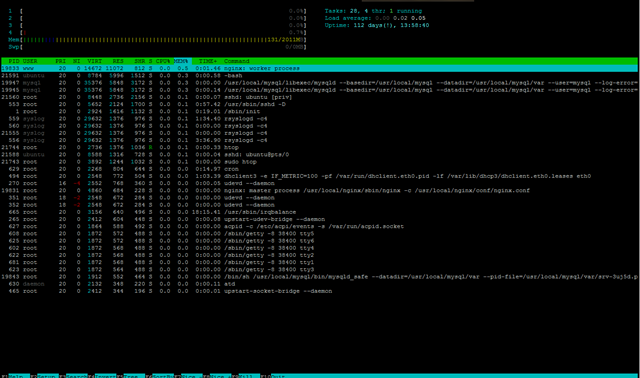
Yes, this box has one of the longest uptime I have, even htop is surprised with the output!
vmstats does not show too much usage on the VPS:
vmstat
procs -----------memory---------- ---swap-- -----io---- -system-- ----cpu----
 r  b   swpd   free   buff  cache   si   so    bi    bo   in   cs us sy id wa
 0  0      0 319476  80172 1532424    0    0     0     0    2    1  0  0 100  0
which is reaffirmed by the output of uptime:
uptime
 11:38:18 up 112 days, 14:00,  1 user,  load average: 0.01, 0.03, 0.05
There is no sign of disk space been oversold from the output of df -h:
df -h
Filesystem            Size  Used Avail Use% Mounted on
/dev/vda1              79G  1.9G   73G   3% /
none                 1004M  144K 1004M   1% /dev
none                 1006M     0 1006M   0% /dev/shm
none                 1006M   44K 1006M   1% /var/run
none                 1006M     0 1006M   0% /var/lock
And Inode was set to pretty high:
 df -i
Filesystem            Inodes   IUsed   IFree IUse% Mounted on
/dev/vda1            4997120   73324 4923796    2% /
none                  217865     618  217247    1% /dev
none                  219086       1  219085    1% /dev/shm
none                  219086      20  219066    1% /var/run
none                  219086       1  219085    1% /var/lock
From the output of CPU info, KVM seems to be the virtualization technology used here and as indicated, 4 CPU cores are available with no throttling on the CPU:
 cat /proc/cpuinfo
processor       : 0
vendor_id       : GenuineIntel
cpu family      : 6
model           : 13
model name      : QEMU Virtual CPU version (cpu64-rhel6)
stepping        : 3
cpu MHz         : 2267.000
cache size      : 4096 KB
fdiv_bug        : no
hlt_bug         : no
f00f_bug        : no
coma_bug        : no
fpu             : yes
fpu_exception   : yes
cpuid level     : 4
wp              : yes
flags           : fpu de pse tsc msr pae mce cx8 apic sep mtrr pge mca cmov pse3                                                                                                 6 clflush mmx fxsr sse sse2 syscall nx lm pni cx16 hypervisor lahf_lm
bogomips        : 4534.00
clflush size    : 64
cache_alignment : 64
address sizes   : 40 bits physical, 48 bits virtual
power management:

processor       : 1
vendor_id       : GenuineIntel
cpu family      : 6
model           : 13
model name      : QEMU Virtual CPU version (cpu64-rhel6)
stepping        : 3
cpu MHz         : 2267.000
cache size      : 4096 KB
fdiv_bug        : no
hlt_bug         : no
f00f_bug        : no
coma_bug        : no
fpu             : yes
fpu_exception   : yes
cpuid level     : 4
wp              : yes
flags           : fpu de pse tsc msr pae mce cx8 apic sep mtrr pge mca cmov pse3                                                                                                 6 clflush mmx fxsr sse sse2 syscall nx lm pni cx16 hypervisor lahf_lm
bogomips        : 4534.00
clflush size    : 64
cache_alignment : 64
address sizes   : 40 bits physical, 48 bits virtual
power management:

processor       : 2
vendor_id       : GenuineIntel
cpu family      : 6
model           : 13
model name      : QEMU Virtual CPU version (cpu64-rhel6)
stepping        : 3
cpu MHz         : 2267.000
cache size      : 4096 KB
fdiv_bug        : no
hlt_bug         : no
f00f_bug        : no
coma_bug        : no
fpu             : yes
fpu_exception   : yes
cpuid level     : 4
wp              : yes
flags           : fpu de pse tsc msr pae mce cx8 apic sep mtrr pge mca cmov pse3                                                                                                 6 clflush mmx fxsr sse sse2 syscall nx lm pni cx16 hypervisor lahf_lm
bogomips        : 4534.00
clflush size    : 64
cache_alignment : 64
address sizes   : 40 bits physical, 48 bits virtual
power management:

processor       : 3
vendor_id       : GenuineIntel
cpu family      : 6
model           : 13
model name      : QEMU Virtual CPU version (cpu64-rhel6)
stepping        : 3
cpu MHz         : 2267.000
cache size      : 4096 KB
fdiv_bug        : no
hlt_bug         : no
f00f_bug        : no
coma_bug        : no
fpu             : yes
fpu_exception   : yes
cpuid level     : 4
wp              : yes
flags           : fpu de pse tsc msr pae mce cx8 apic sep mtrr pge mca cmov pse3                                                                                                 6 clflush mmx fxsr sse sse2 syscall nx lm pni cx16 hypervisor lahf_lm
bogomips        : 4534.00
clflush size    : 64
cache_alignment : 64
address sizes   : 40 bits physical, 48 bits virtual
power management:
Meminfo does not seem to show overselling on the memory as well:
cat /proc/meminfo
MemTotal:        2060076 kB
MemFree:           92468 kB
Buffers:           59080 kB
Cached:          1798588 kB
SwapCached:            0 kB
Active:           747104 kB
Inactive:        1132844 kB
Active(anon):      22404 kB
Inactive(anon):       72 kB
Active(file):     724700 kB
Inactive(file):  1132772 kB
Unevictable:           0 kB
Mlocked:               0 kB
HighTotal:       1183732 kB
HighFree:           3388 kB
LowTotal:         876344 kB
LowFree:           89080 kB
SwapTotal:             0 kB
SwapFree:              0 kB
Dirty:                 0 kB
Writeback:             0 kB
AnonPages:         22296 kB
Mapped:             7680 kB
Shmem:               196 kB
Slab:              78460 kB
SReclaimable:      71992 kB
SUnreclaim:         6468 kB
KernelStack:         664 kB
PageTables:          588 kB
NFS_Unstable:          0 kB
Bounce:                0 kB
WritebackTmp:          0 kB
CommitLimit:     1030036 kB
Committed_AS:      81360 kB
VmallocTotal:     122880 kB
VmallocUsed:        2276 kB
VmallocChunk:     118376 kB
HardwareCorrupted:     0 kB
HugePages_Total:       0
HugePages_Free:        0
HugePages_Rsvd:        0
HugePages_Surp:        0
Hugepagesize:       2048 kB
DirectMap4k:        6136 kB
DirectMap2M:      907264 kB
And the output of time sync:
 time sync

real    0m0.062s
user    0m0.000s
sys     0m0.008s
Disk I/O is something that surprised me, and makes me understand why Brightbox could charge such high prices:
 dd if=/dev/zero of=test bs=64k count=16k conv=fdatasync
16384+0 records in
16384+0 records out
1073741824 bytes (1.1 GB) copied, 5.22598 s, 205 MB/s
And testing again produced even better results:
dd if=/dev/zero of=test bs=64k count=16k conv=fdatasync
16384+0 records in
16384+0 records out
1073741824 bytes (1.1 GB) copied, 4.4293 s, 242 MB/s
I have commonly seen disk I/O speed in the double digits range so normally a triple digit disk I/O is enough to get me surprised, and one that is above 200MB/s…I guess I can only say I am speechless.
The network is pretty solid too as I was able to get close to 30MB/s download:
wget cachefly.cachefly.net/100mb.test -O /dev/null
--2011-08-23 07:01:48--  http://cachefly.cachefly.net/100mb.test
Resolving cachefly.cachefly.net... 140.99.94.175
Connecting to cachefly.cachefly.net|140.99.94.175|:80... connected.
HTTP request sent, awaiting response... 200 OK
Length: 104857600 (100M) [application/octet-stream]
Saving to: `/dev/null'

100%[======================================>] 104,857,600 30.1M/s   in 3.5s

2011-08-23 07:01:51 (29.0 MB/s) - `/dev/null' saved [104857600/104857600]
Upload speed varies, with BuyVM in San Jose, California has the slowest speed since their networks to Europe is normally pretty weak:
 wget 109.107.36.113/100mb.test -O /dev/null
--2011-08-22 21:35:28--  http://109.107.36.113/100mb.test
Connecting to 109.107.36.113:80... connected.
HTTP request sent, awaiting response... 200 OK
Length: 104857600 (100M) [application/octet-stream]
Saving to: `/dev/null'

100%[======================================>] 104,857,600 1.75M/s   in 40s

2011-08-22 21:36:08 (2.52 MB/s) - `/dev/null' saved [104857600/104857600]
Nix Communications VPS in Montreal, Canada has an upload speed that is above 5MB/s, which is pretty good:
wget 109.107.36.113/100mb.test -O /dev/null
--2011-08-23 09:34:32--  http://109.107.36.113/100mb.test
Connecting to 109.107.36.113:80... connected.
HTTP request sent, awaiting response... 200 OK
Length: 104857600 (100M) [application/octet-stream]
Saving to: `/dev/null'

100%[======================================>] 104,857,600 5.43M/s   in 20s

2011-08-23 09:34:52 (5.12 MB/s) - `/dev/null' saved [104857600/104857600]
And finally, and surprisingly, the Quickweb VPS in London, UK did not give me a lot better speed than that of Nix Communications’ VPS, since both VPS are in the same country:
 wget 109.107.36.113/100mb.test -O /dev/null
--2011-08-22 21:36:48--  http://109.107.36.113/100mb.test
Connecting to 109.107.36.113:80... connected.
HTTP request sent, awaiting response... 200 OK
Length: 104857600 (100M) [application/octet-stream]
Saving to: `/dev/null'

100%[======================================>] 104,857,600 4.72M/s   in 19s

2011-08-22 21:37:07 (5.30 MB/s) - `/dev/null' saved [104857600/104857600]
Given the excellent VPS specifications, I was not surprised when the VPS gave really good UnixBench score:
   #    #  #    #  #  #    #          #####   ######  #    #   ####   #    #
   #    #  ##   #  #   #  #           #    #  #       ##   #  #    #  #    #
   #    #  # #  #  #    ##            #####   #####   # #  #  #       ######
   #    #  #  # #  #    ##            #    #  #       #  # #  #       #    #
   #    #  #   ##  #   #  #           #    #  #       #   ##  #    #  #    #
    ####   #    #  #  #    #          #####   ######  #    #   ####   #    #

   Version 5.1.3                      Based on the Byte Magazine Unix Benchmark

   Multi-CPU version                  Version 5 revisions by Ian Smith,
                                      Sunnyvale, CA, USA
   January 13, 2011                   johantheghost at yahoo period com

1 x Dhrystone 2 using register variables  1 2 3 4 5 6 7 8 9 10

1 x Double-Precision Whetstone  1 2 3 4 5 6 7 8 9 10

1 x Execl Throughput  1 2 3

1 x File Copy 1024 bufsize 2000 maxblocks  1 2 3

1 x File Copy 256 bufsize 500 maxblocks  1 2 3

1 x File Copy 4096 bufsize 8000 maxblocks  1 2 3

1 x Pipe Throughput  1 2 3 4 5 6 7 8 9 10

1 x Pipe-based Context Switching  1 2 3 4 5 6 7 8 9 10

1 x Process Creation  1 2 3

1 x System Call Overhead  1 2 3 4 5 6 7 8 9 10

1 x Shell Scripts (1 concurrent)  1 2 3

1 x Shell Scripts (8 concurrent)  1 2 3

4 x Dhrystone 2 using register variables  1 2 3 4 5 6 7 8 9 10

4 x Double-Precision Whetstone  1 2 3 4 5 6 7 8 9 10

4 x Execl Throughput  1 2 3

4 x File Copy 1024 bufsize 2000 maxblocks  1 2 3

4 x File Copy 256 bufsize 500 maxblocks  1 2 3

4 x File Copy 4096 bufsize 8000 maxblocks  1 2 3

4 x Pipe Throughput  1 2 3 4 5 6 7 8 9 10

4 x Pipe-based Context Switching  1 2 3 4 5 6 7 8 9 10

4 x Process Creation  1 2 3

4 x System Call Overhead  1 2 3 4 5 6 7 8 9 10

4 x Shell Scripts (1 concurrent)  1 2 3

4 x Shell Scripts (8 concurrent)  1 2 3

========================================================================
   BYTE UNIX Benchmarks (Version 5.1.3)

   System: srv-3uj5d: GNU/Linux
   OS: GNU/Linux -- 2.6.38-8-virtual -- #42-Ubuntu SMP Mon Apr 11 07:04:38 UTC 2011
   Machine: i686 (i386)
   Language: en_US.utf8 (charmap="UTF-8", collate="UTF-8")
   CPU 0: QEMU Virtual CPU version (cpu64-rhel6) (4534.0 bogomips)
          x86-64, MMX, Physical Address Ext, SYSENTER/SYSEXIT, SYSCALL/SYSRET
   CPU 1: QEMU Virtual CPU version (cpu64-rhel6) (4534.0 bogomips)
          x86-64, MMX, Physical Address Ext, SYSENTER/SYSEXIT, SYSCALL/SYSRET
   CPU 2: QEMU Virtual CPU version (cpu64-rhel6) (4534.0 bogomips)
          x86-64, MMX, Physical Address Ext, SYSENTER/SYSEXIT, SYSCALL/SYSRET
   CPU 3: QEMU Virtual CPU version (cpu64-rhel6) (4534.0 bogomips)
          x86-64, MMX, Physical Address Ext, SYSENTER/SYSEXIT, SYSCALL/SYSRET
   08:30:16 up 60 days, 10:52,  1 user,  load average: 0.00, 0.13, 0.15; runlevel 2

------------------------------------------------------------------------
Benchmark Run: Thu Jul 07 2011 08:30:16 - 08:57:43
4 CPUs in system; running 1 parallel copy of tests

Dhrystone 2 using register variables       12950732.0 lps   (10.0 s, 7 samples)
Double-Precision Whetstone                     2737.2 MWIPS (7.3 s, 7 samples)
Execl Throughput                               1457.3 lps   (29.9 s, 2 samples)
File Copy 1024 bufsize 2000 maxblocks        745219.0 KBps  (30.0 s, 2 samples)
File Copy 256 bufsize 500 maxblocks          201476.0 KBps  (30.0 s, 2 samples)
File Copy 4096 bufsize 8000 maxblocks       1560603.5 KBps  (30.0 s, 2 samples)
Pipe Throughput                             1293677.7 lps   (10.0 s, 7 samples)
Pipe-based Context Switching                 177125.1 lps   (10.0 s, 7 samples)
Process Creation                               3677.9 lps   (30.0 s, 2 samples)
Shell Scripts (1 concurrent)                   2268.1 lpm   (60.0 s, 2 samples)
Shell Scripts (8 concurrent)                    931.6 lpm   (60.0 s, 2 samples)
System Call Overhead                        2581395.6 lps   (10.0 s, 7 samples)

System Benchmarks Index Values               BASELINE       RESULT    INDEX
Dhrystone 2 using register variables         116700.0   12950732.0   1109.7
Double-Precision Whetstone                       55.0       2737.2    497.7
Execl Throughput                                 43.0       1457.3    338.9
File Copy 1024 bufsize 2000 maxblocks          3960.0     745219.0   1881.9
File Copy 256 bufsize 500 maxblocks            1655.0     201476.0   1217.4
File Copy 4096 bufsize 8000 maxblocks          5800.0    1560603.5   2690.7
Pipe Throughput                               12440.0    1293677.7   1039.9
Pipe-based Context Switching                   4000.0     177125.1    442.8
Process Creation                                126.0       3677.9    291.9
Shell Scripts (1 concurrent)                     42.4       2268.1    534.9
Shell Scripts (8 concurrent)                      6.0        931.6   1552.7
System Call Overhead                          15000.0    2581395.6   1720.9
                                                                   ========
System Benchmarks Index Score                                         882.0

------------------------------------------------------------------------
Benchmark Run: Thu Jul 07 2011 08:57:43 - 09:25:20
4 CPUs in system; running 4 parallel copies of tests

Dhrystone 2 using register variables       52610318.2 lps   (10.0 s, 7 samples)
Double-Precision Whetstone                    10984.5 MWIPS (7.3 s, 7 samples)
Execl Throughput                              11691.2 lps   (29.8 s, 2 samples)
File Copy 1024 bufsize 2000 maxblocks        342939.9 KBps  (30.0 s, 2 samples)
File Copy 256 bufsize 500 maxblocks          101201.9 KBps  (30.1 s, 2 samples)
File Copy 4096 bufsize 8000 maxblocks       1075158.0 KBps  (30.0 s, 2 samples)
Pipe Throughput                             5177799.0 lps   (10.0 s, 7 samples)
Pipe-based Context Switching                 771060.3 lps   (10.0 s, 7 samples)
Process Creation                              34255.6 lps   (30.0 s, 2 samples)
Shell Scripts (1 concurrent)                  10322.6 lpm   (60.0 s, 2 samples)
Shell Scripts (8 concurrent)                   1787.1 lpm   (60.1 s, 2 samples)
System Call Overhead                        5839533.5 lps   (10.0 s, 7 samples)

System Benchmarks Index Values               BASELINE       RESULT    INDEX
Dhrystone 2 using register variables         116700.0   52610318.2   4508.2
Double-Precision Whetstone                       55.0      10984.5   1997.2
Execl Throughput                                 43.0      11691.2   2718.9
File Copy 1024 bufsize 2000 maxblocks          3960.0     342939.9    866.0
File Copy 256 bufsize 500 maxblocks            1655.0     101201.9    611.5
File Copy 4096 bufsize 8000 maxblocks          5800.0    1075158.0   1853.7
Pipe Throughput                               12440.0    5177799.0   4162.2
Pipe-based Context Switching                   4000.0     771060.3   1927.7
Process Creation                                126.0      34255.6   2718.7
Shell Scripts (1 concurrent)                     42.4      10322.6   2434.6
Shell Scripts (8 concurrent)                      6.0       1787.1   2978.5
System Call Overhead                          15000.0    5839533.5   3893.0
                                                                   ========
System Benchmarks Index Score                                        2226.0
Running it almost a month later shows the score continued to be really good:
   #    #  #    #  #  #    #          #####   ######  #    #   ####   #    #
   #    #  ##   #  #   #  #           #    #  #       ##   #  #    #  #    #
   #    #  # #  #  #    ##            #####   #####   # #  #  #       ######
   #    #  #  # #  #    ##            #    #  #       #  # #  #       #    #
   #    #  #   ##  #   #  #           #    #  #       #   ##  #    #  #    #
    ####   #    #  #  #    #          #####   ######  #    #   ####   #    #

   Version 5.1.3                      Based on the Byte Magazine Unix Benchmark

   Multi-CPU version                  Version 5 revisions by Ian Smith,
                                      Sunnyvale, CA, USA
   January 13, 2011                   johantheghost at yahoo period com

1 x Dhrystone 2 using register variables  1 2 3 4 5 6 7 8 9 10

1 x Double-Precision Whetstone  1 2 3 4 5 6 7 8 9 10

1 x Execl Throughput  1 2 3

1 x File Copy 1024 bufsize 2000 maxblocks  1 2 3

1 x File Copy 256 bufsize 500 maxblocks  1 2 3

1 x File Copy 4096 bufsize 8000 maxblocks  1 2 3

1 x Pipe Throughput  1 2 3 4 5 6 7 8 9 10

1 x Pipe-based Context Switching  1 2 3 4 5 6 7 8 9 10

1 x Process Creation  1 2 3

1 x System Call Overhead  1 2 3 4 5 6 7 8 9 10

1 x Shell Scripts (1 concurrent)  1 2 3

1 x Shell Scripts (8 concurrent)  1 2 3

4 x Dhrystone 2 using register variables  1 2 3 4 5 6 7 8 9 10

4 x Double-Precision Whetstone  1 2 3 4 5 6 7 8 9 10

4 x Execl Throughput  1 2 3

4 x File Copy 1024 bufsize 2000 maxblocks  1 2 3

4 x File Copy 256 bufsize 500 maxblocks  1 2 3

4 x File Copy 4096 bufsize 8000 maxblocks  1 2 3

4 x Pipe Throughput  1 2 3 4 5 6 7 8 9 10

4 x Pipe-based Context Switching  1 2 3 4 5 6 7 8 9 10

4 x Process Creation  1 2 3

4 x System Call Overhead  1 2 3 4 5 6 7 8 9 10

4 x Shell Scripts (1 concurrent)  1 2 3

4 x Shell Scripts (8 concurrent)  1 2 3

========================================================================
   BYTE UNIX Benchmarks (Version 5.1.3)

   System: srv-3uj5d: GNU/Linux
   OS: GNU/Linux -- 2.6.38-8-virtual -- #42-Ubuntu SMP Mon Apr 11 07:04:38 UTC 2011
   Machine: i686 (i386)
   Language: en_US.utf8 (charmap="UTF-8", collate="UTF-8")
   CPU 0: QEMU Virtual CPU version (cpu64-rhel6) (4534.0 bogomips)
          x86-64, MMX, Physical Address Ext, SYSENTER/SYSEXIT, SYSCALL/SYSRET
   CPU 1: QEMU Virtual CPU version (cpu64-rhel6) (4534.0 bogomips)
          x86-64, MMX, Physical Address Ext, SYSENTER/SYSEXIT, SYSCALL/SYSRET
   CPU 2: QEMU Virtual CPU version (cpu64-rhel6) (4534.0 bogomips)
          x86-64, MMX, Physical Address Ext, SYSENTER/SYSEXIT, SYSCALL/SYSRET
   CPU 3: QEMU Virtual CPU version (cpu64-rhel6) (4534.0 bogomips)
          x86-64, MMX, Physical Address Ext, SYSENTER/SYSEXIT, SYSCALL/SYSRET
   07:03:35 up 107 days,  9:26,  1 user,  load average: 0.03, 0.04, 0.05; runlevel 2

------------------------------------------------------------------------
Benchmark Run: Tue Aug 23 2011 07:03:35 - 07:31:10
4 CPUs in system; running 1 parallel copy of tests

Dhrystone 2 using register variables       13088159.1 lps   (10.0 s, 7 samples)
Double-Precision Whetstone                     2711.2 MWIPS (7.0 s, 7 samples)
Execl Throughput                               1514.3 lps   (29.9 s, 2 samples)
File Copy 1024 bufsize 2000 maxblocks        651055.2 KBps  (30.0 s, 2 samples)
File Copy 256 bufsize 500 maxblocks          154870.2 KBps  (30.0 s, 2 samples)
File Copy 4096 bufsize 8000 maxblocks       1364834.9 KBps  (30.0 s, 2 samples)
Pipe Throughput                              907680.7 lps   (10.0 s, 7 samples)
Pipe-based Context Switching                 166570.0 lps   (10.0 s, 7 samples)
Process Creation                               3426.7 lps   (30.0 s, 2 samples)
Shell Scripts (1 concurrent)                   2273.9 lpm   (60.0 s, 2 samples)
Shell Scripts (8 concurrent)                    893.8 lpm   (60.1 s, 2 samples)
System Call Overhead                        2528284.9 lps   (10.0 s, 7 samples)

System Benchmarks Index Values               BASELINE       RESULT    INDEX
Dhrystone 2 using register variables         116700.0   13088159.1   1121.5
Double-Precision Whetstone                       55.0       2711.2    492.9
Execl Throughput                                 43.0       1514.3    352.2
File Copy 1024 bufsize 2000 maxblocks          3960.0     651055.2   1644.1
File Copy 256 bufsize 500 maxblocks            1655.0     154870.2    935.8
File Copy 4096 bufsize 8000 maxblocks          5800.0    1364834.9   2353.2
Pipe Throughput                               12440.0     907680.7    729.6
Pipe-based Context Switching                   4000.0     166570.0    416.4
Process Creation                                126.0       3426.7    272.0
Shell Scripts (1 concurrent)                     42.4       2273.9    536.3
Shell Scripts (8 concurrent)                      6.0        893.8   1489.7
System Call Overhead                          15000.0    2528284.9   1685.5
                                                                   ========
System Benchmarks Index Score                                         808.9

------------------------------------------------------------------------
Benchmark Run: Tue Aug 23 2011 07:31:10 - 07:58:52
4 CPUs in system; running 4 parallel copies of tests

Dhrystone 2 using register variables       52680595.4 lps   (10.0 s, 7 samples)
Double-Precision Whetstone                    10984.5 MWIPS (7.6 s, 7 samples)
Execl Throughput                              10303.8 lps   (30.0 s, 2 samples)
File Copy 1024 bufsize 2000 maxblocks        308785.7 KBps  (30.0 s, 2 samples)
File Copy 256 bufsize 500 maxblocks           84620.5 KBps  (30.0 s, 2 samples)
File Copy 4096 bufsize 8000 maxblocks       1013008.7 KBps  (30.0 s, 2 samples)
Pipe Throughput                             3629454.2 lps   (10.0 s, 7 samples)
Pipe-based Context Switching                 693532.4 lps   (10.0 s, 7 samples)
Process Creation                              28795.4 lps   (30.0 s, 2 samples)
Shell Scripts (1 concurrent)                  10493.3 lpm   (60.0 s, 2 samples)
Shell Scripts (8 concurrent)                   1661.0 lpm   (60.1 s, 2 samples)
System Call Overhead                        6068445.8 lps   (10.0 s, 7 samples)

System Benchmarks Index Values               BASELINE       RESULT    INDEX
Dhrystone 2 using register variables         116700.0   52680595.4   4514.2
Double-Precision Whetstone                       55.0      10984.5   1997.2
Execl Throughput                                 43.0      10303.8   2396.2
File Copy 1024 bufsize 2000 maxblocks          3960.0     308785.7    779.8
File Copy 256 bufsize 500 maxblocks            1655.0      84620.5    511.3
File Copy 4096 bufsize 8000 maxblocks          5800.0    1013008.7   1746.6
Pipe Throughput                               12440.0    3629454.2   2917.6
Pipe-based Context Switching                   4000.0     693532.4   1733.8
Process Creation                                126.0      28795.4   2285.4
Shell Scripts (1 concurrent)                     42.4      10493.3   2474.8
Shell Scripts (8 concurrent)                      6.0       1661.0   2768.4
System Call Overhead                          15000.0    6068445.8   4045.6
                                                                   ========
System Benchmarks Index Score                                        2027.3
Geekbench shows pretty good score too:
System Information
  Platform:                  Linux x86 (32-bit)
  Compiler:                  GCC 4.1.2 20070925 (Red Hat 4.1.2-33)
  Operating System:          Ubuntu Natty (development branch) 2.6.38-8-virtual i686
  Model:                     Linux PC (QEMU Virtual CPU version (cpu64-rhel6))
  Motherboard:               Unknown Motherboard
  Processor:                 QEMU Virtual CPU version (cpu64-rhel6)
  Processor ID:              GenuineIntel Family 6 Model 13 Stepping 3
  Logical Processors:        4
  Physical Processors:       1
  Processor Frequency:       2.27 GHz
  L1 Instruction Cache:      64.0 KB
  L1 Data Cache:             64.0 KB
  L2 Cache:                  512 KB
  L3 Cache:                  0.00 B
  Bus Frequency:             0.00 Hz
  Memory:                    1.96 GB
  Memory Type:               N/A
  SIMD:                      1
  BIOS:                      N/A
  Processor Model:           QEMU Virtual CPU version (cpu64-rhel6)
  Processor Cores:           4

Integer
  Blowfish
    single-threaded scalar    1058 ||||
    multi-threaded scalar     4560 ||||||||||||||||||
  Text Compress
    single-threaded scalar    1964 |||||||
    multi-threaded scalar     5600 ||||||||||||||||||||||
  Text Decompress
    single-threaded scalar    1985 |||||||
    multi-threaded scalar     5425 |||||||||||||||||||||
  Image Compress
    single-threaded scalar    1018 ||||
    multi-threaded scalar     3770 |||||||||||||||
  Image Decompress
    single-threaded scalar     932 |||
    multi-threaded scalar     3617 ||||||||||||||
  Lua
    single-threaded scalar    3093 ||||||||||||
    multi-threaded scalar     7674 ||||||||||||||||||||||||||||||

Floating Point
  Mandelbrot
    single-threaded scalar    2089 ||||||||
    multi-threaded scalar     5321 |||||||||||||||||||||
  Dot Product
    single-threaded scalar    2130 ||||||||
    multi-threaded scalar     8687 ||||||||||||||||||||||||||||||||||
    single-threaded vector    2748 ||||||||||
    multi-threaded vector    10854 |||||||||||||||||||||||||||||||||||||||||||
  LU Decomposition
    single-threaded scalar    1386 |||||
    multi-threaded scalar     5259 |||||||||||||||||||||
  Primality Test
    single-threaded scalar    3442 |||||||||||||
    multi-threaded scalar     9982 |||||||||||||||||||||||||||||||||||||||
  Sharpen Image
    single-threaded scalar    3877 |||||||||||||||
    multi-threaded scalar    14012 ||||||||||||||||||||||||||||||||||||||||||||||||||||||||
  Blur Image
    single-threaded scalar    5235 ||||||||||||||||||||
    multi-threaded scalar    12740 ||||||||||||||||||||||||||||||||||||||||||||||||||

Memory
  Read Sequential
    single-threaded scalar    3046 ||||||||||||
  Write Sequential
    single-threaded scalar    4916 |||||||||||||||||||
  Stdlib Allocate
    single-threaded scalar    2318 |||||||||
  Stdlib Write
    single-threaded scalar    1233 ||||
  Stdlib Copy
    single-threaded scalar    5098 ||||||||||||||||||||

Stream
  Stream Copy
    single-threaded scalar    3537 ||||||||||||||
    single-threaded vector    3500 ||||||||||||||
  Stream Scale
    single-threaded scalar    2148 ||||||||
    single-threaded vector    3640 ||||||||||||||
  Stream Add
    single-threaded scalar    2503 ||||||||||
    single-threaded vector    3349 |||||||||||||
  Stream Triad
    single-threaded scalar    2446 |||||||||
    single-threaded vector    2556 ||||||||||

Integer Score:                3391 |||||||||||||
Floating Point Score:         6268 |||||||||||||||||||||||||
Memory Score:                 3322 |||||||||||||
Stream Score:                 2959 |||||||||||

Overall Geekbench Score:      4340 |||||||||||||||||
And second time gave even better results:
System Information
  Platform:                  Linux x86 (32-bit)
  Compiler:                  GCC 4.1.2 20070925 (Red Hat 4.1.2-33)
  Operating System:          Ubuntu Natty (development branch) 2.6.38-8-virtual i686
  Model:                     Linux PC (QEMU Virtual CPU version (cpu64-rhel6))
  Motherboard:               Unknown Motherboard
  Processor:                 QEMU Virtual CPU version (cpu64-rhel6)
  Processor ID:              GenuineIntel Family 6 Model 13 Stepping 3
  Logical Processors:        4
  Physical Processors:       1
  Processor Frequency:       2.27 GHz
  L1 Instruction Cache:      64.0 KB
  L1 Data Cache:             64.0 KB
  L2 Cache:                  512 KB
  L3 Cache:                  0.00 B
  Bus Frequency:             0.00 Hz
  Memory:                    1.96 GB
  Memory Type:               N/A
  SIMD:                      1
  BIOS:                      N/A
  Processor Model:           QEMU Virtual CPU version (cpu64-rhel6)
  Processor Cores:           4

Integer
  Blowfish
    single-threaded scalar    1689 ||||||
    multi-threaded scalar     4687 ||||||||||||||||||
  Text Compress
    single-threaded scalar    1966 |||||||
    multi-threaded scalar     7449 |||||||||||||||||||||||||||||
  Text Decompress
    single-threaded scalar    1980 |||||||
    multi-threaded scalar     7336 |||||||||||||||||||||||||||||
  Image Compress
    single-threaded scalar    1614 ||||||
    multi-threaded scalar     5941 |||||||||||||||||||||||
  Image Decompress
    single-threaded scalar     988 |||
    multi-threaded scalar     3550 ||||||||||||||
  Lua
    single-threaded scalar    3092 ||||||||||||
    multi-threaded scalar     5835 |||||||||||||||||||||||

Floating Point
  Mandelbrot
    single-threaded scalar    2096 ||||||||
    multi-threaded scalar     5286 |||||||||||||||||||||
  Dot Product
    single-threaded scalar    2115 ||||||||
    multi-threaded scalar    11434 |||||||||||||||||||||||||||||||||||||||||||||
    single-threaded vector    3388 |||||||||||||
    multi-threaded vector    16693 ||||||||||||||||||||||||||||||||||||||||||||||||||||||||||||||||||
  LU Decomposition
    single-threaded scalar    2030 ||||||||
    multi-threaded scalar     7812 |||||||||||||||||||||||||||||||
  Primality Test
    single-threaded scalar    3389 |||||||||||||
    multi-threaded scalar     8104 ||||||||||||||||||||||||||||||||
  Sharpen Image
    single-threaded scalar    3499 |||||||||||||
    multi-threaded scalar    13360 |||||||||||||||||||||||||||||||||||||||||||||||||||||
  Blur Image
    single-threaded scalar    3241 ||||||||||||
    multi-threaded scalar    13235 ||||||||||||||||||||||||||||||||||||||||||||||||||||

Memory
  Read Sequential
    single-threaded scalar    3284 |||||||||||||
  Write Sequential
    single-threaded scalar    5120 ||||||||||||||||||||
  Stdlib Allocate
    single-threaded scalar    2180 ||||||||
  Stdlib Write
    single-threaded scalar    1410 |||||
  Stdlib Copy
    single-threaded scalar    5783 |||||||||||||||||||||||

Stream
  Stream Copy
    single-threaded scalar    4566 ||||||||||||||||||
    single-threaded vector    4424 |||||||||||||||||
  Stream Scale
    single-threaded scalar    3201 ||||||||||||
    single-threaded vector    4768 |||||||||||||||||||
  Stream Add
    single-threaded scalar    2964 |||||||||||
    single-threaded vector    4367 |||||||||||||||||
  Stream Triad
    single-threaded scalar    3015 ||||||||||||
    single-threaded vector    3256 |||||||||||||

Integer Score:                3843 |||||||||||||||
Floating Point Score:         6834 |||||||||||||||||||||||||||
Memory Score:                 3555 ||||||||||||||
Stream Score:                 3820 |||||||||||||||

Overall Geekbench Score:      4829 |||||||||||||||||||
Customer Service and Support
Since the product is still in beta stage, I assume there is no “production” level of support as well. Indeed, the only way you could contact Brightbox regarding the beta services is to send an email to their email account and most of the time it takes at least a day to get a reply, although the replies are really helpful and not something like “we’ll look into it” kind. John seems to be the only one responding to all help requests (or at least the only one I have been in contact with), but he was able to solve the problem within the first few interactions.
Conclusion
By no means Brightbox is in the low end range, both in terms of price and performance. The VPS is definitely very solid, with zero downtime and amazingly high disk I/O and network speed. It was still in beta stage while I was testing it and there were definitely a few issues here and there and although the support was a little slow, they are definitely knowledgeable and are able to tackle and resolve all of the issue that I have had. If they could bring support to the “production” level, I think Brightbox will definitely be an great option for business or serious hobby sites (with a deep pocket obviously!).
I was looking at the website for these guys and they seem to be more orientated towards cloud technology and higher end hardware them most budget providers.
They use real SAN’s for storage and it looks like if one node goes down it will automatically move your VPS to another node and things like that which is closer to what Amazon would do then a typical budget vps.
That would explain the price though still a ton of money!
Just checked, the VPS is still up and running, definitely one of the best uptime I have ever had: