
96MB Low End VPS Community Member Review Part 1 – Prometeus OpenVZ SSD
Preface
I woke up this morning and was pleasantly surprised to see a review from a long time Low End VPS community member jcaleb (who has done many good deeds in the community, including the most recent ones here) has sent me his own review on one of the Low End VPS providers that was on my to-do list. Thanks so much jcaleb!
This is the first time time I am posting a review that is done by a community member so please feel free to share your thoughts on the comments below and depending on the feedbacks, I may be more than happy to post more reviews from the reputable community members in future.
Disclaimer: jcaleb has provided review using his own test VPS and I have not done any verification (nor any change, other than some minor formatting) on his review. However being a very reputable member of the community, I am fairly confident on the integrity and honesty of the review.
If there is someone that LET/LEB community respects the most, it would be Prometeus. They have very good reputation that it’s hard to find anything negative comment about them. And always recommended to anyone who is trying to find a good VPS home in Europe.
You may check a previous review of Prometeus about their KVM service.
General Information and Background
Through LEB, they posted a great OpenVZ SSD offer last November 2012, with generous amount of RAM and SSD disk space below $7. However, as of the time of this writing, you could still get the same price offer by using the 40% off code: 40JAN2013
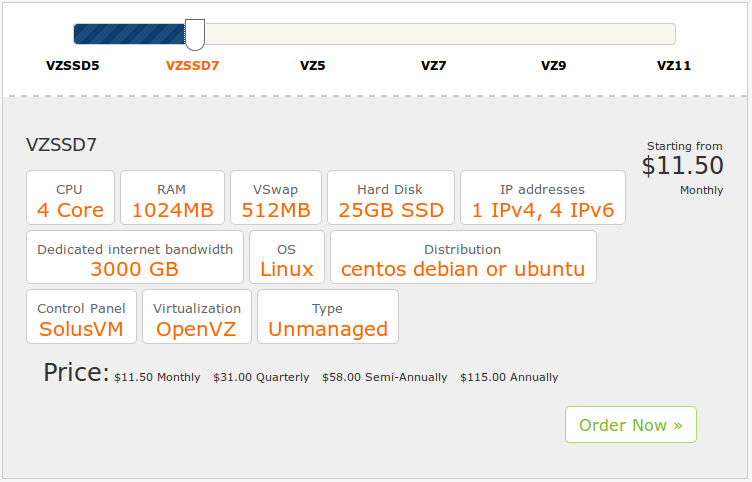
After discount, the price would be $6.9 for monthly payment, or $18.6 for quarterly payment.
It is not obvious with this plan, but if you will choose their other plans, you will see that as you commit to longer payment cycle, the price decreases significantly. Usually quarterly payments will result to 30-40% savings. I guess this is a technique Uncle Sal employ to scare away abusers but encourage legitimate customers.
Options when signing up has minimal options to speed up the process.
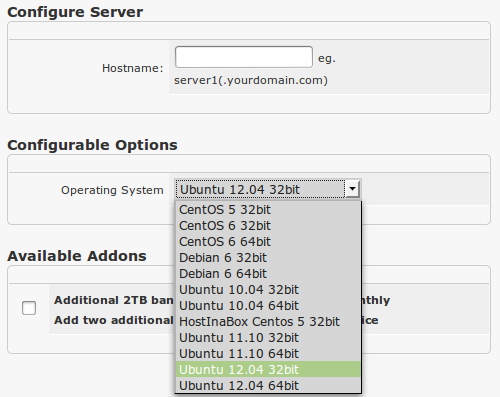
I love the fact that they support Ubuntu 12.04 (the latest LTS release), for the people who needs the latest pre-compiled programs out of the box. Not all providers have support for this. Prometeus however, do not have the latest Ubuntu 12.10.
I could not remember if service activation was instant, as it was a few months ago when I signed up. But if it was not, I am sure it was just a few minutes of waiting time.
The welcome email looks something like this:
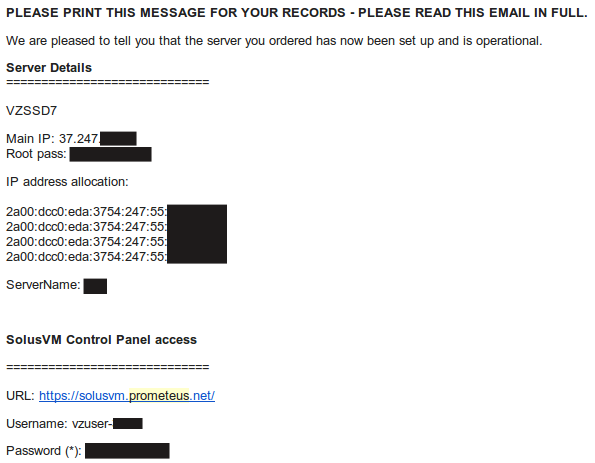
The good news is you get 4 ipv6 address, if that is your thing. But some people will complain that root and solusvm passwords were sent in plaintext.
Prometeus uses SolusVM to control their VPS:
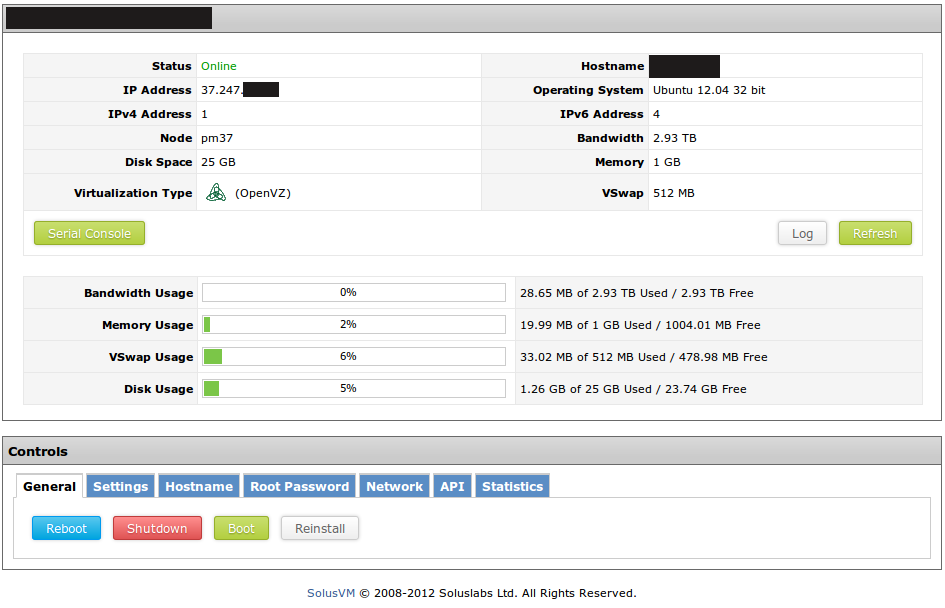
The choice of OS templates are not that many, but consist of the widely used distributions.
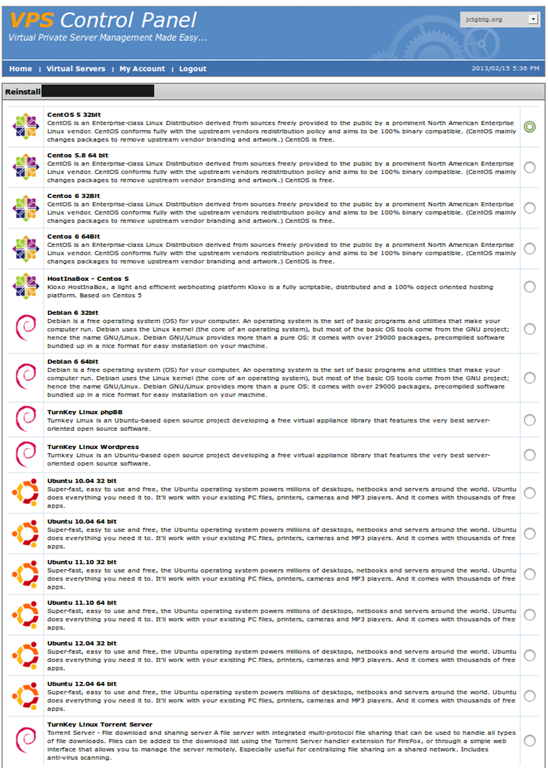
Test on the VPS
As mentioned above, the test VPS I have purchased has 1024MB of RAM with 512 Mb vSwap, 25GB SSD Diskspace and 3000GB of bandwidth, the VPS is located at Milan, Italy and the owner of Prometeus is also the CTO at their Data Center. For the tests carried out below, I have used Debian 6 32 bit minimal as the OS template.
When the OS template was initially loaded, only 7MB of RAM was used. As this is a .32 kernel (vSwap), memory usage reported by free will tend to be lower compared to OpenVZ using .18 kernel (burst).
    free -m
                 total       used       free     shared    buffers     cached
    Mem:          1024         21       1002          0          0         13
    -/+ buffers/cache:          7       1016
    Swap:          512          0        512
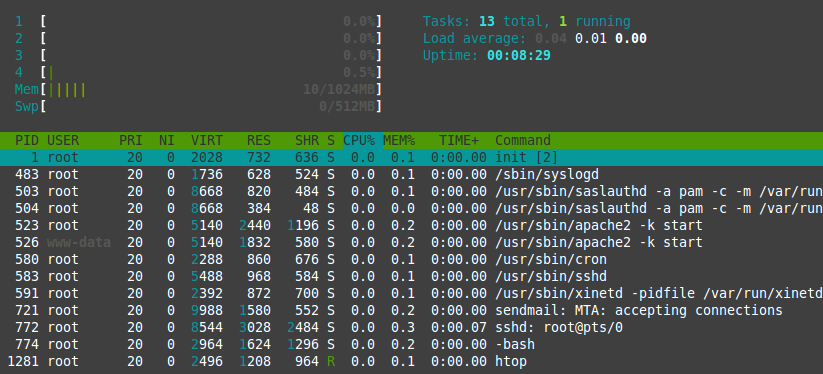
Top showing the processes running. The template can still be improved to make it more minimal.
    top - 20:55:42 up 5 min,  1 user,  load average: 0.00, 0.00, 0.00
    Tasks:  15 total,   1 running,  14 sleeping,   0 stopped,   0 zombie
    Cpu(s):  0.0%us,  0.0%sy,  0.0%ni,100.0%id,  0.0%wa,  0.0%hi,  0.0%si,  0.0%st
    Mem:   1048576k total,    22256k used,  1026320k free,        0k buffers
    Swap:   524288k total,        0k used,   524288k free,    14280k cached

    PID USER      PR  NI  VIRT  RES  SHR S %CPU %MEM    TIME+  COMMAND
    1 root      20   0  2028  732  636 S    0  0.1   0:00.00 init
    2 root      20   0     0    0    0 S    0  0.0   0:00.00 kthreadd/1343
    3 root      20   0     0    0    0 S    0  0.0   0:00.00 khelper/1343
    483 root      20   0  1736  628  524 S    0  0.1   0:00.00 syslogd
    503 root      20   0  8668  820  484 S    0  0.1   0:00.00 saslauthd
    504 root      20   0  8668  384   48 S    0  0.0   0:00.00 saslauthd
    523 root      20   0  5140 2440 1196 S    0  0.2   0:00.00 apache2
    526 www-data  20   0  5140 1832  580 S    0  0.2   0:00.00 apache2
    580 root      20   0  2288  860  676 S    0  0.1   0:00.00 cron
    583 root      20   0  5488  968  584 S    0  0.1   0:00.00 sshd
    591 root      20   0  2392  872  700 S    0  0.1   0:00.00 xinetd
    721 root      20   0  9988 1580  552 S    0  0.2   0:00.00 sendmail-mta
    772 root      20   0  8544 3028 2484 S    0  0.3   0:00.05 sshd
    774 root      20   0  2964 1620 1296 S    0  0.2   0:00.00 bash
    779 root      20   0  2328 1076  880 R    0  0.1   0:00.00 top
And htop output:
About 468MB of hard drive space was used when the OS was initially loaded, which is also a good sign that this OS template has been stripped off many of the unnecessary items:
    df -h
    /dev/simfs             25G  468M   25G   2% /
    tmpfs                 512M     0  512M   0% /lib/init/rw
    tmpfs                 512M     0  512M   0% /dev/shm
And the iNodes are set to pretty high values:
    df -i
    Filesystem            Inodes   IUsed   IFree IUse% Mounted on
    /dev/simfs           13107200   26168 13081032    1% /
    tmpfs                 131072       4  131068    1% /lib/init/rw
    tmpfs                 131072       1  131071    1% /dev/shm
When the full LNMP stack was loaded, 12MB of RAM was used:
    free -m
                 total       used       free     shared    buffers     cached
    Mem:          1024         30        993          0          0         17
    -/+ buffers/cache:         12       1011
    Swap:          512          0        512
My LNMP installation script is different from 96mb, together with the fact that this is a .32 OVZ, hence the low RAM result.
I tried installing a wordpress site and visiting a few pages, the memory consumption:
    free -m
                 total       used       free     shared    buffers     cached
    Mem:          1024         78        945          0          0         32
    -/+ buffers/cache:         45        978
    Swap:          512          0        512
Top showing the full LNMP stack running:
    top - 20:20:15 up 3 min,  1 user,  load average: 0.00, 0.00, 0.00
    Tasks:  24 total,   1 running,  23 sleeping,   0 stopped,   0 zombie
    Cpu(s):  0.0%us,  0.0%sy,  0.0%ni,100.0%id,  0.0%wa,  0.0%hi,  0.0%si,  0.0%st
    Mem:   1048576k total,    80428k used,   968148k free,        0k buffers
    Swap:   524288k total,        0k used,   524288k free,    33288k cached

      PID USER      PR  NI  VIRT  RES  SHR S %CPU %MEM    TIME+  COMMAND
        1 root      20   0  2028  728  636 S    0  0.1   0:00.00 init
        2 root      20   0     0    0    0 S    0  0.0   0:00.00 kthreadd/1343
        3 root      20   0     0    0    0 S    0  0.0   0:00.00 khelper/1343
      424 root      20   0  1948  732  612 S    0  0.1   0:00.00 syslogd
      509 root      20   0 15240  824  380 S    0  0.1   0:00.00 nginx
      511 root      20   0  2288  880  696 S    0  0.1   0:00.00 cron
      515 www-data  20   0 15376 1116  472 S    0  0.1   0:00.00 nginx
      516 www-data  20   0 15480 1636  864 S    0  0.2   0:00.00 nginx
      518 root      20   0  2708 1252 1012 S    0  0.1   0:00.01 mysqld_safe
      521 root      20   0  5488  968  584 S    0  0.1   0:00.00 sshd
      526 root      20   0  2392  864  700 S    0  0.1   0:00.00 xinetd
      529 root      20   0  8668  820  484 S    0  0.1   0:00.00 saslauthd
      530 www-data  20   0 15376 1116  472 S    0  0.1   0:00.00 nginx
      531 www-data  20   0 15376 1116  472 S    0  0.1   0:00.00 nginx
      532 www-data  20   0 15380 1028  484 S    0  0.1   0:00.00 nginx
      554 root      20   0  8668  384   48 S    0  0.0   0:00.00 saslauthd
      576 root      20   0 22328 3192 1228 S    0  0.3   0:00.00 php5-fpm
      579 www-data  20   0 42144  25m 4100 S    0  2.5   0:00.96 php5-fpm
      581 www-data  20   0 32728  16m 4288 S    0  1.6   0:00.97 php5-fpm
     1032 mysql     20   0 39684 9292 5528 S    0  0.9   0:00.10 mysqld
     1033 root      20   0  1668  576  508 S    0  0.1   0:00.00 logger
     1188 root      20   0  8684 3036 2476 S    0  0.3   0:00.05 sshd
     1190 root      20   0  2972 1628 1296 S    0  0.2   0:00.00 bash
     1198 root      20   0  2328 1092  880 R    0  0.1   0:00.00 top
About 1.7Gb of hard drive space was used once the intallation is done:
    df -h
    Filesystem            Size  Used Avail Use% Mounted on
    /dev/simfs             25G  1.7G   24G   7% /
    tmpfs                 512M     0  512M   0% /lib/init/rw
    tmpfs                 512M     0  512M   0% /dev/shm
And the inodes output is pretty standard as well:
    df -i
    Filesystem            Inodes   IUsed   IFree IUse% Mounted on
    /dev/simfs           13107200   31282 13075918    1% /
    tmpfs                 131072       3  131069    1% /lib/init/rw
    tmpfs                 131072       1  131071    1% /dev/shm
The VPS is fairly stable and little used, as shown in the output of uptime:
    uptime
     01:20:06 up 9 min,  1 user,  load average: 0.00, 0.00, 0.00
vmstat shows no IOwait as well, which is also a good sign:
    vmstat
    procs -----------memory---------- ---swap-- -----io---- -system-- ----cpu----
     r  b   swpd   free   buff  cache   si   so    bi    bo   in   cs us sy id wa
     0  0      0 968256      0  33312    0    0     5     1    0 6890  0  0 100  0
CPUInfo shows there are four CPU cores available and none of them are throttled:
cat /proc/cpuinfo
processor	: 0
vendor_id	: GenuineIntel
cpu family	: 6
model		: 42
model name	: Intel(R) Xeon(R) CPU E31270 @ 3.40GHz
stepping	: 7
cpu MHz		: 3392.093
cache size	: 8192 KB
physical id	: 0
siblings	: 8
core id		: 0
cpu cores	: 4
apicid		: 0
initial apicid	: 0
fpu		: yes
fpu_exception	: yes
cpuid level	: 13
wp		: yes
flags		: fpu vme de pse tsc msr pae mce cx8 apic sep mtrr pge mca cmov pat pse36 clflush dts acpi mmx fxsr sse sse2 ss ht tm pbe syscall nx rdtscp lm constant_tsc arch_perfmon pebs bts rep_good xtopology nonstop_tsc aperfmperf pni pclmulqdq dtes64 monitor ds_cpl vmx smx est tm2 ssse3 cx16 xtpr pdcm sse4_1 sse4_2 x2apic popcnt xsave avx lahf_lm ida arat epb xsaveopt pln pts dts tpr_shadow vnmi flexpriority ept vpid
bogomips	: 6784.18
clflush size	: 64
cache_alignment	: 64
address sizes	: 36 bits physical, 48 bits virtual
power management:

processor	: 1
vendor_id	: GenuineIntel
cpu family	: 6
model		: 42
model name	: Intel(R) Xeon(R) CPU E31270 @ 3.40GHz
stepping	: 7
cpu MHz		: 3392.093
cache size	: 8192 KB
physical id	: 0
siblings	: 8
core id		: 1
cpu cores	: 4
apicid		: 2
initial apicid	: 2
fpu		: yes
fpu_exception	: yes
cpuid level	: 13
wp		: yes
flags		: fpu vme de pse tsc msr pae mce cx8 apic sep mtrr pge mca cmov pat pse36 clflush dts acpi mmx fxsr sse sse2 ss ht tm pbe syscall nx rdtscp lm constant_tsc arch_perfmon pebs bts rep_good xtopology nonstop_tsc aperfmperf pni pclmulqdq dtes64 monitor ds_cpl vmx smx est tm2 ssse3 cx16 xtpr pdcm sse4_1 sse4_2 x2apic popcnt xsave avx lahf_lm ida arat epb xsaveopt pln pts dts tpr_shadow vnmi flexpriority ept vpid
bogomips	: 6784.18
clflush size	: 64
cache_alignment	: 64
address sizes	: 36 bits physical, 48 bits virtual
power management:

processor	: 2
vendor_id	: GenuineIntel
cpu family	: 6
model		: 42
model name	: Intel(R) Xeon(R) CPU E31270 @ 3.40GHz
stepping	: 7
cpu MHz		: 3392.093
cache size	: 8192 KB
physical id	: 0
siblings	: 8
core id		: 2
cpu cores	: 4
apicid		: 4
initial apicid	: 4
fpu		: yes
fpu_exception	: yes
cpuid level	: 13
wp		: yes
flags		: fpu vme de pse tsc msr pae mce cx8 apic sep mtrr pge mca cmov pat pse36 clflush dts acpi mmx fxsr sse sse2 ss ht tm pbe syscall nx rdtscp lm constant_tsc arch_perfmon pebs bts rep_good xtopology nonstop_tsc aperfmperf pni pclmulqdq dtes64 monitor ds_cpl vmx smx est tm2 ssse3 cx16 xtpr pdcm sse4_1 sse4_2 x2apic popcnt xsave avx lahf_lm ida arat epb xsaveopt pln pts dts tpr_shadow vnmi flexpriority ept vpid
bogomips	: 6784.18
clflush size	: 64
cache_alignment	: 64
address sizes	: 36 bits physical, 48 bits virtual
power management:

processor	: 3
vendor_id	: GenuineIntel
cpu family	: 6
model		: 42
model name	: Intel(R) Xeon(R) CPU E31270 @ 3.40GHz
stepping	: 7
cpu MHz		: 3392.093
cache size	: 8192 KB
physical id	: 0
siblings	: 8
core id		: 3
cpu cores	: 4
apicid		: 6
initial apicid	: 6
fpu		: yes
fpu_exception	: yes
cpuid level	: 13
wp		: yes
flags		: fpu vme de pse tsc msr pae mce cx8 apic sep mtrr pge mca cmov pat pse36 clflush dts acpi mmx fxsr sse sse2 ss ht tm pbe syscall nx rdtscp lm constant_tsc arch_perfmon pebs bts rep_good xtopology nonstop_tsc aperfmperf pni pclmulqdq dtes64 monitor ds_cpl vmx smx est tm2 ssse3 cx16 xtpr pdcm sse4_1 sse4_2 x2apic popcnt xsave avx lahf_lm ida arat epb xsaveopt pln pts dts tpr_shadow vnmi flexpriority ept vpid
bogomips	: 6784.18
clflush size	: 64
cache_alignment	: 64
address sizes	: 36 bits physical, 48 bits virtual
power management:
Meminfo:
cat /proc/meminfo
MemTotal:        1048576 kB
MemFree:         1017580 kB
Cached:            17948 kB
Active:            22460 kB
Inactive:           5032 kB
Active(anon):       4672 kB
Inactive(anon):     4872 kB
Active(file):      17788 kB
Inactive(file):      160 kB
Unevictable:           0 kB
Mlocked:               0 kB
SwapTotal:        524288 kB
SwapFree:         524288 kB
Dirty:                 0 kB
Writeback:             0 kB
AnonPages:          9544 kB
Shmem:             12816 kB
Slab:               3468 kB
SReclaimable:       1184 kB
SUnreclaim:         2284 kB
And time sync:
real	0m0.001s
user	0m0.000s
sys	0m0.000s
Disk I/O is fast as expected
dd if=/dev/zero of=test bs=64k count=16k conv=fdatasync
16384+0 records in
16384+0 records out
1073741824 bytes (1.1 GB) copied, 1.67301 s, 642 MB/s
Testing again showed almost the same result:
dd if=/dev/zero of=test bs=64k count=16k conv=fdatasync
16384+0 records in
16384+0 records out
1073741824 bytes (1.1 GB) copied, 1.56889 s, 684 MB/s
The ioping results are very consistent as well.
    ioping  -c 10 .
    4096 bytes from . (simfs /vz/private/1343): request=1 time=0.2 ms
    4096 bytes from . (simfs /vz/private/1343): request=2 time=0.2 ms
    4096 bytes from . (simfs /vz/private/1343): request=3 time=0.2 ms
    4096 bytes from . (simfs /vz/private/1343): request=4 time=0.2 ms
    4096 bytes from . (simfs /vz/private/1343): request=5 time=0.2 ms
    4096 bytes from . (simfs /vz/private/1343): request=6 time=0.2 ms
    4096 bytes from . (simfs /vz/private/1343): request=7 time=0.2 ms
    4096 bytes from . (simfs /vz/private/1343): request=8 time=0.2 ms
    4096 bytes from . (simfs /vz/private/1343): request=9 time=0.2 ms
    4096 bytes from . (simfs /vz/private/1343): request=10 time=0.2 ms

    --- . (simfs /vz/private/1343) ioping statistics ---
    10 requests completed in 9002.7 ms, 5552 iops, 21.7 mb/s
    min/avg/max/mdev = 0.2/0.2/0.2/0.0 ms
Testing again showed similar results:
    ioping  -c 10 .
    4096 bytes from . (simfs /vz/private/1343): request=1 time=0.2 ms
    4096 bytes from . (simfs /vz/private/1343): request=2 time=0.2 ms
    4096 bytes from . (simfs /vz/private/1343): request=3 time=0.2 ms
    4096 bytes from . (simfs /vz/private/1343): request=4 time=0.2 ms
    4096 bytes from . (simfs /vz/private/1343): request=5 time=0.2 ms
    4096 bytes from . (simfs /vz/private/1343): request=6 time=0.2 ms
    4096 bytes from . (simfs /vz/private/1343): request=7 time=0.2 ms
    4096 bytes from . (simfs /vz/private/1343): request=8 time=0.2 ms
    4096 bytes from . (simfs /vz/private/1343): request=9 time=0.2 ms
    4096 bytes from . (simfs /vz/private/1343): request=10 time=0.2 ms

    --- . (simfs /vz/private/1343) ioping statistics ---
    10 requests completed in 9002.8 ms, 5476 iops, 21.4 mb/s
    min/avg/max/mdev = 0.2/0.2/0.2/0.0 ms
Using the FreeVPS benchmark script, shows the network network speed. Some locations are not impressive, as Prometeus servers are in Europe.
    bash bench.sh
    CPU model :  Intel(R) Xeon(R) CPU E31270 @ 3.40GHz
    Number of cores : 4
    CPU frequency :  3392.093 MHz
    Total amount of ram : 1024 MB
    Total amount of swap : 512 MB
    System uptime :   16 min,
    Download speed from CacheFly: 25.6MB/s
    Download speed from Linode, Atlanta GA: 2.86MB/s
    Download speed from Linode, Dallas, TX: 3.91MB/s
    Download speed from Linode, Tokyo, JP: 3.73MB/s
    Download speed from Linode, London, UK: 15.0MB/s
    Download speed from Leaseweb, Haarlem, NL: 2.01MB/s
    Download speed from Softlayer, Singapore: 3.80MB/s
    Download speed from Softlayer, Seattle, WA: 7.68MB/s
    Download speed from Softlayer, San Jose, CA: 7.85MB/s
    Download speed from Softlayer, Washington, DC: 13.3MB/s
    I/O speed :  706 MB/s
Testing again shows relatively same results:
    bash bench.sh
    CPU model :  Intel(R) Xeon(R) CPU E31270 @ 3.40GHz
    Number of cores : 4
    CPU frequency :  3392.093 MHz
    Total amount of ram : 1024 MB
    Total amount of swap : 512 MB
    System uptime :   19 min,
    Download speed from CacheFly: 47.5MB/s
    Download speed from Linode, Atlanta GA: 2.88MB/s
    Download speed from Linode, Dallas, TX: 4.00MB/s
    Download speed from Linode, Tokyo, JP: 3.56MB/s
    Download speed from Linode, London, UK: 3.13MB/s
    Download speed from Leaseweb, Haarlem, NL: 2.07MB/s
    Download speed from Softlayer, Singapore: 3.91MB/s
    Download speed from Softlayer, Seattle, WA: 7.81MB/s
    Download speed from Softlayer, San Jose, CA: 7.87MB/s
    Download speed from Softlayer, Washington, DC: 13.0MB/s
    I/O speed :  580 MB/s
For benchmarks, in general more CPU cores would indicate better benchmarks and it is definitely the case with this VPS. With 4 CPU cores available, the Unixbench score is close to 3000 points, which is rather impressive.
       #    #  #    #  #  #    #          #####   ######  #    #   ####   #    #
       #    #  ##   #  #   #  #           #    #  #       ##   #  #    #  #    #
       #    #  # #  #  #    ##            #####   #####   # #  #  #       ######
       #    #  #  # #  #    ##            #    #  #       #  # #  #       #    #
       #    #  #   ##  #   #  #           #    #  #       #   ##  #    #  #    #
        ####   #    #  #  #    #          #####   ######  #    #   ####   #    #

       Version 5.1.2                      Based on the Byte Magazine Unix Benchmark

       Multi-CPU version                  Version 5 revisions by Ian Smith,
                                          Sunnyvale, CA, USA
       December 22, 2007                  johantheghost at yahoo period com


    1 x Dhrystone 2 using register variables  1 2 3 4 5 6 7 8 9 10

    1 x Double-Precision Whetstone  1 2 3 4 5 6 7 8 9 10

    1 x Execl Throughput  1 2 3

    1 x File Copy 1024 bufsize 2000 maxblocks  1 2 3

    1 x File Copy 256 bufsize 500 maxblocks  1 2 3

    1 x File Copy 4096 bufsize 8000 maxblocks  1 2 3

    1 x Pipe Throughput  1 2 3 4 5 6 7 8 9 10

    1 x Pipe-based Context Switching  1 2 3 4 5 6 7 8 9 10

    1 x Process Creation  1 2 3

    1 x System Call Overhead  1 2 3 4 5 6 7 8 9 10

    1 x Shell Scripts (1 concurrent)  1 2 3

    1 x Shell Scripts (8 concurrent)  1 2 3

    4 x Dhrystone 2 using register variables  1 2 3 4 5 6 7 8 9 10

    4 x Double-Precision Whetstone  1 2 3 4 5 6 7 8 9 10

    4 x Execl Throughput  1 2 3

    4 x File Copy 1024 bufsize 2000 maxblocks  1 2 3

    4 x File Copy 256 bufsize 500 maxblocks  1 2 3

    4 x File Copy 4096 bufsize 8000 maxblocks  1 2 3

    4 x Pipe Throughput  1 2 3 4 5 6 7 8 9 10

    4 x Pipe-based Context Switching  1 2 3 4 5 6 7 8 9 10

    4 x Process Creation  1 2 3

    4 x System Call Overhead  1 2 3 4 5 6 7 8 9 10

    4 x Shell Scripts (1 concurrent)  1 2 3

    4 x Shell Scripts (8 concurrent)  1 2 3

    ========================================================================
       BYTE UNIX Benchmarks (Version 5.1.2)

       System: jctgbtg: GNU/Linux
       OS: GNU/Linux -- 2.6.32-042stab068.8 -- #1 SMP Fri Dec 7 17:06:14 MSK 2012
       Machine: i686 (unknown)
       Language: en_US.utf8 (charmap="ANSI_X3.4-1968", collate="ANSI_X3.4-1968")
       CPU 0: Intel(R) Xeon(R) CPU E31270 @ 3.40GHz (6784.2 bogomips)
              Hyper-Threading, x86-64, MMX, Physical Address Ext, SYSENTER/SYSEXIT, SYSCALL/SYSRET, Intel virtualization
       CPU 1: Intel(R) Xeon(R) CPU E31270 @ 3.40GHz (6784.2 bogomips)
              Hyper-Threading, x86-64, MMX, Physical Address Ext, SYSENTER/SYSEXIT, SYSCALL/SYSRET, Intel virtualization
       CPU 2: Intel(R) Xeon(R) CPU E31270 @ 3.40GHz (6784.2 bogomips)
              Hyper-Threading, x86-64, MMX, Physical Address Ext, SYSENTER/SYSEXIT, SYSCALL/SYSRET, Intel virtualization
       CPU 3: Intel(R) Xeon(R) CPU E31270 @ 3.40GHz (6784.2 bogomips)
              Hyper-Threading, x86-64, MMX, Physical Address Ext, SYSENTER/SYSEXIT, SYSCALL/SYSRET, Intel virtualization
       20:42:57 up 26 min,  1 user,  load average: 0.10, 0.04, 0.01; runlevel 2

    ------------------------------------------------------------------------
    Benchmark Run: Sat Feb 16 2013 20:42:57 - 21:11:02
    4 CPUs in system; running 1 parallel copy of tests

    Dhrystone 2 using register variables       19843470.2 lps   (10.0 s, 7 samples)
    Double-Precision Whetstone                     3325.9 MWIPS (10.0 s, 7 samples)
    Execl Throughput                               5381.1 lps   (30.0 s, 2 samples)
    File Copy 1024 bufsize 2000 maxblocks        630423.5 KBps  (30.0 s, 2 samples)
    File Copy 256 bufsize 500 maxblocks          179816.3 KBps  (30.0 s, 2 samples)
    File Copy 4096 bufsize 8000 maxblocks       1727036.1 KBps  (30.0 s, 2 samples)
    Pipe Throughput                             1129257.5 lps   (10.0 s, 7 samples)
    Pipe-based Context Switching                 176057.6 lps   (10.0 s, 7 samples)
    Process Creation                              15060.3 lps   (30.0 s, 2 samples)
    Shell Scripts (1 concurrent)                   7697.5 lpm   (60.0 s, 2 samples)
    Shell Scripts (8 concurrent)                   2206.4 lpm   (60.0 s, 2 samples)
    System Call Overhead                         851459.0 lps   (10.0 s, 7 samples)

    System Benchmarks Index Values               BASELINE       RESULT    INDEX
    Dhrystone 2 using register variables         116700.0   19843470.2   1700.4
    Double-Precision Whetstone                       55.0       3325.9    604.7
    Execl Throughput                                 43.0       5381.1   1251.4
    File Copy 1024 bufsize 2000 maxblocks          3960.0     630423.5   1592.0
    File Copy 256 bufsize 500 maxblocks            1655.0     179816.3   1086.5
    File Copy 4096 bufsize 8000 maxblocks          5800.0    1727036.1   2977.6
    Pipe Throughput                               12440.0    1129257.5    907.8
    Pipe-based Context Switching                   4000.0     176057.6    440.1
    Process Creation                                126.0      15060.3   1195.3
    Shell Scripts (1 concurrent)                     42.4       7697.5   1815.5
    Shell Scripts (8 concurrent)                      6.0       2206.4   3677.3
    System Call Overhead                          15000.0     851459.0    567.6
                                                                       ========
    System Benchmarks Index Score                                        1230.0

    ------------------------------------------------------------------------
    Benchmark Run: Sat Feb 16 2013 21:11:02 - 21:39:30
    4 CPUs in system; running 4 parallel copies of tests

    Dhrystone 2 using register variables       59011003.4 lps   (10.0 s, 7 samples)
    Double-Precision Whetstone                    12344.4 MWIPS (10.1 s, 7 samples)
    Execl Throughput                              17749.8 lps   (30.0 s, 2 samples)
    File Copy 1024 bufsize 2000 maxblocks        858122.6 KBps  (30.0 s, 2 samples)
    File Copy 256 bufsize 500 maxblocks          245197.5 KBps  (30.0 s, 2 samples)
    File Copy 4096 bufsize 8000 maxblocks       2443792.2 KBps  (30.0 s, 2 samples)
    Pipe Throughput                             3468097.5 lps   (10.0 s, 7 samples)
    Pipe-based Context Switching                 720453.4 lps   (10.0 s, 7 samples)
    Process Creation                              44474.7 lps   (30.0 s, 2 samples)
    Shell Scripts (1 concurrent)                  18034.6 lpm   (60.0 s, 2 samples)
    Shell Scripts (8 concurrent)                   2522.7 lpm   (60.0 s, 2 samples)
    System Call Overhead                        2731886.8 lps   (10.0 s, 7 samples)

    System Benchmarks Index Values               BASELINE       RESULT    INDEX
    Dhrystone 2 using register variables         116700.0   59011003.4   5056.6
    Double-Precision Whetstone                       55.0      12344.4   2244.4
    Execl Throughput                                 43.0      17749.8   4127.9
    File Copy 1024 bufsize 2000 maxblocks          3960.0     858122.6   2167.0
    File Copy 256 bufsize 500 maxblocks            1655.0     245197.5   1481.6
    File Copy 4096 bufsize 8000 maxblocks          5800.0    2443792.2   4213.4
    Pipe Throughput                               12440.0    3468097.5   2787.9
    Pipe-based Context Switching                   4000.0     720453.4   1801.1
    Process Creation                                126.0      44474.7   3529.7
    Shell Scripts (1 concurrent)                     42.4      18034.6   4253.5
    Shell Scripts (8 concurrent)                      6.0       2522.7   4204.4
    System Call Overhead                          15000.0    2731886.8   1821.3
                                                                       ========
    System Benchmarks Index Score                                        2908.1
Testing again showed similar results:
       #    #  #    #  #  #    #          #####   ######  #    #   ####   #    #
       #    #  ##   #  #   #  #           #    #  #       ##   #  #    #  #    #
       #    #  # #  #  #    ##            #####   #####   # #  #  #       ######
       #    #  #  # #  #    ##            #    #  #       #  # #  #       #    #
       #    #  #   ##  #   #  #           #    #  #       #   ##  #    #  #    #
        ####   #    #  #  #    #          #####   ######  #    #   ####   #    #

       Version 5.1.2                      Based on the Byte Magazine Unix Benchmark

       Multi-CPU version                  Version 5 revisions by Ian Smith,
                                          Sunnyvale, CA, USA
       December 22, 2007                  johantheghost at yahoo period com


    1 x Dhrystone 2 using register variables  1 2 3 4 5 6 7 8 9 10

    1 x Double-Precision Whetstone  1 2 3 4 5 6 7 8 9 10

    1 x Execl Throughput  1 2 3

    1 x File Copy 1024 bufsize 2000 maxblocks  1 2 3

    1 x File Copy 256 bufsize 500 maxblocks  1 2 3

    1 x File Copy 4096 bufsize 8000 maxblocks  1 2 3

    1 x Pipe Throughput  1 2 3 4 5 6 7 8 9 10

    1 x Pipe-based Context Switching  1 2 3 4 5 6 7 8 9 10

    1 x Process Creation  1 2 3

    1 x System Call Overhead  1 2 3 4 5 6 7 8 9 10

    1 x Shell Scripts (1 concurrent)  1 2 3

    1 x Shell Scripts (8 concurrent)  1 2 3

    4 x Dhrystone 2 using register variables  1 2 3 4 5 6 7 8 9 10

    4 x Double-Precision Whetstone  1 2 3 4 5 6 7 8 9 10

    4 x Execl Throughput  1 2 3

    4 x File Copy 1024 bufsize 2000 maxblocks  1 2 3

    4 x File Copy 256 bufsize 500 maxblocks  1 2 3

    4 x File Copy 4096 bufsize 8000 maxblocks  1 2 3

    4 x Pipe Throughput  1 2 3 4 5 6 7 8 9 10

    4 x Pipe-based Context Switching  1 2 3 4 5 6 7 8 9 10

    4 x Process Creation  1 2 3

    4 x System Call Overhead  1 2 3 4 5 6 7 8 9 10

    4 x Shell Scripts (1 concurrent)  1 2 3

    4 x Shell Scripts (8 concurrent)  1 2 3

    ========================================================================
       BYTE UNIX Benchmarks (Version 5.1.2)

       System: jctgbtg: GNU/Linux
       OS: GNU/Linux -- 2.6.32-042stab068.8 -- #1 SMP Fri Dec 7 17:06:14 MSK 2012
       Machine: i686 (unknown)
       Language: en_US.utf8 (charmap="ANSI_X3.4-1968", collate="ANSI_X3.4-1968")
       CPU 0: Intel(R) Xeon(R) CPU E31270 @ 3.40GHz (6784.2 bogomips)
              Hyper-Threading, x86-64, MMX, Physical Address Ext, SYSENTER/SYSEXIT, SYSCALL/SYSRET, Intel virtualization
       CPU 1: Intel(R) Xeon(R) CPU E31270 @ 3.40GHz (6784.2 bogomips)
              Hyper-Threading, x86-64, MMX, Physical Address Ext, SYSENTER/SYSEXIT, SYSCALL/SYSRET, Intel virtualization
       CPU 2: Intel(R) Xeon(R) CPU E31270 @ 3.40GHz (6784.2 bogomips)
              Hyper-Threading, x86-64, MMX, Physical Address Ext, SYSENTER/SYSEXIT, SYSCALL/SYSRET, Intel virtualization
       CPU 3: Intel(R) Xeon(R) CPU E31270 @ 3.40GHz (6784.2 bogomips)
              Hyper-Threading, x86-64, MMX, Physical Address Ext, SYSENTER/SYSEXIT, SYSCALL/SYSRET, Intel virtualization
       21:56:43 up  1:40,  1 user,  load average: 0.00, 0.49, 2.66; runlevel 2

    ------------------------------------------------------------------------
    Benchmark Run: Sat Feb 16 2013 21:56:43 - 22:24:51
    4 CPUs in system; running 1 parallel copy of tests

    Dhrystone 2 using register variables       20290219.6 lps   (10.0 s, 7 samples)
    Double-Precision Whetstone                     3319.4 MWIPS (10.0 s, 7 samples)
    Execl Throughput                               5455.0 lps   (30.0 s, 2 samples)
    File Copy 1024 bufsize 2000 maxblocks        630688.6 KBps  (30.0 s, 2 samples)
    File Copy 256 bufsize 500 maxblocks          182896.0 KBps  (30.0 s, 2 samples)
    File Copy 4096 bufsize 8000 maxblocks       1786222.6 KBps  (30.0 s, 2 samples)
    Pipe Throughput                             1114493.5 lps   (10.0 s, 7 samples)
    Pipe-based Context Switching                 175444.3 lps   (10.0 s, 7 samples)
    Process Creation                              14662.0 lps   (30.0 s, 2 samples)
    Shell Scripts (1 concurrent)                   7977.1 lpm   (60.0 s, 2 samples)
    Shell Scripts (8 concurrent)                   2301.1 lpm   (60.0 s, 2 samples)
    System Call Overhead                         858559.1 lps   (10.0 s, 7 samples)

    System Benchmarks Index Values               BASELINE       RESULT    INDEX
    Dhrystone 2 using register variables         116700.0   20290219.6   1738.7
    Double-Precision Whetstone                       55.0       3319.4    603.5
    Execl Throughput                                 43.0       5455.0   1268.6
    File Copy 1024 bufsize 2000 maxblocks          3960.0     630688.6   1592.6
    File Copy 256 bufsize 500 maxblocks            1655.0     182896.0   1105.1
    File Copy 4096 bufsize 8000 maxblocks          5800.0    1786222.6   3079.7
    Pipe Throughput                               12440.0    1114493.5    895.9
    Pipe-based Context Switching                   4000.0     175444.3    438.6
    Process Creation                                126.0      14662.0   1163.7
    Shell Scripts (1 concurrent)                     42.4       7977.1   1881.4
    Shell Scripts (8 concurrent)                      6.0       2301.1   3835.1
    System Call Overhead                          15000.0     858559.1    572.4
                                                                       ========
    System Benchmarks Index Score                                        1243.2

    ------------------------------------------------------------------------
    Benchmark Run: Sat Feb 16 2013 22:24:51 - 22:53:12
    4 CPUs in system; running 4 parallel copies of tests

    Dhrystone 2 using register variables       56639778.0 lps   (10.0 s, 7 samples)
    Double-Precision Whetstone                    12429.6 MWIPS (10.0 s, 7 samples)
    Execl Throughput                              17734.6 lps   (30.0 s, 2 samples)
    File Copy 1024 bufsize 2000 maxblocks        851466.4 KBps  (30.0 s, 2 samples)
    File Copy 256 bufsize 500 maxblocks          215115.5 KBps  (30.0 s, 2 samples)
    File Copy 4096 bufsize 8000 maxblocks       2521150.3 KBps  (30.0 s, 2 samples)
    Pipe Throughput                             3389586.1 lps   (10.0 s, 7 samples)
    Pipe-based Context Switching                 749077.2 lps   (10.0 s, 7 samples)
    Process Creation                              46444.0 lps   (30.0 s, 2 samples)
    Shell Scripts (1 concurrent)                  19442.7 lpm   (60.0 s, 2 samples)
    Shell Scripts (8 concurrent)                   2568.7 lpm   (60.0 s, 2 samples)
    System Call Overhead                        2683059.8 lps   (10.0 s, 7 samples)

    System Benchmarks Index Values               BASELINE       RESULT    INDEX
    Dhrystone 2 using register variables         116700.0   56639778.0   4853.5
    Double-Precision Whetstone                       55.0      12429.6   2259.9
    Execl Throughput                                 43.0      17734.6   4124.3
    File Copy 1024 bufsize 2000 maxblocks          3960.0     851466.4   2150.2
    File Copy 256 bufsize 500 maxblocks            1655.0     215115.5   1299.8
    File Copy 4096 bufsize 8000 maxblocks          5800.0    2521150.3   4346.8
    Pipe Throughput                               12440.0    3389586.1   2724.7
    Pipe-based Context Switching                   4000.0     749077.2   1872.7
    Process Creation                                126.0      46444.0   3686.0
    Shell Scripts (1 concurrent)                     42.4      19442.7   4585.5
    Shell Scripts (8 concurrent)                      6.0       2568.7   4281.2
    System Call Overhead                          15000.0    2683059.8   1788.7
                                                                       ========
    System Benchmarks Index Score                                        2906.2
Geekbench scores are impressive:

Testing again showed relatively same results:

Customer Service and Support
I have been a customer for almost a year now, using their KVM and OpenVZ products. I have submitted several tickets with them, but most of them are just clarifications. I just had one technical support where I wish to try out *BSD and I requested to use IDE as disk interface instead of VirtIO.
Ticket response time is typically from 1-2 hours. Although they don’t reply within minutes as other providers, you will be satisfied when you do receive their reply. Salvatore and John are very nice people and very professional.
They also have a forum where they write generous amount of tutorials for beginners and intermediate Linux users. The forum admins are very friendly and helpful to customers seeking advice and clarifications.
Add-Ons
Prometeus also have other add-on services that are great addition if you sign up a VPS with them.
They offer an offloaded MySQL account that runs on a dedicated server with SSD storage. Great if you have busy sites that are heavy on database access.
They also offer cheap storage plan, perfect for backup purposes for your other VPS with them or other provider.
Conclusion
I would like to start with constructive criticism. Prometeus can be a more dominant VPS provider if they could provide more OS templates like BuyVM. Although their current templates covers the most popular distributions, it would be a better customer experience if there are templates for various common uses. E.g. control panels, VPN, TurnKey etc.
They could still improve their network speed, specially to some US locations. Which is helpful for transferring large files from time to time, or other heavy lifting network oriented tasks.
Now for the good things. As expected, the VPS has very good I/O being an SSD plan. The generous number of CPU cores gave impressive processor benchmark results. Ticket response is not the fastest, but quality is very satisfactory. However, aside from things we can measure, I would like to point out additional intangible reasons why I highly recommend this host:
- In the hosting business since 1997 and they own their own hardware plus IP space. They are legit and are not going anywhere anytime soon.
- They have very good relationship with their Data Center. I had experience from two providers where they were kicked out by their Data Center due to DDOS attack. With prometeus, you can sleep better at night not worrying about such thing can happen.
- They don’t use remote hands. It was humorously mentioned that the owner prefers to be close and sleep with his servers t
- Salvatore is an awesome guy. I am sure many LET/LEB community member have their own personal experience of how good and generous guy he is.
There is no doubt that Prometeus is one of the best provider in the market. They receive much love from the very critical LET/LEB community, which is very impressive.
Thank you 96mb for posting the review. More success to you in the future.
Pingback: [EU]Prometeus, 15% TO 40% DISCOUNT AND A FREE MYSQL OFFLOAD ACCOUNT FOR LIFE! | whatisvps.info
Pingback: [EU]Prometeus, 15% TO 40% DISCOUNT! KVM XEN AND OPENVZ, CHOOSE YOUR VPS TODAY!!! | whatisvps.info
Pingback: 96MB Low End VPS Community Member Review Part 2 – CatalystVPS OpenVZ - 96MB.com