
96MB Low End VPS Review Part XX – Burst.Net Miami OpenVZ VPS
Burst.Net has been probably the oldest and largest budget VPS providers in the world. With 20 years of history and customer all over the world, it is certainly a giant in this VPS industry. As such, when they offered a first month free deal on LowEndBox.com, I decided to sign up for one and see how it works.
General Information and Set Up
First, I need to clarify that the offer presented on LowEndBox is not exactly a free month, you will need to pay one dollar of set up fee, which, according to the comment here, the fee is strictly for fraud prevention only. In any case, to take advantage of this offer, you will have to go to this page here and then select one of the VPS for a free month, under the category of Dedicated Servers:
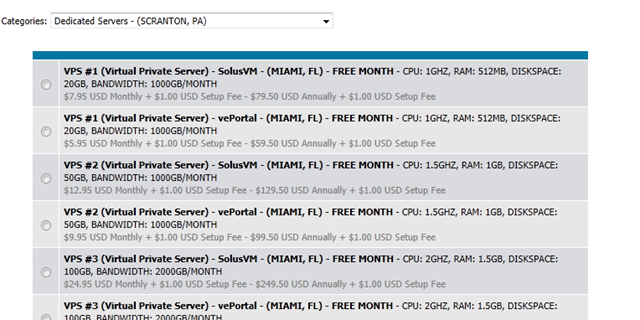
I signed up with the lowest VPS #1 Plan with vePortal and here is the specifications I get:

Unlike many other providers, Burst still gives out 2 IPv4 addresses for each VPS.
Sign up page appears to be a highly customized WHMCS on secured HTTP login page. One interesting thing to note is that upon payment, you are asked to sign and fax a Paypal Authorization Form authorizing the payment made by Paypal, which I did not sign but received the VPS in any case.
The activation was not instant but was really close (Paypal confirmation came at 4:18PM and VPS information was received at 4:24PM). There was a lot of information in the welcome email, including your root username and password in plain text (which, unlike most of the other providers, you can not specify your root password during sign up), and the login details to vePortal. Strange enough, their vePortal’s URL is an IP address rather than FQDN, which is rather unprofessional.
Once login to the client account, you get a very detailed description of the product under My Products and Services:
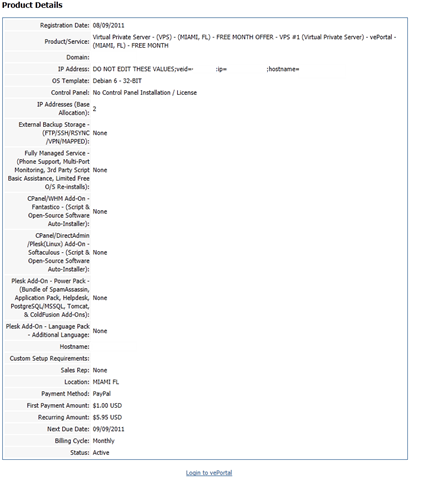
However, unlike most of the VPS providers, Burst actually does not offer any control on WHMCS and all controls on VPS have to be done by logging in to the vePortal using the user name and password assigned.
After adding in two security exceptions due to the SSL certificate issues (since IP addresses were used instead of FQDN), you get logged into the vePortal page:
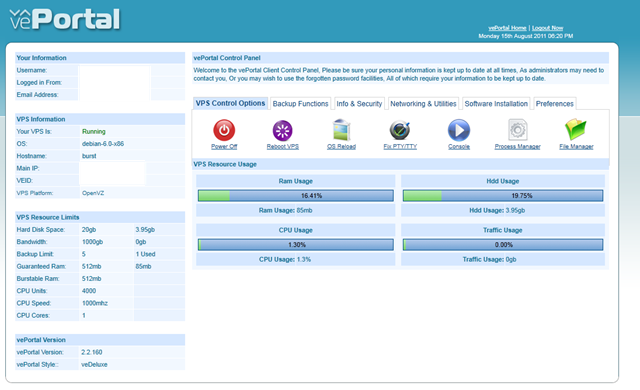
I have to say seeing vePortal for the first time makes me wondering why there were not more hosts using it. The graphical interface is really nice with all information on one page and most of the basic controls are just a click away as well.
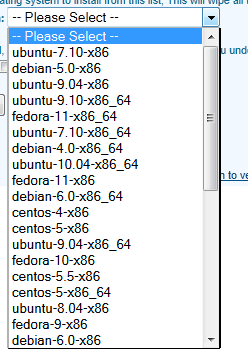
There were quite a few OS templates available under Reload OS, unfortunately none of them stated that if the template is minimal or standard OS template:
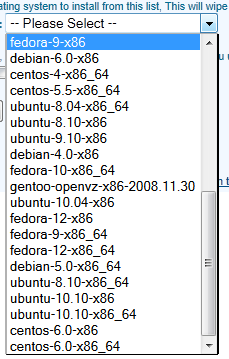
Going through the tabs in vePortal, on the Backup Functions tab, you could create and restore and download backups:

Interestingly, although I did not sign up for any backup service, I did not receive any error message when initiate a backup. However, I did not get any backup file in the end, so I assume that is how Burst make you to pay for backups.
Under Info and Security, you can change root password and even enable TUN/TAP and enable the API automatically, you can also choose to secure directories which will make you lose /var/tmp and /tmp every time you reboot the VPS:

On Networking and Utilities tab, you could do things like changing host name, even doing ping tests and DNS Lookup with the external sites. There is also the functionality to enable veRemote, which is perhaps some sort of desktop VNC program:

Unfortunately, there is no IPv6 address included in the product and no instant rDNS available as well. UPDATE: According to Burst’s customer support, they could give up to 20 IPv6 address to each VPS for free.
Software Installation tab solved the mystery why Burst does not need the that many OS templates, because all the control panels could be set up automatically:

There is also a vePortal Exapps, which made me curious, but it really does not have anything when I clicked there.
Finally, the Preferences tab allows you to change the style and language:

Overall, I have to say that vePortal seems to be a lot nicer and more powerful than SolusVM, and other than set up rDNS and request more IP addresses (including IPv6 addresses), most of the common tasks could be done in the vePortal automatically, which is great.
Another area worth mentioning is their ticket system, which is separated from the WHMCS system and seems to use PerlDesk (although Firefox kept giving me warnings about PerlDesk when I tried to enter what appears to be their product page, so I did not include the link here). The interface does look a bit old-fashioned (last time PerlDesk seems to update their homepage was in 2007) but is nonetheless quite easy to use:
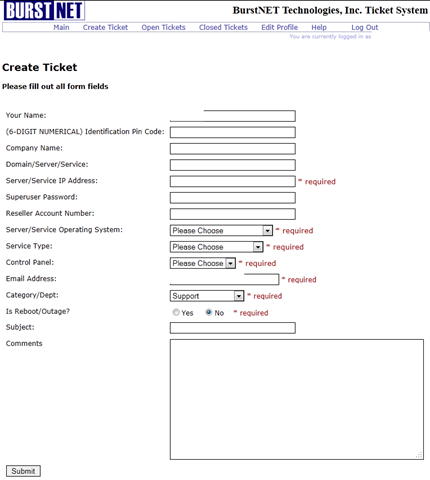
One big advantage I would like to mention about Burst’s helpdesk software is the ability to reply the ticket directly via email. Although I do not think it is a very difficult task, few VPS providers actually realise how useful it is to enable the functionalities to reply tickets directly via email so that the customers do not have to find the helpdesk URL, enter user name and password and then hit reply tickets, which could be frustrating once a while, particularly when the VPS is having a major issue.
Tests on the VPS
As mentioned above, the VPS that I have received has 512MB of RAM and 20 GB of hard drive space, with OpenVZ virtualization. The VPS is in Miami, Florida and I have put up Debian 6 32 bit for testing.
When the OS was initially loaded, it took about 315MB of memory, which is definitely really high:
free -m
             total       used       free     shared    buffers     cached
Mem:           512        315        196          0          0          0
-/+ buffers/cache:        315        196
Swap:            0          0          0
Top output shows that the only memory monster that was running was Apache2:
top - 15:45:43 up 1 day, 19:19,  1 user,  load average: 0.09, 0.03, 0.01
Tasks:  12 total,   2 running,  10 sleeping,   0 stopped,   0 zombie
Cpu(s):  0.0%us,  0.0%sy,  0.0%ni,100.0%id,  0.0%wa,  0.0%hi,  0.0%si,  0.0%st
Mem:    524800k total,   323812k used,   200988k free,        0k buffers
Swap:        0k total,        0k used,        0k free,        0k cached

  PID USER      PR  NI  VIRT  RES  SHR S %CPU %MEM    TIME+  COMMAND
32530 www-data  19   0  275m 2900 1376 S  0.0  0.6   0:00.00 apache2
 6015 root      18   0  8224 2752 2244 R  0.0  0.5   0:00.07 sshd
32515 root      18   0  5520 2740 1444 S  0.0  0.5   0:05.34 apache2
 6018 root      15   0  4012 2712 1332 S  0.0  0.5   0:00.16 bash
32529 www-data  19   0  5292 1852  560 S  0.0  0.4   0:00.00 apache2
27774 root      17   0 33436 1408 1044 S  0.0  0.3   0:00.12 rsyslogd
 6035 root      15   0  2324 1060  872 R  0.0  0.2   0:00.00 top
27786 root      15   0  5484  964  576 S  0.0  0.2   0:00.15 sshd
27843 root      15   0  2284  760  596 S  0.0  0.1   0:00.18 cron
    1 root      15   0  2024  680  588 S  0.0  0.1   0:02.31 init
27706 daemon    25   0  1800  472  388 S  0.0  0.1   0:00.00 portmap
27819 daemon    18   0  2152  416  292 S  0.0  0.1   0:00.00 atd
And the default installation took about 465MB of disk space:
df -h
Filesystem            Size  Used Avail Use% Mounted on
/dev/simfs             20G  465M   20G   3% /
tmpfs                 257M     0  257M   0% /lib/init/rw
tmpfs                 257M     0  257M   0% /dev/shm
After the LNMP stack was put up and apache2 was removed, the memory went down to 90MB:
 free -m
             total       used       free     shared    buffers     cached
Mem:           512         90        422          0          0          0
-/+ buffers/cache:         90        422
Swap:            0          0          0
And the corresponding top output:
top - 00:42:14 up 1 day, 20:16,  1 user,  load average: 0.02, 0.51, 0.78
Tasks:  19 total,   2 running,  17 sleeping,   0 stopped,   0 zombie
Cpu(s):  0.0%us,  0.3%sy,  0.0%ni, 99.7%id,  0.0%wa,  0.0%hi,  0.0%si,  0.0%st
Mem:    524800k total,    92404k used,   432396k free,        0k buffers
Swap:        0k total,        0k used,        0k free,        0k cached

  PID USER      PR  NI  VIRT  RES  SHR S %CPU %MEM    TIME+  COMMAND
27945 www       19   0 14492  10m  412 S  0.0  2.0   0:00.00 nginx
13722 mysql     19   0 34792 5828 3152 S  0.0  1.1   0:00.00 mysqld
27936 root      18   0 22700 4536 1380 S  0.0  0.9   0:00.11 php-cgi
27937 www       18   0 22700 4156 1000 S  0.0  0.8   0:00.00 php-cgi
27938 www       18   0 22700 4156 1000 S  0.0  0.8   0:00.00 php-cgi
27939 www       18   0 22700 4156 1000 S  0.0  0.8   0:00.00 php-cgi
27940 www       18   0 22700 4156 1000 S  0.0  0.8   0:00.00 php-cgi
27941 www       18   0 22700 4156 1000 S  0.0  0.8   0:00.00 php-cgi
 6015 root      16   0  8360 2784 2244 R  0.0  0.5   0:02.29 sshd
 6018 root      15   0  4012 2720 1340 S  0.0  0.5   0:00.17 bash
27774 root      17   0 33436 1396 1044 S  0.0  0.3   0:00.12 rsyslogd
13619 root      25   0  2672 1204 1000 S  0.0  0.2   0:00.00 mysqld_safe
27968 root      15   0  2324 1068  876 R  0.0  0.2   0:00.00 top
27786 root      15   0  5484  964  576 S  0.0  0.2   0:00.15 sshd
27843 root      15   0  2284  760  596 S  0.0  0.1   0:00.19 cron
27944 root      19   0  4680  704  264 S  0.0  0.1   0:00.00 nginx
    1 root      15   0  2024  680  588 S  0.0  0.1   0:02.38 init
And used less than 2GB of hard drive space:
df -h
Filesystem            Size  Used Avail Use% Mounted on
/dev/simfs             20G  1.8G   19G   9% /
tmpfs                 257M     0  257M   0% /lib/init/rw
tmpfs                 257M     0  257M   0% /dev/shm
vmstat shows the VPS is very lightly used:
vmstat
procs -----------memory---------- ---swap-- -----io---- -system-- ----cpu----
 r  b   swpd   free   buff  cache   si   so    bi    bo   in   cs us sy id wa
 0  0      0 432096      0      0    0    0     3    15    0  122  1  0 99  0
And similar results in the output of uptime:
uptime
 00:43:05 up 1 day, 20:17,  1 user,  load average: 0.00, 0.43, 0.73
Beancounters shows some pretty decent values:
 cat /proc/user_beancounters
Version: 2.5
       uid  resource                     held              maxheld              barrier                limit              failcnt
  4006187:  kmemsize                  2955335              3827431             51200000             51200000                    0
            lockedpages                     0                    0                 2048                 2048                    0
            privvmpages                 23243               130666               131200               262200                    1
            shmpages                      642                  729               128000               128000                    0
            dummy                           0                    0                    0                    0                    0
            numproc                        22                   60                  500                  500                    0
            physpages                    7053                36749                    0            200000000                    0
            vmguarpages                     0                    0               512000               512000                    0
            oomguarpages                 7053                36749               512000               512000                    0
            numtcpsock                      6                    9                 4096                 4096                    0
            numflock                        3                    9                 2048                 2048                    0
            numpty                          1                    2                   32                   32                    0
            numsiginfo                      0                    3                 1024                 1024                    0
            tcpsndbuf                  221128               203624             20480000             20480000                    0
            tcprcvbuf                   98304              4759864             20480000             20480000                    0
            othersockbuf                11640                26024             20480000             20480000                    0
            dgramrcvbuf                     0                 8752             10240000             10240000                    0
            numothersock                   11                   13                 2048                 2048                    0
            dcachesize                 214092               226847             10240000             10240000                    0
            numfile                       591                 1086                50000                50000                    0
            dummy                           0                    0                    0                    0                    0
            dummy                           0                    0                    0                    0                    0
            dummy                           0                    0                    0                    0                    0
            numiptent                      24                   24                 2048                 2048                    0
Although I would question if the Inode value is set to a bit low:
 df -i
Filesystem            Inodes   IUsed   IFree IUse% Mounted on
/dev/simfs            400000   68961  331039   18% /
tmpfs                  65600       5   65595    1% /lib/init/rw
tmpfs                  65600       1   65599    1% /dev/shm
Disk I/O veries quite a bit, the first time when I ran dd test, the I/O was really good at about 80MB/s:
 dd if=/dev/zero of=test bs=64k count=16k conv=fdatasync
16384+0 records in
16384+0 records out
1073741824 bytes (1.1 GB) copied, 13.217 s, 81.2 MB/s
Second time running it after a while shows the results is not all that impressive:
 dd if=/dev/zero of=test bs=64k count=16k conv=fdatasync
16384+0 records in
16384+0 records out
1073741824 bytes (1.1 GB) copied, 23.8376 s, 45.0 MB/s
CPU info shows that the CPU given is indeed one core, however unlike advertised, the clock speed is actually not throttled:
cat /proc/cpuinfo
processor       : 0
vendor_id       : GenuineIntel
cpu family      : 6
model           : 44
model name      : Intel(R) Xeon(R) CPU           E5620  @ 2.40GHz
stepping        : 2
cpu MHz         : 2394.071
cache size      : 12288 KB
physical id     : 1
siblings        : 8
core id         : 0
cpu cores       : 4
apicid          : 32
fpu             : yes
fpu_exception   : yes
cpuid level     : 11
wp              : yes
flags           : fpu vme de pse tsc msr pae mce cx8 apic sep mtrr pge mca cmov pat pse36 clflush dts acpi mmx fxsr sse sse2 ss ht tm syscall nx pdpe1gb rdtscp lm constant_tsc ida nonstop_tsc arat pni monitor ds_cpl vmx smx est tm2 ssse3 cx16 xtpr sse4_1 sse4_2 popcnt lahf_lm
bogomips        : 4788.14
clflush size    : 64
cache_alignment : 64
address sizes   : 40 bits physical, 48 bits virtual
power management: [8]
vzfree shows no sign of overselling and interestingly enough, the burst RAM is 2GB in size, which is 4 times of the dedicated RAM:
vzfree
             Total     Used     Free
Kernel:     48.83M    2.83M   46.00M
Allocate:  512.50M   90.79M  421.71M (2000M Guaranteed)
Commit:   2000.00M   30.38M 1969.62M (30.4% of Allocated)
Swap:                 0.00M          (0.0% of Committed)
And this is again confirmed by meminfo output:
cat /proc/meminfo
MemTotal:       524800 kB
MemFree:        431660 kB
Buffers:             0 kB
Cached:              0 kB
SwapCached:          0 kB
Active:              0 kB
Inactive:            0 kB
HighTotal:           0 kB
HighFree:            0 kB
LowTotal:       524800 kB
LowFree:        431660 kB
SwapTotal:           0 kB
SwapFree:            0 kB
Dirty:           98540 kB
Writeback:           0 kB
AnonPages:           0 kB
Mapped:              0 kB
Slab:                0 kB
PageTables:          0 kB
NFS_Unstable:        0 kB
Bounce:              0 kB
CommitLimit:         0 kB
Committed_AS:        0 kB
VmallocTotal:        0 kB
VmallocUsed:         0 kB
VmallocChunk:        0 kB
HugePages_Total:     0
HugePages_Free:      0
HugePages_Rsvd:      0
Hugepagesize:     2048 kB
Downloading from Cachefly was pretty good, I was able to achieve over 10MBps:
wget cachefly.cachefly.net/100mb.test
--2011-08-12 00:45:43--  http://cachefly.cachefly.net/100mb.test
Resolving cachefly.cachefly.net... 205.234.175.175
Connecting to cachefly.cachefly.net|205.234.175.175|:80... connected.
HTTP request sent, awaiting response... 200 OK
Length: 104857600 (100M) [application/octet-stream]
Saving to: `100mb.test'

100%[======================================>] 104,857,600 11.0M/s   in 8.0s

2011-08-12 00:45:51 (12.5 MB/s) - `100mb.test' saved [104857600/104857600]
Considering that it is on shared 100Mbit port, it is a pretty good speed.
As for upload speed, it varies greatly based on location, with the east coast the worst, west coast in the middle, and surprisingly, UK location had the best upload speed:
First from my Nix Communication’s VPS in Montreal, Canada:
wget 184.22.120.20/100mb.test -O /dev/null
--2011-08-16 02:25:41--  http://184.22.120.20/100mb.test
Connecting to 184.22.120.20:80... connected.
HTTP request sent, awaiting response... 200 OK
Length: 104857600 (100M) [application/octet-stream]
Saving to: `/dev/null'

100%[======================================>] 104,857,600  938K/s   in 69s

2011-08-16 02:26:51 (1.44 MB/s) - `/dev/null' saved [104857600/104857600]
Note that I have added a parameter there to redirect the wget output to /dev/null to avoid any disk I/O issue.
With my BuyVM VPS in San Jose, CA (west coast):
wget 184.22.120.20/100mb.test -O /dev/null
--2011-08-15 14:24:22--  http://184.22.120.20/100mb.test
Connecting to 184.22.120.20:80... connected.
HTTP request sent, awaiting response... 200 OK
Length: 104857600 (100M) [application/octet-stream]
Saving to: `/dev/null'

100%[======================================>] 104,857,600 6.42M/s   in 18s

2011-08-15 14:24:40 (5.58 MB/s) - `/dev/null' saved [104857600/104857600]
And finally with Quickweb VPS in London, UK:
 wget 184.22.120.20/100mb.test -O /dev/null
--2011-08-15 14:28:21--  http://184.22.120.20/100mb.test
Connecting to 184.22.120.20:80... connected.
HTTP request sent, awaiting response... 200 OK
Length: 104857600 (100M) [application/octet-stream]
Saving to: `/dev/null'

100%[======================================>] 104,857,600 12.4M/s   in 10s

2011-08-15 14:28:32 (9.71 MB/s) - `/dev/null' saved [104857600/104857600]
It is interesting that despite the specifications seems decent, the UnixBench score does not turned out to be very great, which I assume was due to the fluctuation in disk I/O:
   #    #  #    #  #  #    #          #####   ######  #    #   ####   #    #
   #    #  ##   #  #   #  #           #    #  #       ##   #  #    #  #    #
   #    #  # #  #  #    ##            #####   #####   # #  #  #       ######
   #    #  #  # #  #    ##            #    #  #       #  # #  #       #    #
   #    #  #   ##  #   #  #           #    #  #       #   ##  #    #  #    #
    ####   #    #  #  #    #          #####   ######  #    #   ####   #    #

   Version 5.1.3                      Based on the Byte Magazine Unix Benchmark

   Multi-CPU version                  Version 5 revisions by Ian Smith,
                                      Sunnyvale, CA, USA
   January 13, 2011                   johantheghost at yahoo period com

1 x Dhrystone 2 using register variables  1 2 3 4 5 6 7 8 9 10

1 x Double-Precision Whetstone  1 2 3 4 5 6 7 8 9 10

1 x Execl Throughput  1 2 3

1 x File Copy 1024 bufsize 2000 maxblocks  1 2 3

1 x File Copy 256 bufsize 500 maxblocks  1 2 3

1 x File Copy 4096 bufsize 8000 maxblocks  1 2 3

1 x Pipe Throughput  1 2 3 4 5 6 7 8 9 10

1 x Pipe-based Context Switching  1 2 3 4 5 6 7 8 9 10

1 x Process Creation  1 2 3

1 x System Call Overhead  1 2 3 4 5 6 7 8 9 10

1 x Shell Scripts (1 concurrent)  1 2 3

1 x Shell Scripts (8 concurrent)  1 2 3

========================================================================
   BYTE UNIX Benchmarks (Version 5.1.3)

   System: burst: GNU/Linux
   OS: GNU/Linux -- 2.6.18-238.5.1.el5.028stab085.3 -- #1 SMP Mon Mar 21 20:05:12 MSK 2011
   Machine: i686 (unknown)
   Language: en_US.utf8 (charmap="ANSI_X3.4-1968", collate="ANSI_X3.4-1968")
   CPU 0: Intel(R) Xeon(R) CPU E5620 @ 2.40GHz (4788.1 bogomips)
          Hyper-Threading, x86-64, MMX, Physical Address Ext, SYSENTER/SYSEXIT, SYSCALL/SYSRET, Intel virtualization
   06:43:45 up 2 days,  2:17,  1 user,  load average: 0.09, 0.68, 0.98; runlevel 2

------------------------------------------------------------------------
Benchmark Run: Fri Aug 12 2011 06:43:45 - 07:12:11
1 CPU in system; running 1 parallel copy of tests

Dhrystone 2 using register variables       12818214.4 lps   (10.0 s, 7 samples)
Double-Precision Whetstone                     2582.9 MWIPS (9.9 s, 7 samples)
Execl Throughput                               3765.0 lps   (29.7 s, 2 samples)
File Copy 1024 bufsize 2000 maxblocks        492302.7 KBps  (30.0 s, 2 samples)
File Copy 256 bufsize 500 maxblocks          132234.9 KBps  (30.0 s, 2 samples)
File Copy 4096 bufsize 8000 maxblocks       1101314.2 KBps  (30.0 s, 2 samples)
Pipe Throughput                              878621.0 lps   (10.0 s, 7 samples)
Pipe-based Context Switching                 260134.1 lps   (10.0 s, 7 samples)
Process Creation                              11679.2 lps   (30.0 s, 2 samples)
Shell Scripts (1 concurrent)                   4256.3 lpm   (60.0 s, 2 samples)
Shell Scripts (8 concurrent)                    583.4 lpm   (60.1 s, 2 samples)
System Call Overhead                         677236.2 lps   (10.0 s, 7 samples)

System Benchmarks Index Values               BASELINE       RESULT    INDEX
Dhrystone 2 using register variables         116700.0   12818214.4   1098.4
Double-Precision Whetstone                       55.0       2582.9    469.6
Execl Throughput                                 43.0       3765.0    875.6
File Copy 1024 bufsize 2000 maxblocks          3960.0     492302.7   1243.2
File Copy 256 bufsize 500 maxblocks            1655.0     132234.9    799.0
File Copy 4096 bufsize 8000 maxblocks          5800.0    1101314.2   1898.8
Pipe Throughput                               12440.0     878621.0    706.3
Pipe-based Context Switching                   4000.0     260134.1    650.3
Process Creation                                126.0      11679.2    926.9
Shell Scripts (1 concurrent)                     42.4       4256.3   1003.8
Shell Scripts (8 concurrent)                      6.0        583.4    972.3
System Call Overhead                          15000.0     677236.2    451.5
                                                                   ========
System Benchmarks Index Score                                         858.3
Running it three days later, however, does not seem to give a better score:
   #    #  #    #  #  #    #          #####   ######  #    #   ####   #    #
   #    #  ##   #  #   #  #           #    #  #       ##   #  #    #  #    #
   #    #  # #  #  #    ##            #####   #####   # #  #  #       ######
   #    #  #  # #  #    ##            #    #  #       #  # #  #       #    #
   #    #  #   ##  #   #  #           #    #  #       #   ##  #    #  #    #
    ####   #    #  #  #    #          #####   ######  #    #   ####   #    #

   Version 5.1.3                      Based on the Byte Magazine Unix Benchmark

   Multi-CPU version                  Version 5 revisions by Ian Smith,
                                      Sunnyvale, CA, USA
   January 13, 2011                   johantheghost at yahoo period com

1 x Dhrystone 2 using register variables  1 2 3 4 5 6 7 8 9 10

1 x Double-Precision Whetstone  1 2 3 4 5 6 7 8 9 10

1 x Execl Throughput  1 2 3

1 x File Copy 1024 bufsize 2000 maxblocks  1 2 3

1 x File Copy 256 bufsize 500 maxblocks  1 2 3

1 x File Copy 4096 bufsize 8000 maxblocks  1 2 3

1 x Pipe Throughput  1 2 3 4 5 6 7 8 9 10

1 x Pipe-based Context Switching  1 2 3 4 5 6 7 8 9 10

1 x Process Creation  1 2 3

1 x System Call Overhead  1 2 3 4 5 6 7 8 9 10

1 x Shell Scripts (1 concurrent)  1 2 3

1 x Shell Scripts (8 concurrent)  1 2 3

========================================================================
   BYTE UNIX Benchmarks (Version 5.1.3)

   System: burst: GNU/Linux
   OS: GNU/Linux -- 2.6.18-238.5.1.el5.028stab085.3 -- #1 SMP Mon Mar 21 20:05:12 MSK 2011
   Machine: i686 (unknown)
   Language: en_US.utf8 (charmap="ANSI_X3.4-1968", collate="ANSI_X3.4-1968")
   CPU 0: Intel(R) Xeon(R) CPU E5620 @ 2.40GHz (4788.1 bogomips)
          Hyper-Threading, x86-64, MMX, Physical Address Ext, SYSENTER/SYSEXIT, SYSCALL/SYSRET, Intel virtualization
   01:51:39 up 5 days, 21:25,  1 user,  load average: 0.00, 0.00, 0.00; runlevel 2

------------------------------------------------------------------------
Benchmark Run: Tue Aug 16 2011 01:51:39 - 02:20:06
1 CPU in system; running 1 parallel copy of tests

Dhrystone 2 using register variables       12680222.9 lps   (10.0 s, 7 samples)
Double-Precision Whetstone                     2569.3 MWIPS (10.0 s, 7 samples)
Execl Throughput                               3738.0 lps   (29.9 s, 2 samples)
File Copy 1024 bufsize 2000 maxblocks        481810.7 KBps  (30.0 s, 2 samples)
File Copy 256 bufsize 500 maxblocks          132079.4 KBps  (30.0 s, 2 samples)
File Copy 4096 bufsize 8000 maxblocks       1079214.5 KBps  (30.0 s, 2 samples)
Pipe Throughput                              868606.3 lps   (10.0 s, 7 samples)
Pipe-based Context Switching                 260336.9 lps   (10.0 s, 7 samples)
Process Creation                              11679.5 lps   (30.0 s, 2 samples)
Shell Scripts (1 concurrent)                   4067.1 lpm   (60.0 s, 2 samples)
Shell Scripts (8 concurrent)                    570.9 lpm   (60.1 s, 2 samples)
System Call Overhead                         668336.1 lps   (10.0 s, 7 samples)

System Benchmarks Index Values               BASELINE       RESULT    INDEX
Dhrystone 2 using register variables         116700.0   12680222.9   1086.6
Double-Precision Whetstone                       55.0       2569.3    467.1
Execl Throughput                                 43.0       3738.0    869.3
File Copy 1024 bufsize 2000 maxblocks          3960.0     481810.7   1216.7
File Copy 256 bufsize 500 maxblocks            1655.0     132079.4    798.1
File Copy 4096 bufsize 8000 maxblocks          5800.0    1079214.5   1860.7
Pipe Throughput                               12440.0     868606.3    698.2
Pipe-based Context Switching                   4000.0     260336.9    650.8
Process Creation                                126.0      11679.5    926.9
Shell Scripts (1 concurrent)                     42.4       4067.1    959.2
Shell Scripts (8 concurrent)                      6.0        570.9    951.5
System Call Overhead                          15000.0     668336.1    445.6
                                                                   ========
System Benchmarks Index Score                                         847.1
GeekBench score is pretty good though:
System Information
  Platform:                  Linux x86 (32-bit)
  Compiler:                  GCC 4.1.2 20070925 (Red Hat 4.1.2-33)
  Operating System:          Linux 2.6.18-238.5.1.el5.028stab085.3 i686
  Model:                     Linux PC (Intel(R) Xeon(R) CPU           E5620  @ 2.40GHz)
  Motherboard:               Unknown Motherboard
  Processor:                 Intel(R) Xeon(R) CPU           E5620  @ 2.40GHz
  Processor ID:              GenuineIntel Family 6 Model 44 Stepping 2
  Logical Processors:        1
  Physical Processors:       1
  Processor Frequency:       2.39 GHz
  L1 Instruction Cache:      0.00 B
  L1 Data Cache:             0.00 B
  L2 Cache:                  256 KB
  L3 Cache:                  0.00 B
  Bus Frequency:             0.00 Hz
  Memory:                    23.5 GB
  Memory Type:               N/A
  SIMD:                      1
  BIOS:                      N/A
  Processor Model:           Intel(R) Xeon(R) CPU           E5620  @ 2.40GHz
  Processor Cores:           1

Integer
  Blowfish
    single-threaded scalar    1794 |||||||
    multi-threaded scalar     1880 |||||||
  Text Compress
    single-threaded scalar    2019 ||||||||
    multi-threaded scalar     1941 |||||||
  Text Decompress
    single-threaded scalar    2010 ||||||||
    multi-threaded scalar     2038 ||||||||
  Image Compress
    single-threaded scalar    1674 ||||||
    multi-threaded scalar     1642 ||||||
  Image Decompress
    single-threaded scalar    1548 ||||||
    multi-threaded scalar     1630 ||||||
  Lua
    single-threaded scalar    3104 ||||||||||||
    multi-threaded scalar     3130 ||||||||||||

Floating Point
  Mandelbrot
    single-threaded scalar    2066 ||||||||
    multi-threaded scalar     2182 ||||||||
  Dot Product
    single-threaded scalar    3450 |||||||||||||
    multi-threaded scalar     3639 ||||||||||||||
    single-threaded vector    4159 ||||||||||||||||
    multi-threaded vector     4484 |||||||||||||||||
  LU Decomposition
    single-threaded scalar    2462 |||||||||
    multi-threaded scalar     2433 |||||||||
  Primality Test
    single-threaded scalar    3397 |||||||||||||
    multi-threaded scalar     2784 |||||||||||
  Sharpen Image
    single-threaded scalar    5871 |||||||||||||||||||||||
    multi-threaded scalar     5719 ||||||||||||||||||||||
  Blur Image
    single-threaded scalar    5272 |||||||||||||||||||||
    multi-threaded scalar     5328 |||||||||||||||||||||

Memory
  Read Sequential
    single-threaded scalar    4413 |||||||||||||||||
  Write Sequential
    single-threaded scalar    7860 |||||||||||||||||||||||||||||||
  Stdlib Allocate
    single-threaded scalar    3725 ||||||||||||||
  Stdlib Write
    single-threaded scalar    3236 ||||||||||||
  Stdlib Copy
    single-threaded scalar    6527 ||||||||||||||||||||||||||

Stream
  Stream Copy
    single-threaded scalar    5415 |||||||||||||||||||||
    single-threaded vector    7532 ||||||||||||||||||||||||||||||
  Stream Scale
    single-threaded scalar    4073 ||||||||||||||||
    single-threaded vector    7164 ||||||||||||||||||||||||||||
  Stream Add
    single-threaded scalar    4746 ||||||||||||||||||
    single-threaded vector    7104 ||||||||||||||||||||||||||||
  Stream Triad
    single-threaded scalar    4957 |||||||||||||||||||
    single-threaded vector    4880 |||||||||||||||||||

Integer Score:                2034 ||||||||
Floating Point Score:         3803 |||||||||||||||
Memory Score:                 5152 ||||||||||||||||||||
Stream Score:                 5733 ||||||||||||||||||||||

Overall Geekbench Score:      3646 ||||||||||||||
And testing again 3 days later shows pretty consistent results:
System Information
  Platform:                  Linux x86 (32-bit)
  Compiler:                  GCC 4.1.2 20070925 (Red Hat 4.1.2-33)
  Operating System:          Linux 2.6.18-238.5.1.el5.028stab085.3 i686
  Model:                     Linux PC (Intel(R) Xeon(R) CPU           E5620  @ 2.40GHz)
  Motherboard:               Unknown Motherboard
  Processor:                 Intel(R) Xeon(R) CPU           E5620  @ 2.40GHz
  Processor ID:              GenuineIntel Family 6 Model 44 Stepping 2
  Logical Processors:        1
  Physical Processors:       1
  Processor Frequency:       2.39 GHz
  L1 Instruction Cache:      0.00 B
  L1 Data Cache:             0.00 B
  L2 Cache:                  256 KB
  L3 Cache:                  0.00 B
  Bus Frequency:             0.00 Hz
  Memory:                    23.5 GB
  Memory Type:               N/A
  SIMD:                      1
  BIOS:                      N/A
  Processor Model:           Intel(R) Xeon(R) CPU           E5620  @ 2.40GHz
  Processor Cores:           1

Integer
  Blowfish
    single-threaded scalar    1765 |||||||
    multi-threaded scalar     1922 |||||||
  Text Compress
    single-threaded scalar    1965 |||||||
    multi-threaded scalar     1901 |||||||
  Text Decompress
    single-threaded scalar    1982 |||||||
    multi-threaded scalar     2031 ||||||||
  Image Compress
    single-threaded scalar    1703 ||||||
    multi-threaded scalar     1663 ||||||
  Image Decompress
    single-threaded scalar    1578 ||||||
    multi-threaded scalar     1605 ||||||
  Lua
    single-threaded scalar    3048 ||||||||||||
    multi-threaded scalar     3108 ||||||||||||

Floating Point
  Mandelbrot
    single-threaded scalar    2125 ||||||||
    multi-threaded scalar     2183 ||||||||
  Dot Product
    single-threaded scalar    3429 |||||||||||||
    multi-threaded scalar     3705 ||||||||||||||
    single-threaded vector    4141 ||||||||||||||||
    multi-threaded vector     4608 ||||||||||||||||||
  LU Decomposition
    single-threaded scalar    2376 |||||||||
    multi-threaded scalar     2403 |||||||||
  Primality Test
    single-threaded scalar    3440 |||||||||||||
    multi-threaded scalar     2767 |||||||||||
  Sharpen Image
    single-threaded scalar    5652 ||||||||||||||||||||||
    multi-threaded scalar     5870 |||||||||||||||||||||||
  Blur Image
    single-threaded scalar    5346 |||||||||||||||||||||
    multi-threaded scalar     5135 ||||||||||||||||||||

Memory
  Read Sequential
    single-threaded scalar    4372 |||||||||||||||||
  Write Sequential
    single-threaded scalar    7891 |||||||||||||||||||||||||||||||
  Stdlib Allocate
    single-threaded scalar    3852 |||||||||||||||
  Stdlib Write
    single-threaded scalar    3298 |||||||||||||
  Stdlib Copy
    single-threaded scalar    6220 ||||||||||||||||||||||||

Stream
  Stream Copy
    single-threaded scalar    5656 ||||||||||||||||||||||
    single-threaded vector    7646 ||||||||||||||||||||||||||||||
  Stream Scale
    single-threaded scalar    4300 |||||||||||||||||
    single-threaded vector    6562 ||||||||||||||||||||||||||
  Stream Add
    single-threaded scalar    4849 |||||||||||||||||||
    single-threaded vector    5933 |||||||||||||||||||||||
  Stream Triad
    single-threaded scalar    4720 ||||||||||||||||||
    single-threaded vector    4743 ||||||||||||||||||

Integer Score:                2022 ||||||||
Floating Point Score:         3798 |||||||||||||||
Memory Score:                 5126 ||||||||||||||||||||
Stream Score:                 5551 ||||||||||||||||||||||

Overall Geekbench Score:      3617 ||||||||||||||
Overall, the VPS has pretty decent hardware specifications and other than the disk I/O speed and perhaps the Inode was a little too low, the resources are pretty good for the price.
Customer Service and Support
Despite having a huge customer base and a somewhat outdated customer service system, the customer service level is actually and surprisingly pretty good. My first technical support request was replied in about half an hour (ticket was submitted at 2:31pm and reply was received at 3:12pm, which was the “slowest” one among all. The reply for that ticket was answered in 6 minutes and another tickets that I have put in at 8:00pm was answered at 8:05pm.
Billing department, although quite frankly Jennifer sometimes appears to be quite blunt in response, was nonetheless pretty efficient. My only ticket with billing was raised at 2:02pm and response was received at 4:14pm.
Conclusion
Being perhaps one of the oldest companies in VPS service definitely has its advantages, economies of scale enabled Burst to offer a pretty good specification with at a very decent price. Although disk I/O may fluctuate a lot and the Inode set to a bit low value, which made me probably would think twice before putting any production platform on it, it is nonetheless a very good VPS for non-production uses. The vePortal control panel is definitely impressive and the customer service is pretty fast, furthermore, since Burst has been in business for 20 years, knowing that it is unlikely to be in the deadpool soon is definitely something that would give them a few more points.
Have you tested to send email to Yahoo mail, with that VPS?
Nope, I did not when I did the test, but I decided to give it a try just now and it was OK:
X-Originating-IP: [184.22.120.20]

Authentication-Results: mta1005.mail.cnb.yahoo.com  from=96mb.com; domainkeys=neutral (no sig);  from=96mb.com; dkim=neutral (no sig)

Received: from 127.0.0.1  (EHLO burst) (184.22.120.20)

  by mta1005.mail.cnb.yahoo.com with SMTP; Tue, 16 Aug 2011 11:16:59 +0800

Received: by burst (Postfix, from userid 1001)

	id 7BFB2CE0688; Tue, 16 Aug 2011 11:17:57 +0800 (CST)
Thanks for the review.
I would like to touch on a few points you mentioned:
• Every node has a FQDN. If you need one you only have to send in a request.
• Inodes – We start them at a decent level and will raise them upon request at no charge/issue.
• Template Names for OS – As we do not offer minimal installs, there’s no need for template names.
•Backups – The ability to backup for free comes with every VPS. The reason you probably did not see anything was because your backup was not complete. You should have a directory listing available by now.You can also DL your backup and store it off-site as we do not do backups of your data.
•IPV6 – It should have set them up automatically for you (Some older nodes in Scranton do not, but all Miami nodes should have that). If you can provide the first four numbers of your VEID, or open a ticket and ask that engineers look into it (And mention this link) we can look into that.
•Jennifer – She’s extremely pleasant, but sometimes when there’s a lot of tickets and issues (And you can imagine how many we have with the free month offer), she has to tuck the charm into a back-pocket for a wee bit. Either way she is always helpful and thorough.
•Benchmarks – IMHO running benchmarks on VPS is akin to running performance tests on a Yugo (http://en.wikipedia.org/wiki/Zastava_Koral). 🙂
I hope this cleared up a few points. Feel free to ask us any questions any time.
” interestingly enough, the burst RAM is 2GB in size, which is 4 times of the dedicated RAM”
The burst ram is set to 512mb and the guaranteed ram set to 2GB. Since OpenVZ primarily limits allocation by the burst ram you will never be able to allocate more than 512mb.
@dmmcintyre3: but you will still be able to use more than 512MB correct? Even though you perhaps can’t do that 24×7?
no, 512mb is all you can allocate.
@dmmcintyre3: So you can NEVER go over 512MB? Basically it is like you have a server with only 512MB of RAM set up and nothing else for memory?
512mb is the limit.
@dmmcintyre3: Interesting, all along my understanding is like 512MB is the “dedicated”, i.e, like your own little room where nobody else is allowed to enter, and 2G is like the “living room” where you could dump your stuff there for a while but not for too long. So in this case, what is the use of that 2GB then?
the 2000MB is what the “guarrenteed” ram is set to, but since the burst ram is set to 512mb you can’t use more than 512mb. I’m not sure why burst.net/veportal does it like that.
@dmmcintyre3: So this is like saying you have a room of 200sq ft but because you put up a wall with only 51.2 sq ft of space in there and only allows you to use that much space? That is so weird…
Well, it’s not EXACTLY like that.
Let’s take your private room analogy:
Let’s say you’re a slob and you fill your room to the rafters with crap. The person who is renting you the room has two options:
1) Let the room explode and try to clean up the mess.
2) Open the door a little and let some crap spill out into the living room so the room doesn’t explode and you don’t get paged at 2AM because some fool has chosen to take their one bedroom and act like it’s a mansion.
We choose option 2 as we hate getting paged 🙂
Basically, the 2G limit is like an overflow valve. If your server is gonna blow up, we vent it out a little. But it’s by no means BURSTABLE memory. It’s why we don’t advertize it. Now, our PREMIUM VPS’s does indeed have burstable memory, and can be utilized as such.
Hope this clears it up.
@BurstNET_CSM: So basically the idea is that this is like for emergency use only but won’t normally make available, correct? That is a rather interesting set up 🙂
Pingback: 96MB Low End VPS Review Part 67–Virpus Xen - 96MB.com