
96MB Low End VPS Review Part XV – Secure Dragon
For those low end VPS fans, 15 seems to be a magic price point for many of the ultra-low-end VPs providers. Many of the companies have tried to shoot at this price point and almost every one of them failed. Most of them either oversold the resources so much that makes the box completely unusable, or the price points becomes so unsustainable that eventually the provider just collect cash and run.
Therefore, when Secure Dragon (which has nothing to do with Chinese dragon, I believe) offered a 96MB guaranteed memory low end VPS on LowEndBox.com, and disclaimed “No Overselling!” in bold on their home page, I was instantly curious to see how the performance of such a ultra-low-end VPS would be like.
General Information and Sign Up
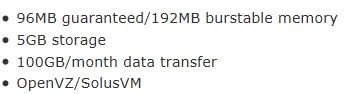
As per the post on LowEndBox, here is the specifications of this low end VPS:
On their product homepage, there are actually more information about this package:
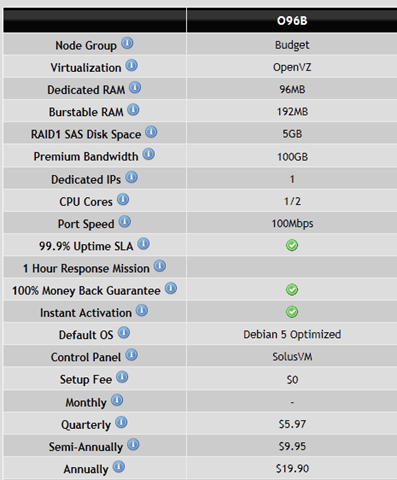
As you can see, the VPS provision was advertised as instant activation. However, what is more notable about them is the fact that they offer Money Back Guarantee for as long as one month!

Compare to most of the VPS providers, even the big names like BuyVM, which has clearly stated that they do not offer refunds, it is indeed a pretty bold move that Secure Dragon is taking.
It is also interesting to note that they have a live counter on the estimated time of ticket response on their website, which is something I have never seen before:

Although they do not guarantee response times, I have been checking this page at different times during the day and I have yet to see any response time for above an hour. Furthermore, unlike most of the ultra-low-end VPS providers, who only offer unmanaged services, Secure Dragon actually offer semi-managed services, which means they perhaps have more work to do than the unmanaged providers.
It is also interesting to note that their entire website is on HTTPs connection, which is really “secure” indeed.
Set up on the server is indeed instant, my Paypal confirmation comes in at 9:43pm and the new VPS information arrived within the same minute. It is good to note that all the password in the email is replaced by *OMITTED*.
The SolusVM address in the email is not on the standard HTTP/HTTPS port, however this announcement has indicated that they now have both secured and unsecured SolusVM access on standard port, which is something great.
After signing into the WHMCS control panel, the VPS control is, as with many other providers, under the services page:
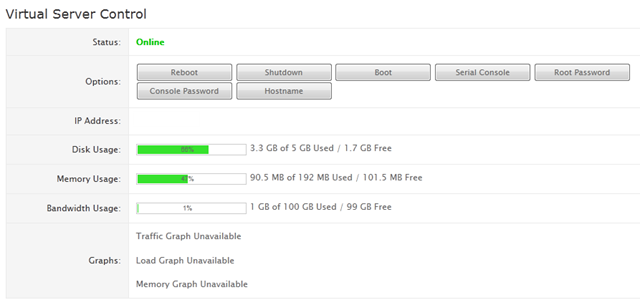
As usual, the basic functionalities to control the VPS are available, and there are also bar graph showing the percentage of resources usage, however the actual resources time series graph are disabled to save on memory usage.
SolusVM shows a pretty standard screen after login using the user name that was assigned to you, which, on a side note, is a common practice by the VPS providers which I dislike. Basically, BuyVM uses your email address as the user names for SolusVM and Quickweb allow you to use anything after submitting a ticket to them, which are both great, I mean, at the end of the day, who is going to remember XYZ648 is my VPS A SolusVM login and ABC359 is my VPS B SolusVM login?
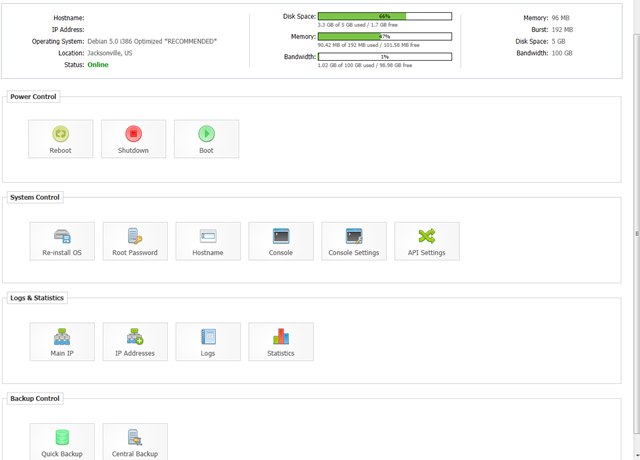
As with many other providers, rDNS is not instant and both built-in backup features are not working.
They have, however, a decent collections of OS templates, and instead of focusing on providing many distributions, they actually chose to focus on providing some ready-to-go packages:
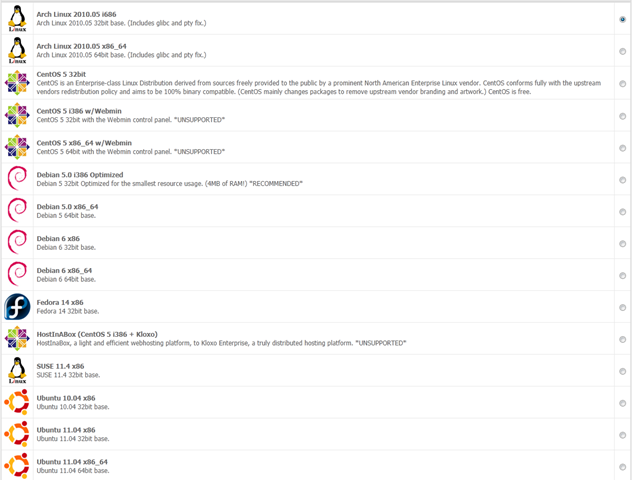
The most interesting one in the list is the Debian minimal template, which according to the description, takes only 4MB of RAM and that is what I used for testing in this particular VPS.
Test on the Box
The VPS I have received, as indicated above, has 96MB of dedicated RAM (96MB burstable), 1 CPU core and 5GB disk drive space and according to this post, they own their hardware in GoRack data centre in Jacksonville, Florida.
Without installing any software after reloading the Debian minimal template, here is the RAM usage:
free -m
             total       used       free     shared    buffers     cached
Mem:           192         38        153          0          0          0
-/+ buffers/cache:         38        153
Swap:            0          0          0
As you can see, it is definitely way more than the 4MB RAM that was advertised. In fact, as shown in the top output below, SSH daemon + bash shell alone used more than 4MB of memory:
top - 21:48:04 up 4 min,  1 user,  load average: 0.00, 0.02, 0.00
Tasks:   7 total,   2 running,   5 sleeping,   0 stopped,   0 zombie
Cpu(s):  0.0%us,  0.0%sy,  0.0%ni,100.0%id,  0.0%wa,  0.0%hi,  0.0%si,  0.0%st
Mem:    196608k total,    39912k used,   156696k free,        0k buffers
Swap:        0k total,        0k used,        0k free,        0k cached

  PID USER      PR  NI  VIRT  RES  SHR S %CPU %MEM    TIME+  COMMAND
 1387 root      16   0  8020 2708 2224 R  0.0  1.4   0:00.01 sshd
 1390 root      15   0  2764 1484 1180 S  0.0  0.8   0:00.00 bash
 1322 root      18   0 33136 1224  936 S  0.0  0.6   0:00.00 rsyslogd
 1394 root      15   0  2260 1068  880 R  0.0  0.5   0:00.00 top
 1331 root      18   0  5276 1032  680 S  0.0  0.5   0:00.00 sshd
 1349 root      18   0  2040  788  636 S  0.0  0.4   0:00.00 cron
    1 root      18   0  1984  688  588 S  0.0  0.3   0:02.12 init
However, I have to admit that they have definitely put in considerable effort to bring down the memory usage and this is definitely one of the shortest top output that I have ever observed.
The magic actually happened after I cleaned up the system a little bit using the famous Low End Script on LEB:
 free -m
             total       used       free     shared    buffers     cached
Mem:           192          3        188          0          0          0
-/+ buffers/cache:          3        188
Swap:            0          0          0
Now we are seriously talking about 4MB of RAM usage, which is confirmed again by the top output:
top - 21:54:09 up 0 min,  1 user,  load average: 0.16, 0.06, 0.02
Tasks:   7 total,   2 running,   5 sleeping,   0 stopped,   0 zombie
Cpu(s):  0.0%us,  0.0%sy,  0.0%ni,100.0%id,  0.0%wa,  0.0%hi,  0.0%si,  0.0%st
Mem:    196608k total,     4188k used,   192420k free,        0k buffers
Swap:        0k total,        0k used,        0k free,        0k cached

  PID USER      PR  NI  VIRT  RES  SHR S %CPU %MEM    TIME+  COMMAND
 1369 root      15   0  2764 1484 1180 S  0.0  0.8   0:00.00 bash
 1368 root      15   0  2356 1240  828 R  0.0  0.6   0:00.08 dropbear
 1373 root      15   0  2260 1068  880 R  0.0  0.5   0:00.00 top
 1356 root      18   0  2040  788  636 S  0.0  0.4   0:00.00 cron
    1 root      15   0  1984  688  588 S  0.0  0.3   0:02.12 init
 1330 root      18   0  1884  680  564 S  0.0  0.3   0:00.00 syslogd
 1338 root      18   0  2044  464  364 S  0.0  0.2   0:00.00 dropbear
Even with the full LNMP stack installed, the total memory usage is still about 60MB, which is really good:
 free -m
             total       used       free     shared    buffers     cached
Mem:           192         59        132          0          0          0
-/+ buffers/cache:         59        132
Swap:            0          0          0
And the corresponding top output:
top - 23:19:45 up 13:24,  1 user,  load average: 0.00, 0.00, 0.00
Tasks:  14 total,   2 running,  12 sleeping,   0 stopped,   0 zombie
Cpu(s):  0.5%us,  0.5%sy,  0.0%ni, 98.9%id,  0.0%wa,  0.0%hi,  0.0%si,  0.0%st
Mem:    196608k total,    61404k used,   135204k free,        0k buffers
Swap:        0k total,        0k used,        0k free,        0k cached

  PID USER      PR  NI  VIRT  RES  SHR S %CPU %MEM    TIME+  COMMAND
16169 www       15   0 15380  11m  852 S  0.0  6.0   0:19.84 nginx
11966 www       16   0 23968 6860 3408 S  0.6  3.5   1:13.15 php-fpm
11967 www       16   0 23968 6648 3408 S  0.0  3.4   1:17.99 php-fpm
11356 mysql     18   0 37048 5924 3220 S  0.0  3.0   0:00.00 mysqld
11965 root      15   0 23680 4080 1180 S  0.0  2.1   0:00.07 php-fpm
16167 root      19   0  4792 2196 1744 S  0.0  1.1   0:00.00 nginx
 1368 root      15   0  2768 1492 1180 S  0.0  0.8   0:00.00 bash
 1367 root      16   0  2464 1304  832 R  0.0  0.7   0:03.69 dropbear
17744 root      15   0  2328 1096  900 R  0.0  0.6   0:00.00 top
17554 root      15   0  2288  764  600 S  0.0  0.4   0:00.00 cron
 1329 root      15   0  1884  708  588 S  0.0  0.4   0:00.01 syslogd
    1 root      15   0  2028  688  600 S  0.0  0.3   0:03.07 init
10230 root      25   0  1744  532  448 S  0.0  0.3   0:00.00 mysqld_safe
 1337 root      18   0  2044  468  372 S  0.0  0.2   0:00.00 dropbear
Vzfree shows no signs of overselling:
 vzfree
             Total     Used     Free
Kernel:   2048.00M    2.53M 2045.47M
Allocate:  192.00M  106.16M   85.84M (96M Guaranteed)
Commit:     96.00M   85.19M   10.81M (77.9% of Allocated)
Swap:                 0.00M          (0.0% of Committed)
The Inodes is set to pretty high limits, which is something great:
df -i
Filesystem            Inodes   IUsed   IFree IUse% Mounted on
tmpfs                  24576       3   24573    1% /lib/init/rw
tmpfs                  24576       1   24575    1% /dev/shm
/dev/simfs           2621440   79931 2541509    4% /
There is not trace of disk space overselling as well:
 df -h
Filesystem            Size  Used Avail Use% Mounted on
tmpfs                  96M     0   96M   0% /lib/init/rw
tmpfs                  96M     0   96M   0% /dev/shm
/dev/simfs            5.0G  1.9G  3.2G  38% /
vmstat shows the node is pretty lightly used:
 vmstat
procs -----------memory---------- ---swap-- -----io---- -system-- ----cpu----
 r  b   swpd   free   buff  cache   si   so    bi    bo   in   cs us sy id wa
 0  0      0  88224      0      0    0    0     0    29    0  181  2  0 98  0
which is again, proved by the output of uptime:
 uptime
 21:21:25 up 1 day, 11:26,  1 user,  load average: 0.01, 0.02, 0.00
Although some of the beancounters values are not that high, we have to keep in mind that this box offers only 96MB of guaranteed memory:
 cat /proc/user_beancounters
Version: 2.5
       uid  resource                     held              maxheld              barrier                limit              failcnt
      226:  kmemsize                  2696742              5057456           2147483646           2147483646                    0
            lockedpages                     0                  411               999999               999999                    0
            privvmpages                 27177                46705                49152                49152                    0
            shmpages                      130                  656                24576                24576                    0
            dummy                           0                    0                    0                    0                    0
            numproc                        16                   28               999999               999999                    0
            physpages                   21159                32101                    0           2147483647                    0
            vmguarpages                     0                    0                24576           2147483647                    0
            oomguarpages                21159                32101                24576           2147483647                    0
            numtcpsock                      4                   12              7999992              7999992                    0
            numflock                        1                    7               999999               999999                    0
            numpty                          1                    2               500000               500000                    0
            numsiginfo                      0                    6               999999               999999                    0
            tcpsndbuf                   72344               398496            214748160            396774400                    0
            tcprcvbuf                   65536              3502832            214748160            396774400                    0
            othersockbuf                 9312              4275728            214748160            396774400                    0
            dgramrcvbuf                     0                 8752            214748160            396774400                    0
            numothersock                    8                   34              7999992              7999992                    0
            dcachesize                 212214               334284           2147483646           2147483646                    0
            numfile                      1043                 1539             23999976             23999976                    0
            dummy                           0                    0                    0                    0                    0
            dummy                           0                    0                    0                    0                    0
            dummy                           0                    0                    0                    0                    0
            numiptent                      14                   14               999999               999999                    0
The disk I/O is actually pretty good for this small box, and it is consistently above 50MB/s:
 dd if=/dev/zero of=test bs=64k count=16k conv=fdatasync
16384+0 records in
16384+0 records out
1073741824 bytes (1.1 GB) copied, 18.9565 s, 56.6 MB/s
The results are pretty consistent:
 dd if=/dev/zero of=test bs=64k count=16k conv=fdatasync
16384+0 records in
16384+0 records out
1073741824 bytes (1.1 GB) copied, 18.5315 s, 57.9 MB/s
It is interesting to note that in the description of the product, each user get half of a CPU core, I was wondering how it was done initially, but when I checked out the cpuinfo, it all make sense:
cat /proc/cpuinfo
processor       : 0
vendor_id       : GenuineIntel
cpu family      : 6
model           : 15
model name      : Intel(R) Xeon(R) CPU            5150  @ 2.66GHz
stepping        : 6
cpu MHz         : 1329.997
cache size      : 4096 KB
physical id     : 0
siblings        : 2
core id         : 0
cpu cores       : 2
apicid          : 0
fpu             : yes
fpu_exception   : yes
cpuid level     : 10
wp              : yes
flags           : fpu vme de pse tsc msr pae mce cx8 apic sep mtrr pge mca cmov pat pse36 clflush dts acpi mmx fxsr sse sse2 ss ht tm syscall nx lm constant_tsc pni monitor ds_cpl vmx est tm2 ssse3 cx16 xtpr lahf_lm
bogomips        : 5319.99
clflush size    : 64
cache_alignment : 64
address sizes   : 36 bits physical, 48 bits virtual
power management:
Basically, the CPU is a Xeon 2.66GHz CPU that is capped at 1.33GHz, which is half of the clock speed.
Meminfo again does not show too many interesting bits:
cat /proc/meminfo
MemTotal:       196608 kB
MemFree:         88296 kB
Buffers:             0 kB
Cached:              0 kB
SwapCached:          0 kB
Active:              0 kB
Inactive:            0 kB
HighTotal:           0 kB
HighFree:            0 kB
LowTotal:       196608 kB
LowFree:         88296 kB
SwapTotal:           0 kB
SwapFree:            0 kB
Dirty:           98020 kB
Writeback:           0 kB
AnonPages:           0 kB
Mapped:              0 kB
Slab:                0 kB
PageTables:          0 kB
NFS_Unstable:        0 kB
Bounce:              0 kB
CommitLimit:         0 kB
Committed_AS:        0 kB
VmallocTotal:        0 kB
VmallocUsed:         0 kB
VmallocChunk:        0 kB
HugePages_Total:     0
HugePages_Free:      0
HugePages_Rsvd:      0
Hugepagesize:     2048 kB
One interesting thing I have noticed is their time sync output, which seems to be a lot higher than the time sync output I have seen, which I guess (and please correct me if I am wrong) primarily due to the lack of physical power of the box:
 time sync

real    0m0.323s
user    0m0.000s
sys     0m0.037s
The download speed is pretty good especially considering it is a 100Mbps port:
 wget cachefly.cachefly.net/100mb.test
--2011-07-24 21:23:10--  http://cachefly.cachefly.net/100mb.test
Resolving cachefly.cachefly.net... 205.234.175.175
Connecting to cachefly.cachefly.net|205.234.175.175|:80... connected.
HTTP request sent, awaiting response... 200 OK
Length: 104857600 (100M) [application/octet-stream]
Saving to: `100mb.test'

100%[======================================>] 104,857,600 13.6M/s   in 14s

2011-07-24 21:23:24 (7.11 MB/s) - `100mb.test' saved [104857600/104857600]
As you can see, I am getting pretty much close to the line speed.
In terms of the upload speed, BuyVM is the first VPS that I tested the upload, and the speed is not all that great:
 wget 8.22.203.164/100mb.test
--2011-07-29 09:15:46--  http://8.22.203.164/100mb.test
Connecting to 8.22.203.164:80... connected.
HTTP request sent, awaiting response... 200 OK
Length: 104857600 (100M) [application/octet-stream]
Saving to: `100mb.test'

100%[======================================>] 104,857,600 4.45M/s   in 29s

2011-07-29 09:16:15 (3.42 MB/s) - `100mb.test' saved [104857600/104857600]
Testing with a Nix Communications VPS from Montreal, Canada, however, the upload speed from the Secure Dragon VPS is a lot better:
wget http://8.22.203.164/100mb.test
--2011-07-29 05:31:05--  http://8.22.203.164/100mb.test
Connecting to 8.22.203.164:80... connected.
HTTP request sent, awaiting response... 200 OK
Length: 104857600 (100M) [application/octet-stream]
Saving to: `100mb.test'

100%[======================================>] 104,857,600 10.5M/s   in 9.8s

2011-07-29 05:31:15 (10.2 MB/s) - `100mb.test' saved [104857600/104857600]
And the QuickWeb VPS in London, UK, gives a pretty slow speed too:
 wget http://8.22.203.164/100mb.test
--2011-07-28 22:13:46--  http://8.22.203.164/100mb.test
Connecting to 8.22.203.164:80... connected.
HTTP request sent, awaiting response... 200 OK
Length: 104857600 (100M) [application/octet-stream]
Saving to: `100mb.test'

100%[======================================>] 104,857,600 2.34M/s   in 39s

2011-07-28 22:14:25 (2.58 MB/s) - `100mb.test' saved [104857600/104857600]
Therefore, it seems that the download speed is only good for east coast locations and is slow for the west coast and European locations.
Finally, given the fact that the VPS has only 96MB of dedicated RAM, I was pretty surprised that it actually managed to completed the UnixBench tests, although obviously the score is pretty low:
   #    #  #    #  #  #    #          #####   ######  #    #   ####   #    #
   #    #  ##   #  #   #  #           #    #  #       ##   #  #    #  #    #
   #    #  # #  #  #    ##            #####   #####   # #  #  #       ######
   #    #  #  # #  #    ##            #    #  #       #  # #  #       #    #
   #    #  #   ##  #   #  #           #    #  #       #   ##  #    #  #    #
    ####   #    #  #  #    #          #####   ######  #    #   ####   #    #

   Version 5.1.3                      Based on the Byte Magazine Unix Benchmark

   Multi-CPU version                  Version 5 revisions by Ian Smith,
                                      Sunnyvale, CA, USA
   January 13, 2011                   johantheghost at yahoo period com


1 x Dhrystone 2 using register variables  1 2 3 4 5 6 7 8 9 10

1 x Double-Precision Whetstone  1 2 3 4 5 6 7 8 9 10

1 x Execl Throughput  1 2 3

1 x File Copy 1024 bufsize 2000 maxblocks  1 2 3

1 x File Copy 256 bufsize 500 maxblocks  1 2 3

1 x File Copy 4096 bufsize 8000 maxblocks  1 2 3

1 x Pipe Throughput  1 2 3 4 5 6 7 8 9 10

1 x Pipe-based Context Switching  1 2 3 4 5 6 7 8 9 10

1 x Process Creation  1 2 3

1 x System Call Overhead  1 2 3 4 5 6 7 8 9 10

1 x Shell Scripts (1 concurrent)  1 2 3

1 x Shell Scripts (8 concurrent)  1 2 3

========================================================================
   BYTE UNIX Benchmarks (Version 5.1.3)

   System: sd: GNU/Linux
   OS: GNU/Linux -- 2.6.18-238.12.1.el5.028stab091.1 -- #1 SMP Wed Jun 1 13:20:25 MSD 2011
   Machine: i686 (unknown)
   Language: en_US.utf8 (charmap="ANSI_X3.4-1968", collate="ANSI_X3.4-1968")
   CPU 0: Intel(R) Xeon(R) CPU 5150 @ 2.66GHz (5320.0 bogomips)
          Hyper-Threading, x86-64, MMX, Physical Address Ext, SYSENTER/SYSEXIT, SYSCALL/SYSRET, Intel virtualization
   21:29:37 up 1 day, 11:34,  1 user,  load average: 0.15, 0.08, 0.02; runlevel 2

------------------------------------------------------------------------
Benchmark Run: Sun Jul 24 2011 21:29:37 - 22:00:38
1 CPU in system; running 1 parallel copy of tests

Dhrystone 2 using register variables        7026307.1 lps   (10.0 s, 7 samples)
Double-Precision Whetstone                     2258.9 MWIPS (10.1 s, 7 samples)
Execl Throughput                               1846.0 lps   (29.3 s, 2 samples)
File Copy 1024 bufsize 2000 maxblocks        177335.9 KBps  (30.0 s, 2 samples)
File Copy 256 bufsize 500 maxblocks           55181.5 KBps  (30.0 s, 2 samples)
File Copy 4096 bufsize 8000 maxblocks        343895.9 KBps  (30.0 s, 2 samples)
Pipe Throughput                              396087.6 lps   (10.0 s, 7 samples)
Pipe-based Context Switching                 119821.6 lps   (10.0 s, 7 samples)
Process Creation                               5466.6 lps   (30.0 s, 2 samples)
Shell Scripts (1 concurrent)                   3760.9 lpm   (60.0 s, 2 samples)
Shell Scripts (8 concurrent)                    505.0 lpm   (60.1 s, 2 samples)
System Call Overhead                         317154.5 lps   (10.0 s, 7 samples)

System Benchmarks Index Values               BASELINE       RESULT    INDEX
Dhrystone 2 using register variables         116700.0    7026307.1    602.1
Double-Precision Whetstone                       55.0       2258.9    410.7
Execl Throughput                                 43.0       1846.0    429.3
File Copy 1024 bufsize 2000 maxblocks          3960.0     177335.9    447.8
File Copy 256 bufsize 500 maxblocks            1655.0      55181.5    333.4
File Copy 4096 bufsize 8000 maxblocks          5800.0     343895.9    592.9
Pipe Throughput                               12440.0     396087.6    318.4
Pipe-based Context Switching                   4000.0     119821.6    299.6
Process Creation                                126.0       5466.6    433.9
Shell Scripts (1 concurrent)                     42.4       3760.9    887.0
Shell Scripts (8 concurrent)                      6.0        505.0    841.6
System Call Overhead                          15000.0     317154.5    211.4
                                                                   ========
System Benchmarks Index Score                                         445.7
Second test produced similar results:
   #    #  #    #  #  #    #          #####   ######  #    #   ####   #    #
   #    #  ##   #  #   #  #           #    #  #       ##   #  #    #  #    #
   #    #  # #  #  #    ##            #####   #####   # #  #  #       ######
   #    #  #  # #  #    ##            #    #  #       #  # #  #       #    #
   #    #  #   ##  #   #  #           #    #  #       #   ##  #    #  #    #
    ####   #    #  #  #    #          #####   ######  #    #   ####   #    #

   Version 5.1.3                      Based on the Byte Magazine Unix Benchmark

   Multi-CPU version                  Version 5 revisions by Ian Smith,
                                      Sunnyvale, CA, USA
   January 13, 2011                   johantheghost at yahoo period com


1 x Dhrystone 2 using register variables  1 2 3 4 5 6 7 8 9 10

1 x Double-Precision Whetstone  1 2 3 4 5 6 7 8 9 10

1 x Execl Throughput  1 2 3

1 x File Copy 1024 bufsize 2000 maxblocks  1 2 3

1 x File Copy 256 bufsize 500 maxblocks  1 2 3

1 x File Copy 4096 bufsize 8000 maxblocks  1 2 3

1 x Pipe Throughput  1 2 3 4 5 6 7 8 9 10

1 x Pipe-based Context Switching  1 2 3 4 5 6 7 8 9 10

1 x Process Creation  1 2 3

1 x System Call Overhead  1 2 3 4 5 6 7 8 9 10

1 x Shell Scripts (1 concurrent)  1 2 3

1 x Shell Scripts (8 concurrent)  1 2 3

========================================================================
   BYTE UNIX Benchmarks (Version 5.1.3)

   System: sd: GNU/Linux
   OS: GNU/Linux -- 2.6.18-238.12.1.el5.028stab091.1 -- #1 SMP Wed Jun 1 13:20:25 MSD 2011
   Machine: i686 (unknown)
   Language: en_US.utf8 (charmap="ANSI_X3.4-1968", collate="ANSI_X3.4-1968")
   CPU 0: Intel(R) Xeon(R) CPU 5150 @ 2.66GHz (5320.0 bogomips)
          Hyper-Threading, x86-64, MMX, Physical Address Ext, SYSENTER/SYSEXIT, SYSCALL/SYSRET, Intel virtualization
   22:11:22 up 1 day, 12:15,  1 user,  load average: 0.04, 0.36, 0.84; runlevel 2

------------------------------------------------------------------------
Benchmark Run: Sun Jul 24 2011 22:11:22 - 22:42:15
1 CPU in system; running 1 parallel copy of tests

Dhrystone 2 using register variables        6808840.7 lps   (10.0 s, 7 samples)
Double-Precision Whetstone                     2212.9 MWIPS (10.1 s, 7 samples)
Execl Throughput                               1829.2 lps   (29.6 s, 2 samples)
File Copy 1024 bufsize 2000 maxblocks        171195.7 KBps  (30.0 s, 2 samples)
File Copy 256 bufsize 500 maxblocks           57220.3 KBps  (30.0 s, 2 samples)
File Copy 4096 bufsize 8000 maxblocks        330493.8 KBps  (30.0 s, 2 samples)
Pipe Throughput                              395309.8 lps   (10.0 s, 7 samples)
Pipe-based Context Switching                 120682.6 lps   (10.0 s, 7 samples)
Process Creation                               5305.6 lps   (30.0 s, 2 samples)
Shell Scripts (1 concurrent)                   3710.3 lpm   (60.0 s, 2 samples)
Shell Scripts (8 concurrent)                    485.2 lpm   (60.1 s, 2 samples)
System Call Overhead                         315396.4 lps   (10.0 s, 7 samples)

System Benchmarks Index Values               BASELINE       RESULT    INDEX
Dhrystone 2 using register variables         116700.0    6808840.7    583.4
Double-Precision Whetstone                       55.0       2212.9    402.3
Execl Throughput                                 43.0       1829.2    425.4
File Copy 1024 bufsize 2000 maxblocks          3960.0     171195.7    432.3
File Copy 256 bufsize 500 maxblocks            1655.0      57220.3    345.7
File Copy 4096 bufsize 8000 maxblocks          5800.0     330493.8    569.8
Pipe Throughput                               12440.0     395309.8    317.8
Pipe-based Context Switching                   4000.0     120682.6    301.7
Process Creation                                126.0       5305.6    421.1
Shell Scripts (1 concurrent)                     42.4       3710.3    875.1
Shell Scripts (8 concurrent)                      6.0        485.2    808.6
System Call Overhead                          15000.0     315396.4    210.3
                                                                   ========
System Benchmarks Index Score                                         438.9
And finally, the GeekBench tests produced a resonable score considering the limited amount of resources available:
System Information
  Platform:                  Linux x86 (32-bit)
  Compiler:                  GCC 4.1.2 20070925 (Red Hat 4.1.2-33)
  Operating System:          Linux 2.6.18-238.12.1.el5.028stab091.1 i686
  Model:                     Linux PC (Intel Xeon 5150)
  Motherboard:               Unknown Motherboard
  Processor:                 Intel Xeon 5150
  Processor ID:              GenuineIntel Family 6 Model 15 Stepping 6
  Logical Processors:        1
  Physical Processors:       1
  Processor Frequency:       1.33 GHz
  L1 Instruction Cache:      0.00 B
  L1 Data Cache:             0.00 B
  L2 Cache:                  4.00 MB
  L3 Cache:                  0.00 B
  Bus Frequency:             0.00 Hz
  Memory:                    15.6 GB
  Memory Type:               N/A
  SIMD:                      1
  BIOS:                      N/A
  Processor Model:           Intel Xeon 5150
  Processor Cores:           1

Integer
  Blowfish
    single-threaded scalar    1894 |||||||
    multi-threaded scalar     1021 ||||
  Text Compress
    single-threaded scalar    1079 ||||
    multi-threaded scalar     1023 ||||
  Text Decompress
    single-threaded scalar     949 |||
    multi-threaded scalar      981 |||
  Image Compress
    single-threaded scalar     916 |||
    multi-threaded scalar      898 |||
  Image Decompress
    single-threaded scalar     844 |||
    multi-threaded scalar      862 |||
  Lua
    single-threaded scalar    1743 ||||||
    multi-threaded scalar     1744 ||||||

Floating Point
  Mandelbrot
    single-threaded scalar    1008 ||||
    multi-threaded scalar     1020 ||||
  Dot Product
    single-threaded scalar    2003 ||||||||
    multi-threaded scalar     1971 |||||||
    single-threaded vector    1345 |||||
    multi-threaded vector     1546 ||||||
  LU Decomposition
    single-threaded scalar    2207 ||||||||
    multi-threaded scalar     2254 |||||||||
  Primality Test
    single-threaded scalar    1559 ||||||
    multi-threaded scalar     1253 |||||
  Sharpen Image
    single-threaded scalar    3193 ||||||||||||
    multi-threaded scalar     3217 ||||||||||||
  Blur Image
    single-threaded scalar    2423 |||||||||
    multi-threaded scalar     2375 |||||||||

Memory
  Read Sequential
    single-threaded scalar    1402 |||||
  Write Sequential
    single-threaded scalar    1944 |||||||
  Stdlib Allocate
    single-threaded scalar    1075 ||||
  Stdlib Write
    single-threaded scalar     666 ||
  Stdlib Copy
    single-threaded scalar     990 |||

Stream
  Stream Copy
    single-threaded scalar    1851 |||||||
    single-threaded vector    2038 ||||||||
  Stream Scale
    single-threaded scalar    1912 |||||||
    single-threaded vector    1961 |||||||
  Stream Add
    single-threaded scalar    1800 |||||||
    single-threaded vector    2046 ||||||||
  Stream Triad
    single-threaded scalar    1951 |||||||
    single-threaded vector    1520 ||||||

Integer Score:                1162 ||||
Floating Point Score:         1955 |||||||
Memory Score:                 1215 ||||
Stream Score:                 1884 |||||||

Overall Geekbench Score:      1522 ||||||
And again, the second time it showed a similar GeekBench score:
System Information
  Platform:                  Linux x86 (32-bit)
  Compiler:                  GCC 4.1.2 20070925 (Red Hat 4.1.2-33)
  Operating System:          Linux 2.6.18-238.12.1.el5.028stab091.1 i686
  Model:                     Linux PC (Intel Xeon 5150)
  Motherboard:               Unknown Motherboard
  Processor:                 Intel Xeon 5150
  Processor ID:              GenuineIntel Family 6 Model 15 Stepping 6
  Logical Processors:        1
  Physical Processors:       1
  Processor Frequency:       1.33 GHz
  L1 Instruction Cache:      0.00 B
  L1 Data Cache:             0.00 B
  L2 Cache:                  4.00 MB
  L3 Cache:                  0.00 B
  Bus Frequency:             0.00 Hz
  Memory:                    15.6 GB
  Memory Type:               N/A
  SIMD:                      1
  BIOS:                      N/A
  Processor Model:           Intel Xeon 5150
  Processor Cores:           1

Integer
  Blowfish
    single-threaded scalar    1907 |||||||
    multi-threaded scalar     1022 ||||
  Text Compress
    single-threaded scalar    1088 ||||
    multi-threaded scalar     1027 ||||
  Text Decompress
    single-threaded scalar     951 |||
    multi-threaded scalar      975 |||
  Image Compress
    single-threaded scalar     917 |||
    multi-threaded scalar      898 |||
  Image Decompress
    single-threaded scalar     859 |||
    multi-threaded scalar      862 |||
  Lua
    single-threaded scalar    1756 |||||||
    multi-threaded scalar     1742 ||||||

Floating Point
  Mandelbrot
    single-threaded scalar    1108 ||||
    multi-threaded scalar     1041 ||||
  Dot Product
    single-threaded scalar    2014 ||||||||
    multi-threaded scalar     1977 |||||||
    single-threaded vector    1363 |||||
    multi-threaded vector     1547 ||||||
  LU Decomposition
    single-threaded scalar    2211 ||||||||
    multi-threaded scalar     2249 ||||||||
  Primality Test
    single-threaded scalar    1559 ||||||
    multi-threaded scalar     1240 ||||
  Sharpen Image
    single-threaded scalar    3400 |||||||||||||
    multi-threaded scalar     3207 ||||||||||||
  Blur Image
    single-threaded scalar    2444 |||||||||
    multi-threaded scalar     2406 |||||||||

Memory
  Read Sequential
    single-threaded scalar    1394 |||||
  Write Sequential
    single-threaded scalar    1536 ||||||
  Stdlib Allocate
    single-threaded scalar    1094 ||||
  Stdlib Write
    single-threaded scalar     531 ||
  Stdlib Copy
    single-threaded scalar    1312 |||||

Stream
  Stream Copy
    single-threaded scalar    1857 |||||||
    single-threaded vector    2008 ||||||||
  Stream Scale
    single-threaded scalar    1983 |||||||
    single-threaded vector    2063 ||||||||
  Stream Add
    single-threaded scalar    1842 |||||||
    single-threaded vector    2098 ||||||||
  Stream Triad
    single-threaded scalar    2055 ||||||||
    single-threaded vector    1558 ||||||

Integer Score:                1167 ||||
Floating Point Score:         1983 |||||||
Memory Score:                 1173 ||||
Stream Score:                 1933 |||||||

Overall Geekbench Score:      1530 ||||||
Overall, the box has no sign of overselling, and besides download speed, it is generally pretty solid given the specifications.
Customer Service and Support
Although the VPS is advertised as semi-managed, what is included in semi-management is pretty vague and unlike Quality Servers, who has a pretty clear boundary on what is managed and what is not, Secure Dragon does not offer that kind of clarity on their website.
Having said that, however, their response time is pretty good, my first ticket with them is replied in 6 minutes (ticket submitted at 10:55AM, replied in 11:01AM) and the second follow-up ticket took 10 minutes (I replied in 11:24AM, ticket was responded at 11:34AM).
Furthermore, Secure Dragon actually put their estimated ticket response time on their website and as mentioned above, from what I have observed, the that time has rarely been more than an hour.
Conclusion
It is rare to see the ultra-low-end VPS providers who could provide a good VPS that is not heavily oversold and the performance are pretty solid with respect to the resources available, and I think Secure Dragon is definitely one of the success stories here. Fast response time, 30 days money back guarantee, and many other things make this deal a really sweet one. Besides the upload speed may not be that satisfactory, it is in general a pretty good ultra-low-end VPS, but once again, with respect to the resources available. For those who would like to sign up for one of these boxes, you have to realize that the resources you are assigned to is severely limited and hence you may not able to run everything you would like to run on it without very heavy optimization. Furthermore, although at the moment I do not think Secure Dragon is overselling any resources, posts like this one definitely make them to my watch list.
Very thorough review! I would like to point out a few things and hopefully clear up some confusion we might have caused you:
1) Our default Debian 5 install is now sitting at 4MB of RAM upon install. I don’t know why it jumped to 38MB but this was fixed when it was brought to our attention by one of our clients on the 21st.
# free -m

             total       used       free     shared    buffers     cached

Mem:           192          4        187          0          0          0

-/+ buffers/cache:          4        187

Swap:            0          0          0
2) About that overselling thread, that was created in response to numerous potential clients requesting that we offer them more resources than we had available and more resources than they are paying for “because it was OpenVZ”, i.e. overselling. After speaking with some of our clients on here, my partner, and the other users on WHT it was decided that we will stick to our “No Overselling EVAR!” policy. We decided that the type of users that are attracted to 5TB of bandwidth for a nickle isn’t the type of clients we want to attract because of the amount of time we spend in the help desk already.
3) Our semi-managed service is pretty extensive actually, it’s not supposed to be but we save the “we’re not fully managed” excuse as a last resort. So far we’ve handled a lot of tickets that some might consider out of the scope of semi-managed but the way we see it is if we know how to fix it and we have the ability to, then we’ll do it. We have the option for an additional $3/month you can have fully managed, but to be honest we try to treat all clients like that and short of making any changes to our nodes that might impact other users, we do our best. To give you an idea of some of the “semi-managed” support we’ve provided, here’s a list of tutorials we wrote specifically because these are some common tasks we were doing for clients: https://securedragon.net/knowledgebase.php?action=displaycat&catid=3
@Kujoe: Good to see the Debian template is fixed, I have just reloaded the OS template and I see here:
free -m
total used free shared buffers cached
Mem: 192 9 182 0 0 0
-/+ buffers/cache: 9 182
Swap: 0 0 0
which I definitely think it is very good, and here is the corresponding output from top:
top – 10:37:06 up 3 min, 1 user, load average: 0.00, 0.00, 0.00
Tasks: 7 total, 2 running, 5 sleeping, 0 stopped, 0 zombie
Cpu(s): 0.0%us, 0.0%sy, 0.0%ni,100.0%id, 0.0%wa, 0.0%hi, 0.0%si, 0.0%st
Mem: 196608k total, 9692k used, 186916k free, 0k buffers
Swap: 0k total, 0k used, 0k free, 0k cached
PID USER PR NI VIRT RES SHR S %CPU %MEM TIME+ COMMAND
1354 root 16 0 8212 2808 2220 R 0.0 1.4 0:00.02 sshd
1356 root 15 0 2764 1488 1180 S 0.0 0.8 0:00.00 bash
1361 root 15 0 2260 1060 876 R 0.0 0.5 0:00.00 top
1322 root 18 0 5276 1032 672 S 0.0 0.5 0:00.00 sshd
1340 root 18 0 2040 788 636 S 0.0 0.4 0:00.00 cron
1316 root 15 0 2852 740 548 S 0.0 0.4 0:00.00 syslog-ng
1 root 15 0 1984 688 588 S 0.0 0.3 0:03.17 init
It is also assuring to know that you guys have decided not to oversell the resources, I think it is a very good move.
Thanks for the clarification!
@KuJoe That’s a very good decision (point 2), respect 🙂 I also don’t want to share my node with bandwidth rapist kind of users 😀
looking forward for your xen offer 😛
@circus: I think your wish has been granted! They have a Xen 96MB plan at the moment and if you are already with them on their OpenVZ plan, they even offer you a discount with the discount code: XEN4US, which makes you pay 16 bucks per year!
Impressed by your post..
Very Describe and even you post every test,etc 🙂
Awesomeeeeeeeeeeeee!!!!! work
Excellent Review.
I signed up with these guys and wow! Awesome service. The coupon did not work at first so I emailed them, they responded in no time flat and fixed it. I signed up and had access to the vps in a few minutes.
I then emailed them to say thank you and they replied in a few minutes.
@Luma: Did you sign up with their Xen or OVZ product line? I have just got another of their Xen box to play around, wondering how will that go, I’ll post a review once I get to it 🙂
I went with the OpenVZ because that is all I need and it runs great.
Good luck with your Xen VM 🙂
I am using both, XEN PV and OpenVZ and both rock! although I was expecting to see KVM from this provider too but I think their plans for KVM are a few months away or something like that.
Overall, very decent support, very nice VPS and you are paying dirt cheap for an excellent service 🙂
@Asim: I have just done some testing today on the box, I agree it seems pretty solid, my only complain is that it does not have a 32bit OS, for some reason people really hate putting up 32 bit OS on Xen PV 🙁 OpenITC does not do that, Secure Dragon does not do that as well 🙁
Last time when I asked that Joe explained that he purchased these templates from another company and they advised not to use 32bit on a 64bit system. I feel that 32bits IS the way to do it on small boxes.
I have seen this company make positive progress and I hope it will grow and we can proudly say one day that YES we are one of the first customers of this company 🙂
@Asim: Glad to know, I think 64 bit is just wasting memory out of nothing, it will do better for those monster systems (with >=3GB memory I think), but for the small low end VPS, it does more bad than good. Unfortunately I think the only one that I can find some 32 bit OS template for Xen is Quickweb, Up2VPS used to have some 32 bit templates at one point (although for some reason the kernel says 64 bit, but I tried to install 64 bit programs on it and it asked me to install the 32 bit versions instead).
Anyways, I do agree with you, so far, my experience with Secure Dragon is great, and I do hope they can keep things like this, making them a potential candidate to move 96MB to as well.
Just wanted to let you know that we do have 32bit OS templates for our Xen PV servers now. I have not tested them extensively (simple tests for network connectivity and such) but a lot of clients are running them and have reported no issues (as in they actually opened tickets to let us know they haven’t had any problems).
I’m glad to read good reviews like this and love the comments, it lets us know that we’re doing it right and will work hard to keep it up. 🙂
@KuJoe: Am I allowed to be more greedy and ask for a minimal template that is similar to the one you have in OVZ?
Never mind, just realised it is the famous minimal template, thanks KuJoe!
To be honest the templates on Xen are not customized at all and are directly from Stacklet. I’m not familiar with building Xen templates so I’m forced to purchase them for now. 🙁
That being said I’ll see if I can trim it down more and type up a tutorial or even write a script for our clients. 😉
Hi,
this becuse OS was installed with default kernel so it shows 64bit but we have new OS using PyGrub so when you are rebuilt to 32bit kernel will be shows 32bit not 64bit . please not . it’s not for all version or all OS only which use PyGrub
like centos 6 etc
Thanks You
UP2VPS
Pingback: 96MB Low End VPS Review Part XVII – Secure Dragon Xen VPS | | 96MB.com96MB.com
Pingback: SecureDragon – $18/Year 128MB OpenVZ VPS in Jacksonville – Low End Box