
96MB Low End VPS Review Part XIII – IonVM
It has been a while since the last time I have signed up for a VPS, after all, the last time I did a count, I have already had 7 VPS under my name. Other than the VPS hosting this blog, and another one hosting another few low-traffic blog that I have, the rest are pretty much idle all the time. However, when IonVM offered a free 48-hour trial VPS, I figured it won’t cause me too much harm to sign up for another one, so I decided to give it a shot.
Set Up and General Information
Entering the signing up page in their WHMCS system using HTTPS, there was not too much information revealed about the trial VPS, however, it is interesting to note that the sign up page allow you to activate TUN/TAP devices during sign up, which is rare, if not the first one (BuyVM has TUN/TAP enabled by default) among the VPS providers:
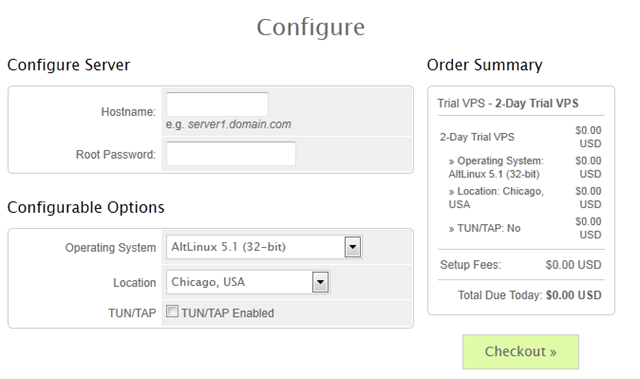
There are also three locations available for you to choose, Chicago in US, London in UK and Amsterdam in Netherlands.
Set up is instant, which is rare among the free trial VPS providers since most of them require manual setup due to fraud screening, so hopefully they have not received too many fraud orders yet.
The welcome email from IonVM is pretty standard, however the root password was sent by plain text.
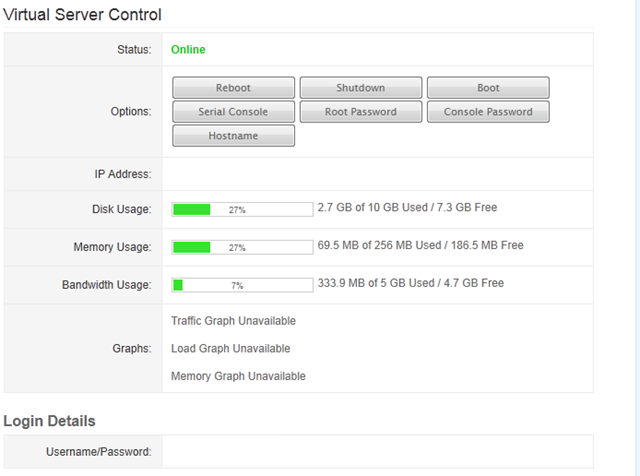
Login to the WHMCS interface (which is secured HTTP connection), you could see most of the functionalities to control VPS are there, however the traffic graphs are unavailable, presumably to save some CPU power on the main node. However, here is really the first time I see the main specifications of my VPS, which comes with 10GB of disk space, 128MB of guaranteed RAM and 5GB of bandwidth, which is pretty generous for 48 hours:
The SolusVM is set up on port 80 and using standard HTTP connection. It is a pretty standard SolusVM set up and the rDNS is not instant:
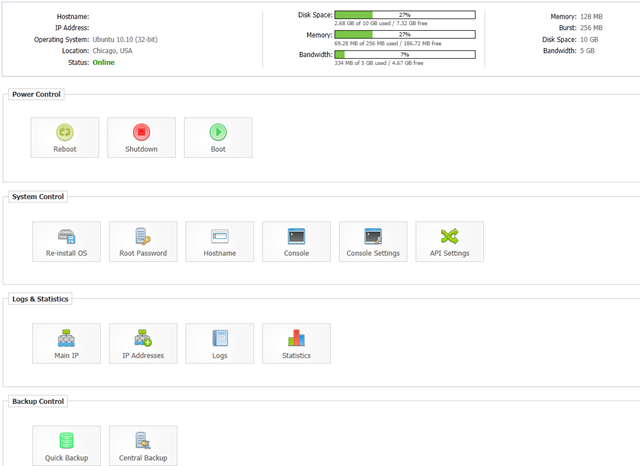
However, they do have quite a few OS templates available, including quite a few LAMP templates for instant set up of servers, as well as some TorrentFlux or ruTorrent templates, presumably for their seedbox VPS line:

One aspect worth noting though, IonVM has not only enabled the Central Backup, but has further provided 5 backup slots for the trial VPS, which is rather convenient and generous to the users if they have that many backup slots in the standard VPS lines for free as well:

Tests on VPS
Since it was never mentioned clearly what is the specification of the trial VPS on any of their advertisements, I can only assume what I got is what I am supposed to get, and for the trial VPS that I have received, it comes with 256MB of RAM:
 free -m
             total       used       free     shared    buffers     cached
Mem:           256         72        183          0          0          0
-/+ buffers/cache:         72        183
Swap:            0          0          0
Vzfree shows 128MB of RAM is guaranteed, which is pretty standard and does not show heavy overselling:
 vzfree
             Total     Used     Free
Kernel:   2048.00M    2.88M 2045.12M
Allocate:  256.00M  125.64M  130.36M (128M Guaranteed)
Commit:    128.00M   47.81M   80.19M (35.8% of Allocated)
Swap:                 0.00M          (0.0% of Committed)
CPU in the trial VPS is the old quad core Xeon L5320, capped at 1.86GHz, which is pretty unimpressive:
 cat /proc/cpuinfo
processor       : 0
vendor_id       : GenuineIntel
cpu family      : 6
model           : 15
model name      : Intel(R) Xeon(R) CPU           L5320  @ 1.86GHz
stepping        : 7
cpu MHz         : 1861.942
cache size      : 4096 KB
physical id     : 0
siblings        : 4
core id         : 0
cpu cores       : 4
apicid          : 0
fpu             : yes
fpu_exception   : yes
cpuid level     : 10
wp              : yes
flags           : fpu vme de pse tsc msr pae mce cx8 apic sep mtrr pge mca cmov pat pse36 clflush dts acpi mmx fxsr sse sse2 ss ht tm syscall nx lm constant_tsc pni monitor ds_cpl vmx tm2 ssse3 cx16 xtpr lahf_lm
bogomips        : 3723.88
clflush size    : 64
cache_alignment : 64
address sizes   : 36 bits physical, 48 bits virtual
power management:

processor       : 1
vendor_id       : GenuineIntel
cpu family      : 6
model           : 15
model name      : Intel(R) Xeon(R) CPU           L5320  @ 1.86GHz
stepping        : 7
cpu MHz         : 1861.942
cache size      : 4096 KB
physical id     : 1
siblings        : 4
core id         : 0
cpu cores       : 4
apicid          : 4
fpu             : yes
fpu_exception   : yes
cpuid level     : 10
wp              : yes
flags           : fpu vme de pse tsc msr pae mce cx8 apic sep mtrr pge mca cmov pat pse36 clflush dts acpi mmx fxsr sse sse2 ss ht tm syscall nx lm constant_tsc pni monitor ds_cpl vmx tm2 ssse3 cx16 xtpr lahf_lm
bogomips        : 3723.35
clflush size    : 64
cache_alignment : 64
address sizes   : 36 bits physical, 48 bits virtual
power management:

processor       : 2
vendor_id       : GenuineIntel
cpu family      : 6
model           : 15
model name      : Intel(R) Xeon(R) CPU           L5320  @ 1.86GHz
stepping        : 7
cpu MHz         : 1861.942
cache size      : 4096 KB
physical id     : 0
siblings        : 4
core id         : 1
cpu cores       : 4
apicid          : 1
fpu             : yes
fpu_exception   : yes
cpuid level     : 10
wp              : yes
flags           : fpu vme de pse tsc msr pae mce cx8 apic sep mtrr pge mca cmov pat pse36 clflush dts acpi mmx fxsr sse sse2 ss ht tm syscall nx lm constant_tsc pni monitor ds_cpl vmx tm2 ssse3 cx16 xtpr lahf_lm
bogomips        : 3723.33
clflush size    : 64
cache_alignment : 64
address sizes   : 36 bits physical, 48 bits virtual
power management:

processor       : 3
vendor_id       : GenuineIntel
cpu family      : 6
model           : 15
model name      : Intel(R) Xeon(R) CPU           L5320  @ 1.86GHz
stepping        : 7
cpu MHz         : 1861.942
cache size      : 4096 KB
physical id     : 1
siblings        : 4
core id         : 1
cpu cores       : 4
apicid          : 5
fpu             : yes
fpu_exception   : yes
cpuid level     : 10
wp              : yes
flags           : fpu vme de pse tsc msr pae mce cx8 apic sep mtrr pge mca cmov pat pse36 clflush dts acpi mmx fxsr sse sse2 ss ht tm syscall nx lm constant_tsc pni monitor ds_cpl vmx tm2 ssse3 cx16 xtpr lahf_lm
bogomips        : 3723.34
clflush size    : 64
cache_alignment : 64
address sizes   : 36 bits physical, 48 bits virtual
power management:
There is 10GB of hard drive space available, and the Inode does not seem to indicate too much overselling on disk space:
 df -h
Filesystem            Size  Used Avail Use% Mounted on
/dev/simfs             10G  1.6G  8.5G  16% /
 df -i
Filesystem            Inodes   IUsed   IFree IUse% Mounted on
/dev/simfs           5242880   68456 5174424    2% /
With a full LNMP stack running, it took about 126MB of RAM, which is a bit higher than usual, however as you could see, due to the fact that I did not use a minimal template, named and sendmail are running to, potentially took quite a bit of memory:
top - 00:43:33 up  3:30,  1 user,  load average: 0.00, 0.03, 0.25
Tasks:  20 total,   1 running,  19 sleeping,   0 stopped,   0 zombie
Cpu(s):  0.1%us,  0.0%sy,  0.0%ni, 99.9%id,  0.0%wa,  0.0%hi,  0.0%si,  0.0%st
Mem:    262144k total,   126896k used,   135248k free,        0k buffers
Swap:        0k total,        0k used,        0k free,        0k cached

  PID USER      PR  NI  VIRT  RES  SHR S %CPU %MEM    TIME+  COMMAND
20072 www       18   0 14984  11m  860 S    0  4.3   0:00.71 nginx
 1927 bind      25   0 67916 9684 2184 S    0  3.7   0:00.03 named
20064 www       15   0 23128 7308 3668 S    0  2.8   0:01.58 php-cgi
20065 www       15   0 23104 6284 2756 S    0  2.4   0:01.66 php-cgi
20066 www       15   0 23104 6284 2756 S    1  2.4   0:01.61 php-cgi
20067 www       15   0 23104 6284 2756 S    0  2.4   0:01.60 php-cgi
20068 www       15   0 23104 6284 2756 S    0  2.4   0:01.58 php-cgi
20054 mysql     18   0 35020 5956 3236 S    0  2.3   0:00.00 mysqld
20063 root      18   0 22812 4716 1420 S    0  1.8   0:00.05 php-cgi
 1611 root      18   0  8524 2960 2336 S    0  1.1   0:03.24 sshd
 1213 root      18   0  5580 2232 1816 S    0  0.9   0:00.00 sshd
 1624 root      16   0  3060 1712 1368 S    0  0.7   0:00.03 bash
 1411 root      18   0 11116 1700  560 S    0  0.6   0:00.24 sendmail-mta
    1 root      15   0  2572 1452 1212 S    0  0.6   0:00.58 init
20123 root      15   0  2436 1124  928 R    0  0.4   0:00.00 top
 1133 root      15   0  2404  916  728 S    0  0.3   0:00.00 cron
 1383 root      24   0  2512  876  704 S    0  0.3   0:00.00 xinetd
The beancounters, on the other hand, are set to really low values, which will potentially deminish the usefulness of the VPS:
cat /proc/user_beancounters
Version: 2.5
       uid  resource                     held              maxheld              barrier                limit              failcnt
      411:  kmemsize                  3014764              3691565           2147483646           2147483646                    0
            lockedpages                     0                    0               999999               999999                    0
            privvmpages                 31443                47596                65536                65536                    0
            shmpages                      642                  672                32768                32768                    0
            dummy                           0                    0                    0                    0                    0
            numproc                        27                   39               999999               999999                    0
            physpages                   10713                32993                    0           2147483647                    0
            vmguarpages                     0                    0                32768           2147483647                    0
            oomguarpages                10713                32993                32768           2147483647                    0
            numtcpsock                     11                   13              7999992              7999992                    0
            numflock                        2                    8               999999               999999                    0
            numpty                          1                    2               500000               500000                    0
            numsiginfo                      0                    3               999999               999999                    0
            tcpsndbuf                  251760               181744            214748160            396774400                    0
            tcprcvbuf                  180224              4787136            214748160            396774400                    0
            othersockbuf                18624                47352            214748160            396774400                    0
            dgramrcvbuf                     0                 8472            214748160            396774400                    0
            numothersock                   18                   26              7999992              7999992                    0
            dcachesize                      0                    0           2147483646           2147483646                    0
            numfile                       623                  987             23999976             23999976                    0
            dummy                           0                    0                    0                    0                    0
            dummy                           0                    0                    0                    0                    0
            dummy                           0                    0                    0                    0                    0
            numiptent                      14                   14               999999               999999                    0
I got to say I really dislike the privvmpages values that was put in here.
On the good side though, this could be the cause why the CPU is not exactly loaded despite the low end CPU was used:
uptime
 12:04:08 up 14:51,  1 user,  load average: 0.08, 0.02, 0.01
Disk I/O, on the other hand, is pretty decent, although definitely not eye-popping impressive, should be more than enough for most of the daily tasks:
 dd if=/dev/zero of=test bs=64k count=16k conv=fdatasync
16384+0 records in
16384+0 records out
1073741824 bytes (1.1 GB) copied, 20.857 s, 51.5 MB/s
And running again gave a little better performance, largely due to disk caching:
 dd if=/dev/zero of=test bs=64k count=16k conv=fdatasync
16384+0 records in
16384+0 records out
1073741824 bytes (1.1 GB) copied, 19.7305 s, 54.4 MB/s
Meminfo does not exactly revealed a lot more than what is already known:
 cat /proc/meminfo
MemTotal:       262144 kB
MemFree:        132580 kB
Buffers:             0 kB
Cached:              0 kB
SwapCached:          0 kB
Active:              0 kB
Inactive:            0 kB
HighTotal:           0 kB
HighFree:            0 kB
LowTotal:       262144 kB
LowFree:        132580 kB
SwapTotal:           0 kB
SwapFree:            0 kB
Dirty:             260 kB
Writeback:           0 kB
AnonPages:           0 kB
Mapped:              0 kB
Slab:                0 kB
PageTables:          0 kB
NFS_Unstable:        0 kB
Bounce:              0 kB
CommitLimit:         0 kB
Committed_AS:        0 kB
VmallocTotal:        0 kB
VmallocUsed:         0 kB
VmallocChunk:        0 kB
HugePages_Total:     0
HugePages_Free:      0
HugePages_Rsvd:      0
Hugepagesize:     2048 kB
And time sync seems to indicate the box is not having any huge I/O issues:
real    0m1.513s
user    0m0.001s
sys     0m0.005s
Since the download port is not mentioned anywhere on their website, I had to open a ticket to ask about it and it seems that they are on shared Gbit port with close to 10 – 15 VPS sharing each port. Therefore, when I see the download speed from CacheFly, it is actually really good since I was able to get close to 160Mbit:
 wget cachefly.cachefly.net/100mb.test
--2011-07-17 03:12:21--  http://cachefly.cachefly.net/100mb.test
Resolving cachefly.cachefly.net... 205.234.175.175
Connecting to cachefly.cachefly.net|205.234.175.175|:80... connected.
HTTP request sent, awaiting response... 200 OK
Length: 104857600 (100M) [application/octet-stream]
Saving to: `100mb.test'

100%[======================================>] 104,857,600 21.7M/s   in 5.2s

2011-07-17 03:12:26 (19.4 MB/s) - `100mb.test' saved [104857600/104857600]
The upload speed was pretty decent for most by testing from a few other VPS, the only exception is BuyVM in Fremont, CA, which only mamanged to give me 2.5MB/s of download speed:
wget 204.93.201.59/100mb.test
--2011-07-16 23:49:23--  http://204.93.201.59/100mb.test
Connecting to 204.93.201.59:80... connected.
HTTP request sent, awaiting response... 200 OK
Length: 104857600 (100M) [application/octet-stream]
Saving to: `100mb.test'

100%[======================================>] 104,857,600 2.22M/s   in 41s

2011-07-16 23:50:05 (2.45 MB/s) - `100mb.test' saved [104857600/104857600]
Nixcom VPS in Montreal, Canada gave me a really good speed, since Chicago apparently has really good connections to Canada:
 wget 204.93.201.59/100mb.test
--2011-07-17 11:50:08--  http://204.93.201.59/100mb.test
Connecting to 204.93.201.59:80... connected.
HTTP request sent, awaiting response... 200 OK
Length: 104857600 (100M) [application/octet-stream]
Saving to: `100mb.test'

100%[======================================>] 104,857,600 10.6M/s   in 9.9s

2011-07-17 11:50:18 (10.1 MB/s) - `100mb.test' saved [104857600/104857600]
Surprisingly, Quickweb’s VPS in London, UK, despite there are thousands of miles apart, actually gave me the best download speed among all 3 that I have tested:
 wget 204.93.201.59/100mb.test
--2011-07-16 23:50:40--  http://204.93.201.59/100mb.test
Connecting to 204.93.201.59:80... connected.
HTTP request sent, awaiting response... 200 OK
Length: 104857600 (100M) [application/octet-stream]
Saving to: `100mb.test'

100%[======================================>] 104,857,600 15.5M/s   in 7.8s

2011-07-16 23:50:48 (12.8 MB/s) - `100mb.test' saved [104857600/104857600]
I have tried to run Unixbench on the machine but it not work out too well, none of the two times I tried, Unixbench managed to complete itself:
   #    #  #    #  #  #    #          #####   ######  #    #   ####   #    #
   #    #  ##   #  #   #  #           #    #  #       ##   #  #    #  #    #
   #    #  # #  #  #    ##            #####   #####   # #  #  #       ######
   #    #  #  # #  #    ##            #    #  #       #  # #  #       #    #
   #    #  #   ##  #   #  #           #    #  #       #   ##  #    #  #    #
    ####   #    #  #  #    #          #####   ######  #    #   ####   #    #

   Version 5.1.3                      Based on the Byte Magazine Unix Benchmark

   Multi-CPU version                  Version 5 revisions by Ian Smith,
                                      Sunnyvale, CA, USA
   January 13, 2011                   johantheghost at yahoo period com


1 x Dhrystone 2 using register variables  1 2 3 4 5 6 7 8 9 10

1 x Double-Precision Whetstone  1 2 3 4 5 6 7 8 9 10

1 x Execl Throughput  1 2 3

1 x File Copy 1024 bufsize 2000 maxblocks  1 2 3

1 x File Copy 256 bufsize 500 maxblocks  1 2 3

1 x File Copy 4096 bufsize 8000 maxblocks  1 2 3

1 x Pipe Throughput  1 2 3 4 5 6 7 8 9 10

1 x Pipe-based Context Switching  1 2 3 4 5 6 7 8 9 10

1 x Process Creation  1 2 3

1 x System Call Overhead  1 2 3 4 5 6 7 8 9 10

1 x Shell Scripts (1 concurrent)  1 2 3

1 x Shell Scripts (8 concurrent)  1 2 3

4 x Dhrystone 2 using register variables  1 2 3 4 5 6 7 8 9 10

4 x Double-Precision Whetstone  1 2 3 4 5 6 7 8 9 10

4 x Execl Throughput  1 2 3

4 x File Copy 1024 bufsize 2000 maxblocks  1 2 3

4 x File Copy 256 bufsize 500 maxblocks  1 2 3

4 x File Copy 4096 bufsize 8000 maxblocks  1 2 3

4 x Pipe Throughput  1 2 3 4 5 6 7 8 9 10

4 x Pipe-based Context Switching  1 2 3 4 5 6 7 8 9 10

4 x Process Creation  1 2 3

4 x System Call Overhead  1 2 3 4 5 6 7 8 9 10

4 x Shell Scripts (1 concurrent)  1 2 3

4 x Shell Scripts (8 concurrent)  1
**********************************************
Run: "Shell Scripts (8 concurrent)": Segmentation fault
Segmentation fault
[: 21: -le: unexpected operator; aborting
Second time with the LNMP stack started, it errored out even earlier:
   #    #  #    #  #  #    #          #####   ######  #    #   ####   #    #
   #    #  ##   #  #   #  #           #    #  #       ##   #  #    #  #    #
   #    #  # #  #  #    ##            #####   #####   # #  #  #       ######
   #    #  #  # #  #    ##            #    #  #       #  # #  #       #    #
   #    #  #   ##  #   #  #           #    #  #       #   ##  #    #  #    #
    ####   #    #  #  #    #          #####   ######  #    #   ####   #    #

   Version 5.1.3                      Based on the Byte Magazine Unix Benchmark

   Multi-CPU version                  Version 5 revisions by Ian Smith,
                                      Sunnyvale, CA, USA
   January 13, 2011                   johantheghost at yahoo period com


1 x Dhrystone 2 using register variables  1 2 3 4 5 6 7 8 9 10

1 x Double-Precision Whetstone  1 2 3 4 5 6 7 8 9 10

1 x Execl Throughput  1 2 3

1 x File Copy 1024 bufsize 2000 maxblocks  1 2 3

1 x File Copy 256 bufsize 500 maxblocks  1 2 3

1 x File Copy 4096 bufsize 8000 maxblocks  1 2 3

1 x Pipe Throughput  1 2 3 4 5 6 7 8 9 10

1 x Pipe-based Context Switching  1 2 3 4 5 6 7 8 9 10

1 x Process Creation  1 2 3

1 x System Call Overhead  1 2 3 4 5 6 7 8 9 10

1 x Shell Scripts (1 concurrent)  1 2 3

1 x Shell Scripts (8 concurrent)  1 2
**********************************************
Run: "Shell Scripts (8 concurrent)": /tmp/UnixBench/pgms/tst.sh: 17: Cannot fork                                                                                                 ; aborting
On the other hand, GeekBench actually managed to run properly, +1 for GeekBench!
System Information
  Platform:                  Linux x86 (32-bit)
  Compiler:                  GCC 4.1.2 20070925 (Red Hat 4.1.2-33)
  Operating System:          Ubuntu 10.10 2.6.18-238.12.1.el5.028stab091.1 i686
  Model:                     Linux PC (Intel Xeon L5320)
  Motherboard:               Unknown Motherboard
  Processor:                 Intel Xeon L5320
  Processor ID:              GenuineIntel Family 6 Model 15 Stepping 7
  Logical Processors:        4
  Physical Processors:       2
  Processor Frequency:       1.86 GHz
  L1 Instruction Cache:      0.00 B
  L1 Data Cache:             0.00 B
  L2 Cache:                  4.00 MB
  L3 Cache:                  0.00 B
  Bus Frequency:             0.00 Hz
  Memory:                    15.6 GB
  Memory Type:               N/A
  SIMD:                      1
  BIOS:                      N/A
  Processor Model:           Intel Xeon L5320
  Processor Cores:           4

Integer
  Blowfish
    single-threaded scalar    1339 |||||
    multi-threaded scalar     3468 |||||||||||||
  Text Compress
    single-threaded scalar    1500 ||||||
    multi-threaded scalar     5483 |||||||||||||||||||||
  Text Decompress
    single-threaded scalar    1272 |||||
    multi-threaded scalar     5114 ||||||||||||||||||||
  Image Compress
    single-threaded scalar    1206 ||||
    multi-threaded scalar     4809 |||||||||||||||||||
  Image Decompress
    single-threaded scalar    1100 ||||
    multi-threaded scalar     4142 ||||||||||||||||
  Lua
    single-threaded scalar    2410 |||||||||
    multi-threaded scalar     6073 ||||||||||||||||||||||||

Floating Point
  Mandelbrot
    single-threaded scalar    1391 |||||
    multi-threaded scalar     5245 ||||||||||||||||||||
  Dot Product
    single-threaded scalar    2545 ||||||||||
    multi-threaded scalar    10664 ||||||||||||||||||||||||||||||||||||||||||
    single-threaded vector    1913 |||||||
    multi-threaded vector     8224 ||||||||||||||||||||||||||||||||
  LU Decomposition
    single-threaded scalar    1545 ||||||
    multi-threaded scalar     2083 ||||||||
  Primality Test
    single-threaded scalar    2153 ||||||||
    multi-threaded scalar     6421 |||||||||||||||||||||||||
  Sharpen Image
    single-threaded scalar    4097 ||||||||||||||||
    multi-threaded scalar    15808 |||||||||||||||||||||||||||||||||||||||||||||||||||||||||||||||
  Blur Image
    single-threaded scalar    3291 |||||||||||||
    multi-threaded scalar    12484 |||||||||||||||||||||||||||||||||||||||||||||||||

Memory
  Read Sequential
    single-threaded scalar    1800 |||||||
  Write Sequential
    single-threaded scalar    2026 ||||||||
  Stdlib Allocate
    single-threaded scalar    1489 |||||
  Stdlib Write
    single-threaded scalar    1143 ||||
  Stdlib Copy
    single-threaded scalar    2280 |||||||||

Stream
  Stream Copy
    single-threaded scalar    1154 ||||
    single-threaded vector    1273 |||||
  Stream Scale
    single-threaded scalar    1407 |||||
    single-threaded vector    1372 |||||
  Stream Add
    single-threaded scalar    1303 |||||
    single-threaded vector    1440 |||||
  Stream Triad
    single-threaded scalar    1427 |||||
    single-threaded vector    1075 ||||

Integer Score:                3159 ||||||||||||
Floating Point Score:         5561 ||||||||||||||||||||||
Memory Score:                 1747 ||||||
Stream Score:                 1306 |||||

Overall Geekbench Score:      3531 ||||||||||||||
Surprisingly, the score is more like in the medium range, which is not bad at all considering all the limitations set on the VPS!.
And running it again gave pretty much the same results:
System Information
  Platform:                  Linux x86 (32-bit)
  Compiler:                  GCC 4.1.2 20070925 (Red Hat 4.1.2-33)
  Operating System:          Ubuntu 10.10 2.6.18-238.12.1.el5.028stab091.1 i686
  Model:                     Linux PC (Intel Xeon L5320)
  Motherboard:               Unknown Motherboard
  Processor:                 Intel Xeon L5320
  Processor ID:              GenuineIntel Family 6 Model 15 Stepping 7
  Logical Processors:        4
  Physical Processors:       2
  Processor Frequency:       1.86 GHz
  L1 Instruction Cache:      0.00 B
  L1 Data Cache:             0.00 B
  L2 Cache:                  4.00 MB
  L3 Cache:                  0.00 B
  Bus Frequency:             0.00 Hz
  Memory:                    15.6 GB
  Memory Type:               N/A
  SIMD:                      1
  BIOS:                      N/A
  Processor Model:           Intel Xeon L5320
  Processor Cores:           4

Integer
  Blowfish
    single-threaded scalar    1342 |||||
    multi-threaded scalar     5447 |||||||||||||||||||||
  Text Compress
    single-threaded scalar    1410 |||||
    multi-threaded scalar     5653 ||||||||||||||||||||||
  Text Decompress
    single-threaded scalar    1331 |||||
    multi-threaded scalar     3684 ||||||||||||||
  Image Compress
    single-threaded scalar    1272 |||||
    multi-threaded scalar     4189 ||||||||||||||||
  Image Decompress
    single-threaded scalar    1097 ||||
    multi-threaded scalar     4175 ||||||||||||||||
  Lua
    single-threaded scalar    2432 |||||||||
    multi-threaded scalar     6509 ||||||||||||||||||||||||||

Floating Point
  Mandelbrot
    single-threaded scalar    1388 |||||
    multi-threaded scalar     5585 ||||||||||||||||||||||
  Dot Product
    single-threaded scalar    2540 ||||||||||
    multi-threaded scalar     9274 |||||||||||||||||||||||||||||||||||||
    single-threaded vector    1853 |||||||
    multi-threaded vector     7918 |||||||||||||||||||||||||||||||
  LU Decomposition
    single-threaded scalar    1527 ||||||
    multi-threaded scalar     2701 ||||||||||
  Primality Test
    single-threaded scalar    2053 ||||||||
    multi-threaded scalar     6597 ||||||||||||||||||||||||||
  Sharpen Image
    single-threaded scalar    4220 ||||||||||||||||
    multi-threaded scalar    16550 ||||||||||||||||||||||||||||||||||||||||||||||||||||||||||||||||||
  Blur Image
    single-threaded scalar    3288 |||||||||||||
    multi-threaded scalar    12550 ||||||||||||||||||||||||||||||||||||||||||||||||||

Memory
  Read Sequential
    single-threaded scalar    1801 |||||||
  Write Sequential
    single-threaded scalar    1941 |||||||
  Stdlib Allocate
    single-threaded scalar    1476 |||||
  Stdlib Write
    single-threaded scalar    1182 ||||
  Stdlib Copy
    single-threaded scalar    2307 |||||||||

Stream
  Stream Copy
    single-threaded scalar    1312 |||||
    single-threaded vector    1451 |||||
  Stream Scale
    single-threaded scalar    1384 |||||
    single-threaded vector    1361 |||||
  Stream Add
    single-threaded scalar    1296 |||||
    single-threaded vector    1418 |||||
  Stream Triad
    single-threaded scalar    1222 ||||
    single-threaded vector     996 |||

Integer Score:                3211 ||||||||||||
Floating Point Score:         5574 ||||||||||||||||||||||
Memory Score:                 1741 ||||||
Stream Score:                 1305 |||||

Overall Geekbench Score:      3553 ||||||||||||||
In conclusion, the VPS has limited processing power and limited RAM, however it has a pretty good I/O as well as download/upload speed, making it good in terms of handling file download/upload tasks.
Customer Service and Support
Since I only have the VPS for 48 hours, there is not exactly too many questions that I asked them. My only question related to port speed was answered in 38 minutes (ticket created at 11:10AM on Saturday and was answered at 11:48AM), which is pretty good especially considering it is the weekend. The answer were very detailed and they were even willing to talk about how many VPS sharing a port, which is something that not too many companies would like to talk about.
Conclusion
IonVM has a seedbox product line probably shows that they have done quite a bit of work on improving the network connections and disk I/Os since seedbox is both network and I/O-intensive. Although the trial VPS was supposedly in a completely different product line, I think it shared the same feature as what a typical seedbox VPS should have. Support is also pretty fast and knowledgeable, which is always a plus. There are many limits set to the box, making it not too effective when it comes to computationally intensive task, however I would definitely recommend it to serve as a file server for uploading/downloading tasks.
Hi,
First of all thank you for your good reviews,
after that are you sure by checking TUN/TAP check box in setup time TUN/TAP will be enable in the vps box? it was enabled in your box? i checked that and it wasn’t enable in mine.
@hakami: I have to admit that I have not checked TUN/TAP settings and unfortunately as I have cancelled the service with them, I can not verify this right now. Did you opt to enable TUN/TAP during sign up? In any case, TUN/TAP should be a fairly standard set up and they should be able to enable it without too much trouble if you submit a request. Let us know how it goes!
I ordered yesterday with checked TUN/TAP support, but it wasn’t enabled on my server.
Had to contact the support to have it enabled.
So far everything is working fine.
@Formdestroyer: I guess time for me to update this post to mention that TUN/TAP does not work then, thanks for your input!
TUN/TAP not enable automatically after rebuild OS, performance is quite good, but unfortunately very less support to customers.
Just purchased a service from ionvm a couple days ago, the uptime is not that good. Just as for reference
http://www.cachecluster.com/di-XKWR.jpg
submitted several support tickets and the answer needs more than an hour to arrive 😀
@alichia: I have seen some negative feedbacks on IonVM recently, not sure how they are doing these days, I guess they probably do have a bit of growing pain…
Yes, they are really not doing well nowadays. I recently purchased a VM2000 plan, they sent me the info and I was off… kinda. Upon logging in, I decided to switch the OS so I did and my server was offline at that point for more than 3 days. Support tickets were largely ignored and I was told that I would be updated “ASAP” when the issue was fixed. I think they SINGLED me out, because I had complained before about their downtime and ticket response time… this is NOT how a customer paying $28.00/mo for their services should be treated!
After one day of this downtime, I decided enough was enough and demanded a refund. It was not until the fourth day of waiting, my server still being down, and a Paypal claim finally suggested to them that I was not throwing my money away on their stupidity. When they gave me the refund, they told me “never to sign up for their services again” which I will gladly never do again!
They really do not belong in the VPS industry, I believe their owner is a 19 year old wannabe nerd.
ha you were lucky, i have used IVM for a year , the latest 6 days off line, server wont boot and logging a ticket is a total waste of time! i had to hassle them on twitter for days, send tickets to all their departments and after 6 days got an e mail “we are aware of the problem, Paul.” If you use them be warned, if something goes wrong , too bad ! the server goes offline all the time buy itself or the hdd says its full all the time. They are cheap but i agree i think the owner is a 19 year old sack and he and his mates run it. Support, what a joke.