
Finding The Right Low-End VPS Providers – Part IV: Dig Through the Data
By the time you have read the first three parts of Finding The Right Low-End VPS series at here, here and here, and if you have not get bored yet, you should have a pretty good idea to have a few service providers to pick from. The last, and perhaps one of, if not the most important step, is to verify those providers by digging through some of the publicly available data sources, that they are indeed what they claim to be.
In this section, I will use QuickWeb as an example for illustration purposes, since they are one of my favourite providers!
The first piece of information that is widely available is the domain registration. Google for "domain whois" information and you will find a myriad number of websites offering such information. I personally do not have a preference which website is better, but some websites do cache those information for a long time, rendering the information useless.
I used DomainTools since this is the first search result popped up on my Google search, and here is the result:
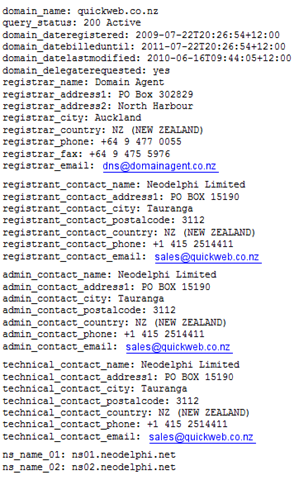
This seems to be quite a lot to read, so what to look for?
1. The registration date will give you a good indication of how long the business has been lasted. Although not an accurate indicator (since one can always purchase a domain name from the actual person who registered it before).
2. The admin contact name. In the case of Quickweb, notice that they are actually a company (Neodelphi Limited), which is also mentioned almost at the bottom of every single page on their website as well. To me, a registered company means at least they are more serious in doing this business and they do plan to provide hosting for a long time rather than just take your money and run.
3. The fact that none of the information is hidden or replaced by some generic "privacy-protection" information is also a good sign. Although this is not a consensus, but I am sure that many people will agree with me that if a website is serious about what they do, they should not hide their contact information.
4. An exact address, which unfortunately QuickWeb failed in this regard. Thanks to things like Google Maps, it is possible for us to view the exact location of the hosting provider’s location of registration without ever physically being there at all. To me, a hotel in Pakistan, for example, definitely does not sounds like a great place to conduct legitimate and serious hosting business and those are the types of providers that I would very unlikely want to go to.
After you have checked through the registration data, it may worth for you to look into further details into their DNS set up, which should give you some insight into their operations too.
I like to use IntoDNS to do my DNS checks, because they do not cache the DNS records and the analysis are quite elaborate.
The first piece of information to look for is the NS records for the name server. Although quite frankly speaking, this is a theory that would be highly debated, many people believes that having both/all NS on the same server is not a good thing for the hosting provider because:
1. It means their website has a high chance of failure and,
2. It means they probably willing to invest very little on their business.
In the Quickweb’s example, here are the NS records returned:

Note that the IPs are different Class C IPs, and also have different locations when doing a traceroute, which means Quickweb’s own website is less prone to failure).
Also, notice the TTL value is quite long (86400 seconds = 1 day). Sometimes short TTL time means the hosting providers change their name servers all over the place, which is not exactly a good sign.
However, I want to emphasize again that this theory is highly subjective. In fact, I have seen great providers pointing all NS to a single box.
The next section to look for is the SOA record, an example from Quickweb is indicated below:

As you could see, basically Quickweb let DNS Made Easy to handle the domain name resolution for their servers instead of using some free AND crappy DNS services (although free != crappy when it comes to DNS, I used ZoneEdit, which is free for the first domain, and they are not crappy at all!).
The overall message here is that if a hosting provider wants to provide serious hosting to other people, he/she/they got to be serious with his/her/their own website/business first. By serious, I mean anything from registering a company with a valid address rather than running from a home basement, to things like finding a professionally-managed DNS and even an external server for the provider’s own website to make sure your customers could find you for help/complains in the (hopefully unlikely) catastrophic event of like power outage in data centre.
Remember, when you are signing up with your VPS provider, it means you are trusting them with hours and hours of your sleepless night of thoughts and plans, blood and tears and as long as you have options, you should choose the one that you trust the most, and I think an important criteria for judgement here, is how serious they deal with their own website/business.
Pre-Sales
By the time you got to this stage, I am pretty sure you are more or less set up your mind on the hosting provider you would like to go with, if not have chosen “the” one, but hold on before you jump into registering an account and pay your invoice. The next stage is perhaps going to help you to decide if you would like to give them a second look about what they claim.
For most of the hosting providers these days using WHCMS template, it is pretty common to notice an icon such as this one from Quickweb somewhere at the bottom of the home page:

Some providers advertise that they offer 24×7 online chat, only to be offline most of the day, or if the status is online, with no person to response to the messages. Others, such as Quickweb, are frank about the fact that they do not offer 24×7 sales chat.
I can completely understand if a sales chat is not 24×7, after all, especially for budget hosting providers, it is quite unrealistic to keep someone sitting in front of a computer screen for the night when the sales he/she is going to make is not even going to pay his/her salary. However, I do expect the hosting providers to be honest about it, if I see a hosting provider advertising 24×7 sales chat and yet chat is offline or not responsive, I would give some really serious thoughts before making any commitment with them.
If the sales is online, then just click the button to chat with them, this is going to be your first interaction with someone who is likely to support your VPS for the next little while, so you may want to have a good chat with them, which will give you a better understanding of their services as well as better understanding about the services you will be getting. For example, if the purpose of your VPS is going to be a little in the “grey” area, such as use it as a torrent box, then you may want to find out if they do allow torrent, the same applies if your application could potentially be a resource-intensive one, make sure you ask so that you won’t violate their Accepted Usage Policy (AUP) or Terms of Services (TOS) since many hosts have indicated if you have violated those, they can suspend your box immediately without any refund.
The other important criteria here is to evaluate the quality of answers. The answer first has to be professional. Although chat is a pretty casual channel of communication, we are talking about serious business with money involved here and I do expect to see a professional responses rather than what you would write on the wall of your Facebook friend. Furthermore, although no person is expected to know every single bit of their operation, I also see a great distinction between “no idea” and “I do not have an answer for your at this moment, however if you could leave your email address with me, I could ask my network technician and get back to you before the end of day today”, or distinction between “no, can’t do” and “unfortunately at this point of time we are unable to provide this service, however we have this service here that you may consider as an alternative to serve your needs”.
So what if they happened not to be online, as the case of Quickweb when I took the screenshot? Don’t worry, most of the reputable VPS providers using WHCMS should have a pretty easy to find place on their website for you to submit a sales ticket, such as this one from Quickweb:
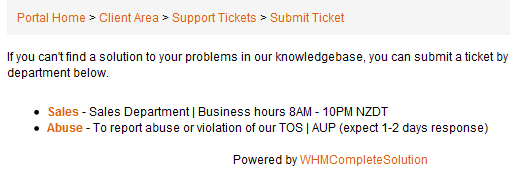
Note that Quickweb has stated clearly that their sales will only be available for 14 hours a day (although I have seen Roel, the owner of Quickweb, staying up all night before).
Even if you have chat with them via online live chat, I would still encourage you to submit a ticket with them. First this would be a method of record if they have promised to offer you any freebies/special discount. Remember, some of the hosting providers are running shifts, so if Joe on day shift promised he will double your bandwidth before taking off, the message may not get to Adam on night shift. However by sending in a ticket, you could always tell them to check the ticket number. This is especially true if you are looking for some custom quotes, since Bob may consider doubling the bandwidth and half the disk size should give you the same price, but Mike may think it is the worst deal ever. However once they have replied your ticket, they should oblige to it.
The second advantage of sending in a ticket is to see how quickly they will respond to your needs. Although most of the hosting providers will claim that they have a policy of cleaning up the technical support ticket queue first before going to sales queue, or have a special sales department dealing with the sales ticket, in reality, I doubt how many of them actually do. It is understandable since a new customer could potentially sign up with another VPS provider if they failed to respond tickets first, where rarely in any occasion would someone switch a VPS provider for an extra five minutes’ of wait. Having said though, this basically implies that if it takes, say, a day for the provider to get back to you on a sales ticket (assuming it is not a holiday and not outside of their regular sales department hours), you can safely estimate how long it will take for them to get back to you should your VPS have any problem.
Thirdly, it is also a test on the technical knowledge the hosting provider has (or rather their sales people have). Personally, I do not feel comfortable to trust my data with someone who has no idea what an Iptable is, or who has no idea how to test and verify the rDNS is created. Don’t afraid to get techy, although I do not expect every VPS sales person to understand how to recompile a Linux kernel, “know-what-you-sale” is something that every single sales person should remember.
Lastly, and perhaps most importantly, is to see if the hosting provider actually read the ticket. There is nothing more frustrating than say, when your VPS is online but has high RAM usage, the response of the ticket is something like:”as far as we can tell, your VPS is online”. I understand that most of the budget VPS providers are severely understuffed to save the cost, and it is not rare that one support person has to resolve 20-30 tickets per hour, however not responding to the right issue would do nothing good but makes you, the person who is trusting them with your precious data, more frustrated. What is even worse is that some of the companies outsourced the support to some individuals and pay them by the number of tickets they have closed. As a result, with one of the hosting providers that I have used before, any question that you have raised, they will close the ticket after the first response, and since the provider is not using WHCMS, you will have to re-open a ticket referring to the previous ticket in order to get further insight into the problem.
The key point here is that the hosting provider must want your business before, well, you give them the business. “Want your business” means that they have to present themselves in a professional manner, and trying really hard to prove that they could offer you what you want, even though they may not exactly be able to offer what you were hoping for when you asked. Treat this like a mini-job interview (without the “how do you like about us?” type of questions) so that you could give them the “job” of taking care of your online contents.
Last Check
OK, I have been reading your articles, it is long and boring, and I have been following all the steps that you outlined here, can I sign up now?
WAIT!
What? Still not it? So what is the last step before sign up?
Have you checked if they offer a test VPS for 24 hours, or even better, offer a money back guarantee within a certain time frame (usually 14-30 days)?
Some people may find it is troublesome to sign up for a trial service because they will need to put in a sales ticket and the set up sometimes is not instant. However, this is a good opportunity for you to test out the actual services and see how good they are and if they would be suitable for your needs. Remember, not all good services are good for you. For example, the BuyVM VPS boxes are great for customers based in North America, however if you are in Europe, this may not be the top choice (as per this comment), some services are cheap but the support is limited, so if you are a Linux guru, this is a good way to save some money but if you are a newbie, it may not be the best option for you. Use the trial period to test the system out, upload/download files, test disk I/O, even run a UnixBench if you are confident that the box would be able to withstand the stress.
At the same time, remember to send a support ticket or two or go through whatever the support channel the hosting providers have recommended (IRC, online chat, etc) with issues such as adding an rDNS or enable TUN/TAP for VPN purposes, if those are not automatic. These are fairly basic tasks and any qualified VPS hosting provider should have a good idea how to do them within 5 minutes once they start to work on your request. Therefore, if it takes a VPS provider a week to get back to you, or even worse, start to ask you what rDNS or TUN/TAP is, then perhaps it is the time for you to leave them before it is too late.
The other common headache for budget VPS providers is the endless node crashes and reboots, make sure you set up an account with either Pingdom or UptimeRobot, or both (since sometimes one of them could give false positives) to monitor the uptime. If the server is online only 50% of the time, it is another good sign that the VPS may not be up to the par for anything important.
Remember, do not put anything that you would like to put for production purposes until you are absolutely sure that what the VPS could offer is within your acceptable range in terms of hardware and services. If you are unhappy about any of the two, even if it means you will have to restart the entire selection process from step 1 again, it totally worth it.
Conclusion
Finding the right VPS provider is not an easy task, however just like finding a real home, finding your online home could be very rewarding if you have made an informed choice or a disaster otherwise. Granted a VPS would cost a fraction of what you pay for a house, however the headache involved with a bad VPS provider or a problematic node could be just as much, particularly if the contents in the server attributed to part of your income. Therefore, I urge you to read through the entire series and perhaps take a look at the few reviews on 96MB.com before sign up for a VPS and wish you find your “Mr. Right” in VPS soon!
Great article mate, it’s specially useful for VPS newbies. 😉
@Gus: Thanks for your support, I am actually pretty new to VPS too, so hopefully this will be a chance/place for both of us, as well as many VPS users out there, to learn VPS together!