
96MB Low End VPS Review Part XXII – BassHost
Another weekend and the time for another VPS review! Scrolling down the list of the providers that I need to review for, it seems this weekend is the time to review the second request on my review list, which is BassHost.
General Information and Set Up
I have to admit BassHost is perhaps one of the “hottest” hosting providers that I will ever get to review, after all, I really do not see how many hosting providers actually put a pretty hot young lady on their home page:

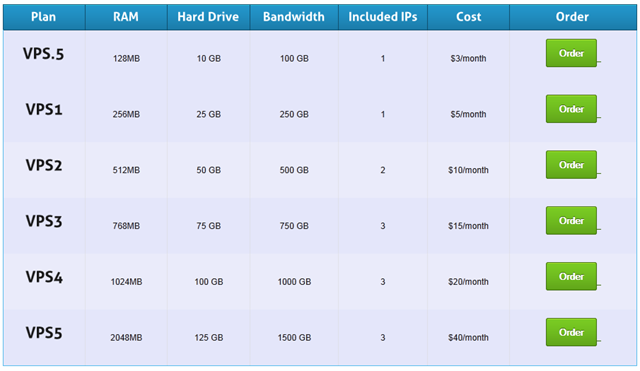
On the VPS plan page, you can see all the plans available and the prices:
The order page is not using HTTPS and for some reason, it is still the default WHMCS set up where you will need to enter the domain name even for registering the VPS, which is rather unnecessary:

Set up was instant and in the confirmation email, the password are shown in plain text and the SolusVM address is pointing to the IP address but not the port, therefore, you will need to copy the entire address (IP + port) to your browser to log into the SolusVM panel.
Once logged in to WHMCS control panel, which is again not via HTTPS connection, the VPS details are under My Services tab. It is worthwhile to note that BassHost actually give very detailed and complete information on your VPS resources usage, and include all three percentage bars and graphs, which is rare among the VPS providers:
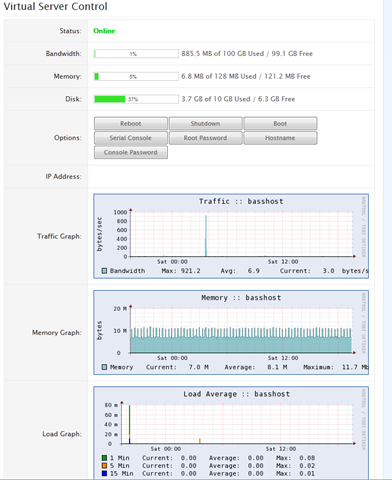
Basic controls for the VPS are available in WHMCS as well, which will allow you to do many things without log into the SolusVM control panel.
The SolusVM control panel only has an IP address and is on a non-standard port and the user name was assigned by the system, once logged in, the standard user interface is shown:
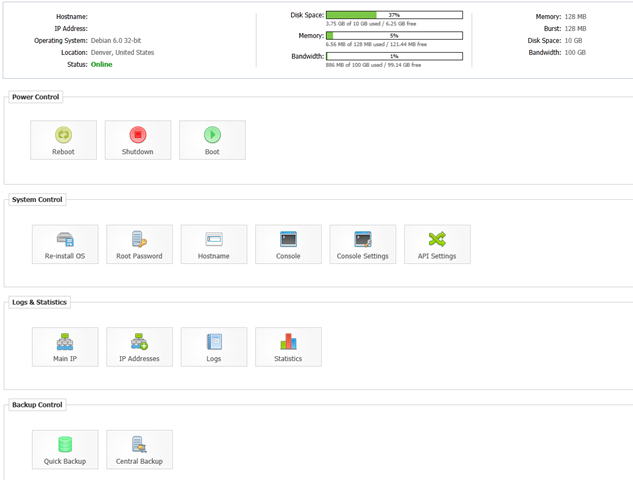
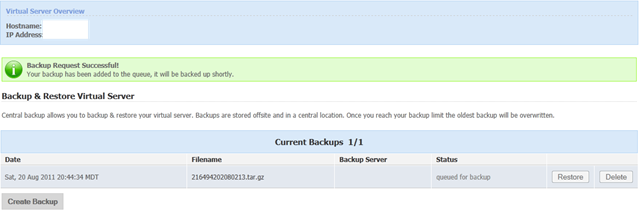
There is no IPv6 address shown here nor instant rDNS is available. Quick Backup is not available although there is one central backup slot comes with the VPS and it seems to be working fine, which is pretty convenient:
There are plenty of OS templates available for loading, including CentOS and Debian 6 (both 32 and 64 bit versions), unfortunately the Ubuntu LTS is not available:
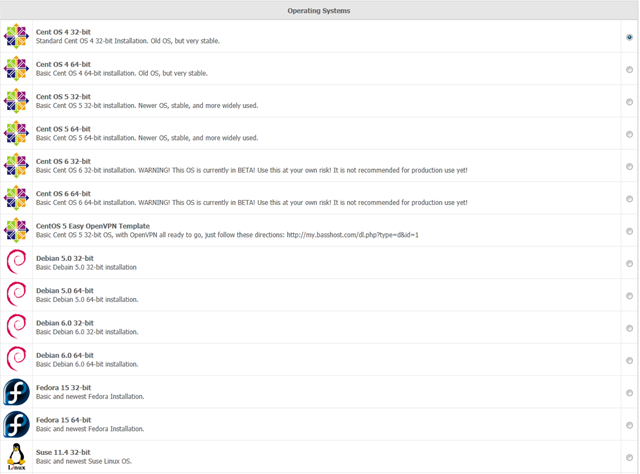

Note that one of the templates available is an OVPN template (and even a link to a tutorial on setting it up as well, although I am not sure if BassHost actually write the tutorial themselves), which is rather handy. However, by default, TUN/TAP is not enabled by default in the VPS, therefore you will still need to contact support first to enable TUN/TAP.
Test on the VPS
The test VPS that I have received is the lowest VPS .5, with 128MB of RAM, 10GB of hard drive and 100GB of bandwidth and the VPS is in Denver, Colorado in the FDC Server’s DC.
I have installed Debian 6 32 bit OS template on there, and on a fresh installation, about 17MB of RAM is used:
 free -m
             total       used       free     shared    buffers     cached
Mem:           128         17        110          0          0          0
-/+ buffers/cache:         17        110
Swap:            0          0          0
Top shows Apache2 is running, and I was amazed how the memory could be so low with Apache:
top - 02:26:46 up 13 min,  1 user,  load average: 0.00, 0.00, 0.00
Tasks:  15 total,   2 running,  13 sleeping,   0 stopped,   0 zombie
Cpu(s):  0.0%us,  0.0%sy,  0.0%ni,100.0%id,  0.0%wa,  0.0%hi,  0.0%si,  0.0%st
Mem:    131072k total,    18636k used,   112436k free,        0k buffers
Swap:        0k total,        0k used,        0k free,        0k cached

  PID USER      PR  NI  VIRT  RES  SHR S %CPU %MEM    TIME+  COMMAND
 1513 root      15   0  8756 3120 2468 R    0  2.4   0:00.10 sshd
 1369 www-data  15   0  5428 2608 1160 S    0  2.0   0:00.00 apache2
 1368 root      15   0  5132 2432 1180 S    0  1.9   0:00.00 apache2
 1487 www-data  15   0  5132 1848  584 S    0  1.4   0:00.00 apache2
 1515 root      18   0  2956 1608 1288 S    0  1.2   0:00.00 bash
 1420 root      18   0  9964 1548  500 S    0  1.2   0:00.00 sendmail-mta
 1521 root      18   0  2324 1068  872 R    0  0.8   0:00.00 top
 1435 root      18   0  5484  972  576 S    0  0.7   0:00.00 sshd
 1390 root      18   0  2284  848  664 S    0  0.6   0:00.00 cron
 1449 root      25   0  2388  840  668 S    0  0.6   0:00.00 xinetd
 1346 root      18   0  8664  784  448 S    0  0.6   0:00.00 saslauthd
 1358 root      18   0  1888  780  648 S    0  0.6   0:00.00 anacron
    1 root      18   0  2024  680  584 S    0  0.5   0:00.38 init
 1354 root      15   0  1732  628  504 S    0  0.5   0:00.00 syslogd
 1347 root      18   0  8664  500  164 S    0  0.4   0:00.00 saslauthd
The OS by itself used a little more than 400MB of disk space:
df -h
Filesystem            Size  Used Avail Use% Mounted on
/dev/simfs             10G  414M  9.6G   5% /
tmpfs                  64M     0   64M   0% /lib/init/rw
tmpfs                  64M     0   64M   0% /dev/shm
There was actually a little bit of incident when I tried to compile MySQL 5.5 from source on this VPS, halfway through I received an out of memory error, which has never happened to even some of my smaller test VPSes:
[ 73%] Building CXX object sql/CMakeFiles/sql.dir/sql_yacc.cc.o

cc1plus: out of memory allocating 16008 bytes after a total of 13090816 bytes
make[2]: *** [sql/CMakeFiles/sql.dir/sql_yacc.cc.o] Error 1
make[1]: *** [sql/CMakeFiles/sql.dir/all] Error 2
make: *** [all] Error 2
I ended up using MySQL 5.1 instead and with the full LNMP stack loaded, memory usage goes to 62MB, which is still very reasonable:
free -m
             total       used       free     shared    buffers     cached
Mem:           128         62         65          0          0          0
-/+ buffers/cache:         62         65
Swap:            0          0          0
And the corresponding top output shows the full LNMP stack running:
top - 08:53:48 up 55 min,  1 user,  load average: 0.13, 0.77, 0.90
Tasks:  21 total,   1 running,  20 sleeping,   0 stopped,   0 zombie
Cpu(s):  0.0%us,  0.0%sy,  0.0%ni,100.0%id,  0.0%wa,  0.0%hi,  0.0%si,  0.0%st
Mem:    131072k total,    63808k used,    67264k free,        0k buffers
Swap:        0k total,        0k used,        0k free,        0k cached

  PID USER      PR  NI  VIRT  RES  SHR S %CPU %MEM    TIME+  COMMAND
27770 www       25   0 14492  10m  412 S    0  8.1   0:00.00 nginx
15638 mysql     19   0 34792 5832 3152 S    0  4.4   0:00.00 mysqld
27752 root      18   0 22700 4540 1380 S    0  3.5   0:00.00 php-cgi
27753 www       25   0 22700 4160 1000 S    0  3.2   0:00.00 php-cgi
27757 www       25   0 22700 4160 1000 S    0  3.2   0:00.00 php-cgi
27758 www       25   0 22700 4160 1000 S    0  3.2   0:00.00 php-cgi
27759 www       25   0 22700 4160 1000 S    0  3.2   0:00.00 php-cgi
27760 www       25   0 22700 4160 1000 S    0  3.2   0:00.00 php-cgi
 1624 root      15   0  8684 3040 2468 S    0  2.3   0:00.55 sshd
 1627 root      15   0  2956 1632 1304 S    0  1.2   0:00.00 bash
 1571 root      15   0  9960 1548  500 S    0  1.2   0:00.03 sendmail-mta
15535 root      18   0  2672 1204 1000 S    0  0.9   0:00.00 mysqld_safe
27856 root      15   0  2324 1072  876 R    0  0.8   0:00.00 top
 1586 root      18   0  5484  964  576 S    0  0.7   0:00.00 sshd
 1396 root      15   0  2284  848  664 S    0  0.6   0:00.00 cron
 1545 root      25   0  2388  832  668 S    0  0.6   0:00.00 xinetd
 1345 root      18   0  8664  784  448 S    0  0.6   0:00.00 saslauthd
And altogether 1.7G of disk space was used:
df -h
Filesystem            Size  Used Avail Use% Mounted on
/dev/simfs             10G  1.7G  8.4G  17% /
tmpfs                  64M     0   64M   0% /lib/init/rw
tmpfs                  64M     0   64M   0% /dev/shm
Although vmstat taken right after the LNMP stack installation shows some CPU usage:
 vmstat
procs -----------memory---------- ---swap-- -----io---- -system-- ----cpu----
 r  b   swpd   free   buff  cache   si   so    bi    bo   in   cs us sy id wa
 0  0      0  62992      0      0    0    0     0   122    0 1026  7  1 92  0
which is also shown in the output of uptime:
 uptime
 09:13:17 up  1:15,  2 users,  load average: 0.00, 0.00, 0.22
However, while I was typing this, I decided to run the vmstat and uptime again and now the numbers are a lot better:
vmstat
procs -----------memory---------- ---swap-- -----io---- -system-- ----cpu----
 r  b   swpd   free   buff  cache   si   so    bi    bo   in   cs us sy id wa
 0  0      0 118088      0      0    0    0     0     5    0   37  0  0 100  0
And uptime output is better as well:
uptime
 04:46:32 up 3 days, 20:48,  1 user,  load average: 0.00, 0.00, 0.00
Beancounters are set to pretty reasonable values:
cat /proc/user_beancounters
Version: 2.5
       uid  resource                     held              maxheld              barrier                limit              failcnt
      139:  kmemsize                  3016928              3393722           2147483646           2147483646                    0
            lockedpages                     0                    0               999999               999999                    0
            privvmpages                 16902                32600                32768                32768                    0
            shmpages                     1282                 1298                32768                32768                    0
            dummy                           0                    0                    0                    0                    0
            numproc                        24                   30               999999               999999                    0
            physpages                    7432                29962                    0           2147483647                    0
            vmguarpages                     0                    0                32768           2147483647                    0
            oomguarpages                 7432                29962                32768           2147483647                    0
            numtcpsock                      8                    9              7999992              7999992                    0
            numflock                        4                   10               999999               999999                    0
            numpty                          2                    2               500000               500000                    0
            numsiginfo                      0                    8               999999               999999                    0
            tcpsndbuf                  214704               227832            214748160            396774400                    0
            tcprcvbuf                  131072              3229840            214748160            396774400                    0
            othersockbuf                11640                29096            214748160            396774400                    0
            dgramrcvbuf                     0                 9776            214748160            396774400                    0
            numothersock                   15                   18              7999992              7999992                    0
            dcachesize                      0                    0           2147483646           2147483646                    0
            numfile                       579                  946             23999976             23999976                    0
            dummy                           0                    0                    0                    0                    0
            dummy                           0                    0                    0                    0                    0
            dummy                           0                    0                    0                    0                    0
            numiptent                      18                   18               999999               999999                    0
vzfree shows no sign of overselling as well:
 vzfree
             Total     Used     Free
Kernel:   2048.00M    1.70M 2046.30M
Allocate:  128.00M   16.38M  111.62M (128M Guaranteed)
Commit:    128.00M    9.45M  118.55M (47.3% of Allocated)
Swap:                 0.00M          (0.0% of Committed)
And the Inode was set to pretty high:
 df -i
Filesystem            Inodes   IUsed   IFree IUse% Mounted on
/dev/simfs           5242880   69554 5173326    2% /
tmpfs                  16384       4   16380    1% /lib/init/rw
tmpfs                  16384       1   16383    1% /dev/shm
Disk I/O, although not the highest I have ever seen, is definitely impressive at close to 100MB/s.
dd if=/dev/zero of=test bs=64k count=16k conv=fdatasync
16384+0 records in
16384+0 records out
1073741824 bytes (1.1 GB) copied, 12.3718 s, 86.8 MB/s
Trying it again showed similar results:
 dd if=/dev/zero of=test bs=64k count=16k conv=fdatasync
16384+0 records in
16384+0 records out
1073741824 bytes (1.1 GB) copied, 11.9867 s, 89.6 MB/s
Interestingly enough, the port for this VPS was not the standard 100Mbit or 1Gbit port, instead, it is a 25Mbit port according to the technical support that I contacted. Given that fact, the download speed was actually pretty good:
wget cachefly.cachefly.net/100mb.test -O /dev/null
--2011-08-18 09:15:07--  http://cachefly.cachefly.net/100mb.test
Resolving cachefly.cachefly.net... 205.234.175.175
Connecting to cachefly.cachefly.net|205.234.175.175|:80... connected.
HTTP request sent, awaiting response... 200 OK
Length: 104857600 (100M) [application/octet-stream]
Saving to: `/dev/null'

100%[======================================>] 104,857,600 7.88M/s   in 25s

2011-08-18 09:15:36 (4.02 MB/s) - `/dev/null' saved [104857600/104857600]
However, it was quite puzzling to see how the speed managed to get to 8MB/s in the end, which has “exceeded” the port speed.
Trying it earlier actually yielded more convincing results, however it still exceeded 25Mbit towards the end.
 wget cachefly.cachefly.net/100mb.test -O /dev/null
--2011-08-22 11:08:17--  http://cachefly.cachefly.net/100mb.test
Resolving cachefly.cachefly.net... 205.234.175.175
Connecting to cachefly.cachefly.net|205.234.175.175|:80... connected.
HTTP request sent, awaiting response... 200 OK
Length: 104857600 (100M) [application/octet-stream]
Saving to: `/dev/null'

100%[======================================>] 104,857,600 5.13M/s   in 37s

2011-08-22 11:08:54 (2.68 MB/s) - `/dev/null' saved [104857600/104857600]
Upload speed varies greatly, however in general they are pretty good:
First, with my BuyVM VPS in San Jose, CA:
 wget 76.73.72.43/100mb.test -O /dev/null
--2011-08-18 11:07:40--  http://76.73.72.43/100mb.test
Connecting to 76.73.72.43:80... connected.
HTTP request sent, awaiting response... 200 OK
Length: 104857600 (100M) [application/octet-stream]
Saving to: `/dev/null'

100%[======================================>] 104,857,600 11.2M/s   in 9.5s

2011-08-18 11:07:49 (10.6 MB/s) - `/dev/null' saved [104857600/104857600]
With my Quickweb VPS, the speed is a bit slower, presumbly due to the long distance:
 wget 76.73.72.43/100mb.test -O /dev/null
--2011-08-17 23:08:59--  http://76.73.72.43/100mb.test
Connecting to 76.73.72.43:80... connected.
HTTP request sent, awaiting response... 200 OK
Length: 104857600 (100M) [application/octet-stream]
Saving to: `/dev/null'

100%[======================================>] 104,857,600 4.77M/s   in 14s

2011-08-17 23:09:13 (6.98 MB/s) - `/dev/null' saved [104857600/104857600]
Finally, with my Nixcom VPS in Montreal, Canada, the result is almost the same as BuyVM’s VPS, indicating the Basshost VPS has pretty good connection throughout North America:
wget 76.73.72.43/100mb.test -O /dev/null
--2011-08-18 11:10:06--  http://76.73.72.43/100mb.test
Connecting to 76.73.72.43:80... connected.
HTTP request sent, awaiting response... 200 OK
Length: 104857600 (100M) [application/octet-stream]
Saving to: `/dev/null'

100%[======================================>] 104,857,600 10.5M/s   in 11s

2011-08-18 11:10:17 (9.23 MB/s) - `/dev/null' saved [104857600/104857600]
The unit comes with 4 CPU cores:
cat /proc/cpuinfo
processor       : 0
vendor_id       : GenuineIntel
cpu family      : 6
model           : 23
model name      : Intel(R) Core(TM)2 Quad CPU    Q9550  @ 2.83GHz
stepping        : 10
cpu MHz         : 354.094
cache size      : 6144 KB
physical id     : 0
siblings        : 4
core id         : 0
cpu cores       : 4
apicid          : 0
fpu             : yes
fpu_exception   : yes
cpuid level     : 13
wp              : yes
flags           : fpu vme de pse tsc msr pae mce cx8 apic sep mtrr pge mca cmov                                                                                                  pat pse36 clflush dts acpi mmx fxsr sse sse2 ss ht tm syscall nx lm constant_tsc                                                                                                  pni monitor ds_cpl vmx smx est tm2 ssse3 cx16 xtpr sse4_1 lahf_lm
bogomips        : 5665.51
clflush size    : 64
cache_alignment : 64
address sizes   : 36 bits physical, 48 bits virtual
power management:

processor       : 1
vendor_id       : GenuineIntel
cpu family      : 6
model           : 23
model name      : Intel(R) Core(TM)2 Quad CPU    Q9550  @ 2.83GHz
stepping        : 10
cpu MHz         : 354.094
cache size      : 6144 KB
physical id     : 0
siblings        : 4
core id         : 1
cpu cores       : 4
apicid          : 1
fpu             : yes
fpu_exception   : yes
cpuid level     : 13
wp              : yes
flags           : fpu vme de pse tsc msr pae mce cx8 apic sep mtrr pge mca cmov                                                                                                  pat pse36 clflush dts acpi mmx fxsr sse sse2 ss ht tm syscall nx lm constant_tsc                                                                                                  pni monitor ds_cpl vmx smx est tm2 ssse3 cx16 xtpr sse4_1 lahf_lm
bogomips        : 5664.56
clflush size    : 64
cache_alignment : 64
address sizes   : 36 bits physical, 48 bits virtual
power management:

processor       : 2
vendor_id       : GenuineIntel
cpu family      : 6
model           : 23
model name      : Intel(R) Core(TM)2 Quad CPU    Q9550  @ 2.83GHz
stepping        : 10
cpu MHz         : 354.094
cache size      : 6144 KB
physical id     : 0
siblings        : 4
core id         : 2
cpu cores       : 4
apicid          : 2
fpu             : yes
fpu_exception   : yes
cpuid level     : 13
wp              : yes
flags           : fpu vme de pse tsc msr pae mce cx8 apic sep mtrr pge mca cmov                                                                                                  pat pse36 clflush dts acpi mmx fxsr sse sse2 ss ht tm syscall nx lm constant_tsc                                                                                                  pni monitor ds_cpl vmx smx est tm2 ssse3 cx16 xtpr sse4_1 lahf_lm
bogomips        : 5664.60
clflush size    : 64
cache_alignment : 64
address sizes   : 36 bits physical, 48 bits virtual
power management:

processor       : 3
vendor_id       : GenuineIntel
cpu family      : 6
model           : 23
model name      : Intel(R) Core(TM)2 Quad CPU    Q9550  @ 2.83GHz
stepping        : 10
cpu MHz         : 354.094
cache size      : 6144 KB
physical id     : 0
siblings        : 4
core id         : 3
cpu cores       : 4
apicid          : 3
fpu             : yes
fpu_exception   : yes
cpuid level     : 13
wp              : yes
flags           : fpu vme de pse tsc msr pae mce cx8 apic sep mtrr pge mca cmov                                                                                                  pat pse36 clflush dts acpi mmx fxsr sse sse2 ss ht tm syscall nx lm constant_tsc                                                                                                  pni monitor ds_cpl vmx smx est tm2 ssse3 cx16 xtpr sse4_1 lahf_lm
bogomips        : 5664.59
clflush size    : 64
cache_alignment : 64
address sizes   : 36 bits physical, 48 bits virtual
power management:
The interesting bit comes in the meminfo output, which mostly shows 0:
cat /proc/meminfo
MemTotal:       131072 kB
MemFree:        114140 kB
Buffers:             0 kB
Cached:              0 kB
SwapCached:          0 kB
Active:              0 kB
Inactive:            0 kB
HighTotal:           0 kB
HighFree:            0 kB
LowTotal:       131072 kB
LowFree:        114140 kB
SwapTotal:           0 kB
SwapFree:            0 kB
Dirty:               0 kB
Writeback:           0 kB
AnonPages:           0 kB
Mapped:              0 kB
Slab:                0 kB
PageTables:          0 kB
NFS_Unstable:        0 kB
Bounce:              0 kB
CommitLimit:         0 kB
Committed_AS:        0 kB
VmallocTotal:        0 kB
VmallocUsed:         0 kB
VmallocChunk:        0 kB
HugePages_Total:     0
HugePages_Free:      0
HugePages_Rsvd:      0
Hugepagesize:     2048 kB
I have been trying to do some benchmarking on the VPS, but unfortunately none of UnixBench and GeekBench seems to want to run on this VPS:
   #    #  #    #  #  #    #          #####   ######  #    #   ####   #    #
   #    #  ##   #  #   #  #           #    #  #       ##   #  #    #  #    #
   #    #  # #  #  #    ##            #####   #####   # #  #  #       ######
   #    #  #  # #  #    ##            #    #  #       #  # #  #       #    #
   #    #  #   ##  #   #  #           #    #  #       #   ##  #    #  #    #
    ####   #    #  #  #    #          #####   ######  #    #   ####   #    #

   Version 5.1.3                      Based on the Byte Magazine Unix Benchmark

   Multi-CPU version                  Version 5 revisions by Ian Smith,
                                      Sunnyvale, CA, USA
   January 13, 2011                   johantheghost at yahoo period com

1 x Dhrystone 2 using register variables  1 2 3 4 5 6 7 8 9 10

1 x Double-Precision Whetstone  1 2 3 4 5 6 7 8 9 10

1 x Execl Throughput  1 2 3

1 x File Copy 1024 bufsize 2000 maxblocks  1 2 3

1 x File Copy 256 bufsize 500 maxblocks  1 2 3

1 x File Copy 4096 bufsize 8000 maxblocks  1 2 3

1 x Pipe Throughput  1 2 3 4 5 6 7 8 9 10

1 x Pipe-based Context Switching  1 2 3 4 5 6 7 8 9 10

1 x Process Creation  1 2 3

1 x System Call Overhead  1 2 3 4 5 6 7 8 9 10

1 x Shell Scripts (1 concurrent)  1 2 3

1 x Shell Scripts (8 concurrent)  1 2 3

4 x Dhrystone 2 using register variables  1 2 3 4 5 6 7 8 9 10

4 x Double-Precision Whetstone  1 2 3 4 5 6 7 8 9 10

4 x Execl Throughput  1 2 3

4 x File Copy 1024 bufsize 2000 maxblocks  1 2 3

4 x File Copy 256 bufsize 500 maxblocks  1 2 3

4 x File Copy 4096 bufsize 8000 maxblocks  1 2 3

4 x Pipe Throughput  1 2 3 4 5 6 7 8 9 10

4 x Pipe-based Context Switching  1 2 3 4 5 6 7 8 9 10

4 x Process Creation  1 2 3

4 x System Call Overhead  1 2 3 4 5 6 7 8 9 10

4 x Shell Scripts (1 concurrent)  1 2 3

4 x Shell Scripts (8 concurrent)  1
**********************************************
Run: "Shell Scripts (8 concurrent)": /tmp/UnixBench/pgms/tst.sh: line 17: /usr/bin/sort: Cannot allocate memory
/tmp/UnixBench/pgms/tst.sh: fork: Cannot allocate memory
/tmp/UnixBench/pgms/tst.sh: fork: Cannot allocate memory
/bin/sh: xmalloc: ../bash/variables.c:1971: cannot allocate 4 bytes (0 bytes allocated)
/tmp/UnixBench/pgms/multi.sh: fork: Cannot allocate memory
Bad wait status: 0xfe00; aborting
Trying it again did not get any better:
   #    #  #    #  #  #    #          #####   ######  #    #   ####   #    #
   #    #  ##   #  #   #  #           #    #  #       ##   #  #    #  #    #
   #    #  # #  #  #    ##            #####   #####   # #  #  #       ######
   #    #  #  # #  #    ##            #    #  #       #  # #  #       #    #
   #    #  #   ##  #   #  #           #    #  #       #   ##  #    #  #    #
    ####   #    #  #  #    #          #####   ######  #    #   ####   #    #

   Version 5.1.3                      Based on the Byte Magazine Unix Benchmark

   Multi-CPU version                  Version 5 revisions by Ian Smith,
                                      Sunnyvale, CA, USA
   January 13, 2011                   johantheghost at yahoo period com

1 x Dhrystone 2 using register variables  1 2 3 4 5 6 7 8 9 10

1 x Double-Precision Whetstone  1 2 3 4 5 6 7 8 9 10

1 x Execl Throughput  1 2 3

1 x File Copy 1024 bufsize 2000 maxblocks  1 2 3

1 x File Copy 256 bufsize 500 maxblocks  1 2 3

1 x File Copy 4096 bufsize 8000 maxblocks  1 2 3

1 x Pipe Throughput  1 2 3 4 5 6 7 8 9 10

1 x Pipe-based Context Switching  1 2 3 4 5 6 7 8 9 10

1 x Process Creation  1 2 3

1 x System Call Overhead  1 2 3 4 5 6 7 8 9 10

1 x Shell Scripts (1 concurrent)  1 2 3

1 x Shell Scripts (8 concurrent)  1 2 3

4 x Dhrystone 2 using register variables  1 2 3 4 5 6 7 8 9 10

4 x Double-Precision Whetstone  1 2 3 4 5 6 7 8 9 10

4 x Execl Throughput  1 2 3

4 x File Copy 1024 bufsize 2000 maxblocks  1 2 3

4 x File Copy 256 bufsize 500 maxblocks  1 2 3

4 x File Copy 4096 bufsize 8000 maxblocks  1 2 3

4 x Pipe Throughput  1 2 3 4 5 6 7 8 9 10

4 x Pipe-based Context Switching  1 2 3 4 5 6 7 8 9 10

4 x Process Creation  1 2 3

4 x System Call Overhead  1 2 3 4 5 6 7 8 9 10

4 x Shell Scripts (1 concurrent)  1 2 3

4 x Shell Scripts (8 concurrent)  1
**********************************************
Run: "Shell Scripts (8 concurrent)": /tmp/UnixBench/pgms/multi.sh: fork: Cannot allocate memory
Bad wait status: 0xfe00; aborting
Similar results for GeekBench tests as well:
System Information
  Platform:                  Linux x86 (32-bit)
  Compiler:                  GCC 4.1.2 20070925 (Red Hat 4.1.2-33)
  Operating System:          Linux 2.6.32-238.19.1.el5.028stab092.2 i686
  Model:                     Linux PC (Intel Core 2 Quad Q9550)
  Motherboard:               Unknown Motherboard
  Processor:                 Intel Core 2 Quad Q9550
  Processor ID:              GenuineIntel Family 6 Model 23 Stepping 10
  Logical Processors:        4
  Physical Processors:       1
  Processor Frequency:       354 MHz
  L1 Instruction Cache:      0.00 B
  L1 Data Cache:             0.00 B
  L2 Cache:                  6.00 MB
  L3 Cache:                  0.00 B
  Bus Frequency:             0.00 Hz
  Memory:                    7.77 GB
  Memory Type:               N/A
  SIMD:                      1
  BIOS:                      N/A
  Processor Model:           Intel Core 2 Quad Q9550
  Processor Cores:           4

Integer
  Blowfish
    single-threaded scalar    1921 |||||||
    multi-threaded scalar     1020 ||||
  Text Compress
    single-threaded scalar    1093 ||||
    multi-threaded scalar     1032 ||||
  Text Decompress
    single-threaded scalar     985 |||
    multi-threaded scalar      989 |||
  Image Compress
    single-threaded scalar    1057 ||||
    multi-threaded scalar      904 |||
  Image Decompress
    single-threaded scalar    1056 ||||
    multi-threaded scalar      830 |||
  Lua
    single-threaded scalar    1831 |||||||
    multi-threaded scalar     1766 |||||||

Floating Point
  Mandelbrot
    single-threaded scalar    1084 ||||
    multi-threaded scalar     1014 ||||
  Dot Product
    single-threaded scalar    2012 ||||||||
    multi-threaded scalar     1949 |||||||
    single-threaded vector    1553 ||||||
    multi-threaded vector     1563 ||||||
  LU Decomposition
    single-threaded scalar    2352 |||||||||
    multi-threaded scalar     1191 ||||
  Primality Test
    single-threaded scalar    1612 ||||||
    multi-threaded scalar     1243 ||||
  Sharpen Image
    single-threaded scalar    3703 ||||||||||||||
    multi-threaded scalar     3420 |||||||||||||
  Blur Image
    single-threaded scalar    2409 |||||||||
    multi-threaded scalar     2362 |||||||||

Memory
terminate called after throwing an instance of 'std::bad_alloc'
  what():  std::bad_alloc
Aborted
And try one more time:
System Information
  Platform:                  Linux x86 (32-bit)
  Compiler:                  GCC 4.1.2 20070925 (Red Hat 4.1.2-33)
  Operating System:          Linux 2.6.32-238.19.1.el5.028stab092.2 i686
  Model:                     Linux PC (Intel Core 2 Quad Q9550)
  Motherboard:               Unknown Motherboard
  Processor:                 Intel Core 2 Quad Q9550
  Processor ID:              GenuineIntel Family 6 Model 23 Stepping 10
  Logical Processors:        4
  Physical Processors:       1
  Processor Frequency:       354 MHz
  L1 Instruction Cache:      0.00 B
  L1 Data Cache:             0.00 B
  L2 Cache:                  6.00 MB
  L3 Cache:                  0.00 B
  Bus Frequency:             0.00 Hz
  Memory:                    7.77 GB
  Memory Type:               N/A
  SIMD:                      1
  BIOS:                      N/A
  Processor Model:           Intel Core 2 Quad Q9550
  Processor Cores:           4

Integer
  Blowfish
    single-threaded scalar    1922 |||||||
    multi-threaded scalar     1023 ||||
  Text Compress
    single-threaded scalar    1103 ||||
    multi-threaded scalar     1034 ||||
  Text Decompress
    single-threaded scalar    1002 ||||
    multi-threaded scalar      993 |||
  Image Compress
    single-threaded scalar     982 |||
    multi-threaded scalar      926 |||
  Image Decompress
    single-threaded scalar     860 |||
    multi-threaded scalar      823 |||
  Lua
    single-threaded scalar    1850 |||||||
    multi-threaded scalar     1778 |||||||

Floating Point
  Mandelbrot
    single-threaded scalar    1079 ||||
    multi-threaded scalar     1025 ||||
  Dot Product
    single-threaded scalar    2072 ||||||||
    multi-threaded scalar     1947 |||||||
    single-threaded vector    1457 |||||
    multi-threaded vector     1555 ||||||
  LU Decomposition
    single-threaded scalar    2344 |||||||||
    multi-threaded scalar     2386 |||||||||
  Primality Test
    single-threaded scalar    1573 ||||||
    multi-threaded scalar     1244 ||||
  Sharpen Image
    single-threaded scalar    3530 ||||||||||||||
    multi-threaded scalar     3288 |||||||||||||
  Blur Image
    single-threaded scalar    2496 |||||||||
    multi-threaded scalar     2370 |||||||||

Memory
  Read Sequential
    single-threaded scalar    2166 ||||||||
  Write Sequential
    single-threaded scalar    1678 ||||||
  Stdlib Allocate
    single-threaded scalar    1326 |||||
terminate called after throwing an instance of 'std::bad_alloc'
  what():  std::bad_alloc
Aborted
Although I do not think the memory is highly oversold by any chance, I really can not tell how BassHost tweaked the memory settings on the VPS, and in any case, the VPS has very limited uses when the memory becomes such a huge constraint.
Finally, just as a side note, TUN/TAP is not enabled in this VPS by default but I am sure it will be done if you care to raise a ticket with them.
 modprobe tun
WARNING: Deprecated config file /etc/modprobe.conf, all config files belong into /etc/modprobe.d/.
FATAL: Module tun not found.

 modprobe blktap
WARNING: Deprecated config file /etc/modprobe.conf, all config files belong into /etc/modprobe.d/.
FATAL: Module blktap not found.
Customer Service and Support
The support responded fairly quickly to my request for help, the ticket regarding the port speed that I have put in on 9:11AM on a Saturday was answered at 9:29AM and a pre-sales ticket that I have put in during a week day was answered in 43 minutes as well, which is not bad at all.
Conclusion
There are quite a few shiny points on the VPS provided by Basshost, for example, the network speed is great (for a 25mbit port anyways) and the disk I/O is pretty good as well. Unfortunately, the somewhat “weird” memory settings has made the memory performance worse than other VPS with comparable amount of memory and hence made it less useful than it should be.
Is the cpu speed throttled down to 350mhz? I guess with 4 cores at 350 each that is not that bad but still a bit odd, Rather have 1 faster core as tons of applications are still single threaded.
@Luc: sharp eyes you have! The CPU is indeed throttled:
model name : Intel(R) Core(TM)2 Quad CPU Q9550 @ 2.83GHz
stepping : 10
cpu MHz : 354.094
This is indeed very weird….
Yes the CPU is throttled, but the higher plan you order, the more CPU is allocated. However, because it is an OpenVZ container, limits are more like guidelines / soft limits instead of hard limits.
It is just an effort to make sure that all clients are getting a fair share for what they pay. 🙂
@Todd: That is good to know 🙂
You have a really good point. We will change the settings and hopefully will optimize all the VPS. Over looked that part. Again thanks for the tip.
@Sam: Thanks for looking into that, hopefully Basshost will be better and better 🙂
Thanks for the review.
@Sam: No problem!