
96MB Low End VPS Review Part II – XenVZ/OpenITC
The first review is obviously on my XenVZ/OpenITC box, which is the very box that 96MB.com is sitting on.
The original offer is no longer available, however as per the offer page on LowEndBox.com, here are the specification of this most low-end VPS that I have:

Obviously Xen is what I chose as this is really what I see makes the offer attractive.
Also, it was not mentioned that it also comes with 2GB of off-site backup with 2GB monthly transfer.
Set up is almost instant, order paid via Paypal on 9:07PM, VPS provisioned on 9:38PM.
The control panel is highly customized, and here is how it looks like:
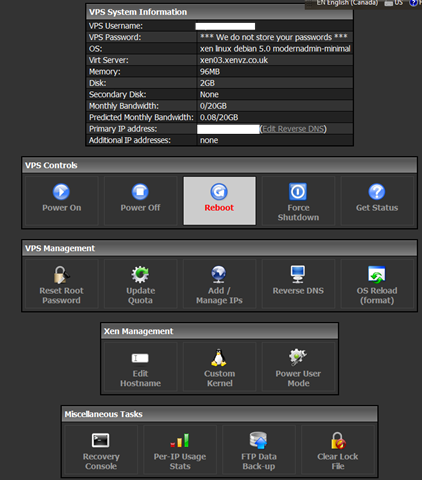
Some of the really nice features about this custom panels are:
1. Allow custom kernel through PyGrub, some users have reported here that they actually managed to get a few MB of RAM after making use of the custom kernels, however I have tried it with the Debian minimal install and did not notice any difference, so YMMV.
2. Allow Power User Mode where you can literally tweak every single aspect of the OS. I have not tried it as I do not consider myself good enough to tweak the system, so again, at your own risk.
3. Best part of it is that there is a lock file, which requires the previous action (boot/reboot/shutdown/get status) to be completed before the next action is taken. This is very neat feature to make sure the VPS is not taking multiple actions as it could take a while for the VPS to boot up. There is also an option to Clear Lock File if you are sure what you are doing.
OS Templates:
Here are all the OS Templates available:
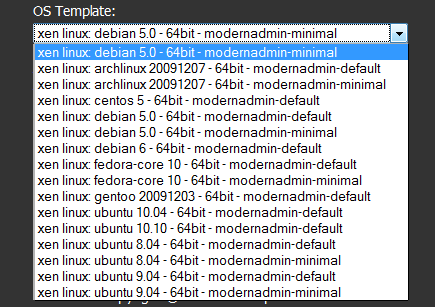
As you could see, there are quite a few options available, however for a VPS with 2GB of disk, it is quite unlikely you can install anything meaningful after putting up a “default” template, so only “minimal” templates are recommended. That actually removes most of the options here and my favourite OS – Ubuntu,only has a 9.04 minimal template, which is no longer maintained. Therefore I had to choose a Debian 5 minimal template to set up my VPS.
Note that they only have 64-bit OSes, which is less memory-efficient when it comes to 96MB of RAM. As per Sean here, it seems that 64-bit is all they could offer in Xen although they have 32-bit OS in OpenVZ (although OpenVZ will not have TUN/TAP available as per here).
Service/Contact:
I have to admit they may not have the best contact forms (if not the worst) among all the providers, basically it is just a simple form here with no integration with the customer accounts whatsoever.
However, in general the responses seem to be pretty fast during the day-time in UK and the only person I have ever contacted was Sean. There were quite a few times when it was more like we were chatting almost real-time by email and he has been providing really great help, thanks Sean!
VPS Speed:
Here are some of the basic tests I did:
cat /proc/cpuinfo
processor       : 0
vendor_id       : GenuineIntel
cpu family      : 6
model           : 23
model name      : Intel(R) Xeon(R) CPU           L5410  @ 2.33GHz
stepping        : 10
cpu MHz         : 2333.332
cache size      : 6144 KB
physical id     : 0
siblings        : 1
core id         : 0
cpu cores       : 1
fpu             : yes
fpu_exception   : yes
cpuid level     : 13
wp              : yes
flags           : fpu tsc msr pae cx8 apic cmov pat clflush acpi mmx fxsr sse ss                                                                                                 e2 ss ht syscall nx lm constant_tsc pni vmx est ssse3 cx16 sse4_1 lahf_lm
bogomips        : 5877.31
clflush size    : 64
cache_alignment : 64
address sizes   : 38 bits physical, 48 bits virtual
power management:

processor       : 1
vendor_id       : GenuineIntel
cpu family      : 6
model           : 23
model name      : Intel(R) Xeon(R) CPU           L5410  @ 2.33GHz
stepping        : 10
cpu MHz         : 2333.332
cache size      : 6144 KB
physical id     : 1
siblings        : 1
core id         : 0
cpu cores       : 1
fpu             : yes
fpu_exception   : yes
cpuid level     : 13
wp              : yes
flags           : fpu tsc msr pae cx8 apic cmov pat clflush acpi mmx fxsr sse ss                                                                                                 e2 ss ht syscall nx lm constant_tsc pni vmx est ssse3 cx16 sse4_1 lahf_lm
bogomips        : 5877.31
clflush size    : 64
cache_alignment : 64
address sizes   : 38 bits physical, 48 bits virtual
power management:
Note that there are actually 2 cores enabled for each VPS and they do not restrict resources unless it is affecting the other users (as per Sean), so I think it is a lot better than the providers who “ballooning” the Xen VPS.
dd if=/dev/zero of=test bs=64k count=512 conv=fdatasync
512+0 records in
512+0 records out
33554432 bytes (34 MB) copied, 1.57097 s, 21.4 MB/s
which I personally think is pretty good.
 wget http://cachefly.cachefly.net/100mb.test
--2011-04-02 11:31:50--  http://cachefly.cachefly.net/100mb.test
Resolving cachefly.cachefly.net... 205.234.175.175
Connecting to cachefly.cachefly.net|205.234.175.175|:80... connected.
HTTP request sent, awaiting response... 200 OK
Length: 104857600 (100M) [application/octet-stream]
Saving to: `100mb.test'

100%[=======================================================================================================================================>] 104,857,600 9.53M/s   in 10s

2011-04-02 11:32:00 (10.0 MB/s) - `100mb.test' saved [104857600/104857600]
This basically is one of the fastest I have seen! Even better than some of much more expensive VPSes!
Here is the result of downloading the same test file from this VPS to my QuickWeb VPS (Located in London, UK):
 wget http://95.154.255.222/100mb.test
--2011-04-02 11:34:03--  http://95.154.255.222/100mb.test
Connecting to 95.154.255.222:80... connected.
HTTP request sent, awaiting response... 200 OK
Length: 104857600 (100M) [application/octet-stream]
Saving to: `100mb.test'

100%[======================================>] 104,857,600 10.6M/s   in 9.3s

2011-04-02 11:34:12 (10.7 MB/s) - `100mb.test' saved [104857600/104857600]
Again, pretty decent speed if not really good.
And this is from my Nix Communications VPS in Montreal, QC, Canada:
wget http://95.154.255.222/100mb.test
--2011-04-02 11:36:16--  http://95.154.255.222/100mb.test
Connecting to 95.154.255.222:80... connected.
HTTP request sent, awaiting response... 200 OK
Length: 104857600 (100M) [application/octet-stream]
Saving to: `100mb.test'

100%[======================================>] 104,857,600 6.52M/s   in 20s

2011-04-02 11:36:36 (5.03 MB/s) - `100mb.test' saved [104857600/104857600]
Not bad even though the data has to travel across the Atlantic Ocean!
I did not bother to run the UnixBench because it will perhaps gives me serious trouble running it on such a tiny box and won’t be doing too much good either.
Summary:
Pretty neat low-end VPS for one pound a month, fast setup, good control panel and fast machine in general. Contact form is perhaps not the best but definitely responsive.
Here is the current RAM usage:
total used free shared buffers cached Mem: 96 94 1 0 0 21 -/+ buffers/cache: 72 23 Swap: 255 24 231Pingback: Happy 30-Day Aninversary, 96MB.com! - 96MB.com-Blog running on a 96MB RAM VPS
Pingback: 96MB Low End VPS Review Part XXXXIII – XenVZ revisited | | 96MB.com96MB.com