
96MB Low End VPS Review Part 67–Virpus Xen
One of the trends that I noticed among many VPS providers with large client base is always they have more negative reviews. I guess one could always attribute that to “it is easier to make one person happy but difficult to make a million”, or, from the customers’ perspective, “when a VPS provider gets too large, they don’t care about each individual customer, since 1/10 is a huge loss but 1/1,00,000 loss of customer is next to none. For example, Googling “Burst.NET negative reviews” and I am sure you will be able to find quite a few of them. Virpus, which is based in WholeSale Internet in Kansas City (but has recently expanded to other cities as well), is another VPS with quite a large client base and obviously, searching for their reviews shows more negative reviews than the positive one.
At 96MB, I try not be driven by the what others think of the services of VPS providers, rather, I would focus everything solely on my own experience and investigations. As such, with some curiosity, I decided to sign up for one of the Virpus Xen VPS and review them.
Background Information and Sign Up
As per their advertisement on Webhostingtalk, this is what you get for equivalent for 5USD per month:
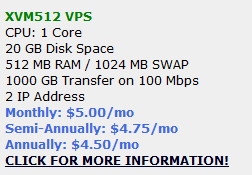
The biggest selling point, though, is the fact that they offer free DirectAdmin license if you are willing to pay for longer period:

In fact, Wholesale Internet, being one of the earlier client of DirectAdmin, is able to issue DirectAdmin license to their own clients for VPS and dedicated servers, which is a plus for those who need a control panel within the VPS. Furthermore, Virpus will install the control panel for you as well, which is good.
Their order/client management system is on standard WHMCS interface:

Other than the standard input, there are a few options that could be chosen from.
Extra IPv4 address cost 1.5 USD per month per address, which is not exactly cheap.
For the location, you can choose between Kansas City and Los Angeles, however LA seems to have a longer wait time as stated in the order form:

For the OS, there is only a single selection available, however you can always change the OS selection later on in the SolusVM panel:

You can also choose to add DirectAdmin or CPanel as the control panel. The DirectAdmin panel is 7 USD per month (free if you pay semi-annually or annually), and the CPanel cost 12 USD per month, which is still cheaper than the typical cost of the panel (15 USD per month).
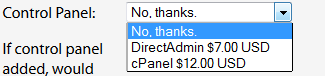
You can also choose to have Virpus install the control panel for you or have it installed by yourself. I would assume the advantage of installing it yourself is you’ll have the VPS up and running immediately (using the trial license until Virpus gives you the actual license) rather than wait for the panel to be installed (which took a bit longer than a day in my case).

You can also make the VPS to be a fully managed one, although at 20 USD a month, I would probably think twice before going for the management option with them (and you’d miss all the fun of configuring and messing up the VPS yourself!):

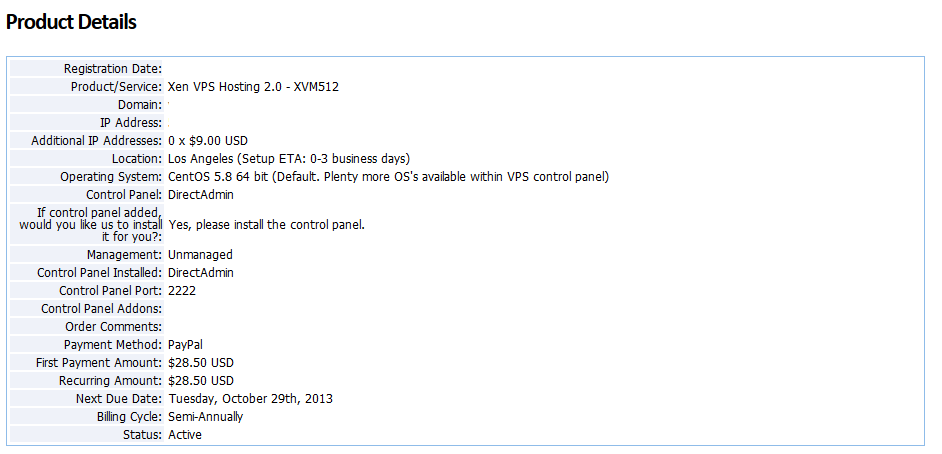
The activation of the VPS was not instant due to the location I picked, however obviously the installation of DirectAdmin is not (which surprised me considering the number of installations they have to do). Once logged into their WHMCS interface via the secured HTTPS link, you could see the active service with all the details listed:
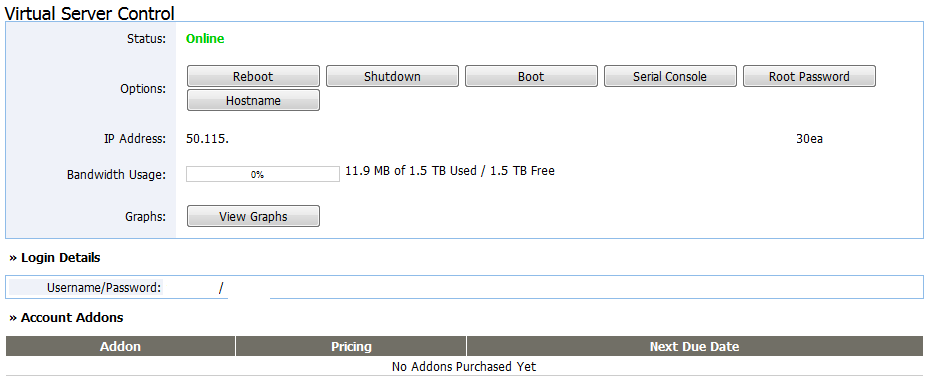
Scrolling down you would be able to see the integrated control panel to perform various actions on the VPS, as well as the address and the IPv4 and IPv6 address. Although not listed, there are 3 IPv6 address that comes with the VPS:
Their SolusVM interface is accessed via the unsecured HTTP protocol and appear to use the new Bootstrap SolusVM interface, with the username assigned automatically by the system:
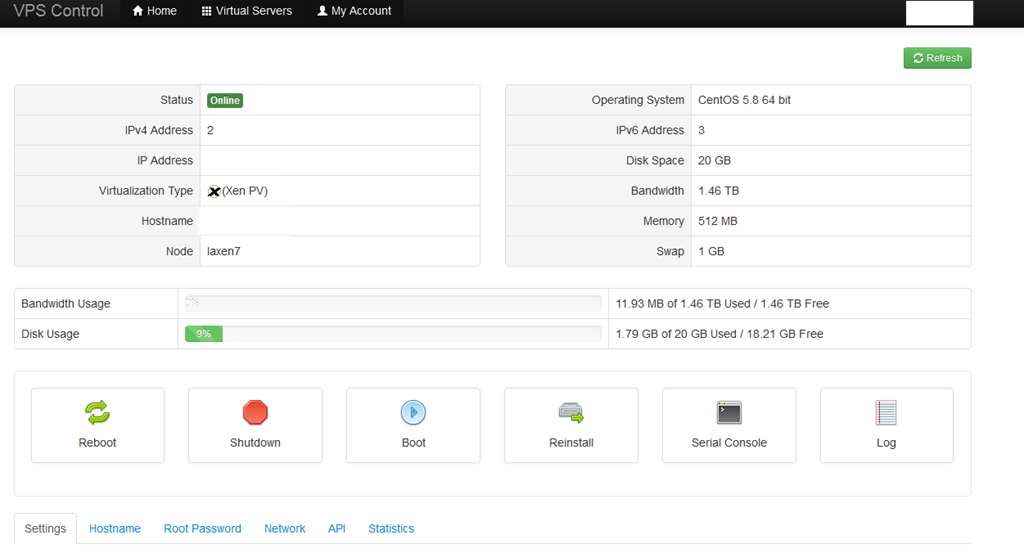
Strictly a matter of personal preference, but for some reason I always thought the initial SolusVM interface is a lot better than this one, as the old one had everything on one page and was quite intuitive. The new ones certainly have the more “modern” look due to the Bootstrap interface, but is probably not as functional as the old one.
The only option in Settings tab is the network card, and you have three options to choose from:
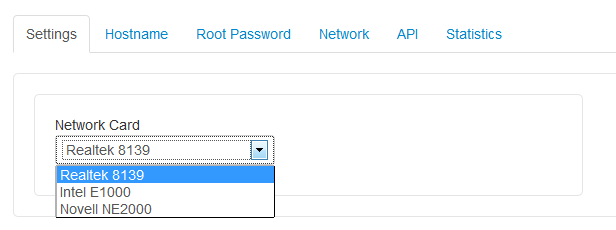
All of the tests done in the next section were using the Realtek 8139 card, which was the default option.
The OS reinstallation options are somewhat limited compare to many other providers, covering only the basic OS distribution templates without any of the application stacks. However there are quite a few varieties of CentOS templates being covered, and for the Debian 7 templates, only 64 bit is available:

Test on the VPS
As mentioned above, the VPS that I have signed up has 512MB of RAM and 1024MB of swap space, 20GB of hard drive space and 1.5TB of bandwidth, the VPS also comes with 2 IPv4 addresses and 3 IPv6 addresses and is located in QuadraNet datacenter in Los Angeles, CA and I have installed Debian 6 32 bit for testing purposes.
When the VPS was first installed, about 10MB of RAM was used:
free -m
             total       used       free     shared    buffers     cached
Mem:           501         27        473          0          1         14
-/+ buffers/cache:         10        490
Swap:         1023          0       1023
Top showing the processes running:
top - 00:19:18 up 3 min,  1 user,  load average: 0.00, 0.00, 0.00
Tasks:  47 total,   1 running,  46 sleeping,   0 stopped,   0 zombie
Cpu(s):  0.0%us,  0.0%sy,  0.0%ni, 99.7%id,  0.0%wa,  0.0%hi,  0.0%si,  0.3%st
Mem:    513028k total,    27708k used,   485320k free,     1300k buffers
Swap:  1048568k total,        0k used,  1048568k free,    15204k cached

  PID USER      PR  NI  VIRT  RES  SHR S %CPU %MEM    TIME+  COMMAND
  894 root      20   0  8264 2844 2324 S  0.7  0.6   0:00.06 sshd
  897 root      20   0  3948 2640 1332 S  0.0  0.5   0:00.25 bash
  562 root      20   0 27320 1472 1032 S  0.0  0.3   0:00.01 rsyslogd
  916 root      20   0  2340 1120  900 R  0.7  0.2   0:00.01 top
  738 root      20   0  5500  972  584 S  0.0  0.2   0:00.00 sshd
  863 Debian-e  20   0  6500  920  620 S  0.0  0.2   0:00.00 exim4
  600 root      20   0  2300  860  672 S  0.0  0.2   0:00.00 cron
  146 root      16  -4  2264  748  416 S  0.0  0.1   0:00.03 udevd
    1 root      20   0  2040  728  628 S  0.0  0.1   0:00.24 init
  176 root      18  -2  2260  628  300 S  0.0  0.1   0:00.00 udevd
  181 root      18  -2  2260  628  300 S  0.0  0.1   0:00.00 udevd
  598 root      20   0  1692  564  464 S  0.0  0.1   0:00.00 anacron
  883 root      20   0  1712  556  476 S  0.0  0.1   0:00.00 getty
  884 root      20   0  1712  556  476 S  0.0  0.1   0:00.00 getty
  886 root      20   0  1712  556  476 S  0.0  0.1   0:00.00 getty
  887 root      20   0  1712  556  476 S  0.0  0.1   0:00.00 getty
  882 root      20   0  1712  552  476 S  0.0  0.1   0:00.00 getty
And htop output:
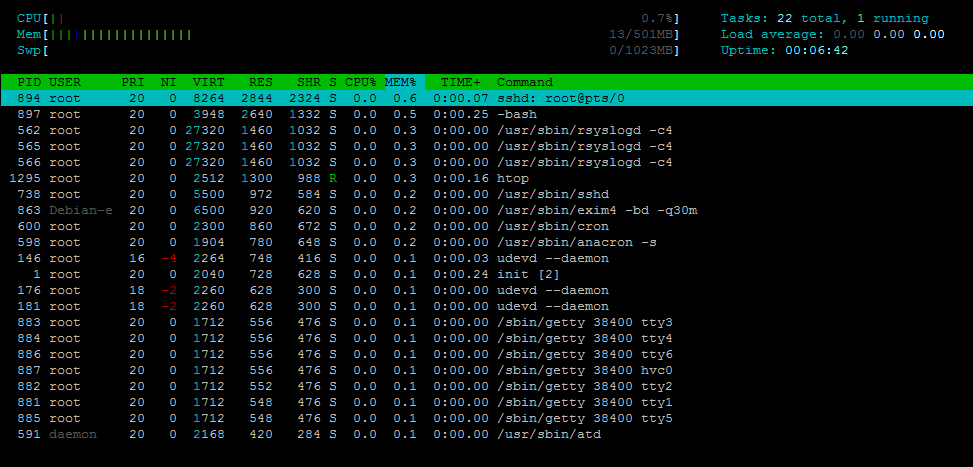
About 800MB of hard drive space was used:
 df -h
Filesystem            Size  Used Avail Use% Mounted on
/dev/xvda1             20G  801M   18G   5% /
tmpfs                 251M     0  251M   0% /lib/init/rw
udev                  241M   24K  241M   1% /dev
tmpfs                 251M  4.0K  251M   1% /dev/shm
The iNode limit is set to pretty standard values:
df -i
Filesystem            Inodes   IUsed   IFree IUse% Mounted on
/dev/xvda1           2621440   24939 2596501    1% /
tmpfs                  64128       4   64124    1% /lib/init/rw
udev                   61479     390   61089    1% /dev
tmpfs                  64128       3   64125    1% /dev/shm
When the full LNMP stack was loaded, 51MB of RAM was used, which is a little less than the usual memory usage for such a template:
free -m
             total       used       free     shared    buffers     cached
Mem:           501        491          9          0         21        419
-/+ buffers/cache:         51        449
Swap:         1023          0       1023
Top showing the processes running:
top - 09:21:56 up  1:06,  1 user,  load average: 0.01, 0.46, 0.72
Tasks:  55 total,   1 running,  54 sleeping,   0 stopped,   0 zombie
Cpu(s):  0.0%us,  0.0%sy,  0.0%ni, 99.8%id,  0.0%wa,  0.0%hi,  0.0%si,  0.2%st
Mem:    513028k total,   503624k used,     9404k free,    21792k buffers
Swap:  1048568k total,      108k used,  1048460k free,   429480k cached

  PID USER      PR  NI  VIRT  RES  SHR S %CPU %MEM    TIME+  COMMAND
 6500 www       20   0 15024  10m  436 S  0.0  2.2   0:00.01 nginx
18995 mysql     20   0 33948 4620 2020 S  0.0  0.9   0:00.01 mysqld
 6490 root      20   0 22640 4552 1412 S  0.0  0.9   0:00.06 php-cgi
 6491 www       20   0 22640 4136  996 S  0.0  0.8   0:00.00 php-cgi
 6492 www       20   0 22640 4136  996 S  0.0  0.8   0:00.00 php-cgi
 6494 www       20   0 22640 4136  996 S  0.0  0.8   0:00.00 php-cgi
 6495 www       20   0 22640 4136  996 S  0.0  0.8   0:00.00 php-cgi
 6497 www       20   0 22640 4136  996 S  0.0  0.8   0:00.00 php-cgi
  897 root      20   0  3952 2292  980 S  0.0  0.4   0:00.29 bash
  894 root      20   0  8404 1652 1096 S  0.0  0.3   0:02.23 sshd
 6522 root      20   0  2344 1128  904 R  0.2  0.2   0:00.01 top
  562 root      20   0 27320 1060  632 S  0.0  0.2   0:00.01 rsyslogd
 6498 root      20   0  4812  736  272 S  0.0  0.1   0:00.00 nginx
  738 root      20   0  5500  712  324 S  0.0  0.1   0:00.00 sshd
  863 Debian-e  20   0  6500  656  356 S  0.0  0.1   0:00.00 exim4
    1 root      20   0  2024  588  504 S  0.0  0.1   0:00.27 init
18893 root      20   0  1760  556  464 S  0.0  0.1   0:00.02 mysqld_safe
And htop output:
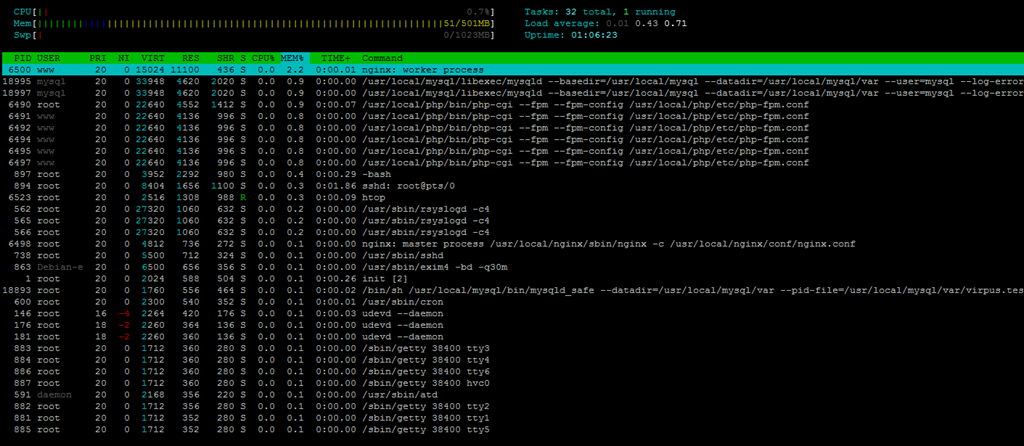
About 2.1GB of hard drive space was used:
df -h
Filesystem            Size  Used Avail Use% Mounted on
/dev/xvda1             20G  2.1G   17G  11% /
tmpfs                 251M     0  251M   0% /lib/init/rw
udev                  241M   24K  241M   1% /dev
tmpfs                 251M  4.0K  251M   1% /dev/shm
And about 3% of iNodes:
df -i
Filesystem            Inodes   IUsed   IFree IUse% Mounted on
/dev/xvda1           2621440   73638 2547802    3% /
tmpfs                  64128       4   64124    1% /lib/init/rw
udev                   61479     390   61089    1% /dev
tmpfs                  64128       3   64125    1% /dev/shm
CPUInfo shows there is a single core assigned to this VPS and it is a E5-2620 CPU:
 cat /proc/cpuinfo
processor       : 0
vendor_id       : GenuineIntel
cpu family      : 6
model           : 45
model name      : Intel(R) Xeon(R) CPU E5-2620 0 @ 2.00GHz
stepping        : 7
cpu MHz         : 1999.999
cache size      : 15360 KB
fdiv_bug        : no
hlt_bug         : no
f00f_bug        : no
coma_bug        : no
fpu             : yes
fpu_exception   : yes
cpuid level     : 13
wp              : yes
flags           : fpu de tsc msr pae cx8 sep cmov pat clflush mmx fxsr sse sse2 ss ht nx constant_tsc up nonstop_tsc pni pclmulqdq ssse3 sse4_1 sse4_2 x2apic popcnt aes avx hypervisor
bogomips        : 3999.99
clflush size    : 64
cache_alignment : 64
address sizes   : 46 bits physical, 48 bits virtual
power management:
Meminfo output:
cat /proc/meminfo
MemTotal:         513028 kB
MemFree:           11144 kB
Buffers:           18920 kB
Cached:           441712 kB
SwapCached:          108 kB
Active:            62816 kB
Inactive:         420608 kB
Active(anon):      11088 kB
Inactive(anon):    11744 kB
Active(file):      51728 kB
Inactive(file):   408864 kB
Unevictable:           0 kB
Mlocked:               0 kB
HighTotal:             0 kB
HighFree:              0 kB
LowTotal:         513028 kB
LowFree:           11144 kB
SwapTotal:       1048568 kB
SwapFree:        1048460 kB
Dirty:                 0 kB
Writeback:             0 kB
AnonPages:         22724 kB
Mapped:             6020 kB
Shmem:                40 kB
Slab:              14616 kB
SReclaimable:      12252 kB
SUnreclaim:         2364 kB
KernelStack:         456 kB
PageTables:          860 kB
NFS_Unstable:          0 kB
Bounce:                0 kB
WritebackTmp:          0 kB
CommitLimit:     1305080 kB
Committed_AS:     104776 kB
VmallocTotal:     335864 kB
VmallocUsed:        1036 kB
VmallocChunk:     334756 kB
HardwareCorrupted:     0 kB
HugePages_Total:       0
HugePages_Free:        0
HugePages_Rsvd:        0
HugePages_Surp:        0
Hugepagesize:       2048 kB
DirectMap4k:      524288 kB
DirectMap2M:           0 kB
And time sync:
time sync

real    0m0.016s
user    0m0.004s
sys     0m0.004s
Download test from Cachefly showed pretty decent results:
 wget cachefly.cachefly.net/100mb.test -O /dev/null
--2013-04-30 09:25:14--  http://cachefly.cachefly.net/100mb.test
Resolving cachefly.cachefly.net... 205.234.175.175
Connecting to cachefly.cachefly.net|205.234.175.175|:80... connected.
HTTP request sent, awaiting response... 200 OK
Length: 104857600 (100M) [application/octet-stream]
Saving to: `/dev/null'

100%[======================================>] 104,857,600 7.67M/s   in 11s

2013-04-30 09:25:25 (8.91 MB/s) - `/dev/null' saved [104857600/104857600]
Testing again showed pretty consistent results:
 wget cachefly.cachefly.net/100mb.test
--2013-04-30 09:29:55--  http://cachefly.cachefly.net/100mb.test
Resolving cachefly.cachefly.net... 205.234.175.175
Connecting to cachefly.cachefly.net|205.234.175.175|:80... connected.
HTTP request sent, awaiting response... 200 OK
Length: 104857600 (100M) [application/octet-stream]
Saving to: `100mb.test'

100%[======================================>] 104,857,600 9.04M/s   in 11s

2013-04-30 09:30:07 (8.89 MB/s) - `100mb.test' saved [104857600/104857600]
As for the upload, it was pretty interesting that to see that my test VPS from ChicagoVPS that is located in the same city to the physical location of this VPS actually gave the slowest upload test speed:
wget 198.167.xxx,xxx/100mb.test -O /dev/null
--2013-04-30 09:30:40--  http://198.167.xxx,xxx/100mb.test
Connecting to 198.167.xxx,xxx:80... connected.
HTTP request sent, awaiting response... 200 OK
Length: 104857600 (100M) [application/octet-stream]
Saving to: `/dev/null'

100%[======================================>] 104,857,600 1.68M/s   in 57s

2013-04-30 09:31:37 (1.75 MB/s) - `/dev/null' saved [104857600/104857600]
My Quickweb test VPS located in Chicago, IL, showed better upload speed than this one:
wget 198.167.xxx,xxx/100mb.test -O /dev/null
--2013-04-30 01:33:14--  http://198.167.xxx,xxx/100mb.test
Connecting to 198.167.xxx,xxx:80... connected.
HTTP request sent, awaiting response... 200 OK
Length: 104857600 (100M) [application/octet-stream]
Saving to: `/dev/null'

100%[======================================>] 104,857,600 1.65M/s   in 61s

2013-04-30 01:34:15 (1.65 MB/s) - `/dev/null' saved [104857600/104857600]
And finally, my test VPS with Prometeus, in Milan, Italy, which is the furthest from this VPS in terms of physical distance, actually gave the best test speed:
wget 198.167.xxx,xxx/100mb.test -O /dev/null
--2013-04-29 21:34:54--  http://198.167.xxx,xxx/100mb.test
Connecting to 198.167.xxx,xxx:80... connected.
HTTP request sent, awaiting response... 200 OK
Length: 104857600 (100M) [application/octet-stream]
Saving to: `/dev/null'

100%[======================================>] 104,857,600 2.87M/s   in 62s

2013-04-29 21:35:56 (1.61 MB/s) - `/dev/null' saved [104857600/104857600]
The dd test actually revealed pretty good disk I/O speed:
dd if=/dev/zero of=test bs=64k count=16k conv=fdatasync
16384+0 records in
16384+0 records out
1073741824 bytes (1.1 GB) copied, 6.77652 s, 158 MB/s
Testing again showed similar results, which is pretty impressive:
dd if=/dev/zero of=test bs=64k count=16k conv=fdatasync
16384+0 records in
16384+0 records out
1073741824 bytes (1.1 GB) copied, 7.61619 s, 141 MB/s
IOPing showed fairly consistent disk I/O speed, in fact, all but the last reading had slightly higher than ususal IO ping, showing that in general the disk is performing pretty good:
ioping -c 10 .
4096 bytes from . (ext3 /dev/xvda1): request=1 time=0.1 ms
4096 bytes from . (ext3 /dev/xvda1): request=2 time=0.3 ms
4096 bytes from . (ext3 /dev/xvda1): request=3 time=0.2 ms
4096 bytes from . (ext3 /dev/xvda1): request=4 time=0.3 ms
4096 bytes from . (ext3 /dev/xvda1): request=5 time=0.3 ms
4096 bytes from . (ext3 /dev/xvda1): request=6 time=0.6 ms
4096 bytes from . (ext3 /dev/xvda1): request=7 time=0.2 ms
4096 bytes from . (ext3 /dev/xvda1): request=8 time=0.2 ms
4096 bytes from . (ext3 /dev/xvda1): request=9 time=0.3 ms
4096 bytes from . (ext3 /dev/xvda1): request=10 time=3.6 ms

--- . (ext3 /dev/xvda1) ioping statistics ---
10 requests completed in 9007.8 ms, 1620 iops, 6.3 mb/s
min/avg/max/mdev = 0.1/0.6/3.6/1.0 ms
The results for the same test was a little disappointing when I tried it again:
ioping -c 10 .
4096 bytes from . (ext3 /dev/xvda1): request=1 time=0.2 ms
4096 bytes from . (ext3 /dev/xvda1): request=2 time=0.2 ms
4096 bytes from . (ext3 /dev/xvda1): request=3 time=0.2 ms
4096 bytes from . (ext3 /dev/xvda1): request=4 time=8.9 ms
4096 bytes from . (ext3 /dev/xvda1): request=5 time=21.5 ms
4096 bytes from . (ext3 /dev/xvda1): request=6 time=0.2 ms
4096 bytes from . (ext3 /dev/xvda1): request=7 time=6.2 ms
4096 bytes from . (ext3 /dev/xvda1): request=8 time=0.2 ms
4096 bytes from . (ext3 /dev/xvda1): request=9 time=0.2 ms
4096 bytes from . (ext3 /dev/xvda1): request=10 time=0.2 ms

--- . (ext3 /dev/xvda1) ioping statistics ---
10 requests completed in 9040.2 ms, 262 iops, 1.0 mb/s
min/avg/max/mdev = 0.2/3.8/21.5/6.6 ms
With a single CPU core, it is difficult to expect any good Unixbench score, but I was still a little surprised to see that in the end, the score was a little above 300, considering that E5-2620 is a pretty powerful CPU:
   #    #  #    #  #  #    #          #####   ######  #    #   ####   #    #
   #    #  ##   #  #   #  #           #    #  #       ##   #  #    #  #    #
   #    #  # #  #  #    ##            #####   #####   # #  #  #       ######
   #    #  #  # #  #    ##            #    #  #       #  # #  #       #    #
   #    #  #   ##  #   #  #           #    #  #       #   ##  #    #  #    #
    ####   #    #  #  #    #          #####   ######  #    #   ####   #    #

   Version 5.1.3                      Based on the Byte Magazine Unix Benchmark

   Multi-CPU version                  Version 5 revisions by Ian Smith,
                                      Sunnyvale, CA, USA
   January 13, 2011                   johantheghost at yahoo period com


1 x Dhrystone 2 using register variables  1 2 3 4 5 6 7 8 9 10

1 x Double-Precision Whetstone  1 2 3 4 5 6 7 8 9 10

1 x Execl Throughput  1 2 3

1 x File Copy 1024 bufsize 2000 maxblocks  1 2 3

1 x File Copy 256 bufsize 500 maxblocks  1 2 3

1 x File Copy 4096 bufsize 8000 maxblocks  1 2 3

1 x Pipe Throughput  1 2 3 4 5 6 7 8 9 10

1 x Pipe-based Context Switching  1 2 3 4 5 6 7 8 9 10

1 x Process Creation  1 2 3

1 x System Call Overhead  1 2 3 4 5 6 7 8 9 10

1 x Shell Scripts (1 concurrent)  1 2 3

1 x Shell Scripts (8 concurrent)  1 2 3

========================================================================
   BYTE UNIX Benchmarks (Version 5.1.3)

   System: xxxxxxx: GNU/Linux
   OS: GNU/Linux -- 2.6.32-5-686-bigmem -- #1 SMP Mon Oct 3 05:03:32 UTC 2011
   Machine: i686 (unknown)
   Language: en_US.utf8 (charmap="UTF-8", collate="UTF-8")
   CPU 0: Intel(R) Xeon(R) CPU E5-2620 0 @ 2.00GHz (4000.0 bogomips)
          Hyper-Threading, MMX, Physical Address Ext, SYSENTER/SYSEXIT
   09:37:09 up  1:21,  1 user,  load average: 0.08, 0.04, 0.26; runlevel 2

------------------------------------------------------------------------
Benchmark Run: Tue Apr 30 2013 09:37:09 - 10:05:09
1 CPU in system; running 1 parallel copy of tests

Dhrystone 2 using register variables        7814464.7 lps   (10.0 s, 7 samples)
Double-Precision Whetstone                     1655.9 MWIPS (10.3 s, 7 samples)
Execl Throughput                               1058.1 lps   (30.0 s, 2 samples)
File Copy 1024 bufsize 2000 maxblocks        186602.3 KBps  (30.0 s, 2 samples)
File Copy 256 bufsize 500 maxblocks           53175.6 KBps  (30.0 s, 2 samples)
File Copy 4096 bufsize 8000 maxblocks        618814.8 KBps  (30.0 s, 2 samples)
Pipe Throughput                              344959.6 lps   (10.0 s, 7 samples)
Pipe-based Context Switching                  42426.5 lps   (10.0 s, 7 samples)
Process Creation                               1715.9 lps   (30.0 s, 2 samples)
Shell Scripts (1 concurrent)                   1800.3 lpm   (60.0 s, 2 samples)
Shell Scripts (8 concurrent)                    238.7 lpm   (60.2 s, 2 samples)
System Call Overhead                         395911.0 lps   (10.0 s, 7 samples)

System Benchmarks Index Values               BASELINE       RESULT    INDEX
Dhrystone 2 using register variables         116700.0    7814464.7    669.6
Double-Precision Whetstone                       55.0       1655.9    301.1
Execl Throughput                                 43.0       1058.1    246.1
File Copy 1024 bufsize 2000 maxblocks          3960.0     186602.3    471.2
File Copy 256 bufsize 500 maxblocks            1655.0      53175.6    321.3
File Copy 4096 bufsize 8000 maxblocks          5800.0     618814.8   1066.9
Pipe Throughput                               12440.0     344959.6    277.3
Pipe-based Context Switching                   4000.0      42426.5    106.1
Process Creation                                126.0       1715.9    136.2
Shell Scripts (1 concurrent)                     42.4       1800.3    424.6
Shell Scripts (8 concurrent)                      6.0        238.7    397.8
System Call Overhead                          15000.0     395911.0    263.9
                                                                   ========
System Benchmarks Index Score                                         325.8
Testing again showed similar results:
   #    #  #    #  #  #    #          #####   ######  #    #   ####   #    #
   #    #  ##   #  #   #  #           #    #  #       ##   #  #    #  #    #
   #    #  # #  #  #    ##            #####   #####   # #  #  #       ######
   #    #  #  # #  #    ##            #    #  #       #  # #  #       #    #
   #    #  #   ##  #   #  #           #    #  #       #   ##  #    #  #    #
    ####   #    #  #  #    #          #####   ######  #    #   ####   #    #

   Version 5.1.3                      Based on the Byte Magazine Unix Benchmark

   Multi-CPU version                  Version 5 revisions by Ian Smith,
                                      Sunnyvale, CA, USA
   January 13, 2011                   johantheghost at yahoo period com


1 x Dhrystone 2 using register variables  1 2 3 4 5 6 7 8 9 10

1 x Double-Precision Whetstone  1 2 3 4 5 6 7 8 9 10

1 x Execl Throughput  1 2 3

1 x File Copy 1024 bufsize 2000 maxblocks  1 2 3

1 x File Copy 256 bufsize 500 maxblocks  1 2 3

1 x File Copy 4096 bufsize 8000 maxblocks  1 2 3

1 x Pipe Throughput  1 2 3 4 5 6 7 8 9 10

1 x Pipe-based Context Switching  1 2 3 4 5 6 7 8 9 10

1 x Process Creation  1 2 3

1 x System Call Overhead  1 2 3 4 5 6 7 8 9 10

1 x Shell Scripts (1 concurrent)  1 2 3

1 x Shell Scripts (8 concurrent)  1 2 3

========================================================================
   BYTE UNIX Benchmarks (Version 5.1.3)

   System: xxxxxxxx: GNU/Linux
   OS: GNU/Linux -- 2.6.32-5-686-bigmem -- #1 SMP Mon Oct 3 05:03:32 UTC 2011
   Machine: i686 (unknown)
   Language: en_US.utf8 (charmap="UTF-8", collate="UTF-8")
   CPU 0: Intel(R) Xeon(R) CPU E5-2620 0 @ 2.00GHz (4000.0 bogomips)
          Hyper-Threading, MMX, Physical Address Ext, SYSENTER/SYSEXIT
   12:31:12 up  4:15,  1 user,  load average: 0.00, 0.00, 0.00; runlevel 2

------------------------------------------------------------------------
Benchmark Run: Tue Apr 30 2013 12:31:12 - 12:59:10
1 CPU in system; running 1 parallel copy of tests

Dhrystone 2 using register variables        8186740.8 lps   (10.0 s, 7 samples)
Double-Precision Whetstone                     1727.6 MWIPS (10.4 s, 7 samples)
Execl Throughput                               1040.9 lps   (30.0 s, 2 samples)
File Copy 1024 bufsize 2000 maxblocks        192154.1 KBps  (30.0 s, 2 samples)
File Copy 256 bufsize 500 maxblocks           51725.8 KBps  (30.0 s, 2 samples)
File Copy 4096 bufsize 8000 maxblocks        625464.3 KBps  (30.0 s, 2 samples)
Pipe Throughput                              344245.8 lps   (10.0 s, 7 samples)
Pipe-based Context Switching                  42321.9 lps   (10.0 s, 7 samples)
Process Creation                               1866.4 lps   (30.0 s, 2 samples)
Shell Scripts (1 concurrent)                   1928.2 lpm   (60.0 s, 2 samples)
Shell Scripts (8 concurrent)                    242.4 lpm   (60.2 s, 2 samples)
System Call Overhead                         398695.4 lps   (10.0 s, 7 samples)

System Benchmarks Index Values               BASELINE       RESULT    INDEX
Dhrystone 2 using register variables         116700.0    8186740.8    701.5
Double-Precision Whetstone                       55.0       1727.6    314.1
Execl Throughput                                 43.0       1040.9    242.1
File Copy 1024 bufsize 2000 maxblocks          3960.0     192154.1    485.2
File Copy 256 bufsize 500 maxblocks            1655.0      51725.8    312.5
File Copy 4096 bufsize 8000 maxblocks          5800.0     625464.3   1078.4
Pipe Throughput                               12440.0     344245.8    276.7
Pipe-based Context Switching                   4000.0      42321.9    105.8
Process Creation                                126.0       1866.4    148.1
Shell Scripts (1 concurrent)                     42.4       1928.2    454.8
Shell Scripts (8 concurrent)                      6.0        242.4    404.0
System Call Overhead                          15000.0     398695.4    265.8
                                                                   ========
System Benchmarks Index Score                                         332.8
Geekbench showed slightly above 2700 points, which is probably average at best:
System Information
  Platform:                  Linux x86 (32-bit)
  Compiler:                  GCC 4.1.2 20070925 (Red Hat 4.1.2-33)
  Operating System:          Linux 2.6.32-5-686-bigmem i686
  Model:                     Linux PC (Intel(R) Xeon(R) CPU E5-2620 0 @ 2.00GHz)
  Motherboard:               Unknown Motherboard
  Processor:                 Intel(R) Xeon(R) CPU E5-2620 0 @ 2.00GHz
  Processor ID:              GenuineIntel Family 6 Model 45 Stepping 7
  Logical Processors:        1
  Physical Processors:       1
  Processor Frequency:       2.00 GHz
  L1 Instruction Cache:      0.00 B
  L1 Data Cache:             0.00 B
  L2 Cache:                  256 KB
  L3 Cache:                  0.00 B
  Bus Frequency:             0.00 Hz
  Memory:                    501 MB
  Memory Type:               N/A
  SIMD:                      1
  BIOS:                      N/A
  Processor Model:                  Intel(R) Xeon(R) CPU E5-2620 0 @ 2.00GHz
  Processor Cores:           1

Integer
  Blowfish
    single-threaded scalar    1139 ||||
    multi-threaded scalar     1158 ||||
  Text Compress
    single-threaded scalar    1164 ||||
    multi-threaded scalar     1196 ||||
  Text Decompress
    single-threaded scalar    1416 |||||
    multi-threaded scalar     1532 ||||||
  Image Compress
    single-threaded scalar    1171 ||||
    multi-threaded scalar     1172 ||||
  Image Decompress
    single-threaded scalar    1025 ||||
    multi-threaded scalar      955 |||
  Lua
    single-threaded scalar    1850 |||||||
    multi-threaded scalar     1784 |||||||

Floating Point
  Mandelbrot
    single-threaded scalar    1598 ||||||
    multi-threaded scalar     1594 ||||||
  Dot Product
    single-threaded scalar    2229 ||||||||
    multi-threaded scalar     2535 ||||||||||
    single-threaded vector    2926 |||||||||||
    multi-threaded vector     2957 |||||||||||
  LU Decomposition
    single-threaded scalar    1377 |||||
    multi-threaded scalar     1384 |||||
  Primality Test
    single-threaded scalar    2439 |||||||||
    multi-threaded scalar     1908 |||||||
  Sharpen Image
    single-threaded scalar    5267 |||||||||||||||||||||
    multi-threaded scalar     4649 ||||||||||||||||||
  Blur Image
    single-threaded scalar    3488 |||||||||||||
    multi-threaded scalar     3834 |||||||||||||||

Memory
  Read Sequential
    single-threaded scalar    3835 |||||||||||||||
  Write Sequential
    single-threaded scalar    5887 |||||||||||||||||||||||
  Stdlib Allocate
    single-threaded scalar    1821 |||||||
  Stdlib Write
    single-threaded scalar    3491 |||||||||||||
  Stdlib Copy
    single-threaded scalar    6279 |||||||||||||||||||||||||

Stream
  Stream Copy
    single-threaded scalar    3333 |||||||||||||
    single-threaded vector    5809 |||||||||||||||||||||||
  Stream Scale
    single-threaded scalar    3675 ||||||||||||||
    single-threaded vector    5471 |||||||||||||||||||||
  Stream Add
    single-threaded scalar    4164 ||||||||||||||||
    single-threaded vector    5798 |||||||||||||||||||||||
  Stream Triad
    single-threaded scalar    3841 |||||||||||||||
    single-threaded vector    4378 |||||||||||||||||

Integer Score:                1296 |||||
Floating Point Score:         2727 ||||||||||
Memory Score:                 4262 |||||||||||||||||
Stream Score:                 4558 ||||||||||||||||||

Overall Geekbench Score:      2716 ||||||||||
However at least from this, we can see that the CPU is not throttled, which is good.
Testing again showed somewhat better results:
System Information
  Platform:                  Linux x86 (32-bit)
  Compiler:                  GCC 4.1.2 20070925 (Red Hat 4.1.2-33)
  Operating System:          Linux 2.6.32-5-686-bigmem i686
  Model:                     Linux PC (Intel(R) Xeon(R) CPU E5-2620 0 @ 2.00GHz)
  Motherboard:               Unknown Motherboard
  Processor:                 Intel(R) Xeon(R) CPU E5-2620 0 @ 2.00GHz
  Processor ID:              GenuineIntel Family 6 Model 45 Stepping 7
  Logical Processors:        1
  Physical Processors:       1
  Processor Frequency:       2.00 GHz
  L1 Instruction Cache:      0.00 B
  L1 Data Cache:             0.00 B
  L2 Cache:                  256 KB
  L3 Cache:                  0.00 B
  Bus Frequency:             0.00 Hz
  Memory:                    501 MB
  Memory Type:               N/A
  SIMD:                      1
  BIOS:                      N/A
  Processor Model:                  Intel(R) Xeon(R) CPU E5-2620 0 @ 2.00GHz
  Processor Cores:           1

Integer
  Blowfish
    single-threaded scalar    1204 ||||
    multi-threaded scalar     1249 ||||
  Text Compress
    single-threaded scalar    1433 |||||
    multi-threaded scalar     1380 |||||
  Text Decompress
    single-threaded scalar    1534 ||||||
    multi-threaded scalar     1453 |||||
  Image Compress
    single-threaded scalar    1065 ||||
    multi-threaded scalar     1028 ||||
  Image Decompress
    single-threaded scalar     932 |||
    multi-threaded scalar      936 |||
  Lua
    single-threaded scalar    1787 |||||||
    multi-threaded scalar     1771 |||||||

Floating Point
  Mandelbrot
    single-threaded scalar    1563 ||||||
    multi-threaded scalar     1582 ||||||
  Dot Product
    single-threaded scalar    2366 |||||||||
    multi-threaded scalar     2538 ||||||||||
    single-threaded vector    2682 ||||||||||
    multi-threaded vector     2828 |||||||||||
  LU Decomposition
    single-threaded scalar    1524 ||||||
    multi-threaded scalar     1402 |||||
  Primality Test
    single-threaded scalar    2355 |||||||||
    multi-threaded scalar     1912 |||||||
  Sharpen Image
    single-threaded scalar    5297 |||||||||||||||||||||
    multi-threaded scalar     4902 |||||||||||||||||||
  Blur Image
    single-threaded scalar    3993 |||||||||||||||
    multi-threaded scalar     4033 ||||||||||||||||

Memory
  Read Sequential
    single-threaded scalar    4201 ||||||||||||||||
  Write Sequential
    single-threaded scalar    6035 ||||||||||||||||||||||||
  Stdlib Allocate
    single-threaded scalar    2166 ||||||||
  Stdlib Write
    single-threaded scalar    3957 |||||||||||||||
  Stdlib Copy
    single-threaded scalar    7312 |||||||||||||||||||||||||||||

Stream
  Stream Copy
    single-threaded scalar    4445 |||||||||||||||||
    single-threaded vector    7265 |||||||||||||||||||||||||||||
  Stream Scale
    single-threaded scalar    3653 ||||||||||||||
    single-threaded vector    5446 |||||||||||||||||||||
  Stream Add
    single-threaded scalar    3944 |||||||||||||||
    single-threaded vector    6283 |||||||||||||||||||||||||
  Stream Triad
    single-threaded scalar    5069 ||||||||||||||||||||
    single-threaded vector    4446 |||||||||||||||||

Integer Score:                1314 |||||
Floating Point Score:         2784 |||||||||||
Memory Score:                 4734 ||||||||||||||||||
Stream Score:                 5068 ||||||||||||||||||||

Overall Geekbench Score:      2887 |||||||||||
As you can see, the overall specifications of this VPS is not very in the “high-end” of the spectrum and even though the disk I/O as shown by dd test is impressive, for some reason the ioping output was less than ideal.
Customer Service and Support
There seem to be quite a few complaints on the support of Virpus team, however I have actually had pretty decent interaction with them. The WHMCS system in Virpus is set up to allow clients responding to the tickets via email, which is a feature that, surprisingly, many providers are lacking, but it is something that I personally love since I always consider it a trouble that I have to log into the providers’ client management system every time I need to send in a ticket or reply to one.
My first ticket was regarding the install of DirectAdmin and was sent in at 15:46 on a Tuesday and the initial response from Virpus was made 8 minutes later (and it is not a “we are working on it” type of response but an actual request for further information) and other than the installation issues which took a bit longer, most of the replies were made within an hour. For some reason the DirectAdmin installation on my original VPS did not work after several attempt and Virpus has moved the VPS to another node for me as well.
My second interaction with them was actually over an abuse complaint that Virpus has received from my VPS the day after DirectAdmin was installed and before I even get to log in to the VPS (so someone actually hacked into the VPS and put up a phishing site there) and I have responded the complaint in about 30 minute, explaining to them there is no way I could have logged in, let alone setting up a phishing website. Jeremy from Virpus has responded within 2 minutes and helped me to reload the OS since I was not able to SSH into my server at that time.
Overall, I think the customer service is quite prompt, and is in line with what I would expect from a big provider like Virpus. They obviously have to follow their rules but as long as I am willing to provide instructions and solutions, they are more than willing to help me.
Conclusion
Just like some of the other large budget VPS providers I have reviewed before (Burst.Net Review for example), the performance of the VPS itself is probably not the best that we have ever seen even among the budget providers. For example, the ioping may be a little inconsistent from time to time and the benchmark, having a single core CPU, is not all that impressive. However, the VPS is in general pretty stable and at least from my interaction with Virpus, the customer support seems to be pretty professional and prompt. Granted that for a large company like Virpus, it is difficult to convince them to offer any sort of “favor” to a particular client and they may seem to be quite strict about the rules; however to me, these are really good things considering the number of clients they will have to offer favors on and how much it would impact others. Of course, the final bonus feature they have is the free DirectAdmin license, which is always good for those who would like to learn more about the DirectAdmin package.
Another good post 96mb! Hope you get to review more frequently!
@grails tutorial Thanks for your support, I will try to keep up with the pace.
it is also nice that XEN people are still doing great!
Virpus is a hit or miss company