
96MB Low End VPS Review Part 62-NECS
As many have said recently, my pace in writing VPS reviews are getting slower and slower. Believe it or not, I am actually just getting as frustrated with my own progress as well as I have received quite a few email politely reminding me their review requests have not been completed for months. NECS is one such example, Ramon from NECS has sent me a review request since June 7, and another reminder last month about it. I have finally got around to them and let’s take a look at their services.
Basic Information and Set Up
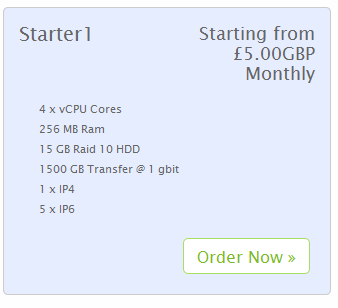
I have decided to take advantage of their offer on WHT and unfortunately their lowest plan (Basic) was sold out, so I had to sign up for the Starter 1 Plan, which offers the following amount of resources for 5 GBP (equivalent to slightly above 8 USD at the time of writing) per month:
Sign up page is standard WHMCS on HTTPS protocol (although the entire site is accessible via HTTP as well) and the sign up interface is a pretty straight-forward WHMCS interface:

Strictly a matter of personal preferences, but sometimes I have found graphics, particularly not-so-small ones, take a while to load up on the screen, and if this graphics is reload on every single page, it is quickly becomes an annoyance rather than advertising.
Also, there is not really any discount for long-term payments, even if paid for three years in advance, the price is still 5 GBP per month.
Since the plan is a KVM VPS plan, it has one of the biggest advantage of all KVM plans: the ability to load various types of ISOs and indeed they have a pretty large selection of ISOs even at the order stage. In fact, the selection is so big (50 ISOs in total) that I have to take the shortcut and get the list from the HTML code because it will take quite a few screenshots to get to the bottom of the list. Note that only some of the ISOs can be installed automatically, which was clearly labeled on the drop-down list as well:
CentOS 5.8 64bit DVD (Self Install)
CentOS 6.3 64bit minimal (Self Install)
CentOS 5.8 64 bit Minimal (Auto Install)
CentOS 5.8 32 bit Minimal (Auto Install)
CentOS 6.3 64 bit Minimal (Auto Install)
CentOS 6.3 32 Bit Minimal (Auto Install)
ClearOS 6.3 64 Bit (Auto Install)
ClearOS 6.3 32Bit Minimal (Auto Install)
Debian 6.0.5 64 Bit Minimal (Auto Installl)
Debian 6.0.5 32 Bit Minimal (Auto Install)
Fedora 17 64 Bit Minimal  (Auto Install)
Fedora 32 Bit Minimal (Auto Install)
OpenSUSE 12.2 64 Bit Minimal (Auto Install)
OpenSUSE 12.2 32 Bit Minimal (Auto Install)
Scientific Linux 5.8 64 Bit Minimal (Auto Install)
Scientific Linux 5.8 32 Bit Minimal (Auto Install)
Scientific Linux 6.3 32 Bit Minimal (Auto Install)
Scientific Linux 6.3 32 Bit Minimal (Auto Install)
Ubuntu 12.04 64 Bit Minimal (Auto Install)
Ubuntu 12.04 32 Bit Minimal (Auto Install)
CentOS 5.8 32bit DVD (Self Install)
CentOS 5.8 64bit Netinstall (Self Install)
CentOS 6.2 64bit Minimal Install (Self Install)
LIVE Debain with CD OpenVPN Access Server (Self Install)
TinyCore 4.5  (Self Install)
Fedora 16 64bit DVD (Self Install)
FreeBSD 9.0 64bit (Self Install)
FreeNAS 8.0.4 64bit (Self Install)
FreePBX 1.812 64bit NetInstall (Self Install)
Scientific Linux 6.2 64bit (Self Install)
Windows Server 2008 R2 Standard (Self Install)
Windows Server 2008 R2 Web (Self Install)
Arch Linux 2011 (Self Install)
Debian 6.0.4 64bit Net Install (Self Install)
Debian 6.0.5 32bit Net Install (Self Install)
Gentoo 64bit minimal (Self Install)
Linux Mint 13 DVD (Self Install)
openSUSE 12.1 64bit DVD (Self Install)
Slackware 13.37 64bit (Self Install)
TurnKey Linux 11.3 Lucid Dokuwiki (Self Install)
TurnKey Linux 11.3 Domain Controller (Self Install)
TurnKey Linux 11.3 Joomla 16 (Self Install)
TurnKey Linux 11.3 LAMP (Self Install)
TurnKey Linux 11.3 Magento (Self Install)
TurnKey Linux 11.3 phpbb (Self Install)
TurnKey Linux 11.3 Rails (Self Install)
TurnKey Linux 11.3 WordPress (Self Install)
TurnKey Linux 11.3 Zimbra (Self Install)
Ubuntu 12.04 64bit (Self Install)
Ubuntu 12.04 32bit (Self Install)
Provision of the VPS was instant and I have received my VPS login information the same minute as I received my payment confirmation. However, there was a little incident happened, basically when the order confirmation was generated, the one-time 50% promo code worked and I was only required to pay 2.50 GBP:

However, when the actual invoice was generated, the amount is back to 5 GBP:

I did not notice this until I paid the invoice (yes, good thing I was not billed for a million dollars), and after raising a ticket at 2am in the morning in the UK time zone, the issue was resolved 6 hours later at 8:50am, and a partial refund was offered, which I think is really not bad since billing tickets are normally answered outside of the business hours.
The welcome email is actually quite elaborate and contains quite a lot of useful information, although majority of it is still based of the standard WHMCS email template, note that the five IPv6 addresses are also given there:
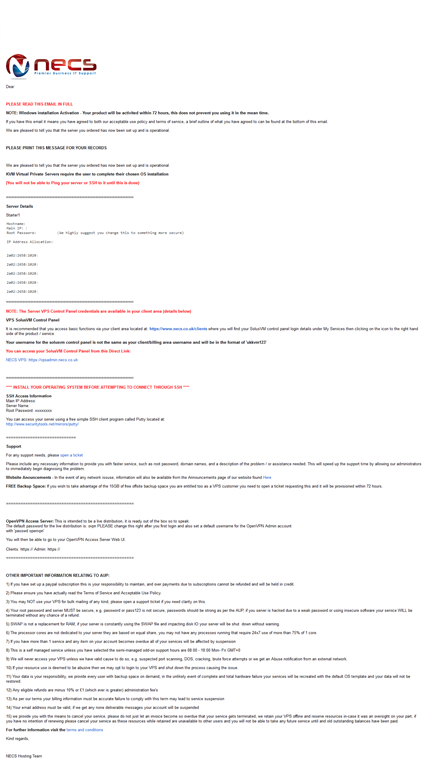
Their WHMCS system is using HTTPS protocol and once logged in, the control panel for the VPS could be found under My Services:
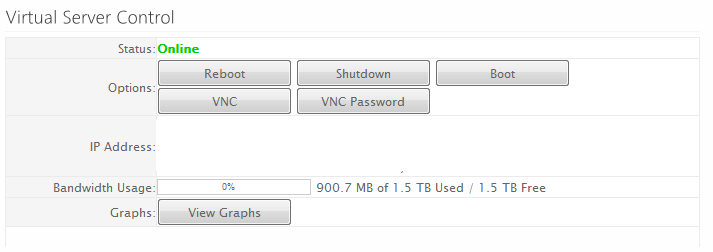
As you can see, there are buttons which controls the basic operations of the VPS and there is also a View Graphs tab which you can click open to see the graphs:
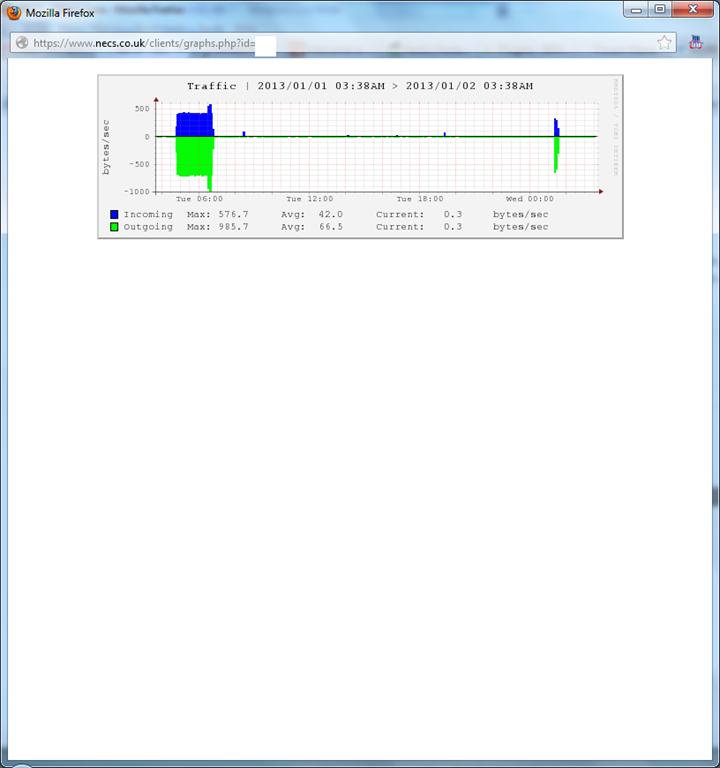
Note that only the traffic graph is available.
The only complain I have is that although there are three links to different control panels on their home page, none of which sent me to their WHMCS system, and other than remembering the URL, the only other method for me to get to the WHMCS login page is to dig out my New Server Information email.

NECS, like many other providers, uses standard SolusVM control panel for controlling the VPS as well, and their SolusVM control panel is on HTTPS protocol, however, the user name and password is not provided in the welcome email, but you have to login to your WHMCS account to find them, and it is assigned by the system.
Once logged in, a pretty standard SolusVM page is shown:
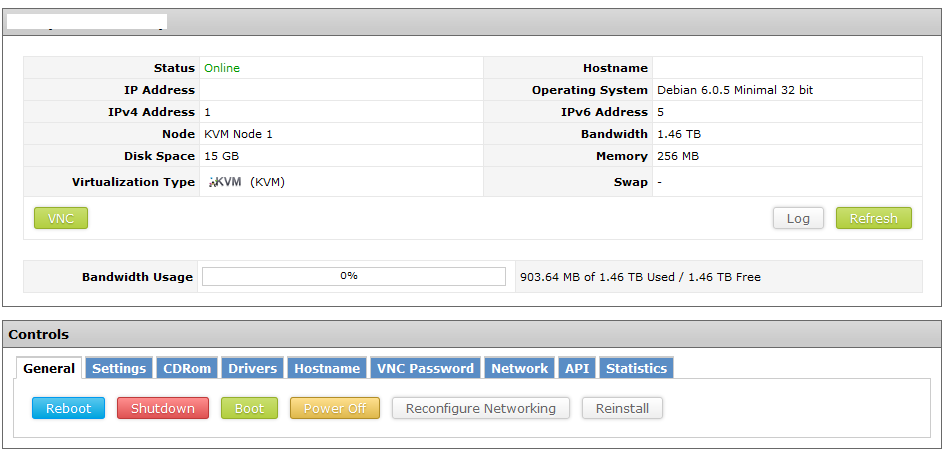
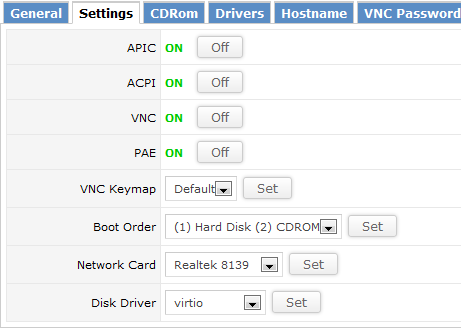
Settings tab appears to be of the common types of controls for KVM VPS:
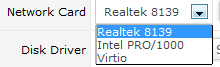
For the network card, you can choose between the three types of card:
And for the hard drive, you can choose between virtio and IDE:

The reconfigure networking appear to work but not the reinstall tab, and when I clicked on the reinstall tab, here is what I see:

Instead, you will have to go to the CDROM tab to mount the ISO to perform the install via VNC, and here are the list of ISOs that are available for installation:
Arch Linux 2011.08
CentOS 5.8 32Bit DVD1
CentOS 5.8 32Bit DVD2
CentOS 5.8 64bit DVD1
CentOS 5.8 64bit DVD2
CentOS 5.8 64bit Netinstall
CentOS 6.2 64bit Minimal
CentOS 6.3 32bit
CentOS 6.3 64bit
CloneZilla Live
Debian 6 with OpenVPN AS
Debian 6.0.4 64bit Netinstall
Debian 6.0.5 32bit Netinstall
Debian 6.0.6 amd64 Net
Fedora 16 64bit DVD
FreeBSD 9.0 64Bit
FreeNAS 8.0.4 64bit
FreePBX Distro
Gentoo 64bit Minimal
Linux Mint
Mail cleaner community 32bit
Mail cleaner community 64bit
Mikrotik Router OS 5.21
openSUSE
Parted Magic 2012
pfSense 2.0.1
Proxmox VE 2.1
Scientific Linux 6.2 64bit
Scrollout F1 email gateway
Slackware 13.37 64bit
Tiny Core
Turn Key Linux DokuWiki
Turn Key Linux Domain Controller
Turn Key Linux File Server
Turn Key Linux Joomla
Turn Key Linux LAMP Server
Turn Key Linux Magento
Turn Key Linux phpBB
Turn Key Linux Rails
Turn Key Linux WordPress
Turn Key Linux Zimbra
Ubuntu 10.10 64 bit
Ubuntu 12.04 Server 32 bit
Ubuntu 12.04 Server 64bit
Windows Server Std 2003 R2 DVD1
Windows Server Std 2008 R2
Windows Server Web 2008 R2
Note that here, besides so many different varieties of Linux, we actually see 3 Windows flavors are available as well! Obviously the test VPS that I have is a bit too small for me to try to install Windows on, but it is definitely very interesting to see Windows available on the larger VPS with sufficient memory.
Other than that, everything else is pretty standard and they do not have instant rDNS available:

Test on the VPS
As mentioned above, the test VPS has 4 virtual CPU cores, 256MB of RAM and 15GB of RAID10 hard drive space, the VPS is located in the Redstation DC in Hampshire, UK.
When the VPS was first installed, about 12MB of RAM was used, which is slightly less than a standard OpenVZ installation:
 free -m
             total       used       free     shared    buffers     cached
Mem:           248         30        218          0          4         13
-/+ buffers/cache:         12        235
Swap:         1023          0       1023
Top showing the processes running:
top - 20:24:42 up 54 min,  1 user,  load average: 0.06, 0.03, 0.00
Tasks:  84 total,   1 running,  83 sleeping,   0 stopped,   0 zombie
Cpu(s):  0.1%us,  0.0%sy,  0.0%ni, 99.9%id,  0.0%wa,  0.0%hi,  0.0%si,  0.0%st
Mem:    254644k total,    31620k used,   223024k free,     4288k buffers
Swap:  1048568k total,        0k used,  1048568k free,    14104k cached

  PID USER      PR  NI  VIRT  RES  SHR S %CPU %MEM    TIME+  COMMAND
 1111 root      20   0  8264 2864 2336 S    0  1.1   0:00.06 sshd
 1115 root      20   0  4492 1740 1416 S    0  0.7   0:00.02 bash
 1030 root      20   0 27452 1560 1032 S    0  0.6   0:00.02 rsyslogd
 1123 root      20   0  2436 1144  904 R    0  0.4   0:00.01 top
 1077 root      20   0  5500  972  584 S    0  0.4   0:00.00 sshd
  400 root      16  -4  2412  852  404 S    0  0.3   0:00.06 udevd
    1 root      20   0  2036  712  616 S    0  0.3   0:00.86 init
 1070 root      20   0  3788  672  500 S    0  0.3   0:00.00 cron
 1083 root      20   0  1708  592  480 S    0  0.2   0:00.00 acpid
 1102 root      20   0  1712  572  492 S    0  0.2   0:00.00 getty
 1100 root      20   0  1712  568  492 S    0  0.2   0:00.00 getty
 1101 root      20   0  1712  568  492 S    0  0.2   0:00.00 getty
 1103 root      20   0  1712  568  492 S    0  0.2   0:00.00 getty
 1104 root      20   0  1712  568  492 S    0  0.2   0:00.00 getty
 1105 root      20   0  1712  568  492 S    0  0.2   0:00.00 getty
    2 root      20   0     0    0    0 S    0  0.0   0:00.01 kthreadd
    3 root      RT   0     0    0    0 S    0  0.0   0:00.00 migration/0
And htop output:
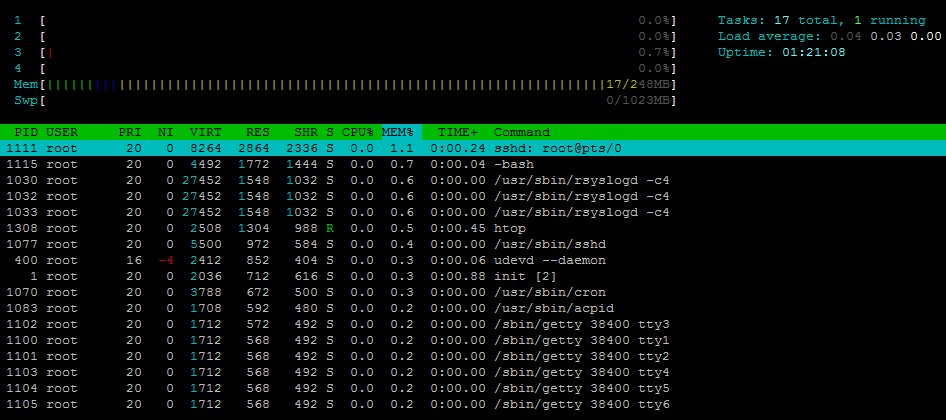
About 300MB of hard drive space was used as well, which is again pretty small compare to many standard OpenVZ templates:
df -h
Filesystem            Size  Used Avail Use% Mounted on
/dev/vda1              14G  316M   13G   3% /
tmpfs                 125M     0  125M   0% /lib/init/rw
udev                  121M  108K  120M   1% /dev
tmpfs                 125M     0  125M   0% /dev/shm
And the iNodes are set to pretty standard values:
df -i
Filesystem            Inodes   IUsed   IFree IUse% Mounted on
/dev/vda1             854784   15694  839090    2% /
tmpfs                  31830       4   31826    1% /lib/init/rw
udev                   30721     492   30229    2% /dev
tmpfs                  31830       1   31829    1% /dev/shm
When the full LNMP stack was installed, about 40MB of RAM was used:
 free -m
             total       used       free     shared    buffers     cached
Mem:           248        243          5          0          9        193
-/+ buffers/cache:         40        208
Swap:         1023          0       1023
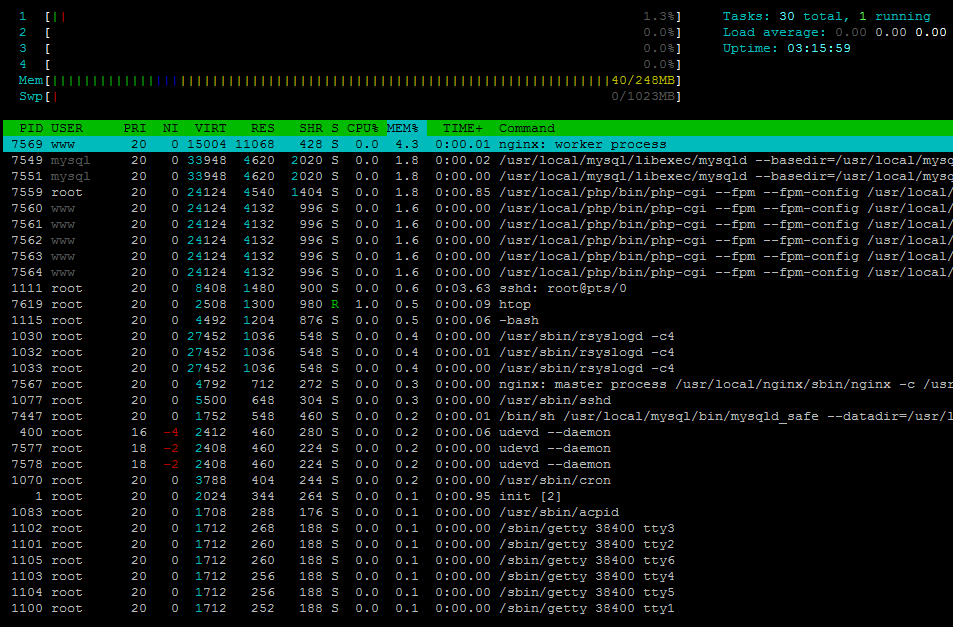
Top showing the full LNMP stack running:
top - 11:45:22 up  3:15,  1 user,  load average: 0.00, 0.00, 0.00
Tasks:  95 total,   1 running,  94 sleeping,   0 stopped,   0 zombie
Cpu(s):  0.2%us,  0.0%sy,  0.0%ni, 99.8%id,  0.0%wa,  0.0%hi,  0.0%si,  0.0%st
Mem:    254644k total,   250664k used,     3980k free,     9760k buffers
Swap:  1048568k total,      424k used,  1048144k free,   199532k cached

  PID USER      PR  NI  VIRT  RES  SHR S %CPU %MEM    TIME+  COMMAND
 7569 www       20   0 15004  10m  428 S    0  4.3   0:00.01 nginx
 7549 mysql     20   0 33948 4620 2020 S    0  1.8   0:00.02 mysqld
 7559 root      20   0 24124 4540 1404 S    0  1.8   0:00.84 php-cgi
 7560 www       20   0 24124 4132  996 S    0  1.6   0:00.00 php-cgi
 7561 www       20   0 24124 4132  996 S    0  1.6   0:00.00 php-cgi
 7562 www       20   0 24124 4132  996 S    0  1.6   0:00.00 php-cgi
 7563 www       20   0 24124 4132  996 S    0  1.6   0:00.00 php-cgi
 7564 www       20   0 24124 4132  996 S    0  1.6   0:00.00 php-cgi
 1111 root      20   0  8408 1480  900 S    1  0.6   0:03.65 sshd
 1115 root      20   0  4492 1204  876 S    0  0.5   0:00.06 bash
 7618 root      20   0  2452 1160  904 R    1  0.5   0:00.02 top
 1030 root      20   0 27452 1036  548 S    0  0.4   0:00.05 rsyslogd
 7567 root      20   0  4792  712  272 S    0  0.3   0:00.00 nginx
 1077 root      20   0  5500  648  304 S    0  0.3   0:00.00 sshd
 7447 root      20   0  1752  548  460 S    0  0.2   0:00.01 mysqld_safe
  400 root      16  -4  2412  460  280 S    0  0.2   0:00.06 udevd
 7577 root      18  -2  2408  460  224 S    0  0.2   0:00.00 udevd
 7578 root      18  -2  2408  460  224 S    0  0.2   0:00.00 udevd
 1070 root      20   0  3788  404  244 S    0  0.2   0:00.00 cron
    1 root      20   0  2024  344  264 S    0  0.1   0:00.95 init
 1083 root      20   0  1708  288  176 S    0  0.1   0:00.00 acpid
 1102 root      20   0  1712  268  188 S    0  0.1   0:00.00 getty
 1101 root      20   0  1712  260  188 S    0  0.1   0:00.00 getty
 1105 root      20   0  1712  260  188 S    0  0.1   0:00.00 getty
 1103 root      20   0  1712  256  188 S    0  0.1   0:00.00 getty
 1104 root      20   0  1712  256  188 S    0  0.1   0:00.00 getty
 1100 root      20   0  1712  252  188 S    0  0.1   0:00.00 getty
And htop output as usual:
About 1.8GB of hard drive space was used:
 df -h
Filesystem            Size  Used Avail Use% Mounted on
/dev/vda1              14G  1.8G   12G  14% /
tmpfs                 125M     0  125M   0% /lib/init/rw
udev                  121M  108K  120M   1% /dev
tmpfs                 125M     0  125M   0% /dev/shm
And the standard iNodes values:
df -i
Filesystem            Inodes   IUsed   IFree IUse% Mounted on
/dev/vda1             854784   68599  786185    9% /
tmpfs                  31830       4   31826    1% /lib/init/rw
udev                   30721     492   30229    2% /dev
tmpfs                  31830       1   31829    1% /dev/shm
Uptime shows the VPS is mostly idle:
uptime
 07:25:36 up 1 day, 22:55,  1 user,  load average: 0.00, 0.00, 0.00
As I am writing this review, I went back and checked on the uptime again and it is still pretty solid:
 uptime
 07:53:20 up 24 days, 23:23,  1 user,  load average: 0.00, 0.00, 0.00
And vmStats shows there is no iowait:
vmstat
procs -----------memory---------- ---swap-- -----io---- -system-- ----cpu----
 r  b   swpd   free   buff  cache   si   so    bi    bo   in   cs us sy id wa
 0  0    416  18096  17204 177932    0    0     1     4   13    8  0  0 100  0
CPUInfo shows there are four CPU cores assigned to the VPS, none of which is throttled:
cat /proc/cpuinfo
processor       : 0
vendor_id       : GenuineIntel
cpu family      : 6
model           : 13
model name      : QEMU Virtual CPU version (cpu64-rhel6)
stepping        : 3
cpu MHz         : 2393.998
cache size      : 4096 KB
physical id     : 0
siblings        : 4
core id         : 0
cpu cores       : 4
apicid          : 0
initial apicid  : 0
fdiv_bug        : no
hlt_bug         : no
f00f_bug        : no
coma_bug        : no
fpu             : yes
fpu_exception   : yes
cpuid level     : 4
wp              : yes
flags           : fpu de pse tsc msr pae mce cx8 apic mtrr pge mca cmov pse36 clflush mmx fxsr sse sse2 ht syscall nx lm pni cx16 hypervisor lahf_lm
bogomips        : 4787.99
clflush size    : 64
cache_alignment : 64
address sizes   : 40 bits physical, 48 bits virtual
power management:

processor       : 1
vendor_id       : GenuineIntel
cpu family      : 6
model           : 13
model name      : QEMU Virtual CPU version (cpu64-rhel6)
stepping        : 3
cpu MHz         : 2393.998
cache size      : 4096 KB
physical id     : 0
siblings        : 4
core id         : 1
cpu cores       : 4
apicid          : 1
initial apicid  : 1
fdiv_bug        : no
hlt_bug         : no
f00f_bug        : no
coma_bug        : no
fpu             : yes
fpu_exception   : yes
cpuid level     : 4
wp              : yes
flags           : fpu de pse tsc msr pae mce cx8 apic mtrr pge mca cmov pse36 clflush mmx fxsr sse sse2 ht syscall nx lm pni cx16 hypervisor lahf_lm
bogomips        : 4787.99
clflush size    : 64
cache_alignment : 64
address sizes   : 40 bits physical, 48 bits virtual
power management:

processor       : 2
vendor_id       : GenuineIntel
cpu family      : 6
model           : 13
model name      : QEMU Virtual CPU version (cpu64-rhel6)
stepping        : 3
cpu MHz         : 2393.998
cache size      : 4096 KB
physical id     : 0
siblings        : 4
core id         : 2
cpu cores       : 4
apicid          : 2
initial apicid  : 2
fdiv_bug        : no
hlt_bug         : no
f00f_bug        : no
coma_bug        : no
fpu             : yes
fpu_exception   : yes
cpuid level     : 4
wp              : yes
flags           : fpu de pse tsc msr pae mce cx8 apic mtrr pge mca cmov pse36 clflush mmx fxsr sse sse2 ht syscall nx lm pni cx16 hypervisor lahf_lm
bogomips        : 4787.99
clflush size    : 64
cache_alignment : 64
address sizes   : 40 bits physical, 48 bits virtual
power management:

processor       : 3
vendor_id       : GenuineIntel
cpu family      : 6
model           : 13
model name      : QEMU Virtual CPU version (cpu64-rhel6)
stepping        : 3
cpu MHz         : 2393.998
cache size      : 4096 KB
physical id     : 0
siblings        : 4
core id         : 3
cpu cores       : 4
apicid          : 3
initial apicid  : 3
fdiv_bug        : no
hlt_bug         : no
f00f_bug        : no
coma_bug        : no
fpu             : yes
fpu_exception   : yes
cpuid level     : 4
wp              : yes
flags           : fpu de pse tsc msr pae mce cx8 apic mtrr pge mca cmov pse36 clflush mmx fxsr sse sse2 ht syscall nx lm pni cx16 hypervisor lahf_lm
bogomips        : 4787.99
clflush size    : 64
cache_alignment : 64
address sizes   : 40 bits physical, 48 bits virtual
power management:
And meminfo output:
cat /proc/meminfo
MemTotal:         254644 kB
MemFree:            4572 kB
Buffers:            5836 kB
Cached:           206312 kB
SwapCached:          372 kB
Active:            58236 kB
Inactive:         175504 kB
Active(anon):      10144 kB
Inactive(anon):    11600 kB
Active(file):      48092 kB
Inactive(file):   163904 kB
Unevictable:           0 kB
Mlocked:               0 kB
HighTotal:             0 kB
HighFree:              0 kB
LowTotal:         254644 kB
LowFree:            4572 kB
SwapTotal:       1048568 kB
SwapFree:        1048152 kB
Dirty:                 4 kB
Writeback:             0 kB
AnonPages:         21356 kB
Mapped:             7540 kB
Shmem:               116 kB
Slab:              11648 kB
SReclaimable:       7224 kB
SUnreclaim:         4424 kB
KernelStack:         808 kB
PageTables:          540 kB
NFS_Unstable:          0 kB
Bounce:                0 kB
WritebackTmp:          0 kB
CommitLimit:     1175888 kB
Committed_AS:     102736 kB
VmallocTotal:     765956 kB
VmallocUsed:        6100 kB
VmallocChunk:     751636 kB
HardwareCorrupted:     0 kB
HugePages_Total:       0
HugePages_Free:        0
HugePages_Rsvd:        0
HugePages_Surp:        0
Hugepagesize:       4096 kB
DirectMap4k:       12276 kB
DirectMap4M:      249856 kB
And time sync output:
time sync

real    0m0.112s
user    0m0.004s
sys     0m0.000s
I am actually fairly impressed with the disk I/O, particularly considering it is not a SSD RAID:
 dd if=/dev/zero of=test bs=64k count=16k conv=fdatasync
16384+0 records in
16384+0 records out
1073741824 bytes (1.1 GB) copied, 4.16527 s, 258 MB/s
Testing again showed pretty impressive result as well, although a lot less impressive than the first one:
dd if=/dev/zero of=test bs=64k count=16k conv=fdatasync
16384+0 records in
16384+0 records out
1073741824 bytes (1.1 GB) copied, 8.33699 s, 129 MB/s
IOPing also showed some quite impressive results:
 ioping -c 10 .
4096 bytes from . (ext4 /dev/disk/by-uuid/548e4fc3-9196-46b9-b04b-ec314efcb21c): request=1 time=0.2 ms
4096 bytes from . (ext4 /dev/disk/by-uuid/548e4fc3-9196-46b9-b04b-ec314efcb21c): request=2 time=0.2 ms
4096 bytes from . (ext4 /dev/disk/by-uuid/548e4fc3-9196-46b9-b04b-ec314efcb21c): request=3 time=0.3 ms
4096 bytes from . (ext4 /dev/disk/by-uuid/548e4fc3-9196-46b9-b04b-ec314efcb21c): request=4 time=0.3 ms
4096 bytes from . (ext4 /dev/disk/by-uuid/548e4fc3-9196-46b9-b04b-ec314efcb21c): request=5 time=0.3 ms
4096 bytes from . (ext4 /dev/disk/by-uuid/548e4fc3-9196-46b9-b04b-ec314efcb21c): request=6 time=0.3 ms
4096 bytes from . (ext4 /dev/disk/by-uuid/548e4fc3-9196-46b9-b04b-ec314efcb21c): request=7 time=0.3 ms
4096 bytes from . (ext4 /dev/disk/by-uuid/548e4fc3-9196-46b9-b04b-ec314efcb21c): request=8 time=0.2 ms
4096 bytes from . (ext4 /dev/disk/by-uuid/548e4fc3-9196-46b9-b04b-ec314efcb21c): request=9 time=0.3 ms
4096 bytes from . (ext4 /dev/disk/by-uuid/548e4fc3-9196-46b9-b04b-ec314efcb21c): request=10 time=0.2 ms

--- . (ext4 /dev/disk/by-uuid/548e4fc3-9196-46b9-b04b-ec314efcb21c) ioping statistics ---
10 requests completed in 9005.0 ms, 3695 iops, 14.4 mb/s
min/avg/max/mdev = 0.2/0.3/0.3/0.0 ms
Testing again showed similar results:
ioping -c 10 .
4096 bytes from . (ext4 /dev/disk/by-uuid/548e4fc3-9196-46b9-b04b-ec314efcb21c): request=1 time=0.2 ms
4096 bytes from . (ext4 /dev/disk/by-uuid/548e4fc3-9196-46b9-b04b-ec314efcb21c): request=2 time=0.2 ms
4096 bytes from . (ext4 /dev/disk/by-uuid/548e4fc3-9196-46b9-b04b-ec314efcb21c): request=3 time=0.2 ms
4096 bytes from . (ext4 /dev/disk/by-uuid/548e4fc3-9196-46b9-b04b-ec314efcb21c): request=4 time=0.3 ms
4096 bytes from . (ext4 /dev/disk/by-uuid/548e4fc3-9196-46b9-b04b-ec314efcb21c): request=5 time=0.3 ms
4096 bytes from . (ext4 /dev/disk/by-uuid/548e4fc3-9196-46b9-b04b-ec314efcb21c): request=6 time=0.3 ms
4096 bytes from . (ext4 /dev/disk/by-uuid/548e4fc3-9196-46b9-b04b-ec314efcb21c): request=7 time=0.3 ms
4096 bytes from . (ext4 /dev/disk/by-uuid/548e4fc3-9196-46b9-b04b-ec314efcb21c): request=8 time=0.2 ms
4096 bytes from . (ext4 /dev/disk/by-uuid/548e4fc3-9196-46b9-b04b-ec314efcb21c): request=9 time=0.3 ms
4096 bytes from . (ext4 /dev/disk/by-uuid/548e4fc3-9196-46b9-b04b-ec314efcb21c): request=10 time=0.8 ms

--- . (ext4 /dev/disk/by-uuid/548e4fc3-9196-46b9-b04b-ec314efcb21c) ioping statistics ---
10 requests completed in 9006.0 ms, 3169 iops, 12.4 mb/s
min/avg/max/mdev = 0.2/0.3/0.8/0.2 ms
The network speed might be somewhat less impressive, particularly considering that it is on 1Gbit port:
 wget cachefly.cachefly.net/100mb.test -O /dev/null
--2012-12-08 07:27:13--  http://cachefly.cachefly.net/100mb.test
Resolving cachefly.cachefly.net... 205.234.175.175
Connecting to cachefly.cachefly.net|205.234.175.175|:80... connected.
HTTP request sent, awaiting response... 200 OK
Length: 104857600 (100M) [application/octet-stream]
Saving to: a€?/dev/nulla€

100%[======================================>] 104,857,600 6.74M/s   in 12s

2012-12-08 07:27:25 (8.09 MB/s) - a€?/dev/nulla€
I suspect the 1Gbit port is a shared port and there is some sort of port limiting on each VPS to ensure that each VPS in the node has a decent network speed, rather than having one person using up all the bandwidth.
Testing again showed similar results:
wget cachefly.cachefly.net/100mb.test -O /dev/null
--2012-12-08 07:29:48--  http://cachefly.cachefly.net/100mb.test
Resolving cachefly.cachefly.net... 205.234.175.175
Connecting to cachefly.cachefly.net|205.234.175.175|:80... connected.
HTTP request sent, awaiting response... 200 OK
Length: 104857600 (100M) [application/octet-stream]
Saving to: a€?/dev/nulla€

100%[======================================>] 104,857,600 9.16M/s   in 12s

2012-12-08 07:30:00 (8.41 MB/s) - a€?/dev/nulla€
For the upload speed, as expected, the speed is much better in Europe than in North America. First is from my test VPS in Quickweb Chicago, IL location:
wget http://37.220.xxx.xxx/100mb.test -O /dev/null
--2012-12-07 18:37:18--  http://37.220.xxx.xxx/100mb.test
Connecting to 37.220.xxx.xxx:80... connected.
HTTP request sent, awaiting response... 200 OK
Length: 104857600 (100M) [application/octet-stream]
Saving to: `/dev/null'

100%[======================================>] 104,857,600 1.20M/s   in 84s

2012-12-07 18:38:42 (1.20 MB/s) - `/dev/null' saved [104857600/104857600]
As you can see, the speed is slightly less than 10mbit per second, which is not that impressive.
Next with my test VPS with Quickweb at their Los Angeles location, and the speed is almost the same as on the east coast:
wget http://37.220.xxx.xxx/100mb.test -O /dev/null
--2012-12-08 08:13:38--  http://37.220.xxx.xxx/100mb.test
Connecting to 37.220.xxx.xxx:80... connected.
HTTP request sent, awaiting response... 200 OK
Length: 104857600 (100M) [application/octet-stream]
Saving to: `/dev/null'

100%[======================================>] 104,857,600 2.36M/s   in 80s

2012-12-08 08:14:58 (1.25 MB/s) - `/dev/null' saved [104857600/104857600]
Finally, the test VPS at Maidenhead, UK, with XenVZ showed a lot better network speed due to the fact that they are both on the same continent:
 wget http://37.220.xxx.xxx/100mb.test -O /dev/null
--2012-12-08 08:10:45--  http://37.220.xxx.xxx/100mb.test
Connecting to 37.220.xxx.xxx:80... connected.
HTTP request sent, awaiting response... 200 OK
Length: 104857600 (100M) [application/octet-stream]
Saving to: `/dev/null'

100%[======================================>] 104,857,600 9.52M/s   in 11s

2012-12-08 08:10:56 (9.11 MB/s) - `/dev/null' saved [104857600/104857600]
For benchmarks, in general more CPU cores would indicate better benchmarks and it is definitely the case with this VPS. With 4 CPU cores available, the Unixbench score is close to 2000 points, which is rather impressive.
   #    #  #    #  #  #    #          #####   ######  #    #   ####   #    #
   #    #  ##   #  #   #  #           #    #  #       ##   #  #    #  #    #
   #    #  # #  #  #    ##            #####   #####   # #  #  #       ######
   #    #  #  # #  #    ##            #    #  #       #  # #  #       #    #
   #    #  #   ##  #   #  #           #    #  #       #   ##  #    #  #    #
    ####   #    #  #  #    #          #####   ######  #    #   ####   #    #

   Version 5.1.3                      Based on the Byte Magazine Unix Benchmark

   Multi-CPU version                  Version 5 revisions by Ian Smith,
                                      Sunnyvale, CA, USA
   January 13, 2011                   johantheghost at yahoo period com


1 x Dhrystone 2 using register variables  1 2 3 4 5 6 7 8 9 10

1 x Double-Precision Whetstone  1 2 3 4 5 6 7 8 9 10

1 x Execl Throughput  1 2 3

1 x File Copy 1024 bufsize 2000 maxblocks  1 2 3

1 x File Copy 256 bufsize 500 maxblocks  1 2 3

1 x File Copy 4096 bufsize 8000 maxblocks  1 2 3

1 x Pipe Throughput  1 2 3 4 5 6 7 8 9 10

1 x Pipe-based Context Switching  1 2 3 4 5 6 7 8 9 10

1 x Process Creation  1 2 3

1 x System Call Overhead  1 2 3 4 5 6 7 8 9 10

1 x Shell Scripts (1 concurrent)  1 2 3

1 x Shell Scripts (8 concurrent)  1 2 3

4 x Dhrystone 2 using register variables  1 2 3 4 5 6 7 8 9 10

4 x Double-Precision Whetstone  1 2 3 4 5 6 7 8 9 10

4 x Execl Throughput  1 2 3

4 x File Copy 1024 bufsize 2000 maxblocks  1 2 3

4 x File Copy 256 bufsize 500 maxblocks  1 2 3

4 x File Copy 4096 bufsize 8000 maxblocks  1 2 3

4 x Pipe Throughput  1 2 3 4 5 6 7 8 9 10

4 x Pipe-based Context Switching  1 2 3 4 5 6 7 8 9 10

4 x Process Creation  1 2 3

4 x System Call Overhead  1 2 3 4 5 6 7 8 9 10

4 x Shell Scripts (1 concurrent)  1 2 3

4 x Shell Scripts (8 concurrent)  1 2 3

========================================================================
   BYTE UNIX Benchmarks (Version 5.1.3)

   System: xxxxxx: GNU/Linux
   OS: GNU/Linux -- 2.6.32-5-686 -- #1 SMP Sun May 6 04:01:19 UTC 2012
   Machine: i686 (unknown)
   Language: en_US.utf8 (charmap="UTF-8", collate="UTF-8")
   CPU 0: QEMU Virtual CPU version (cpu64-rhel6) (4788.0 bogomips)
          Hyper-Threading, x86-64, MMX, Physical Address Ext, SYSCALL/SYSRET
   CPU 1: QEMU Virtual CPU version (cpu64-rhel6) (4788.0 bogomips)
          Hyper-Threading, x86-64, MMX, Physical Address Ext, SYSCALL/SYSRET
   CPU 2: QEMU Virtual CPU version (cpu64-rhel6) (4788.0 bogomips)
          Hyper-Threading, x86-64, MMX, Physical Address Ext, SYSCALL/SYSRET
   CPU 3: QEMU Virtual CPU version (cpu64-rhel6) (4788.0 bogomips)
          Hyper-Threading, x86-64, MMX, Physical Address Ext, SYSCALL/SYSRET
   11:28:51 up 3 days,  2:58,  2 users,  load average: 0.30, 0.06, 0.02; runlevel 2

------------------------------------------------------------------------
Benchmark Run: Sun Dec 09 2012 11:28:51 - 11:56:21
4 CPUs in system; running 1 parallel copy of tests

Dhrystone 2 using register variables       13251232.4 lps   (10.0 s, 7 samples)
Double-Precision Whetstone                     2455.1 MWIPS (7.5 s, 7 samples)
Execl Throughput                               1733.6 lps   (29.9 s, 2 samples)
File Copy 1024 bufsize 2000 maxblocks        564994.2 KBps  (30.0 s, 2 samples)
File Copy 256 bufsize 500 maxblocks          140868.6 KBps  (30.0 s, 2 samples)
File Copy 4096 bufsize 8000 maxblocks       1150603.0 KBps  (30.0 s, 2 samples)
Pipe Throughput                             1034831.6 lps   (10.0 s, 7 samples)
Pipe-based Context Switching                 135805.2 lps   (10.0 s, 7 samples)
Process Creation                               4184.6 lps   (30.0 s, 2 samples)
Shell Scripts (1 concurrent)                   2967.4 lpm   (60.0 s, 2 samples)
Shell Scripts (8 concurrent)                   1109.1 lpm   (60.0 s, 2 samples)
System Call Overhead                         961447.8 lps   (10.0 s, 7 samples)

System Benchmarks Index Values               BASELINE       RESULT    INDEX
Dhrystone 2 using register variables         116700.0   13251232.4   1135.5
Double-Precision Whetstone                       55.0       2455.1    446.4
Execl Throughput                                 43.0       1733.6    403.2
File Copy 1024 bufsize 2000 maxblocks          3960.0     564994.2   1426.8
File Copy 256 bufsize 500 maxblocks            1655.0     140868.6    851.2
File Copy 4096 bufsize 8000 maxblocks          5800.0    1150603.0   1983.8
Pipe Throughput                               12440.0    1034831.6    831.9
Pipe-based Context Switching                   4000.0     135805.2    339.5
Process Creation                                126.0       4184.6    332.1
Shell Scripts (1 concurrent)                     42.4       2967.4    699.9
Shell Scripts (8 concurrent)                      6.0       1109.1   1848.6
System Call Overhead                          15000.0     961447.8    641.0
                                                                   ========
System Benchmarks Index Score                                         761.9

------------------------------------------------------------------------
Benchmark Run: Sun Dec 09 2012 11:56:21 - 12:24:05
4 CPUs in system; running 4 parallel copies of tests

Dhrystone 2 using register variables       45152456.7 lps   (10.0 s, 7 samples)
Double-Precision Whetstone                     9390.0 MWIPS (7.1 s, 7 samples)
Execl Throughput                               8716.5 lps   (29.9 s, 2 samples)
File Copy 1024 bufsize 2000 maxblocks        441327.8 KBps  (30.0 s, 2 samples)
File Copy 256 bufsize 500 maxblocks          103533.0 KBps  (30.0 s, 2 samples)
File Copy 4096 bufsize 8000 maxblocks       1137124.2 KBps  (30.0 s, 2 samples)
Pipe Throughput                             3127046.4 lps   (10.0 s, 7 samples)
Pipe-based Context Switching                 725818.7 lps   (10.0 s, 7 samples)
Process Creation                              20397.1 lps   (30.0 s, 2 samples)
Shell Scripts (1 concurrent)                  14244.2 lpm   (60.0 s, 2 samples)
Shell Scripts (8 concurrent)                   1804.2 lpm   (60.1 s, 2 samples)
System Call Overhead                        3138885.8 lps   (10.0 s, 7 samples)

System Benchmarks Index Values               BASELINE       RESULT    INDEX
Dhrystone 2 using register variables         116700.0   45152456.7   3869.1
Double-Precision Whetstone                       55.0       9390.0   1707.3
Execl Throughput                                 43.0       8716.5   2027.1
File Copy 1024 bufsize 2000 maxblocks          3960.0     441327.8   1114.5
File Copy 256 bufsize 500 maxblocks            1655.0     103533.0    625.6
File Copy 4096 bufsize 8000 maxblocks          5800.0    1137124.2   1960.6
Pipe Throughput                               12440.0    3127046.4   2513.7
Pipe-based Context Switching                   4000.0     725818.7   1814.5
Process Creation                                126.0      20397.1   1618.8
Shell Scripts (1 concurrent)                     42.4      14244.2   3359.5
Shell Scripts (8 concurrent)                      6.0       1804.2   3007.0
System Call Overhead                          15000.0    3138885.8   2092.6
                                                                   ========
System Benchmarks Index Score                                        1940.8
Testing again showed similar results:
   #    #  #    #  #  #    #          #####   ######  #    #   ####   #    #
   #    #  ##   #  #   #  #           #    #  #       ##   #  #    #  #    #
   #    #  # #  #  #    ##            #####   #####   # #  #  #       ######
   #    #  #  # #  #    ##            #    #  #       #  # #  #       #    #
   #    #  #   ##  #   #  #           #    #  #       #   ##  #    #  #    #
    ####   #    #  #  #    #          #####   ######  #    #   ####   #    #

   Version 5.1.3                      Based on the Byte Magazine Unix Benchmark

   Multi-CPU version                  Version 5 revisions by Ian Smith,
                                      Sunnyvale, CA, USA
   January 13, 2011                   johantheghost at yahoo period com


1 x Dhrystone 2 using register variables  1 2 3 4 5 6 7 8 9 10

1 x Double-Precision Whetstone  1 2 3 4 5 6 7 8 9 10

1 x Execl Throughput  1 2 3

1 x File Copy 1024 bufsize 2000 maxblocks  1 2 3

1 x File Copy 256 bufsize 500 maxblocks  1 2 3

1 x File Copy 4096 bufsize 8000 maxblocks  1 2 3

1 x Pipe Throughput  1 2 3 4 5 6 7 8 9 10

1 x Pipe-based Context Switching  1 2 3 4 5 6 7 8 9 10

1 x Process Creation  1 2 3

1 x System Call Overhead  1 2 3 4 5 6 7 8 9 10

1 x Shell Scripts (1 concurrent)  1 2 3

1 x Shell Scripts (8 concurrent)  1 2 3

4 x Dhrystone 2 using register variables  1 2 3 4 5 6 7 8 9 10

4 x Double-Precision Whetstone  1 2 3 4 5 6 7 8 9 10

4 x Execl Throughput  1 2 3

4 x File Copy 1024 bufsize 2000 maxblocks  1 2 3

4 x File Copy 256 bufsize 500 maxblocks  1 2 3

4 x File Copy 4096 bufsize 8000 maxblocks  1 2 3

4 x Pipe Throughput  1 2 3 4 5 6 7 8 9 10

4 x Pipe-based Context Switching  1 2 3 4 5 6 7 8 9 10

4 x Process Creation  1 2 3

4 x System Call Overhead  1 2 3 4 5 6 7 8 9 10

4 x Shell Scripts (1 concurrent)  1 2 3

4 x Shell Scripts (8 concurrent)  1 2 3

========================================================================
   BYTE UNIX Benchmarks (Version 5.1.3)

   System: xxxxxx: GNU/Linux
   OS: GNU/Linux -- 2.6.32-5-686 -- #1 SMP Sun May 6 04:01:19 UTC 2012
   Machine: i686 (unknown)
   Language: en_US.utf8 (charmap="UTF-8", collate="UTF-8")
   CPU 0: QEMU Virtual CPU version (cpu64-rhel6) (4788.0 bogomips)
          Hyper-Threading, x86-64, MMX, Physical Address Ext, SYSCALL/SYSRET
   CPU 1: QEMU Virtual CPU version (cpu64-rhel6) (4788.0 bogomips)
          Hyper-Threading, x86-64, MMX, Physical Address Ext, SYSCALL/SYSRET
   CPU 2: QEMU Virtual CPU version (cpu64-rhel6) (4788.0 bogomips)
          Hyper-Threading, x86-64, MMX, Physical Address Ext, SYSCALL/SYSRET
   CPU 3: QEMU Virtual CPU version (cpu64-rhel6) (4788.0 bogomips)
          Hyper-Threading, x86-64, MMX, Physical Address Ext, SYSCALL/SYSRET
   12:35:37 up 3 days,  4:05,  2 users,  load average: 0.00, 1.22, 2.96; runlevel 2

------------------------------------------------------------------------
Benchmark Run: Sun Dec 09 2012 12:35:37 - 13:03:03
4 CPUs in system; running 1 parallel copy of tests

Dhrystone 2 using register variables       13290180.6 lps   (10.0 s, 7 samples)
Double-Precision Whetstone                     2521.4 MWIPS (7.0 s, 7 samples)
Execl Throughput                               1705.3 lps   (29.6 s, 2 samples)
File Copy 1024 bufsize 2000 maxblocks        573695.7 KBps  (30.0 s, 2 samples)
File Copy 256 bufsize 500 maxblocks          150033.6 KBps  (30.0 s, 2 samples)
File Copy 4096 bufsize 8000 maxblocks       1161682.6 KBps  (30.0 s, 2 samples)
Pipe Throughput                              994123.9 lps   (10.0 s, 7 samples)
Pipe-based Context Switching                 132820.1 lps   (10.0 s, 7 samples)
Process Creation                               4217.2 lps   (30.0 s, 2 samples)
Shell Scripts (1 concurrent)                   2997.3 lpm   (60.0 s, 2 samples)
Shell Scripts (8 concurrent)                   1111.5 lpm   (60.0 s, 2 samples)
System Call Overhead                         966103.0 lps   (10.0 s, 7 samples)

System Benchmarks Index Values               BASELINE       RESULT    INDEX
Dhrystone 2 using register variables         116700.0   13290180.6   1138.8
Double-Precision Whetstone                       55.0       2521.4    458.4
Execl Throughput                                 43.0       1705.3    396.6
File Copy 1024 bufsize 2000 maxblocks          3960.0     573695.7   1448.7
File Copy 256 bufsize 500 maxblocks            1655.0     150033.6    906.5
File Copy 4096 bufsize 8000 maxblocks          5800.0    1161682.6   2002.9
Pipe Throughput                               12440.0     994123.9    799.1
Pipe-based Context Switching                   4000.0     132820.1    332.1
Process Creation                                126.0       4217.2    334.7
Shell Scripts (1 concurrent)                     42.4       2997.3    706.9
Shell Scripts (8 concurrent)                      6.0       1111.5   1852.5
System Call Overhead                          15000.0     966103.0    644.1
                                                                   ========
System Benchmarks Index Score                                         766.0

------------------------------------------------------------------------
Benchmark Run: Sun Dec 09 2012 13:03:03 - 13:30:40
4 CPUs in system; running 4 parallel copies of tests

Dhrystone 2 using register variables       44710788.9 lps   (10.0 s, 7 samples)
Double-Precision Whetstone                     9663.1 MWIPS (7.1 s, 7 samples)
Execl Throughput                              10818.9 lps   (29.9 s, 2 samples)
File Copy 1024 bufsize 2000 maxblocks        362996.8 KBps  (30.0 s, 2 samples)
File Copy 256 bufsize 500 maxblocks          112061.7 KBps  (30.0 s, 2 samples)
File Copy 4096 bufsize 8000 maxblocks       1100647.6 KBps  (30.0 s, 2 samples)
Pipe Throughput                             3515066.9 lps   (10.0 s, 7 samples)
Pipe-based Context Switching                 728142.8 lps   (10.0 s, 7 samples)
Process Creation                              21376.5 lps   (30.0 s, 2 samples)
Shell Scripts (1 concurrent)                  11285.7 lpm   (60.0 s, 2 samples)
Shell Scripts (8 concurrent)                   1827.4 lpm   (60.1 s, 2 samples)
System Call Overhead                        3119237.4 lps   (10.0 s, 7 samples)

System Benchmarks Index Values               BASELINE       RESULT    INDEX
Dhrystone 2 using register variables         116700.0   44710788.9   3831.3
Double-Precision Whetstone                       55.0       9663.1   1756.9
Execl Throughput                                 43.0      10818.9   2516.0
File Copy 1024 bufsize 2000 maxblocks          3960.0     362996.8    916.7
File Copy 256 bufsize 500 maxblocks            1655.0     112061.7    677.1
File Copy 4096 bufsize 8000 maxblocks          5800.0    1100647.6   1897.7
Pipe Throughput                               12440.0    3515066.9   2825.6
Pipe-based Context Switching                   4000.0     728142.8   1820.4
Process Creation                                126.0      21376.5   1696.5
Shell Scripts (1 concurrent)                     42.4      11285.7   2661.7
Shell Scripts (8 concurrent)                      6.0       1827.4   3045.7
System Call Overhead                          15000.0    3119237.4   2079.5
                                                                   ========
System Benchmarks Index Score                                        1945.2
Geekbench scores are over 3000 points, which is in the range I am expecting as well:
System Information
  Platform:                  Linux x86 (32-bit)
  Compiler:                  GCC 4.1.2 20070925 (Red Hat 4.1.2-33)
  Operating System:          Linux 2.6.32-5-686 i686
  Model:                     Linux PC (QEMU Virtual CPU version (cpu64-rhel6))
  Motherboard:               Unknown Motherboard
  Processor:                 QEMU Virtual CPU version (cpu64-rhel6)
  Processor ID:              GenuineIntel Family 6 Model 13 Stepping 3
  Logical Processors:        4
  Physical Processors:       1
  Processor Frequency:       2.39 GHz
  L1 Instruction Cache:      64.0 KB
  L1 Data Cache:             64.0 KB
  L2 Cache:                  512 KB
  L3 Cache:                  0.00 B
  Bus Frequency:             0.00 Hz
  Memory:                    249 MB
  Memory Type:               N/A
  SIMD:                      1
  BIOS:                      N/A
  Processor Model:           QEMU Virtual CPU version (cpu64-rhel6)
  Processor Cores:           4

Integer
  Blowfish
    single-threaded scalar    1094 ||||
    multi-threaded scalar     4239 ||||||||||||||||
  Text Compress
    single-threaded scalar    1924 |||||||
    multi-threaded scalar     3265 |||||||||||||
  Text Decompress
    single-threaded scalar    1907 |||||||
    multi-threaded scalar     4762 |||||||||||||||||||
  Image Compress
    single-threaded scalar    1016 ||||
    multi-threaded scalar     3820 |||||||||||||||
  Image Decompress
    single-threaded scalar     926 |||
    multi-threaded scalar     2995 |||||||||||
  Lua
    single-threaded scalar    3057 ||||||||||||
    multi-threaded scalar     5416 |||||||||||||||||||||

Floating Point
  Mandelbrot
    single-threaded scalar    1300 |||||
    multi-threaded scalar     4965 |||||||||||||||||||
  Dot Product
    single-threaded scalar    2060 ||||||||
    multi-threaded scalar     6621 ||||||||||||||||||||||||||
    single-threaded vector    2519 ||||||||||
    multi-threaded vector     7067 ||||||||||||||||||||||||||||
  LU Decomposition
    single-threaded scalar    1414 |||||
    multi-threaded scalar     3105 ||||||||||||
  Primality Test
    single-threaded scalar    3261 |||||||||||||
    multi-threaded scalar     6038 ||||||||||||||||||||||||
  Sharpen Image
    single-threaded scalar    3295 |||||||||||||
    multi-threaded scalar    11101 ||||||||||||||||||||||||||||||||||||||||||||
  Blur Image
    single-threaded scalar    3142 ||||||||||||
    multi-threaded scalar    10337 |||||||||||||||||||||||||||||||||||||||||

Memory
  Read Sequential
    single-threaded scalar    3047 ||||||||||||
  Write Sequential
    single-threaded scalar    4866 |||||||||||||||||||
  Stdlib Allocate
    single-threaded scalar    2177 ||||||||
  Stdlib Write
    single-threaded scalar    2530 ||||||||||
  Stdlib Copy
    single-threaded scalar    5000 ||||||||||||||||||||

Stream
  Stream Copy
    single-threaded scalar    3060 ||||||||||||
    single-threaded vector    4568 ||||||||||||||||||
  Stream Scale
    single-threaded scalar    2434 |||||||||
    single-threaded vector    4474 |||||||||||||||||
  Stream Add
    single-threaded scalar    2870 |||||||||||
    single-threaded vector    4298 |||||||||||||||||
  Stream Triad
    single-threaded scalar    3288 |||||||||||||
    single-threaded vector    3426 |||||||||||||

Integer Score:                2868 |||||||||||
Floating Point Score:         4730 ||||||||||||||||||
Memory Score:                 3524 ||||||||||||||
Stream Score:                 3552 ||||||||||||||

Overall Geekbench Score:      3719 ||||||||||||||
Testing again showed even better score, which is close to 4000 points range:
System Information
  Platform:                  Linux x86 (32-bit)
  Compiler:                  GCC 4.1.2 20070925 (Red Hat 4.1.2-33)
  Operating System:          Linux 2.6.32-5-686 i686
  Model:                     Linux PC (QEMU Virtual CPU version (cpu64-rhel6))
  Motherboard:               Unknown Motherboard
  Processor:                 QEMU Virtual CPU version (cpu64-rhel6)
  Processor ID:              GenuineIntel Family 6 Model 13 Stepping 3
  Logical Processors:        4
  Physical Processors:       1
  Processor Frequency:       2.39 GHz
  L1 Instruction Cache:      64.0 KB
  L1 Data Cache:             64.0 KB
  L2 Cache:                  512 KB
  L3 Cache:                  0.00 B
  Bus Frequency:             0.00 Hz
  Memory:                    249 MB
  Memory Type:               N/A
  SIMD:                      1
  BIOS:                      N/A
  Processor Model:           QEMU Virtual CPU version (cpu64-rhel6)
  Processor Cores:           4

Integer
  Blowfish
    single-threaded scalar    1075 ||||
    multi-threaded scalar     4124 ||||||||||||||||
  Text Compress
    single-threaded scalar    1806 |||||||
    multi-threaded scalar     4780 |||||||||||||||||||
  Text Decompress
    single-threaded scalar    1170 ||||
    multi-threaded scalar     4319 |||||||||||||||||
  Image Compress
    single-threaded scalar     991 |||
    multi-threaded scalar     2904 |||||||||||
  Image Decompress
    single-threaded scalar     894 |||
    multi-threaded scalar     2443 |||||||||
  Lua
    single-threaded scalar    1792 |||||||
    multi-threaded scalar     6615 ||||||||||||||||||||||||||

Floating Point
  Mandelbrot
    single-threaded scalar    1532 ||||||
    multi-threaded scalar     6099 ||||||||||||||||||||||||
  Dot Product
    single-threaded scalar    2283 |||||||||
    multi-threaded scalar     7438 |||||||||||||||||||||||||||||
    single-threaded vector    2401 |||||||||
    multi-threaded vector     9438 |||||||||||||||||||||||||||||||||||||
  LU Decomposition
    single-threaded scalar    2207 ||||||||
    multi-threaded scalar     5280 |||||||||||||||||||||
  Primality Test
    single-threaded scalar    2600 ||||||||||
    multi-threaded scalar     5999 |||||||||||||||||||||||
  Sharpen Image
    single-threaded scalar    3491 |||||||||||||
    multi-threaded scalar     9850 |||||||||||||||||||||||||||||||||||||||
  Blur Image
    single-threaded scalar    5031 ||||||||||||||||||||
    multi-threaded scalar    12281 |||||||||||||||||||||||||||||||||||||||||||||||||

Memory
  Read Sequential
    single-threaded scalar    3095 ||||||||||||
  Write Sequential
    single-threaded scalar    4863 |||||||||||||||||||
  Stdlib Allocate
    single-threaded scalar    2386 |||||||||
  Stdlib Write
    single-threaded scalar    2674 ||||||||||
  Stdlib Copy
    single-threaded scalar    5176 ||||||||||||||||||||

Stream
  Stream Copy
    single-threaded scalar    3175 ||||||||||||
    single-threaded vector    4759 |||||||||||||||||||
  Stream Scale
    single-threaded scalar    2537 ||||||||||
    single-threaded vector    4594 ||||||||||||||||||
  Stream Add
    single-threaded scalar    2924 |||||||||||
    single-threaded vector    4596 ||||||||||||||||||
  Stream Triad
    single-threaded scalar    3158 ||||||||||||
    single-threaded vector    3371 |||||||||||||

Integer Score:                2742 ||||||||||
Floating Point Score:         5423 |||||||||||||||||||||
Memory Score:                 3638 ||||||||||||||
Stream Score:                 3639 ||||||||||||||

Overall Geekbench Score:      3949 |||||||||||||||
Customer Service and Support
I have not had any interaction with the technical support of NECS, in fact, my only interaction with them was through the billing ticket, which could be a good indication of the pace they are responding to the technical support ticket since I have yet to see any VPS providers who answer billing tickets faster than technical tickets and from that perspective, my billing ticket raised at 9:00pm EST was answered by 3:50 EST the next day, not too bad considering it is barely the start of the day over in UK.
Conclusion
Overall, I was quite glad with the KVM service that NECS has offered, in particular, the disk speed is quite impressive for a KVM units and the network speed is also pretty good if you are within continental Europe. Furthermore, the availability of Windows OS template would be a plus for those who require Windows as well. Although definitely not the cheapest in the market, NECS is definitely worth considering as a great option for UK-based VPS for a reasonable price.
Hello, 96mb
I am one of your follower. I use your site to research good providers. I am thankful that there is a site such as 96mb.com.
I have on recommendation. Somehow incorporate feedback on VPS on people who are actually using them. Although you give report on support and server performance, it is my impression that those are only based on few days you are using them. But if conclusion is based on using the VPS for months, that would be very valuable.
Happy New year by the way and more power to you this 2013!
Hi jcaleb, thanks a lot for your suggestions and recommendations, I really appreciate the support I have received from guys like you that keeps 96MB going. As an end user, you currently have two ways to share with the community your own experience, you could either leave a comment on the specific post (say if you have used NECS before and would like to discuss about your experience with them), the second option is a little less known, but you could always post on http://forum.96mb.com/, I know I have never advertised for this forum openly so it is relatively empty now, however you are more than welcome to be the first poster there and if you would like to get a mod role on some of the boards, let me know as well!
Of course, you can always send me your review and I may publish them on 96MB, I can’t promise since it is something that I have never done before (and I have not given too much thoughts about it to be honest), but feel free to email me and we can see how this would work out for us.
Happy New Year to you and your family too! Have a great 2013 and thanks once again for your support on 96MB!
Many thanks again for your review, we are always keen to improve our services and feedback like this is appreciated.
We also provide telephone support and advice if needed.
Ramon
@thanks a lot Ramon for your feedback, may I know if this is the right number that the customers should call for technical support: Existing Business Clients: 0191 213 0055, thanks!
We can be contacted on 0191 285 9999 or 0191 213 0055, )ption 4 for Hosting and VPS
or even use our live chat facility on the website.
Regards
I want a VPS cheap one before 15th FEb 2013 . I daily get 200 Hits . SO suggest me a cheap VPS . ANd also give me tutorial to install ZPanel so that i can manage a few other blogs on same VPS.
Thanks
You could ask nicely and perhaps someone would answer you