
96MB Low End VPS Review Part 61-FileMedia
My recent VPS reviews have been focused on mostly the VPS that are located in North America and despite all the similarities between the VPS services provided in Europe and Americas, the specifications provided, at the same price level, could varies quite a bit simply due to the cheaper bandwidth cost and the existence of some really low-cost DCs such as OVH and Hetzner. As such, I will start a review today on FileMedia, which is a German-based VPS provider offering KVM VPS.
Basic Information and Set Up
I noticed FileMedia when they have made a post on LowEndTalk to provide a free test VPS for three months for a review. As per the the advertisement, here is server that is on the offer:

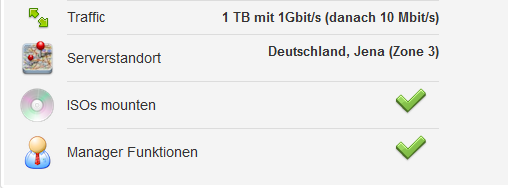
Although I have been in Germany a few times as a tourist, I have to confess that I knew next to nothing about the language, however, thanks to the similarities between the European languages, it was actually not that difficult for me to figure out the VPS has 1 single CPU core capped at 500MHz, 256MB of RAM, 15GB of hard drive, 1TB of bandwidth at 1Gbit port and unlimited at 10Mbit port. There is one IPv4 addresses provided for free (extra cost 1.49Euro per month) and two IPv6 addresses that comes by default. It is actually pretty interesting in the way they give out the IPv6 addresses though since majority of the VPS providers would offer at least a /112 block, if not more, of IPv6 address.
Provision of the VPS was instant and I have received the New Server Information the moment that the invoice was generated, however, it was a little difficult for me to read because everything was in German:

Thankfully, the welcome email is a pretty standard email which most of the people are able to read it.
However, the language start to get challenging again once I logged into my WHMCS account, which is using secured HTTP protocol:
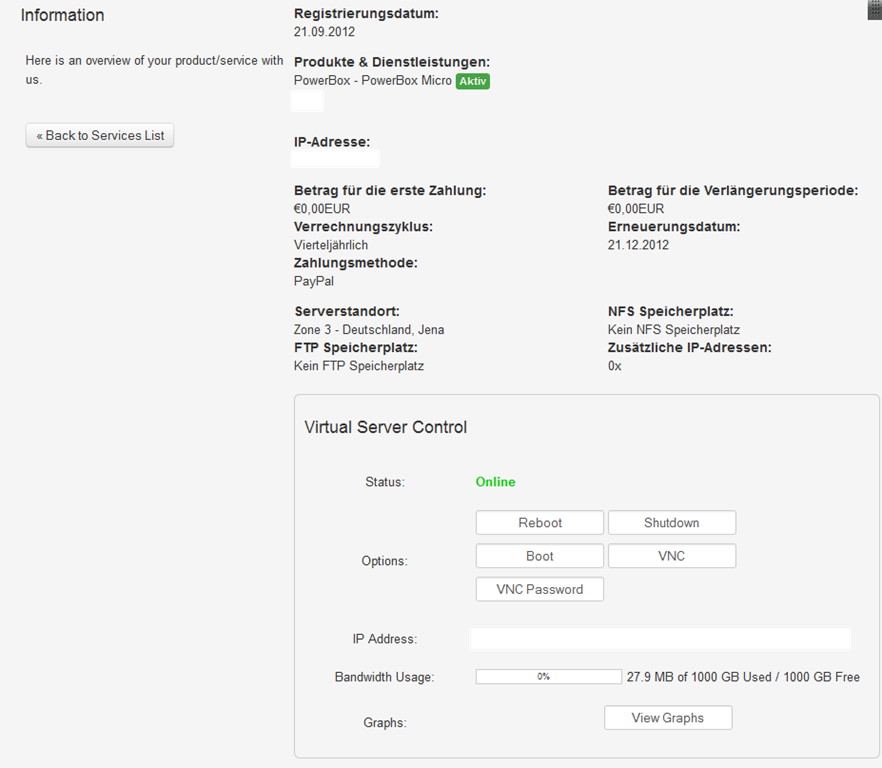
As you can see, although I have selected English as the interface language in WHMCS, many items in the interface remains in German language. It is understandable as FileMedia is primarily a Germany-based business.
Language aside, I am actually quite glad to see how detailed the service listing is, and the VPS control buttons seem to be working as well. Unlike most of the providers which have the graphs listed directly under the My Services, FileMedia actually used a pop-up to display the resource usage:
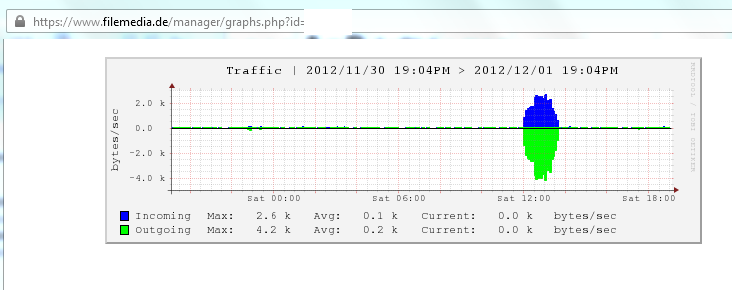
I think this is a great approach since the system no longer need to render a graph every time this page is opened, thus save some system resources as well.
The SolusVM control panel FileMedia uses is on non-standard HTTPS port with an user name that you are assigned to (which contains a 8 digit number that makes it really difficult to remember), and once logged in, a pretty standard interface shows up:
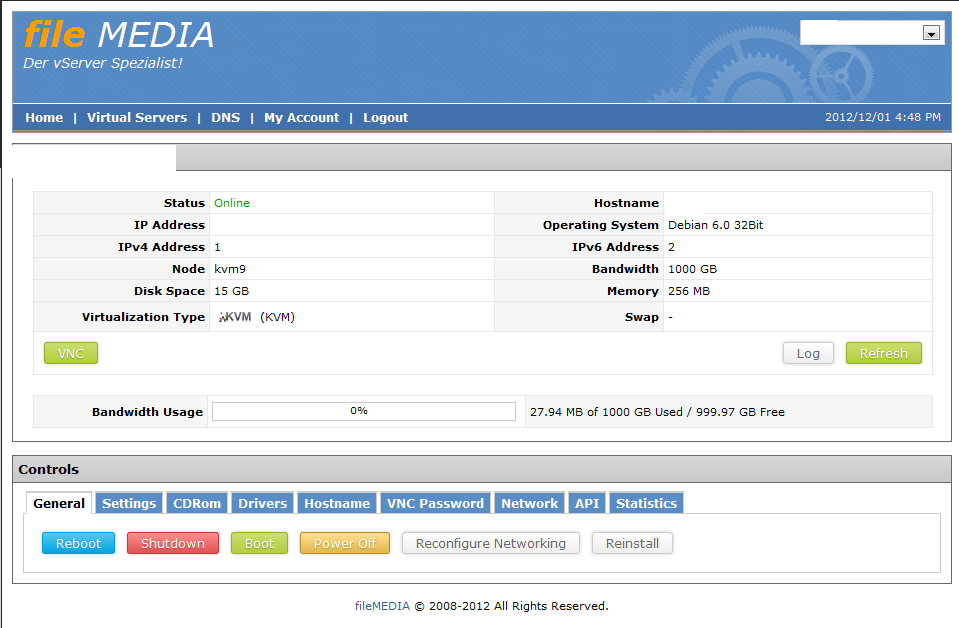
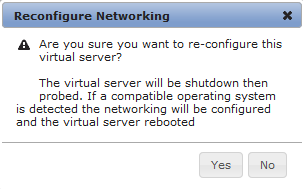
The reconfigure networking tab is useful if you have had any changes made to the IP address and once clicking on that button, a pop up showed up:
In the Reinstall tab, there are quite a few OS templates available, but as we have expected, the explanations are all in German:
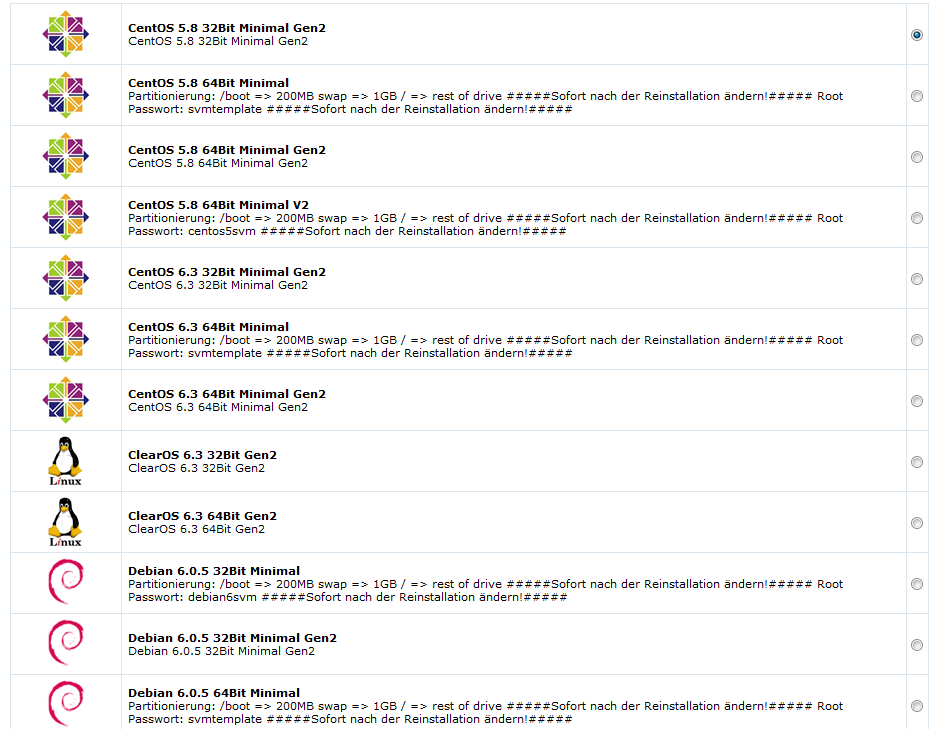
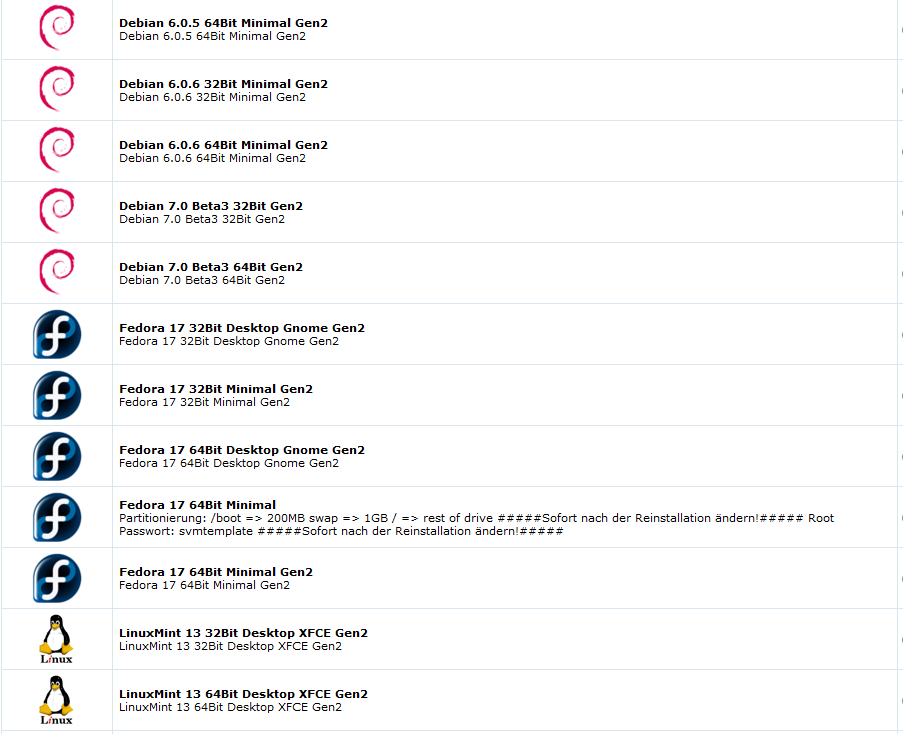
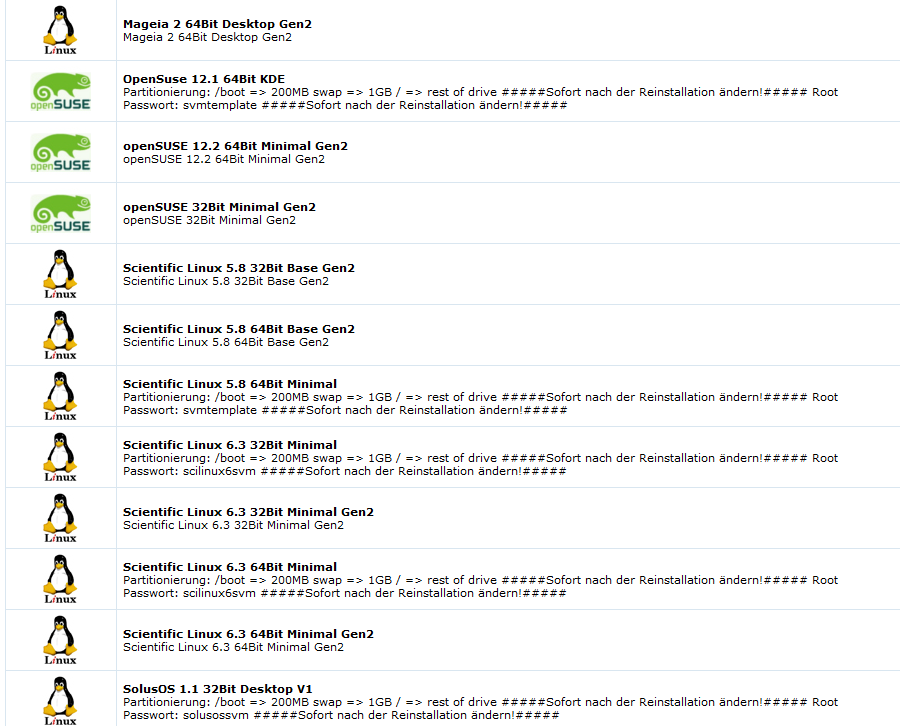
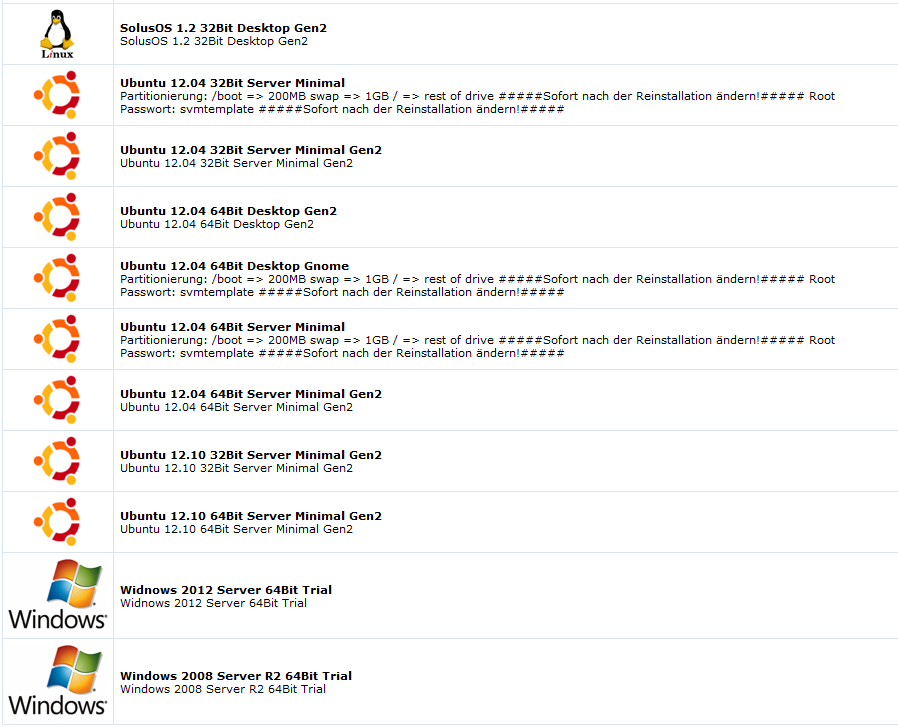
Other than many flavors of Linux distributions, one of the highlights would be the availability of Windows 2008 and 2012, although with just 256MB of RAM, I am pretty certain that I won’t be able to use any of the two distributions available.
Interesting enough, there seems to be a lot more CD images available once you click on the CD ROM tab:
Archlinux 2012.10.06 Dual

archlinux-2011.08.19-core-i686.iso

archlinux-2011.08.19-core-x86_64.iso

archlinux-2011.08.19-netinstall-i686.iso

archlinux-2011.08.19-netinstall-x86_64.iso

asg-8.980-7.1.iso

CentOS 5.4 64Bit Full DVD

CentOS 5.4 64Bit Netinstall

CentOS 5.5 32Bit Full DVD

CentOS 5.5 64Bit Full DVD2

CentOS 5.5 64Bit LiveCD

CentOS 5.5 64Bit Netinstall

CentOS 6.0 32Bit DVD

CentOS 6.0 32Bit Netinstall

CentOS 6.0 64Bit DVD1

CentOS 6.0 64Bit DVD2

CentOS 6.0 64Bit LiveCD

CentOS 6.0 64Bit LiveDVD

CentOS 6.0 64Bit Minimal

CentOS 6.0 64Bit Netinstall

Citrix XenServer 5.6.0

Clearos Enterprise 5.2 Service Pack 1

CloudLinux-5.6-i386-CD.iso

CloudLinux-5.6-x86_64-CD.iso

CloudLinux-6.1-i386-DVD.iso

CloudLinux-6.1-x86_64-DVD.iso

Debian 5.0 Lenny 32Bit Netinstall

Debian 5.0 Lenny 64Bit Netinstall

Debian 6.0 32Bit

Debian 6.0 64Bit

Eisfair 1.7.3 1.24 CD

Elastix-1.6.0-x86_64-bin-29oct2009.iso

Elastix-2.0.3-x86_64-bin-15nov2010.iso

Fedora 12 64Bit Netinstall

Fedora-17-i386-DVD.iso

Fedora-17-i386-netinst.iso

Fedora-17-i686-Live-Desktop.iso

Fedora-17-i686-Live-KDE.iso

Fedora-17-x86_64-DVD.iso

Fedora-17-x86_64-Live-Desktop.iso

Fedora-17-x86_64-Live-KDE.iso

Fedora-17-x86_64-netinst.iso

Flexiant 2.0.1 Install DVD

FreeBSD 7.2 32Bit DVD

FreeBSD 7.2 64Bit BootOnly

FreeBSD 8.0 32Bit

FreeBSD 8.0 64Bit

FreeNAS 0.7.1 64Bit

FreeNAS 0.7.2.5255 64Bit

FreeNAS 8.0 32Bit

FreeNAS 8.0 64Bit

Gentoo 2010 64Bit

GParted Live 0.13

GRML 2010.04 32Bit

GRML 2010.04 64Bit

Grml 2011.05 32Bit

Grml 2011.05 64Bit

Hurd 32 Bit mini-20110227.iso

Hurd 32Bit mini-20110215

ipfire-2.11.i586-full-core55.iso

KNOPPIX_V6.4.3CD-2010-12-20-DE.iso

Mikrotik 5.21

mini-20110308.iso

NexentaStor Community 3.1.0

Open-Xchange Appliance Edition 6.20 64 Bit 16.12.2011

OpenBSD 4.6 64Bit

OpenFiler 2.3 64Bit

Openfiler 2.99 64 Bit

openmediavault_0.2.5_amd64.iso

OpenSolaris 2009.06 x86

OpenSUSE 12.1 Netinstall 64Bit

OpenSuse GNOME LiveCD 64Bit

OpenSuse KDE4 LiveCD 64Bit

pbxinaflash-x86_64-17554.iso

Ping 3.02 LiveCD

Proxmox 2.0 Stable 2.0-4b59ea39-23

Proxmox VE 2.0 Beta3

SmartOS 13.07.2012

StackOps 0.3 Installer Iso

Starface 4.05

systemrescuecd-x86-3.1.0.iso

Turnkey Domain Controller 2009.10 Hardy x86

Turnkey Fileserver 2009.10 Hardy x86

Turnkey TorrentServer 2009.10 Hardy x86

Ubuntu 10.04.1 Desktop 64Bit

Ubuntu 10.04.1 Server 32Bit

Ubuntu 10.04.1 Server 64Bit

Ubuntu 10.10 Desktop 32Bit

Ubuntu 10.10 Desktop 64Bit

Ubuntu 10.10 Server 64Bit

Ubuntu 11.04 32Bit Desktop

Ubuntu 11.04 64Bit Desktop

Ubuntu 9.10 32Bit Desktop

Ubuntu 9.10 64Bit Desktop

Ubuntu 9.10 64Bit Server

ubuntu-12.04-alternate-amd64.iso

ubuntu-12.04-alternate-i386.iso

ubuntu-12.04-dvd-amd64.iso

ubuntu-12.04-dvd-i386.iso

ubuntu-12.04-server-amd64.iso

ubuntu-12.04-server-i386.iso

VMWARE ESXi 4.1

VMware ESXi Installer 5.0.0 64 Bit

Vyatta Community Edition Version 5

Vyatta LiveCD VC6.4 32Bit

Vyatta LiveCD VC6.4 32Bit Virtual

Vyatta LiveCD VC6.4 64Bit

Vyatta LiveCD VC6.4 64Bit Virtual

Windows 7 Home Premium 32Bit

Windows 7 Ultimate 64Bit Deutsch

Windows Home Server German inkl. SP3

Windows Server 2003 Enterprise 32Bit Deutsch

Windows Server 2003 R2 Enterprise 64Bit Deutsch CD1

Windows Server 2003 R2 Enterprise 64Bit Deutsch CD2

Windows Server 2003 R2 Standard 32Bit mit SP2 CD 1

Windows Server 2003 R2 Standard 32Bit SP2 CD 2

Windows Server 2003 R2 Standard 32Bit SP2 VL CD 1

Windows Server 2003 R2 Standard 32Bit SP2 VL CD 2

Windows Server 2003 R2 Standard 64Bit mit SP2 CD 1

Windows Server 2003 R2 Standard 64Bit SP2 CD 2

Windows Server 2008 64 Bit Alle Versionen

Windows Server 2008 R2 Standard/Enterprise/Datacenter 64 Bit

Windows Server 2008 Web 64Bit Deutsch

Zenlive 7.0
In fact, there are so many CD images that rather than taking many screenshots, I simply decided to open up the HTML code and listed it here.
There is also instant rDNS entry:
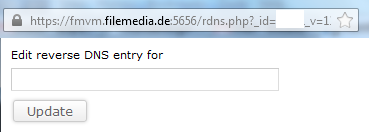
And for IPv6 as well:

On the Driver’s tab though, you only get a single option, and I am not sure why there is only Windows Virtio drivers available there:

Other than offering VPS service, there is also a 50-domain DNS service offered by FileMedia to the VPS users:

Test on the VPS
The test VPS that I have obtained 500MHz of CPU, 256MB of RAM and 15GB of hard drive space, and it has 1TB of bandwidth at 1Gbit and unmetered at 10mbit after that. The VPS is located at the data centre of ISPpro Internet at Jena, Germany and I have installed, as usual, Debian 6 32 bit for testing purposes.
When the OS was first loaded, 15MB of RAM was used, which is slightly less than the usual OpenVZ template:
free -m
             total       used       free     shared    buffers     cached
Mem:           248         94        154          0         38         40
-/+ buffers/cache:         15        233
Swap:          483          0        483
Top showing the processes running:
top - 14:01:54 up 23:40,  1 user,  load average: 0.00, 0.00, 0.00
Tasks:  57 total,   1 running,  56 sleeping,   0 stopped,   0 zombie
Cpu(s):  0.0%us,  0.0%sy,  0.0%ni,100.0%id,  0.0%wa,  0.0%hi,  0.0%si,  0.0%st
Mem:    254836k total,    97268k used,   157568k free,    39612k buffers
Swap:   495608k total,        0k used,   495608k free,    41540k cached

  PID USER      PR  NI  VIRT  RES  SHR S %CPU %MEM    TIME+  COMMAND
 2762 root      20   0  8264 2864 2344 S  0.3  1.1   0:00.07 sshd
 2766 root      20   0  5508 2812 1468 S  0.0  1.1   0:00.18 bash
 1028 root      20   0 27452 1564 1048 S  0.0  0.6   0:00.14 rsyslogd
 2786 root      20   0  2336 1120  904 R  0.3  0.4   0:00.01 top
 1370 root      20   0  5500  972  584 S  0.0  0.4   0:00.14 sshd
  353 root      16  -4  2412  944  404 S  0.0  0.4   0:00.02 udevd
 1362 Debian-e  20   0  6520  932  616 S  0.0  0.4   0:00.01 exim4
  869 statd     20   0  1940  784  656 S  0.0  0.3   0:00.00 rpc.statd
 1089 root      20   0  3788  772  604 S  0.0  0.3   0:00.05 cron
    1 root      20   0  2036  708  616 S  0.0  0.3   0:01.20 init
  526 root      18  -2  2388  664  240 S  0.0  0.3   0:00.00 udevd
  527 root      18  -2  2388  664  240 S  0.0  0.3   0:00.00 udevd
 1108 root      20   0  2336  628  352 S  0.0  0.2   0:00.00 dhclient
 1054 root      20   0  1708  588  480 S  0.0  0.2   0:00.00 acpid
 1387 root      20   0  1712  572  492 S  0.0  0.2   0:00.00 getty
 1390 root      20   0  1712  572  492 S  0.0  0.2   0:00.00 getty
 1391 root      20   0  1712  572  492 S  0.0  0.2   0:00.00 getty
And htop output:
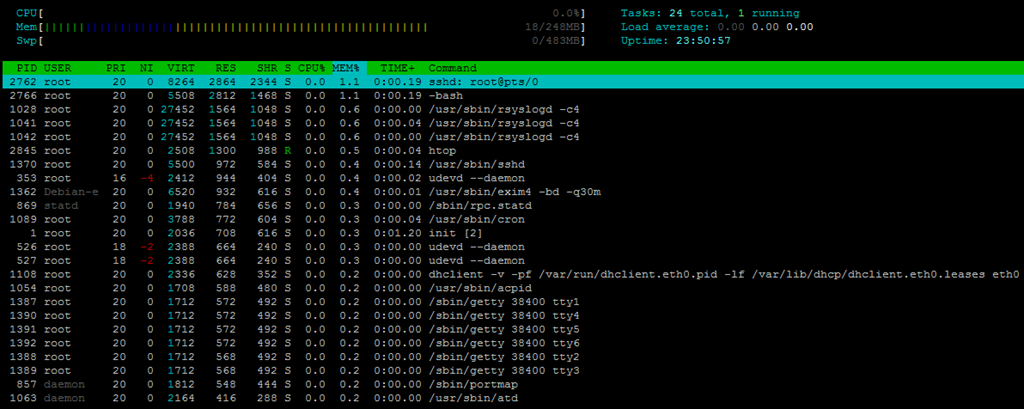
About 680MB of hard drive was used:
 df -h
Filesystem            Size  Used Avail Use% Mounted on
/dev/sda1              15G  680M   13G   5% /
tmpfs                 125M     0  125M   0% /lib/init/rw
udev                  121M  112K  120M   1% /dev
tmpfs                 125M     0  125M   0% /dev/shm
And the inodes are set to pretty standard values:
 df -i
Filesystem            Inodes   IUsed   IFree IUse% Mounted on
/dev/sda1             952848   25362  927486    3% /
tmpfs                  31854       5   31849    1% /lib/init/rw
udev                   30745     543   30202    2% /dev
tmpfs                  31854       1   31853    1% /dev/shm
When the full LNMP stack was loaded, to my surprise, only 38MB of RAM was used, which is a lot smaller than most of the cases I have seen in OpenVZ VPS:
free -m
             total       used       free     shared    buffers     cached
Mem:           248        243          5          0          9        195
-/+ buffers/cache:         38        209
Swap:          483          0        483
Top showing the processes running:
top - 04:14:47 up 1 day, 53 min,  1 user,  load average: 0.00, 0.35, 0.47
Tasks:  67 total,   1 running,  66 sleeping,   0 stopped,   0 zombie
Cpu(s):  0.0%us,  0.0%sy,  0.0%ni, 96.4%id,  3.6%wa,  0.0%hi,  0.0%si,  0.0%st
Mem:    254836k total,   249800k used,     5036k free,     9836k buffers
Swap:   495608k total,      356k used,   495252k free,   200024k cached

  PID USER      PR  NI  VIRT  RES  SHR S %CPU %MEM    TIME+  COMMAND
 4627 www       20   0 15004  10m  428 S  0.0  4.3   0:00.00 nginx
 4606 mysql     20   0 33948 4620 2020 S  0.0  1.8   0:00.02 mysqld
 4618 root      20   0 24124 4548 1404 S  0.0  1.8   0:00.04 php-cgi
 4619 www       20   0 24124 4140  996 S  0.0  1.6   0:00.00 php-cgi
 4620 www       20   0 24124 4140  996 S  0.0  1.6   0:00.00 php-cgi
 4621 www       20   0 24124 4140  996 S  0.0  1.6   0:00.00 php-cgi
 4622 www       20   0 24124 4140  996 S  0.0  1.6   0:00.00 php-cgi
 4623 www       20   0 24124 4140  996 S  0.0  1.6   0:00.00 php-cgi
 2766 root      20   0  5508 2296  952 S  0.0  0.9   0:00.21 bash
 4658 root      20   0  2336 1140  904 R  1.8  0.4   0:00.01 top
 1028 root      20   0 27452 1116  600 S  0.0  0.4   0:00.14 rsyslogd
 2762 root      20   0  8404 1108  532 S  0.0  0.4   0:01.94 sshd
 4626 root      20   0  4792  716  272 S  0.0  0.3   0:00.00 nginx
 4632 root      18  -2  2408  680  224 S  0.0  0.3   0:00.00 udevd
  353 root      16  -4  2412  672  272 S  0.0  0.3   0:00.02 udevd
 1370 root      20   0  5500  640  252 S  0.0  0.3   0:00.14 sshd
 4504 root      20   0  1752  544  460 S  0.0  0.2   0:00.00 mysqld_safe
And htop output:
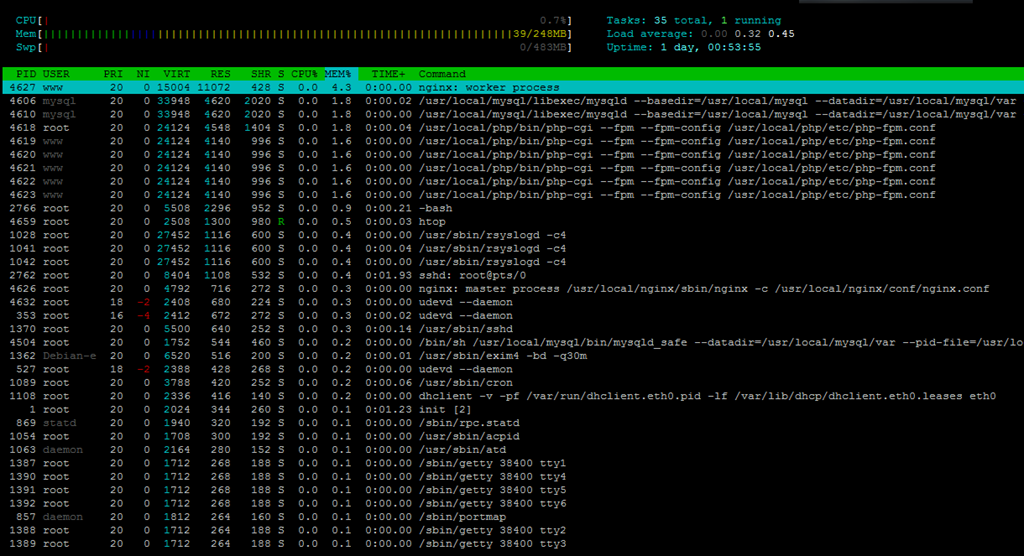
1.9GB of hard drive space was used:
df -h
Filesystem            Size  Used Avail Use% Mounted on
/dev/sda1              15G  1.9G   12G  14% /
tmpfs                 125M     0  125M   0% /lib/init/rw
udev                  121M  112K  120M   1% /dev
tmpfs                 125M     0  125M   0% /dev/shm
And the pretty standard iNodes values:
df -i
Filesystem            Inodes   IUsed   IFree IUse% Mounted on
/dev/sda1             952848   74061  878787    8% /
tmpfs                  31854       5   31849    1% /lib/init/rw
udev                   30745     543   30202    2% /dev
tmpfs                  31854       1   31853    1% /dev/shm
Uptime shows the VPS has not been used a lot:
 uptime
 14:00:27 up 23:39,  1 user,  load average: 0.00, 0.00, 0.00
And vmstat shows there is no iowait:
vmstat
procs -----------memory---------- ---swap-- -----io---- -system-- ----cpu----
 r  b   swpd   free   buff  cache   si   so    bi    bo   in   cs us sy id wa
 0  0    356   4804   9852 200144    0    0     7    29   18   16  1  0 99  0
CPUinfo shows a single CPU core was assigned to the VPS:
 cat /proc/cpuinfo
processor       : 0
vendor_id       : GenuineIntel
cpu family      : 6
model           : 13
model name      : QEMU Virtual CPU version (cpu64-rhel6)
stepping        : 3
cpu MHz         : 3392.292
cache size      : 4096 KB
fdiv_bug        : no
hlt_bug         : no
f00f_bug        : no
coma_bug        : no
fpu             : yes
fpu_exception   : yes
cpuid level     : 4
wp              : yes
flags           : fpu de pse tsc msr pae mce cx8 apic mtrr pge mca cmov pse36 cl                                                                                                 flush mmx fxsr sse sse2 syscall nx lm up pni cx16 hypervisor lahf_lm
bogomips        : 6784.58
clflush size    : 64
cache_alignment : 64
address sizes   : 36 bits physical, 48 bits virtual
power management:
RAM info did not show anything interesting:
 cat /proc/meminfo
MemTotal:         254836 kB
MemFree:            8144 kB
Buffers:            8240 kB
Cached:           199420 kB
SwapCached:          324 kB
Active:            42352 kB
Inactive:         191388 kB
Active(anon):      12184 kB
Inactive(anon):    14020 kB
Active(file):      30168 kB
Inactive(file):   177368 kB
Unevictable:           0 kB
Mlocked:               0 kB
HighTotal:             0 kB
HighFree:              0 kB
LowTotal:         254836 kB
LowFree:            8144 kB
SwapTotal:        495608 kB
SwapFree:         495252 kB
Dirty:                 0 kB
Writeback:             0 kB
AnonPages:         25852 kB
Mapped:             7292 kB
Shmem:               124 kB
Slab:               9516 kB
SReclaimable:       6124 kB
SUnreclaim:         3392 kB
KernelStack:         560 kB
PageTables:          664 kB
NFS_Unstable:          0 kB
Bounce:                0 kB
WritebackTmp:          0 kB
CommitLimit:      623024 kB
Committed_AS:     111608 kB
VmallocTotal:     765956 kB
VmallocUsed:        5848 kB
VmallocChunk:     752340 kB
HardwareCorrupted:     0 kB
HugePages_Total:       0
HugePages_Free:        0
HugePages_Rsvd:        0
HugePages_Surp:        0
Hugepagesize:       4096 kB
DirectMap4k:       12276 kB
DirectMap4M:      249856 kB
And time sync:
time sync

real    0m0.048s
user    0m0.004s
sys     0m0.000s
I was not too impressed with the disk I/O speed though, in fact, such speed is considered pretty low by the standard today:
dd if=/dev/zero of=test bs=64k count=16k conv=fdatasync
16384+0 records in
16384+0 records out
1073741824 bytes (1.1 GB) copied, 38.0617 s, 28.2 MB/s
Testing again showed significant improvements, however the results is still not so satisfactory:
 dd if=/dev/zero of=test bs=64k count=16k conv=fdatasync
16384+0 records in
16384+0 records out
1073741824 bytes (1.1 GB) copied, 27.6352 s, 38.9 MB/s
IOPing showed some pretty unstable results as well:
--- . (ext3 /dev/disk/by-uuid/7487fae1-4134-447b-8b2f-abe843c5d5ca) ioping statistics ---
10 requests completed in 9080.0 ms, 127 iops, 0.5 mb/s
min/avg/max/mdev = 0.4/7.8/16.3/6.1 ms
And test again:
--- . (ext3 /dev/disk/by-uuid/7487fae1-4134-447b-8b2f-abe843c5d5ca) ioping stati                                                                                             stics ---
10 requests completed in 9058.5 ms, 190 iops, 0.7 mb/s
min/avg/max/mdev = 0.0/5.3/16.4/5.6 ms
The download speed was pretty impressive – if the port is on 100mbit connection instead of the advertised 1Gbit connection:
wget cachefly.cachefly.net/100mb.test -O /dev/null
--2012-11-13 04:36:51--  http://cachefly.cachefly.net/100mb.test
Resolving cachefly.cachefly.net... 205.234.175.175
Connecting to cachefly.cachefly.net|205.234.175.175|:80... connected.
HTTP request sent, awaiting response... 200 OK
Length: 104857600 (100M) [application/octet-stream]
Saving to: `/dev/null'

100%[=======================================================================================================================================>] 104,857,600 18.3M/s   in 5.6s

2012-11-13 04:36:57 (17.8 MB/s) - `/dev/null' saved [104857600/104857600]
Testing again showed similar results:
 wget cachefly.cachefly.net/100mb.test -O /dev/null
--2012-11-13 04:45:04--  http://cachefly.cachefly.net/100mb.test
Resolving cachefly.cachefly.net... 205.234.175.175
Connecting to cachefly.cachefly.net|205.234.175.175|:80... connected.
HTTP request sent, awaiting response... 200 OK
Length: 104857600 (100M) [application/octet-stream]
Saving to: `/dev/null'

100%[======================================>] 104,857,600 18.7M/s   in 5.3s

2012-11-13 04:45:10 (18.7 MB/s) - `/dev/null' saved [104857600/104857600]
Furthermore, since FileMedia has mentioned that they uses 1Gbit port, I have decided to use aget to test out the multi-threaded download, and the results is more consistent with the 100mbit port than 1Gbit could offer:
The first download test is from ThinkBroad, with their server located in London, UK in the Telehouse DC owned by NetConnex:
aget -n 10 http://ipv4.download.thinkbroadband.com/1GB.zipAttempting to read log file aget-1GB.zip.log for resuming download job... Couldn't find log file for this download, starting a clean job... Head-Request Connection established Downloading /1GB.zip (1073741824 bytes) from site ipv4.download.thinkbroadband.com(80.249.99.148:80). Number of Threads: 10 .. [4% completed] ..... [9% completed] ....... [14% completed] .......... [19% completed] ............ [24% completed] ............... [29% completed] ................. [34% completed] .................... [39% completed] ...................... [44% completed] ......................... [49% completed] ........................... [54% completed] .............................. [59% completed] ................................ [64% completed] ................................... [69% completed] ..................................... [74% completed] ........................................ [79% completed] .......................................... [84% completed] ............................................. [89% completed] ............................................... [94% completed] .................................................. [99% completed] .................................................. [100% completed] Download completed, job completed in 60 seconds. (17476 Kb/sec) Shutting down...
Testing again showed even worse results:
aget -n 10 http://ipv4.download.thinkbroadband.com/1GB.zipAttempting to read log file aget-1GB.zip.log for resuming download job... Couldn't find log file for this download, starting a clean job... Head-Request Connection established Downloading /1GB.zip (1073741824 bytes) from site ipv4.download.thinkbroadband.com(80.249.99.148:80). Number of Threads: 10 .. [4% completed] ..... [9% completed] ....... [14% completed] .......... [19% completed] ............ [24% completed] ............... [29% completed] ................. [34% completed] .................... [39% completed] ...................... [44% completed] ......................... [49% completed] ........................... [54% completed] .............................. [59% completed] ................................ [64% completed] ................................... [69% completed] ..................................... [74% completed] ........................................ [79% completed] .......................................... [84% completed] ............................................. [89% completed] ............................................... [94% completed] .................................................. [99% completed] .................................................. [100% completed] Download completed, job completed in 305 seconds. (3437 Kb/sec) Shutting down...
The next test file used was from HostDime in their Orlando, Florida location:
aget -n 10 http://72.29.70.131/1gbfile.tgzAttempting to read log file aget-1gbfile.tgz.log for resuming download job... Couldn't find log file for this download, starting a clean job... Head-Request Connection established Downloading /1gbfile.tgz (1023410176 bytes) from site 72.29.70.131(72.29.70.131:80). Number of Threads: 10 .. [4% completed] ..... [9% completed] ....... [14% completed] .......... [19% completed] ............ [24% completed] ............... [29% completed] ................. [34% completed] .................... [39% completed] ...................... [44% completed] ......................... [49% completed] ........................... [54% completed] .............................. [59% completed] ................................ [64% completed] ................................... [69% completed] ..................................... [74% completed] ........................................ [79% completed] .......................................... [84% completed] ............................................. [89% completed] ............................................... [94% completed] .................................................. [99% completed] .................................................. [100% completed] Download completed, job completed in 205 seconds. (4875 Kb/sec) Shutting down...
Testing again showed similar results:
aget -n 10 http://72.29.70.131/1gbfile.tgzAttempting to read log file aget-1gbfile.tgz.log for resuming download job... Couldn't find log file for this download, starting a clean job... Head-Request Connection established Downloading /1gbfile.tgz (1023410176 bytes) from site 72.29.70.131(72.29.70.131:80). Number of Threads: 10 .. [4% completed] ..... [9% completed] ....... [14% completed] .......... [19% completed] ............ [24% completed] ............... [29% completed] ................. [34% completed] .................... [39% completed] ...................... [44% completed] ......................... [49% completed] ........................... [54% completed] .............................. [59% completed] ................................ [64% completed] ................................... [69% completed] ..................................... [74% completed] ........................................ [79% completed] .......................................... [84% completed] ............................................. [89% completed] ............................................... [94% completed] .................................................. [99% completed] .................................................. [100% completed] Download completed, job completed in 306 seconds. (3266 Kb/sec) Shutting down...
As you can see, from the download tests alone, it is very difficult for me to justify that it is actually using a 1Gbit port.
Upload speed is dependent on the physical location too, first is the upload test from my Quickweb test VPS in Chicago, IL:
wget http://84.23.xxx.xxx/100mb.test -O /dev/null
--2012-12-01 17:51:01--  http://84.23.xxx.xxx/100mb.test
Connecting to 84.23.xxx.xxx:80... connected.
HTTP request sent, awaiting response... 200 OK
Length: 104857600 (100M) [application/octet-stream]
Saving to: `/dev/null'

100%[======================================>] 104,857,600  722K/s   in 3m 10s

2012-12-01 17:54:11 (540 KB/s) - `/dev/null' saved [104857600/104857600]
My test VPS in Los Angeles, CA, which is along the West Coast, showed slightly worse results:
wget http://84.23.xxx.xxx/100mb.test -O /dev/null
--2012-12-02 06:56:37--  http://84.23.xxx.xxx/100mb.test
Connecting to 84.23.xxx.xxx:80... connected.
HTTP request sent, awaiting response... 200 OK
Length: 104857600 (100M) [application/octet-stream]
Saving to: `/dev/null'

100%[======================================>] 104,857,600  543K/s   in 4m 8s

2012-12-02 07:00:45 (414 KB/s) - `/dev/null' saved [104857600/104857600]
Finally, my XenVZ test VPS at Maidenhead, UK, showed the fastest speed of all due to physical proximity.
 wget http://84.23.xxx.xxx/100mb.test -O /dev/null
--2012-12-02 06:56:08--  http://84.23.xxx.xxx/100mb.test
Connecting to 84.23.xxx.xxx:80... connected.
HTTP request sent, awaiting response... 200 OK
Length: 104857600 (100M) [application/octet-stream]
Saving to: `/dev/null'

100%[======================================>] 104,857,600 1.81M/s   in 67s

2012-12-02 06:57:15 (1.49 MB/s) - `/dev/null' saved [104857600/104857600]
As you can see, even in continetal Europe, the network speed is probably less than satisfacotry for a 1Gbit port.
Finally, the benchmark tests, I was actually pretty surprised by the high score considering this VPS has only a single core CPU.
   #    #  #    #  #  #    #          #####   ######  #    #   ####   #    #
   #    #  ##   #  #   #  #           #    #  #       ##   #  #    #  #    #
   #    #  # #  #  #    ##            #####   #####   # #  #  #       ######
   #    #  #  # #  #    ##            #    #  #       #  # #  #       #    #
   #    #  #   ##  #   #  #           #    #  #       #   ##  #    #  #    #
    ####   #    #  #  #    #          #####   ######  #    #   ####   #    #

   Version 5.1.3                      Based on the Byte Magazine Unix Benchmark

   Multi-CPU version                  Version 5 revisions by Ian Smith,
                                      Sunnyvale, CA, USA
   January 13, 2011                   johantheghost at yahoo period com


1 x Dhrystone 2 using register variables  1 2 3 4 5 6 7 8 9 10

1 x Double-Precision Whetstone  1 2 3 4 5 6 7 8 9 10

1 x Execl Throughput  1 2 3

1 x File Copy 1024 bufsize 2000 maxblocks  1 2 3

1 x File Copy 256 bufsize 500 maxblocks  1 2 3

1 x File Copy 4096 bufsize 8000 maxblocks  1 2 3

1 x Pipe Throughput  1 2 3 4 5 6 7 8 9 10

1 x Pipe-based Context Switching  1 2 3 4 5 6 7 8 9 10

1 x Process Creation  1 2 3

1 x System Call Overhead  1 2 3 4 5 6 7 8 9 10

1 x Shell Scripts (1 concurrent)  1 2 3

1 x Shell Scripts (8 concurrent)  1 2 3

========================================================================
   BYTE UNIX Benchmarks (Version 5.1.3)

   System: xxxxx: GNU/Linux
   OS: GNU/Linux -- 2.6.32-5-686 -- #1 SMP Sun May 6 04:01:19 UTC 2012
   Machine: i686 (unknown)
   Language: en_US.utf8 (charmap="ANSI_X3.4-1968", collate="ANSI_X3.4-1968")
   CPU 0: QEMU Virtual CPU version (cpu64-rhel6) (6784.6 bogomips)
          x86-64, MMX, Physical Address Ext, SYSCALL/SYSRET
   04:51:28 up 1 day,  1:30,  2 users,  load average: 0.08, 0.02, 0.01; runlevel 2

------------------------------------------------------------------------
Benchmark Run: Tue Nov 13 2012 04:51:28 - 05:19:39
1 CPU in system; running 1 parallel copy of tests

Dhrystone 2 using register variables       19854776.6 lps   (10.0 s, 7 samples)
Double-Precision Whetstone                     3359.6 MWIPS (9.8 s, 7 samples)
Execl Throughput                               6885.5 lps   (29.9 s, 2 samples)
File Copy 1024 bufsize 2000 maxblocks        777639.2 KBps  (30.0 s, 2 samples)
File Copy 256 bufsize 500 maxblocks          213955.1 KBps  (30.1 s, 2 samples)
File Copy 4096 bufsize 8000 maxblocks       1993313.9 KBps  (30.0 s, 2 samples)
Pipe Throughput                             1451173.6 lps   (10.0 s, 7 samples)
Pipe-based Context Switching                 372585.9 lps   (10.0 s, 7 samples)
Process Creation                              26862.3 lps   (30.0 s, 2 samples)
Shell Scripts (1 concurrent)                   9167.7 lpm   (60.0 s, 2 samples)
Shell Scripts (8 concurrent)                   1218.2 lpm   (60.0 s, 2 samples)
System Call Overhead                        1261122.2 lps   (10.0 s, 7 samples)

System Benchmarks Index Values               BASELINE       RESULT    INDEX
Dhrystone 2 using register variables         116700.0   19854776.6   1701.4
Double-Precision Whetstone                       55.0       3359.6    610.8
Execl Throughput                                 43.0       6885.5   1601.3
File Copy 1024 bufsize 2000 maxblocks          3960.0     777639.2   1963.7
File Copy 256 bufsize 500 maxblocks            1655.0     213955.1   1292.8
File Copy 4096 bufsize 8000 maxblocks          5800.0    1993313.9   3436.7
Pipe Throughput                               12440.0    1451173.6   1166.5
Pipe-based Context Switching                   4000.0     372585.9    931.5
Process Creation                                126.0      26862.3   2131.9
Shell Scripts (1 concurrent)                     42.4       9167.7   2162.2
Shell Scripts (8 concurrent)                      6.0       1218.2   2030.4
System Call Overhead                          15000.0    1261122.2    840.7
                                                                   ========
System Benchmarks Index Score                                        1494.5
Testing again showed slightly worse results, but stil fairly impressive:
   #    #  #    #  #  #    #          #####   ######  #    #   ####   #    #
   #    #  ##   #  #   #  #           #    #  #       ##   #  #    #  #    #
   #    #  # #  #  #    ##            #####   #####   # #  #  #       ######
   #    #  #  # #  #    ##            #    #  #       #  # #  #       #    #
   #    #  #   ##  #   #  #           #    #  #       #   ##  #    #  #    #
    ####   #    #  #  #    #          #####   ######  #    #   ####   #    #

   Version 5.1.3                      Based on the Byte Magazine Unix Benchmark

   Multi-CPU version                  Version 5 revisions by Ian Smith,
                                      Sunnyvale, CA, USA
   January 13, 2011                   johantheghost at yahoo period com


1 x Dhrystone 2 using register variables  1 2 3 4 5 6 7 8 9 10

1 x Double-Precision Whetstone  1 2 3 4 5 6 7 8 9 10

1 x Execl Throughput  1 2 3

1 x File Copy 1024 bufsize 2000 maxblocks  1 2 3

1 x File Copy 256 bufsize 500 maxblocks  1 2 3

1 x File Copy 4096 bufsize 8000 maxblocks  1 2 3

1 x Pipe Throughput  1 2 3 4 5 6 7 8 9 10

1 x Pipe-based Context Switching  1 2 3 4 5 6 7 8 9 10

1 x Process Creation  1 2 3

1 x System Call Overhead  1 2 3 4 5 6 7 8 9 10

1 x Shell Scripts (1 concurrent)  1 2 3

1 x Shell Scripts (8 concurrent)  1 2 3

========================================================================
   BYTE UNIX Benchmarks (Version 5.1.3)

   System: xxxxx: GNU/Linux
   OS: GNU/Linux -- 2.6.32-5-686 -- #1 SMP Sun May 6 04:01:19 UTC 2012
   Machine: i686 (unknown)
   Language: en_US.utf8 (charmap="ANSI_X3.4-1968", collate="ANSI_X3.4-1968")
   CPU 0: QEMU Virtual CPU version (cpu64-rhel6) (6784.6 bogomips)
          x86-64, MMX, Physical Address Ext, SYSCALL/SYSRET
   05:27:56 up 1 day,  2:06,  2 users,  load average: 0.22, 0.86, 1.16; runlevel 2

------------------------------------------------------------------------
Benchmark Run: Tue Nov 13 2012 05:27:56 - 05:56:07
1 CPU in system; running 1 parallel copy of tests

Dhrystone 2 using register variables       19946412.1 lps   (10.0 s, 7 samples)
Double-Precision Whetstone                     3374.0 MWIPS (10.0 s, 7 samples)
Execl Throughput                               7145.2 lps   (29.6 s, 2 samples)
File Copy 1024 bufsize 2000 maxblocks        793521.7 KBps  (30.0 s, 2 samples)
File Copy 256 bufsize 500 maxblocks          223670.0 KBps  (30.1 s, 2 samples)
File Copy 4096 bufsize 8000 maxblocks       1976912.8 KBps  (30.0 s, 2 samples)
Pipe Throughput                             1451803.5 lps   (10.0 s, 7 samples)
Pipe-based Context Switching                 378572.7 lps   (10.0 s, 7 samples)
Process Creation                              26849.9 lps   (30.0 s, 2 samples)
Shell Scripts (1 concurrent)                   9158.7 lpm   (60.1 s, 2 samples)
Shell Scripts (8 concurrent)                   1193.6 lpm   (60.1 s, 2 samples)
System Call Overhead                        1264982.0 lps   (10.0 s, 7 samples)

System Benchmarks Index Values               BASELINE       RESULT    INDEX
Dhrystone 2 using register variables         116700.0   19946412.1   1709.2
Double-Precision Whetstone                       55.0       3374.0    613.5
Execl Throughput                                 43.0       7145.2   1661.7
File Copy 1024 bufsize 2000 maxblocks          3960.0     793521.7   2003.8
File Copy 256 bufsize 500 maxblocks            1655.0     223670.0   1351.5
File Copy 4096 bufsize 8000 maxblocks          5800.0    1976912.8   3408.5
Pipe Throughput                               12440.0    1451803.5   1167.0
Pipe-based Context Switching                   4000.0     378572.7    946.4
Process Creation                                126.0      26849.9   2130.9
Shell Scripts (1 concurrent)                     42.4       9158.7   2160.1
Shell Scripts (8 concurrent)                      6.0       1193.6   1989.4
System Call Overhead                          15000.0    1264982.0    843.3
                                                                   ========
System Benchmarks Index Score                                        1507.0
GeekBench results are pretty good too:
System Information
  Platform:                  Linux x86 (32-bit)
  Compiler:                  GCC 4.1.2 20070925 (Red Hat 4.1.2-33)
  Operating System:          Linux 2.6.32-5-686 i686
  Model:                     Linux PC (QEMU Virtual CPU version (cpu64-rhel6))
  Motherboard:               Unknown Motherboard
  Processor:                 QEMU Virtual CPU version (cpu64-rhel6)
  Processor ID:              GenuineIntel Family 6 Model 13 Stepping 3
  Logical Processors:        1
  Physical Processors:       1
  Processor Frequency:       3.39 GHz
  L1 Instruction Cache:      64.0 KB
  L1 Data Cache:             64.0 KB
  L2 Cache:                  512 KB
  L3 Cache:                  0.00 B
  Bus Frequency:             0.00 Hz
  Memory:                    249 MB
  Memory Type:               N/A
  SIMD:                      1
  BIOS:                      N/A
  Processor Model:           QEMU Virtual CPU version (cpu64-rhel6)
  Processor Cores:           1

Integer
  Blowfish
    single-threaded scalar    2181 ||||||||
    multi-threaded scalar     2368 |||||||||
  Text Compress
    single-threaded scalar    2974 |||||||||||
    multi-threaded scalar     2922 |||||||||||
  Text Decompress
    single-threaded scalar    3130 ||||||||||||
    multi-threaded scalar     3291 |||||||||||||
  Image Compress
    single-threaded scalar    2533 ||||||||||
    multi-threaded scalar     2499 |||||||||
  Image Decompress
    single-threaded scalar    2509 ||||||||||
    multi-threaded scalar     2577 ||||||||||
  Lua
    single-threaded scalar    3983 |||||||||||||||
    multi-threaded scalar     4100 ||||||||||||||||

Floating Point
  Mandelbrot
    single-threaded scalar    2884 |||||||||||
    multi-threaded scalar     2928 |||||||||||
  Dot Product
    single-threaded scalar    4687 ||||||||||||||||||
    multi-threaded scalar     4967 |||||||||||||||||||
    single-threaded vector    5483 |||||||||||||||||||||
    multi-threaded vector     6395 |||||||||||||||||||||||||
  LU Decomposition
    single-threaded scalar    3599 ||||||||||||||
    multi-threaded scalar     3627 ||||||||||||||
  Primality Test
    single-threaded scalar    5000 ||||||||||||||||||||
    multi-threaded scalar     4058 ||||||||||||||||
  Sharpen Image
    single-threaded scalar   11307 |||||||||||||||||||||||||||||||||||||||||||||
    multi-threaded scalar    11387 |||||||||||||||||||||||||||||||||||||||||||||
  Blur Image
    single-threaded scalar    8908 |||||||||||||||||||||||||||||||||||
    multi-threaded scalar     9008 ||||||||||||||||||||||||||||||||||||

Memory
  Read Sequential
    single-threaded scalar    7341 |||||||||||||||||||||||||||||
  Write Sequential
    single-threaded scalar   10820 |||||||||||||||||||||||||||||||||||||||||||
  Stdlib Allocate
    single-threaded scalar    5276 |||||||||||||||||||||
  Stdlib Write
    single-threaded scalar    6828 |||||||||||||||||||||||||||
  Stdlib Copy
    single-threaded scalar   13729 ||||||||||||||||||||||||||||||||||||||||||||||||||||||

Stream
  Stream Copy
    single-threaded scalar    5909 |||||||||||||||||||||||
    single-threaded vector    6666 ||||||||||||||||||||||||||
  Stream Scale
    single-threaded scalar    6246 ||||||||||||||||||||||||
    single-threaded vector    6119 ||||||||||||||||||||||||
  Stream Add
    single-threaded scalar    5771 |||||||||||||||||||||||
    single-threaded vector    6249 ||||||||||||||||||||||||
  Stream Triad
    single-threaded scalar    6415 |||||||||||||||||||||||||
    single-threaded vector    4637 ||||||||||||||||||

Integer Score:                2922 |||||||||||
Floating Point Score:         6017 ||||||||||||||||||||||||
Memory Score:                 8798 |||||||||||||||||||||||||||||||||||
Stream Score:                 6001 ||||||||||||||||||||||||

Overall Geekbench Score:      5488 |||||||||||||||||||||
Testing again showed similar results:
System Information
  Platform:                  Linux x86 (32-bit)
  Compiler:                  GCC 4.1.2 20070925 (Red Hat 4.1.2-33)
  Operating System:          Linux 2.6.32-5-686 i686
  Model:                     Linux PC (QEMU Virtual CPU version (cpu64-rhel6))
  Motherboard:               Unknown Motherboard
  Processor:                 QEMU Virtual CPU version (cpu64-rhel6)
  Processor ID:              GenuineIntel Family 6 Model 13 Stepping 3
  Logical Processors:        1
  Physical Processors:       1
  Processor Frequency:       3.39 GHz
  L1 Instruction Cache:      64.0 KB
  L1 Data Cache:             64.0 KB
  L2 Cache:                  512 KB
  L3 Cache:                  0.00 B
  Bus Frequency:             0.00 Hz
  Memory:                    249 MB
  Memory Type:               N/A
  SIMD:                      1
  BIOS:                      N/A
  Processor Model:           QEMU Virtual CPU version (cpu64-rhel6)
  Processor Cores:           1

Integer
  Blowfish
    single-threaded scalar    2229 ||||||||
    multi-threaded scalar     2401 |||||||||
  Text Compress
    single-threaded scalar    2843 |||||||||||
    multi-threaded scalar     2686 ||||||||||
  Text Decompress
    single-threaded scalar    2964 |||||||||||
    multi-threaded scalar     3123 ||||||||||||
  Image Compress
    single-threaded scalar    2432 |||||||||
    multi-threaded scalar     2369 |||||||||
  Image Decompress
    single-threaded scalar    2459 |||||||||
    multi-threaded scalar     2424 |||||||||
  Lua
    single-threaded scalar    4037 ||||||||||||||||
    multi-threaded scalar     4131 ||||||||||||||||

Floating Point
  Mandelbrot
    single-threaded scalar    2896 |||||||||||
    multi-threaded scalar     2941 |||||||||||
  Dot Product
    single-threaded scalar    4724 ||||||||||||||||||
    multi-threaded scalar     4975 |||||||||||||||||||
    single-threaded vector    5635 ||||||||||||||||||||||
    multi-threaded vector     6459 |||||||||||||||||||||||||
  LU Decomposition
    single-threaded scalar    3619 ||||||||||||||
    multi-threaded scalar     3699 ||||||||||||||
  Primality Test
    single-threaded scalar    5043 ||||||||||||||||||||
    multi-threaded scalar     3959 |||||||||||||||
  Sharpen Image
    single-threaded scalar   11339 |||||||||||||||||||||||||||||||||||||||||||||
    multi-threaded scalar    11424 |||||||||||||||||||||||||||||||||||||||||||||
  Blur Image
    single-threaded scalar    8839 |||||||||||||||||||||||||||||||||||
    multi-threaded scalar     8381 |||||||||||||||||||||||||||||||||

Memory
  Read Sequential
    single-threaded scalar    6990 |||||||||||||||||||||||||||
  Write Sequential
    single-threaded scalar    9872 |||||||||||||||||||||||||||||||||||||||
  Stdlib Allocate
    single-threaded scalar    5224 ||||||||||||||||||||
  Stdlib Write
    single-threaded scalar    6508 ||||||||||||||||||||||||||
  Stdlib Copy
    single-threaded scalar   13007 ||||||||||||||||||||||||||||||||||||||||||||||||||||

Stream
  Stream Copy
    single-threaded scalar    5541 ||||||||||||||||||||||
    single-threaded vector    6404 |||||||||||||||||||||||||
  Stream Scale
    single-threaded scalar    6038 ||||||||||||||||||||||||
    single-threaded vector    6328 |||||||||||||||||||||||||
  Stream Add
    single-threaded scalar    5424 |||||||||||||||||||||
    single-threaded vector    6426 |||||||||||||||||||||||||
  Stream Triad
    single-threaded scalar    6173 ||||||||||||||||||||||||
    single-threaded vector    4864 |||||||||||||||||||

Integer Score:                2841 |||||||||||
Floating Point Score:         5995 |||||||||||||||||||||||
Memory Score:                 8320 |||||||||||||||||||||||||||||||||
Stream Score:                 5899 |||||||||||||||||||||||

Overall Geekbench Score:      5346 |||||||||||||||||||||
Customer Service and Support
I did expect too much out of a free testing VPS when it comes to support, however my technical ticket submitted on a Saturday at 23:44pm was answered the next day at 12:10pm. Although it was not the fastest I have ever seen, but for a low cost provider, such time should be acceptable. The best part? Reply was in English and is very formal.
Conclusion
Although primarily a German-based business, I am glad that FileMedia has taken a bold step moving to the international market, although obviously there will still be quite a bit of work ahead in terms of making the whole business a bit more catered towards the non-German speaking population. Disk I/O is not that great and the network speed may not be as good as they have advertised as 1Gbit port, however the benchmarks are pretty impressive and the support is relatively reasonable, and particularly the availability of Windows ISOs make it a good option for people who might need a Windows VPS in Europe.
Very nice they have Debian 7 and Ubuntu 12.10, and other latest iso.
Did you use virtio? For KVMs you tested, whats the average IO?
@jcaleb: Unfortunately there was no option for me to select disk driver 🙁
i thought that was standard with solus
Isnt the language thing the fault of WHMCS, certainly looks like they use it, that or Solus, since half of it is in English.
A lot of those automated Emails are from whmcs, *it* should be smart enough to send an english copy, assuming it even offers the option to include multi-lang welcomes etc, if not, again, WHMCS problem, perhaps it why many hostings are moving away to hostbill
@Nobby6: I would think the template is fully customizable. In case of EDIS for example, they do send their welcome letter in 2 copies, one in German and one in English, I know it is duplicate emails for those who are bilingual in both languages but in reality, we are living in a world with way more German speakers than English speakers.