
96MB Low End VPS Review Part 59–VPS Node Box
Recently, I have been doing quite a few “unsolicited” reviews, i.e., reviews that are not from anyone in particular. Reasons being I was quite curious in taking a look at those “cloud” VPS providers myself as well. The review today is “unsolicited” as well, however this time, it was simply due to the few recent controversies that this VPSNodeBox, as a relatively newcommer to the LEB market (such as here and here), has got involved in, which made me rather curious about their services and decided to take a look at their service to see how it is like.
Basic Information and Set Up
I have grabbed their 1GB KVM VPS deal that is listed on LowEndBox.com and here is how it looks like:
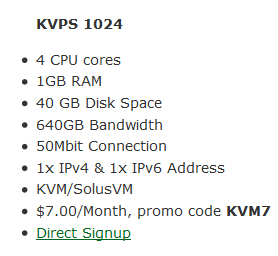
I have to say, for a 1GB RAM KVM box, the price of 7USD per month is actually quite good, although the fact that Windows is not supported in this case seems to be a big disadvantage (with the reasons explained here) since many people using KVM rather than OpenVZ or Xen PV due to the fact that it is capable of running Windows.
It is also worth noting that the promo code KVM7 did not work for me initially (which I think might be related to this comment here, although Xen7 worked fine for me) however once I sent in a ticket on the issue, it was fixed and I was able to proceed with the 7USD per month price.
The ordering system appears to be a heavily themed WHMCS system. In fact, one of the most interesting “tweak” I have seen is actually to have a dialogue box asking you if you really want to log out when click on the log out button in their WHMCS:

The order page contains fairly detailed description of the products, as well as the discount offered. Note that with the promo code mentioned in the LEB post could only be applied to the monthly payment and there is no further discount offered for pre-payments (as explained here). Also, the NS1 and NS2 prefix were filled up automatically with two of their Anycast DNS servers, which is rather convenient if you plan to use the VPS as a web server:
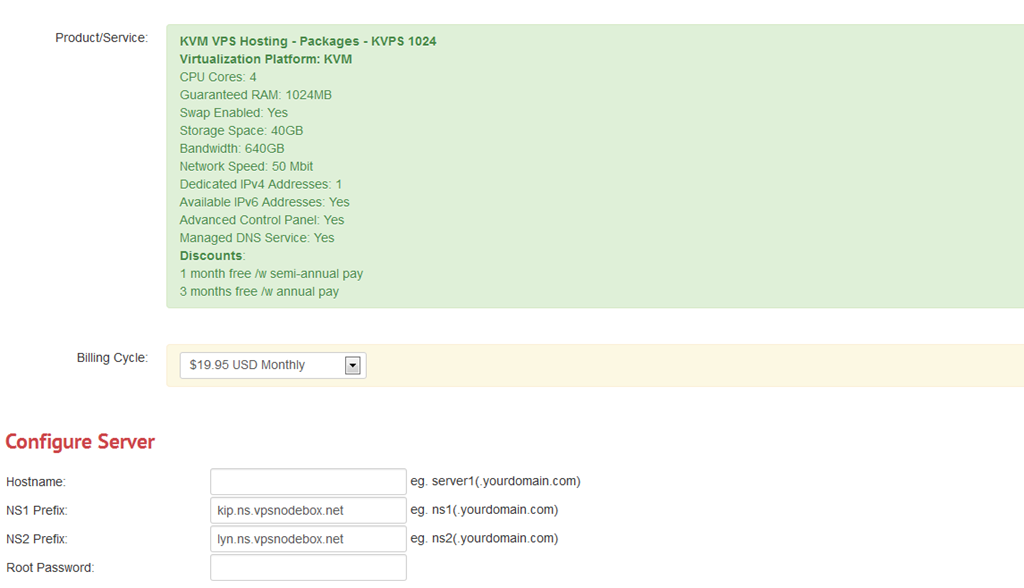
There are a few configurable options that you can select from:
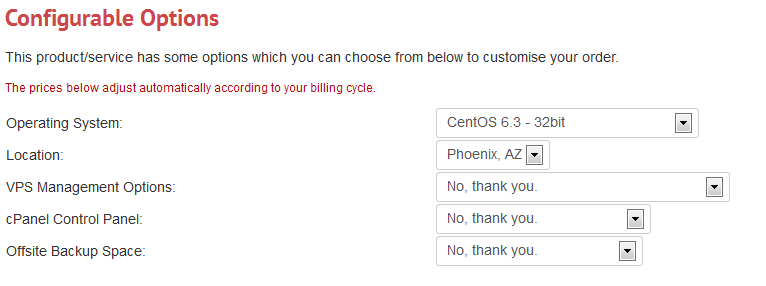
For the OS, there are quite a few choices covering pretty much all the latest Linux distributions:
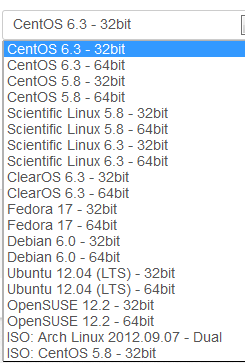
And here is more:
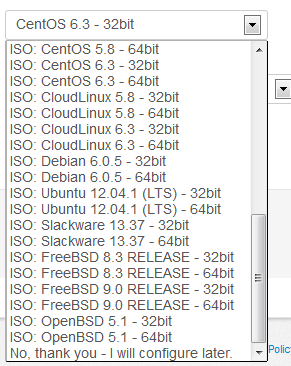
For the location, there is only Phoenix location for now, so it is not exactly “selectable”:

CPanel is available as a control panel option, and it cost 14.95USD per month, which is almost the same as you would get from any third-party vendors:

VPSNodeBox also provide backup space at extra costs:

Scrolling down even further, their footer area is a bit more interesting, particularly in regards to the copy right notice:

Interestingly, that notice is actually a direct copy from BuySellAds.com:

Provision of the VPS was instant and I was able to get the VPS details the moment I submit my payment. The control panel is a SolusVM panel on standard HTTPS port, and it is rather interesting to note that the URL for the control panel is cloud.vpsnodebox.com although I actually failed to see anywhere in their set up that the VPS is a “cloud” VPS, but I guess it is not exactly relevant.
Once logged in, a pretty standard SolusVM interface was shown, which seems to be rather boring:
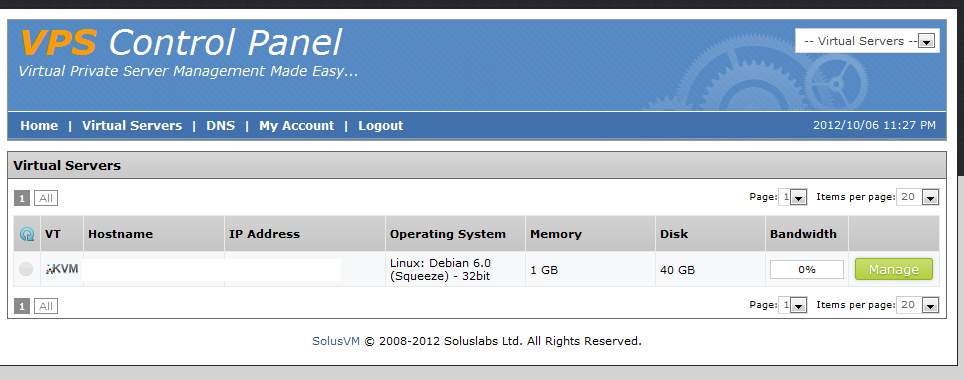
However, once you click on the VPS, there are actually a few interesting items shown in the Controls section of the overview:

As far as I can remember, I have never seen “Reconfigure Networking” appear among all the providers that I have reviewed and I have seen “Reinstall” available but only for OpenVZ VPS. Does VPSNodeBox actually come up a way to automatically reinstall OS on a KVM VPS?
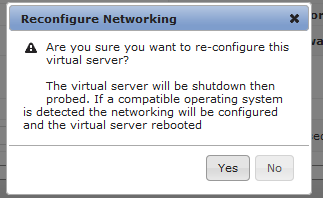
First, the Reconfigure Networking tab. Once the button is clicked, here is the warning message that popped up. I did not click any further however it appears to me that this is just, as the name has stated, reconfigure the networking and I think it is only useful when you are assigned new IP addresses:
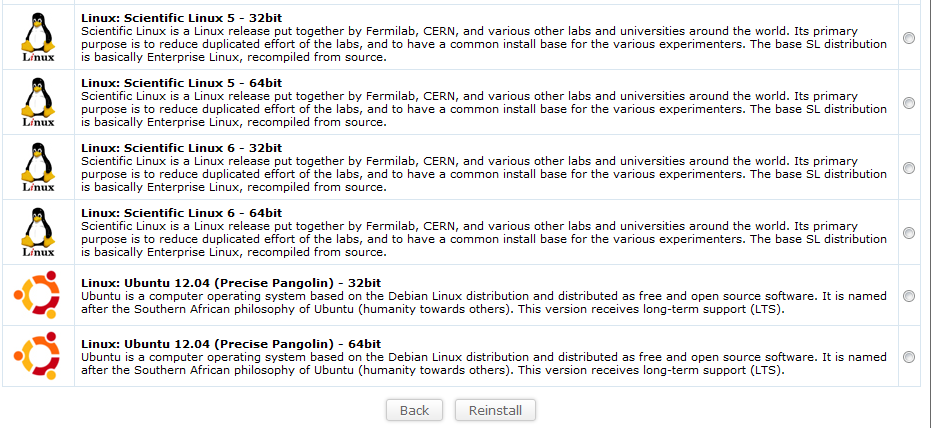
For the Reinstall tab, once I clicked on it, a long list of operating systems actually showed up:

When I clicked on the Reinstall button, it actually appear to work and this message popped up on the top of the page with a randomly generated password:

However, my excitement quickly faded away when, after 10 minutes, I still could not log into my VPS and when I decided to VNC into the VPS, I noticed the VPS was merely booted to the ISO that I have mounted.
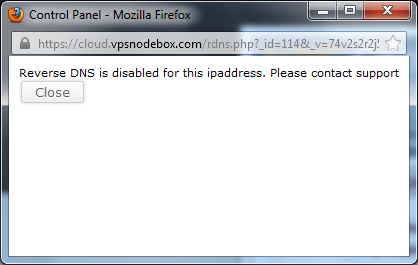
Other than those two highlights, everything else appears to be a pretty standard KVM VPS control on SolusVM. Instant rDNS was disabled:
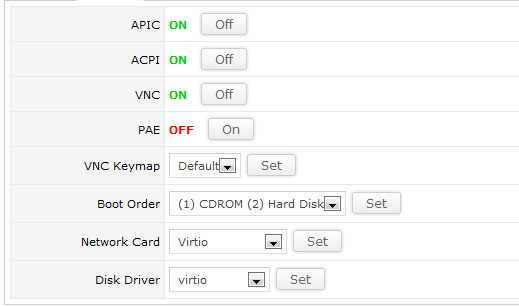
And there are a few standard items in the control section of the controls section as well:
Free DNS is another highlight of the VPS and here is how the interface looks like when you click on the DNS tab:

As stated in their welcome letter, VPSNodeBox has 4 DNS servers located in various parts of the world:
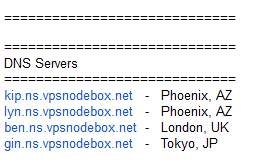
To be quite honest, I do not think four is diverse enough to serve as a great DNS network, particularly when two out of the four servers are essentially in the same location. However, as an add-on service integrated with the control panel, it might be attractive to people who would like to control everything in one place.
Test on the VPS
As mentioned above, the VPS that I have bought has 1024MB of RAM, 40GB of hard drive space and 640GB of bandwidth at 50mbit connection. The VPS is located in the Phoenix NAP/Secured Servers DC in Phoenix, AZ and I have installed Debian 6 32-bit OS for testing purposes.
When the OS was first loaded, about 19MB of hard drive space was used, which is pretty standard for a new Debian OS installation:
free -m
             total       used       free     shared    buffers     cached
Mem:          1010         39        970          0          2         17
-/+ buffers/cache:         19        990
Swap:         1707          0       1707
Top showing the processes running:
top - 00:01:07 up 3 min,  1 user,  load average: 0.17, 0.07, 0.01
Tasks:  87 total,   1 running,  86 sleeping,   0 stopped,   0 zombie
Cpu(s):  0.0%us,  0.0%sy,  0.0%ni,100.0%id,  0.0%wa,  0.0%hi,  0.0%si,  0.0%st
Mem:   1034332k total,    40960k used,   993372k free,     2196k buffers
Swap:  1748984k total,        0k used,  1748984k free,    18224k cached

  PID USER      PR  NI  VIRT  RES  SHR S %CPU %MEM    TIME+  COMMAND
 1441 root      20   0  8264 2864 2340 S    0  0.3   0:00.12 sshd
 1444 root      20   0  5508 2832 1484 S    0  0.3   0:00.63 bash
 1048 root      20   0 27452 1540 1032 S    0  0.1   0:00.26 rsyslogd
 1459 root      20   0  2440 1152  904 R    0  0.1   0:00.02 top
  456 root      16  -4  2524 1008  404 S    0  0.1   0:00.11 udevd
 1440 root      20   0  5500  980  592 S    0  0.1   0:00.01 sshd
  622 root      18  -2  2520  924  320 S    0  0.1   0:00.00 udevd
  629 root      18  -2  2520  924  320 S    0  0.1   0:00.00 udevd
 1376 Debian-e  20   0  6516  916  604 S    0  0.1   0:00.01 exim4
  901 statd     20   0  1940  816  680 S    0  0.1   0:00.04 rpc.statd
 1145 root      20   0  3788  776  612 S    0  0.1   0:00.00 cron
    1 root      20   0  2036  712  620 S    0  0.1   0:01.14 init
 1220 root      20   0  1708  600  492 S    0  0.1   0:00.00 acpid
 1394 root      20   0  1712  568  488 S    0  0.1   0:00.00 getty
 1397 root      20   0  1712  568  488 S    0  0.1   0:00.00 getty
 1395 root      20   0  1712  564  488 S    0  0.1   0:00.00 getty
 1396 root      20   0  1712  564  488 S    0  0.1   0:00.00 getty
And htop output:
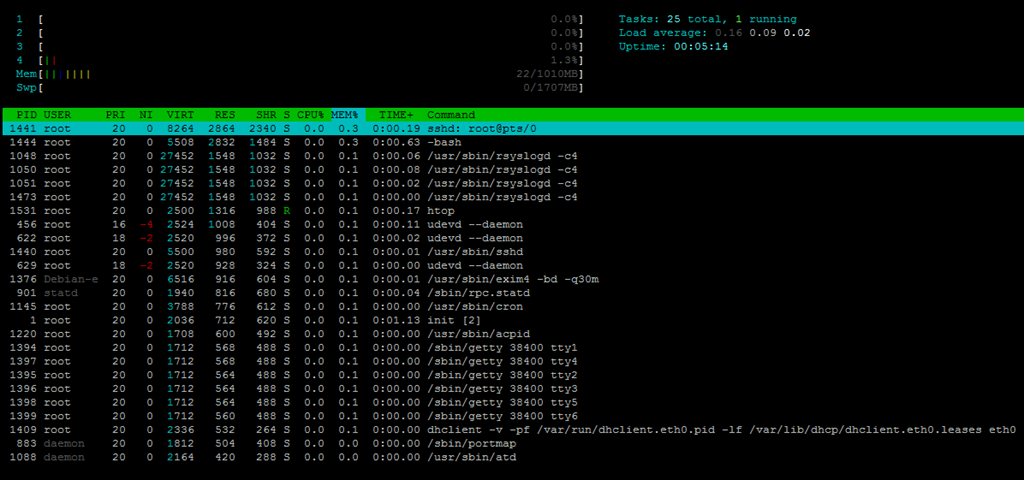
Close to 700MB of hard drive space was used:
df -h
Filesystem            Size  Used Avail Use% Mounted on
/dev/vda1              38G  691M   36G   2% /
tmpfs                 506M     0  506M   0% /lib/init/rw
udev                  501M  112K  501M   1% /dev
tmpfs                 506M     0  506M   0% /dev/shm
And the inodes values are pretty standard:
 df -i
Filesystem            Inodes   IUsed   IFree IUse% Mounted on
/dev/vda1            2514944   25308 2489636    2% /
tmpfs                 129291       5  129286    1% /lib/init/rw
udev                  128179     496  127683    1% /dev
tmpfs                 129291       1  129290    1% /dev/shm
When the full LNMP stack was loaded, RAM usage went up to 85MB:
free -m
             total       used       free     shared    buffers     cached
Mem:          1010        994         15          0         53        855
-/+ buffers/cache:         85        924
Swap:         1707          0       1707
Again the top output showing the processes running:
top - 21:16:40 up  9:19,  1 user,  load average: 0.00, 0.00, 0.00
Tasks:  97 total,   1 running,  96 sleeping,   0 stopped,   0 zombie
Cpu(s):  0.0%us,  0.0%sy,  0.0%ni,100.0%id,  0.0%wa,  0.0%hi,  0.0%si,  0.0%st
Mem:   1034332k total,  1019216k used,    15116k free,    54548k buffers
Swap:  1748984k total,        0k used,  1748984k free,   876384k cached

  PID USER      PR  NI  VIRT  RES  SHR S %CPU %MEM    TIME+  COMMAND
 3126 www       20   0 15004  11m  772 S    0  1.1   0:01.16 nginx
 3107 mysql     20   0 34244 4860 2220 S    0  0.5   0:00.05 mysqld
 3117 root      20   0 24124 4544 1404 S    0  0.4   0:04.31 php-cgi
 3118 www       20   0 24124 4136  996 S    0  0.4   0:00.06 php-cgi
 3119 www       20   0 24124 4136  996 S    0  0.4   0:00.06 php-cgi
 3120 www       20   0 24124 4136  996 S    0  0.4   0:00.00 php-cgi
 3121 www       20   0 24124 4136  996 S    0  0.4   0:00.00 php-cgi
 3122 www       20   0 24124 4136  996 S    0  0.4   0:00.00 php-cgi
 1441 root      20   0  8404 2948 2356 S    0  0.3   0:14.09 sshd
 1444 root      20   0  5508 2904 1556 S    0  0.3   0:00.79 bash
 1048 root      20   0 27452 1536 1032 S    0  0.1   0:00.57 rsyslogd
 3461 root      20   0  2444 1156  904 R    0  0.1   0:00.03 top
  456 root      16  -4  2524 1008  404 S    0  0.1   0:00.33 udevd
  622 root      18  -2  2520  996  372 S    0  0.1   0:00.14 udevd
 1440 root      20   0  5500  980  592 S    0  0.1   0:00.01 sshd
  629 root      18  -2  2520  928  324 S    0  0.1   0:00.02 udevd
 1376 Debian-e  20   0  6516  920  608 S    0  0.1   0:00.73 exim4
And htop output:
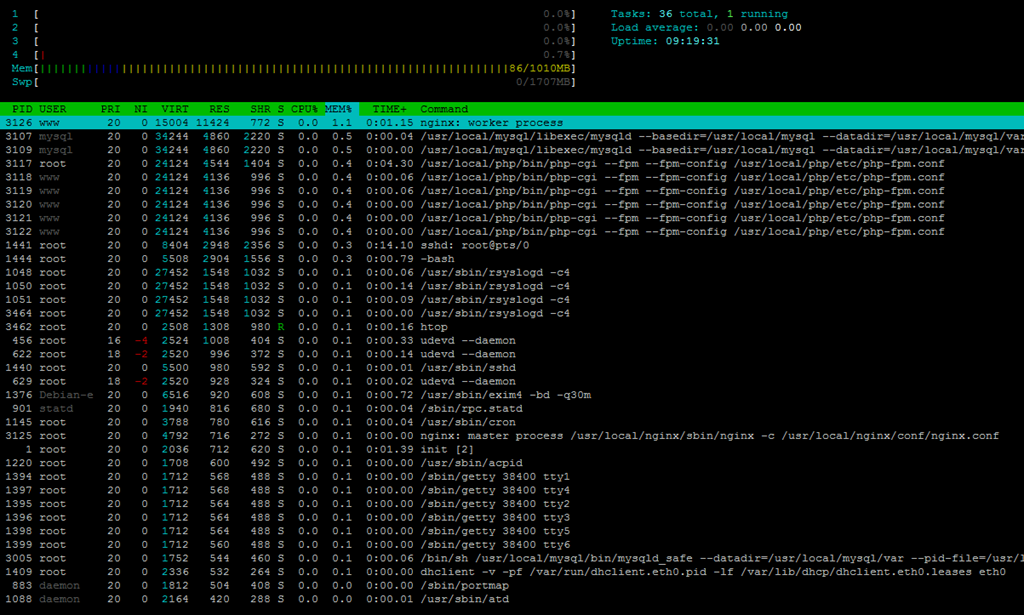
With the full LNMP stack loaded, close to 2GB of hard drive space was used:
 df -h
Filesystem            Size  Used Avail Use% Mounted on
/dev/vda1              38G  1.9G   34G   6% /
tmpfs                 506M     0  506M   0% /lib/init/rw
udev                  501M  112K  501M   1% /dev
tmpfs                 506M     0  506M   0% /dev/shm
And the inodes usage:
df -i
Filesystem            Inodes   IUsed   IFree IUse% Mounted on
/dev/vda1            2514944   73931 2441013    3% /
tmpfs                 129291       5  129286    1% /lib/init/rw
udev                  128179     500  127679    1% /dev
tmpfs                 129291       1  129290    1% /dev/shm
Uptime shows the node is pretty stable:
 uptime
 21:16:16 up  9:18,  1 user,  load average: 0.00, 0.00, 0.00
Checking back almost a week later and there was no downtime on the node:
 uptime
 22:25:46 up 6 days, 10:28,  1 user,  load average: 0.40, 0.11, 0.03
vmstat shows there is no iowait:
 vmstat
procs -----------memory---------- ---swap-- -----io---- -system-- ----cpu----
 r  b   swpd   free   buff  cache   si   so    bi    bo   in   cs us sy id wa
 0  0      0  15428  54536 876300    0    0     2    18   26   16  1  1 98  0
CPUInfo shows there are four CPU cores and they seems to be unthrottled, which as you could see later on, may not be the case:
cat /proc/cpuinfo
processor       : 0
vendor_id       : GenuineIntel
cpu family      : 6
model           : 13
model name      : QEMU Virtual CPU version (cpu64-rhel6)
stepping        : 3
cpu MHz         : 2533.334
cache size      : 4096 KB
physical id     : 0
siblings        : 4
core id         : 0
cpu cores       : 4
apicid          : 0
initial apicid  : 0
fdiv_bug        : no
hlt_bug         : no
f00f_bug        : no
coma_bug        : no
fpu             : yes
fpu_exception   : yes
cpuid level     : 4
wp              : yes
flags           : fpu de pse tsc msr pae mce cx8 apic sep mtrr pge mca cmov pse36 clflush mmx fxsr sse sse2 ht syscall nx lm pni cx16 hypervisor lahf_lm
bogomips        : 5066.66
clflush size    : 64
cache_alignment : 64
address sizes   : 36 bits physical, 48 bits virtual
power management:

processor       : 1
vendor_id       : GenuineIntel
cpu family      : 6
model           : 13
model name      : QEMU Virtual CPU version (cpu64-rhel6)
stepping        : 3
cpu MHz         : 2533.334
cache size      : 4096 KB
physical id     : 0
siblings        : 4
core id         : 1
cpu cores       : 4
apicid          : 1
initial apicid  : 1
fdiv_bug        : no
hlt_bug         : no
f00f_bug        : no
coma_bug        : no
fpu             : yes
fpu_exception   : yes
cpuid level     : 4
wp              : yes
flags           : fpu de pse tsc msr pae mce cx8 apic sep mtrr pge mca cmov pse36 clflush mmx fxsr sse sse2 ht syscall nx lm pni cx16 hypervisor lahf_lm
bogomips        : 5066.66
clflush size    : 64
cache_alignment : 64
address sizes   : 36 bits physical, 48 bits virtual
power management:

processor       : 2
vendor_id       : GenuineIntel
cpu family      : 6
model           : 13
model name      : QEMU Virtual CPU version (cpu64-rhel6)
stepping        : 3
cpu MHz         : 2533.334
cache size      : 4096 KB
physical id     : 0
siblings        : 4
core id         : 2
cpu cores       : 4
apicid          : 2
initial apicid  : 2
fdiv_bug        : no
hlt_bug         : no
f00f_bug        : no
coma_bug        : no
fpu             : yes
fpu_exception   : yes
cpuid level     : 4
wp              : yes
flags           : fpu de pse tsc msr pae mce cx8 apic sep mtrr pge mca cmov pse36 clflush mmx fxsr sse sse2 ht syscall nx lm pni cx16 hypervisor lahf_lm
bogomips        : 5066.66
clflush size    : 64
cache_alignment : 64
address sizes   : 36 bits physical, 48 bits virtual
power management:

processor       : 3
vendor_id       : GenuineIntel
cpu family      : 6
model           : 13
model name      : QEMU Virtual CPU version (cpu64-rhel6)
stepping        : 3
cpu MHz         : 2533.334
cache size      : 4096 KB
physical id     : 0
siblings        : 4
core id         : 3
cpu cores       : 4
apicid          : 3
initial apicid  : 3
fdiv_bug        : no
hlt_bug         : no
f00f_bug        : no
coma_bug        : no
fpu             : yes
fpu_exception   : yes
cpuid level     : 4
wp              : yes
flags           : fpu de pse tsc msr pae mce cx8 apic sep mtrr pge mca cmov pse36 clflush mmx fxsr sse sse2 ht syscall nx lm pni cx16 hypervisor lahf_lm
bogomips        : 5066.66
clflush size    : 64
cache_alignment : 64
address sizes   : 36 bits physical, 48 bits virtual
power management:
Meminfo did not show anything too interesting:
cat /proc/meminfo
MemTotal:        1034332 kB
MemFree:           13496 kB
Buffers:           32356 kB
Cached:           926200 kB
SwapCached:            0 kB
Active:            77592 kB
Inactive:         905512 kB
Active(anon):        356 kB
Inactive(anon):    24312 kB
Active(file):      77236 kB
Inactive(file):   881200 kB
Unevictable:           0 kB
Mlocked:               0 kB
HighTotal:        143356 kB
HighFree:            204 kB
LowTotal:         890976 kB
LowFree:           13292 kB
SwapTotal:       1748984 kB
SwapFree:        1748984 kB
Dirty:                 0 kB
Writeback:             0 kB
AnonPages:         24708 kB
Mapped:             7844 kB
Shmem:               124 kB
Slab:              28176 kB
SReclaimable:      23188 kB
SUnreclaim:         4988 kB
KernelStack:         824 kB
PageTables:          644 kB
NFS_Unstable:          0 kB
Bounce:                0 kB
WritebackTmp:          0 kB
CommitLimit:     2266148 kB
Committed_AS:     107440 kB
VmallocTotal:     122880 kB
VmallocUsed:        6312 kB
VmallocChunk:     108632 kB
HardwareCorrupted:     0 kB
HugePages_Total:       0
HugePages_Free:        0
HugePages_Rsvd:        0
HugePages_Surp:        0
Hugepagesize:       4096 kB
DirectMap4k:       12280 kB
DirectMap4M:      892928 kB
And time sync:
 time sync

real    0m0.034s
user    0m0.004s
sys     0m0.000s
For the disk speed test, originally I chose to use virtIO as the driver for the hard drive, and the dd output is actually pretty unstable, the first time I was only able to get a pretty bad speed of 30MB/s:
dd if=/dev/zero of=test bs=64k count=16k conv=fdatasync
16384+0 records in
16384+0 records out
1073741824 bytes (1.1 GB) copied, 34.9756 s, 30.7 MB/s
The second time I ran this test, the speed actually doubled:
dd if=/dev/zero of=test bs=64k count=16k conv=fdatasync
16384+0 records in
16384+0 records out
1073741824 bytes (1.1 GB) copied, 14.3239 s, 75.0 MB/s
Running it a little later and the speed was again doubled:
dd if=/dev/zero of=test bs=64k count=16k conv=fdatasync
16384+0 records in
16384+0 records out
1073741824 bytes (1.1 GB) copied, 7.86664 s, 136 MB/s
Yes, I know about the disk caching effect, however I actually took the tests 10 minutes apart and I am not sure how long the caching would be.
I have decided to give it another try a few days later, and here is how the IO looks like:
dd if=/dev/zero of=test bs=64k count=16k conv=fdatasync
16384+0 records in
16384+0 records out
1073741824 bytes (1.1 GB) copied, 15.6517 s, 68.6 MB/s
However, ioping is more or less stable, which is always something good:
4096 bytes from . (ext3 /dev/disk/by-uuid/8e81b97c-1954-4a38-91e7-3bfe80d210a4): request=1 time=0.1 ms
4096 bytes from . (ext3 /dev/disk/by-uuid/8e81b97c-1954-4a38-91e7-3bfe80d210a4): request=2 time=0.3 ms
4096 bytes from . (ext3 /dev/disk/by-uuid/8e81b97c-1954-4a38-91e7-3bfe80d210a4): request=3 time=0.2 ms
4096 bytes from . (ext3 /dev/disk/by-uuid/8e81b97c-1954-4a38-91e7-3bfe80d210a4): request=4 time=0.3 ms
4096 bytes from . (ext3 /dev/disk/by-uuid/8e81b97c-1954-4a38-91e7-3bfe80d210a4): request=5 time=0.2 ms
4096 bytes from . (ext3 /dev/disk/by-uuid/8e81b97c-1954-4a38-91e7-3bfe80d210a4): request=6 time=0.2 ms
4096 bytes from . (ext3 /dev/disk/by-uuid/8e81b97c-1954-4a38-91e7-3bfe80d210a4): request=7 time=0.5 ms
4096 bytes from . (ext3 /dev/disk/by-uuid/8e81b97c-1954-4a38-91e7-3bfe80d210a4): request=8 time=0.2 ms
4096 bytes from . (ext3 /dev/disk/by-uuid/8e81b97c-1954-4a38-91e7-3bfe80d210a4): request=9 time=0.2 ms
4096 bytes from . (ext3 /dev/disk/by-uuid/8e81b97c-1954-4a38-91e7-3bfe80d210a4): request=10 time=0.3 ms

--- . (ext3 /dev/disk/by-uuid/8e81b97c-1954-4a38-91e7-3bfe80d210a4) ioping statistics ---
10 requests completed in 9004.2 ms, 4218 iops, 16.5 mb/s
min/avg/max/mdev = 0.1/0.2/0.5/0.1 ms
Trying again showed similar results:
ioping -c 10 .
4096 bytes from . (ext3 /dev/disk/by-uuid/8e81b97c-1954-4a38-91e7-3bfe80d210a4): request=1 time=0.2 ms
4096 bytes from . (ext3 /dev/disk/by-uuid/8e81b97c-1954-4a38-91e7-3bfe80d210a4): request=2 time=0.2 ms
4096 bytes from . (ext3 /dev/disk/by-uuid/8e81b97c-1954-4a38-91e7-3bfe80d210a4): request=3 time=0.6 ms
4096 bytes from . (ext3 /dev/disk/by-uuid/8e81b97c-1954-4a38-91e7-3bfe80d210a4): request=4 time=0.2 ms
4096 bytes from . (ext3 /dev/disk/by-uuid/8e81b97c-1954-4a38-91e7-3bfe80d210a4): request=5 time=1.0 ms
4096 bytes from . (ext3 /dev/disk/by-uuid/8e81b97c-1954-4a38-91e7-3bfe80d210a4): request=6 time=0.2 ms
4096 bytes from . (ext3 /dev/disk/by-uuid/8e81b97c-1954-4a38-91e7-3bfe80d210a4): request=7 time=1.1 ms
4096 bytes from . (ext3 /dev/disk/by-uuid/8e81b97c-1954-4a38-91e7-3bfe80d210a4): request=8 time=0.2 ms
4096 bytes from . (ext3 /dev/disk/by-uuid/8e81b97c-1954-4a38-91e7-3bfe80d210a4): request=9 time=0.2 ms
4096 bytes from . (ext3 /dev/disk/by-uuid/8e81b97c-1954-4a38-91e7-3bfe80d210a4): request=10 time=0.1 ms

--- . (ext3 /dev/disk/by-uuid/8e81b97c-1954-4a38-91e7-3bfe80d210a4) ioping statistics ---
10 requests completed in 9005.9 ms, 2482 iops, 9.7 mb/s
min/avg/max/mdev = 0.1/0.4/1.1/0.3 ms
Somestimes the choice of the driver could potentially make a difference so I have switched to the ide driver to test things out. Unfortunately, this test was giving me worse disk performance:
dd if=/dev/zero of=test bs=64k count=16k conv=fdatasync
16384+0 records in
16384+0 records out
1073741824 bytes (1.1 GB) copied, 18.6171 s, 57.7 MB/s
Testing again showed similar results:
dd if=/dev/zero of=test bs=64k count=16k conv=fdatasync
16384+0 records in
16384+0 records out
1073741824 bytes (1.1 GB) copied, 12.8636 s, 83.5 MB/s
The ioping is not stable as well:
ioping -c 10 .
4096 bytes from . (ext3 /dev/disk/by-uuid/8e81b97c-1954-4a38-91e7-3bfe80d210a4): request=1 time=0.6 ms
4096 bytes from . (ext3 /dev/disk/by-uuid/8e81b97c-1954-4a38-91e7-3bfe80d210a4): request=2 time=91.4 ms
4096 bytes from . (ext3 /dev/disk/by-uuid/8e81b97c-1954-4a38-91e7-3bfe80d210a4): request=3 time=60.7 ms
4096 bytes from . (ext3 /dev/disk/by-uuid/8e81b97c-1954-4a38-91e7-3bfe80d210a4): request=4 time=0.5 ms
4096 bytes from . (ext3 /dev/disk/by-uuid/8e81b97c-1954-4a38-91e7-3bfe80d210a4): request=5 time=2.6 ms
4096 bytes from . (ext3 /dev/disk/by-uuid/8e81b97c-1954-4a38-91e7-3bfe80d210a4): request=6 time=55.0 ms
4096 bytes from . (ext3 /dev/disk/by-uuid/8e81b97c-1954-4a38-91e7-3bfe80d210a4): request=7 time=38.7 ms
4096 bytes from . (ext3 /dev/disk/by-uuid/8e81b97c-1954-4a38-91e7-3bfe80d210a4): request=8 time=0.7 ms
4096 bytes from . (ext3 /dev/disk/by-uuid/8e81b97c-1954-4a38-91e7-3bfe80d210a4): request=9 time=0.6 ms
4096 bytes from . (ext3 /dev/disk/by-uuid/8e81b97c-1954-4a38-91e7-3bfe80d210a4): request=10 time=2.4 ms

--- . (ext3 /dev/disk/by-uuid/8e81b97c-1954-4a38-91e7-3bfe80d210a4) ioping statistics ---
10 requests completed in 9255.6 ms, 39 iops, 0.2 mb/s
min/avg/max/mdev = 0.5/25.3/91.4/31.9 ms
Testing again is about the same:
ioping -c 10 .
4096 bytes from . (ext3 /dev/disk/by-uuid/8e81b97c-1954-4a38-91e7-3bfe80d210a4): request=1 time=0.4 ms
4096 bytes from . (ext3 /dev/disk/by-uuid/8e81b97c-1954-4a38-91e7-3bfe80d210a4): request=2 time=18.0 ms
4096 bytes from . (ext3 /dev/disk/by-uuid/8e81b97c-1954-4a38-91e7-3bfe80d210a4): request=3 time=12.9 ms
4096 bytes from . (ext3 /dev/disk/by-uuid/8e81b97c-1954-4a38-91e7-3bfe80d210a4): request=4 time=116.1 ms
4096 bytes from . (ext3 /dev/disk/by-uuid/8e81b97c-1954-4a38-91e7-3bfe80d210a4): request=5 time=16.3 ms
4096 bytes from . (ext3 /dev/disk/by-uuid/8e81b97c-1954-4a38-91e7-3bfe80d210a4): request=6 time=21.2 ms
4096 bytes from . (ext3 /dev/disk/by-uuid/8e81b97c-1954-4a38-91e7-3bfe80d210a4): request=7 time=47.8 ms
4096 bytes from . (ext3 /dev/disk/by-uuid/8e81b97c-1954-4a38-91e7-3bfe80d210a4): request=8 time=2.9 ms
4096 bytes from . (ext3 /dev/disk/by-uuid/8e81b97c-1954-4a38-91e7-3bfe80d210a4): request=9 time=53.6 ms
4096 bytes from . (ext3 /dev/disk/by-uuid/8e81b97c-1954-4a38-91e7-3bfe80d210a4): request=10 time=39.8 ms

--- . (ext3 /dev/disk/by-uuid/8e81b97c-1954-4a38-91e7-3bfe80d210a4) ioping statistics ---
10 requests completed in 9332.3 ms, 30 iops, 0.1 mb/s
min/avg/max/mdev = 0.4/32.9/116.1/32.6 ms
As you can see, the virtio driver is definitely a lot better than default IDE driver.
For the network speed, I have initially used the VirtIO driver as well and the download :
wget cachefly.cachefly.net/100mb.test -O /dev/null
--2012-10-08 08:35:26--  http://cachefly.cachefly.net/100mb.test
Resolving cachefly.cachefly.net... 205.234.175.175
Connecting to cachefly.cachefly.net|205.234.175.175|:80... connected.
HTTP request sent, awaiting response... 200 OK
Length: 104857600 (100M) [application/octet-stream]
Saving to: `/dev/null'

100%[======================================>] 104,857,600 16.7M/s   in 6.1s

2012-10-08 08:35:32 (16.3 MB/s) - `/dev/null' saved [104857600/104857600]
Testing immediately after showed slightly worse speed:
 wget cachefly.cachefly.net/100mb.test -O /dev/null
--2012-10-08 08:36:24--  http://cachefly.cachefly.net/100mb.test
Resolving cachefly.cachefly.net... 205.234.175.175
Connecting to cachefly.cachefly.net|205.234.175.175|:80... connected.
HTTP request sent, awaiting response... 200 OK
Length: 104857600 (100M) [application/octet-stream]
Saving to: `/dev/null'

100%[======================================>] 104,857,600 16.7M/s   in 8.4s

2012-10-08 08:36:33 (11.9 MB/s) - `/dev/null' saved [104857600/104857600]
However, 2 minutes later the test actually showed somewhat better results:
 wget cachefly.cachefly.net/100mb.test -O /dev/null
--2012-10-08 08:47:46--  http://cachefly.cachefly.net/100mb.test
Resolving cachefly.cachefly.net... 205.234.175.175
Connecting to cachefly.cachefly.net|205.234.175.175|:80... connected.
HTTP request sent, awaiting response... 200 OK
Length: 104857600 (100M) [application/octet-stream]
Saving to: `/dev/null'

100%[======================================>] 104,857,600 28.5M/s   in 3.8s

2012-10-08 08:47:50 (26.6 MB/s) - `/dev/null' saved [104857600/104857600]
And a test a few days showed great speed too:
wget cachefly.cachefly.net/100mb.test -O /dev/null
--2012-10-13 22:23:35--  http://cachefly.cachefly.net/100mb.test
Resolving cachefly.cachefly.net... 205.234.175.175
Connecting to cachefly.cachefly.net|205.234.175.175|:80... connected.
HTTP request sent, awaiting response... 200 OK
Length: 104857600 (100M) [application/octet-stream]
Saving to: `/dev/null'

100%[======================================>] 104,857,600 24.9M/s   in 4.0s

2012-10-13 22:23:39 (24.9 MB/s) - `/dev/null' saved [104857600/104857600]
For the uploading speed, I was actually pretty suprised with the differences across different locations, first was with my Quickweb VPS in Chicago, IL:
wget 198.15.xxx.xxx/100mb.test -O /dev/null
--2012-10-13 10:27:22--  http://198.15.xxx.xxx/100mb.test
Connecting to 198.15.xxx.xxx:80... connected.
HTTP request sent, awaiting response... 200 OK
Length: 104857600 (100M) [application/octet-stream]
Saving to: `/dev/null'

100%[======================================>] 104,857,600 1.92M/s   in 57s

2012-10-13 10:28:19 (1.76 MB/s) - `/dev/null' saved [104857600/104857600]
As you can see, the speed is not that impressive even though the port is 50mbit. Then I did a test with another Quickweb VPS in Los Angeles, CA, and this time the results is much more impressive:
wget 198.15.xxx.xxx/100mb.test -O /dev/null
--2012-10-13 22:28:44--  http://198.15.xxx.xxx/100mb.test
Connecting to 198.15.xxx.xxx:80... connected.
HTTP request sent, awaiting response... 200 OK
Length: 104857600 (100M) [application/octet-stream]
Saving to: `/dev/null'

100%[======================================>] 104,857,600 14.2M/s   in 14s

2012-10-13 22:28:58 (7.08 MB/s) - `/dev/null' saved [104857600/104857600]
And needless to say, for my XenVZ VPS in Maidenhead, UK, the speed is the least impressive as it is also the furthest away in terms of physical distance:
wget 198.15.xxx.xxx/100mb.test -O /dev/null
--2012-10-13 22:22:02--  http://198.15.xxx.xxx/100mb.test
Connecting to 198.15.xxx.xxx:80... connected.
HTTP request sent, awaiting response... 200 OK
Length: 104857600 (100M) [application/octet-stream]
Saving to: `/dev/null'

100%[======================================>] 104,857,600  595K/s   in 2m 47s

2012-10-13 22:24:49 (614 KB/s) - `/dev/null' saved [104857600/104857600]
I have also done a round of testing by switching to Realtek ethernet driver, and I think it is pretty obvious that the speed is significantly less impressive. First is the Cachefly download test:
wget cachefly.cachefly.net/100mb.test -O /dev/null
--2012-10-13 22:50:57--  http://cachefly.cachefly.net/100mb.test
Resolving cachefly.cachefly.net... 205.234.175.175
Connecting to cachefly.cachefly.net|205.234.175.175|:80... connected.
HTTP request sent, awaiting response... 200 OK
Length: 104857600 (100M) [application/octet-stream]
Saving to: `/dev/null'

100%[======================================>] 104,857,600 5.09M/s   in 18s

2012-10-13 22:51:15 (5.56 MB/s) - `/dev/null' saved [104857600/104857600]
Testing again and the speed was more or less the same:
wget cachefly.cachefly.net/100mb.test -O /dev/null
--2012-10-13 22:55:29--  http://cachefly.cachefly.net/100mb.test
Resolving cachefly.cachefly.net... 205.234.175.175
Connecting to cachefly.cachefly.net|205.234.175.175|:80... connected.
HTTP request sent, awaiting response... 200 OK
Length: 104857600 (100M) [application/octet-stream]
Saving to: `/dev/null'

100%[======================================>] 104,857,600 5.13M/s   in 16s

2012-10-13 22:55:45 (6.26 MB/s) - `/dev/null' saved [104857600/104857600]
And for the upload test, again starting with the Quickweb VPS in Chicago, IL:
wget 198.15.xxx.xxx/100mb.test -O /dev/null
--2012-10-13 11:12:43--  http://198.15.xxx.xxx/100mb.test
Connecting to 198.15.xxx.xxx:80... connected.
HTTP request sent, awaiting response... 200 OK
Length: 104857600 (100M) [application/octet-stream]
Saving to: `/dev/null'

100%[======================================>] 104,857,600 1.95M/s   in 54s

2012-10-13 11:13:37 (1.84 MB/s) - `/dev/null' saved [104857600/104857600]
Quickweb VPS in Los Angeles, CA:
wget 198.15.xxx.xxx/100mb.test -O /dev/null
--2012-10-13 23:14:25--  http://198.15.xxx.xxx/100mb.test
Connecting to 198.15.xxx.xxx:80... connected.
HTTP request sent, awaiting response... 200 OK
Length: 104857600 (100M) [application/octet-stream]
Saving to: `/dev/null'

100%[======================================>] 104,857,600 12.1M/s   in 14s

2012-10-13 23:14:40 (6.96 MB/s) - `/dev/null' saved [104857600/104857600]
And the XenVZ VPS in Maidenhead, UK:
 wget 198.15.xxx.xxx/100mb.test -O /dev/null
--2012-10-15 04:52:59--  http://198.15.xxx.xxx/100mb.test
Connecting to 198.15.xxx.xxx:80... connected.
HTTP request sent, awaiting response... 200 OK
Length: 104857600 (100M) [application/octet-stream]
Saving to: `/dev/null'

100%[======================================>] 104,857,600 2.28M/s   in 71s

2012-10-15 04:54:10 (1.42 MB/s) - `/dev/null' saved [104857600/104857600]
As you can see, both the disk drive speed and the network speed is a lot better in using VirtIO drivers than anything else, making it probably the best choice if you are going after the performance of the VPS.
It was not until the benchmarking time that I noticed the resources on the VPS, in particular the CPU, might be throttled, although it appears to be otherwise during the earlier tests, simply because the score appears to be a bit too low for a fully unthrottled four-core CPU, 1GB RAM VPS:
   #    #  #    #  #  #    #          #####   ######  #    #   ####   #    #
   #    #  ##   #  #   #  #           #    #  #       ##   #  #    #  #    #
   #    #  # #  #  #    ##            #####   #####   # #  #  #       ######
   #    #  #  # #  #    ##            #    #  #       #  # #  #       #    #
   #    #  #   ##  #   #  #           #    #  #       #   ##  #    #  #    #
    ####   #    #  #  #    #          #####   ######  #    #   ####   #    #

   Version 5.1.3                      Based on the Byte Magazine Unix Benchmark

   Multi-CPU version                  Version 5 revisions by Ian Smith,
                                      Sunnyvale, CA, USA
   January 13, 2011                   johantheghost at yahoo period com


1 x Dhrystone 2 using register variables  1 2 3 4 5 6 7 8 9 10

1 x Double-Precision Whetstone  1 2 3 4 5 6 7 8 9 10

1 x Execl Throughput  1 2 3

1 x File Copy 1024 bufsize 2000 maxblocks  1 2 3

1 x File Copy 256 bufsize 500 maxblocks  1 2 3

1 x File Copy 4096 bufsize 8000 maxblocks  1 2 3

1 x Pipe Throughput  1 2 3 4 5 6 7 8 9 10

1 x Pipe-based Context Switching  1 2 3 4 5 6 7 8 9 10

1 x Process Creation  1 2 3

1 x System Call Overhead  1 2 3 4 5 6 7 8 9 10

1 x Shell Scripts (1 concurrent)  1 2 3

1 x Shell Scripts (8 concurrent)  1 2 3

4 x Dhrystone 2 using register variables  1 2 3 4 5 6 7 8 9 10

4 x Double-Precision Whetstone  1 2 3 4 5 6 7 8 9 10

4 x Execl Throughput  1 2 3

4 x File Copy 1024 bufsize 2000 maxblocks  1 2 3

4 x File Copy 256 bufsize 500 maxblocks  1 2 3

4 x File Copy 4096 bufsize 8000 maxblocks  1 2 3

4 x Pipe Throughput  1 2 3 4 5 6 7 8 9 10

4 x Pipe-based Context Switching  1 2 3 4 5 6 7 8 9 10

4 x Process Creation  1 2 3

4 x System Call Overhead  1 2 3 4 5 6 7 8 9 10

4 x Shell Scripts (1 concurrent)  1 2 3

4 x Shell Scripts (8 concurrent)  1 2 3

========================================================================
   BYTE UNIX Benchmarks (Version 5.1.3)

   System: xxxxxxx: GNU/Linux
   OS: GNU/Linux -- 2.6.32-5-686 -- #1 SMP Sun Sep 23 09:49:36 UTC 2012
   Machine: i686 (unknown)
   Language: en_US.utf8 (charmap="ANSI_X3.4-1968", collate="ANSI_X3.4-1968")
   CPU 0: QEMU Virtual CPU version (cpu64-rhel6) (5066.7 bogomips)
          Hyper-Threading, x86-64, MMX, Physical Address Ext, SYSENTER/SYSEXIT, SYSCALL/SYSRET
   CPU 1: QEMU Virtual CPU version (cpu64-rhel6) (5066.7 bogomips)
          Hyper-Threading, x86-64, MMX, Physical Address Ext, SYSENTER/SYSEXIT, SYSCALL/SYSRET
   CPU 2: QEMU Virtual CPU version (cpu64-rhel6) (5066.7 bogomips)
          Hyper-Threading, x86-64, MMX, Physical Address Ext, SYSENTER/SYSEXIT, SYSCALL/SYSRET
   CPU 3: QEMU Virtual CPU version (cpu64-rhel6) (5066.7 bogomips)
          Hyper-Threading, x86-64, MMX, Physical Address Ext, SYSENTER/SYSEXIT, SYSCALL/SYSRET
   21:19:53 up  9:22,  1 user,  load average: 0.15, 0.03, 0.01; runlevel 2

------------------------------------------------------------------------
Benchmark Run: Sun Oct 07 2012 21:19:53 - 21:47:54
4 CPUs in system; running 1 parallel copy of tests

Dhrystone 2 using register variables        9390980.0 lps   (10.0 s, 7 samples)
Double-Precision Whetstone                     2226.3 MWIPS (10.0 s, 7 samples)
Execl Throughput                                505.6 lps   (29.9 s, 2 samples)
File Copy 1024 bufsize 2000 maxblocks        405700.6 KBps  (30.0 s, 2 samples)
File Copy 256 bufsize 500 maxblocks          116405.9 KBps  (30.0 s, 2 samples)
File Copy 4096 bufsize 8000 maxblocks        894527.3 KBps  (30.0 s, 2 samples)
Pipe Throughput                              594073.9 lps   (10.0 s, 7 samples)
Pipe-based Context Switching                 128735.3 lps   (10.0 s, 7 samples)
Process Creation                               1486.5 lps   (30.0 s, 2 samples)
Shell Scripts (1 concurrent)                    895.3 lpm   (60.0 s, 2 samples)
Shell Scripts (8 concurrent)                    205.3 lpm   (60.0 s, 2 samples)
System Call Overhead                        2243295.4 lps   (10.0 s, 7 samples)

System Benchmarks Index Values               BASELINE       RESULT    INDEX
Dhrystone 2 using register variables         116700.0    9390980.0    804.7
Double-Precision Whetstone                       55.0       2226.3    404.8
Execl Throughput                                 43.0        505.6    117.6
File Copy 1024 bufsize 2000 maxblocks          3960.0     405700.6   1024.5
File Copy 256 bufsize 500 maxblocks            1655.0     116405.9    703.4
File Copy 4096 bufsize 8000 maxblocks          5800.0     894527.3   1542.3
Pipe Throughput                               12440.0     594073.9    477.6
Pipe-based Context Switching                   4000.0     128735.3    321.8
Process Creation                                126.0       1486.5    118.0
Shell Scripts (1 concurrent)                     42.4        895.3    211.2
Shell Scripts (8 concurrent)                      6.0        205.3    342.2
System Call Overhead                          15000.0    2243295.4   1495.5
                                                                   ========
System Benchmarks Index Score                                         457.2

------------------------------------------------------------------------
Benchmark Run: Sun Oct 07 2012 21:47:54 - 22:16:27
4 CPUs in system; running 4 parallel copies of tests

Dhrystone 2 using register variables       12210462.6 lps   (10.0 s, 7 samples)
Double-Precision Whetstone                     3883.9 MWIPS (7.9 s, 7 samples)
Execl Throughput                                650.1 lps   (29.9 s, 2 samples)
File Copy 1024 bufsize 2000 maxblocks        175187.8 KBps  (30.0 s, 2 samples)
File Copy 256 bufsize 500 maxblocks           42207.7 KBps  (30.0 s, 2 samples)
File Copy 4096 bufsize 8000 maxblocks        505500.6 KBps  (30.0 s, 2 samples)
Pipe Throughput                             1013442.4 lps   (10.0 s, 7 samples)
Pipe-based Context Switching                 230512.5 lps   (10.0 s, 7 samples)
Process Creation                               1643.4 lps   (30.0 s, 2 samples)
Shell Scripts (1 concurrent)                   2768.4 lpm   (60.1 s, 2 samples)
Shell Scripts (8 concurrent)                    600.0 lpm   (60.3 s, 2 samples)
System Call Overhead                        3266897.8 lps   (10.0 s, 7 samples)

System Benchmarks Index Values               BASELINE       RESULT    INDEX
Dhrystone 2 using register variables         116700.0   12210462.6   1046.3
Double-Precision Whetstone                       55.0       3883.9    706.2
Execl Throughput                                 43.0        650.1    151.2
File Copy 1024 bufsize 2000 maxblocks          3960.0     175187.8    442.4
File Copy 256 bufsize 500 maxblocks            1655.0      42207.7    255.0
File Copy 4096 bufsize 8000 maxblocks          5800.0     505500.6    871.6
Pipe Throughput                               12440.0    1013442.4    814.7
Pipe-based Context Switching                   4000.0     230512.5    576.3
Process Creation                                126.0       1643.4    130.4
Shell Scripts (1 concurrent)                     42.4       2768.4    652.9
Shell Scripts (8 concurrent)                      6.0        600.0    999.9
System Call Overhead                          15000.0    3266897.8   2177.9
                                                                   ========
System Benchmarks Index Score                                         560.3
As you can see, the Unixbench score is about 560 points, I tried to run the tests again and although this time the results shows a 50% jump, I think it is still way below what a typically unthrottled VPS would show:
   #    #  #    #  #  #    #          #####   ######  #    #   ####   #    #
   #    #  ##   #  #   #  #           #    #  #       ##   #  #    #  #    #
   #    #  # #  #  #    ##            #####   #####   # #  #  #       ######
   #    #  #  # #  #    ##            #    #  #       #  # #  #       #    #
   #    #  #   ##  #   #  #           #    #  #       #   ##  #    #  #    #
    ####   #    #  #  #    #          #####   ######  #    #   ####   #    #

   Version 5.1.3                      Based on the Byte Magazine Unix Benchmark

   Multi-CPU version                  Version 5 revisions by Ian Smith,
                                      Sunnyvale, CA, USA
   January 13, 2011                   johantheghost at yahoo period com


1 x Dhrystone 2 using register variables  1 2 3 4 5 6 7 8 9 10

1 x Double-Precision Whetstone  1 2 3 4 5 6 7 8 9 10

1 x Execl Throughput  1 2 3

1 x File Copy 1024 bufsize 2000 maxblocks  1 2 3

1 x File Copy 256 bufsize 500 maxblocks  1 2 3

1 x File Copy 4096 bufsize 8000 maxblocks  1 2 3

1 x Pipe Throughput  1 2 3 4 5 6 7 8 9 10

1 x Pipe-based Context Switching  1 2 3 4 5 6 7 8 9 10

1 x Process Creation  1 2 3

1 x System Call Overhead  1 2 3 4 5 6 7 8 9 10

1 x Shell Scripts (1 concurrent)  1 2 3

1 x Shell Scripts (8 concurrent)  1 2 3

4 x Dhrystone 2 using register variables  1 2 3 4 5 6 7 8 9 10

4 x Double-Precision Whetstone  1 2 3 4 5 6 7 8 9 10

4 x Execl Throughput  1 2 3

4 x File Copy 1024 bufsize 2000 maxblocks  1 2 3

4 x File Copy 256 bufsize 500 maxblocks  1 2 3

4 x File Copy 4096 bufsize 8000 maxblocks  1 2 3

4 x Pipe Throughput  1 2 3 4 5 6 7 8 9 10

4 x Pipe-based Context Switching  1 2 3 4 5 6 7 8 9 10

4 x Process Creation  1 2 3

4 x System Call Overhead  1 2 3 4 5 6 7 8 9 10

4 x Shell Scripts (1 concurrent)  1 2 3

4 x Shell Scripts (8 concurrent)  1 2 3

========================================================================
   BYTE UNIX Benchmarks (Version 5.1.3)

   System: xxxxxx: GNU/Linux
   OS: GNU/Linux -- 2.6.32-5-686 -- #1 SMP Sun Sep 23 09:49:36 UTC 2012
   Machine: i686 (unknown)
   Language: en_US.utf8 (charmap="ANSI_X3.4-1968", collate="ANSI_X3.4-1968")
   CPU 0: QEMU Virtual CPU version (cpu64-rhel6) (5066.7 bogomips)
          Hyper-Threading, x86-64, MMX, Physical Address Ext, SYSENTER/SYSEXIT, SYSCALL/SYSRET
   CPU 1: QEMU Virtual CPU version (cpu64-rhel6) (5066.7 bogomips)
          Hyper-Threading, x86-64, MMX, Physical Address Ext, SYSENTER/SYSEXIT, SYSCALL/SYSRET
   CPU 2: QEMU Virtual CPU version (cpu64-rhel6) (5066.7 bogomips)
          Hyper-Threading, x86-64, MMX, Physical Address Ext, SYSENTER/SYSEXIT, SYSCALL/SYSRET
   CPU 3: QEMU Virtual CPU version (cpu64-rhel6) (5066.7 bogomips)
          Hyper-Threading, x86-64, MMX, Physical Address Ext, SYSENTER/SYSEXIT, SYSCALL/SYSRET
   06:59:01 up 19:01,  1 user,  load average: 0.00, 0.00, 0.00; runlevel 2

------------------------------------------------------------------------
Benchmark Run: Mon Oct 08 2012 06:59:01 - 07:27:01
4 CPUs in system; running 1 parallel copy of tests

Dhrystone 2 using register variables        9506183.5 lps   (10.0 s, 7 samples)
Double-Precision Whetstone                     2255.9 MWIPS (9.9 s, 7 samples)
Execl Throughput                                544.9 lps   (29.9 s, 2 samples)
File Copy 1024 bufsize 2000 maxblocks        317752.1 KBps  (30.0 s, 2 samples)
File Copy 256 bufsize 500 maxblocks           82611.0 KBps  (30.0 s, 2 samples)
File Copy 4096 bufsize 8000 maxblocks        917864.1 KBps  (30.0 s, 2 samples)
Pipe Throughput                              597082.8 lps   (10.0 s, 7 samples)
Pipe-based Context Switching                 118929.0 lps   (10.0 s, 7 samples)
Process Creation                               1367.3 lps   (30.0 s, 2 samples)
Shell Scripts (1 concurrent)                   1282.2 lpm   (60.0 s, 2 samples)
Shell Scripts (8 concurrent)                    370.8 lpm   (60.0 s, 2 samples)
System Call Overhead                        2189931.0 lps   (10.0 s, 7 samples)

System Benchmarks Index Values               BASELINE       RESULT    INDEX
Dhrystone 2 using register variables         116700.0    9506183.5    814.6
Double-Precision Whetstone                       55.0       2255.9    410.2
Execl Throughput                                 43.0        544.9    126.7
File Copy 1024 bufsize 2000 maxblocks          3960.0     317752.1    802.4
File Copy 256 bufsize 500 maxblocks            1655.0      82611.0    499.2
File Copy 4096 bufsize 8000 maxblocks          5800.0     917864.1   1582.5
Pipe Throughput                               12440.0     597082.8    480.0
Pipe-based Context Switching                   4000.0     118929.0    297.3
Process Creation                                126.0       1367.3    108.5
Shell Scripts (1 concurrent)                     42.4       1282.2    302.4
Shell Scripts (8 concurrent)                      6.0        370.8    617.9
System Call Overhead                          15000.0    2189931.0   1460.0
                                                                   ========
System Benchmarks Index Score                                         469.0

------------------------------------------------------------------------
Benchmark Run: Mon Oct 08 2012 07:27:01 - 07:55:29
4 CPUs in system; running 4 parallel copies of tests

Dhrystone 2 using register variables       20001262.1 lps   (10.0 s, 7 samples)
Double-Precision Whetstone                     5485.4 MWIPS (9.4 s, 7 samples)
Execl Throughput                               1129.1 lps   (29.5 s, 2 samples)
File Copy 1024 bufsize 2000 maxblocks        228265.3 KBps  (30.0 s, 2 samples)
File Copy 256 bufsize 500 maxblocks           52131.2 KBps  (30.0 s, 2 samples)
File Copy 4096 bufsize 8000 maxblocks        684348.1 KBps  (30.0 s, 2 samples)
Pipe Throughput                             1267405.0 lps   (10.0 s, 7 samples)
Pipe-based Context Switching                 290946.6 lps   (10.0 s, 7 samples)
Process Creation                               2590.9 lps   (30.1 s, 2 samples)
Shell Scripts (1 concurrent)                   3652.8 lpm   (60.1 s, 2 samples)
Shell Scripts (8 concurrent)                    817.7 lpm   (60.1 s, 2 samples)
System Call Overhead                        4104457.1 lps   (10.0 s, 7 samples)

System Benchmarks Index Values               BASELINE       RESULT    INDEX
Dhrystone 2 using register variables         116700.0   20001262.1   1713.9
Double-Precision Whetstone                       55.0       5485.4    997.3
Execl Throughput                                 43.0       1129.1    262.6
File Copy 1024 bufsize 2000 maxblocks          3960.0     228265.3    576.4
File Copy 256 bufsize 500 maxblocks            1655.0      52131.2    315.0
File Copy 4096 bufsize 8000 maxblocks          5800.0     684348.1   1179.9
Pipe Throughput                               12440.0    1267405.0   1018.8
Pipe-based Context Switching                   4000.0     290946.6    727.4
Process Creation                                126.0       2590.9    205.6
Shell Scripts (1 concurrent)                     42.4       3652.8    861.5
Shell Scripts (8 concurrent)                      6.0        817.7   1362.8
System Call Overhead                          15000.0    4104457.1   2736.3
                                                                   ========
System Benchmarks Index Score                                         775.2
Geekbench scores are not that impressive either:
System Information
  Platform:                  Linux x86 (32-bit)
  Compiler:                  GCC 4.1.2 20070925 (Red Hat 4.1.2-33)
  Operating System:          Linux 2.6.32-5-686 i686
  Model:                     Linux PC (QEMU Virtual CPU version (cpu64-rhel6))
  Motherboard:               Unknown Motherboard
  Processor:                 QEMU Virtual CPU version (cpu64-rhel6)
  Processor ID:              GenuineIntel Family 6 Model 13 Stepping 3
  Logical Processors:        4
  Physical Processors:       1
  Processor Frequency:       2.53 GHz
  L1 Instruction Cache:      64.0 KB
  L1 Data Cache:             64.0 KB
  L2 Cache:                  512 KB
  L3 Cache:                  0.00 B
  Bus Frequency:             0.00 Hz
  Memory:                    1010 MB
  Memory Type:               N/A
  SIMD:                      1
  BIOS:                      N/A
  Processor Model:           QEMU Virtual CPU version (cpu64-rhel6)
  Processor Cores:           4

Integer
  Blowfish
    single-threaded scalar    1411 |||||
    multi-threaded scalar     3505 ||||||||||||||
  Text Compress
    single-threaded scalar    1375 |||||
    multi-threaded scalar     2226 ||||||||
  Text Decompress
    single-threaded scalar    1335 |||||
    multi-threaded scalar     2776 |||||||||||
  Image Compress
    single-threaded scalar    1403 |||||
    multi-threaded scalar     2309 |||||||||
  Image Decompress
    single-threaded scalar    1118 ||||
    multi-threaded scalar     1066 ||||
  Lua
    single-threaded scalar    2301 |||||||||
    multi-threaded scalar     3312 |||||||||||||

Floating Point
  Mandelbrot
    single-threaded scalar    1978 |||||||
    multi-threaded scalar     3549 ||||||||||||||
  Dot Product
    single-threaded scalar    2384 |||||||||
    multi-threaded scalar     4192 ||||||||||||||||
    single-threaded vector    3088 ||||||||||||
    multi-threaded vector     3867 |||||||||||||||
  LU Decomposition
    single-threaded scalar    1587 ||||||
    multi-threaded scalar     2192 ||||||||
  Primality Test
    single-threaded scalar    2614 ||||||||||
    multi-threaded scalar     3654 ||||||||||||||
  Sharpen Image
    single-threaded scalar    4054 ||||||||||||||||
    multi-threaded scalar     7519 ||||||||||||||||||||||||||||||
  Blur Image
    single-threaded scalar    4076 ||||||||||||||||
    multi-threaded scalar     6099 ||||||||||||||||||||||||

Memory
  Read Sequential
    single-threaded scalar    3526 ||||||||||||||
  Write Sequential
    single-threaded scalar    4492 |||||||||||||||||
  Stdlib Allocate
    single-threaded scalar    1863 |||||||
  Stdlib Write
    single-threaded scalar    2871 |||||||||||
  Stdlib Copy
    single-threaded scalar    3273 |||||||||||||

Stream
  Stream Copy
    single-threaded scalar    2634 ||||||||||
    single-threaded vector    2458 |||||||||
  Stream Scale
    single-threaded scalar    2520 ||||||||||
    single-threaded vector    2415 |||||||||
  Stream Add
    single-threaded scalar    2073 ||||||||
    single-threaded vector    2848 |||||||||||
  Stream Triad
    single-threaded scalar    2432 |||||||||
    single-threaded vector    1971 |||||||

Integer Score:                2011 ||||||||
Floating Point Score:         3632 ||||||||||||||
Memory Score:                 3205 ||||||||||||
Stream Score:                 2418 |||||||||

Overall Geekbench Score:      2857 |||||||||||
Testing again showed similar results:
System Information
  Platform:                  Linux x86 (32-bit)
  Compiler:                  GCC 4.1.2 20070925 (Red Hat 4.1.2-33)
  Operating System:          Linux 2.6.32-5-686 i686
  Model:                     Linux PC (QEMU Virtual CPU version (cpu64-rhel6))
  Motherboard:               Unknown Motherboard
  Processor:                 QEMU Virtual CPU version (cpu64-rhel6)
  Processor ID:              GenuineIntel Family 6 Model 13 Stepping 3
  Logical Processors:        4
  Physical Processors:       1
  Processor Frequency:       2.53 GHz
  L1 Instruction Cache:      64.0 KB
  L1 Data Cache:             64.0 KB
  L2 Cache:                  512 KB
  L3 Cache:                  0.00 B
  Bus Frequency:             0.00 Hz
  Memory:                    1010 MB
  Memory Type:               N/A
  SIMD:                      1
  BIOS:                      N/A
  Processor Model:           QEMU Virtual CPU version (cpu64-rhel6)
  Processor Cores:           4

Integer
  Blowfish
    single-threaded scalar    1475 |||||
    multi-threaded scalar     2504 ||||||||||
  Text Compress
    single-threaded scalar    1488 |||||
    multi-threaded scalar     2924 |||||||||||
  Text Decompress
    single-threaded scalar    1593 ||||||
    multi-threaded scalar     2340 |||||||||
  Image Compress
    single-threaded scalar    1192 ||||
    multi-threaded scalar     1866 |||||||
  Image Decompress
    single-threaded scalar    1157 ||||
    multi-threaded scalar     1185 ||||
  Lua
    single-threaded scalar    2148 ||||||||
    multi-threaded scalar     3682 ||||||||||||||

Floating Point
  Mandelbrot
    single-threaded scalar    2026 ||||||||
    multi-threaded scalar     3472 |||||||||||||
  Dot Product
    single-threaded scalar    2650 ||||||||||
    multi-threaded scalar     4136 ||||||||||||||||
    single-threaded vector    3530 ||||||||||||||
    multi-threaded vector     3348 |||||||||||||
  LU Decomposition
    single-threaded scalar    2207 ||||||||
    multi-threaded scalar     1985 |||||||
  Primality Test
    single-threaded scalar    2611 ||||||||||
    multi-threaded scalar     3811 |||||||||||||||
  Sharpen Image
    single-threaded scalar    3359 |||||||||||||
    multi-threaded scalar     6297 |||||||||||||||||||||||||
  Blur Image
    single-threaded scalar    4151 ||||||||||||||||
    multi-threaded scalar     5625 ||||||||||||||||||||||

Memory
  Read Sequential
    single-threaded scalar    3372 |||||||||||||
  Write Sequential
    single-threaded scalar    5084 ||||||||||||||||||||
  Stdlib Allocate
    single-threaded scalar    2425 |||||||||
  Stdlib Write
    single-threaded scalar    2839 |||||||||||
  Stdlib Copy
    single-threaded scalar    6359 |||||||||||||||||||||||||

Stream
  Stream Copy
    single-threaded scalar    2658 ||||||||||
    single-threaded vector    2389 |||||||||
  Stream Scale
    single-threaded scalar    1605 ||||||
    single-threaded vector    2985 |||||||||||
  Stream Add
    single-threaded scalar    2231 ||||||||
    single-threaded vector    2599 ||||||||||
  Stream Triad
    single-threaded scalar    2184 ||||||||
    single-threaded vector    2026 ||||||||

Integer Score:                1962 |||||||
Floating Point Score:         3514 ||||||||||||||
Memory Score:                 4015 ||||||||||||||||
Stream Score:                 2334 |||||||||

Overall Geekbench Score:      2952 |||||||||||
Again, I am doing the testing from an user’s perspective so I can only guess the resources is somewhat constrained, however I guess we would not know if it is actually going to be the case unless VPSNodeBox is willing to come up and explain.
Customer Service and Support
Normally support is where I actually see the differences between a good budget VPS versus simply a cheap VPS, and from that aspect I actually had some good experience with VPSNodeBox. When I initially signed up for their services, I was having difficulties using the KVM7 coupon I decided to send a ticket to their sales department and my ticket sent in at 8:16PM on a Saturday evening was responded by 11:07PM the same evening. Considering many VPS providers don’t even respond to tickets on Saturdays, I have to say I was pleasantly surprised with it.
I have also raised a ticket on whether the 50mbit connection was shared on dedicated to their technical department and the ticket submitted at 12:28PM again on a Saturday was responded at 12:45PM, barely 17 minutes later informing me that the port is actually dedicated.
Conclusion
Despite that VPSNodeBox may not appear to be the happiest participant in the low end VPS community, I have to admit that the VPS that they provide is actually pretty decent. Granted the resources may be somewhat restrained, leading to low benchmark scores and the network speed is probably not that great other than along the West Coast, but at 7 USD per month, and with relatively speedy customer service, I think this VPS should be a great choice for those who are looking for a cheap KVM VPS along the west coast, particularly for those who might need some help at the beginning.
Afaik there are KVM templates in the newest SolusVM version, so it’s not a new thing.
@Humza: I guess it would be better if they could get the reinstallations to actually work 🙂
So many 1GB LEB options nowadays!
@jcaleb: 1GB LEB yes, but 1GB KVM LEB is still relatively rare I believe, most are openvz which are known to be cheaper.
As a web hosting provider and a Solus Labs customer we are extremely disappointed with how Solus Labs has handled KVM integration in SolusVM. Throughout 2012 they have been extremely slow at providing support for KVM and KVM templates, and only recently they started rushing the development of KVM features. Many bugs and issues are not fixed yet, and what is even of greater concern to us is their attitude when a provider submits a bug report: it is not our fault, you did something wrong. As a result the same bug report has to be submitted several times before someone from management acknowledges it. Not to long ago the only KVM support that was provided was minimal, and the only option that a customer had was to install his VPS from an ISO, and no tools where provided for outside KVM VPS administration. Many providers had to develop or improvise their own workaround so that they could offer KVM virtual machines to customers, workarounds like ISOs that contained minimal installations of various Linux distributions and scripts that would create the partitions, copy the files and set a temporary root password. We just skipped over all of that and patiently waited for Solus Labs to improve KVM support. Xen support wasn’t that much better, but as long as we provided our own templates, Xen 4 packages and our custom Linux kernel for CentOS 6 it worked. We have also skipped over the first implementation of KVM templates that Solus Labs came out with and went straight to v2 templates which make much more sense and are much more compact and advanced. To provide this support we have been using all the 1.13 beta releases in production while carefully testing each release before updating the production servers, and provided adequate feedback. If you are wondering why we did this the answer is simple: because we knew that Solus Labs would abandon their first implementation once the new one came out with SWAP support in the KVM plans amongst other things. However all the effort that we have put into it wasn’t worth much in the end since Solus Labs decided to rush version 1.13 to a final production release without performing proper Q&A. Huge bugs like the root password bug, failing to initialize SWAP bug, improper network configuration of a template bug and many more have been left in there. We would not have a problem paying more for Solus VM if Solus Labs needed more money for proper research and development and quality assurance. But as a customer of this company we feel let down by their product, and once we find a suitable alternative to SolusVM we will switch away from using their software.
From a customer’s point of view all of this information does not matter, and it should not matter, because all that a customer expects is to pay and to have a working Virtual Machine within a couple of minutes at the most. If a customer does not get what he paid for then he will not only ask for a refund, but also leave and find himself a new provider, and there are plenty to choose from. So we have been working closely with our customers and provided them with great support and solutions to all their KVM related issues.
At this time we are developing our own v2 Linux templates that contain all the KVM tweaks, proper networking configuration and a script to properly set up the swap partition on first boot. The SolusVM templates are barely OK, and not very polished. When a customer has to wait for a while on a CentOS install because Secure Linux has to reconfigure itself or when a customer can’t SSH into his KVM VPS after installing Ubuntu then that is embarrassing and no customer should have to deal with that. The Networking Reconfiguration button that was implemented in SolusVM 1.13R5 (beta) and made it to the final release is a late reaction to the networking configuration issues on the part of Solus Labs. This script should automatically run at the time when a template is being installed. We are not trying to shift blame here, how ever when we pay for a commercial product like SolusVM we expect it to work right and if possible not make us look bad, and even more so when we try to contribute and provide feedback and bug reports to them.
Again, customers should not have to be concerned with any of these issues, and we are working hard to fix them and bring proper KVM templates to our existing and future customers.
Thank you again for reviewing us and providing us with feedback, and I apologize for the lengthy comment, but it is meant to serve a dual purpose: first to provide your readers and our customers with an adequate explanation, and second to inform anyone who reads or may read this review with as much information as possible about the problems that they could run into with KVM and SolusVM.
Thank you.
Sincerely,
Pete M. @ VPS Node Box
so far 1GB KVM. I got my first from prometeus. Then Liquid Host, I also have one for $48/year ~ $4/month. Node Deploy also have, but I did not try them out. I am expecting this is just the beginning as some providers has opened the way. I’m sure a year after this will be a common thing
I would like to thank you for taking the time to review us and for providing such detailed and in depth information about our website, performance numbers and suggestions. All advice, feedback and criticism is equally welcome because at the end of the day it shows us where and how we can improve.
I would like to take this opportunity and address the issues that you have raised in your review, and I would like to begin with resource allocation and performance issues.
The three main issues that are affecting performance are I/O, CPU and networking. We have been extremely focused on the I/O performance and following your review we have effectively tested and successfully implemented a couple of I/O scheduler tweaks that should greatly improve I/O speeds. While for example with Xen PV most of the tweaks on the guest side are taken care of by the VPS software, with KVM things are a little bit different because the user has more control over his VPS. And while we have successfully tweaked the scheduler on the KVM host nodes, we recommend to all of our customers who run Linux on KVM to do the following:
– switch to VirtIO drivers for networking and hdd for best performance; less emulation is always better for performance especially when it comes to hdd I/O speed.
– set the parameter elevator=noop in /boot/grub/menu.lst or /boot/grub/grub.cfg as this will effectively force the KVM Virtual Machine to use the host’s I/O scheduler instead of running a separate scheduler inside the KVM Virtual Machine which normally defaults to CFQ in KVM’s case; this actually causes a performance decrease and can lead to I/O degradation.
– except for the BBU backed RAID controller cache we are not using any kind of caching for our KVM VPS servers, so caching for guests is set to “none”; we have found that setting this to anything else like “write-back” can lead to I/O performance loss;
CPU Performance Issues: One of the mistakes that we made was to assign 4 cpu cores for each plan. While on paper this looks great, on a node with a single quad core CPU this can lead to inconsistent results especially if someone is consistently abusing all 4 cores. Hyperthreading does not help in this scenario. We have solved this problem by throwing more hardware at it with our Dual Hexa Core Xeon E5 nodes that come with 12 cores and 24 threads, but this does not solve the problem for customers who are on the single CPU qaud core nodes. We have started paying closer attention to CPU ussage on those nodes, and even suspended one user who has been consistently abusing his VPS. One solution would be to limit the VPS servers only 2 cores. More testing has to be done so that we can draw a conclusion for what the best course of action will be. At the end of the day we want to provide solutions for our customers that will give them adequate performance.
We are working with our data center to identify the networking performance issues. At this time we are providing them with as much data as possible so that they can identify where the problems are and fix them.
In conclusion I can tell you that we are not trying to constrain performance at all. As far as I/O performance is concerned we have tweaked updated the I/O scheduler for each node and we will be informing our customers via email and an announcement of the tweaks that they can perform inside their VPS servers in order to obtain maximum I/O performance.
The dd benchmarks where performed on a single socket quad core node with hardware RAID-10 + BBU – same setup as the node that you performed your tests on. This is by no means a lightly used node mind you. The readings where taken approximately 5 minutes apart to avoid the caching effect and after we performed the I/O scheduler and VPS tweaks that we have mentioned above:
[root@kvps1024 ~]# date

Mon Oct 15 19:26:18 EDT 2012

[root@kvps1024 ~]# dd if=/dev/zero of=test bs=64k count=16k conv=fdatasync

16384+0 records in

16384+0 records out

1073741824 bytes (1.1 GB) copied, 7.1272 s, 151 MB/s

[root@kvps1024 ~]# dd if=/dev/zero of=test bs=64k count=16k conv=fdatasync

16384+0 records in

16384+0 records out

1073741824 bytes (1.1 GB) copied, 8.12691 s, 132 MB/s

[root@kvps1024 ~]# date

Mon Oct 15 19:31:34 EDT 2012

[root@kvps1024 ~]# date

Mon Oct 15 19:35:01 EDT 2012

[root@kvps1024 ~]# dd if=/dev/zero of=test bs=64k count=16k conv=fdatasync

16384+0 records in

16384+0 records out

1073741824 bytes (1.1 GB) copied, 5.00884 s, 214 MB/s

[root@kvps1024 ~]# date

Mon Oct 15 19:39:52 EDT 2012

[root@kvps1024 ~]# dd if=/dev/zero of=test bs=64k count=16k conv=fdatasync

16384+0 records in

16384+0 records out

1073741824 bytes (1.1 GB) copied, 5.50887 s, 195 MB/s

[root@kvps1024 ~]# date

Mon Oct 15 19:53:27 EDT 2012

[root@kvps1024 ~]# dd if=/dev/zero of=test bs=64k count=16k conv=fdatasync

16384+0 records in

16384+0 records out

1073741824 bytes (1.1 GB) copied, 7.31445 s, 147 MB/s

[root@kvps1024 ~]#
You should be able to perform with your own VPS and verify if the I/O has improved or not. While there are fluctuations in performance, at least it doesn’t dip anymore under 100MB/s.
We are actively working on a way to even out CPU usage amongst our customers. KVM is a little bit different when it comes to setting CPU limits than Xen PV or Xen HVM. And we are working with our data center to solve the inconsistencies regarding the networking performance.
And now I would like to address the other issues that you have mentioned, starting with the copyright notice: indeed it was inspired by the notice on BuySellAds.com back when we where not yet decided if we wanted to enter the web design and WordPress theming market. Since we are about to release our first WP theme on Themeforest.net we have changed that notice with ~ Designed by Theme Node Box ~ and linked it to our Themeforest.net profile. I guess that in the end it turned out to be bad luck for us after all using a similar copyright notice.
The KVM templates are v2 templates provided by SolusVM, however we are currently working on our own templates that will incorporate all the tweaks for improved I/O performance that where mentioned above. I believe that those I/O tweaks can be incorporated by any VPS provider that offers KVM.
We used to have a presence in a Chicago, IL data center, but we decided to pull out of there and move all of our customers to our Phoenix, AZ location. Currently we are looking to offer an East Coast location anywhere from Lenoir, NC to Atlanta, GA. This is something that we are still working on.
The default SolusVM template is boring and we have created our own control panel template. When we upgrade to a new version of SolusVM we revert to the default template until we can catch up to all the changes that SolusVM has done. At the time that I am writing this we are again providing our own custom template to our customers. We used to call the control panel URL anything from manage.vpsnodebox.com to vps.vpsnodebox.com to cp.vpsnodebox.com but we where always getting a couple of tickets from our customers asking us what the VPS login URL was. Amazingly since we started calling it cloud.vpsnodebox.com everyone seems to remember it. Equally, the control panel theme is themed with clouds and is meant to make the user remember and easily recognize it. The intention is not by any means to confuse anyone. We have a fairly educated customer base and we are not trying to fool anyone that we are providing cloud VPS service. Apparently it is the marking word of the decade and it proved to be extremely easy to remember.
The “Reconfigure Networking” button and box: I believe that this is one of the most useful tools that SolusVM has provided for KVM users. Its purpose is not only to adjust networking settings if you are getting a new or additional IP address, but to fix networking settings for SolusVM templates where ir doesn’t work from the first setup, or for those times when a customer installs Linux from an ISO and messes up the networking settings. We have tested this feature extensively and it works great. It auto-detects the Linux distribution, adjusts the settings and then reboots it. The downside is that it only works for Linux Virtual Machines.
The root password issue for KVM is still a pretty annoying with SolusVM. Customers cannot directly change it from their control panel, and while we can do it for them if they submit a ticket, it is a randomly generated password by SolusVM. The same thing happens when you re-install your KVM VPS from a template: SolusVM will randomly generate a password that the user needs to write down if he wants to log into his newly created VPS server. We have submitted a bug report to SolusVM and we can only hope that they will fix this and provide a better solution.
DNS Locations: We have two huge VPS servers in Phoenix from where all the other slaves synchronize themselves every 60 seconds. Despite the fact that we had high hopes for this feature, many customers completely ignore it or even miss it. I think that we could do a better job at informing our customers about all the features that their packages come with. As more customers will start using our free DNS service we will add more locations to our network.
SolusVM left us with a bug in release 1.13 (their latest release), and while we have reported it we where told that the fix wouldn’t make the cut until their next release; basically this bug causes the SWAP partition not to work correctly when v2 templates are used – and all of our templates are v2 from SolusVM; the fix is simple and it can be accomplished by running the following three commands:
swapoff /dev/vda2
mkswap /dev/vda2
swapon /dev/vda2
This is a bug that affects all providers using SolusVM 1.13 and KVM with v2 templates.
I have tried to answer most of the concerns raised in your review, especially the more pertinent ones regarding performance. Should there be any more questions, please don’t hesitate to ask. We are actively working at improving our products and services, and therefore we welcome all feedback.
Thank you again for reviewing us.
Pete M. @ VPS Node Box
@Pete Thanks a lot for your input and my apologies in delaying publish this comment, somehow it went to the spam queue although this is probably one of the most useful comments for this review, thanks for sharing your thoughts.
Pingback: VPS Node Box – $7 1024MB KVM/XEN in Phoenix, AZ – Low End Box
Great feedbacks, Pete 🙂