
96MB Low End VPS Review Part XII – FitVPS IPV6 Only VPS
The World IPV6 day has just passed, however, for average home Internet users like me, IPV6 remains a distant dream than a reality: my ISP does not support IPV6 and some of my friends, even those with some computing background, have no idea what IPV6 is.
Therefore, when FitVPS advertised their IPV6-only VPS offer, I was really curious to see how it is looks like and the 99 cents price for the first 3 months made me decided to give it a shot.
Product Information and Miscellaneous
Based on this post on LowEndBox.com, here is what you get for 0.99 for the first quarter and $10 thereafter. However the prices have been down to $3 per quarter afterwards:

There are also free upgrades offer to LEB readers, however I was been told the ports are already on 100Mbps port, hence you can either double the hard drive space or double the bandwidth.

The provision of the VPS was instant upon payment completion. I paid at 9:43AM and received the login details within the same minute. The root password was hidden in the Welcome email for security reasons.
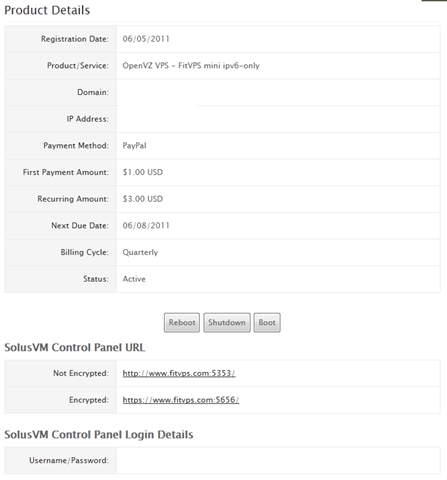
Once after login to the WHMCS interface through the HTTPS connection, you can actually see that they have both HTTP and HTTPS connections to access SolusVM, although both are not on standard port 80, it is still rare among VPS providers.
Other than that, the control panel on WHMCS offers the options to reboot, shutdown and boot the VPS, although not as functionality-rich as some of the other VPS providers put in their WHMCS control panel and there is no graphs for the system resources, it is none the less more than enough for the basic functionalities:
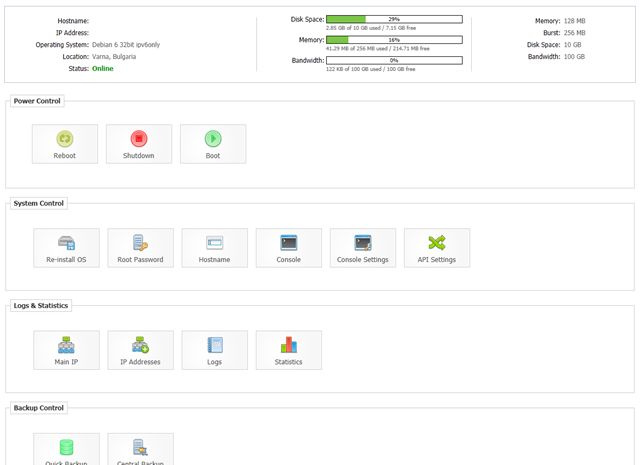
As mentioned before, FitVPS use standard SolusVM Control Panel, with both HTTP and HTTPS logins and ironically, are only accessible via IPV4, presumably due to lack of IPV6 support in SolusVM:
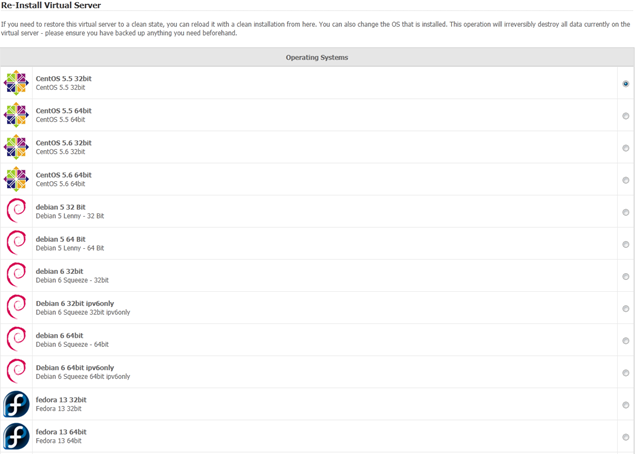
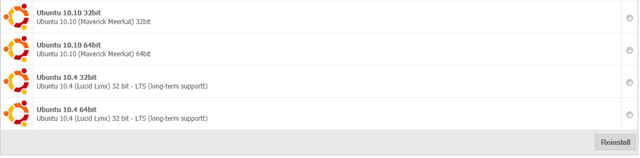
There are many OS templates available, including the pretty recent versions of CentOS, Debian, Fedora and Ubuntu. However, for this particular VPS line, since it is using IPV6 only, the only dedicated IPV6 template is a Debian 6, 32bit, other templates may work, however they will require IPV6-enabled repositories and there will be some changes made to the resolvers.
There are 1 IPV4 and 5 IPV6 address listed on the IP address section of the SolusVM control panel. However, the IPv4 address is not usable, only the IPV6 are:
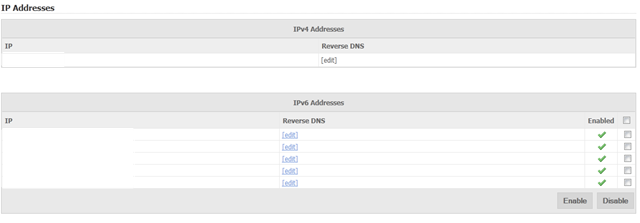
It is worth mention that rDNS is instant in this case, which, besides BuyVM, is the only one that I have seen providing instant rDNS for IPV6.

FitVPS has also been kind enough to provide 2 central backup slots for each one of the VPS, which, although is build into SolusVM, the functionality is rarely allowed among most of the VPS providers, which I think a very convenient way to back up and move your VPS if you decide to transfer later.
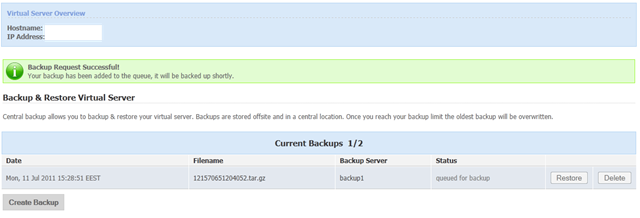
Test on VPS
The test box I have received is the standard IPV6-only mini VPS with 128MB of dedicated memory (128MB burstable) and 5GB of disk space.
Even with a full LNMP stack installed, the VPS box only used 50MB of RAM:
 free -m
             total       used       free     shared    buffers     cached
Mem:           256         50        205          0          0          0
-/+ buffers/cache:         50        205
Swap:            0          0          0
And here is the corresponding output of top command:
top - 12:00:56 up 59 days,  1:24,  1 user,  load average: 0.27, 0.09, 0.03
Tasks:  22 total,   2 running,  20 sleeping,   0 stopped,   0 zombie
Cpu(s):  0.0%us,  0.0%sy,  0.0%ni,100.0%id,  0.0%wa,  0.0%hi,  0.0%si,  0.0%st
Mem:    262144k total,    51560k used,   210584k free,        0k buffers
Swap:        0k total,        0k used,        0k free,        0k cached
It is also interesting to note about the uptime in the top command output, because I rarely play around with this box, it has been online longer than perhaps any other VPS that I have!
The unfortunately part seems to be with the CPU processing power, as you could see the load average was definitely above average when I ran the top command. It is bad considering the fact that this VPS only has one core (although I am still trying to figure out if the number is normalized to the number of cores that the VPS has access to or the cores in the physical node):
cat /proc/cpuinfo
processor       : 0
vendor_id       : AuthenticAMD
cpu family      : 16
model           : 10
model name      : AMD Phenom(tm) II X6 1075T Processor
stepping        : 0
cpu MHz         : 1054.056
cache size      : 512 KB
physical id     : 0
siblings        : 6
core id         : 0
cpu cores       : 6
apicid          : 0
fpu             : yes
fpu_exception   : yes
cpuid level     : 6
wp              : yes
flags           : fpu vme de pse tsc msr pae mce cx8 apic sep mtrr pge mca cmov pat pse36 clflush mmx fxsr sse sse2 ht syscall nx mmxext fxsr_opt pdpe1gb rdtscp lm 3dnowext 3dnow constant_tsc nonstop_tsc pni cx16 popcnt lahf_lm cmp_legacy svm extapic cr8_legacy altmovcr8 abm sse4a misalignsse 3dnowprefetch osvw
bogomips        : 6027.10
TLB size        : 1024 4K pages
clflush size    : 64
cache_alignment : 64
address sizes   : 48 bits physical, 48 bits virtual
power management: ts ttp tm stc 100mhzsteps hwpstate [8] [9]
The output of uptime is a little better in terms of the load averages:
uptime
 12:02:22 up 59 days,  1:25,  1 user,  load average: 0.06, 0.06, 0.02
VZFree shows the VPS is not badly oversold, which is something good:
vzfree
             Total     Used     Free
Kernel:   2048.00M    2.24M 2045.76M
Allocate:  256.00M   47.08M  208.92M (128M Guaranteed)
Commit:    128.00M   15.95M  112.05M (29.1% of Allocated)
Swap:                 0.00M          (0.0% of Committed)
And the output of vmstat basically confirmed that the box is mostly in an idle state:
vmstat
procs -----------memory---------- ---swap-- -----io---- -system-- ----cpu----
 r  b   swpd   free   buff  cache   si   so    bi    bo   in   cs us sy id wa
 1  0      0 213492      0      0    0    0     0     0    0    3  0  0 100  0
One of the common headaches of OpenVZ VPS is that sometimes the resources for each VPS is severely limited, set by the beancounters, unfortunately, it is also the case with FitVPS, as indicated by the privvmpages settings:
 cat /proc/user_beancounters
Version: 2.5
       uid  resource                     held              maxheld              barrier                limit              failcnt
      176:  kmemsize                  2371584             16237281           2147483646           2147483646                    0
            lockedpages                     0                  431               999999               999999                    0
            privvmpages                 12025                41603                65536                65536                    0
            shmpages                      641                 1296                32768                32768                    0
            dummy                           0                    0                    0                    0                    0
            numproc                        19                   43                 1000                 1000                    0
            physpages                    3485                33289                    0           2147483647                    0
            vmguarpages                     0                    0                32768           2147483647                    0
            oomguarpages                 3485                33289                32768           2147483647                    0
            numtcpsock                      5                    7                 1000                 1000                    0
            numflock                        2                    8               999999               999999                    0
            numpty                          1                    3                  100                  100                    0
            numsiginfo                      0                   11                  500                  500                    0
            tcpsndbuf                   62856               165288            214748160            396774400                    0
            tcprcvbuf                   81920              2063128            214748160            396774400                    0
            othersockbuf                 9312                46560            214748160            396774400                    0
            dgramrcvbuf                     0                 9776            214748160            396774400                    0
            numothersock                   12                   28                 1000                 1000                    0
            dcachesize                      0                    0           2147483646           2147483646                    0
            numfile                       487                  860             23999976             23999976                    0
            dummy                           0                    0                    0                    0                    0
            dummy                           0                    0                    0                    0                    0
            dummy                           0                    0                    0                    0                    0
            numiptent                      24                   24                  200                  200                    0
And df -i and df -h output shows the hard disk space is not oversold nor restricted:
 df -i
Filesystem            Inodes   IUsed   IFree IUse% Mounted on
/dev/simfs           5242880   72330 5170550    2% /
 df -h
Filesystem            Size  Used Avail Use% Mounted on
/dev/simfs             10G  1.9G  8.2G  19% /
Disk I/O is rather impressive on this VPS, it has been a while since I see triple digit figures for dd test output, and I am glad that it is the case for FitVPS:
 dd if=/dev/zero of=test bs=64k count=16k conv=fdatasync
16384+0 records in
16384+0 records out
1073741824 bytes (1.1 GB) copied, 9.71808 s, 110 MB/s
And again just to make sure:
 dd if=/dev/zero of=test bs=64k count=16k conv=fdatasync
16384+0 records in
16384+0 records out
1073741824 bytes (1.1 GB) copied, 9.93181 s, 108 MB/s
Testing network speed is pretty difficult for me to test since CacheFly is not IPV6-enabled (another great example to show how “unready” most of the business are with IPV6), and even Linode, which boost itself for being IPV6-ready in most of their datacentres, does not have a single download test file that is IPV6-accessible. After some searching on WHT, I only got this provider which actually has a test file on IPV6, as well as my BuyVM VPS, which has IPV6 enabled by default.
Here is the results from downloading a 100MB test file from my VPS in Fremont, CA:
100%[======================================>] 104,857,600 91.7K/s   in 14m 54s

2011-05-09 11:40:27 (115 KB/s) - a€?100mb.test.1a€
Downloading from Trabia-Network in Republic of Moldova in Europe seems to be a lot better since it is closer to Bulgaria, where the VPS is located:
wget http://[2a00:1dc0::22]/100mb.bin --2011-07-13 09:46:02-- http://[2a00:1dc0::22]/100mb.bin Connecting to 2a00:1dc0::22:80... connected. HTTP request sent, awaiting response... 200 OK Length: 104857600 (100M) [application/octet-stream] Saving to: “100mb.bin†100%[======================================>] 104,857,600 4.33M/s in 15s 2011-07-13 09:46:18 (6.58 MB/s) - “100mb.binâ€
Trying again actually gives a little bit better download speed, possibly due to caching:
wget http://[2a00:1dc0::22]/100mb.bin --2011-07-12 21:47:33-- http://[2a00:1dc0::22]/100mb.bin Connecting to 2a00:1dc0::22:80... connected. HTTP request sent, awaiting response... 200 OK Length: 104857600 (100M) [application/octet-stream] Saving to: “100mb.bin†100%[======================================>] 104,857,600 8.99M/s in 12s 2011-07-12 21:47:45 (8.16 MB/s) - “100mb.binâ€
It is indeed already on 100Mbps port, then I can only guess the port is shared among quite a few VPS.
Update:Thanks to fanovpn, I was able to do a few more IPv6 speed tests and the download speed seems really good in Europe:
First test is with tele2.net in Sweden:
wget http://speedtest.tele2.net/100MB.zip
--2011-07-14 09:47:49--  http://speedtest.tele2.net/100MB.zip
Resolving speedtest.tele2.net... 2a00:801:0:11::2, 90.130.66.198
Connecting to speedtest.tele2.net|2a00:801:0:11::2|:80... connected.
HTTP request sent, awaiting response... 200 OK
Length: 104857600 (100M) [application/zip]
Saving to: â100MB.zipâ

100%[======================================>] 104,857,600 11.1M/s   in 10s

2011-07-14 09:47:59 (10.0 MB/s) - â100MB.zipâ
And another one in Netherlands:
wget http://download.xs4all.nl/test/100mb.bin
--2011-07-14 09:48:26--  http://download.xs4all.nl/test/100mb.bin
Resolving download.xs4all.nl... 2001:888:0:25:194:109:21:66, 194.109.21.66
Connecting to download.xs4all.nl|2001:888:0:25:194:109:21:66|:80... connected.
HTTP request sent, awaiting response... 200 OK
Length: 104900000 (100M) [application/octet-stream]
Saving to: â100mb.bin.1â

100%[======================================>] 104,900,000 11.1M/s   in 9.7s

2011-07-14 09:48:36 (10.3 MB/s) - â100mb.bin.1â
Both are at a solid 10MB/s (80Mbit/s) speed, which is really good for a 100Mbit port.
Finally, given the processing power of this unit is quite limited, it is actually pretty impressive to see the VPS still had a decent UnixBench score:
   #    #  #    #  #  #    #          #####   ######  #    #   ####   #    #
   #    #  ##   #  #   #  #           #    #  #       ##   #  #    #  #    #
   #    #  # #  #  #    ##            #####   #####   # #  #  #       ######
   #    #  #  # #  #    ##            #    #  #       #  # #  #       #    #
   #    #  #   ##  #   #  #           #    #  #       #   ##  #    #  #    #
    ####   #    #  #  #    #          #####   ######  #    #   ####   #    #

   Version 5.1.3                      Based on the Byte Magazine Unix Benchmark

   Multi-CPU version                  Version 5 revisions by Ian Smith,
                                      Sunnyvale, CA, USA
   January 13, 2011                   johantheghost at yahoo period com

1 x Dhrystone 2 using register variables  1 2 3 4 5 6 7 8 9 10

1 x Double-Precision Whetstone  1 2 3 4 5 6 7 8 9 10

1 x Execl Throughput  1 2 3

1 x File Copy 1024 bufsize 2000 maxblocks  1 2 3

1 x File Copy 256 bufsize 500 maxblocks  1 2 3

1 x File Copy 4096 bufsize 8000 maxblocks  1 2 3

1 x Pipe Throughput  1 2 3 4 5 6 7 8 9 10

1 x Pipe-based Context Switching  1 2 3 4 5 6 7 8 9 10

1 x Process Creation  1 2 3

1 x System Call Overhead  1 2 3 4 5 6 7 8 9 10

1 x Shell Scripts (1 concurrent)  1 2 3

1 x Shell Scripts (8 concurrent)  1 2 3

========================================================================
   BYTE UNIX Benchmarks (Version 5.1.3)

   System: ayserv: GNU/Linux
   OS: GNU/Linux -- 2.6.18-238.5.1.el5.028stab087.1.fitvps3 -- #2 SMP Mon Apr 18 14:08:12 EEST 2011
   Machine: i686 (unknown)
   Language: en_US.utf8 (charmap="UTF-8", collate="UTF-8")
   CPU 0: AMD Phenom(tm) II X6 1075T Processor (6027.1 bogomips)
          Hyper-Threading, x86-64, MMX, AMD MMX, Physical Address Ext, SYSENTER/SYSEXIT, AMD virtualization, SYSCALL/SYSRET
   22:56:58 up 12:19,  1 user,  load average: 0.07, 0.02, 0.00; runlevel 2

------------------------------------------------------------------------
Benchmark Run: Sun May 08 2011 22:56:58 - 23:29:00
1 CPU in system; running 1 parallel copy of tests

Dhrystone 2 using register variables        4713850.3 lps   (10.0 s, 7 samples)
Double-Precision Whetstone                     2451.7 MWIPS (10.0 s, 7 samples)
Execl Throughput                               1824.6 lps   (29.9 s, 2 samples)
File Copy 1024 bufsize 2000 maxblocks        239027.5 KBps  (30.0 s, 2 samples)
File Copy 256 bufsize 500 maxblocks           74013.2 KBps  (30.0 s, 2 samples)
File Copy 4096 bufsize 8000 maxblocks        432195.5 KBps  (30.0 s, 2 samples)
Pipe Throughput                              506068.2 lps   (10.0 s, 7 samples)
Pipe-based Context Switching                 132496.8 lps   (10.0 s, 7 samples)
Process Creation                               5768.8 lps   (30.0 s, 2 samples)
Shell Scripts (1 concurrent)                   2023.7 lpm   (60.0 s, 2 samples)
Shell Scripts (8 concurrent)                    261.4 lpm   (60.1 s, 2 samples)
System Call Overhead                         464465.8 lps   (10.0 s, 7 samples)

System Benchmarks Index Values               BASELINE       RESULT    INDEX
Dhrystone 2 using register variables         116700.0    4713850.3    403.9
Double-Precision Whetstone                       55.0       2451.7    445.8
Execl Throughput                                 43.0       1824.6    424.3
File Copy 1024 bufsize 2000 maxblocks          3960.0     239027.5    603.6
File Copy 256 bufsize 500 maxblocks            1655.0      74013.2    447.2
File Copy 4096 bufsize 8000 maxblocks          5800.0     432195.5    745.2
Pipe Throughput                               12440.0     506068.2    406.8
Pipe-based Context Switching                   4000.0     132496.8    331.2
Process Creation                                126.0       5768.8    457.8
Shell Scripts (1 concurrent)                     42.4       2023.7    477.3
Shell Scripts (8 concurrent)                      6.0        261.4    435.7
System Call Overhead                          15000.0     464465.8    309.6
                                                                   ========
System Benchmarks Index Score                                         445.5
Similar results for GeekBench tests:
System Information
  Platform:                  Linux x86 (32-bit)
  Compiler:                  GCC 4.1.2 20070925 (Red Hat 4.1.2-33)
  Operating System:          Linux 2.6.18-238.5.1.el5.028stab087.1.fitvps3 i686
  Model:                     Linux PC (AMD Phenom(tm) II X6 1075T Processor)
  Motherboard:               Unknown Motherboard
  Processor:                 AMD Phenom(tm) II X6 1075T Processor
  Processor ID:              AuthenticAMD Family 16 Model 10 Stepping 0
  Logical Processors:        1
  Physical Processors:       1
  Processor Frequency:       1.05 GHz
  L1 Instruction Cache:      64.0 KB
  L1 Data Cache:             64.0 KB
  L2 Cache:                  512 KB
  L3 Cache:                  6.00 MB
  Bus Frequency:             0.00 Hz
  Memory:                    15.6 GB
  Memory Type:               N/A
  SIMD:                      1
  BIOS:                      N/A
  Processor Model:           AMD Phenom(tm) II X6 1075T Processor
  Processor Cores:           1

Integer
  Blowfish
    single-threaded scalar    2250 |||||||||
    multi-threaded scalar      740 ||
  Text Compress
    single-threaded scalar     800 |||
    multi-threaded scalar      746 ||
  Text Decompress
    single-threaded scalar     738 ||
    multi-threaded scalar      759 |||
  Image Compress
    single-threaded scalar     895 |||
    multi-threaded scalar      671 ||
  Image Decompress
    single-threaded scalar     526 ||
    multi-threaded scalar      547 ||
  Lua
    single-threaded scalar    1050 ||||
    multi-threaded scalar     1049 ||||

Floating Point
  Mandelbrot
    single-threaded scalar     773 |||
    multi-threaded scalar      709 ||
  Dot Product
    single-threaded scalar    1006 ||||
    multi-threaded scalar     1057 ||||
    single-threaded vector    1321 |||||
    multi-threaded vector     1188 ||||
  LU Decomposition
    single-threaded scalar    2817 |||||||||||
    multi-threaded scalar     2857 |||||||||||
  Primality Test
    single-threaded scalar     972 |||
    multi-threaded scalar      764 |||
  Sharpen Image
    single-threaded scalar    3372 |||||||||||||
    multi-threaded scalar     2609 ||||||||||
  Blur Image
    single-threaded scalar    2828 |||||||||||
    multi-threaded scalar     2856 |||||||||||

Memory
  Read Sequential
    single-threaded scalar    3932 |||||||||||||||
  Write Sequential
    single-threaded scalar    1605 ||||||
  Stdlib Allocate
    single-threaded scalar    1245 ||||
  Stdlib Write
    single-threaded scalar     571 ||
  Stdlib Copy
    single-threaded scalar    1014 ||||

Stream
  Stream Copy
    single-threaded scalar    2859 |||||||||||
    single-threaded vector    3230 ||||||||||||
  Stream Scale
    single-threaded scalar    3065 ||||||||||||
    single-threaded vector    3137 ||||||||||||
  Stream Add
    single-threaded scalar    2750 |||||||||||
    single-threaded vector    3143 ||||||||||||
  Stream Triad
    single-threaded scalar    3041 ||||||||||||
    single-threaded vector    2391 |||||||||

Integer Score:                 897 |||
Floating Point Score:         1794 |||||||
Memory Score:                 1673 ||||||
Stream Score:                 2952 |||||||||||

Overall Geekbench Score:      1571 ||||||
As a side note, when I tried to submit the score in GeekBench, this is what I got:
Submit results to the Geekbench Result Browser? [Y/n] Y

Submitting results; this might take a minute or two.
Segmentation fault
Again, IPV6 is not fully supported in GeekBench.
Customer Service and Support
I am not sure how many support FitVPS has, Rumen is the only person I have ever spoken with regarding the 2 issues I have ever had but he does respond tickets very fast. One of my tickets was responded within the minute and for the one that took longer to reply (longer as in within half an hour), he has not only answer the question, but has provided me some additional information that would help me to use the VPS better, which is really remarkable.
Conclusion
Having a IPV6-only VPS is more an interesting experiment for me rather than a serious pre-production test run, and I personally consider majority of the users who signed up for this service are along the same line of thoughts (even Rumen agreed with that) . However, besides the low processing power and perhaps (although I can not give an affirmative answer due to lack of tests) a not-so-great network speed, the machine itself is solid and in particular, the disk I/O is remarkable. Together with a friendly and yet really fast support, I would recommend FitVPS to anyone who want to test out the IPV6-side of the Internet world.
Very cool box to review. I’m lucky enough to have a handful of IPv6-enabled VPSes already, so I don’t want to take up any of the limited accounts available… and I also want to avoid having to join the waiting list 🙂
But I really like what they’re doing, trying to push forward IPv6 familiarity. I wonder why they don’t provide a NAT router to allow access to IPv4, though. Seems like it would be useful for doing stuff like accessing distribution’s repositories if they aren’t IPv6 accessible (though my favourite does have IPv6 mirrors, if it was an available choice). At the same time, your server wouldn’t be accessible over IPv4, so it wouldn’t make the account “too valuable”. Maybe they don’t want to deal with spammers and such, though. But I guess there is a certain coolness to being truly IPv6 pure.
BTW, if you run wget with ‘wget -O /dev/null [url]’, it will write the file to /dev/null, avoiding the possibility for disk access to slow down your bandwidth test (you also don’t have to clean up the 100mb.test file afterwards). Though with 110MB/s on the dd test, that certainly doesn’t seem like a problem here!
IPv6 speed test files do seem to be sparse. Looks like there’s also http://speedtest.tele2.net/ (8.14MB/s to my BuyVM) and http://download.xs4all.nl/test/100mb.bin (2.84 MB/s to my BuyVM).
Anyway… when will we see 96mb.com on IPv6 🙂
@fanovpn: thanks a lot for such detailed suggestions and comments, you are definitely an expert in the area and I definitely have a lot to learn about Linux and VPS in general 🙂 As for speed tests, I have just performed both tests you have mentioned above and this box clocked a solid 10MB/s speed on both! I really hope IPv6 would be popular soon now so that I can deploy this for production uses 🙂
I actually tried to wget to /dev/null once and for some reason my box no longer boots up after it so I had to reload the entire template, which scared me a little, that is why I normally just download to either /root or a random folder on the VPS, but I definitely see your point. One question though: if I save the file to /dev/null in OVZ, is it like writing to memory or it is writing to the main node? Somehow I was under the impression that /dev is basically something that is shared by all VPSes on the physical node, is that the case?
Now, finally, regarding the “tough” question 🙂 I actually contacted both XenVZ (who is hosting the VPS which host 96mb.com) and my backup box provider, unfortunately I have not heard from XenVZ and my backup provider does not provide IPv6. I then tried to create a HE.Net tunnel but for some reason it is not working yet. Anyways, I will spend more time tonight to figure it out and hopefully 96mb would be on IPV6 soon!
I’m so far from an expert, I’ve just picked up a few bits and pieces here and there, including a few from your posts 🙂
I’m not really sure of the implementation details of /dev/null, but in operation it’s basically a blackhole. Copying or writing a file to /dev/null shouldn’t write to memory or anywhere else, it should just discard the bits immediately. wget will be happy because the OS has handled the ‘file’, the OS is happy because there’s no work involved in doing the handling, the HDD is happy because it doesn’t have to do anything.
I wouldn’t worry too much about doing anything that will mess up the host box, Xen/KVM/VMWare/OpenVZ are all supposed to protect against that and your VPS alone should be all that you can screw up, which just means a reload if it’s a testing box (and with this many VPSes, you might as well do all your playing around / testing on a box that you don’t mind reloading). Even if you do manage to mess up the host box somehow, that’s not your fault, it’s a bug with the virtualization layer, and is a valuable bug report you/your host can make to the virtualization company so that it can be fixed before someone with malicious intent can make use of it.
Anyway, managing to make your box unbootable with a wget to /dev/null is surprising, and actually a pretty impressive feat. 🙂 I’m trying to imagine how to do that. All I can think of is that maybe there was a space between ‘-O /dev/’ and ‘null’ and wget outputted something into your /dev tree that messed the OS up, though I’m sure there’s lots of other possibilities.
Maybe it’s a good lesson on why it’s recommended that you not login as root, and only use sudo when necessary… 🙂 A regular user account can still output to /dev/null, and has much less chance of messing the entire system up.
Looks like you worked through the night 😉 I see you have an IPv6 address for http://www.96mb.com now, and it’s responding to pings! It doesn’t look like a web browser is listening on it yet, though. Maybe you need to restart nginx, so it can bind to the new address?
@fanovpn: Please try ipv6.96mb.com, it is accessible via IPV6 only, through HE.Net tunnel, and the main domain (96mb.com) is accessible through both IPV4 and IPV6. I forgot to put Nginx to listen to the IPV6 address last night (yes, I can get very silly once after midnight :))
By the way, this is done through He.Net’s tunnel broker, thanks He.NET!
Have you actually tested that the rdns works?
The page works and it ‘claims’ to work, but it doesn’t actually issue the records.
This is why we had to write our own pages into solusvm for it to work 🙂
Easy way to tell if it’s working – when you enter an entry and tell it to save, it isn’t updating what the ‘current’ entry is.
Francisco
@Francisco: Ha, you caught my laziness 🙂 OK, I think it is configured properly now, not sure how long it will take to populate though since I accidentally mapping ipv6.96mb.com to the wrong IPV6 address, hopefully soon.
Thanks for point that out!
It should be instant 🙂
Does it actually say what you said it to? The official solus code does NOT have this fixed nor do they intend to fix it anytime this year at this rate.
Like I said, we ended up having to start a war with solus to even get our way on making our own addons for it.
Francisco
This is what I tried just now, seems to work:
@Francisco: My provider (XenVZ) actually does not use Solus nor they have native IPV6 (I believe), so I am using He.Net’s tunnel for the work, which actually works great 🙂
Hi @admin, what font do you use for this blog comment? because it’s kinda looks ugly on my computer -> http://i.imgur.com/rGl1i.png although it’s probably opera or my linux being silly ^_^
@circus: Interesting, here is how it shows on mine: http://i.imgur.com/B6u76.jpg, Win7 + Firefox, but thanks for letting me know, here is what I use (same as what I use in the blog as well)
What do you think might be better? 🙂
@admin – Aah 😉 I meant for fitVPS, not for your HE tunnel.
Francisco
@Francisco – Ohhhhhhhhhhhhh, now it start to make sense 🙂
So here is what I see after enters the rDNS, it got me to this page: https://www.fitvps.com:5656/soluslabsrdns6sux.cgi with a single word: accepted
And dig shows the following output in my BuyVM VPS:
So I guess it does work then.
@admin: HTTP over IPv6 is working for me now, both ipv6.96mb.com and http://www.96mb.com. Of course, I’m browsing from an HE tunnel also, so not the best test.
As to fonts, I suspect trying to make type look good on Linux is something of a lost cause, especially if it’s someone else’s box. 🙂 But I guess adding a linux-friendly font-family specification wouldn’t hurt.
First though, that’s not the right CSS rule you quoted, the comments are in Calibri, while the main post is in Arial (even your screenshot shows Calibri; as a quick check look for the double-story ‘g’ in Calibri, and the single-story ‘g’ in Arial). Calibri is a bit mis-matched metric-wise with Arial/Helvetica (the comment text will be a bit bigger if the browser falls back to Arial or Helvetica), but the cleartype family certainly does look prettier than Arial 🙂 Anyway, I think the font list for comments is over-ridden in .commentlist and .commentlist .body, so make sure any changes you make are reflected there also.
If you want to keep with Helvetica’s metrics, the Linux font to add is ‘Liberation Sans’, a newer truetype Helvetica/Arial metric-matched font that’s pretty widespread on newer desktop distributions. That said, circus’ screenshot looks like some sort of default X11 font, and I know my freetype came preconfigured to replace ‘Arial’ and ‘Helvetica’ with ‘Liberation Sans’ if it couldn’t find arial or helvetica (but I’ve installed Arial, and Helvetica anyway, so I see Calibri on my Linux box), so I don’t know if adding it to the font list would really help him. Worth a try, though.
Or you can target newer browsers and just embed any free font as a font-face via CSS and let modern browsers download and use that, regardless of what they have installed already (and older browsers will still try to use system-installed versions of anything in font-family). You could even embed Liberation Sans (click ‘@font-face kit’). Check out http://www.fontsquirrel.com or http://www.google.com/webfonts if you want to play around with it.
@fanovpn: It is really nice of you to test it out for me, I tried to visit the ipv6.96mb.com directly in my Windows VPS (since that only has a AAAA record) and it seems to work, and use wget -6 in my BuyVM box seems to give me my index page as well, so hopefully that means at least it is working most of the time 🙂
And thanks so much, you are absolutely correct! I should definitely stop replying any comments late in the evening because my brain shut down as soon as the clock ticks past 10pm 🙂
Here is the actual CSS for comment:
.commentlist {font-family: Calibri, Arial, Helvetica, sans-serif;
margin: 0 0 0 2em;
}
.commentlist .body {
font-family: Calibri, Arial, Helvetica, sans-serif;
padding: 0 1em;
overflow: hidden;
}
You definitely have a pair of sharp eyes! Thanks a lot for pointing that out!
I have already downloaded the font-face kit, this is the first time I am doing this so let me do some Googling and make sure I know what I am doing before making the change. Thanks so much for your suggestion!
@fanovpn: I have just updated the font to liberation sans, I can see the font no longer looks the same, having said that, however, I am not exactly sure if the change indeed worked or I just simply messed up the CSS and now it is changing to the default font, is there anyway you know I can verify that? Again, many thanks for your help!