
96MB Low End VPS Review Part 57–Atomic VPS
Recently, there has been quite a few cloud VPS hosting appeared on the 96MB Low End VPS reviews, and the review today is no exception. Atomic VPS is probably one of the “high-end” VPS providers as well, with their regular price start at 59.95USD per month for a 1GB RAM VPS. At this price level, how would the performance be? Let’s take a look.
Basic Information and Set Up
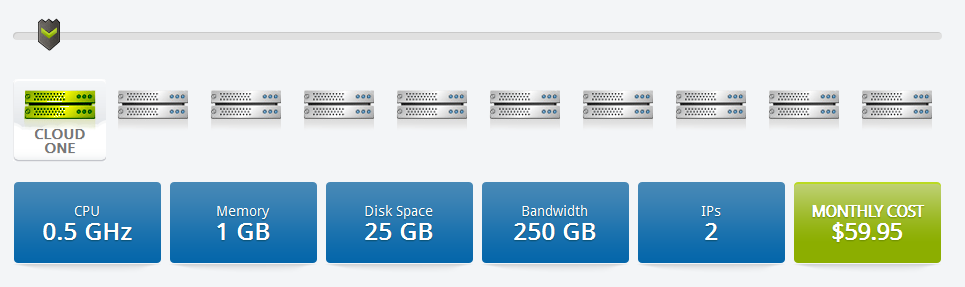
I have signed up for a cloudONE package during their open beta test stage for this particular review when I saw their posting on WebhostingTalk and here is the package specifications on their plan page:
At the moment they are running a promotion for 14.95 at the first month, which is really out of the “low end” VPS range as well:

The sign up page is pretty standard WHMCS page and in fact I was asked to enter my domain name as well, which is really something I hope they could get rid of.
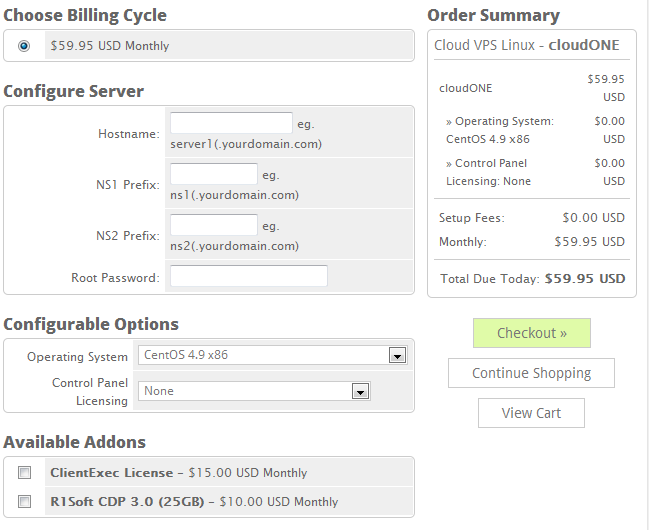
You have quite a few options when it comes to operating systems:
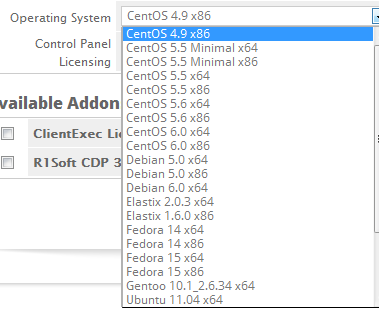

You can even choose Windows 2008 Web Edition and CloudLinux if you are willing to pay a little extra.
For the control panel, there seems to be no discount and the price is pretty much the same as what you pay from any external vendor:

You can also get ClientExec for 15USD per month and R1Soft backup license for 10USD per month, which is not exactly cheap. I think AtomicVPS is not exactly catered towards the budget-conscious customers and I can only imagine a few dollars won’t make too much differences to those who are signing up for their services.
I am not sure if it was due to the fact that I signed up for the service during the “beta” stage but the provision of this VPS was not instant. My invoice payment confirmation has arrived at 8:20AM but I have not received the server details until 9:36AM.
The control panel is on standard HTTPS port and unlike most of the VPS providers who use SolusVM as the control panel, AtomicVPS uses the OnApp control panel, which is integrated with the WHMCS application (which they have nick-named the “Reactor” to echo their brand name).
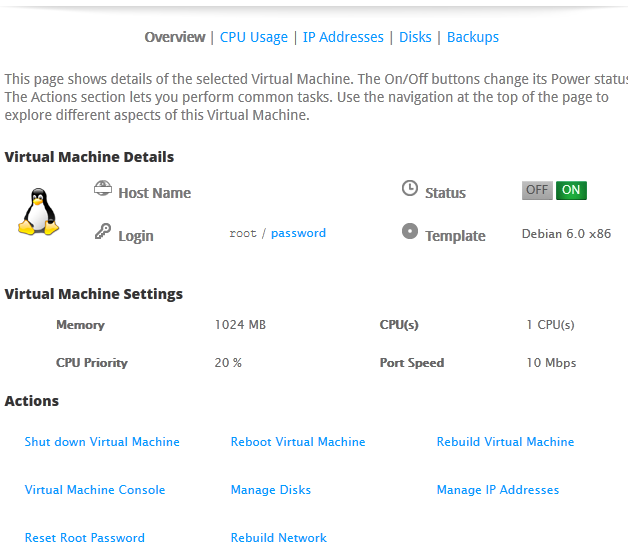
Once logged in, the summary of the VPS is shown on the main page, as well as some basic actions to control the VPS. As you can see, the CPU priority is 20% and the port speed is only 10Mbps, which is quite slow:
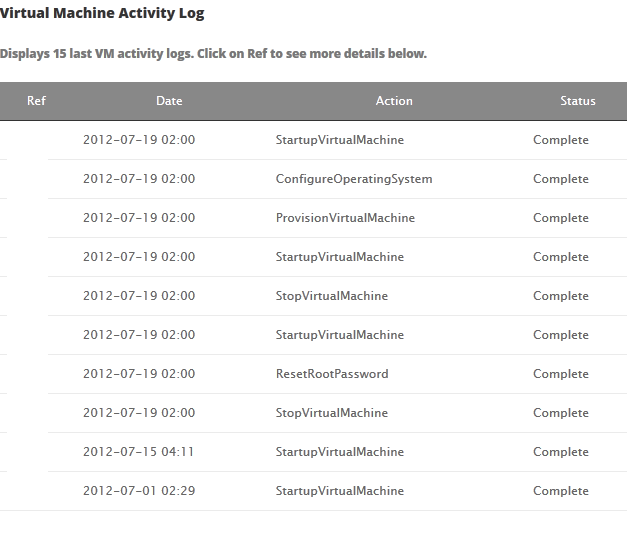
Further down the page, you can actually see a log of all the activities you have performed on the VPS:
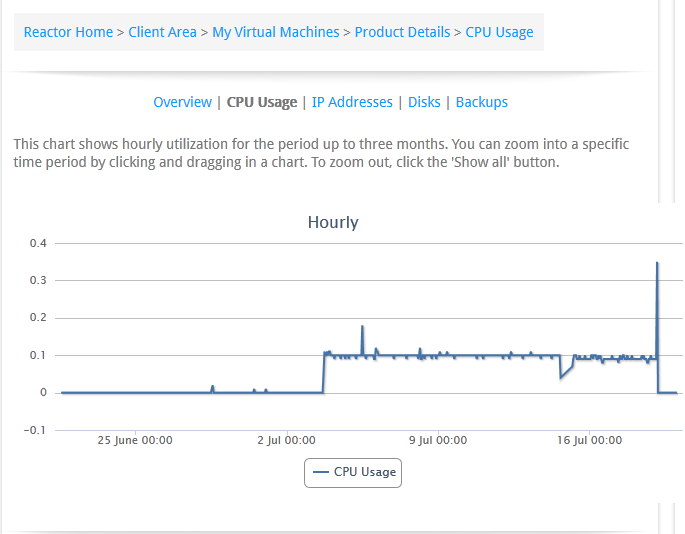
The next tab shows the hourly CPU usage graph, I prefer this kind of time series graph a lot more than just a number (as we see in some other control panels). To me, knowing how much the CPU has been used at different points of the day is definitely a lot more useful than just having a simple number:
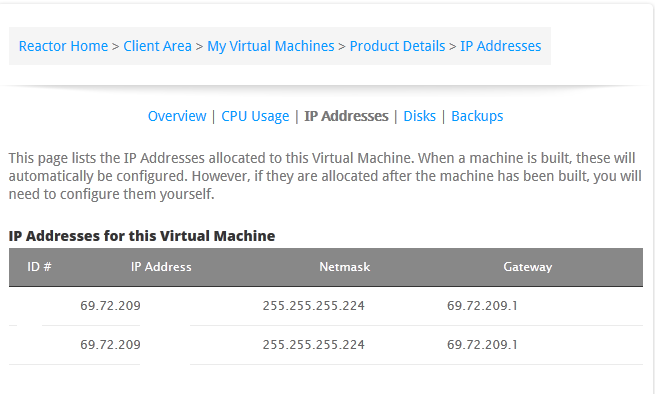
The next tab showed two IP addresses that my VPS was assigned to, as well as the basic configuration information. Unfortunately, there is no place for you to set rDNS nor some control functionality for you to change the IP addresses easily:
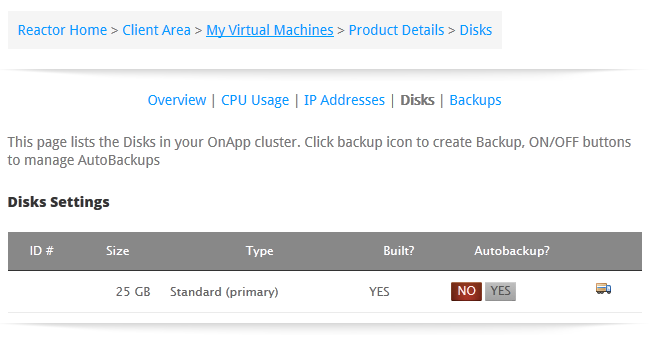
Disks tab, as the name suggests, shows you the hard disk usage, there is also an automatic backup feature for the VPS, however I could not figure out how to turn it on as it is probably sold separately as an add-on.
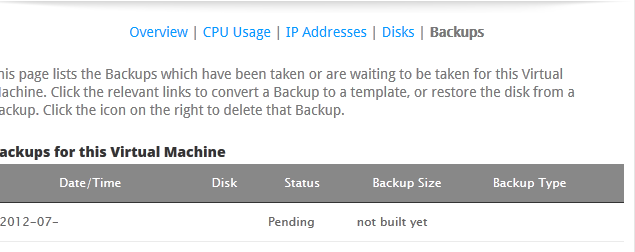
Finally, for the backups tab, you can literally back up the entire hard drive with the click of one button, which is pretty good:
Test on the VPS
As mentioned above, the VPS comes with 0.5GHz of CPU, 1GB of RAM and 25GB of hard drive, it is located in Clifton, NJ in the FortressItx DC.
When the OS was first loaded, about 35MB of RAM was used:
 free -m
             total       used       free     shared    buffers     cached
Mem:          1020        137        882          0          1         99
-/+ buffers/cache:         35        984
Swap:            0          0          0
Top output showing the processes running:
top - 02:26:16 up 24 min,  1 user,  load average: 0.00, 0.00, 0.00
Tasks:  50 total,   1 running,  49 sleeping,   0 stopped,   0 zombie
Cpu(s):  0.0%us,  0.0%sy,  0.0%ni,100.0%id,  0.0%wa,  0.0%hi,  0.0%si,  0.0%st
Mem:   1045140k total,   141128k used,   904012k free,     1996k buffers
Swap:        0k total,        0k used,        0k free,   102476k cached

  PID USER      PR  NI  VIRT  RES  SHR S %CPU %MEM    TIME+  COMMAND
  832 snmp      20   0  8844 4072 2624 S  0.0  0.4   0:00.22 snmpd
  994 root      20   0  5672 2972 1480 S  0.0  0.3   0:00.17 bash
  991 root      20   0  8280 2868 2348 S  0.0  0.3   0:00.03 sshd
  782 ntp       20   0  4684 1932 1508 S  0.0  0.2   0:00.08 ntpd
  621 root      20   0 27336 1472 1036 S  0.0  0.1   0:00.02 rsyslogd
 1028 root      20   0  2356 1116  896 R  0.0  0.1   0:00.00 top
  911 root      20   0  5516  984  596 S  0.0  0.1   0:00.00 sshd
  966 Debian-e  20   0  6536  948  632 S  0.0  0.1   0:00.00 exim4
  474 statd     20   0  1960  792  664 S  0.0  0.1   0:00.00 rpc.statd
  720 root      20   0  3808  788  620 S  0.0  0.1   0:00.00 cron
  156 root      16  -4  2284  732  404 S  0.0  0.1   0:00.02 udevd
    1 root      20   0  2056  724  624 S  0.0  0.1   0:00.14 init
  192 root      18  -2  2280  648  320 S  0.0  0.1   0:00.00 udevd
  200 root      18  -2  2280  648  320 S  0.0  0.1   0:00.00 udevd
  663 root      20   0  1728  604  488 S  0.0  0.1   0:00.00 acpid
  985 root      20   0  1728  556  476 S  0.0  0.1   0:00.00 getty
  984 root      20   0  1728  552  476 S  0.0  0.1   0:00.00 getty
And htop output:
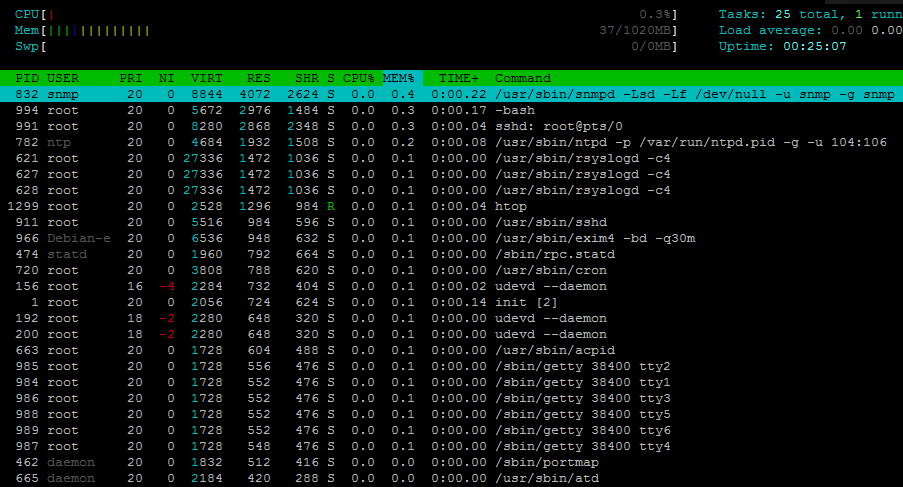
Interestingly, there is a process named snmped which seems to take quite a bit of memory, however it is definitely not one of the processes that I have commonly seen in Debian, turns out it is used to respond to SNMP requests, which I suspect has something to do with the way OnApp controls the individual VPS.
About 773MB of hard drive space was used, which was pretty standard for the VPS.
 df -h
Filesystem            Size  Used Avail Use% Mounted on
/dev/xvda1             25G  773M   23G   4% /
tmpfs                 511M     0  511M   0% /lib/init/rw
udev                  493M   68K  493M   1% /dev
tmpfs                 511M     0  511M   0% /dev/shm
And the inodes are set to pretty standard values:
df -i
Filesystem            Inodes   IUsed   IFree IUse% Mounted on
/dev/xvda1           3276800   29089 3247711    1% /
tmpfs                 130642       5  130637    1% /lib/init/rw
udev                  126050     438  125612    1% /dev
tmpfs                 130642       1  130641    1% /dev/shm
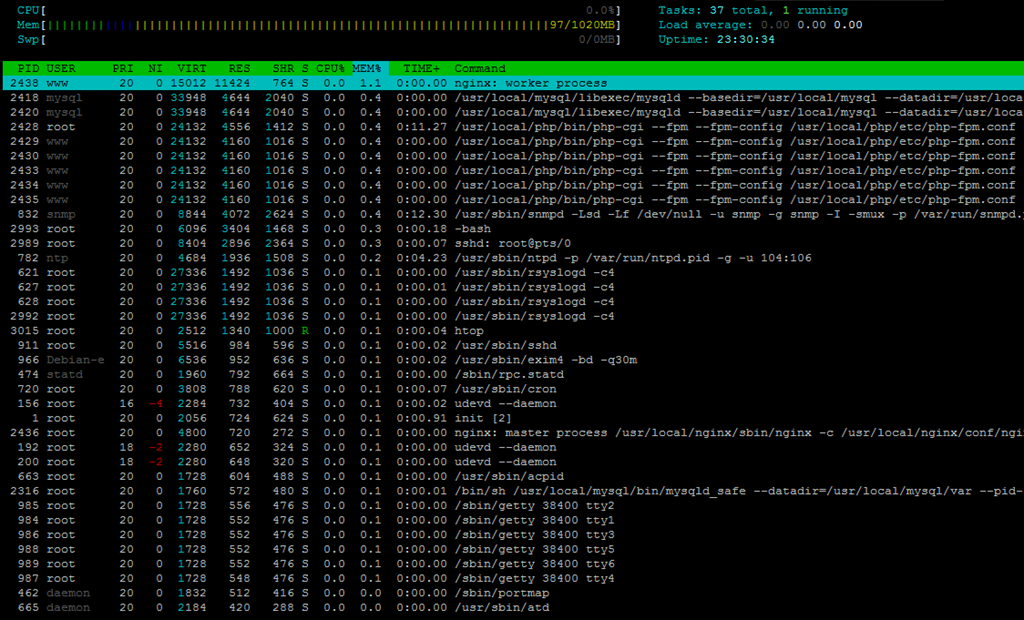
Once the full LNMP stack was installed, the memory usage went all the way up to 96MB (which is perfect for this site!):
 free -m
             total       used       free     shared    buffers     cached
Mem:          1020       1000         20          0         49        853
-/+ buffers/cache:         96        923
Swap:            0          0          0
Top showing the processes running:
top - 09:32:01 up 23:30,  1 user,  load average: 0.00, 0.00, 0.00
Tasks:  60 total,   1 running,  59 sleeping,   0 stopped,   0 zombie
Cpu(s):  0.0%us,  0.0%sy,  0.0%ni,100.0%id,  0.0%wa,  0.0%hi,  0.0%si,  0.0%st
Mem:   1045140k total,  1024960k used,    20180k free,    51184k buffers
Swap:        0k total,        0k used,        0k free,   874372k cached

  PID USER      PR  NI  VIRT  RES  SHR S %CPU %MEM    TIME+  COMMAND
 2438 www       20   0 15012  11m  764 S  0.0  1.1   0:00.00 nginx
 2418 mysql     20   0 33948 4644 2040 S  0.0  0.4   0:00.00 mysqld
 2428 root      20   0 24132 4556 1412 S  0.0  0.4   0:11.28 php-cgi
 2429 www       20   0 24132 4160 1016 S  0.0  0.4   0:00.00 php-cgi
 2430 www       20   0 24132 4160 1016 S  0.0  0.4   0:00.00 php-cgi
 2433 www       20   0 24132 4160 1016 S  0.0  0.4   0:00.00 php-cgi
 2434 www       20   0 24132 4160 1016 S  0.0  0.4   0:00.00 php-cgi
 2435 www       20   0 24132 4160 1016 S  0.0  0.4   0:00.00 php-cgi
  832 snmp      20   0  8844 4072 2624 S  0.0  0.4   0:12.31 snmpd
 2993 root      20   0  6096 3404 1468 S  0.0  0.3   0:00.18 bash
 2989 root      20   0  8268 2880 2364 S  0.0  0.3   0:00.07 sshd
  782 ntp       20   0  4684 1936 1508 S  0.0  0.2   0:04.23 ntpd
  621 root      20   0 27336 1492 1036 S  0.0  0.1   0:00.03 rsyslogd
 3014 root      20   0  2344 1132  904 R  0.0  0.1   0:00.00 top
  911 root      20   0  5516  984  596 S  0.0  0.1   0:00.02 sshd
  966 Debian-e  20   0  6536  952  636 S  0.0  0.1   0:00.02 exim4
  474 statd     20   0  1960  792  664 S  0.0  0.1   0:00.00 rpc.statd
And the htop output ranked by memory usage:
Approximately 2GB of hard drive space was used to complete the installation:
 df -h
Filesystem            Size  Used Avail Use% Mounted on
/dev/xvda1             25G  2.0G   22G   9% /
tmpfs                 511M     0  511M   0% /lib/init/rw
udev                  493M   68K  493M   1% /dev
tmpfs                 511M     0  511M   0% /dev/shm
And the inodes are set to pretty standard values:
 df -i
Filesystem            Inodes   IUsed   IFree IUse% Mounted on
/dev/xvda1           3276800   77790 3199010    3% /
tmpfs                 130642       5  130637    1% /lib/init/rw
udev                  126050     438  125612    1% /dev
tmpfs                 130642       1  130641    1% /dev/shm
Vmstat shows the VPS is mostly idle with no iowait:
 vmstat
procs -----------memory---------- ---swap-- -----io---- -system-- ----cpu----
 r  b   swpd   free   buff  cache   si   so    bi    bo   in   cs us sy id wa
 0  0      0  19824  51204 874472    0    0     1    15   14   22  1  0 99  0
Uptime shows similar information:
 uptime
 09:33:40 up 23:31,  1 user,  load average: 0.00, 0.00, 0.00
CPUInfo shows one E5620 core assigned to this VPS and is not throttled:
cat /proc/cpuinfo
processor       : 0
vendor_id       : GenuineIntel
cpu family      : 6
model           : 44
model name      : Intel(R) Xeon(R) CPU           E5620  @ 2.40GHz
stepping        : 2
cpu MHz         : 2399.998
cache size      : 12288 KB
fdiv_bug        : no
hlt_bug         : no
f00f_bug        : no
coma_bug        : no
fpu             : yes
fpu_exception   : yes
cpuid level     : 11
wp              : yes
flags           : fpu de tsc msr pae cx8 sep cmov pat clflush mmx fxsr sse sse2 ss ht nx constant_tsc up nonstop_tsc pni ssse3 sse4_1 sse4_2 popcnt hypervisor
bogomips        : 4799.99
clflush size    : 64
cache_alignment : 64
address sizes   : 40 bits physical, 48 bits virtual
power management:
And meminfo:
cat /proc/meminfo
MemTotal:        1045140 kB
MemFree:           21668 kB
Buffers:           26220 kB
Cached:           918348 kB
SwapCached:            0 kB
Active:            92172 kB
Inactive:         877988 kB
Active(anon):      11404 kB
Inactive(anon):    14264 kB
Active(file):      80768 kB
Inactive(file):   863724 kB
Unevictable:           0 kB
Mlocked:               0 kB
HighTotal:        311304 kB
HighFree:            624 kB
LowTotal:         733836 kB
LowFree:           21044 kB
SwapTotal:             0 kB
SwapFree:              0 kB
Dirty:                 0 kB
Writeback:             0 kB
AnonPages:         25588 kB
Mapped:            10780 kB
Shmem:                80 kB
Slab:              28268 kB
SReclaimable:      25600 kB
SUnreclaim:         2668 kB
KernelStack:         496 kB
PageTables:          988 kB
NFS_Unstable:          0 kB
Bounce:                0 kB
WritebackTmp:          0 kB
CommitLimit:      522568 kB
Committed_AS:     109080 kB
VmallocTotal:     122880 kB
VmallocUsed:        2752 kB
VmallocChunk:     118780 kB
HardwareCorrupted:     0 kB
HugePages_Total:       0
HugePages_Free:        0
HugePages_Rsvd:        0
HugePages_Surp:        0
Hugepagesize:       2048 kB
DirectMap4k:      737272 kB
DirectMap2M:           0 kB
As well as time sync:
time sync

real    0m0.021s
user    0m0.004s
sys     0m0.000s
As with any other cloud providers whose storage device is not on the same physical node, disk I/O from Atomic VPS did not impress me too much:
 dd if=/dev/zero of=test bs=64k count=16k conv=fdatasync
16384+0 records in
16384+0 records out
1073741824 bytes (1.1 GB) copied, 14.0765 s, 76.3 MB/s
Testing again showed slightly worse results:
 dd if=/dev/zero of=test bs=64k count=16k conv=fdatasync
16384+0 records in
16384+0 records out
1073741824 bytes (1.1 GB) copied, 15.3326 s, 70.0 MB/s
Fortunately, ioping is more or less stable:
 ioping -c 10 .
4096 bytes from . (ext3 /dev/xvda1): request=1 time=0.3 ms
4096 bytes from . (ext3 /dev/xvda1): request=2 time=0.4 ms
4096 bytes from . (ext3 /dev/xvda1): request=3 time=0.4 ms
4096 bytes from . (ext3 /dev/xvda1): request=4 time=0.4 ms
4096 bytes from . (ext3 /dev/xvda1): request=5 time=0.5 ms
4096 bytes from . (ext3 /dev/xvda1): request=6 time=0.4 ms
4096 bytes from . (ext3 /dev/xvda1): request=7 time=0.4 ms
4096 bytes from . (ext3 /dev/xvda1): request=8 time=0.4 ms
4096 bytes from . (ext3 /dev/xvda1): request=9 time=0.4 ms
4096 bytes from . (ext3 /dev/xvda1): request=10 time=0.4 ms

--- . (ext3 /dev/xvda1) ioping statistics ---
10 requests completed in 9005.5 ms, 2513 iops, 9.8 mb/s
min/avg/max/mdev = 0.3/0.4/0.5/0.0 ms
Testing again showed slightly worse results, but is still pretty good:
ioping -c 10 .
4096 bytes from . (ext3 /dev/xvda1): request=1 time=0.3 ms
4096 bytes from . (ext3 /dev/xvda1): request=2 time=0.9 ms
4096 bytes from . (ext3 /dev/xvda1): request=3 time=0.4 ms
4096 bytes from . (ext3 /dev/xvda1): request=4 time=0.4 ms
4096 bytes from . (ext3 /dev/xvda1): request=5 time=0.4 ms
4096 bytes from . (ext3 /dev/xvda1): request=6 time=0.4 ms
4096 bytes from . (ext3 /dev/xvda1): request=7 time=0.4 ms
4096 bytes from . (ext3 /dev/xvda1): request=8 time=0.4 ms
4096 bytes from . (ext3 /dev/xvda1): request=9 time=0.4 ms
4096 bytes from . (ext3 /dev/xvda1): request=10 time=1.6 ms

--- . (ext3 /dev/xvda1) ioping statistics ---
10 requests completed in 9007.0 ms, 1782 iops, 7.0 mb/s
min/avg/max/mdev = 0.3/0.6/1.6/0.4 ms
Network speed is normally a strength of some of these “cloud” providers that I have reviewed before, unfortunately this does not seem to be the case with Atomic VPS. However, given the fact that the port speed is only 10mbps, the file downloaded from Cachefly is actually close to the port speed:
 wget cachefly.cachefly.net/100mb.test -O /dev/null
--2012-07-20 09:37:54--  http://cachefly.cachefly.net/100mb.test
Resolving cachefly.cachefly.net... 205.234.175.175
Connecting to cachefly.cachefly.net|205.234.175.175|:80... connected.
HTTP request sent, awaiting response... 200 OK
Length: 104857600 (100M) [application/octet-stream]
Saving to: a€?/dev/nulla€

100%[======================================>] 104,857,600 1.35M/s   in 73s

2012-07-20 09:39:07 (1.36 MB/s) - a€?/dev/nulla€
Trying again had exactly the same results, I think it really seems to me that the port speed is capped but is dedicated:
wget cachefly.cachefly.net/100mb.test -O /dev/null
--2012-07-20 09:41:14--  http://cachefly.cachefly.net/100mb.test
Resolving cachefly.cachefly.net... 205.234.175.175
Connecting to cachefly.cachefly.net|205.234.175.175|:80... connected.
HTTP request sent, awaiting response... 200 OK
Length: 104857600 (100M) [application/octet-stream]
Saving to: a€?/dev/nulla€

100%[======================================>] 104,857,600 1.35M/s   in 73s

2012-07-20 09:42:27 (1.36 MB/s) - a€?/dev/nulla€
The upload tests yields pretty much the same speed as the download tests, which suggests that the port is fully symetrical. First, the test file was downloaded from this VPS to my Quickweb VPS in Chicago, IL:
wget 69.72.xxx.xxx/100mb.test -O /dev/null
--2012-07-20 10:52:39--  http://69.72.xxx.xxx/100mb.test
Connecting to 69.72.xxx.xxx:80... connected.
HTTP request sent, awaiting response... 200 OK
Length: 104857600 (100M) [application/octet-stream]
Saving to: `/dev/null'

100%[======================================>] 104,857,600 1.12M/s   in 90s

2012-07-20 10:54:09 (1.11 MB/s) - `/dev/null' saved [104857600/104857600]
This is actually the test that yielded the fastest speed as the physical location between Chicago and Clifton is the closest.
Next is the test VPS located in Los Angeles, CA, which is along the west coast.
wget 69.72.xxx.xxx/100mb.test -O /dev/null
--2012-07-21 13:07:58--  http://69.72.xxx.xxx/100mb.test
Connecting to 69.72.xxx.xxx:80... connected.
HTTP request sent, awaiting response... 200 OK
Length: 104857600 (100M) [application/octet-stream]
Saving to: `/dev/null'

100%[======================================>] 104,857,600  859K/s   in 2m 1s

2012-07-21 13:09:59 (849 KB/s) - `/dev/null' saved [104857600/104857600]
And finally, with my XenVZ VPS in Maidenhead, UK:
wget 69.72.xxx.xxx/100mb.test -O /dev/null
--2012-07-22 01:28:42--  http://69.72.xxx.xxx/100mb.test
Connecting to 69.72.xxx.xxx:80... connected.
HTTP request sent, awaiting response... 200 OK
Length: 104857600 (100M) [application/octet-stream]
Saving to: `/dev/null'

100%[======================================>] 104,857,600  942K/s   in 1m 53s

2012-07-22 01:30:35 (906 KB/s) - `/dev/null' saved [104857600/104857600]
For the Unixbench, I do not think I could realistically expect a lot out of this VPS since although the RAM amount is quite generous, CPU is actually very limited, and in the end, it is indeed the case when the Unixbench score is just a little more than 400 points:
   #    #  #    #  #  #    #          #####   ######  #    #   ####   #    #
   #    #  ##   #  #   #  #           #    #  #       ##   #  #    #  #    #
   #    #  # #  #  #    ##            #####   #####   # #  #  #       ######
   #    #  #  # #  #    ##            #    #  #       #  # #  #       #    #
   #    #  #   ##  #   #  #           #    #  #       #   ##  #    #  #    #
    ####   #    #  #  #    #          #####   ######  #    #   ####   #    #

   Version 5.1.3                      Based on the Byte Magazine Unix Benchmark

   Multi-CPU version                  Version 5 revisions by Ian Smith,
                                      Sunnyvale, CA, USA
   January 13, 2011                   johantheghost at yahoo period com


1 x Dhrystone 2 using register variables  1 2 3 4 5 6 7 8 9 10

1 x Double-Precision Whetstone  1 2 3 4 5 6 7 8 9 10

1 x Execl Throughput  1 2 3

1 x File Copy 1024 bufsize 2000 maxblocks  1 2 3

1 x File Copy 256 bufsize 500 maxblocks  1 2 3

1 x File Copy 4096 bufsize 8000 maxblocks  1 2 3

1 x Pipe Throughput  1 2 3 4 5 6 7 8 9 10

1 x Pipe-based Context Switching  1 2 3 4 5 6 7 8 9 10

1 x Process Creation  1 2 3

1 x System Call Overhead  1 2 3 4 5 6 7 8 9 10

1 x Shell Scripts (1 concurrent)  1 2 3

1 x Shell Scripts (8 concurrent)  1 2 3

========================================================================
   BYTE UNIX Benchmarks (Version 5.1.3)

   System: xxxxxx: GNU/Linux
   OS: GNU/Linux -- 2.6.32-5-xen-686 -- #1 SMP Mon Mar 26 10:32:49 UTC 2012
   Machine: i686 (unknown)
   Language: en_US.utf8 (charmap="UTF-8", collate="UTF-8")
   CPU 0: Intel(R) Xeon(R) CPU E5620 @ 2.40GHz (4800.0 bogomips)
          Hyper-Threading, MMX, Physical Address Ext, SYSENTER/SYSEXIT
   09:43:49 up 23:42,  1 user,  load average: 0.08, 0.04, 0.01; runlevel 2

------------------------------------------------------------------------
Benchmark Run: Fri Jul 20 2012 09:43:49 - 10:12:07
1 CPU in system; running 1 parallel copy of tests

Dhrystone 2 using register variables       14979187.1 lps   (10.0 s, 7 samples)
Double-Precision Whetstone                     2577.1 MWIPS (10.0 s, 7 samples)
Execl Throughput                               1597.1 lps   (30.0 s, 2 samples)
File Copy 1024 bufsize 2000 maxblocks        297705.0 KBps  (30.0 s, 2 samples)
File Copy 256 bufsize 500 maxblocks           49194.0 KBps  (30.0 s, 2 samples)
File Copy 4096 bufsize 8000 maxblocks        688827.4 KBps  (30.0 s, 2 samples)
Pipe Throughput                              104470.8 lps   (10.0 s, 7 samples)
Pipe-based Context Switching                  32702.4 lps   (10.0 s, 7 samples)
Process Creation                               2719.4 lps   (30.0 s, 2 samples)
Shell Scripts (1 concurrent)                   2974.6 lpm   (60.0 s, 2 samples)
Shell Scripts (8 concurrent)                    388.4 lpm   (60.1 s, 2 samples)
System Call Overhead                         675009.7 lps   (10.0 s, 7 samples)

System Benchmarks Index Values               BASELINE       RESULT    INDEX
Dhrystone 2 using register variables         116700.0   14979187.1   1283.6
Double-Precision Whetstone                       55.0       2577.1    468.6
Execl Throughput                                 43.0       1597.1    371.4
File Copy 1024 bufsize 2000 maxblocks          3960.0     297705.0    751.8
File Copy 256 bufsize 500 maxblocks            1655.0      49194.0    297.2
File Copy 4096 bufsize 8000 maxblocks          5800.0     688827.4   1187.6
Pipe Throughput                               12440.0     104470.8     84.0
Pipe-based Context Switching                   4000.0      32702.4     81.8
Process Creation                                126.0       2719.4    215.8
Shell Scripts (1 concurrent)                     42.4       2974.6    701.6
Shell Scripts (8 concurrent)                      6.0        388.4    647.4
System Call Overhead                          15000.0     675009.7    450.0
                                                                   ========
System Benchmarks Index Score                                         402.3
Testing again yielded even lower results:
   #    #  #    #  #  #    #          #####   ######  #    #   ####   #    #
   #    #  ##   #  #   #  #           #    #  #       ##   #  #    #  #    #
   #    #  # #  #  #    ##            #####   #####   # #  #  #       ######
   #    #  #  # #  #    ##            #    #  #       #  # #  #       #    #
   #    #  #   ##  #   #  #           #    #  #       #   ##  #    #  #    #
    ####   #    #  #  #    #          #####   ######  #    #   ####   #    #

   Version 5.1.3                      Based on the Byte Magazine Unix Benchmark

   Multi-CPU version                  Version 5 revisions by Ian Smith,
                                      Sunnyvale, CA, USA
   January 13, 2011                   johantheghost at yahoo period com


1 x Dhrystone 2 using register variables  1 2 3 4 5 6 7 8 9 10

1 x Double-Precision Whetstone  1 2 3 4 5 6 7 8 9 10

1 x Execl Throughput  1 2 3

1 x File Copy 1024 bufsize 2000 maxblocks  1 2 3

1 x File Copy 256 bufsize 500 maxblocks  1 2 3

1 x File Copy 4096 bufsize 8000 maxblocks  1 2 3

1 x Pipe Throughput  1 2 3 4 5 6 7 8 9 10

1 x Pipe-based Context Switching  1 2 3 4 5 6 7 8 9 10

1 x Process Creation  1 2 3

1 x System Call Overhead  1 2 3 4 5 6 7 8 9 10

1 x Shell Scripts (1 concurrent)  1 2 3

1 x Shell Scripts (8 concurrent)  1 2 3

========================================================================
   BYTE UNIX Benchmarks (Version 5.1.3)

   System: xxxxxx: GNU/Linux
   OS: GNU/Linux -- 2.6.32-5-xen-686 -- #1 SMP Mon Mar 26 10:32:49 UTC 2012
   Machine: i686 (unknown)
   Language: en_US.utf8 (charmap="UTF-8", collate="UTF-8")
   CPU 0: Intel(R) Xeon(R) CPU E5620 @ 2.40GHz (4800.0 bogomips)
          Hyper-Threading, MMX, Physical Address Ext, SYSENTER/SYSEXIT
   10:18:00 up 1 day, 16 min,  1 user,  load average: 0.02, 1.28, 1.39; runlevel 2

------------------------------------------------------------------------
Benchmark Run: Fri Jul 20 2012 10:18:00 - 10:46:17
1 CPU in system; running 1 parallel copy of tests

Dhrystone 2 using register variables       14945471.3 lps   (10.0 s, 7 samples)
Double-Precision Whetstone                     2571.6 MWIPS (10.1 s, 7 samples)
Execl Throughput                               1591.7 lps   (30.0 s, 2 samples)
File Copy 1024 bufsize 2000 maxblocks        186784.6 KBps  (30.0 s, 2 samples)
File Copy 256 bufsize 500 maxblocks           22771.5 KBps  (30.0 s, 2 samples)
File Copy 4096 bufsize 8000 maxblocks        674981.8 KBps  (30.0 s, 2 samples)
Pipe Throughput                              105373.8 lps   (10.0 s, 7 samples)
Pipe-based Context Switching                  32720.3 lps   (10.0 s, 7 samples)
Process Creation                               2794.2 lps   (30.0 s, 2 samples)
Shell Scripts (1 concurrent)                   2923.4 lpm   (60.0 s, 2 samples)
Shell Scripts (8 concurrent)                    391.8 lpm   (60.1 s, 2 samples)
System Call Overhead                         667181.1 lps   (10.0 s, 7 samples)

System Benchmarks Index Values               BASELINE       RESULT    INDEX
Dhrystone 2 using register variables         116700.0   14945471.3   1280.7
Double-Precision Whetstone                       55.0       2571.6    467.6
Execl Throughput                                 43.0       1591.7    370.2
File Copy 1024 bufsize 2000 maxblocks          3960.0     186784.6    471.7
File Copy 256 bufsize 500 maxblocks            1655.0      22771.5    137.6
File Copy 4096 bufsize 8000 maxblocks          5800.0     674981.8   1163.8
Pipe Throughput                               12440.0     105373.8     84.7
Pipe-based Context Switching                   4000.0      32720.3     81.8
Process Creation                                126.0       2794.2    221.8
Shell Scripts (1 concurrent)                     42.4       2923.4    689.5
Shell Scripts (8 concurrent)                      6.0        391.8    653.0
System Call Overhead                          15000.0     667181.1    444.8
                                                                   ========
System Benchmarks Index Score                                         362.5
Geekbench score, is probably more relatively impressive in this case, at least is generally in line with many of the VPS that I have reviewed:
System Information
  Platform:                  Linux x86 (32-bit)
  Compiler:                  GCC 4.1.2 20070925 (Red Hat 4.1.2-33)
  Operating System:          Linux 2.6.32-5-xen-686 i686
  Model:                     Linux PC (Intel(R) Xeon(R) CPU           E5620  @ 2.40GHz)
  Motherboard:               Unknown Motherboard
  Processor:                 Intel(R) Xeon(R) CPU           E5620  @ 2.40GHz
  Processor ID:              GenuineIntel Family 6 Model 44 Stepping 2
  Logical Processors:        1
  Physical Processors:       1
  Processor Frequency:       2.40 GHz
  L1 Instruction Cache:      0.00 B
  L1 Data Cache:             0.00 B
  L2 Cache:                  256 KB
  L3 Cache:                  0.00 B
  Bus Frequency:             0.00 Hz
  Memory:                    1021 MB
  Memory Type:               N/A
  SIMD:                      1
  BIOS:                      N/A
  Processor Model:           Intel(R) Xeon(R) CPU           E5620  @ 2.40GHz
  Processor Cores:           1

Integer
  Blowfish
    single-threaded scalar    1774 |||||||
    multi-threaded scalar     1890 |||||||
  Text Compress
    single-threaded scalar    1997 |||||||
    multi-threaded scalar     1938 |||||||
  Text Decompress
    single-threaded scalar    2043 ||||||||
    multi-threaded scalar     2040 ||||||||
  Image Compress
    single-threaded scalar    1672 ||||||
    multi-threaded scalar     1635 ||||||
  Image Decompress
    single-threaded scalar    1446 |||||
    multi-threaded scalar     1502 ||||||
  Lua
    single-threaded scalar    3110 ||||||||||||
    multi-threaded scalar     3148 ||||||||||||

Floating Point
  Mandelbrot
    single-threaded scalar    2120 ||||||||
    multi-threaded scalar     2155 ||||||||
  Dot Product
    single-threaded scalar    3452 |||||||||||||
    multi-threaded scalar     3629 ||||||||||||||
    single-threaded vector    4101 ||||||||||||||||
    multi-threaded vector     4720 ||||||||||||||||||
  LU Decomposition
    single-threaded scalar    2389 |||||||||
    multi-threaded scalar     2441 |||||||||
  Primality Test
    single-threaded scalar    3486 |||||||||||||
    multi-threaded scalar     2790 |||||||||||
  Sharpen Image
    single-threaded scalar    5671 ||||||||||||||||||||||
    multi-threaded scalar     5737 ||||||||||||||||||||||
  Blur Image
    single-threaded scalar    5279 |||||||||||||||||||||
    multi-threaded scalar     5310 |||||||||||||||||||||

Memory
  Read Sequential
    single-threaded scalar    4874 |||||||||||||||||||
  Write Sequential
    single-threaded scalar    7615 ||||||||||||||||||||||||||||||
  Stdlib Allocate
    single-threaded scalar    3344 |||||||||||||
  Stdlib Write
    single-threaded scalar    3255 |||||||||||||
  Stdlib Copy
    single-threaded scalar    6305 |||||||||||||||||||||||||

Stream
  Stream Copy
    single-threaded scalar    5460 |||||||||||||||||||||
    single-threaded vector    8228 ||||||||||||||||||||||||||||||||
  Stream Scale
    single-threaded scalar    4240 ||||||||||||||||
    single-threaded vector    8681 ||||||||||||||||||||||||||||||||||
  Stream Add
    single-threaded scalar    5197 ||||||||||||||||||||
    single-threaded vector    7873 |||||||||||||||||||||||||||||||
  Stream Triad
    single-threaded scalar    5550 ||||||||||||||||||||||
    single-threaded vector    5696 ||||||||||||||||||||||

Integer Score:                2016 ||||||||
Floating Point Score:         3805 |||||||||||||||
Memory Score:                 5078 ||||||||||||||||||||
Stream Score:                 6365 |||||||||||||||||||||||||

Overall Geekbench Score:      3689 ||||||||||||||
Repeat the tests and the score is more or less identical:
System Information
  Platform:                  Linux x86 (32-bit)
  Compiler:                  GCC 4.1.2 20070925 (Red Hat 4.1.2-33)
  Operating System:          Linux 2.6.32-5-xen-686 i686
  Model:                     Linux PC (Intel(R) Xeon(R) CPU           E5620  @ 2.40GHz)
  Motherboard:               Unknown Motherboard
  Processor:                 Intel(R) Xeon(R) CPU           E5620  @ 2.40GHz
  Processor ID:              GenuineIntel Family 6 Model 44 Stepping 2
  Logical Processors:        1
  Physical Processors:       1
  Processor Frequency:       2.40 GHz
  L1 Instruction Cache:      0.00 B
  L1 Data Cache:             0.00 B
  L2 Cache:                  256 KB
  L3 Cache:                  0.00 B
  Bus Frequency:             0.00 Hz
  Memory:                    1021 MB
  Memory Type:               N/A
  SIMD:                      1
  BIOS:                      N/A
  Processor Model:           Intel(R) Xeon(R) CPU           E5620  @ 2.40GHz
  Processor Cores:           1

Integer
  Blowfish
    single-threaded scalar    1778 |||||||
    multi-threaded scalar     1886 |||||||
  Text Compress
    single-threaded scalar    1994 |||||||
    multi-threaded scalar     1930 |||||||
  Text Decompress
    single-threaded scalar    2024 ||||||||
    multi-threaded scalar     2083 ||||||||
  Image Compress
    single-threaded scalar    1673 ||||||
    multi-threaded scalar     1639 ||||||
  Image Decompress
    single-threaded scalar    1391 |||||
    multi-threaded scalar     1428 |||||
  Lua
    single-threaded scalar    3140 ||||||||||||
    multi-threaded scalar     3140 ||||||||||||

Floating Point
  Mandelbrot
    single-threaded scalar    2098 ||||||||
    multi-threaded scalar     2146 ||||||||
  Dot Product
    single-threaded scalar    3443 |||||||||||||
    multi-threaded scalar     3631 ||||||||||||||
    single-threaded vector    4097 ||||||||||||||||
    multi-threaded vector     4726 ||||||||||||||||||
  LU Decomposition
    single-threaded scalar    2376 |||||||||
    multi-threaded scalar     2416 |||||||||
  Primality Test
    single-threaded scalar    3472 |||||||||||||
    multi-threaded scalar     2778 |||||||||||
  Sharpen Image
    single-threaded scalar    5386 |||||||||||||||||||||
    multi-threaded scalar     5443 |||||||||||||||||||||
  Blur Image
    single-threaded scalar    5212 ||||||||||||||||||||
    multi-threaded scalar     5237 ||||||||||||||||||||

Memory
  Read Sequential
    single-threaded scalar    5231 ||||||||||||||||||||
  Write Sequential
    single-threaded scalar    7664 ||||||||||||||||||||||||||||||
  Stdlib Allocate
    single-threaded scalar    3317 |||||||||||||
  Stdlib Write
    single-threaded scalar    3249 ||||||||||||
  Stdlib Copy
    single-threaded scalar    6182 ||||||||||||||||||||||||

Stream
  Stream Copy
    single-threaded scalar    5472 |||||||||||||||||||||
    single-threaded vector    7929 |||||||||||||||||||||||||||||||
  Stream Scale
    single-threaded scalar    4175 ||||||||||||||||
    single-threaded vector    7637 ||||||||||||||||||||||||||||||
  Stream Add
    single-threaded scalar    4138 ||||||||||||||||
    single-threaded vector    6061 ||||||||||||||||||||||||
  Stream Triad
    single-threaded scalar    4349 |||||||||||||||||
    single-threaded vector    5797 |||||||||||||||||||||||

Integer Score:                2008 ||||||||
Floating Point Score:         3747 ||||||||||||||
Memory Score:                 5128 ||||||||||||||||||||
Stream Score:                 5694 ||||||||||||||||||||||

Overall Geekbench Score:      3609 ||||||||||||||
Customer Service and Support
Compare to the VPS itself, I was a lot more impressed with the support from Atomic VPS. When I first signed up for their services, there was no Debian 6 x86 OS templates and I sent a ticket at 8:28AM, the ticket was responded at 8:33AM saying they are adding the templates and rather than just give me a Debian template, they actually sent me another note 11 minutes later asked me if I want a plain Debian template or one with Vyatta pre-installed, which I think is something great. Finally, by 9:24AM, the template was added and I happily loaded the OS template without any issue.
Conclusion
Quoted from John from Atomic VPS:
we’re really excited about our Cloud platform and we’ve spared no expense to make sure that the term “cloud” was actually functional instead of just being marketable. So that was our goal while working to get AtomicVPS launched.
As such, the performance of the smallest node, although is very expensive compare to the “low-end” VPS standard, is rather “average” at best. For most of the readers of 96MB.com, the service is rather unimpressive since we can probably get the budget services with better performance at less than a quarter of the cost. However, I can definitely see, with the professional and fast response from the client support team, that their service would appeal to customers who needs stability for mission-critical services.
do they know who you are when you submitted ticket? thats impressive response indeed!
@jcaleb Not at all, I will never contact a provider to identify myself prior to the review, in fact, that is why this website is whois protected, so that I can use my genuine personal information to sign up, review them, post the review, without having the providers know who I am at all in order to give the best indication of their services.
then that is indeed an impressive service. i had a similar experience with prometeus with their kvm, when i asked for additional iso be provided.
@jcaleb: Prometeus is normally pretty quick in replying but is never within a few minutes for me, I guess you got really lucky!
I PM’ed uncle in LET thats why. In tickets, its usually within 2 hours. But when they do answer, they also have solved your problem also. So it does not go back and forth.
@jcaleb: LOL, you probably just shared one of the best kept secrets on LET, now Uncle Sal’s going to get quite a few PMs every day!
On a more serious note, although what you have suggested is good, but I won’t take the response time for LET PM into account since not every provider is active on LET and I do not think providers should be punished in the review if they are not active on LET.