
96MB Low End VPS Review Part XI – IPAP.CO
There is perhaps no VPS providers recently (other than the ones almost in the dead-pool, such as Hostrail or W2 Servers) has caused as much controversy as IPAP.Co. Their previous offer on LowEndBox has gathered close to 500 replies. However, they are definitely not satisfied with the amount publicity (positive or negative) that they have received, and this time, they came up with a even more surprising offer on LowEndBox, and for 6.99 USD per month, here is what you expect to receive:
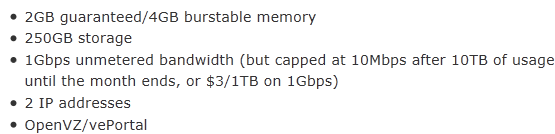
I have to say I really doubt how they could possibly offer this crazy amount of resources at this price. After all, 6.99 would perhaps cover the cost of 2IP + 2GB memory and nothing else. So, I decided to give it a shot myself to see how such a insane plan works.
General and Set Up
The origin of IPAP.CO is truly a mystery, besides a hidden WhoIs, the stuff only identify themselves by “IPAP CO. admin” and there were even, at one point, some speculations that the company is Iran-based, stir even further debates, until one of the “IPAP.CO admin” replied to say that all they have is an exchange office there.
Iranians or not, there is no politics on 96MB.com, just great and not-so-great VPS providers. From this aspect, I have to say IPAP.CO has improved somewhat since their first not-so-successful debut on the low end VPS world. The original design of their website was a free template, probably one of the most common ones you will see among low-end VPS providers, however I think they have learnt to invest a little bit more on their company and switched a template that is not very commonly seen. Although for other offers that they have put up before, it literally took them days, if not weeks, to set up the VPS, the provision for the SuperVPS was instant. My Paypal confirmation was sent at 10:47AM and the VPS was provisioned the very next minute, with root password masked by ***** for security reasons.
After getting some negative feedback for using Blesta initially, they have managed to switch to WHMCS for their billing management/customer support platform. It was pretty much standard set up with no SSL login, however IPAP has enabled controlling VPS in WHMCS platform.
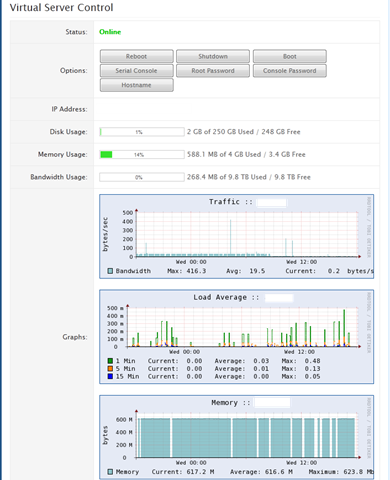
Although I have observed more and more hosts are using this feature, it still pleases me whenever I see something like this. Having SolusVM is obviously nice and powerful, however since most of the providers do not run SolusVM on port 80 and sometimes I can only access Internet via that port, it is a bit pain in the butt for me if I need to do some maintenance on the VPS during the day.
Interestingly, the SolusVM link on their VPS welcome email pointed to http://xxxx:2086, so you can not just click on the link and expect to get to your control panel. However, if you copy and paste the link, which is a non-secured IP address running on port 5353, you will see the SolusVM login.
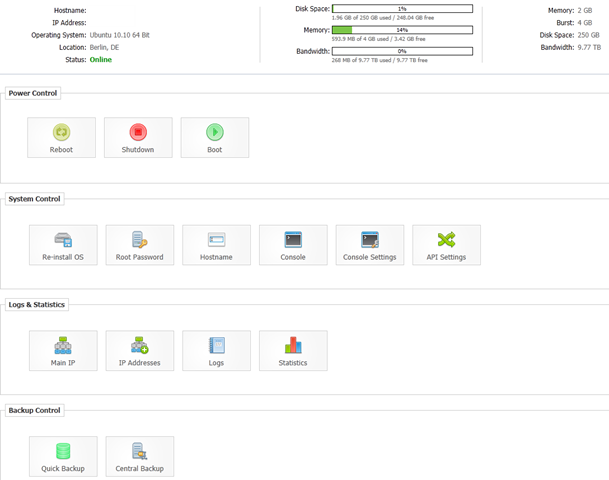
Other than seeing a crazy amount of resources, there is really no surprise factor, everything is standard SolusVM set up with manual rDNS and non-working Backups.
They have really few varieties of OS template available, just the major CentOS, Ubuntu and Debian templates:
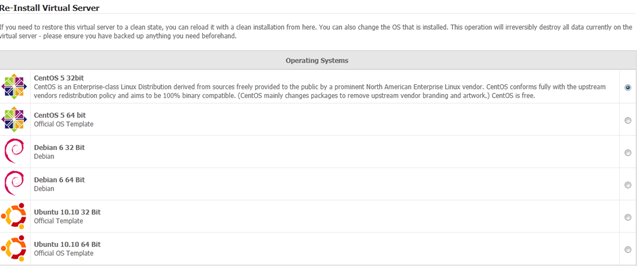
Even for Ubuntu templates, my favourite version, the 10.04 LTS is not available. Instead, I had to use 10.10, which seems to work perfectly.
Tests on the VPS
With an almost insane specifications, and a decent datacenter (although Hetzner one of the cheapest in Europe, if not the world, they provide pretty good services with good connections), I was hoping that this monster could put in some good performance. Needless to say, initially there were a lot of problems at the beginning when the offer first came. In fact, one of the IPAP.CO Admin (assuming they have multiple admins) has even posted an urgent help request after their VePortal was not working and they did not have too much luck getting help from VePortal.
So how are they doing right now?
The test VPS, as mentioned at the beginning of this post, has 2048MB of guaranteed memory and 4096MB of burstable memory, with 12 virtual cores of i7 980 CPU, the CPU list is so long that the screen was half-truncated, however for all 12 cores, the information is pretty much the same:
fpu_exception   : yes
cpuid level     : 11
wp              : yes
flags           : fpu vme de pse tsc msr pae mce cx8 apic sep mtrr pge
mca cmov pat pse36 clflush dts acpi mmx fxsr sse sse2 ss ht tm syscall
nx pdpe1gb rdtscp lm constant_tsc ida nonstop_tsc arat pni monitor
ds_cpl vmx est tm2 ssse3 cx16 xtpr sse4_1 sse4_2 popcnt lahf_lm
bogomips        : 6683.26
clflush size    : 64
cache_alignment : 64
address sizes   : 36 bits physical, 48 bits virtual
power management: [8]

processor       : 2
vendor_id       : GenuineIntel
cpu family      : 6
model           : 44
model name      : Intel(R) Core(TM) i7 CPU       X 980  @ 3.33GHz
stepping        : 2
cpu MHz         : 1112.797
cache size      : 12288 KB
physical id     : 0
siblings        : 12
core id         : 2
cpu cores       : 6
apicid          : 4
fpu             : yes
fpu_exception   : yes
cpuid level     : 11
wp              : yes
flags           : fpu vme de pse tsc msr pae mce cx8 apic sep mtrr pge
mca cmov pat pse36 clflush dts acpi mmx fxsr sse sse2 ss ht tm syscall
nx pdpe1gb rdtscp lm constant_tsc ida nonstop_tsc arat pni monitor
ds_cpl vmx est tm2 ssse3 cx16 xtpr sse4_1 sse4_2 popcnt lahf_lm
bogomips        : 6683.43
clflush size    : 64
cache_alignment : 64
address sizes   : 36 bits physical, 48 bits virtual
power management: [8]

processor       : 3
vendor_id       : GenuineIntel
cpu family      : 6
model           : 44
model name      : Intel(R) Core(TM) i7 CPU       X 980  @ 3.33GHz
stepping        : 2
cpu MHz         : 1112.797
cache size      : 12288 KB
physical id     : 0
siblings        : 12
core id         : 8
cpu cores       : 6
apicid          : 16
fpu             : yes
fpu_exception   : yes
cpuid level     : 11
wp              : yes
flags           : fpu vme de pse tsc msr pae mce cx8 apic sep mtrr pge
mca cmov pat pse36 clflush dts acpi mmx fxsr sse sse2 ss ht tm syscall
nx pdpe1gb rdtscp lm constant_tsc ida nonstop_tsc arat pni monitor
ds_cpl vmx est tm2 ssse3 cx16 xtpr sse4_1 sse4_2 popcnt lahf_lm
bogomips        : 6683.09
clflush size    : 64
cache_alignment : 64
address sizes   : 36 bits physical, 48 bits virtual
power management: [8]

processor       : 4
vendor_id       : GenuineIntel
cpu family      : 6
model           : 44
model name      : Intel(R) Core(TM) i7 CPU       X 980  @ 3.33GHz
stepping        : 2
cpu MHz         : 1112.797
cache size      : 12288 KB
physical id     : 0
siblings        : 12
core id         : 9
cpu cores       : 6
apicid          : 18
fpu             : yes
fpu_exception   : yes
cpuid level     : 11
wp              : yes
flags           : fpu vme de pse tsc msr pae mce cx8 apic sep mtrr pge
mca cmov pat pse36 clflush dts acpi mmx fxsr sse sse2 ss ht tm syscall
nx pdpe1gb rdtscp lm constant_tsc ida nonstop_tsc arat pni monitor
ds_cpl vmx est tm2 ssse3 cx16 xtpr sse4_1 sse4_2 popcnt lahf_lm
bogomips        : 6683.15
clflush size    : 64
cache_alignment : 64
address sizes   : 36 bits physical, 48 bits virtual
power management: [8]

processor       : 5
vendor_id       : GenuineIntel
cpu family      : 6
model           : 44
model name      : Intel(R) Core(TM) i7 CPU       X 980  @ 3.33GHz
stepping        : 2
cpu MHz         : 1112.797
cache size      : 12288 KB
physical id     : 0
siblings        : 12
core id         : 10
cpu cores       : 6
apicid          : 20
fpu             : yes
fpu_exception   : yes
cpuid level     : 11
wp              : yes
flags           : fpu vme de pse tsc msr pae mce cx8 apic sep mtrr pge
mca cmov pat pse36 clflush dts acpi mmx fxsr sse sse2 ss ht tm syscall
nx pdpe1gb rdtscp lm constant_tsc ida nonstop_tsc arat pni monitor
ds_cpl vmx est tm2 ssse3 cx16 xtpr sse4_1 sse4_2 popcnt lahf_lm
bogomips        : 6683.08
clflush size    : 64
cache_alignment : 64
address sizes   : 36 bits physical, 48 bits virtual
power management: [8]

processor       : 6
vendor_id       : GenuineIntel
cpu family      : 6
model           : 44
model name      : Intel(R) Core(TM) i7 CPU       X 980  @ 3.33GHz
stepping        : 2
cpu MHz         : 1112.797
cache size      : 12288 KB
physical id     : 0
siblings        : 12
core id         : 0
cpu cores       : 6
apicid          : 1
fpu             : yes
fpu_exception   : yes
cpuid level     : 11
wp              : yes
flags           : fpu vme de pse tsc msr pae mce cx8 apic sep mtrr pge
mca cmov pat pse36 clflush dts acpi mmx fxsr sse sse2 ss ht tm syscall
nx pdpe1gb rdtscp lm constant_tsc ida nonstop_tsc arat pni monitor
ds_cpl vmx est tm2 ssse3 cx16 xtpr sse4_1 sse4_2 popcnt lahf_lm
bogomips        : 6683.14
clflush size    : 64
cache_alignment : 64
address sizes   : 36 bits physical, 48 bits virtual
power management: [8]

processor       : 7
vendor_id       : GenuineIntel
cpu family      : 6
model           : 44
model name      : Intel(R) Core(TM) i7 CPU       X 980  @ 3.33GHz
stepping        : 2
cpu MHz         : 1112.797
cache size      : 12288 KB
physical id     : 0
siblings        : 12
core id         : 1
cpu cores       : 6
apicid          : 3
fpu             : yes
fpu_exception   : yes
cpuid level     : 11
wp              : yes
flags           : fpu vme de pse tsc msr pae mce cx8 apic sep mtrr pge
mca cmov pat pse36 clflush dts acpi mmx fxsr sse sse2 ss ht tm syscall
nx pdpe1gb rdtscp lm constant_tsc ida nonstop_tsc arat pni monitor
ds_cpl vmx est tm2 ssse3 cx16 xtpr sse4_1 sse4_2 popcnt lahf_lm
bogomips        : 6683.21
clflush size    : 64
cache_alignment : 64
address sizes   : 36 bits physical, 48 bits virtual
power management: [8]

processor       : 8
vendor_id       : GenuineIntel
cpu family      : 6
model           : 44
model name      : Intel(R) Core(TM) i7 CPU       X 980  @ 3.33GHz
stepping        : 2
cpu MHz         : 1112.797
cache size      : 12288 KB
physical id     : 0
siblings        : 12
core id         : 2
cpu cores       : 6
apicid          : 5
fpu             : yes
fpu_exception   : yes
cpuid level     : 11
wp              : yes
flags           : fpu vme de pse tsc msr pae mce cx8 apic sep mtrr pge
mca cmov pat pse36 clflush dts acpi mmx fxsr sse sse2 ss ht tm syscall
nx pdpe1gb rdtscp lm constant_tsc ida nonstop_tsc arat pni monitor
ds_cpl vmx est tm2 ssse3 cx16 xtpr sse4_1 sse4_2 popcnt lahf_lm
bogomips        : 6683.46
clflush size    : 64
cache_alignment : 64
address sizes   : 36 bits physical, 48 bits virtual
power management: [8]

processor       : 9
vendor_id       : GenuineIntel
cpu family      : 6
model           : 44
model name      : Intel(R) Core(TM) i7 CPU       X 980  @ 3.33GHz
stepping        : 2
cpu MHz         : 1112.797
cache size      : 12288 KB
physical id     : 0
siblings        : 12
core id         : 8
cpu cores       : 6
apicid          : 17
fpu             : yes
fpu_exception   : yes
cpuid level     : 11
wp              : yes
flags           : fpu vme de pse tsc msr pae mce cx8 apic sep mtrr pge
mca cmov pat pse36 clflush dts acpi mmx fxsr sse sse2 ss ht tm syscall
nx pdpe1gb rdtscp lm constant_tsc ida nonstop_tsc arat pni monitor
ds_cpl vmx est tm2 ssse3 cx16 xtpr sse4_1 sse4_2 popcnt lahf_lm
bogomips        : 6683.19
clflush size    : 64
cache_alignment : 64
address sizes   : 36 bits physical, 48 bits virtual
power management: [8]

processor       : 10
vendor_id       : GenuineIntel
cpu family      : 6
model           : 44
model name      : Intel(R) Core(TM) i7 CPU       X 980  @ 3.33GHz
stepping        : 2
cpu MHz         : 1112.797
cache size      : 12288 KB
physical id     : 0
siblings        : 12
core id         : 9
cpu cores       : 6
apicid          : 19
fpu             : yes
fpu_exception   : yes
cpuid level     : 11
wp              : yes
flags           : fpu vme de pse tsc msr pae mce cx8 apic sep mtrr pge
mca cmov pat pse36 clflush dts acpi mmx fxsr sse sse2 ss ht tm syscall
nx pdpe1gb rdtscp lm constant_tsc ida nonstop_tsc arat pni monitor
ds_cpl vmx est tm2 ssse3 cx16 xtpr sse4_1 sse4_2 popcnt lahf_lm
bogomips        : 6683.19
clflush size    : 64
cache_alignment : 64
address sizes   : 36 bits physical, 48 bits virtual
power management: [8]

processor       : 11
vendor_id       : GenuineIntel
cpu family      : 6
model           : 44
model name      : Intel(R) Core(TM) i7 CPU       X 980  @ 3.33GHz
stepping        : 2
cpu MHz         : 1112.797
cache size      : 12288 KB
physical id     : 0
siblings        : 12
core id         : 10
cpu cores       : 6
apicid          : 21
fpu             : yes
fpu_exception   : yes
cpuid level     : 11
wp              : yes
flags           : fpu vme de pse tsc msr pae mce cx8 apic sep mtrr pge
mca cmov pat pse36 clflush dts acpi mmx fxsr sse sse2 ss ht tm syscall
nx pdpe1gb rdtscp lm constant_tsc ida nonstop_tsc arat pni monitor
ds_cpl vmx est tm2 ssse3 cx16 xtpr sse4_1 sse4_2 popcnt lahf_lm
bogomips        : 6683.19
clflush size    : 64
cache_alignment : 64
address sizes   : 36 bits physical, 48 bits virtual
power management: [8]
VZFree, surprisingly, did not show too much sign of heavy overselling:
vzfree
            Total     Used     Free
Kernel:   2048.00M    6.90M 2041.10M
Allocate: 4096.00M  567.36M 3528.64M (2048M Guaranteed)
Commit:   2048.00M  126.13M 1921.87M (21.0% of Allocated)
Swap:                 0.00M          (0.0% of Committed)
Even with a full LAMP installed from apt with no optimization at all, the box still showed a pretty good RAM usage:
free -m
            total       used       free     shared    buffers     cached
Mem:          4096        566       3529          0          0          0
-/+ buffers/cache:        566       3529
Swap:            0          0          0
And the full top output from when the LAMP stack is installed:
top - 00:39:28 up 2 days,  5:50,  1 user,  load average: 0.38, 0.18, 0.07
Tasks:  19 total,   2 running,  17 sleeping,   0 stopped,   0 zombie
Cpu(s):  0.0%us,  0.0%sy,  0.0%ni,100.0%id,  0.0%wa,  0.0%hi,  0.0%si,  0.0%st
Mem:   4194304k total,   580020k used,  3614284k free,        0k buffers
Swap:        0k total,        0k used,        0k free,        0k cached

 PID USER      PR  NI  VIRT  RES  SHR S %CPU %MEM    TIME+  COMMAND
 9901 www-data  19   0  415m  40m 4044 S    0  1.0   0:02.49 apache2
 7500 mysql     23   6  249m  25m 7272 S    0  0.6   0:00.57 mysqld
 5351 bind      23   0  216m  24m 2076 S    0  0.6   0:00.00 named
 9925 www-data  16   0  187m  17m 4556 S    0  0.4   0:00.08 apache2
 9897 root      18   0  178m 9680 4452 S    0  0.2   0:00.16 apache2
 9930 www-data  18   0  180m 9484 2312 S    0  0.2   0:00.00 apache2
 9934 www-data  18   0  180m 9472 2308 S    0  0.2   0:00.00 apache2
 9935 www-data  16   0  180m 9472 2308 S    0  0.2   0:00.00 apache2
 9936 www-data  15   0  180m 9472 2308 S    0  0.2   0:00.00 apache2
22383 root      18   0 70628 3380 2632 R    0  0.1   0:00.02 sshd
 5435 root      15   0 49268 2684 2124 S    0  0.1   0:00.09 sshd
 1655 root      24   8 72080 2092  532 S    0  0.0   0:01.20 sendmail-mta
22394 root      15   0 17856 1928 1444 S    0  0.0   0:00.00 bash
   1 root      15   0 23324 1608 1296 S    0  0.0   0:00.10 init
22414 root      15   0 19096 1316 1064 R    0  0.0   0:00.00 top
 1141 root      15   0 21084 1020  784 S    0  0.0   0:00.01 cron
 5737 root      25   0 19528  976  768 S    0  0.0   0:00.00 xinetd
VMStat indicated tat the VPS was relatively lightly used when the tests are done:
vmstat
procs -----------memory---------- ---swap-- -----io---- -system-- ----cpu----
 r  b   swpd   free   buff  cache   si   so    bi    bo   in   cs us sy id wa
 0  1      0 3609300      0      0    0    0     0     0    0   17  0  0 100  0
This was the uptime output when I originally did the data collection process, which showed the node was pretty heavily used:
 uptime
 00:40:54 up 2 days,  5:52,  1 user,  load average: 0.17, 0.16, 0.07
As I was typing this post, however, I decided to give it another shot just for curiosity sake:
 uptime
 04:48:31 up 13 days,  9:59,  1 user,  load average: 0.08, 0.02, 0.01
As you can see, the usage is still pretty high, however has come down quite a bit, presumably due to less users doing heavy lifting to test the servers than initially.
Results of time sync did not sounds too promising:
time sync

real    0m7.347s
user    0m0.000s
sys     0m0.002s
Beancounters shows little restrictions:
cat /proc/user_beancounters
Version: 2.5
       uid  resource                     held              maxheld              barrier                limit              failcnt
     2439:  kmemsize                  7566234              9166875           2147483646           2147483646                    0
            lockedpages                     0                    4               999999               999999                    0
            privvmpages                152095               168013              1048576              1048576                    0
            shmpages                      658                 1362               524288               524288                    0
            dummy                           0                    0                    0                    0                    0
            numproc                        67                   74               999999               999999                    0
            physpages                   35998                40637                    0           2147483647                    0
            vmguarpages                     0                    0               524288           2147483647                    0
            oomguarpages                35998                40637               524288           2147483647                    0
            numtcpsock                     14                   25              7999992              7999992                    0
            numflock                        6                   12               999999               999999                    0
            numpty                          1                    2               500000               500000                    0
            numsiginfo                      0                    3               999999               999999                    0
            tcpsndbuf                  245056               550168            214748160            396774400                    0
            tcprcvbuf                  229376             10335608            214748160            396774400                    0
            othersockbuf                23280                78024            214748160            396774400                    0
            dgramrcvbuf                     0                16944            214748160            396774400                    0
            numothersock                   16                   51              7999992              7999992                    0
            dcachesize                      0                    0           2147483646           2147483646                    0
            numfile                      1475                 2300             23999976             23999976                    0
            dummy                           0                    0                    0                    0                    0
            dummy                           0                    0                    0                    0                    0
            dummy                           0                    0                    0                    0                    0
            numiptent                      18                   18               999999               999999                    0
And both df -i and df -h output seems to show that at least the disk is not that heavily oversold:
 df -i
Filesystem            Inodes   IUsed   IFree IUse% Mounted on
/dev/simfs           131072000   39060 131032940    1% /
 df -h
Filesystem            Size  Used Avail Use% Mounted on
/dev/simfs            250G  899M  250G   1% /
Disk I/O was another interesting test, however, it was particularly weird (And if you have any reasons behind it, feel free to comment on), because dd actually gets better and better every time I run it, the first three are running one after another and the last two ran as I typed:
 dd if=/dev/zero of=test bs=64k count=16k conv=fdatasync
16384+0 records in
16384+0 records out
1073741824 bytes (1.1 GB) copied, 72.5646 s, 14.8 MB/s

dd if=/dev/zero of=test bs=64k count=16k conv=fdatasync
16384+0 records in
16384+0 records out
1073741824 bytes (1.1 GB) copied, 44.078 s, 24.4 MB/s

dd if=/dev/zero of=test bs=64k count=16k conv=fdatasync
16384+0 records in
16384+0 records out
1073741824 bytes (1.1 GB) copied, 41.7715 s, 25.7 MB/s

dd if=/dev/zero of=test bs=64k count=16k conv=fdatasync
16384+0 records in
16384+0 records out
1073741824 bytes (1.1 GB) copied, 26.8778 s, 39.9 MB/s

dd if=/dev/zero of=test bs=64k count=16k conv=fdatasync
16384+0 records in
16384+0 records out
1073741824 bytes (1.1 GB) copied, 13.7178 s, 78.3 MB/s
Although it is still low compare to many of the VPS providers, it has at least go from unusable to somewhat usable.
Download tests showed some pretty decent results:
wget http://cachefly.cachefly.net/100mb.test
--2011-06-25 00:38:10--  http://cachefly.cachefly.net/100mb.test
Resolving cachefly.cachefly.net... 140.99.93.175, 140.99.93.175
Connecting to cachefly.cachefly.net|140.99.93.175|:80... connected.
HTTP request sent, awaiting response... 200 OK
Length: 104857600 (100M) [application/octet-stream]
Saving to: `100mb.test'

100%[======================================>] 104,857,600 29.8M/s   in 3.4s

2011-06-25 00:38:14 (29.8 MB/s) - `100mb.test' saved [104857600/104857600]
And running it again while typing this article showed the download speed did not slow down a lot after a while, which seems to contradict a popular belief that the download speed will be capped if the entire hardware node hit 10TB every month:
 wget http://cachefly.cachefly.net/100mb.test
--2011-07-06 05:49:36--  http://cachefly.cachefly.net/100mb.test
Resolving cachefly.cachefly.net... 205.234.175.175
Connecting to cachefly.cachefly.net|205.234.175.175|:80... connected.
HTTP request sent, awaiting response... 200 OK
Length: 104857600 (100M) [application/octet-stream]
Saving to: `100mb.test'

100%[======================================>] 104,857,600 43.1M/s   in 2.3s

2011-07-06 05:49:39 (43.1 MB/s) - `100mb.test' saved [104857600/104857600]
The download speed are equally impressive. In fact, download results to BuyVM’s VPS in Fremont, CA, is probably one of the best I have observed on the BuyVM box:
wget 46.4.127.16/upfiles/100mb.test
--2011-07-06 05:53:26--  http://46.4.127.16/upfiles/100mb.test
Connecting to 46.4.127.16:80... connected.
HTTP request sent, awaiting response... 200 OK
Length: 104857600 (100M) [text/plain]
Saving to: `100mb.test'

100%[======================================>] 104,857,600 11.4M/s   in 13s

2011-07-06 05:53:40 (7.73 MB/s) - `100mb.test' saved [104857600/104857600]
On Nix Communication’s VPS in Montreal, Canada, the results are similar:
wget http://46.4.127.16/upfiles/100mb.test
--2011-07-05 21:58:27--  http://46.4.127.16/upfiles/100mb.test
Connecting to 46.4.127.16:80... connected.
HTTP request sent, awaiting response... 200 OK
Length: 104857600 (100M) [text/plain]
Saving to: `100mb.test'

100%[======================================>] 104,857,600 10.3M/s   in 12s

2011-07-05 21:58:40 (8.19 MB/s) - `100mb.test' saved [104857600/104857600]
Similar results showed from a QualityServers from Tempa, Florida
 wget http://46.4.127.16/upfiles/100mb.test
--2011-07-06 05:59:55--  http://46.4.127.16/upfiles/100mb.test
Connecting to 46.4.127.16:80... connected.
HTTP request sent, awaiting response... 200 OK
Length: 104857600 (100M) [text/plain]
Saving to: `100mb.test'

100%[======================================>] 104,857,600 8.42M/s   in 14s

2011-07-06 06:00:10 (7.06 MB/s) - `100mb.test' saved [104857600/104857600]
I was sort of expecting my Quickweb VPS in London, UK would give a pretty good speed since both are in Europe, and it looks like it is definitely the case!
wget http://46.4.127.16/upfiles/100mb.test
--2011-07-05 22:34:53--  http://46.4.127.16/upfiles/100mb.test
Connecting to 46.4.127.16:80... connected.
HTTP request sent, awaiting response... 200 OK
Length: 104857600 (100M) [text/plain]
Saving to: `100mb.test'

100%[======================================>] 104,857,600 57.7M/s   in 1.7s

2011-07-05 22:34:55 (57.7 MB/s) - `100mb.test' saved [104857600/104857600]
This is indeed a truly impressive upload speed!
Finally the UnixBench results, which, given the fact that it has 12 cores running, offers little surprise factor:
   #    #  #    #  #  #    #          #####   ######  #    #   ####   #    #
   #    #  ##   #  #   #  #           #    #  #       ##   #  #    #  #    #
   #    #  # #  #  #    ##            #####   #####   # #  #  #       ######
   #    #  #  # #  #    ##            #    #  #       #  # #  #       #    #
   #    #  #   ##  #   #  #           #    #  #       #   ##  #    #  #    #
    ####   #    #  #  #    #          #####   ######  #    #   ####   #    #

   Version 5.1.3                      Based on the Byte Magazine Unix Benchmark

   Multi-CPU version                  Version 5 revisions by Ian Smith,
                                      Sunnyvale, CA, USA
   January 13, 2011                   johantheghost at yahoo period com


1 x Dhrystone 2 using register variables  1 2 3 4 5 6 7 8 9 10

1 x Double-Precision Whetstone  1 2 3 4 5 6 7 8 9 10

1 x Execl Throughput  1 2 3

1 x File Copy 1024 bufsize 2000 maxblocks  1 2 3

1 x File Copy 256 bufsize 500 maxblocks  1 2 3

1 x File Copy 4096 bufsize 8000 maxblocks  1 2 3

1 x Pipe Throughput  1 2 3 4 5 6 7 8 9 10

1 x Pipe-based Context Switching  1 2 3 4 5 6 7 8 9 10

1 x Process Creation  1 2 3

1 x System Call Overhead  1 2 3 4 5 6 7 8 9 10

1 x Shell Scripts (1 concurrent)  1 2 3

1 x Shell Scripts (8 concurrent)  1 2 3

12 x Dhrystone 2 using register variables  1 2 3 4 5 6 7 8 9 10

12 x Double-Precision Whetstone  1 2 3 4 5 6 7 8 9 10

12 x Execl Throughput  1 2 3

12 x File Copy 1024 bufsize 2000 maxblocks  1 2 3

12 x File Copy 256 bufsize 500 maxblocks  1 2 3

12 x File Copy 4096 bufsize 8000 maxblocks  1 2 3

12 x Pipe Throughput  1 2 3 4 5 6 7 8 9 10

12 x Pipe-based Context Switching  1 2 3 4 5 6 7 8 9 10

12 x Process Creation  1 2 3

12 x System Call Overhead  1 2 3 4 5 6 7 8 9 10

12 x Shell Scripts (1 concurrent)  1 2 3

12 x Shell Scripts (8 concurrent)  1 2 3

========================================================================
   BYTE UNIX Benchmarks (Version 5.1.3)

   System: : GNU/Linux
   OS: GNU/Linux -- 2.6.18-238.9.1.el5.028stab089.1 -- #1 SMP Thu Apr 14 14:06:0                                                                                                                                                             1 MSD 2011
   Machine: x86_64 (unknown)
   Language: en_US.utf8 (charmap="ANSI_X3.4-1968", collate="ANSI_X3.4-1968")
   CPU 0: Intel(R) Core(TM) i7 CPU X 980 @ 3.33GHz (6683.3 bogomips)
          Hyper-Threading, x86-64, MMX, Physical Address Ext, SYSENTER/SYSEXIT,                                                                                                                                                              SYSCALL/SYSRET, Intel virtualization
   CPU 1: Intel(R) Core(TM) i7 CPU X 980 @ 3.33GHz (6683.3 bogomips)
          Hyper-Threading, x86-64, MMX, Physical Address Ext, SYSENTER/SYSEXIT,                                                                                                                                                              SYSCALL/SYSRET, Intel virtualization
   CPU 2: Intel(R) Core(TM) i7 CPU X 980 @ 3.33GHz (6683.4 bogomips)
          Hyper-Threading, x86-64, MMX, Physical Address Ext, SYSENTER/SYSEXIT,                                                                                                                                                              SYSCALL/SYSRET, Intel virtualization
   CPU 3: Intel(R) Core(TM) i7 CPU X 980 @ 3.33GHz (6683.1 bogomips)
          Hyper-Threading, x86-64, MMX, Physical Address Ext, SYSENTER/SYSEXIT,                                                                                                                                                              SYSCALL/SYSRET, Intel virtualization
   CPU 4: Intel(R) Core(TM) i7 CPU X 980 @ 3.33GHz (6683.1 bogomips)
          Hyper-Threading, x86-64, MMX, Physical Address Ext, SYSENTER/SYSEXIT,                                                                                                                                                              SYSCALL/SYSRET, Intel virtualization
   CPU 5: Intel(R) Core(TM) i7 CPU X 980 @ 3.33GHz (6683.1 bogomips)
          Hyper-Threading, x86-64, MMX, Physical Address Ext, SYSENTER/SYSEXIT,                                                                                                                                                              SYSCALL/SYSRET, Intel virtualization
   CPU 6: Intel(R) Core(TM) i7 CPU X 980 @ 3.33GHz (6683.1 bogomips)
          Hyper-Threading, x86-64, MMX, Physical Address Ext, SYSENTER/SYSEXIT,                                                                                                                                                              SYSCALL/SYSRET, Intel virtualization
   CPU 7: Intel(R) Core(TM) i7 CPU X 980 @ 3.33GHz (6683.2 bogomips)
          Hyper-Threading, x86-64, MMX, Physical Address Ext, SYSENTER/SYSEXIT,                                                                                                                                                              SYSCALL/SYSRET, Intel virtualization
   CPU 8: Intel(R) Core(TM) i7 CPU X 980 @ 3.33GHz (6683.5 bogomips)
          Hyper-Threading, x86-64, MMX, Physical Address Ext, SYSENTER/SYSEXIT,                                                                                                                                                              SYSCALL/SYSRET, Intel virtualization
   CPU 9: Intel(R) Core(TM) i7 CPU X 980 @ 3.33GHz (6683.2 bogomips)
          Hyper-Threading, x86-64, MMX, Physical Address Ext, SYSENTER/SYSEXIT,                                                                                                                                                              SYSCALL/SYSRET, Intel virtualization
   CPU 10: Intel(R) Core(TM) i7 CPU X 980 @ 3.33GHz (6683.2 bogomips)
          Hyper-Threading, x86-64, MMX, Physical Address Ext, SYSENTER/SYSEXIT,                                                                                                                                                              SYSCALL/SYSRET, Intel virtualization
   CPU 11: Intel(R) Core(TM) i7 CPU X 980 @ 3.33GHz (6683.2 bogomips)
          Hyper-Threading, x86-64, MMX, Physical Address Ext, SYSENTER/SYSEXIT,                                                                                                                                                              SYSCALL/SYSRET, Intel virtualization
   07:14:21 up 5 days, 12:25,  1 user,  load average: 0.15, 0.09, 0.03; runlevel                                                                                                                                                              2

------------------------------------------------------------------------
Benchmark Run: Tue Jun 28 2011 07:14:21 - 07:43:39
12 CPUs in system; running 1 parallel copy of tests

Dhrystone 2 using register variables       27841016.3 lps   (10.0 s, 7 samples)
Double-Precision Whetstone                     3875.9 MWIPS (10.0 s, 7 samples)
Execl Throughput                               3609.4 lps   (29.6 s, 2 samples)
File Copy 1024 bufsize 2000 maxblocks        532745.6 KBps  (30.0 s, 2 samples)
File Copy 256 bufsize 500 maxblocks          166474.7 KBps  (30.0 s, 2 samples)
File Copy 4096 bufsize 8000 maxblocks       1104785.9 KBps  (30.0 s, 2 samples)
Pipe Throughput                             1222951.8 lps   (10.0 s, 7 samples)
Pipe-based Context Switching                 143402.2 lps   (10.0 s, 7 samples)
Process Creation                               9387.3 lps   (30.0 s, 2 samples)
Shell Scripts (1 concurrent)                   5545.4 lpm   (60.0 s, 2 samples)
Shell Scripts (8 concurrent)                   2246.4 lpm   (60.0 s, 2 samples)
System Call Overhead                        1100102.3 lps   (10.0 s, 7 samples)

System Benchmarks Index Values               BASELINE       RESULT    INDEX
Dhrystone 2 using register variables         116700.0   27841016.3   2385.7
Double-Precision Whetstone                       55.0       3875.9    704.7
Execl Throughput                                 43.0       3609.4    839.4
File Copy 1024 bufsize 2000 maxblocks          3960.0     532745.6   1345.3
File Copy 256 bufsize 500 maxblocks            1655.0     166474.7   1005.9
File Copy 4096 bufsize 8000 maxblocks          5800.0    1104785.9   1904.8
Pipe Throughput                               12440.0    1222951.8    983.1
Pipe-based Context Switching                   4000.0     143402.2    358.5
Process Creation                                126.0       9387.3    745.0
Shell Scripts (1 concurrent)                     42.4       5545.4   1307.9
Shell Scripts (8 concurrent)                      6.0       2246.4   3744.1
System Call Overhead                          15000.0    1100102.3    733.4
                                                                   ========
System Benchmarks Index Score                                        1108.2

------------------------------------------------------------------------
Benchmark Run: Tue Jun 28 2011 07:43:39 - 08:19:24
12 CPUs in system; running 12 parallel copies of tests

Dhrystone 2 using register variables       93015044.6 lps   (10.0 s, 7 samples)
Double-Precision Whetstone                    44007.1 MWIPS (10.0 s, 7 samples)
Execl Throughput                              12641.0 lps   (29.3 s, 2 samples)
File Copy 1024 bufsize 2000 maxblocks        570411.2 KBps  (30.0 s, 2 samples)
File Copy 256 bufsize 500 maxblocks          153741.7 KBps  (30.0 s, 2 samples)
File Copy 4096 bufsize 8000 maxblocks       1160426.7 KBps  (30.0 s, 2 samples)
Pipe Throughput                             4175135.9 lps   (10.0 s, 7 samples)
Pipe-based Context Switching                1207130.2 lps   (10.0 s, 7 samples)
Process Creation                              35322.7 lps   (30.0 s, 2 samples)
Shell Scripts (1 concurrent)                  16586.8 lpm   (60.0 s, 2 samples)
Shell Scripts (8 concurrent)                   2730.7 lpm   (60.1 s, 2 samples)
System Call Overhead                        3709574.4 lps   (10.0 s, 7 samples)

System Benchmarks Index Values               BASELINE       RESULT    INDEX
Dhrystone 2 using register variables         116700.0   93015044.6   7970.4
Double-Precision Whetstone                       55.0      44007.1   8001.3
Execl Throughput                                 43.0      12641.0   2939.8
File Copy 1024 bufsize 2000 maxblocks          3960.0     570411.2   1440.4
File Copy 256 bufsize 500 maxblocks            1655.0     153741.7    929.0
File Copy 4096 bufsize 8000 maxblocks          5800.0    1160426.7   2000.7
Pipe Throughput                               12440.0    4175135.9   3356.2
Pipe-based Context Switching                   4000.0    1207130.2   3017.8
Process Creation                                126.0      35322.7   2803.4
Shell Scripts (1 concurrent)                     42.4      16586.8   3912.0
Shell Scripts (8 concurrent)                      6.0       2730.7   4551.2
System Call Overhead                          15000.0    3709574.4   2473.0
                                                                   ========
System Benchmarks Index Score                                        3041.8
As you may have guessed, I decided to run the test one more time as I am typing, again, just for curiosity sake:
   #    #  #    #  #  #    #          #####   ######  #    #   ####   #    #
   #    #  ##   #  #   #  #           #    #  #       ##   #  #    #  #    #
   #    #  # #  #  #    ##            #####   #####   # #  #  #       ######
   #    #  #  # #  #    ##            #    #  #       #  # #  #       #    #
   #    #  #   ##  #   #  #           #    #  #       #   ##  #    #  #    #
    ####   #    #  #  #    #          #####   ######  #    #   ####   #    #

   Version 5.1.3                      Based on the Byte Magazine Unix Benchmark

   Multi-CPU version                  Version 5 revisions by Ian Smith,
                                      Sunnyvale, CA, USA
   January 13, 2011                   johantheghost at yahoo period com


1 x Dhrystone 2 using register variables  1 2 3 4 5 6 7 8 9 10

1 x Double-Precision Whetstone  1 2 3 4 5 6 7 8 9 10

1 x Execl Throughput  1 2 3

1 x File Copy 1024 bufsize 2000 maxblocks  1 2 3

1 x File Copy 256 bufsize 500 maxblocks  1 2 3

1 x File Copy 4096 bufsize 8000 maxblocks  1 2 3

1 x Pipe Throughput  1 2 3 4 5 6 7 8 9 10

1 x Pipe-based Context Switching  1 2 3 4 5 6 7 8 9 10

1 x Process Creation  1 2 3

1 x System Call Overhead  1 2 3 4 5 6 7 8 9 10

1 x Shell Scripts (1 concurrent)  1 2 3

1 x Shell Scripts (8 concurrent)  1 2 3

12 x Dhrystone 2 using register variables  1 2 3 4 5 6 7 8 9 10

12 x Double-Precision Whetstone  1 2 3 4 5 6 7 8 9 10

12 x Execl Throughput  1 2 3

12 x File Copy 1024 bufsize 2000 maxblocks  1 2 3

12 x File Copy 256 bufsize 500 maxblocks  1 2 3

12 x File Copy 4096 bufsize 8000 maxblocks  1 2 3

12 x Pipe Throughput  1 2 3 4 5 6 7 8 9 10

12 x Pipe-based Context Switching  1 2 3 4 5 6 7 8 9 10

12 x Process Creation  1 2 3

12 x System Call Overhead  1 2 3 4 5 6 7 8 9 10

12 x Shell Scripts (1 concurrent)  1 2 3

12 x Shell Scripts (8 concurrent)  1 2 3

========================================================================
   BYTE UNIX Benchmarks (Version 5.1.3)

   System: : GNU/Linux
   OS: GNU/Linux -- 2.6.18-238.9.1.el5.028stab089.1 -- #1 SMP Thu Apr 14 14:06:01 MSD 2011
   Machine: x86_64 (unknown)
   Language: en_US.utf8 (charmap="ANSI_X3.4-1968", collate="ANSI_X3.4-1968")
   CPU 0: Intel(R) Core(TM) i7 CPU X 980 @ 3.33GHz (6683.3 bogomips)
          Hyper-Threading, x86-64, MMX, Physical Address Ext, SYSENTER/SYSEXIT, SYSCALL/SYSRET, Intel virtualization
   CPU 1: Intel(R) Core(TM) i7 CPU X 980 @ 3.33GHz (6683.3 bogomips)
          Hyper-Threading, x86-64, MMX, Physical Address Ext, SYSENTER/SYSEXIT, SYSCALL/SYSRET, Intel virtualization
   CPU 2: Intel(R) Core(TM) i7 CPU X 980 @ 3.33GHz (6683.4 bogomips)
          Hyper-Threading, x86-64, MMX, Physical Address Ext, SYSENTER/SYSEXIT, SYSCALL/SYSRET, Intel virtualization
   CPU 3: Intel(R) Core(TM) i7 CPU X 980 @ 3.33GHz (6683.1 bogomips)
          Hyper-Threading, x86-64, MMX, Physical Address Ext, SYSENTER/SYSEXIT, SYSCALL/SYSRET, Intel virtualization
   CPU 4: Intel(R) Core(TM) i7 CPU X 980 @ 3.33GHz (6683.1 bogomips)
          Hyper-Threading, x86-64, MMX, Physical Address Ext, SYSENTER/SYSEXIT, SYSCALL/SYSRET, Intel virtualization
   CPU 5: Intel(R) Core(TM) i7 CPU X 980 @ 3.33GHz (6683.1 bogomips)
          Hyper-Threading, x86-64, MMX, Physical Address Ext, SYSENTER/SYSEXIT, SYSCALL/SYSRET, Intel virtualization
   CPU 6: Intel(R) Core(TM) i7 CPU X 980 @ 3.33GHz (6683.1 bogomips)
          Hyper-Threading, x86-64, MMX, Physical Address Ext, SYSENTER/SYSEXIT, SYSCALL/SYSRET, Intel virtualization
   CPU 7: Intel(R) Core(TM) i7 CPU X 980 @ 3.33GHz (6683.2 bogomips)
          Hyper-Threading, x86-64, MMX, Physical Address Ext, SYSENTER/SYSEXIT, SYSCALL/SYSRET, Intel virtualization
   CPU 8: Intel(R) Core(TM) i7 CPU X 980 @ 3.33GHz (6683.5 bogomips)
          Hyper-Threading, x86-64, MMX, Physical Address Ext, SYSENTER/SYSEXIT, SYSCALL/SYSRET, Intel virtualization
   CPU 9: Intel(R) Core(TM) i7 CPU X 980 @ 3.33GHz (6683.2 bogomips)
          Hyper-Threading, x86-64, MMX, Physical Address Ext, SYSENTER/SYSEXIT, SYSCALL/SYSRET, Intel virtualization
   CPU 10: Intel(R) Core(TM) i7 CPU X 980 @ 3.33GHz (6683.2 bogomips)
          Hyper-Threading, x86-64, MMX, Physical Address Ext, SYSENTER/SYSEXIT, SYSCALL/SYSRET, Intel virtualization
   CPU 11: Intel(R) Core(TM) i7 CPU X 980 @ 3.33GHz (6683.2 bogomips)
          Hyper-Threading, x86-64, MMX, Physical Address Ext, SYSENTER/SYSEXIT, SYSCALL/SYSRET, Intel virtualization
   05:45:24 up 13 days, 10:56,  1 user,  load average: 0.08, 0.02, 0.01; runlevel 2

------------------------------------------------------------------------
Benchmark Run: Wed Jul 06 2011 05:45:25 - 06:15:39
12 CPUs in system; running 1 parallel copy of tests

Dhrystone 2 using register variables       27566964.1 lps   (10.0 s, 7 samples)
Double-Precision Whetstone                     3896.0 MWIPS (9.9 s, 7 samples)
Execl Throughput                               3796.0 lps   (29.6 s, 2 samples)
File Copy 1024 bufsize 2000 maxblocks        466694.4 KBps  (30.0 s, 2 samples)
File Copy 256 bufsize 500 maxblocks          156305.3 KBps  (30.0 s, 2 samples)
File Copy 4096 bufsize 8000 maxblocks        902497.0 KBps  (30.0 s, 2 samples)
Pipe Throughput                             1244689.6 lps   (10.0 s, 7 samples)
Pipe-based Context Switching                 156284.6 lps   (10.0 s, 7 samples)
Process Creation                               9635.0 lps   (30.0 s, 2 samples)
Shell Scripts (1 concurrent)                   4789.3 lpm   (60.0 s, 2 samples)
Shell Scripts (8 concurrent)                   1821.1 lpm   (60.0 s, 2 samples)
System Call Overhead                        1104575.5 lps   (10.0 s, 7 samples)

System Benchmarks Index Values               BASELINE       RESULT    INDEX
Dhrystone 2 using register variables         116700.0   27566964.1   2362.2
Double-Precision Whetstone                       55.0       3896.0    708.4
Execl Throughput                                 43.0       3796.0    882.8
File Copy 1024 bufsize 2000 maxblocks          3960.0     466694.4   1178.5
File Copy 256 bufsize 500 maxblocks            1655.0     156305.3    944.4
File Copy 4096 bufsize 8000 maxblocks          5800.0     902497.0   1556.0
Pipe Throughput                               12440.0    1244689.6   1000.6
Pipe-based Context Switching                   4000.0     156284.6    390.7
Process Creation                                126.0       9635.0    764.7
Shell Scripts (1 concurrent)                     42.4       4789.3   1129.5
Shell Scripts (8 concurrent)                      6.0       1821.1   3035.2
System Call Overhead                          15000.0    1104575.5    736.4
                                                                   ========
System Benchmarks Index Score                                        1056.4

------------------------------------------------------------------------
Benchmark Run: Wed Jul 06 2011 06:15:39 - 06:53:00
12 CPUs in system; running 12 parallel copies of tests

Dhrystone 2 using register variables       93314480.5 lps   (10.0 s, 7 samples)
Double-Precision Whetstone                    44268.2 MWIPS (10.0 s, 7 samples)
Execl Throughput                              12835.4 lps   (29.7 s, 2 samples)
File Copy 1024 bufsize 2000 maxblocks        477837.8 KBps  (30.1 s, 2 samples)
File Copy 256 bufsize 500 maxblocks          225744.1 KBps  (30.0 s, 2 samples)
File Copy 4096 bufsize 8000 maxblocks       1235396.5 KBps  (30.3 s, 2 samples)
Pipe Throughput                             4305587.0 lps   (10.0 s, 7 samples)
Pipe-based Context Switching                1263281.2 lps   (10.0 s, 7 samples)
Process Creation                              38401.1 lps   (30.0 s, 2 samples)
Shell Scripts (1 concurrent)                  17314.9 lpm   (60.3 s, 2 samples)
Shell Scripts (8 concurrent)                   2407.4 lpm   (60.1 s, 2 samples)
System Call Overhead                        3846332.1 lps   (10.0 s, 7 samples)

System Benchmarks Index Values               BASELINE       RESULT    INDEX
Dhrystone 2 using register variables         116700.0   93314480.5   7996.1
Double-Precision Whetstone                       55.0      44268.2   8048.8
Execl Throughput                                 43.0      12835.4   2985.0
File Copy 1024 bufsize 2000 maxblocks          3960.0     477837.8   1206.7
File Copy 256 bufsize 500 maxblocks            1655.0     225744.1   1364.0
File Copy 4096 bufsize 8000 maxblocks          5800.0    1235396.5   2130.0
Pipe Throughput                               12440.0    4305587.0   3461.1
Pipe-based Context Switching                   4000.0    1263281.2   3158.2
Process Creation                                126.0      38401.1   3047.7
Shell Scripts (1 concurrent)                     42.4      17314.9   4083.7
Shell Scripts (8 concurrent)                      6.0       2407.4   4012.4
System Call Overhead                          15000.0    3846332.1   2564.2
                                                                   ========
System Benchmarks Index Score                                        3146.8
Finally, in order to satisfy all the GeekBench fans, I actually reloaded the OS template to run the GeekBench tests.
System Information
  Platform:                  Linux x86 (32-bit)
  Compiler:                  GCC 4.1.2 20070925 (Red Hat 4.1.2-33)
  Operating System:          Ubuntu 10.10 2.6.18-238.9.1.el5.028stab089.1 i686
  Model:                     Linux PC (Intel(R) Core(TM) i7 CPU       X 980  @ 3                                                                                                 .33GHz)
  Motherboard:               Unknown Motherboard
  Processor:                 Intel(R) Core(TM) i7 CPU       X 980  @ 3.33GHz
  Processor ID:              GenuineIntel Family 6 Model 44 Stepping 2
  Logical Processors:        12
  Physical Processors:       1
  Processor Frequency:       1.11 GHz
  L1 Instruction Cache:      0.00 B
  L1 Data Cache:             0.00 B
  L2 Cache:                  256 KB
  L3 Cache:                  0.00 B
  Bus Frequency:             0.00 Hz
  Memory:                    23.5 GB
  Memory Type:               N/A
  SIMD:                      1
  BIOS:                      N/A
  Processor Model:           Intel(R) Core(TM) i7 CPU       X 980  @ 3.33GHz
  Processor Cores:           12

Integer
  Blowfish
    single-threaded scalar    2344 |||||||||
    multi-threaded scalar    11781 |||||||||||||||||||||||||||||||||||||||||||||                                                                                                 ||
  Text Compress
    single-threaded scalar    2415 |||||||||
    multi-threaded scalar     8102 ||||||||||||||||||||||||||||||||
  Text Decompress
    single-threaded scalar    2128 ||||||||
    multi-threaded scalar     9027 ||||||||||||||||||||||||||||||||||||
  Image Compress
    single-threaded scalar    2138 ||||||||
    multi-threaded scalar     8099 ||||||||||||||||||||||||||||||||
  Image Decompress
    single-threaded scalar    1459 |||||
    multi-threaded scalar     6834 |||||||||||||||||||||||||||
  Lua
    single-threaded scalar    3777 |||||||||||||||
    multi-threaded scalar    12273 |||||||||||||||||||||||||||||||||||||||||||||||||

Floating Point
  Mandelbrot
    single-threaded scalar    2881 |||||||||||
    multi-threaded scalar    13851 |||||||||||||||||||||||||||||||||||||||||||||||||||||||
  Dot Product
    single-threaded scalar    4454 |||||||||||||||||
    multi-threaded scalar    13956 |||||||||||||||||||||||||||||||||||||||||||||||||||||||
    single-threaded vector    5459 |||||||||||||||||||||
    multi-threaded vector    17730 ||||||||||||||||||||||||||||||||||||||||||||||||||||||||||||||||||||||
  LU Decomposition
    single-threaded scalar    3266 |||||||||||||
    multi-threaded scalar     7147 ||||||||||||||||||||||||||||
  Primality Test
    single-threaded scalar    3955 |||||||||||||||
    multi-threaded scalar    11945 |||||||||||||||||||||||||||||||||||||||||||||||
  Sharpen Image
    single-threaded scalar    4593 ||||||||||||||||||
    multi-threaded scalar    22167 ||||||||||||||||||||||||||||||||||||||||||||||||||||||||||||||||||||||||||||||||||||||||
  Blur Image
    single-threaded scalar    6568 ||||||||||||||||||||||||||
    multi-threaded scalar    21209 ||||||||||||||||||||||||||||||||||||||||||||||||||||||||||||||||||||||||||||||||||||

Memory
  Read Sequential
    single-threaded scalar    5198 ||||||||||||||||||||
  Write Sequential
    single-threaded scalar    8681 ||||||||||||||||||||||||||||||||||
  Stdlib Allocate
    single-threaded scalar    4960 |||||||||||||||||||
  Stdlib Write
    single-threaded scalar    4220 ||||||||||||||||
  Stdlib Copy
    single-threaded scalar    8227 ||||||||||||||||||||||||||||||||

Stream
  Stream Copy
    single-threaded scalar    5983 |||||||||||||||||||||||
    single-threaded vector    5876 |||||||||||||||||||||||
  Stream Scale
    single-threaded scalar    5503 ||||||||||||||||||||||
    single-threaded vector    5900 |||||||||||||||||||||||
  Stream Add
    single-threaded scalar    4804 |||||||||||||||||||
    single-threaded vector    4212 ||||||||||||||||
  Stream Triad
    single-threaded scalar    4392 |||||||||||||||||
    single-threaded vector    5098 ||||||||||||||||||||

Integer Score:                5864 |||||||||||||||||||||||
Floating Point Score:         9941 |||||||||||||||||||||||||||||||||||||||
Memory Score:                 6257 |||||||||||||||||||||||||
Stream Score:                 5221 ||||||||||||||||||||

Overall Geekbench Score:      7305 |||||||||||||||||||||||||||||
And the second time, the results are almost equally good:
System Information
  Platform:                  Linux x86 (32-bit)
  Compiler:                  GCC 4.1.2 20070925 (Red Hat 4.1.2-33)
  Operating System:          Ubuntu 10.10 2.6.18-238.9.1.el5.028stab089.1 i686
  Model:                     Linux PC (Intel(R) Core(TM) i7 CPU       X 980  @ 3.33GHz)
  Motherboard:               Unknown Motherboard
  Processor:                 Intel(R) Core(TM) i7 CPU       X 980  @ 3.33GHz
  Processor ID:              GenuineIntel Family 6 Model 44 Stepping 2
  Logical Processors:        12
  Physical Processors:       1
  Processor Frequency:       1.11 GHz
  L1 Instruction Cache:      0.00 B
  L1 Data Cache:             0.00 B
  L2 Cache:                  256 KB
  L3 Cache:                  0.00 B
  Bus Frequency:             0.00 Hz
  Memory:                    23.5 GB
  Memory Type:               N/A
  SIMD:                      1
  BIOS:                      N/A
  Processor Model:           Intel(R) Core(TM) i7 CPU       X 980  @ 3.33GHz
  Processor Cores:           12

Integer
  Blowfish
    single-threaded scalar    2366 |||||||||
    multi-threaded scalar    10298 |||||||||||||||||||||||||||||||||||||||||
  Text Compress
    single-threaded scalar    2488 |||||||||
    multi-threaded scalar     8124 ||||||||||||||||||||||||||||||||
  Text Decompress
    single-threaded scalar    2613 ||||||||||
    multi-threaded scalar     8971 |||||||||||||||||||||||||||||||||||
  Image Compress
    single-threaded scalar    2231 ||||||||
    multi-threaded scalar     8208 ||||||||||||||||||||||||||||||||
  Image Decompress
    single-threaded scalar    1521 ||||||
    multi-threaded scalar     6122 ||||||||||||||||||||||||
  Lua
    single-threaded scalar    3331 |||||||||||||
    multi-threaded scalar    11956 |||||||||||||||||||||||||||||||||||||||||||||||

Floating Point
  Mandelbrot
    single-threaded scalar    2893 |||||||||||
    multi-threaded scalar    13105 ||||||||||||||||||||||||||||||||||||||||||||||||||||
  Dot Product
    single-threaded scalar    4415 |||||||||||||||||
    multi-threaded scalar    14030 ||||||||||||||||||||||||||||||||||||||||||||||||||||||||
    single-threaded vector    5601 ||||||||||||||||||||||
    multi-threaded vector    16546 ||||||||||||||||||||||||||||||||||||||||||||||||||||||||||||||||||
  LU Decomposition
    single-threaded scalar    1845 |||||||
    multi-threaded scalar     8356 |||||||||||||||||||||||||||||||||
  Primality Test
    single-threaded scalar    4353 |||||||||||||||||
    multi-threaded scalar    11911 |||||||||||||||||||||||||||||||||||||||||||||||
  Sharpen Image
    single-threaded scalar    7079 ||||||||||||||||||||||||||||
    multi-threaded scalar    23827 |||||||||||||||||||||||||||||||||||||||||||||||||||||||||||||||||||||||||||||||||||||||||||||||
  Blur Image
    single-threaded scalar    6600 ||||||||||||||||||||||||||
    multi-threaded scalar    20781 |||||||||||||||||||||||||||||||||||||||||||||||||||||||||||||||||||||||||||||||||||

Memory
  Read Sequential
    single-threaded scalar    5204 ||||||||||||||||||||
  Write Sequential
    single-threaded scalar    8021 ||||||||||||||||||||||||||||||||
  Stdlib Allocate
    single-threaded scalar    3349 |||||||||||||
  Stdlib Write
    single-threaded scalar    3523 ||||||||||||||
  Stdlib Copy
    single-threaded scalar    7344 |||||||||||||||||||||||||||||

Stream
  Stream Copy
    single-threaded scalar    4891 |||||||||||||||||||
    single-threaded vector    9253 |||||||||||||||||||||||||||||||||||||
  Stream Scale
    single-threaded scalar    3678 ||||||||||||||
    single-threaded vector    5681 ||||||||||||||||||||||
  Stream Add
    single-threaded scalar    4082 ||||||||||||||||
    single-threaded vector    5369 |||||||||||||||||||||
  Stream Triad
    single-threaded scalar    3327 |||||||||||||
    single-threaded vector    3547 ||||||||||||||

Integer Score:                5685 ||||||||||||||||||||||
Floating Point Score:        10095 ||||||||||||||||||||||||||||||||||||||||
Memory Score:                 5488 |||||||||||||||||||||
Stream Score:                 4978 |||||||||||||||||||

Overall Geekbench Score:      7118 ||||||||||||||||||||||||||||
In conclusion, the biggest advantage of this box is its fast download speed, although disk I/O is not that great, which is sort of a waste considering the processing power of the box can be quite useful as it is sitting on 12 virtual cores of CPU.
Service and Support
I have to give IPAP.Co some credits in terms of improving service standard. Although tickets have, in general, have been responded within a relatively short period of time, mostly within a few hours, the response are generally along the line of "we will do it!", which is essentially meaningless. It is particularly strange that they seems to really love closing tickets, and Blesta does not have the ability to re-open a ticket after it was closed, so my best record was opening three tickets for the same issue. However, since they are using WHMCS, closed tickets can always be re-opened easily by replying the ticket.
Furthermore, if you need to set up an add-on service, instead of putting in a ticket on WHMCS, you will need to email info AT ipap.co and after emailing them on June 19, I have yet to receive the free backup space as promised.
Conclusion
In the VPS service industry, there is always a saying that “if something is too good to be true, then it perhaps is.” IPAP.CO, unfortunately, could not escape from this. Although the VPS by itself is pretty steady and has good download speed and really strong processing power, it can only be used as-is and do not need any customer service. Hence, I would only recommend it if you need a download box due to the huge hard drive size. However, do note that torrent is prohibited for this service, so make sure you are just downloading from non-torrent places.
dd increases since the data gets cached in the RAID card (assuming there is one). Granted, they would have at least a 512MB cache if they do have an actual raid card so that performance is still very much sub par.
I can attest that from our 8 disk array boxes, even fully loaded, I can blow out 150 – 200MB/sec to the disk.
They recently passed a TOS change to ban all minecraft users, which makes no sense since users pay for 2GB so they should be able to use it.
Francisco
Francisco: Ahh…the caching, although I thought with fdatasync parameters, it should write directly to the disk, I guess that is not the case here huh?
@Francisco: And for Minecraft, I am not sure if you are able to run it anyways with such slow dd, but I did remember reading something about users are not able to control the CPU/memory usage in Java and hence trashing their boxes 🙂
The RAID card still has a cache that the OS isn’t aware of 🙂 fsyncdata expects to be told when the data is actually written and the raid card goes ‘yep its written (to my cache)’.
As for the java thing, you can control RAM by passing it -Xmin -Xmax or something along those lines for the RAM. By default java on OVZ isn’t great, but it just takes a few changes to get past that. For CPU the customers could use ‘cpulimit’, but, if they are bursting in CPU they’ll feel lag.
Francisco
@Francisco: Oh, so this make sense, the fsyncdata only ensure the data are written to the hard drive but not the memory but what happens in the hard drives (i.e., if they are in the RAID card or in the disc) is another story.
I have not exactly played around with Minecraft a lot, but I guess it is definitely controllable via parameters, after all, if a smart phone could run Java (although a slimmed down version for sure), I do not see why a VPS could not. However, I guess given IPAP.co’s technology know-how level, it is hard for them to control so that is perhaps why Minecraft was banned…Sigh, wondering when people will start to offer “unlimited” VPS resources that does not allow you to run anything 🙂
Just wondering,
Is there a problem with it being an iranian company?
It irritates me when people say that, I have gone too iraq twice and the people there are fine. Its not always like they are out to get you…
Thinks like this are what cause wars.
Sorry if I sound harsh, but this intolerance deal pisses me off. I even saw a company that refused a guy due to his name, even though he lived in the US.
Crazy days…