
96MB Low End VPS Review Part VII – F9 Servers
Quite frankly speaking, F9 Servers is another not-so-cheap VPS service provider that should probably be excluded from the “low end” VPS list, however they are one of the very few Canadian providers in Ontario province and the company itself is located in the same city that I spent my university life at! Therefore, when they offered a free trial server on WebHostingTalk, I could not resist but to sign up for one quickly.
Price and Sign Up
The lowest configuration for a VPS in F9 Servers looks something like this:
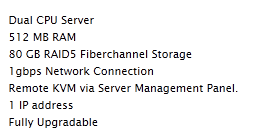
and here is the corresponding price:
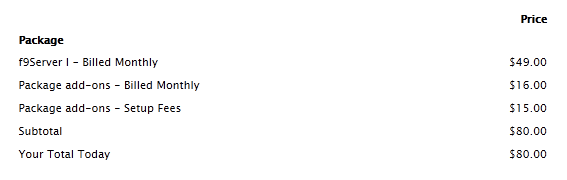
For that price, you can get a similar specification for the whole year in Montreal Canada, so I really do not see how much advantage they would have price-wise. However they claim to have pretty solid servers and very few VPS per node, which could potentially meet the clientele who needs high-end VPS. One of their selling point is the port is unmetered, and since the port is 100MBps port shared, it should, in theory, give the VPS users pretty good upload/download speed for some bandwidth-intensive applications. Also, they are based on VMWare technology rather than OpenVZ, which is more expensive to set up as well.
F9 Servers use Client Exec rather than WHMCS as their client portal. Client Exec does not look as “fancy” as WHMCS, however it is actually something I prefer, everything is pretty simple and very intuitive to see.
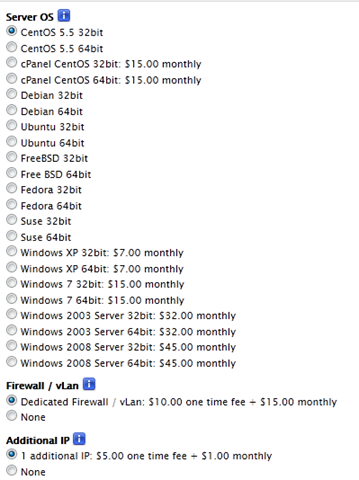
During the sign up, you can choose the OS to be installed, as you could see, they also have Windows available for extra few dollars a month (although I do see Windows 2008 Server 64 bit cost 45 per month!) and CPanel cost 15 per month extra. The IP address is fairly cheap at 1 per month, however there is a one-time set up fee as well. Interestingly, the list does not contain the versions of the Linux distributions, just the name, for all but CentOS Linux:
Provision and Management Interface
The provision of the server is not instant, however is pretty fast. My order was submitted at 12:59PM (EST) and I have received my VPS login details by 4:07PM (EST), so only took 3 hours to set it up, which is pretty good.
Once you have received the login to the client portal, the first page looks something like this:
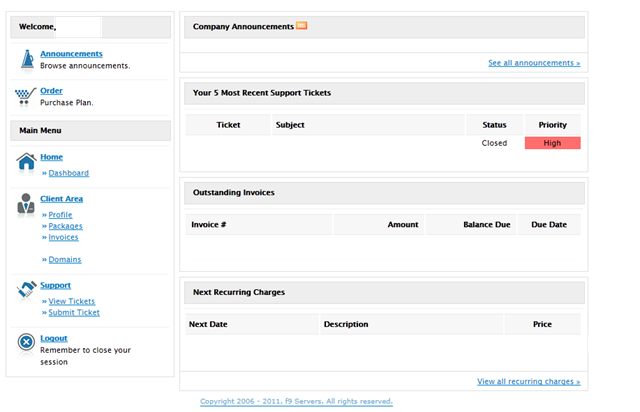
As you can see this is a reason why I like Client Exec a lot more than WHMCS, everything is on one page and one click away, although the UI is not designed as fancy as WHMCS, it is definitely a lot more useful as far as I can see.
Your servers are listed here once you click the “Product” in Client Area:
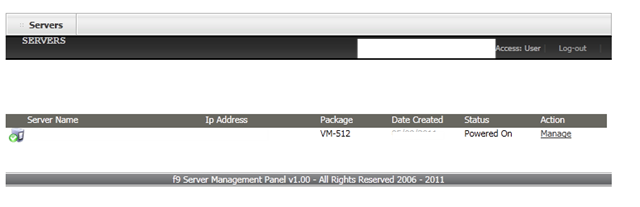
And click on “Manage”, here is what you get to:
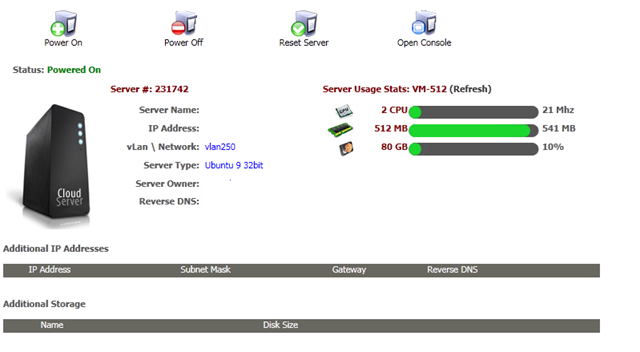
The control interface is fairly simple, you can see the current resources usage as well as some basic functionalities such as Power On, Power Off, Reset and Open Console, you will need to open a ticket if you would like to get the OS reloaded (and they will create another VPS for you before removing the first one) as well as rDNS set up. The lack of functionality is pretty much the biggest drawback comparing their IOD Panel (which is the first time I heard of this term as well) to the SolusVM panel that majority of the hosting providers use.
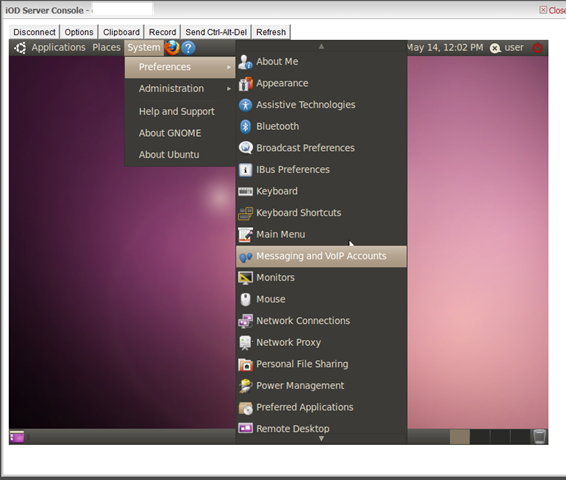
The VNC console is another highlight in the control panel, although most of the SolusVM set-up I have seen these days, it is the first time I see this gets implemented in the Client Exec, and since they normally install the full OS package rather than the minimal package, the beautiful Ubuntu UI comes right out of the box:
Tests On The Box
The test VPS that I have used has 80 GB of space (which is definitely one the biggest I have seen with otherwise similar specs), 512MB of RAM and 2 AMD Opteron 6172 CPUs. It is interesting to note that the swap space is 3 times as much as the actual dedicated memory, which is pretty different compare to many other providers who will simply double the memory.
df -h
Filesystem            Size  Used Avail Use% Mounted on
/dev/sda1              78G  3.1G   71G   5% /
none                  245M  180K  245M   1% /dev
none                  249M  164K  249M   1% /dev/shm
none                  249M   84K  249M   1% /var/run
none                  249M     0  249M   0% /var/lock
none                  249M     0  249M   0% /lib/init/rw
free -m
             total       used       free     shared    buffers     cached
Mem:           497        489          7          0         61        319
-/+ buffers/cache:        108        388
Swap:         1454          0       1454
cat /proc/cpuinfo
processor       : 0
vendor_id       : AuthenticAMD
cpu family      : 16
model           : 2
model name      : AMD Opteron(tm) Processor 6172
stepping        : 3
cpu MHz         : 2100.024
cache size      : 512 KB
fdiv_bug        : no
hlt_bug         : no
f00f_bug        : no
coma_bug        : no
fpu             : yes
fpu_exception   : yes
cpuid level     : 5
wp              : yes
flags           : fpu vme de pse tsc msr pae mce cx8 apic mtrr pge mca cmov pat                                                                              pse36 clflush mmx fxsr sse sse2 syscall nx mmxext fxsr_opt rdtscp lm 3dnowext 3d                                                                             now constant_tsc tsc_reliable nonstop_tsc pni cx16 popcnt hypervisor lahf_lm ext                                                                             apic abm sse4a misalignsse 3dnowprefetch
bogomips        : 4200.04
clflush size    : 64
cache_alignment : 64
address sizes   : 40 bits physical, 48 bits virtual
power management:

processor       : 1
vendor_id       : AuthenticAMD
cpu family      : 16
model           : 2
model name      : AMD Opteron(tm) Processor 6172
stepping        : 3
cpu MHz         : 2100.024
cache size      : 512 KB
fdiv_bug        : no
hlt_bug         : no
f00f_bug        : no
coma_bug        : no
fpu             : yes
fpu_exception   : yes
cpuid level     : 5
wp              : yes
flags           : fpu vme de pse tsc msr pae mce cx8 apic mtrr pge mca cmov pat                                                                              pse36 clflush mmx fxsr sse sse2 syscall nx mmxext fxsr_opt rdtscp lm 3dnowext 3d                                                                             now constant_tsc tsc_reliable nonstop_tsc pni cx16 popcnt hypervisor lahf_lm ext                                                                             apic abm sse4a misalignsse 3dnowprefetch
bogomips        : 4200.04
clflush size    : 64
cache_alignment : 64
address sizes   : 40 bits physical, 48 bits virtual
power management:
The hard drive I/O speed is pretty low at merely 18 MB/s, which is far from the 15k SAS drive that they claimed to have:
dd if=/dev/zero of=test bs=64k count=16k conv=fdatasync
16384+0 records in
16384+0 records out
1073741824 bytes (1.1 GB) copied, 59.5185 s, 18.0 MB/s
dd if=/dev/zero of=test bs=64k count=16k conv=fdatasync
16384+0 records in
16384+0 records out
1073741824 bytes (1.1 GB) copied, 61.1532 s, 17.6 MB/s
The port speed, as per their website, is 1GBps shared, however from the Cachefly download test I can only say either there are some serious bandwidth users or the box is significantly less than 1GBps as F9 has claimed:
sudo wget http://cachefly.cachefly.net/100mb.test
--2011-05-14 04:17:37--  http://cachefly.cachefly.net/100mb.test
Resolving cachefly.cachefly.net... 205.234.175.175
Connecting to cachefly.cachefly.net|205.234.175.175|:80... connected.
HTTP request sent, awaiting response... 200 OK
Length: 104857600 (100M) [application/octet-stream]
Saving to: `100mb.test'

100%[======================================>] 104,857,600 4.88M/s   in 16s

2011-05-14 04:17:53 (6.10 MB/s) - `100mb.test' saved [104857600/104857600]
Almost needless to say, the upload speed from the VPS is equally not satisfactory:
First is the test from BuyVM VPS in Fremont, CA:
wget 199.47.241.50/100mb.test
--2011-05-14 04:33:42--  http://199.47.241.50/100mb.test
Connecting to 199.47.241.50:80... connected.
HTTP request sent, awaiting response... 200 OK
Length: 104857600 (100M) [application/octet-stream]
Saving to: `100mb.test'

100%[======================================>] 104,857,600  235K/s   in 91s

2011-05-14 04:35:13 (1.10 MB/s) - `100mb.test' saved [104857600/104857600]
Next is the Nix Communications VPS in Montreal Canada, which I thought would be quicker because it is within the same country, but turns out not to be the case:
wget 199.47.241.50/100mb.test
--2011-05-14 04:38:59--  http://199.47.241.50/100mb.test
Connecting to 199.47.241.50:80... connected.
HTTP request sent, awaiting response... 200 OK
Length: 104857600 (100M) [application/octet-stream]
Saving to: `100mb.test.1'

100%[======================================>] 104,857,600  272K/s   in 98s

2011-05-14 04:40:37 (1.02 MB/s) - `100mb.test.1' saved [104857600/104857600]
Finally, and pretty surprisingly, the Quickweb VPS in London, UK, seems to give a download speed even better than the Nix Communication box although the data has to travel a few thousand miles:
wget 199.47.241.50/100mb.test
--2011-05-14 04:43:22--  http://199.47.241.50/100mb.test
Connecting to 199.47.241.50:80... connected.
HTTP request sent, awaiting response... 200 OK
Length: 104857600 (100M) [application/octet-stream]
Saving to: `100mb.test'

100%[======================================>] 104,857,600 1.31M/s   in 80s

2011-05-14 04:44:42 (1.25 MB/s) - `100mb.test' saved [104857600/104857600]
Finally are the Unix Bench result, which actually turns out pretty good, I guess I seriously need someone to explain to me how exactly this benchmark tool works:
   #    #  #    #  #  #    #          #####   ######  #    #   ####   #    #
   #    #  ##   #  #   #  #           #    #  #       ##   #  #    #  #    #
   #    #  # #  #  #    ##            #####   #####   # #  #  #       ######
   #    #  #  # #  #    ##            #    #  #       #  # #  #       #    #
   #    #  #   ##  #   #  #           #    #  #       #   ##  #    #  #    #
    ####   #    #  #  #    #          #####   ######  #    #   ####   #    #

   Version 5.1.3                      Based on the Byte Magazine Unix Benchmark

   Multi-CPU version                  Version 5 revisions by Ian Smith,
                                      Sunnyvale, CA, USA
   January 13, 2011                   johantheghost at yahoo period com

1 x Dhrystone 2 using register variables  1 2 3 4 5 6 7 8 9 10

1 x Double-Precision Whetstone  1 2 3 4 5 6 7 8 9 10

1 x Execl Throughput  1 2 3

1 x File Copy 1024 bufsize 2000 maxblocks  1 2 3

1 x File Copy 256 bufsize 500 maxblocks  1 2 3

1 x File Copy 4096 bufsize 8000 maxblocks  1 2 3

1 x Pipe Throughput  1 2 3 4 5 6 7 8 9 10

1 x Pipe-based Context Switching  1 2 3 4 5 6 7 8 9 10

1 x Process Creation  1 2 3

1 x System Call Overhead  1 2 3 4 5 6 7 8 9 10

1 x Shell Scripts (1 concurrent)  1 2 3

1 x Shell Scripts (8 concurrent)  1 2 3

2 x Dhrystone 2 using register variables  1 2 3 4 5 6 7 8 9 10

2 x Double-Precision Whetstone  1 2 3 4 5 6 7 8 9 10

2 x Execl Throughput  1 2 3

2 x File Copy 1024 bufsize 2000 maxblocks  1 2 3

2 x File Copy 256 bufsize 500 maxblocks  1 2 3

2 x File Copy 4096 bufsize 8000 maxblocks  1 2 3

2 x Pipe Throughput  1 2 3 4 5 6 7 8 9 10

2 x Pipe-based Context Switching  1 2 3 4 5 6 7 8 9 10

2 x Process Creation  1 2 3

2 x System Call Overhead  1 2 3 4 5 6 7 8 9 10

2 x Shell Scripts (1 concurrent)  1 2 3

2 x Shell Scripts (8 concurrent)  1 2 3

========================================================================
   BYTE UNIX Benchmarks (Version 5.1.3)

   System: user-desktop: GNU/Linux
   OS: GNU/Linux -- 2.6.32-28-generic -- #55-Ubuntu SMP Mon Jan 10 21:21:01 UTC 2011
   Machine: i686 (unknown)
   Language: en_US.utf8 (charmap="UTF-8", collate="UTF-8")
   CPU 0: AMD Opteron(tm) Processor 6172 (4200.0 bogomips)
          x86-64, MMX, AMD MMX, Physical Address Ext, SYSCALL/SYSRET
   CPU 1: AMD Opteron(tm) Processor 6172 (4200.0 bogomips)
          x86-64, MMX, AMD MMX, Physical Address Ext, SYSCALL/SYSRET
   20:45:35 up  1:46,  1 user,  load average: 0.16, 0.22, 0.14; runlevel 2

------------------------------------------------------------------------
Benchmark Run: Thu May 12 2011 20:45:35 - 21:13:30
2 CPUs in system; running 1 parallel copy of tests

Dhrystone 2 using register variables       10061986.0 lps   (10.0 s, 7 samples)
Double-Precision Whetstone                     1618.6 MWIPS (10.0 s, 7 samples)
Execl Throughput                               1664.0 lps   (30.0 s, 2 samples)
File Copy 1024 bufsize 2000 maxblocks        437807.1 KBps  (30.0 s, 2 samples)
File Copy 256 bufsize 500 maxblocks          137142.2 KBps  (30.0 s, 2 samples)
File Copy 4096 bufsize 8000 maxblocks        934477.2 KBps  (30.0 s, 2 samples)
Pipe Throughput                              981174.5 lps   (10.0 s, 7 samples)
Pipe-based Context Switching                 196730.4 lps   (10.0 s, 7 samples)
Process Creation                               3611.9 lps   (30.0 s, 2 samples)
Shell Scripts (1 concurrent)                   3575.6 lpm   (60.0 s, 2 samples)
Shell Scripts (8 concurrent)                    745.1 lpm   (60.0 s, 2 samples)
System Call Overhead                        1212373.1 lps   (10.0 s, 7 samples)

System Benchmarks Index Values               BASELINE       RESULT    INDEX
Dhrystone 2 using register variables         116700.0   10061986.0    862.2
Double-Precision Whetstone                       55.0       1618.6    294.3
Execl Throughput                                 43.0       1664.0    387.0
File Copy 1024 bufsize 2000 maxblocks          3960.0     437807.1   1105.6
File Copy 256 bufsize 500 maxblocks            1655.0     137142.2    828.7
File Copy 4096 bufsize 8000 maxblocks          5800.0     934477.2   1611.2
Pipe Throughput                               12440.0     981174.5    788.7
Pipe-based Context Switching                   4000.0     196730.4    491.8
Process Creation                                126.0       3611.9    286.7
Shell Scripts (1 concurrent)                     42.4       3575.6    843.3
Shell Scripts (8 concurrent)                      6.0        745.1   1241.8
System Call Overhead                          15000.0    1212373.1    808.2
                                                                   ========
System Benchmarks Index Score                                         699.2

------------------------------------------------------------------------
Benchmark Run: Thu May 12 2011 21:13:30 - 21:41:25
2 CPUs in system; running 2 parallel copies of tests

Dhrystone 2 using register variables       20014156.1 lps   (10.0 s, 7 samples)
Double-Precision Whetstone                     3220.9 MWIPS (10.0 s, 7 samples)
Execl Throughput                               4607.5 lps   (29.9 s, 2 samples)
File Copy 1024 bufsize 2000 maxblocks        298114.8 KBps  (30.0 s, 2 samples)
File Copy 256 bufsize 500 maxblocks           81910.3 KBps  (30.0 s, 2 samples)
File Copy 4096 bufsize 8000 maxblocks        854821.1 KBps  (30.0 s, 2 samples)
Pipe Throughput                             1938801.8 lps   (10.0 s, 7 samples)
Pipe-based Context Switching                 401100.0 lps   (10.0 s, 7 samples)
Process Creation                              11459.8 lps   (30.0 s, 2 samples)
Shell Scripts (1 concurrent)                   5928.0 lpm   (60.0 s, 2 samples)
Shell Scripts (8 concurrent)                    770.4 lpm   (60.1 s, 2 samples)
System Call Overhead                        1200651.2 lps   (10.0 s, 7 samples)

System Benchmarks Index Values               BASELINE       RESULT    INDEX
Dhrystone 2 using register variables         116700.0   20014156.1   1715.0
Double-Precision Whetstone                       55.0       3220.9    585.6
Execl Throughput                                 43.0       4607.5   1071.5
File Copy 1024 bufsize 2000 maxblocks          3960.0     298114.8    752.8
File Copy 256 bufsize 500 maxblocks            1655.0      81910.3    494.9
File Copy 4096 bufsize 8000 maxblocks          5800.0     854821.1   1473.8
Pipe Throughput                               12440.0    1938801.8   1558.5
Pipe-based Context Switching                   4000.0     401100.0   1002.7
Process Creation                                126.0      11459.8    909.5
Shell Scripts (1 concurrent)                     42.4       5928.0   1398.1
Shell Scripts (8 concurrent)                      6.0        770.4   1284.0
System Call Overhead                          15000.0    1200651.2    800.4
                                                                   ========
System Benchmarks Index Score                                        1015.8
And the second time, similar results were produced:
   #    #  #    #  #  #    #          #####   ######  #    #   ####   #    #
   #    #  ##   #  #   #  #           #    #  #       ##   #  #    #  #    #
   #    #  # #  #  #    ##            #####   #####   # #  #  #       ######
   #    #  #  # #  #    ##            #    #  #       #  # #  #       #    #
   #    #  #   ##  #   #  #           #    #  #       #   ##  #    #  #    #
    ####   #    #  #  #    #          #####   ######  #    #   ####   #    #

   Version 5.1.3                      Based on the Byte Magazine Unix Benchmark

   Multi-CPU version                  Version 5 revisions by Ian Smith,
                                      Sunnyvale, CA, USA
   January 13, 2011                   johantheghost at yahoo period com

1 x Dhrystone 2 using register variables  1 2 3 4 5 6 7 8 9 10

1 x Double-Precision Whetstone  1 2 3 4 5 6 7 8 9 10

1 x Execl Throughput  1 2 3

1 x File Copy 1024 bufsize 2000 maxblocks  1 2 3

1 x File Copy 256 bufsize 500 maxblocks  1 2 3

1 x File Copy 4096 bufsize 8000 maxblocks  1 2 3

1 x Pipe Throughput  1 2 3 4 5 6 7 8 9 10

1 x Pipe-based Context Switching  1 2 3 4 5 6 7 8 9 10

1 x Process Creation  1 2 3

1 x System Call Overhead  1 2 3 4 5 6 7 8 9 10

1 x Shell Scripts (1 concurrent)  1 2 3

1 x Shell Scripts (8 concurrent)  1 2 3

2 x Dhrystone 2 using register variables  1 2 3 4 5 6 7 8 9 10

2 x Double-Precision Whetstone  1 2 3 4 5 6 7 8 9 10

2 x Execl Throughput  1 2 3

2 x File Copy 1024 bufsize 2000 maxblocks  1 2 3

2 x File Copy 256 bufsize 500 maxblocks  1 2 3

2 x File Copy 4096 bufsize 8000 maxblocks  1 2 3

2 x Pipe Throughput  1 2 3 4 5 6 7 8 9 10

2 x Pipe-based Context Switching  1 2 3 4 5 6 7 8 9 10

2 x Process Creation  1 2 3

2 x System Call Overhead  1 2 3 4 5 6 7 8 9 10

2 x Shell Scripts (1 concurrent)  1 2 3

2 x Shell Scripts (8 concurrent)  1 2 3

========================================================================
   BYTE UNIX Benchmarks (Version 5.1.3)

   System: user-desktop: GNU/Linux
   OS: GNU/Linux -- 2.6.32-28-generic -- #55-Ubuntu SMP Mon Jan 10 21:21:01 UTC                                                                              2011
   Machine: i686 (unknown)
   Language: en_US.utf8 (charmap="UTF-8", collate="UTF-8")
   CPU 0: AMD Opteron(tm) Processor 6172 (4200.0 bogomips)
          x86-64, MMX, AMD MMX, Physical Address Ext, SYSCALL/SYSRET
   CPU 1: AMD Opteron(tm) Processor 6172 (4200.0 bogomips)
          x86-64, MMX, AMD MMX, Physical Address Ext, SYSCALL/SYSRET
   04:32:35 up 1 day,  9:33,  1 user,  load average: 0.12, 0.28, 0.17; runlevel                                                                              2

------------------------------------------------------------------------
Benchmark Run: Sat May 14 2011 04:32:35 - 05:00:31
2 CPUs in system; running 1 parallel copy of tests

Dhrystone 2 using register variables        9819826.5 lps   (10.0 s, 7 samples)
Double-Precision Whetstone                     1610.9 MWIPS (10.0 s, 7 samples)
Execl Throughput                               1671.3 lps   (29.9 s, 2 samples)
File Copy 1024 bufsize 2000 maxblocks        429406.5 KBps  (30.0 s, 2 samples)
File Copy 256 bufsize 500 maxblocks          137507.5 KBps  (30.0 s, 2 samples)
File Copy 4096 bufsize 8000 maxblocks        926663.8 KBps  (30.0 s, 2 samples)
Pipe Throughput                              967083.2 lps   (10.0 s, 7 samples)
Pipe-based Context Switching                 198581.0 lps   (10.0 s, 7 samples)
Process Creation                               3564.5 lps   (30.0 s, 2 samples)
Shell Scripts (1 concurrent)                   3603.4 lpm   (60.0 s, 2 samples)
Shell Scripts (8 concurrent)                    738.0 lpm   (60.0 s, 2 samples)
System Call Overhead                        1214504.4 lps   (10.0 s, 7 samples)

System Benchmarks Index Values               BASELINE       RESULT    INDEX
Dhrystone 2 using register variables         116700.0    9819826.5    841.5
Double-Precision Whetstone                       55.0       1610.9    292.9
Execl Throughput                                 43.0       1671.3    388.7
File Copy 1024 bufsize 2000 maxblocks          3960.0     429406.5   1084.4
File Copy 256 bufsize 500 maxblocks            1655.0     137507.5    830.9
File Copy 4096 bufsize 8000 maxblocks          5800.0     926663.8   1597.7
Pipe Throughput                               12440.0     967083.2    777.4
Pipe-based Context Switching                   4000.0     198581.0    496.5
Process Creation                                126.0       3564.5    282.9
Shell Scripts (1 concurrent)                     42.4       3603.4    849.9
Shell Scripts (8 concurrent)                      6.0        738.0   1230.1
System Call Overhead                          15000.0    1214504.4    809.7
                                                                   ========
System Benchmarks Index Score                                         695.2

------------------------------------------------------------------------
Benchmark Run: Sat May 14 2011 05:00:31 - 05:28:26
2 CPUs in system; running 2 parallel copies of tests

Dhrystone 2 using register variables       19955806.7 lps   (10.0 s, 7 samples)
Double-Precision Whetstone                     3208.3 MWIPS (10.0 s, 7 samples)
Execl Throughput                               4684.1 lps   (30.0 s, 2 samples)
File Copy 1024 bufsize 2000 maxblocks        295122.4 KBps  (30.0 s, 2 samples)
File Copy 256 bufsize 500 maxblocks           82249.7 KBps  (30.0 s, 2 samples)
File Copy 4096 bufsize 8000 maxblocks        861118.7 KBps  (30.0 s, 2 samples)
Pipe Throughput                             1944200.8 lps   (10.0 s, 7 samples)
Pipe-based Context Switching                 395663.4 lps   (10.0 s, 7 samples)
Process Creation                              11093.5 lps   (30.0 s, 2 samples)
Shell Scripts (1 concurrent)                   5896.1 lpm   (60.0 s, 2 samples)
Shell Scripts (8 concurrent)                    762.7 lpm   (60.1 s, 2 samples)
System Call Overhead                        1229437.8 lps   (10.0 s, 7 samples)

System Benchmarks Index Values               BASELINE       RESULT    INDEX
Dhrystone 2 using register variables         116700.0   19955806.7   1710.0
Double-Precision Whetstone                       55.0       3208.3    583.3
Execl Throughput                                 43.0       4684.1   1089.3
File Copy 1024 bufsize 2000 maxblocks          3960.0     295122.4    745.3
File Copy 256 bufsize 500 maxblocks            1655.0      82249.7    497.0
File Copy 4096 bufsize 8000 maxblocks          5800.0     861118.7   1484.7
Pipe Throughput                               12440.0    1944200.8   1562.9
Pipe-based Context Switching                   4000.0     395663.4    989.2
Process Creation                                126.0      11093.5    880.4
Shell Scripts (1 concurrent)                     42.4       5896.1   1390.6
Shell Scripts (8 concurrent)                      6.0        762.7   1271.1
System Call Overhead                          15000.0    1229437.8    819.6
                                                                   ========
System Benchmarks Index Score                                        1013.8
Support and Service
I actually had to pause a while here to think what I should write regarding their support. The support people are nice and I can definitely see them putting in a lot of effort of trying to help, however they seem to be running with pretty limited resources. One such example is that I have requested for Ubuntu 10.04 but was told only Ubuntu 9 is what they have at the moment and getting Ubuntu 10 version could potentially take a while, which I was surprised since Ubuntu 10.04 is pretty much the de-facto LTS version for most of the Ubuntu users and is perhaps the most popular one. However, I have to give them the credit for trying to help me out with the issue I had as I was unable to access my VPS after a new VPS was put up with the Ubuntu OS, they have at least tried once to reinstall the OS and once to play around the gateway until I finally managed to get the issue resolved.
Having said that, I think it is pretty important to find them at the right time, the ticket that I had with them took them only an hour for an initial response but the later ones took significantly more than that. They also have a toll-free number and as per their advertisement:
We are constantly getting praised on the fact that our customers call us and we resolve their issue while on the phone.
I have not used this option since I am not exactly a phone person, but it is something good to know.
Conclusion
As much as I would like to recommend F9 servers because they are in the same city as the place where I spend 5 wonderful years in college, I found it is difficult for me to do so. The server is priced for the 2000 market and although they have tried to deploy the state-of-art hardware, the performance of the server really does not prove the technology is better. Having said that though, they use Client Exec and the support is really trying to do their best, which hopefully will make a selling point for them. However for bargain-hunters like me, my adventure with them will definitely stop no further than the trial period.
Pingback: 96MB Low End VPS Review Part VIII – Inception Hosting - 96MB.com-Blog running on a 96MB RAM VPS