
96MB Low End VPS Review Part VI – Gandi.net
The idea of "Cloud" hosting has always fascinated me. Everyone seems to talk about it at all times but yet I am not sure how many people (me included) knows too much beyond "putting up a bunch of super-powerful computers together and make them look like one".
Therefore, when I was offered an opportunity to test out the cloud VPS offer from Gandi.Net, I jumped on the wagon almost instantly.
Price
Price for Gandi’s cloud VPS is not exactly low-end, considering the cheapest you can get is 12 Euro per month, which is about 18USD, for a 256MB, 5Mbps share:
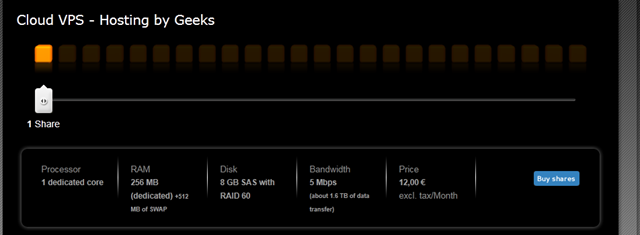
The key advantage here is rather the dedicated CPU core, which is different from most of the budget providers that only offer “fair share CPU usage”. If they truly don’t oversell, that means you will at most have 15 neighbours on a 16-core server, which, compare to some hosts that puts like 50 VPS on one server with quad core (or dual quad core), is a lot better. Also note that from the description, the port appears to be unmetered, restricted only by the port speed.
Initial Setup
Gandi.Net goes by the "Handle", which is essentially your user name (although a more difficult to remember version). Once you have registered for a handle, the "share" (maximum allocated resources to you) will be added to your account. To me, the process takes a little more than 12 hours (requested for account at 1:05PM, received "share" at 4:30AM next morning), so I would assume at the time when I registered the account (May 2, 2011), it was a manual process.
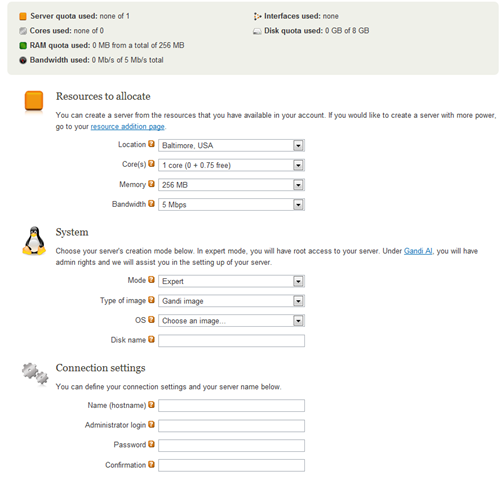
It took a while after log into the home screen before I can find their VPS control panel, which is a highly customized one that allows to choose pretty much everything you would like for your VPS: location, number of processor cores, RAM, bandwidth and of course, OS as well:
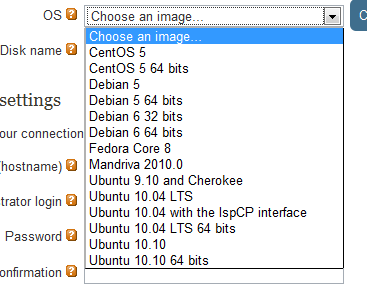
They have pretty standard selection of OS template from what I can tell:
But the surprise is here: it also has a what they call a "Gandi AI" mode, in which you can group and select modules to be pre-packaged into the OS install and save you some trouble of configuration:
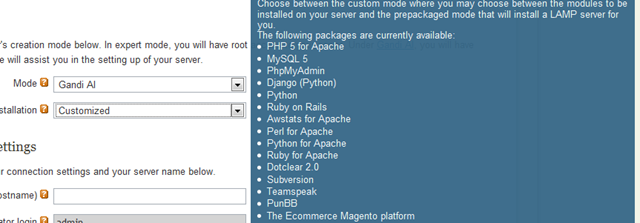
Obviously, this feature is not so attractive with guys who runs their own Linux kernel, but for a relative Linux newbie, having everything installed for you when you load the OS template can be very helpful.
After you have made all the selections, and after some patient waiting time, you will get the VPS set up and running!
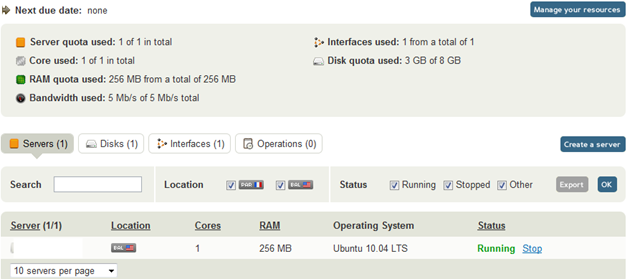
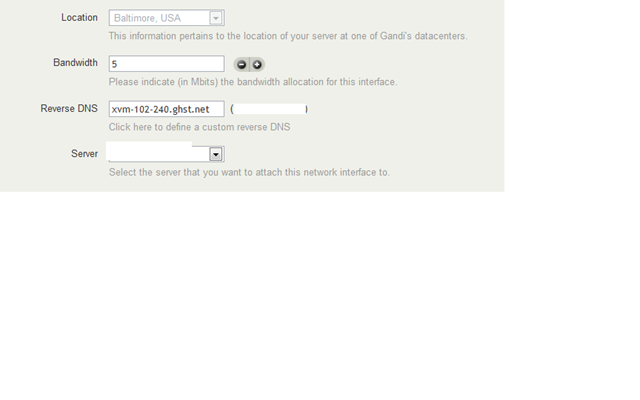
Even after the VPS is online, it is still highly configurable, an example is shown in the screen below, as you could see, the bandwidth could be added or removed accordingly, rDNS is instant as well:
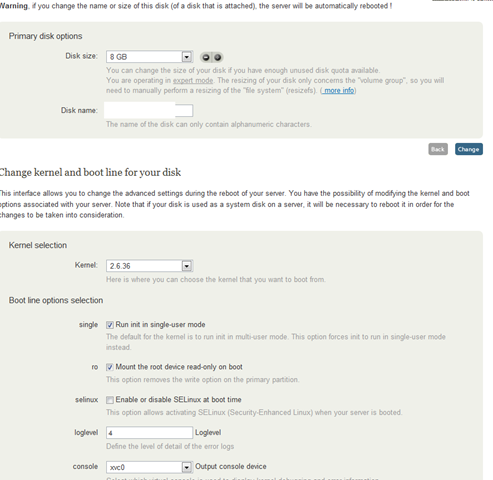
There are even more configurable options on this screen, anything from disk size to kernel version can be changed almost on the fly (reboot required). Note that you could configure the log level and the output console device as well.
Warning: as per Gandi.Net technical support:
Gandi support is in the process of investigating a possible issue regarding kernel
version 2.6.36 and VMs doing disk attach/detach operations,
which may or may not affect your VM.
I tried to run the VPS with 2.6.36 and I was not even able to boot into the SSH console.
Also, different kernel versions have different output device when you are using the emergency console, so make sure that is being selected carefully as well.
Testing the VPS
The performance for such a not-so-cheap low end VPS turns out to be pretty good (except upload speed), which I guess partially explained why Gandi could charge so much for the service and not worried of getting no customer.
The test VPS that I have put up has 256MB of RAM, 1 processor core and 2.5GB of hard drive:
free -m
             total       used       free     shared    buffers     cached
Mem:           246        243          3          0          9        182
-/+ buffers/cache:         51        195
Swap:          255          0        255
vendor_id       : GenuineIntel
cpu family      : 6
model           : 44
model name      : Intel(R) Xeon(R) CPU           L5640  @ 2.27GHz
stepping        : 2
cpu MHz         : 2261.000
cache size      : 12288 KB
fdiv_bug        : no
hlt_bug         : no
f00f_bug        : no
coma_bug        : no
fpu             : yes
fpu_exception   : yes
cpuid level     : 11
wp              : yes
flags           : fpu de tsc msr pae cx8 cmov pat clflush mmx fxsr sse sse2 ss ht nx constant_tsc up nonstop_tsc pni ssse3 sse4_1 sse4_2 popcnt hypervisor
bogomips        : 4522.00
clflush size    : 64
cache_alignment : 64
address sizes   : 40 bits physical, 48 bits virtual
power management:
Filesystem            Size  Used Avail Use% Mounted on
/dev/xvda1            2.4G  1.9G  394M  83% /
/dev                  124M   84K  124M   1% /dev
none                  124M     0  124M   0% /dev/shm
none                  124M   36K  124M   1% /var/run
none                  124M     0  124M   0% /var/lock
none                  124M     0  124M   0% /lib/init/rw
tmpfs                  24K   12K   12K  50% /var/gandi
First the UnixBench test, 500+ is definitely not the highest score that I have ever seen, however it is definitely impressive with the specs that this box has:
Pipe Throughput                              547733.7 lps   (10.0 s, 7 samples)
Pipe-based Context Switching                  75425.8 lps   (10.0 s, 7 samples)
Process Creation                               3513.8 lps   (30.0 s, 2 samples)
Shell Scripts (1 concurrent)                   3856.8 lpm   (60.0 s, 2 samples)
Shell Scripts (8 concurrent)                    510.8 lpm   (60.1 s, 2 samples)
System Call Overhead                         558838.5 lps   (10.0 s, 7 samples)

System Benchmarks Index Values               BASELINE       RESULT    INDEX
Dhrystone 2 using register variables         116700.0   18407493.7   1577.3
Double-Precision Whetstone                       55.0       2695.9    490.2
Execl Throughput                                 43.0       1844.6    429.0
File Copy 1024 bufsize 2000 maxblocks          3960.0     370038.0    934.4
File Copy 256 bufsize 500 maxblocks            1655.0      97760.9    590.7
File Copy 4096 bufsize 8000 maxblocks          5800.0     934124.0   1610.6
Pipe Throughput                               12440.0     547733.7    440.3
Pipe-based Context Switching                   4000.0      75425.8    188.6
Process Creation                                126.0       3513.8    278.9
Shell Scripts (1 concurrent)                     42.4       3856.8    909.6
Shell Scripts (8 concurrent)                      6.0        510.8    851.4
System Call Overhead                          15000.0     558838.5    372.6
                                                                   ========
System Benchmarks Index Score                                         595.0
The download speed is equally impressive, particularly when you consider this is achieved on a 5Mbps port, unmetered as well:
wget http://cachefly.cachefly.net/100mb.test
--2011-05-06 11:12:31--  http://cachefly.cachefly.net/100mb.test
Resolving cachefly.cachefly.net... 205.234.175.175
Connecting to cachefly.cachefly.net|205.234.175.175|:80... connected.
HTTP request sent, awaiting response... 200 OK
Length: 104857600 (100M) [application/octet-stream]
Saving to: `100mb.test'

100%[======================================>] 104,857,600 4.74M/s   in 23s

2011-05-06 11:12:54 (4.36 MB/s) - `100mb.test' saved [104857600/104857600]
As with all other VPS reviews, I have tried to download a 100MB file from this server to several other locations to see the upload speed of the box:
First one is from a Quickweb VPS in London, UK:
 wget 173.246.102.240/100mb.test
--2011-05-06 11:17:44--  http://173.246.102.240/100mb.test
Connecting to 173.246.102.240:80... connected.
HTTP request sent, awaiting response... 200 OK
Length: 104857600 (100M) [application/octet-stream]
Saving to: `100mb.test'

100%[=======================================================================================================================================>] 104,857,600  641K/s   in 2m 50s

2011-05-06 11:20:34 (603 KB/s) - `100mb.test' saved [104857600/104857600]
From Nix Communications server in Montreal, Canada, which you would expect better upload speed because of its close proximity, but turned out to be a disappointment as well:
wget 173.246.102.240/100mb.test
--2011-05-06 11:30:43--  http://173.246.102.240/100mb.test
Connecting to 173.246.102.240:80... connected.
HTTP request sent, awaiting response... 200 OK
Length: 104857600 (100M) [application/octet-stream]
Saving to: `100mb.test'

100%[======================================>] 104,857,600  590K/s   in 2m 57s

2011-05-06 11:33:40 (578 KB/s) - `100mb.test' saved [104857600/104857600]
And finally, an equally disappointing result from a BuyVM VPS from Fremont, CA in US:
--2011-05-06 11:43:59-- http://173.246.102.240/100mb.test
Connecting to 173.246.102.240:80... connected.
HTTP request sent, awaiting response...
200 OK Length: 104857600 (100M) [application/octet-stream]
Saving to: `100mb.test' 100%[======================================>] 104,857,600 624K/s in 3m 10s
2011-05-06 11:47:09 (539 KB/s) - `100mb.test' saved [104857600/104857600]
The last test I did was to test disk I/O, which is reasonable for such a tiny box:
 dd if=/dev/zero of=test bs=64k count=512 conv=fdatasync
512+0 records in
512+0 records out
33554432 bytes (34 MB) copied, 0.786937 s, 42.6 MB/s
I did it again just to make sure the speed was not caused during some temporary high I/O:
 dd if=/dev/zero of=test bs=64k count=512 conv=fdatasync
512+0 records in
512+0 records out
33554432 bytes (34 MB) copied, 0.904972 s, 37.1 MB/s
Overall, you can see the UnixBench marks and download speed are pretty good, disk I/O is average but the upload speed is pretty disappointing.
Support and Service
Quite frankly speaking, the support in Gandi is where I see the true value of this not-so-cheap low-end VPS. As mentioned above, there was once I was having trouble accessing my box and I sent them a quick email asking for help, the email was sent at 09:17 AM (EST) and 11:03 AM (EST), in less than 2 hours! I did not see any sort of “we are looking into this” type of reply, instead, I have a page-long reply that detailed every possible reason why I could have lost the access to the box and the instructions on how to fix them.
Conclusion
The prices for Gandi’s VPS are not cheap by any means, however other than the upload speed (which could be due to the test unit having only 5MBps port), the box itself is pretty amazing. Together with the unmetered bandwidth, high quality of customer service and high flexibility and almost on-the-fly capability to change virtually any aspect of the configuration, makes it a suitable candidate for any mission-critical task, provided, of course, there won’t be too much data uploading.
Pingback: 96MB Low End VPS Review Part VIII – Inception Hosting - 96MB.com-Blog running on a 96MB RAM VPS
If I remenber correctly, Gandi since theyre begginings on the VPS service, they have provided 5mbps symetrical per share.
Since you got a test for the 1 share plan, you were limited to 5mbps. If you want higher speed, you need to upgrade your plan.
For the price, I think Webby would be a bit better.
@thekreek: I did not know they were using symmetrical connections, which is I guess somewhat rare, however it does make sense to a server. Actually I am wondering if there is any reverse-asymmetrical sort of bandwidth to the servers, i.e., upload bandwidth is larger than downloads?