
96MB Low End VPS Review Part XXXXII – Quickweb Budget Box (Los Angeles)
For the low end VPS regulars, Quickweb is definitely one of the big names out there. It has, at least in the past, done some really impressive work and sold really stable VPS, and more importantly, perhaps the most central website in this low end VPS community, LowEndBox.com, is hosted with them. Personally, my first VPS was purchased from them and the VPS I have paid the most is a Supa VZ1 at their London, UK location.
However, the recent posting about them did come with some negative feedbacks, and a long time LEB veteran, drmike, does not seems to be too happy with their VPS offerings as per this comment here,which was posted on the Christmas day. So what is going on with Quickweb recently? I decided to sign up for a VPS and take a look myself.
Basic Information and Set Up
Again, as per this post on LowEndBox, here is what they have offered for 6.99USD per month, which is just below the limit set by LEA to be called a “low end” VPS:
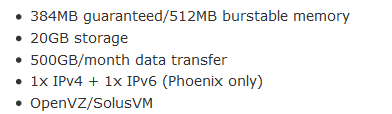
They do have smaller Budget VZ I and II plans at cheaper prices, but only accept minimum semi-annual payments. I decided to try the Los Angeles location since it is their most popular location and both VZ I and II plans were sold out by the time I wanted to sign up, leaving me no choice but to sign up for the VZ III plan.
Having said that though, it is not really that expensive if you apply the promo code that LEA has put on the posting:

By the way, may I know is staff is actually a countable noun or it is uncountable?
For my particular case, I did not actually added the LEB Promo code initially since I could not find the comments section on the shopping cart page:
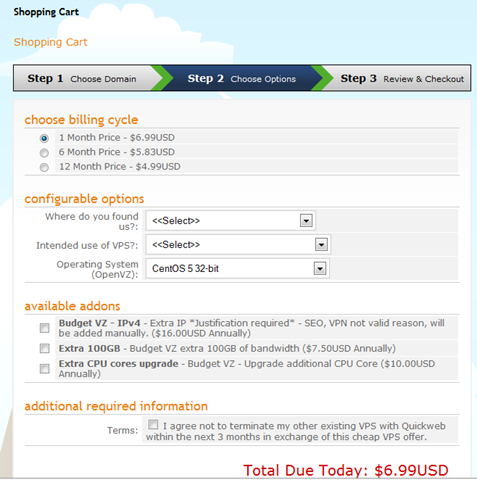
However, a ticket after the VPS was provisioned and Joe actually added the memory for me. Making the VPS have 512MB of dedicated RAM at 4.99USD per month, which brings down the price at a fairly competitive level.
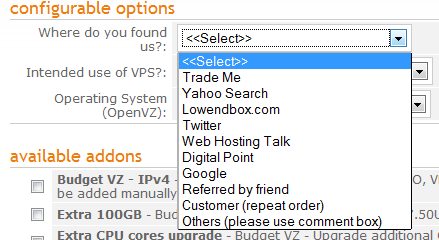
I think Quickweb was the only VPS providers that I can remember asking me where I knew them from in the order form, which, obviously, the answer is LowEndBox:
They also specifically mentioned that IRC is not allowed, although I am kind of curious what if I select IRC as my response for the intended use of the VPS:
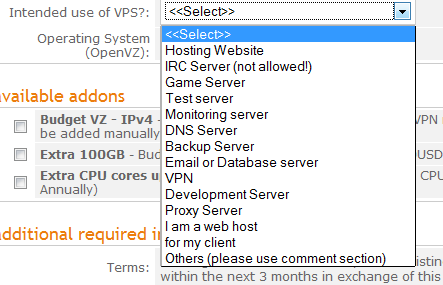
The Operating System offers you several choices, pretty much including the 32 bit version of the most of the popular Linux distributions. To be honest, I think at least for low end VPS, there is really little value listing out the 64 bit OS templates since rarely anyone would want to run a 128MB VPS (or 512MB in this case) with a 64 bit OS.
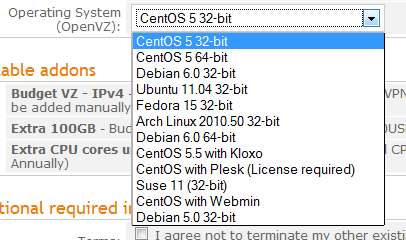
Also, note that they do not have CPanel nor CPanel DNS Only in the drop down list (although they do have those options in the SolusVM manager), instead, Plesk were offered as one of the options. I used to use Plesk for a month after signing up with them on the Supa VZ1 offer (for which Plesk was offered for free at that time), however after a while, I lost my temper while trying to get Plesk to work with Python and Django, which I used for another project, and give up on it. I actually tried to negotiate with Roel, unsuccessfully, on getting a discount on the VPS since I am not using Plesk. This might be a little off the topic, but I think a lot of times, when you sign up for a VPS, you should really try to talk to their sales and see if you can get some sort of discount. Obviously if you are thinking of paying 5 bucks for a 2GB RAM VPS, it might not be realistic, however there is always no harm asking and the worst you can get is a no. After all, even if it is just a single dollar lower every month, you can buy yourself quite a few cups of coffee during the year.
Furthermore, it is a great opportunity to know the customer service level of this VPS provider. If the VPS provider replied your request for a bargain by making some comments with your nationality or sexual orientation, then I definitely would not want to pay a single cent to them. On the other hand, as a professional provider and despite being firm about their prices, Roel in Quickweb has always been extremely polite and professional, which is perhaps one of the reasons why they are well-rated in the low end VPS community.
One thing I really wish Quickweb (as well as many VPS providers) would have on their ordering page is the cost of add-on items. For example, recently I was checking out the prices of CPanel from each VPS provider just for curiosity, and I do notice that there is a huge variation in the CPanel licensing cost. The most expensive one is about 15 pounds (which translate to more than 20 USD) per month and the cheapest one I have seen is like 7USD (which I am pretty sure the cost is subsidized). Therefore, the overall cheapest VPS + CPanel provider may not be the one selling the cheapest VPS and I am pretty sure many users would like to have an overall packaged price rather than just the price of the VPS.
In any case (and before I drift any further from this VPS review), the price for each extra IPv4 address is 16 per year, with no possibility for monthly payment. So I guess basically that means if you sign up for this VPS for a month and asked for an extra IPv4 address, it would cost you 23USD for that month. Similarly, extra 100GB of bandwidth cost you 7.50 USD per year and an extra CPU core cost you 10USD per year.
Finally, there is an interesting declaration checkbox where you are not permitted to cancel the existing VPS within 3 months after signing up for the budget VPS. I am not sure if this rule is strictly adhere to or if it is more like “please do not make us lose money” kind of advice.
Provision of the VPS, as usual, was instant. I received the VPS login information the moment I received my Paypal confirmation. As I have mentioned before, the extra resources were added manually, and all it takes is a ticket to quote the magic promo code.
Both of their WHMCS system and SolusVM manager are on secured HTTPS and on port 80, with no certificate warning from Firefox (because they did not use the SolusVM SSL certificate), which is something I really appreciate. Honestly, how much would a SSL certificate cost for a business? And how much time would it take to set up a reverse apache proxy or change configuration of SolusVM to make it listen to port 80 of a subdomain of the company?
After logged into WHMCS system, controls of the VPS are available under My Products and Services > Product Details:
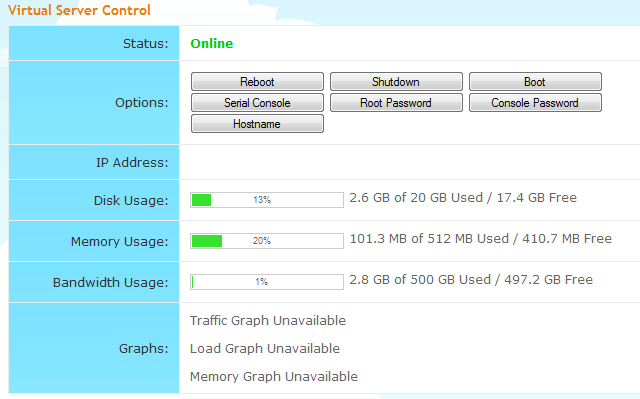
Note that the percentage bar for the resources usage are available but not the graph, and all the control buttons appears to work as well.
My new VPS was originally under a separate SolusVM account with a rather hard-to-remember user name. However, it took again, a ticket, to get the VPS merged with my existing SolusVM account, which has an user name that I have chosen and is easy for me to remember. Most of the VPS users perhaps don’t know that your VPS providers (at least for OpenVZ VPS, I think some of the providers have issues with the KVM VPS for this matter) could actually create a SolusVM account with the user name you like instead of the automatically generated VPSuser123 or Solus456 kind of hard to remember user IDs. Of course, whether they want to do the favor is a completely different story.
Once logged in, you are presented with a pretty standard SolusVM page. Remember on the sign up page I was not told to specify a host name? By default, the VPS is provisioned with vps.server.com. I think this is a quite neat feature, after all, not everyone uses the VPS as a web server and point domain names to it. Note that I have got an extra 50% of memory as well:
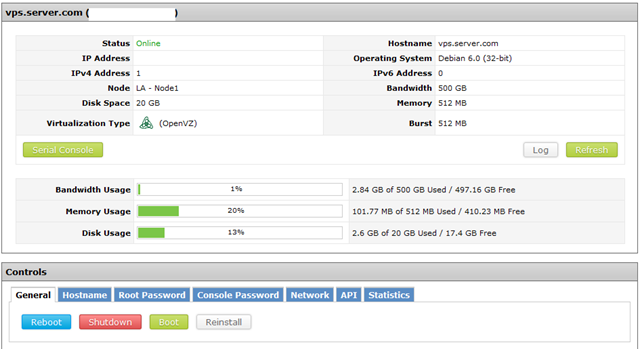
There is no Central Backup and no instant rDNS as well. However, Quickweb did spend the effort to put a custom message there when you try to edit the rDNS:

which is a lot better than the default SolusVM message stating that the rDNS for this IP is “disabled”, I mean, how could you “disable” rDNS, which is like saying “the cell phone for this phone number is disabled”?
There are quite a few OS templates available from Quickweb for reinstallation:




Note that particularly for the CentOS templates, they actually gives you the basic description on how to get started with the control panel installed. I remembered (forgive me for talking too much today) the first time I loaded the Kloxo template to a VPS that I bought to play with, I had absolutely no idea what was the default port nor the username and password, and it took me about 10 minutes to Google for the default port and the default credentials. I am pretty sure there are many VPS users like me who does not bother to remember these little details and putting some meaningful descriptions like this could potentially save both the VPS provider as well as the users some time (VPS providers: just imagine if you receive 20 tickets a day asking you what is the default login credential for Kloxo or CPanel).
Also note that Quickweb has customized their SolusVM page to include a link to their ticketing system:

You can just log into your ticket system directly by clicking on the Help Desk link and start to fire your questions away, directly to the help desk. I think it is a great feature since most of the time, for example, if I have received a notification on that my VPS is down, my first step is always to go into my SolusVM manager to check if I can just manually boot it up, if it does not work, then I will have to submit a ticket. It simply saves me so much trouble of having to go through to the VPS provider’s home page, click on Client Area, log in, click on Support Tickets and select the department. Instead, this is what I see after click on the Help Desk link:
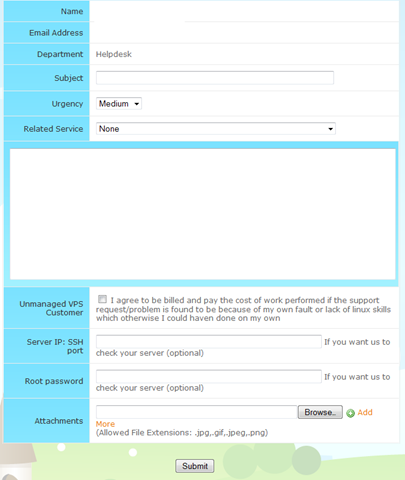
Note that you again, have to declare that you are willing to pay for things that are your own fault and you can provide, if you would like to, the port and root password for the VPS to help support checking on your VPS.
I understand that I have said a lot about Quickweb, which is perhaps not fair to some other VPS providers who provide great services. However, my point is: details matter. Every single VPS provider knows how to set up SolusVM, every single one knows how to get their servers online and running. So what makes one provider better than the other in this extremely competitive market, particularly when all the offering are more or less the same? Obviously, have a stable company and stable server matters, but other than that, it is really little details like this that make the customers happy.
Test on the VPS
As mentioned above, the VPS that I have signed up has 512MB of dedicated RAM (it is also supposed to come with 512MB of burstable RAM although I did not see that in the free –m output), 20GB of hard drive space and 500GB of data transfer. The VPS is located in Los Angeles, CA and I have used Debian 6, 32 bit for testing purposes.
When the OS template was loaded, about 16MB of RAM was used:
free -m
             total       used       free     shared    buffers     cached
Mem:           512         16        495          0          0          0
-/+ buffers/cache:         16        495
Swap:            0          0          0
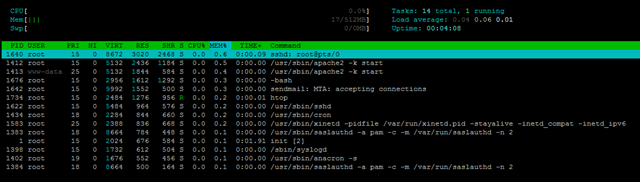
Top output showing the processes running:
top - 19:04:36 up 3 min,  1 user,  load average: 0.07, 0.07, 0.02
Tasks:  14 total,   2 running,  12 sleeping,   0 stopped,   0 zombie
Cpu(s):  0.0%us,  0.0%sy,  0.0%ni,100.0%id,  0.0%wa,  0.0%hi,  0.0%si,  0.0%st
Mem:    524288k total,    17588k used,   506700k free,        0k buffers
Swap:        0k total,        0k used,        0k free,        0k cached

  PID USER      PR  NI  VIRT  RES  SHR S %CPU %MEM    TIME+  COMMAND
 1640 root      18   0  8672 3020 2468 R  0.0  0.6   0:00.09 sshd
 1412 root      15   0  5132 2436 1184 S  0.0  0.5   0:00.00 apache2
 1413 www-data  25   0  5132 1844  584 S  0.0  0.4   0:00.00 apache2
 1676 root      15   0  2956 1612 1292 S  0.0  0.3   0:00.00 bash
 1642 root      15   0  9992 1552  500 S  0.0  0.3   0:00.00 sendmail-mta
 1705 root      15   0  2324 1064  872 R  0.0  0.2   0:00.00 top
 1622 root      15   0  5484  964  576 S  0.0  0.2   0:00.00 sshd
 1434 root      18   0  2284  844  660 S  0.0  0.2   0:00.00 cron
 1583 root      25   0  2388  836  668 S  0.0  0.2   0:00.00 xinetd
 1383 root      18   0  8664  784  448 S  0.0  0.1   0:00.00 saslauthd
    1 root      15   0  2024  676  584 S  0.0  0.1   0:01.91 init
 1398 root      15   0  1732  612  504 S  0.0  0.1   0:00.00 syslogd
 1402 root      19   0  1676  552  456 S  0.0  0.1   0:00.00 anacron
 1384 root      18   0  8664  500  164 S  0.0  0.1   0:00.00 saslauthd
And htop output:
About 470MB of hard drive space were used for the OS, which is pretty standard:
df -h
Filesystem            Size  Used Avail Use% Mounted on
/dev/simfs             20G  472M   20G   3% /
tmpfs                 256M     0  256M   0% /lib/init/rw
tmpfs                 256M     0  256M   0% /dev/shm
The iNodes are set to pretty high values as well:
 df -i
Filesystem            Inodes   IUsed   IFree IUse% Mounted on
/dev/simfs           10485760   26166 10459594    1% /
tmpfs                  65536       4   65532    1% /lib/init/rw
tmpfs                  65536       1   65535    1% /dev/shm
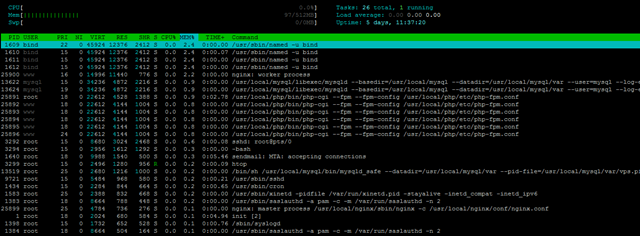
Once after the full LNMP stack was installed, RAM usage goes to about 100MB.
 free -m
             total       used       free     shared    buffers     cached
Mem:           512         97        414          0          0          0
-/+ buffers/cache:         97        414
Swap:            0          0          0
Top output showing the processes running:
top - 22:04:36 up 5 days, 12:24,  1 user,  load average: 0.00, 0.00, 0.00
Tasks:  22 total,   2 running,  20 sleeping,   0 stopped,   0 zombie
Cpu(s):  0.0%us,  0.0%sy,  0.0%ni,100.0%id,  0.0%wa,  0.0%hi,  0.0%si,  0.0%st
Mem:    524288k total,   100564k used,   423724k free,        0k buffers
Swap:        0k total,        0k used,        0k free,        0k cached

  PID USER      PR  NI  VIRT  RES  SHR S %CPU %MEM    TIME+  COMMAND
 1609 bind      22   0 45924  12m 2412 S  0.0  2.4   0:00.08 named
25900 www       16   0 14996  11m  776 S  0.0  2.2   0:00.00 nginx
13622 mysql     15   0 34236 4872 2216 S  0.0  0.9   0:00.00 mysqld
25891 root      15   0 22612 4528 1388 S  0.0  0.9   0:02.88 php-cgi
25892 www       18   0 22612 4144 1004 S  0.0  0.8   0:00.00 php-cgi
25893 www       18   0 22612 4144 1004 S  0.0  0.8   0:00.00 php-cgi
25894 www       18   0 22612 4144 1004 S  0.0  0.8   0:00.00 php-cgi
25895 www       18   0 22612 4144 1004 S  0.0  0.8   0:00.00 php-cgi
25896 www       24   0 22612 4144 1004 S  0.0  0.8   0:00.00 php-cgi
 3292 root      16   0  8680 3024 2468 R  0.0  0.6   0:00.08 sshd
 3294 root      15   0  2956 1616 1292 S  0.0  0.3   0:00.00 bash
 1640 root      15   0  9988 1540  500 S  0.0  0.3   0:05.51 sendmail-mta
13519 root      25   0  2680 1216 1000 S  0.0  0.2   0:00.00 mysqld_safe
 3388 root      15   0  2324 1076  876 R  0.0  0.2   0:00.00 top
 9721 root      15   0  5484  968  580 S  0.0  0.2   0:00.21 sshd
 1434 root      15   0  2284  844  664 S  0.0  0.2   0:00.66 cron
 1583 root      25   0  2388  832  668 S  0.0  0.2   0:00.00 xinetd
And again the htop output:
2.6GB of hard drive space in total was taken here:
df -h
Filesystem            Size  Used Avail Use% Mounted on
/dev/simfs             20G  2.6G   18G  13% /
tmpfs                 256M     0  256M   0% /lib/init/rw
tmpfs                 256M     0  256M   0% /dev/shm
The beacounters values are set to pretty high, however unlike many of the beancounters values I have seen, many of the limit values are not set to the default with many 9s.
cat /proc/user_beancounters
Version: 2.5
       uid  resource                     held              maxheld              barrier                limit              failcnt
     3227:  kmemsize                  3484291              4440642           2147483646           2147483646                    0
            lockedpages                     0                  427               999999               999999                    0
            privvmpages                 25147               131084               131072               131072                    4
            shmpages                      642                 1426               131072               131072                    0
            dummy                           0                    0                    0                    0                    0
            numproc                        26                   46               999999               999999                    0
            physpages                   10027                46095                    0           2147483647                    0
            vmguarpages                     0                    0               131072           2147483647                    0
            oomguarpages                10027                46095               131072           2147483647                    0
            numtcpsock                     13                   18              7999992              7999992                    0
            numflock                        4                   10               999999               999999                    0
            numpty                          1                    3               500000               500000                    0
            numsiginfo                      0                   18               999999               999999                    0
            tcpsndbuf                  234256               325416            214748160            396774400                    0
            tcprcvbuf                  212992              3627392            214748160            396774400                    0
            othersockbuf                20952                42272            214748160            396774400                    0
            dgramrcvbuf                     0                12848            214748160            396774400                    0
            numothersock                   19                   24              7999992              7999992                    0
            dcachesize                 268554               329746           2147483646           2147483646                    0
            numfile                       730                 1378             23999976             23999976                    0
            dummy                           0                    0                    0                    0                    0
            dummy                           0                    0                    0                    0                    0
            dummy                           0                    0                    0                    0                    0
            numiptent                      24                   24               999999               999999                    0
Vzfree shows no evidence of overselling:
 vzfree
             Total     Used     Free
Kernel:   2048.00M    3.33M 2044.67M
Allocate:  512.00M   98.21M  413.79M (512M Guaranteed)
Commit:    512.00M   42.47M  469.53M (39.9% of Allocated)
Swap:                 0.00M          (0.0% of Committed)
Uptime shows the VPS is mostly idle:
uptime
 22:04:46 up 5 days, 12:24,  1 user,  load average: 0.00, 0.00, 0.00
Similar output for vmstat:
 vmstat
procs -----------memory---------- ---swap-- -----io---- -system-- ----cpu----
 r  b   swpd   free   buff  cache   si   so    bi    bo   in   cs us sy id wa
 0  0      0 423412      0      0    0    0     0    14    0   38  0  0 100  0
CPUinfo shows there is a single core assigned to the VPS and it is not throttled:
cat /proc/cpuinfo
processor       : 0
vendor_id       : GenuineIntel
cpu family      : 6
model           : 44
model name      : Intel(R) Xeon(R) CPU           E5620  @ 2.40GHz
stepping        : 2
cpu MHz         : 2400.152
cache size      : 12288 KB
physical id     : 0
siblings        : 8
core id         : 0
cpu cores       : 4
apicid          : 0
fpu             : yes
fpu_exception   : yes
cpuid level     : 11
wp              : yes
flags           : fpu vme de pse tsc msr pae mce cx8 apic sep mtrr pge mca cmov pat pse36 clflush dts acpi mmx fxsr sse sse2 ss ht tm syscall nx pdpe1gb rdtscp lm constant_tsc ida nonstop_tsc arat pni monitor ds_cpl vmx smx est tm2 ssse3 cx16 xtpr sse4_1 sse4_2 popcnt lahf_lm
bogomips        : 4800.30
clflush size    : 64
cache_alignment : 64
address sizes   : 40 bits physical, 48 bits virtual
power management: [8]
Meminfo output here:
cat /proc/meminfo
MemTotal:       524288 kB
MemFree:        423744 kB
Buffers:             0 kB
Cached:              0 kB
SwapCached:          0 kB
Active:              0 kB
Inactive:            0 kB
HighTotal:           0 kB
HighFree:            0 kB
LowTotal:       524288 kB
LowFree:        423744 kB
SwapTotal:           0 kB
SwapFree:            0 kB
Dirty:            1820 kB
Writeback:           0 kB
AnonPages:           0 kB
Mapped:              0 kB
Slab:                0 kB
PageTables:          0 kB
NFS_Unstable:        0 kB
Bounce:              0 kB
CommitLimit:         0 kB
Committed_AS:        0 kB
VmallocTotal:        0 kB
VmallocUsed:         0 kB
VmallocChunk:        0 kB
HugePages_Total:     0
HugePages_Free:      0
HugePages_Rsvd:      0
Hugepagesize:     2048 kB
And time sync:
time sync

real    0m0.222s
user    0m0.000s
sys     0m0.002s
Disk I/O is pretty impressive:
dd if=/dev/zero of=test bs=64k count=16k conv=fdatasync
16384+0 records in
16384+0 records out
1073741824 bytes (1.1 GB) copied, 17.8781 s, 60.1 MB/s
Testing again after a while actually shows significantly better results:
dd if=/dev/zero of=test bs=64k count=16k conv=fdatasync
16384+0 records in
16384+0 records out
1073741824 bytes (1.1 GB) copied, 6.56945 s, 163 MB/s
Ioping shows pretty stable values as well:
 ioping -c 10 .
4096 bytes from . (simfs /dev/simfs): request=1 time=0.2 ms
4096 bytes from . (simfs /dev/simfs): request=2 time=0.2 ms
4096 bytes from . (simfs /dev/simfs): request=3 time=0.1 ms
4096 bytes from . (simfs /dev/simfs): request=4 time=0.3 ms
4096 bytes from . (simfs /dev/simfs): request=5 time=0.2 ms
4096 bytes from . (simfs /dev/simfs): request=6 time=0.2 ms
4096 bytes from . (simfs /dev/simfs): request=7 time=0.1 ms
4096 bytes from . (simfs /dev/simfs): request=8 time=0.2 ms
4096 bytes from . (simfs /dev/simfs): request=9 time=0.2 ms
4096 bytes from . (simfs /dev/simfs): request=10 time=0.2 ms

--- . (simfs /dev/simfs) ioping statistics ---
10 requests completed in 9014.0 ms, 5507 iops, 21.5 mb/s
min/avg/max/mdev = 0.1/0.2/0.3/0.1 ms
Testing again and the results are still more or less the same:
 ioping -c 10 .
4096 bytes from . (simfs /dev/simfs): request=1 time=0.1 ms
4096 bytes from . (simfs /dev/simfs): request=2 time=0.2 ms
4096 bytes from . (simfs /dev/simfs): request=3 time=0.1 ms
4096 bytes from . (simfs /dev/simfs): request=4 time=0.2 ms
4096 bytes from . (simfs /dev/simfs): request=5 time=0.2 ms
4096 bytes from . (simfs /dev/simfs): request=6 time=0.2 ms
4096 bytes from . (simfs /dev/simfs): request=7 time=0.2 ms
4096 bytes from . (simfs /dev/simfs): request=8 time=0.2 ms
4096 bytes from . (simfs /dev/simfs): request=9 time=0.2 ms
4096 bytes from . (simfs /dev/simfs): request=10 time=0.2 ms

--- . (simfs /dev/simfs) ioping statistics ---
10 requests completed in 9008.9 ms, 5348 iops, 20.9 mb/s
min/avg/max/mdev = 0.1/0.2/0.2/0.0 ms
Network speed is pretty good, I was able to get close tothe line speed for the Cachefly test:
 wget cachefly.cachefly.net/100mb.test -O /dev/null
--2012-01-15 22:05:56--  http://cachefly.cachefly.net/100mb.test
Resolving cachefly.cachefly.net... 205.234.175.175
Connecting to cachefly.cachefly.net|205.234.175.175|:80... connected.
HTTP request sent, awaiting response... 200 OK
Length: 104857600 (100M) [application/octet-stream]
Saving to: `/dev/null'

100%[======================================>] 104,857,600 15.1M/s   in 6.6s

2012-01-15 22:06:03 (15.2 MB/s) - `/dev/null' saved [104857600/104857600]
Testing again shows even better results:
wget cachefly.cachefly.net/100mb.test -O /dev/null
--2012-01-15 22:06:30--  http://cachefly.cachefly.net/100mb.test
Resolving cachefly.cachefly.net... 205.234.175.175
Connecting to cachefly.cachefly.net|205.234.175.175|:80... connected.
HTTP request sent, awaiting response... 200 OK
Length: 104857600 (100M) [application/octet-stream]
Saving to: `/dev/null'

100%[======================================>] 104,857,600 15.2M/s   in 6.2s

2012-01-15 22:06:36 (16.1 MB/s) - `/dev/null' saved [104857600/104857600]
The upload speed is pretty stable as well, I was getting very similar speed across different test VPS that I have:
First is the test VPS at BuffaloVPS in Chicago, IL:
 wget 199.195.xxx.xxx/100mb.test -O /dev/null
--2012-01-22 13:45:27--  http://199.195.xxx.xxx/100mb.test
Connecting to 199.195.xxx.xxx:80... connected.
HTTP request sent, awaiting response... 200 OK
Length: 104857600 (100M) [application/octet-stream]
Saving to: `/dev/null'

100%[======================================>] 104,857,600 5.16M/s   in 27s

2012-01-22 13:45:53 (3.76 MB/s) - `/dev/null' saved [104857600/104857600]
The BuyVM VPS at San Jose, CA:
 wget 199.195.xxx.xxx/100mb.test -O /dev/null
--2012-01-22 14:39:07--  http://199.195.xxx.xxx/100mb.test
Connecting to 199.195.xxx.xxx:80... connected.
HTTP request sent, awaiting response... 200 OK
Length: 104857600 (100M) [application/octet-stream]
Saving to: `/dev/null'

100%[======================================>] 104,857,600 4.03M/s   in 20s

2012-01-22 14:39:27 (5.07 MB/s) - `/dev/null' saved [104857600/104857600]
Finally the VPS from Quickweb as well, in London, UK:
wget 199.195.xxx.xxx/100mb.test -O /dev/null
--2012-01-22 14:40:49--  http://199.195.xxx.xxx/100mb.test
Connecting to 199.195.xxx.xxx:80... connected.
HTTP request sent, awaiting response... 200 OK
Length: 104857600 (100M) [application/octet-stream]
Saving to: `/dev/null'

100%[======================================>] 104,857,600  833K/s   in 65s

2012-01-22 14:41:54 (1.53 MB/s) - `/dev/null' saved [104857600/104857600]
Actually I really expected some pretty decent upload speed with the VPS under the same company (sort of Intranet, I guess), however that is not the case here. Futhermore, there is no internal IP configured so that the 2 VPS could communicate with each other without costing the precious external bandwidth.
With one single CPU core, it is difficult to expect the Unixbench score to be really impressive. However I have to say that Quickweb has definitely produced one of the highest UnixBench score for a single core CPU VPS:
   #    #  #    #  #  #    #          #####   ######  #    #   ####   #    #
   #    #  ##   #  #   #  #           #    #  #       ##   #  #    #  #    #
   #    #  # #  #  #    ##            #####   #####   # #  #  #       ######
   #    #  #  # #  #    ##            #    #  #       #  # #  #       #    #
   #    #  #   ##  #   #  #           #    #  #       #   ##  #    #  #    #
    ####   #    #  #  #    #          #####   ######  #    #   ####   #    #

   Version 5.1.3                      Based on the Byte Magazine Unix Benchmark

   Multi-CPU version                  Version 5 revisions by Ian Smith,
                                      Sunnyvale, CA, USA
   January 13, 2011                   johantheghost at yahoo period com


1 x Dhrystone 2 using register variables  1 2 3 4 5 6 7 8 9 10

1 x Double-Precision Whetstone  1 2 3 4 5 6 7 8 9 10

1 x Execl Throughput  1 2 3

1 x File Copy 1024 bufsize 2000 maxblocks  1 2 3

1 x File Copy 256 bufsize 500 maxblocks  1 2 3

1 x File Copy 4096 bufsize 8000 maxblocks  1 2 3

1 x Pipe Throughput  1 2 3 4 5 6 7 8 9 10

1 x Pipe-based Context Switching  1 2 3 4 5 6 7 8 9 10

1 x Process Creation  1 2 3

1 x System Call Overhead  1 2 3 4 5 6 7 8 9 10

1 x Shell Scripts (1 concurrent)  1 2 3

1 x Shell Scripts (8 concurrent)  1 2 3

========================================================================
   BYTE UNIX Benchmarks (Version 5.1.3)

   System: ******: GNU/Linux
   OS: GNU/Linux -- 2.6.32-274.3.1.el5.028stab094.3 -- #1 SMP Thu Sep 22 13:24:07 MSD 2011
   Machine: i686 (unknown)
   Language: en_US.utf8 (charmap="ANSI_X3.4-1968", collate="ANSI_X3.4-1968")
   CPU 0: Intel(R) Xeon(R) CPU E5620 @ 2.40GHz (4800.3 bogomips)
          Hyper-Threading, x86-64, MMX, Physical Address Ext, SYSENTER/SYSEXIT, SYSCALL/SYSRET, Intel virtualization
   22:11:21 up 5 days, 12:31,  1 user,  load average: 0.00, 0.03, 0.01; runlevel 2

------------------------------------------------------------------------
Benchmark Run: Sun Jan 15 2012 22:11:21 - 22:39:39
1 CPU in system; running 1 parallel copy of tests

Dhrystone 2 using register variables       10584121.5 lps   (10.0 s, 7 samples)
Double-Precision Whetstone                     2351.0 MWIPS (10.2 s, 7 samples)
Execl Throughput                               3604.0 lps   (29.8 s, 2 samples)
File Copy 1024 bufsize 2000 maxblocks        486808.8 KBps  (30.0 s, 2 samples)
File Copy 256 bufsize 500 maxblocks          126444.3 KBps  (30.0 s, 2 samples)
File Copy 4096 bufsize 8000 maxblocks       1071954.4 KBps  (30.0 s, 2 samples)
Pipe Throughput                              901894.5 lps   (10.0 s, 7 samples)
Pipe-based Context Switching                 248715.6 lps   (10.0 s, 7 samples)
Process Creation                              10596.7 lps   (30.0 s, 2 samples)
Shell Scripts (1 concurrent)                   3918.0 lpm   (60.0 s, 2 samples)
Shell Scripts (8 concurrent)                    537.9 lpm   (60.1 s, 2 samples)
System Call Overhead                         792262.5 lps   (10.0 s, 7 samples)

System Benchmarks Index Values               BASELINE       RESULT    INDEX
Dhrystone 2 using register variables         116700.0   10584121.5    907.0
Double-Precision Whetstone                       55.0       2351.0    427.4
Execl Throughput                                 43.0       3604.0    838.1
File Copy 1024 bufsize 2000 maxblocks          3960.0     486808.8   1229.3
File Copy 256 bufsize 500 maxblocks            1655.0     126444.3    764.0
File Copy 4096 bufsize 8000 maxblocks          5800.0    1071954.4   1848.2
Pipe Throughput                               12440.0     901894.5    725.0
Pipe-based Context Switching                   4000.0     248715.6    621.8
Process Creation                                126.0      10596.7    841.0
Shell Scripts (1 concurrent)                     42.4       3918.0    924.1
Shell Scripts (8 concurrent)                      6.0        537.9    896.5
System Call Overhead                          15000.0     792262.5    528.2
                                                                   ========
System Benchmarks Index Score                                         820.8
For Geekbench, the VPS has scored more than 3500 points at the first test, which is rather impressive:
System Information
  Platform:                  Linux x86 (32-bit)
  Compiler:                  GCC 4.1.2 20070925 (Red Hat 4.1.2-33)
  Operating System:          Linux 2.6.32-274.3.1.el5.028stab094.3 i686
  Model:                     Linux PC (Intel(R) Xeon(R) CPU           E5620  @ 2.40GHz)
  Motherboard:               Unknown Motherboard
  Processor:                 Intel(R) Xeon(R) CPU           E5620  @ 2.40GHz
  Processor ID:              GenuineIntel Family 6 Model 44 Stepping 2
  Logical Processors:        1
  Physical Processors:       1
  Processor Frequency:       2.40 GHz
  L1 Instruction Cache:      0.00 B
  L1 Data Cache:             0.00 B
  L2 Cache:                  256 KB
  L3 Cache:                  0.00 B
  Bus Frequency:             0.00 Hz
  Memory:                    31.4 GB
  Memory Type:               N/A
  SIMD:                      1
  BIOS:                      N/A
  Processor Model:           Intel(R) Xeon(R) CPU           E5620  @ 2.40GHz
  Processor Cores:           1

Integer
  Blowfish
    single-threaded scalar    1682 ||||||
    multi-threaded scalar     1799 |||||||
  Text Compress
    single-threaded scalar    1902 |||||||
    multi-threaded scalar     1835 |||||||
  Text Decompress
    single-threaded scalar    1923 |||||||
    multi-threaded scalar     1983 |||||||
  Image Compress
    single-threaded scalar    1586 ||||||
    multi-threaded scalar     1556 ||||||
  Image Decompress
    single-threaded scalar    1477 |||||
    multi-threaded scalar     1517 ||||||
  Lua
    single-threaded scalar    2973 |||||||||||
    multi-threaded scalar     2974 |||||||||||

Floating Point
  Mandelbrot
    single-threaded scalar    2011 ||||||||
    multi-threaded scalar     2043 ||||||||
  Dot Product
    single-threaded scalar    3263 |||||||||||||
    multi-threaded scalar     3459 |||||||||||||
    single-threaded vector    3816 |||||||||||||||
    multi-threaded vector     4488 |||||||||||||||||
  LU Decomposition
    single-threaded scalar    2298 |||||||||
    multi-threaded scalar     2332 |||||||||
  Primality Test
    single-threaded scalar    3308 |||||||||||||
    multi-threaded scalar     2664 ||||||||||
  Sharpen Image
    single-threaded scalar    5452 |||||||||||||||||||||
    multi-threaded scalar     5513 ||||||||||||||||||||||
  Blur Image
    single-threaded scalar    5043 ||||||||||||||||||||
    multi-threaded scalar     5060 ||||||||||||||||||||

Memory
  Read Sequential
    single-threaded scalar    4523 ||||||||||||||||||
  Write Sequential
    single-threaded scalar    8072 ||||||||||||||||||||||||||||||||
  Stdlib Allocate
    single-threaded scalar    3637 ||||||||||||||
  Stdlib Write
    single-threaded scalar    3335 |||||||||||||
  Stdlib Copy
    single-threaded scalar    6602 ||||||||||||||||||||||||||

Stream
  Stream Copy
    single-threaded scalar    5678 ||||||||||||||||||||||
    single-threaded vector    8485 |||||||||||||||||||||||||||||||||
  Stream Scale
    single-threaded scalar    4186 ||||||||||||||||
    single-threaded vector    7740 ||||||||||||||||||||||||||||||
  Stream Add
    single-threaded scalar    4816 |||||||||||||||||||
    single-threaded vector    6664 ||||||||||||||||||||||||||
  Stream Triad
    single-threaded scalar    4998 |||||||||||||||||||
    single-threaded vector    4597 ||||||||||||||||||

Integer Score:                1933 |||||||
Floating Point Score:         3625 ||||||||||||||
Memory Score:                 5233 ||||||||||||||||||||
Stream Score:                 5895 |||||||||||||||||||||||

Overall Geekbench Score:      3581 ||||||||||||||
Testing again showed slightly worse results, but is still pretty good:
System Information
  Platform:                  Linux x86 (32-bit)
  Compiler:                  GCC 4.1.2 20070925 (Red Hat 4.1.2-33)
  Operating System:          Linux 2.6.32-274.3.1.el5.028stab094.3 i686
  Model:                     Linux PC (Intel(R) Xeon(R) CPU           E5620  @ 2.40GHz)
  Motherboard:               Unknown Motherboard
  Processor:                 Intel(R) Xeon(R) CPU           E5620  @ 2.40GHz
  Processor ID:              GenuineIntel Family 6 Model 44 Stepping 2
  Logical Processors:        1
  Physical Processors:       1
  Processor Frequency:       2.40 GHz
  L1 Instruction Cache:      0.00 B
  L1 Data Cache:             0.00 B
  L2 Cache:                  256 KB
  L3 Cache:                  0.00 B
  Bus Frequency:             0.00 Hz
  Memory:                    31.4 GB
  Memory Type:               N/A
  SIMD:                      1
  BIOS:                      N/A
  Processor Model:           Intel(R) Xeon(R) CPU           E5620  @ 2.40GHz
  Processor Cores:           1

Integer
  Blowfish
    single-threaded scalar    1549 ||||||
    multi-threaded scalar     1656 ||||||
  Text Compress
    single-threaded scalar    1392 |||||
    multi-threaded scalar     1372 |||||
  Text Decompress
    single-threaded scalar    1926 |||||||
    multi-threaded scalar     1975 |||||||
  Image Compress
    single-threaded scalar    1589 ||||||
    multi-threaded scalar     1556 ||||||
  Image Decompress
    single-threaded scalar    1474 |||||
    multi-threaded scalar     1519 ||||||
  Lua
    single-threaded scalar    2970 |||||||||||
    multi-threaded scalar     2949 |||||||||||

Floating Point
  Mandelbrot
    single-threaded scalar    1887 |||||||
    multi-threaded scalar     1960 |||||||
  Dot Product
    single-threaded scalar    3109 ||||||||||||
    multi-threaded scalar     3295 |||||||||||||
    single-threaded vector    3788 |||||||||||||||
    multi-threaded vector     4251 |||||||||||||||||
  LU Decomposition
    single-threaded scalar    2291 |||||||||
    multi-threaded scalar     2254 |||||||||
  Primality Test
    single-threaded scalar    3140 ||||||||||||
    multi-threaded scalar     2540 ||||||||||
  Sharpen Image
    single-threaded scalar    5233 ||||||||||||||||||||
    multi-threaded scalar     5286 |||||||||||||||||||||
  Blur Image
    single-threaded scalar    4762 |||||||||||||||||||
    multi-threaded scalar     4811 |||||||||||||||||||

Memory
  Read Sequential
    single-threaded scalar    4123 ||||||||||||||||
  Write Sequential
    single-threaded scalar    7177 ||||||||||||||||||||||||||||
  Stdlib Allocate
    single-threaded scalar    3404 |||||||||||||
  Stdlib Write
    single-threaded scalar    3079 ||||||||||||
  Stdlib Copy
    single-threaded scalar    6082 ||||||||||||||||||||||||

Stream
  Stream Copy
    single-threaded scalar    3418 |||||||||||||
    single-threaded vector    6900 |||||||||||||||||||||||||||
  Stream Scale
    single-threaded scalar    3922 |||||||||||||||
    single-threaded vector    6145 ||||||||||||||||||||||||
  Stream Add
    single-threaded scalar    3937 |||||||||||||||
    single-threaded vector    5528 ||||||||||||||||||||||
  Stream Triad
    single-threaded scalar    4372 |||||||||||||||||
    single-threaded vector    4256 |||||||||||||||||

Integer Score:                1827 |||||||
Floating Point Score:         3471 |||||||||||||
Memory Score:                 4773 |||||||||||||||||||
Stream Score:                 4809 |||||||||||||||||||

Overall Geekbench Score:      3289 |||||||||||||
Customer Service and Support
Although I have not had the Budget VPS for very long, I have already had 3 tickets with them. The first one was to add the resources to the VPS using the promo code (ticket submitted on 5:22pm, responded half an hour later and resources were added by 8:42pm by the admin stuff, which was still pretty fast). Second one was to have the SolusVM account merged (ticket submitted at 5:17pm, everything is done by 5:36pm, which was really fast), and the third and the most recent one was one that really got me a little impatient with, which was on the network issue.
So basically, after leaving the box idle for a few days, I decided to test things out by setting up the LNMP stack, and I realized that I could not even run apt-get update as I had many “unable to resolve URL” type of error. I then tried to run wget on Google.com, which almost never fails, and it was again unable to resolve the domain name. I tried to change the DNS in /etc/resolv.conf to the Google public DNS and even that did not work after I restarted the networking services. So I submitted a help request. First I was told to change the nameserver to the Verizon DNS, which I did and still did not help. Matt from Quickweb then suggested me to try to wget another file, so I tried Cachefly, which again failed after a while.
And one of the replies goes like this:
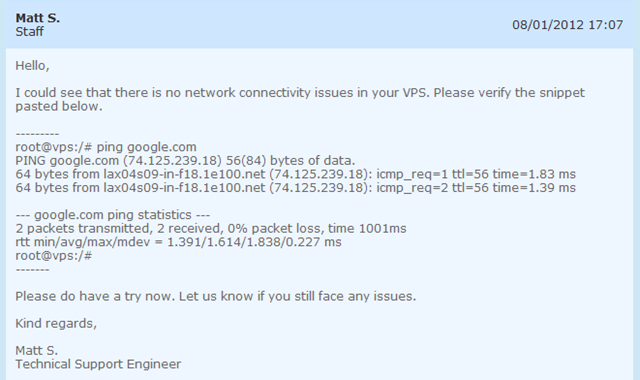
Mmm…so two ping would be able to tell if the VPS is not having a connection issue?
And at one point Joe was pretty unhappy about I kept telling him I can not download the Cachefly file:

However, at least they have been really fast in responding the tickets and quick in providing the update, if I asked for one. Most importantly, I actually emailed Roel and he was really quick in getting back to me and actually went through the tickets to make sure that it is updated.
Conclusion
Despite some minor hiccups with the network, overall the VPS provided by Quickweb was stable and the specifications are great. However, what I like about them the most is their attention to the tiny little details. Like what I have mentioned before, it does not take a lot of time for one, especially with everything readily available, to set up a website and start selling VPS, however, it is really those details (besides providing a solid VPS) that distinguishes a good provider from a not-so-good one and that is perhaps one of their “trick” to claim the throne of Best Low End Box Provider for 3 consecutive times.
Shame that their customer service has ruined it entirely. After seeing those 2 ticket replies I have no interest in even giving these guys a shot. Too much competition to get that sort of rude reply.
So what was the reason of that network problem?