
96MB Low End VPS Review Part IV – TelVPS
It was not exactly my plan to get another VPS, after having 6 VPS and 3 of them are practically sitting idle. However, when I saw this test offer from TelVPS, my finger start to get itchy again. After all, for 3 cents (for 24 hours), you can’t really lose too much.
Basically, this is what you get for 24 hours for 3 cents (yes, you read it right, USD 0.03):
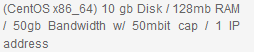
Server is located with ServerCentral (they have a link to the information sheet on the DC here) in Chicago.
Setup and Control Panel
The set up was instant, I got my payment received email the same time as I got my VPS login! Although it is no longer rare these days, it is always something great.
Control Panel is the standard SolusVM panel with all the standard functionality:
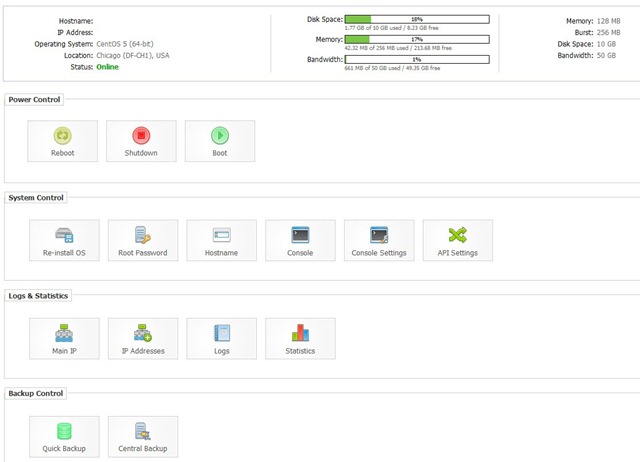
What is really great is that they have a myriad selection of OS templates, which is definitely one of the largest, if not THE largest, selection I have encountered among all the low-end VPS providers:
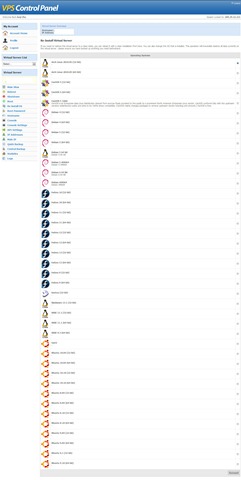
I am a huge Ubuntu fan so I did not tested out if all the templates works, but they do have almost every single distribution of Ubuntu that people uses nowadays, which is something that made me really happy!
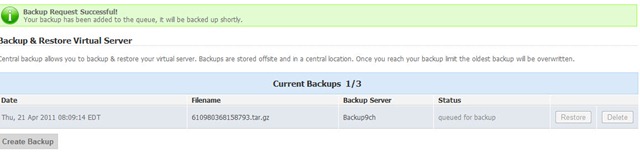
Another unique feature that they have is that they actually offer Central Backups free of charge. I have used quite a few VPS providers, most of them either have turned this feature off or require extra for backing up your data or simply give you a FTP account to back up your data, however you will still need to set up your own cron jobs/scripts. Therefore, it is really neat that TelVPS has managed to provide this one-click feature for data backup:
Location and Speed
First, the a segment output of traceroute:
9    11 ms    11 ms    11 ms  ae4-52.cr1.ord1.us.nlayer.net  [69.31.111.145]
10    11 ms    11 ms    11 ms  po6.ar1.ord1.us.scnet.net [69.31.111.58]
11    17 ms    19 ms    20 ms  61.po1.ar1.ord6.us.scnet.net  [75.102.3.226]
12    12 ms    12 ms    12 ms  as23367.ge8-19.ar1.ord6.us.scnet.net  [204.93.192
.162]
13    12 ms    12 ms    12 ms  ch7.super-vm.com [204.93.162.250]
14    12 ms    12 ms    12 ms  ****VPS IP*****
There is nothing too exciting about it except the second last step, note that it actually says super-vm.com. Since this is generally the IP address of the hardware node, I can only assume that they are a reselling super-vm‘s VPS. I actually went to super-vm to take a peek of their prices, and it shows TelVPS is selling the 128MB VPS at 1USD premium and 256MB VPS at 2USD premium to super-vm. One can only hope that TelVPS will offer better services in order to justify why their customer have to pay a dollar more every month to use the same VPS on the same hardware node.
The download test on the standard cachefly 100MB test file is OK, but far from impressive:
--2011-04-20 09:46:12--  http://cachefly.cachefly.net/100mb.test
Resolving cachefly.cachefly.net... 205.234.175.175
Connecting to cachefly.cachefly.net|205.234.175.175|:80... connected.
HTTP request sent, awaiting response... 200 OK
Length: 104857600 (100M) [application/octet-stream]
Saving to: `100mb.test'

100%[======================================>] 104,857,600   3.67M/s   in 26s

2011-04-20 09:46:38 (3.78 MB/s) - `100mb.test' saved   [104857600/104857600]
And I actually tested the download again later just to make sure I did not just happened to have a bad time:
Resolving cachefly.cachefly.net... 205.234.175.175
Connecting to cachefly.cachefly.net|205.234.175.175|:80... connected.
HTTP request sent, awaiting response... 200 OK
Length: 104857600 (100M) [application/octet-stream]
Saving to: `100mb.test'

100%[======================================>] 104,857,600  3.98M/s   in 24s

2011-04-19 22:25:31 (4.09 MB/s) - `100mb.test' saved  [104857600/104857600]
And this time, there is really not a lot of differences.
Since this is a server rather than a home PC, I did a few more test to download the same test file from other servers to give it another opportunity to impress me:
Here is the result from the BuyVM VPS in Fremont, CA:
--2011-04-20 09:52:31--  http://64.250.115.46/100mb.test
Connecting to 64.250.115.46:80... connected.
HTTP request sent, awaiting response... 200 OK
Length: 104857600 (100M) [application/octet-stream]
Saving to: `100mb.test'

100%[======================================>] 104,857,600   1.91M/s   in 39s

2011-04-20 09:53:10 (2.56 MB/s) - `100mb.test' saved   [104857600/104857600]
2.56MB/s, you saw it right, this is even slower than my home DSL line!
Nix Communication server in Montreal, Canada:
--2011-04-20 09:52:54--  http://64.250.115.46/100mb.test
Connecting to 64.250.115.46:80... connected.
HTTP request sent, awaiting response... 200 OK
Length: 104857600 (100M) [application/octet-stream]
Saving to: `100mb.test'

100%[======================================>] 104,857,600   10.2M/s   in 9.8s

2011-04-20 09:53:04 (10.2 MB/s) - `100mb.test' saved   [104857600/104857600]
10.2MB/s, this looks a lot better but still far from impressive.
Quickweb server in London, UK:
wget http://64.250.115.46/100mb.test
--2011-04-20 09:54:38--  http://64.250.115.46/100mb.test
Connecting to 64.250.115.46:80... connected.
HTTP request sent, awaiting response... 200 OK
Length: 104857600 (100M) [application/octet-stream]
Saving to: `100mb.test'

100%[======================================>] 104,857,600   4.27M/s   in 24s

2011-04-20 09:55:02 (4.20 MB/s) - `100mb.test' saved   [104857600/104857600]
Once again, I am sure you will agree with me 4.20MB/s is pretty slow even though it is across the Atlantic.
Overall, I have to say the download and upload speed from the server is far from impressive, if not unusually slow compare to many other VPS providers.
Server Information and Tests
First, the output of CPU info, quad-core i7-930 CPU. The good part is that they do not seem to restrict the CPU, so essentially you will get a "fair share" provided that you are on a node with a bunch of friendly neighbors:
cat /proc/cpuinfo
processor       : 0
vendor_id       : GenuineIntel
cpu family      : 6
model           : 26
model name      : Intel(R) Core(TM) i7 CPU         930  @ 2.80GHz
stepping        : 5
cpu MHz         : 2793.024
cache size      : 8192 KB
physical id     : 0
siblings        : 8
core id         : 0
cpu cores       : 4
apicid          : 0
fpu             : yes
fpu_exception   : yes
cpuid level     : 11
wp              : yes
flags           : fpu vme de pse tsc msr pae mce cx8 apic sep mtrr pge mca cmov pat pse36 clflush dts acpi mmx fxsr sse sse2 ss ht tm syscall nx rdtscp lm constant_tsc ida nonstop_tsc pni monitor ds_cpl vmx est tm2 ssse3 cx16 xtpr sse4_1 sse4_2 popcnt lahf_lm
bogomips        : 5586.04
clflush size    : 64
cache_alignment : 64
address sizes   : 36 bits physical, 48 bits virtual
power management: [8]

processor       : 1
vendor_id       : GenuineIntel
cpu family      : 6
model           : 26
model name      : Intel(R) Core(TM) i7 CPU         930  @ 2.80GHz
stepping        : 5
cpu MHz         : 2793.024
cache size      : 8192 KB
physical id     : 0
siblings        : 8
core id         : 1
cpu cores       : 4
apicid          : 2
fpu             : yes
fpu_exception   : yes
cpuid level     : 11
wp              : yes
flags           : fpu vme de pse tsc msr pae mce cx8 apic sep mtrr pge mca cmov pat pse36 clflush dts acpi mmx fxsr sse sse2 ss ht tm syscall nx rdtscp lm constant_tsc ida nonstop_tsc pni monitor ds_cpl vmx est tm2 ssse3 cx16 xtpr sse4_1 sse4_2 popcnt lahf_lm
bogomips        : 5585.90
clflush size    : 64
cache_alignment : 64
address sizes   : 36 bits physical, 48 bits virtual
power management: [8]

processor       : 2
vendor_id       : GenuineIntel
cpu family      : 6
model           : 26
model name      : Intel(R) Core(TM) i7 CPU         930  @ 2.80GHz
stepping        : 5
cpu MHz         : 2793.024
cache size      : 8192 KB
physical id     : 0
siblings        : 8
core id         : 2
cpu cores       : 4
apicid          : 4
fpu             : yes
fpu_exception   : yes
cpuid level     : 11
wp              : yes
flags           : fpu vme de pse tsc msr pae mce cx8 apic sep mtrr pge mca cmov pat pse36 clflush dts acpi mmx fxsr sse sse2 ss ht tm syscall nx rdtscp lm constant_tsc ida nonstop_tsc pni monitor ds_cpl vmx est tm2 ssse3 cx16 xtpr sse4_1 sse4_2 popcnt lahf_lm
bogomips        : 5585.90
clflush size    : 64
cache_alignment : 64
address sizes   : 36 bits physical, 48 bits virtual
power management: [8]

processor       : 3
vendor_id       : GenuineIntel
cpu family      : 6
model           : 26
model name      : Intel(R) Core(TM) i7 CPU         930  @ 2.80GHz
stepping        : 5
cpu MHz         : 2793.024
cache size      : 8192 KB
physical id     : 0
siblings        : 8
core id         : 3
cpu cores       : 4
apicid          : 6
fpu             : yes
fpu_exception   : yes
cpuid level     : 11
wp              : yes
flags           : fpu vme de pse tsc msr pae mce cx8 apic sep mtrr pge mca cmov pat pse36 clflush dts acpi mmx fxsr sse sse2 ss ht tm syscall nx rdtscp lm constant_tsc ida nonstop_tsc pni monitor ds_cpl vmx est tm2 ssse3 cx16 xtpr sse4_1 sse4_2 popcnt lahf_lm
bogomips        : 5585.99
clflush size    : 64
cache_alignment : 64
address sizes   : 36 bits physical, 48 bits virtual
power management: [8]
Beancounters output:
cat /proc/user_beancounters
Version: 2.5
uid  resource                     held              maxheld              barrier                limit              failcnt
487:  kmemsize                  3598495             52106606           2147483646           2147483646                    0
lockedpages                     0                    0               999999               999999                    0
privvmpages                  7311                65565                65536                65536                   10
shmpages                     1311                 1327                32768                32768                    0
dummy                           0                    0                    0                    0                    0
numproc                        17                   89               999999               999999                    0
physpages                    4156                42777                    0           2147483647                    0
vmguarpages                     0                    0                32768           2147483647                    0
oomguarpages                 4156                42777                32768           2147483647                    0
numtcpsock                      6                   25              7999992              7999992                    0
numflock                        5                    9               999999               999999                    0
numpty                          2                    2               500000               500000                    0
numsiginfo                      0                   16               999999               999999                    0
tcpsndbuf                  140312               149064            214748160            396774400                    0
tcprcvbuf                   98304              5286560            214748160            396774400                    0
othersockbuf                 6984                41904            214748160            396774400                    0
dgramrcvbuf                     0                 9776            214748160            396774400                    0
numothersock                   11                   22              7999992              7999992                    0
dcachesize                      0                    0           2147483646           2147483646                    0
numfile                       583                 2280             23999976             23999976                    0
dummy                           0                    0                    0                    0                    0
dummy                           0                    0                    0                    0                    0
dummy                           0                    0                    0                    0                    0
numiptent                       0                    0               999999               999999                    0
The standard dd test seems to be, once again, unimpressive:
dd if=/dev/zero of=test bs=64k count=512 conv=fdatasync
512+0 records in
512+0 records out
33554432 bytes (34 MB) copied, 1.82512 seconds, 18.4 MB/s
May be I was spoiled by the my other experiences using VPSs, but 18.4MB/s is almost good enough for me to raise a ticket with them to ask why.
And I did the test one more time later on, again, it failed to impress me although it is getting "reasonable" this time:
dd if=/dev/zero of=test bs=64k count=512 conv=fdatasync
512+0 records in
512+0 records out
33554432 bytes (34 MB) copied, 0.521948 seconds, 64.3 MB/s
Finally, just to give it a last bit of stretch, I decided to put up a UnixBench test to see how far it will hold:
#    #  #    #  #  #    #          #####   ######  #    #   ####   #    #
#    #  ##   #  #   #  #           #    #  #       ##   #  #    #  #    #
#    #  # #  #  #    ##            #####   #####   # #  #  #       ######
#    #  #  # #  #    ##            #    #  #       #  # #  #       #    #
#    #  #   ##  #   #  #           #    #  #       #   ##  #    #  #    #
####   #    #  #  #    #          #####   ######  #    #   ####   #    #

Version 5.1.3                      Based on the Byte Magazine Unix  Benchmark

Multi-CPU version                  Version 5 revisions by Ian Smith,
Sunnyvale, CA, USA
January 13, 2011                   johantheghost at yahoo period com

1 x Dhrystone 2 using register variables  1 2 3 4 5 6 7 8 9 10

1 x Double-Precision Whetstone  1 2 3 4 5 6 7 8 9 10

1 x Execl Throughput  1 2 3

1 x File Copy 1024 bufsize 2000 maxblocks  1 2 3

1 x File Copy 256 bufsize 500 maxblocks  1 2 3

1 x File Copy 4096 bufsize 8000 maxblocks  1 2 3

1 x Pipe Throughput  1 2 3 4 5 6 7 8 9 10

1 x Pipe-based Context Switching  1 2 3 4 5 6 7 8 9 10

1 x Process Creation  1 2 3

1 x System Call Overhead  1 2 3 4 5 6 7 8 9 10

1 x Shell Scripts (1 concurrent)  1 2 3

1 x Shell Scripts (8 concurrent)  1 2 3

4 x Dhrystone 2 using register variables  1 2 3 4 5 6 7 8 9 10

4 x Double-Precision Whetstone  1 2 3 4 5 6 7 8 9 10

4 x Execl Throughput  1 2 3

4 x File Copy 1024 bufsize 2000 maxblocks  1 2 3

4 x File Copy 256 bufsize 500 maxblocks  1 2 3

4 x File Copy 4096 bufsize 8000 maxblocks  1 2 3

4 x Pipe Throughput  1 2 3 4 5 6 7 8 9 10

4 x Pipe-based Context Switching  1 2 3 4 5 6 7 8 9 10

4 x Process Creation  1 2 3

4 x System Call Overhead  1 2 3 4 5 6 7 8 9 10

4 x Shell Scripts (1 concurrent)  1 2 3

4 x Shell Scripts (8 concurrent)  1
**********************************************
Run: "Shell Scripts (8 concurrent)": /tmp/UnixBench/pgms/tst.sh: fork:  Cannot allocate memory
/tmp/UnixBench/pgms/tst.sh: fork: Cannot allocate memory; aborting
Yes, you read it right unfortunately, I got a fork error and could not even complete the test. I know it is just a 128MB box, so I should not expect a lot, but at least I thought it would be able to struggle through the Unix Bench with a low 300/high 200 score…guess not!
I did not give up so as usual, I repeated the test, and here is what I see for the second time:
#    #  #    #  #  #    #          #####   ######  #    #   ####   #    #
#    #  ##   #  #   #  #           #    #  #       ##   #  #    #  #    #
#    #  # #  #  #    ##            #####   #####   # #  #  #       ######
#    #  #  # #  #    ##            #    #  #       #  # #  #       #    #
#    #  #   ##  #   #  #           #    #  #       #   ##  #    #  #    #
####   #    #  #  #    #          #####   ######  #    #   ####   #    #

Version 5.1.3                      Based on the Byte Magazine Unix  Benchmark

Multi-CPU version                  Version 5 revisions by Ian Smith,
Sunnyvale, CA, USA
January 13, 2011                   johantheghost at yahoo period com

1 x Dhrystone 2 using register variables  1 2 3 4 5 6 7 8 9 10

1 x Double-Precision Whetstone  1 2 3 4 5 6 7 8 9 10

1 x Execl Throughput  1 2 3

1 x File Copy 1024 bufsize 2000 maxblocks  1 2 3

1 x File Copy 256 bufsize 500 maxblocks  1 2 3

1 x File Copy 4096 bufsize 8000 maxblocks  1 2 3

1 x Pipe Throughput  1 2 3 4 5 6 7 8 9 10

1 x Pipe-based Context Switching  1 2 3 4 5 6 7 8 9 10

1 x Process Creation  1 2 3

1 x System Call Overhead  1 2 3 4 5 6 7 8 9 10

1 x Shell Scripts (1 concurrent)  1 2 3

1 x Shell Scripts (8 concurrent)  1 2 3

4 x Dhrystone 2 using register variables  1 2 3 4 5 6 7 8 9 10

4 x Double-Precision Whetstone  1 2 3 4 5 6 7 8 9 10

4 x Execl Throughput  1 2 3

4 x File Copy 1024 bufsize 2000 maxblocks  1 2 3

4 x File Copy 256 bufsize 500 maxblocks  1 2 3

4 x File Copy 4096 bufsize 8000 maxblocks  1 2 3

4 x Pipe Throughput  1 2 3 4 5 6 7 8 9 10

4 x Pipe-based Context Switching  1 2 3 4 5 6 7 8 9 10

4 x Process Creation  1 2 3

4 x System Call Overhead  1 2 3 4 5 6 7 8 9 10

4 x Shell Scripts (1 concurrent)  1 2 3

4 x Shell Scripts (8 concurrent)  1
**********************************************
Run: "Shell Scripts (8 concurrent)": /tmp/UnixBench/pgms/tst.sh: fork:  Cannot  al                                                                                                 locate memory
/tmp/UnixBench/pgms/multi.sh: fork: Cannot allocate memory
Bad wait status: 0x8000; aborting
Once again, FAIL!
Therefore, I have to say the performance of the VPS that I have received is not really great, and far from being satisfactory.
Ticket Support and Customer Service
Since the testing window was only 24 hours, I have not submitted too many tickets. My first request is to get rDNS set up, which they have replied in 50 minutes. Second ticket was regarding the URL of the control panel redirected me to a non-working page, which they have replied in 50 minutes as well. For a low end VPS provider, that is pretty good.
However, this seems only to be my only lucky time with them. I replied my rDNS ticket on Apr 19, 22:02 and they did not respond to me until Apr 20, 11:02 (yes, 13 hours later) to tell me my trial has expired. So I am really not sure if they were too reluctant to reply because they knew the trial has expired or they their service response time just have a lot of variations.
Conclusion
There are many good aspects of TelVPS, for example, instant set up and large amount of choices for OS template. However, the VPS box itself is far from impressive, slow hard drive and slow networks essentially kills the purpose of a server. Therefore, I can only recommend that you spend 5USD minimum a month if you need one of their OS templates that you can not find it anywhere else. Otherwise, I can not find other reasons to justify the reason why you would want to use them.
You are aware that speeds from wget are in megabytes per second rather than megabits right? Ie 10MB is around 80 megabits per sec
Yes I do, and I hope they do not mean having people sharing 50mbit port…